
Recording a full soccer match is easier when the camera can follow the action without constant manual panning. The best options combine wide coverage, stable footage, and simple setup.
Below, we’ve rounded up 10 strong picks for different needs, from budget-friendly camcorders to AI-powered sports cameras built for team play.
Best 10 Video Camera for Recording Soccer Games Picks for 2026
Budget Camcorder
ZYDIIE 4K 18X Zoom Touchscreen Camcorder

- 4K video with 64MP photo capture
- 18X digital zoom and 270° touchscreen
- Includes remote, 32GB card, and 2 batteries
Best For: Budget buyers who want a simple camcorder for soccer and family use
Full-Field AI Tracker
BallerCam 180° Auto-Tracking Soccer System

- AI follows ball and key action automatically
- 180° lens captures the full field
- No subscription required with easy live streaming
Best For: iPhone users who want automated soccer coverage and quick highlight sharing
Feature-Rich Camcorder
88MP 8K WiFi Camcorder with Mic and Stabilizer

- Up to 8K video with 88MP photos
- 6-axis anti-shake and handheld stabilizer included
- External microphone and Wi-Fi support
Best For: Manual soccer filming with extra stabilization and accessory value
Elite Sideline Bundle
VEO Cam 3 1080HD Sports Camera Bundle

- 1080HD recording with AI auto-tracking
- Includes 24.2 ft carbon fiber tripod
- Cloud storage for sharing and review
Best For: Coaches and teams needing elevated sideline coverage
Weather-Ready Tracker
Veo Cam 3 1080HD Sports Camera

- 1080HD recording with AI auto-tracking
- Portable design for easy sideline setup
- Weather-resistant for outdoor sports
Best For: Coaches and families filming outdoor team sports
Smart Phone-Ready Ball Tracker
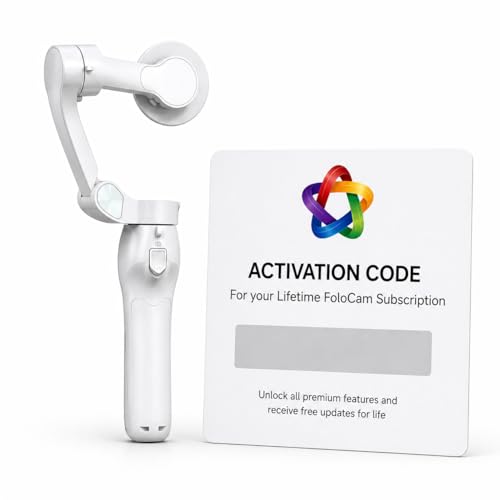
- AI tracking follows players and the ball automatically
- Smart ball tracking is aimed at soccer and basketball
- 4K video with live streaming support
Best For: iPhone users recording youth soccer with automatic tracking
Sideline AI Team-Sport Recorder
XbotGo Falcon AI Action Camera

- AI tracking follows players and the ball in soccer
- Dual-lens 4K system supports game review and highlights
- Wi-Fi live streaming and water-resistant sideline design
Best For: Coaches and parents wanting an all-in-one soccer tracking camera
AI Auto-Tracking Pick – XbotGo Chameleon 4K 60FPS Soccer Camera
If you want a video camera for recording soccer games that can follow the action without constant manual adjustments, the XbotGo Chameleon is built around AI sports tracking and wide-angle capture. It combines 4K 60FPS recording, 360° panoramic tracking, and live streaming support, making it a strong pick for filming team sports from the sideline.
Best For: Coaches, parents, and teams who want automated soccer tracking with live streaming and app-based control.
Pros:
- AI tracking supports over 20 sports, including soccer and basketball.
- 4K 60FPS recording with a 120° ultra-wide AI lens and 360° panoramic tracking.
- Live streaming and AI-assisted editing features are built into the app.
- Includes Bluetooth remote and Apple Watch integration for easier control.
Cons:
- Requires a smartphone and app-based workflow to get full functionality.
- Not water resistant, so outdoor sideline use needs care.
The XbotGo Chameleon stands out if you want hands-free sports filming with modern automation rather than a traditional camcorder. Its strengths are tracking, streaming, and wide coverage, which makes it especially practical for soccer games.
Budget Camcorder – ZYDIIE 4K 18X Zoom Touchscreen Camcorder
The ZYDIIE is a straightforward video camera for recording soccer games if you want a traditional camcorder with useful extras like a touchscreen, zoom, and remote control. Its 4K recording, 18X digital zoom, and included batteries make it a practical option for casual field use, especially when you want a simple setup.
Best For: Budget-conscious buyers who want a basic 4K camcorder for soccer, family, and general video recording.
Pros:
- Records in 4K and includes 64MP photo capture.
- 18X digital zoom helps bring distant action closer.
- 3-inch touchscreen rotates 270° for flexible framing.
- Includes remote control, 32GB card, and two batteries.
Cons:
- Digital zoom is less flexible than optical zoom for fast action.
- Not purpose-built for automatic sports tracking.
This camcorder makes sense if you want a familiar handheld camera for soccer games rather than an AI tracking system. It offers a good mix of convenience and included accessories for the price-focused shopper.
Full-Field AI Tracker – BallerCam 180° Auto-Tracking Soccer System
For a video camera for recording soccer games that follows the play automatically, BallerCam focuses on AI tracking and a full-field 180° view. Instead of mechanical panning, it keeps the action centered digitally, which can be useful when you want a wider tactical view of the match.
Best For: Coaches and families who want automated soccer recording with a wide field of view and fast sharing.
Pros:
- AI auto-tracking follows the ball and key action automatically.
- 180° ultra-wide lens captures the full field for better context.
- Supports soccer, basketball, futsal, flag football, and volleyball.
- Simple live streaming and clipping features with no subscription required.
Cons:
- Designed for iPhone use, so compatibility is limited to that ecosystem.
- It uses the phone on a tripod rather than being a standalone camera body.
BallerCam is a strong fit if you care more about intelligent game coverage than traditional camcorder controls. The wide lens and easy sharing tools make it especially appealing for capturing soccer and quickly posting highlights.
Feature-Rich Camcorder – 88MP 8K WiFi Camcorder with Mic and Stabilizer
If you want a more general video camera for recording soccer games, this 8K camcorder offers high-resolution capture, stabilization, and a useful microphone bundle. It is not a dedicated sports tracker, but the 18X zoom, 6-axis anti-shake, and included handheld stabilizer can help when filming from the sidelines.
Best For: Creators who want a versatile camcorder for soccer, travel, and content recording with extra accessories included.
Pros:
- Offers up to 8K video plus 88MP still photos.
- 6-axis anti-shake and a handheld stabilizer help smooth footage.
- Includes an external X-Y stereo microphone for better audio.
- Wi-Fi, webcam mode, and remote control add flexibility.
Cons:
- 8K is limited to 15FPS, so it is not the smoothest top-resolution mode.
- It lacks dedicated AI sports tracking for following the ball automatically.
This model is best viewed as a flexible camcorder with strong specs and accessories, rather than a specialized sports camera. For soccer recording, it works best when you want manual control and added stabilization more than automated tracking.
Elite Sideline Bundle – VEO Cam 3 1080HD Sports Camera Bundle
If you want a video camera for recording soccer games that prioritizes automated coverage and easy sharing, the VEO Cam 3 bundle is built for team use. It records in 1080HD and pairs with a 24.2 ft carbon fiber tripod, giving you a higher field view for game review and training. Just note that a subscription is required for the camera to function, so this is a system purchase rather than a standalone camera.
Best For: Coaches and teams that want elevated sideline coverage with cloud storage and AI tracking.
Pros:
- 1080HD recording for clear game footage and analysis
- AI auto-tracking helps follow the action without manual control
- 24.2 ft tripod provides a wider, higher angle for field coverage
- Cloud storage and sharing support team review workflows
Cons:
- Subscription required for the camera to operate
- Not water resistant, so weather protection may be needed
- No image stabilization listed
This bundle is a strong fit if your main goal is consistent sideline filming rather than handheld shooting. The tall tripod and AI tracking make it especially useful for soccer games and other field sports where a wide overview matters most.
Live Stream Utility – AVKANS GO 4K Wireless Camera
For buyers searching for a video camera for recording soccer games, the AVKANS GO stands out if you also want live streaming and multiple output options. It records in 4K, supports HDMI, USB, RTMP, NDI, and SRT, and can stream while saving a clean high-resolution feed to micro SD. That makes it appealing for sideline workflows where recording and broadcasting need to happen at the same time.
Best For: Teams, creators, and streamers who need 4K recording with flexible live output options.
Pros:
- 4K recording with simultaneous ISO recording to micro SD
- Multiple outputs including HDMI, USB, RTMP, NDI, and SRT
- 90-degree wide angle with 3X optical zoom
- Wireless app control with scoreboard and overlay tools
Cons:
- Not water resistant
- Stable live streaming is recommended over Wi-Fi or wired Ethernet
- Battery life is listed at 6 hours
This model makes the most sense if your soccer coverage goes beyond basic recording. Its streaming features, clean recording output, and broad connection support make it especially useful for GameChanger, SidelineHD, and similar workflows.
Weather-Ready Tracker – Veo Cam 3 1080HD Sports Camera
If you need a video camera for recording soccer games that is easy to move and built for outdoor team sports, the Veo Cam 3 is a practical option. It records in 1080HD, uses AI-powered auto-tracking, and is described as lightweight and travel-friendly for setup anywhere. It also adds weather resistance and a wide supported temperature range, which is helpful for outdoor match days.
Best For: Coaches and sports families who want portable AI-tracked recording for outdoor games.
Pros:
- 1080HD recording for clear sports footage
- AI auto-tracking follows the action automatically
- Portable design is made for easy setup and travel
- Weather-resistant with support for cold and hot conditions
Cons:
- Subscription required
- No image stabilization listed
- Veo subscriptions are only usable in supported countries
This is a strong choice if portability and automated tracking matter more than manual camera control. For soccer, its weather-ready design and team-sport focus make it a reliable sideline companion when you want consistent coverage without a complex rig.
Portable 4K All-in-One Camcorder – 4K Video Camera Camcorder for YouTube
If you want a video camera for recording soccer games that can also double as a general-purpose creator camcorder, this 4K model gives you a lot in one package. Its 18X digital zoom, handheld stabilizer, and 4K recording make it better suited to sideline action than a basic point-and-shoot, while the included microphone and lens hood help round out the setup for outdoor use.
Best For: Parents, coaches, and solo creators who want a flexible camcorder for outdoor sports and everyday video.
Pros:
- 18X digital zoom and handheld stabilizer help keep soccer footage smoother and closer to the action.
- 4K Ultra HD recording with 64MP capture delivers sharp, detailed video.
- External stereo microphone improves audio for sideline commentary and general recording.
- Includes 2 batteries, 32GB card, remote, and lens hood for a ready-to-use kit.
Cons:
- Digital zoom is less versatile than optical zoom for distant plays.
- Best for casual sports recording rather than a specialized auto-tracking setup.
Overall, this is a practical pick if you want a feature-packed camcorder that can handle soccer games, travel, and family video without needing extra accessories right away.
Smart Phone-Ready Ball Tracker – FoloCam Kit AI Sports Camera
For anyone looking for a video camera for recording soccer games with less manual panning, this AI sports camera is built around automatic tracking. It is designed to work with iPhone 13 or newer and uses smart ball-tracking to follow soccer action, while 4K recording and live streaming make it useful for sharing games as they happen.
Best For: iPhone users who want automated ball tracking for youth soccer and recreational sports.
Pros:
- AI automatic tracking keeps the subject centered without constant manual control.
- Smart ball tracking is specifically aimed at soccer and basketball filming.
- 4K UHD recording captures crisp game footage.
- Built-in live streaming support is handy for real-time sharing.
Cons:
- Works exclusively with iPhone 13 or newer.
- No audio recording is listed in the supplied specs.
- Requires the bundled gimbal and subscription activation for premium features.
This is a strong choice if your main goal is to record soccer games with less effort and you already use a compatible iPhone, especially for youth sports and casual sidelines.
Sideline AI Team-Sport Recorder – XbotGo Falcon AI Action Camera
If you want a video camera for recording soccer games that feels closer to a dedicated team-sport recorder, the XbotGo Falcon is built around AI tracking and dual-lens capture. Its 4K recording, live streaming, and compact all-in-one design make it a practical sideline option for coaches and parents who want to review plays or share highlights.
Best For: Coaches and parents who want an AI-powered soccer camera with easy sideline setup.
Pros:
- AI auto-tracking is designed to follow players and the ball in soccer and other team sports.
- Dual-lens 4K system is aimed at sharper game review and highlight capture.
- Built-in Wi-Fi enables instant live streaming and sharing.
- Compact, IPX5 water-resistant design is made for outdoor sideline conditions.
Cons:
- MicroSD card is required for recording and sold separately.
- No image stabilization is listed in the supplied specs.
- Works best as a mounted sports camera rather than a handheld camcorder.
Overall, this is the most sports-focused option here if your priority is automated soccer recording, quick setup, and dependable game-day operation without extra gimbal gear.
How We Picked the Best Video Camera for Recording Soccer Games
We focused on cameras that make sideline filming practical for real games: reliable tracking, enough field of view for wide play, usable battery life, easy mounting, and convenient sharing or live streaming. We also considered whether each model works well as a Video Camera for Recording Soccer Games in typical youth, high school, and club settings.
Quick Comparison
If you want the simplest setup, AI sports cameras are usually the best fit because they automate much of the filming. If you prefer more control, traditional camcorders can still work well, especially when you want zoom, manual framing, or a lower-cost option. Streaming support, storage method, and tripod compatibility can also make a big difference on game day.
Key Buying Factors for a Video Camera for Recording Soccer Games
Field Coverage and Tracking
Soccer is a wide, fast-moving sport, so the camera should capture sideline-to-sideline action without frequent cutoffs. Auto-tracking helps keep the ball and play centered, while a wide lens reduces the chance of missing buildup or transitions.
Video Quality and Stabilization
Look for crisp resolution, smooth frame rates, and steady footage. Even if 4K sounds appealing, stabilization and tracking often matter more than raw specs for sideline recording. Clear footage in changing outdoor light is also important.
Battery, Storage, and Connectivity
Long matches and tournaments call for dependable battery life and enough storage. Wi-Fi, HDMI, USB, or RTMP output can help if you want to stream games, review clips quickly, or move footage to a laptop or cloud service.
Setup and Mounting
Easy setup is a major advantage for parents, volunteer coaches, and one-person filming jobs. Check tripod compatibility, camera weight, and whether the system needs a phone app or account to function fully.
Who Should Buy Which Video Camera for Recording Soccer Games?
Coaches and teams usually benefit most from AI tracking systems and sports cameras designed for full-field recording. Parents covering one player or one team may prefer a simpler camcorder or a versatile 4K model with decent zoom. If you want live sharing or remote viewing, prioritize connectivity and streaming support. If your main goal is post-game analysis, choose the most stable camera with the widest, cleanest view you can get within budget.
In short, the best Video Camera for Recording Soccer Games is the one that matches your level of control, your filming setup, and how you plan to use the footage after the final whistle.