
Filming a game while coaching, cheering, or playing is tough. An automatic tracking camera for sports can follow the action without someone standing behind a tripod all match.
The right setup depends on what you film: full-field play, a single player, or indoor court action. We’ve brought together six selected listings, including dedicated cameras and iPhone-based systems, to help you compare the practical trade-offs.
Best 6 Automatic Tracking Camera for Sports Picks for 2026
Best Elevated Field Bundle
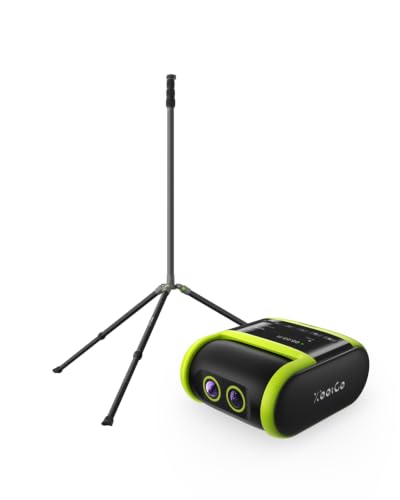
- Falcon camera plus 13-foot tripod
- AI tracking, 4K recording, and live streaming
- Carbon fiber center column and reinforced steel legs
Best For: Elevated sideline recording for team sports
Best iPhone Gimbal Kit
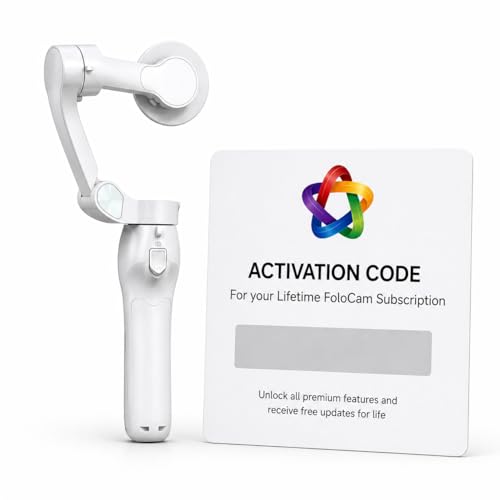
- Requires iPhone 13 or newer
- 3-axis gimbal with AI and ball tracking
- Lifetime subscription tied to bundled gimbal
Best For: iPhone-based youth soccer and basketball filming
Best Camera-Only Option
XbotGo Falcon All-in-One AI Action Camera

- Standalone AI-tracking sports camera
- Dual-lens 4K recording and Wi-Fi streaming
- Standard 1/4-inch tripod mount
Best For: Buyers choosing their own tripod or mount
Best iPhone Setup
BallerCam 180° Sports Filming System

- Stationary 180° full-field view
- AI digitally follows game action
- 4K recording and easy highlight sharing
Best For: iPhone users filming and sharing team games
Best Elevated Bundle

- Standalone AI sports camera
- 4K dual-lens recording and live streaming
- Includes a 13-foot field tripod
Best For: Teams seeking an elevated, standalone field setup
Best Player Tracking
XbotGo Chameleon Professional Sports Kit

- Team tracking plus FollowMe player mode
- Up to 4K 60fps recording
- Mount, case, and gimbal umbrella included
Best For: Coaches and families spotlighting individual athletes
Best Elevated Field Bundle – XbotGo Falcon Pro Field Pack
If you need an automatic tracking camera for sports with an elevated field setup, this pack pairs the XbotGo Falcon with a 13-foot NT4 PRO tripod. The camera handles AI tracking, 4K recording, and live streaming without a smartphone or dedicated operator.
Best For: Teams and families recording field sports from an elevated sideline position.
Pros:
- Includes both the Falcon camera and a 13-foot tripod.
- Dual-lens system combines AI-assisted tracking with 4K recording.
- Tripod has a carbon fiber center column, reinforced steel legs, and a wide stance.
Cons:
- The 13-foot tripod may be more setup than you need for casual recording.
- The supplied details do not specify battery runtime.
Choose this bundle when elevated placement matters as much as automated capture. If you already have suitable support, the camera-only Falcon may be a simpler choice.
Best iPhone Gimbal Kit – FoloCam Kit AI Sports Camera
The FoloCam Kit is an automatic tracking camera for sports setup built around an iPhone 13 or newer rather than a standalone camera. Its 3-axis stabilized gimbal offers AI subject tracking, specialized soccer and basketball ball tracking, 4K capture, and live streaming.
Best For: iPhone users filming youth soccer or basketball who want stabilized, automated tracking.
Pros:
- Tracks subjects and is designed to follow soccer and basketballs.
- 3-axis stabilization supports smoother phone footage.
- Includes a lifetime FoloCam subscription tied to the bundled gimbal.
Cons:
- Requires an iPhone 13 or newer; it is not a standalone camera.
- Ball-tracking claims specifically name soccer and basketball.
This kit makes the most sense if you already plan to record with a compatible iPhone. Check the phone requirement before buying, especially if you need a self-contained field camera.
Best Camera-Only Option – XbotGo Falcon All-in-One AI Action Camera
For an automatic tracking camera for sports without a bundled tripod, the XbotGo Falcon combines AI action tracking, dual-lens 4K recording, and Wi-Fi live streaming in one camera. Its standard 1/4-inch tripod mount gives you flexibility to choose your own support.
Best For: Buyers who want a self-contained sports camera and already have, or prefer to choose, a tripod.
Pros:
- AI tracking keeps the main action centered during supported team sports.
- Dual-lens design separates recording and AI-assisted tracking functions.
- Offers Wi-Fi live streaming plus microSD and cloud storage options.
Cons:
- Tripod support is not listed as part of this camera-only package.
- The supplied details do not specify battery runtime.
This is the more flexible Falcon choice if you want to select your own camera position and mounting gear. For an included elevated field tripod, consider the Field Pack instead.
Best iPhone Setup – BallerCam 180° Sports Filming System
If you want an automatic tracking camera for sports that works with an iPhone, BallerCam uses a stationary 180° lens to capture the full court or field while digitally keeping the ball and key action centered. It supports basketball, soccer, futsal, flag football, and volleyball.
Best For: iPhone users who want hands-free game footage, quick clips, and simple live-stream links.
Pros:
- Wide, stationary view avoids reliance on mechanical panning.
- Records 4K video and lets you save and share highlight clips.
- Includes 20 hours of cloud storage with no subscription required.
Cons:
- Requires a compatible iPhone rather than working as a standalone camera.
- Digital tracking does not physically pan the camera.
BallerCam is a practical pick if you already film with an iPhone and value full-field coverage over a moving camera head.
Best Elevated Bundle – XbotGo Falcon Pro Field Pack
The XbotGo Falcon Pro Field Pack pairs an automatic tracking camera for sports with a 13-foot tripod, giving teams an elevated recording setup in one bundle. Its standalone camera offers AI tracking, 4K recording, and live streaming without a smartphone or dedicated camera operator.
Best For: Teams that want a standalone camera and tall tripod for filming outdoor fields.
Pros:
- Includes the Falcon camera and NT4 PRO 13-foot tripod.
- Dual-lens system supports AI-assisted tracking and 4K capture.
- Tripod has a carbon-fiber center column, reinforced steel legs, and a wide stance.
Cons:
- A 13-foot tripod may be more setup than buyers need for casual sideline recording.
- The supplied details do not specify cloud storage or subscription terms.
Choose this pack when getting the camera above field level matters and you prefer not to build a camera-and-tripod setup separately.
Best Player Tracking – XbotGo Chameleon Professional Sports Kit
For an automatic tracking camera for sports with an individual-athlete option, the XbotGo Chameleon kit combines AI team tracking with FollowMe mode for a selected player. It includes a mounting system, hard-shell case, and protective gimbal umbrella alongside the camera.
Best For: Coaches and families who want both team-game coverage and selected-player footage.
Pros:
- FollowMe mode tracks a selected player.
- Records at up to 4K 60fps with a 120° lens and gimbal tracking system.
- Supports live streaming to major platforms and RTMP-compatible destinations.
- Includes 20GB of free cloud storage with no subscription required.
Cons:
- Its 120° lens is narrower than a 180° full-field lens.
- Gimbal tracking introduces moving hardware into the setup.
This kit offers the most flexibility here for buyers who want to switch between following overall play and spotlighting one athlete.
How We Picked the Best Automatic Tracking Camera for Sports
We focused on the six selected listings and the decisions that matter before a game: whether the system needs an iPhone, what it is designed to track, how it mounts, and whether it offers features such as 4K recording or live streaming. Two listings name the same XbotGo Falcon Pro Field Pack, so check the seller, included accessories, and price rather than assuming they are different models. Feature claims are a starting point, not a guarantee that tracking will stay locked on during every fast or crowded play.
Quick Comparison
For a dedicated camera setup, compare the XbotGo Falcon models by their included hardware and tracking options. The Falcon Pro Field Pack lists a carbon fiber tripod; the Falcon is presented as an all-in-one camera; and the Chameleon Professional Sports Kit emphasizes team and player tracking with a gimbal system. For an iPhone-based setup, look at the FoloCam Kit’s three-axis gimbal and ball-tracking focus alongside the separate 180° full-field filming system. Verify current app, phone, mounting, and streaming requirements before choosing either phone-dependent option.
Key Buying Factors for an Automatic Tracking Camera for Sports
Tracking Target and Field of View
Decide whether you need the ball, an individual athlete, or the overall game kept in frame. A wide view helps preserve context across a field or court, but players may appear smaller. Tighter tracking can make clips easier to watch, yet quick passes and player overlap may challenge it. Check sample footage from your sport and venue when available.
Phone Compatibility and Setup
A phone-based kit may be appealing if you already have a compatible iPhone, but confirm supported models, app access, storage, and whether the phone remains available for other use during recording. A dedicated camera avoids tying up your phone; still check how you control it and transfer footage.
Mounting, Power, and Streaming
Match tripod height and placement to the venue’s sideline rules and sightlines. Check what mounts are actually in the box, plus battery runtime against the length of your events. If you plan to stream, verify the required connection, platform support, and any app or subscription costs; recording locally and going live are different needs.
Who Should Buy Which Automatic Tracking Camera for Sports?
Choose an all-in-one or field-pack camera if you want a dedicated sideline setup and do not want to occupy your phone. Consider the Chameleon kit if player-versus-team tracking is your priority, subject to confirming its modes. Choose FoloCam if you want an iPhone gimbal built around following ball action, or investigate the 180° system if keeping more of the playing area visible matters most. If you mainly need occasional clips, compare the total cost and setup time with filming on the phone you already own.