
The best webcams for live streaming make it easier to produce sharp, consistent video without a complicated camera setup. This roundup compares 10 options across 4K and 1080p resolution, autofocus, AI tracking, microphones, lighting, and framing features.
Whether you stream games, teach online, host webinars, or create content from a home studio, the right webcam should match your lighting, workspace, computer, and preferred streaming software.
Best 10 Webcams for Live Streaming Picks for 2026
Best PTZ Pick

- 4K HDR video with a 1/2-inch sensor
- AI tracking with motorized pan and tilt
- Noise cancellation, gesture control, and creator modes
Best For: Streamers wanting automated framing and advanced controls
Best Value 4K

- True 4K CMOS video with PDAF autofocus
- Dual microphones and automatic light correction
- Privacy cover with wide operating-system support
Best For: Streamers seeking an accessible 4K webcam
Best for Pro Controls

- Large 1/1.3-inch sensor with 4K/30fps video
- Manual settings and Windows color-grading tools
- Aluminum body designed for continuous streaming
Best For: Creators who want DSLR-style webcam adjustments
Best Budget Mainstay

- Full HD 1080p video at 30fps
- Autofocus, lighting adjustment, and stereo microphones
- Includes three-month XSplit VCam license
Best For: Beginners and everyday 1080p streamers
Dual-Camera Detail
EMEET C60E Dual-Camera 4K Webcam
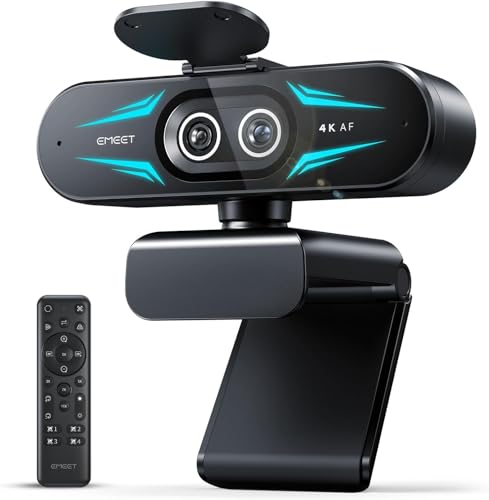
- 4K dual-camera design with wide-angle and telephoto views
- Up to 11X hybrid zoom with PDAF autofocus
- Remote, software, RGB, and dual-mic features
Best For: Product demos, teaching, and multi-distance streaming
Built-In Lighting Value
Angetube 862Pro 1080p Streaming Webcam
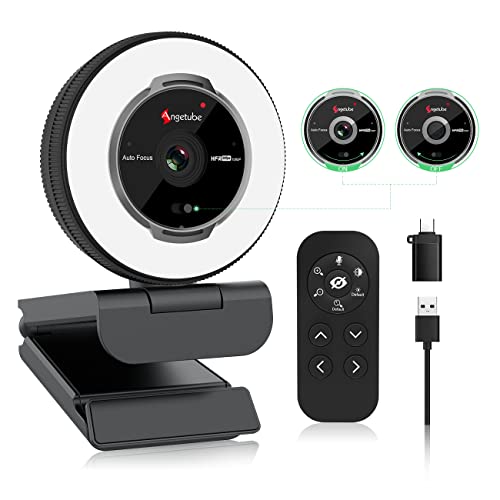
- 1080p video capture at up to 60 FPS
- Three-color adjustable ring light with touch controls
- Autofocus, dual mics, remote, and privacy shutter
Best For: Desk streaming with inconsistent lighting
AI Tracking Flexibility
OBSBOT Tiny 2 Lite 4K AI PTZ Webcam

- 4K at 30 FPS and 1080p at 60 FPS
- AI upper-body and hand tracking with customizable zones
- PTZ presets, gesture control, and multiple shooting modes
Best For: Moving presenters, teachers, and interactive streamers
Best 4K Tripod Webcam

- 4K/30fps or 1080p/60fps capture
- Adjustable 6.7–18.5-inch tripod
- PDAF autofocus and light balancing
Best For: Streamers needing high-resolution video and flexible camera placement
Best High-FPS Webcam

- 1080p video up to 100fps
- AI framing for individuals and groups
- Gesture controls and USB-C setup
Best For: Gamers and streamers prioritizing smooth motion and automated framing
Best Budget Lighting Webcam

- 1080p/60fps video
- Built-in RGB fill light
- Autofocus and noise-canceling mic
Best For: New streamers seeking affordable video, lighting, and plug-and-play setup
Best PTZ Pick – Insta360 Link 2
The Insta360 Link 2 is a premium choice among webcams for live streaming, combining 4K video, a large 1/2-inch sensor, HDR, and AI-powered tracking. Its motorized pan-and-tilt design can keep you in frame as you move, while PDAF autofocus and AI noise cancellation support polished streams and calls.
Best For: Streamers and creators who want PTZ movement, advanced framing tools, and high-quality video.
Pros:
- 4K video, HDR, and a 1/2-inch sensor support detailed images in varied lighting.
- AI tracking physically pans and tilts to follow movement.
- PDAF autofocus and AI noise cancellation help maintain clear video and audio.
- DeskView, Whiteboard, gesture control, and smartphone control add flexibility.
Cons:
- Advanced features require the Link Controller software.
- Not currently compatible with ARM-based Windows systems or Windows Hello Face Recognition.
The Link 2 is more feature-rich than a conventional fixed webcam. Choose it if automated framing and creator-focused controls justify a premium setup; otherwise, a simpler model may be easier to use.
Best Value 4K – EMEET C960
The EMEET C960 is a practical 4K option for webcams for live streaming, meetings, and teaching. It combines a true 4K CMOS sensor with PDAF autofocus, automatic light correction, dual omnidirectional microphones, and a privacy cover. Keep in mind that video defaults to 1080p and must be switched to 4K through supported software.
Best For: Buyers who want plug-and-play 4K capability with broad operating-system compatibility.
Pros:
- True 4K resolution is available rather than simple upscaling.
- PDAF autofocus and auto light correction help maintain a clear image.
- Dual omnidirectional microphones are built in for calls and streams.
- Works with Windows, macOS, Android TV, and Linux, with a privacy cover included.
Cons:
- 4K is not the default resolution and requires a software change.
- The 73-degree field of view is designed to focus on the subject rather than show a wide room.
The C960 offers useful essentials without requiring Wi-Fi, Bluetooth, cloud storage, or drivers. It is a sensible fit for straightforward streaming and video calls where 4K detail and privacy matter.
Best for Pro Controls – YOLOLIV YoloCam S3
The YOLOLIV YoloCam S3 stands out among webcams for live streaming with a large 1/1.3-inch sensor, uncompressed 4K/30fps video, and 1080p/60fps support. Fast PDAF autofocus, AI-enhanced imaging, manual camera controls, and a 4x digital zoom at 1080p give creators room to fine-tune their presentation.
Best For: Creators who want a compact webcam with manual image controls and extended streaming operation.
Pros:
- The 1/1.3-inch sensor is designed to deliver detailed 4K video and stronger low-light results.
- PDAF autofocus and AI tuning support exposure, white balance, HDR, and face detail.
- Manual controls cover contrast, sharpness, saturation, exposure, focus, and color grading.
- Aluminum construction is designed to dissipate heat during 24/7 streaming.
Cons:
- The Picasso Resolve color-grading tool is currently available only on Windows.
- It lacks built-in media storage and uses digital rather than optical zoom.
The YoloCam S3 is a strong choice for streamers who want more control than automatic webcam presets provide. Its magnetic mount, tripod thread, and USB 3.0 connection also make it adaptable across desktop setups.
Best Budget Mainstay – Logitech C920x
The Logitech C920x remains a straightforward option among webcams for live streaming, offering Full HD 1080p video at 30fps, autofocus, automatic lighting adjustment, and stereo microphones. Its familiar USB setup and broad computer compatibility make it a dependable choice for basic streams, calls, and recordings.
Best For: New streamers and everyday users who prioritize reliable 1080p video over 4K features.
Pros:
- Full HD 1080p video at 30fps provides clear detail for streams and calls.
- Autofocus and automatic lighting adjustment help in changing conditions.
- Dual microphones capture stereo audio for calls and recorded content.
- Includes a three-month XSplit VCam license for background removal, replacement, or blur.
Cons:
- It is limited to 1080p/30fps rather than 4K or 60fps video.
- There is no privacy shutter.
The C920x is a sensible starting point for live streaming when ease of use and established features matter most. Choose it for a familiar, no-frills setup, especially if you do not need PTZ movement or high-resolution video.
Dual-Camera Detail – EMEET C60E Dual-Camera 4K Webcam
For streamers who need to move between a wide room view and a detailed close-up, the EMEET C60E is one of the most versatile webcams for live streaming. Its dual-camera design combines 4K capture with wide-angle and telephoto perspectives, while remote and software controls simplify framing during a broadcast.
Best For: Product demonstrations, teaching, presentations, and streams that alternate between full-scene and close-up views.
Pros:
- Dual-camera 4K setup provides wide-angle and telephoto framing options.
- Up to 11X hybrid zoom and PDAF autofocus support flexible, stable framing.
- Remote control, EMEET STUDIO adjustments, RGB lighting, and dual microphones add convenience.
- Works with Windows, macOS, OBS, Twitch, YouTube, and Facebook.
Cons:
- Zoom is unavailable in 4K, 60FPS, and YUY2 modes.
- USB 2.0 connectivity may be less appealing for users seeking newer interfaces.
The C60E stands out when a standard fixed webcam cannot cover both presenter and detail shots. It is a strong choice for creators willing to trade some simplicity for extensive framing control.
Built-In Lighting Value – Angetube 862Pro 1080p Streaming Webcam
The Angetube 862Pro is a practical pick among webcams for live streaming, especially when your setup has inconsistent lighting. It combines 1080p video at up to 60 FPS with a touch-controlled ring light, autofocus, remote controls, and built-in microphones.
Best For: Streamers and video callers who want adjustable portrait lighting and straightforward USB compatibility.
Pros:
- 1080p at 60 FPS delivers smooth Full HD video for streaming.
- Three light colors and stepless brightness adjustment help improve portrait lighting.
- Autofocus, low-light correction, dual microphones, and a privacy shutter are included.
- USB-A and USB-C support, plug-and-play setup, and broad operating-system compatibility.
Cons:
- 5X digital zoom works only at 720p and lower resolutions.
- It lacks the 4K resolution offered by some higher-end streaming webcams.
This model focuses on useful everyday streaming features rather than advanced camera movement. Its integrated ring light makes it particularly convenient for desk setups where lighting is the main challenge.
AI Tracking Flexibility – OBSBOT Tiny 2 Lite 4K AI PTZ Webcam
The OBSBOT Tiny 2 Lite brings intelligent movement into the webcams for live streaming category. Its 4K image quality, PTZ design, multiple tracking modes, preset positions, and gesture controls are suited to creators, teachers, and presenters who move around during broadcasts.
Best For: Active presenters, educators, and streamers who need automatic subject tracking and programmable camera positions.
Pros:
- 4K capture uses a 1/2-inch CMOS sensor, with 1080p available at 60 FPS.
- AI tracking supports upper-body and hand tracking with customizable tracking areas.
- Preset positions can store separate parameters and tracking modes for different scenes.
- Gesture control, portrait and landscape modes, SDK support, and Stream Deck compatibility add flexibility.
Cons:
- Whiteboard mode and voice control are not included in this Lite version.
- 4K capture is limited to 30 FPS.
Choose the Tiny 2 Lite when staying centered on camera matters more than having a basic fixed webcam. Its automated tracking and presets can reduce manual adjustments during presentations and live sessions.
Best 4K Tripod Webcam – EMEET S600
For shoppers comparing webcams for live streaming, the EMEET S600 stands out with 4K capture, a larger Sony sensor, and a height-adjustable tripod. It can record at 4K/30fps or 1080p/60fps, while PDAF autofocus and automatic light balancing help maintain a clear image as conditions change.
Best For: Streamers and creators who want 4K detail plus flexible tripod positioning for face, group, or full-body shots.
Pros:
- 4K/30fps and 1080p/60fps options supported by a Sony 1/2.55-inch sensor.
- Tripod adjusts from 6.7 to 18.5 inches and offers 360-degree swivel positioning.
- PDAF autofocus, automatic light adjustment, privacy cover, and dual noise-canceling microphones.
- Compatible with Windows, macOS, OBS, Zoom, Teams, and other major platforms.
Cons:
- 4K availability depends on the camera software or app being used.
- The tripod-oriented design may be more equipment than casual callers need.
The S600 is a flexible choice when framing options and high-resolution video matter as much as convenience. Its included tripod makes it especially practical for varied streaming setups.
Best High-FPS Webcam – OBSBOT Meet SE
The OBSBOT Meet SE is a strong option among webcams for live streaming when smooth motion and automated framing are priorities. It supports up to 1080p at 100fps, uses AI framing for individuals or groups, and includes software controls for image adjustments and beauty effects.
Best For: Gamers, esports-focused creators, and streamers who want high frame rates and hands-free framing controls.
Pros:
- Supports 1080p at 100fps, 1080p at 60fps, and 720p at 150fps.
- AI framing can recognize individuals or groups and adjust composition in real time.
- Stacked CMOS sensor, Dual Native ISO, HDR, and 12-bit dynamic color support low-light performance.
- Gesture controls, USB-C plug-and-play setup, and support for SDK, Stream Deck, and hotkeys.
Cons:
- 100fps recording requires selecting “More Output Options” in OBSBOT software.
- Advanced controls and beauty adjustments require using the companion software.
Meet SE is well suited to fast-moving content and creators who want less manual camera adjustment. Its 1080p ceiling makes it more about frame rate and intelligent control than 4K detail.
Best Budget Lighting Webcam – NBPOWER H782
For an affordable entry among webcams for live streaming, the NBPOWER H782 combines 1080p/60fps video with an integrated RGB fill light. Autofocus, a noise-canceling microphone, and plug-and-play USB connectivity make it a practical choice for streaming, calls, classes, and gaming.
Best For: Budget-conscious streamers who need built-in lighting and straightforward setup for a laptop or desktop.
Pros:
- Full HD 1080p video at 60fps for smooth streaming and calls.
- Built-in fill light helps reduce graininess in darker environments.
- Face autofocus, noise-canceling microphone, and privacy cover included.
- Works with Windows and macOS and supports Zoom, YouTube, OBS, Teams, and Skype.
Cons:
- It uses USB connectivity and does not offer the higher-resolution 4K capture of some alternatives.
- The integrated lighting is useful for basic illumination but may not replace a dedicated light.
The H782 focuses on essential streaming features rather than advanced production controls. Its 60fps video, fill light, and simple USB setup make it a sensible starter webcam for live content and video communication.
How We Picked the Best Webcams for Live Streaming
We focused on features that directly affect a live broadcast: image resolution, frame rate, autofocus performance, field of view, low-light handling, microphone quality, and mounting flexibility. We also considered useful workflow features such as AI framing, subject tracking, pan-tilt-zoom control, gesture commands, HDR, and included lighting.
The selection covers several budgets and use cases, including straightforward 1080p USB webcams, affordable 4K models, and advanced PTZ cameras for creators who want automated framing. Compatibility with common Windows and Mac setups was also treated as a practical priority.
Quick Comparison
| Best For | Recommended Type | Key Features to Look For |
|---|---|---|
| First-time streamers | 1080p USB webcam | Reliable autofocus, built-in microphone, simple plug-and-play setup |
| Professional-looking video | 4K webcam | Larger sensor, HDR, strong exposure control, sharp detail |
| Moving presenters | AI PTZ webcam | Face or subject tracking, automatic framing, pan and tilt |
| Shared or wide setups | Wide-angle or dual-camera model | Flexible framing, multiple perspectives, adjustable field of view |
| Low-light rooms | Webcam with lighting or advanced sensor | Fill light, HDR, noise reduction, and good exposure handling |
Key Buying Factors for Webcams for Live Streaming
Resolution and Frame Rate
1080p is sufficient for many Twitch, YouTube, and video-call streams, especially when bandwidth is limited. Choose 4K if you want a sharper image, plan to crop during editing, or want more flexibility for close-up framing. A 60fps mode can make motion look smoother, but it may require more bandwidth and processing power than 30fps.
Autofocus, Framing, and Tracking
Fast autofocus helps when you move toward or away from the camera. AI framing and tracking are especially useful for presenters, instructors, and streamers who stand or move around. PTZ models generally offer the most flexibility, while fixed webcams are simpler and often more affordable.
Audio, Lighting, and Connectivity
Built-in microphones are convenient, but a dedicated USB or XLR microphone will usually sound better. Treat integrated lighting as a helpful backup rather than a replacement for a key light. Before buying, confirm the webcam uses a compatible USB connection and works with your operating system and streaming application.
Who Should Buy Which Webcams for Live Streaming?
Choose the Logitech C920x or a comparable 1080p model if you want dependable video for casual streaming, meetings, or a low-cost starter setup. Choose an EMEET, YOLOLIV, OBSBOT, or Insta360 4K model if image detail and a more polished presentation matter most.
Choose the Insta360 Link 2 or OBSBOT Tiny 2 Lite if you move during broadcasts and want automatic tracking or PTZ control. Choose a dual-camera or wide-angle model for demonstrations, group presentations, or setups where one fixed view is limiting. If your room is dim, prioritize a larger sensor, HDR, or an integrated fill light—and remember that better room lighting often improves results more than a resolution upgrade.