
The right camera external recorder can improve studio production with cleaner recording formats, longer runtimes, better monitoring, and more reliable connections. The best choice depends on whether you need an on-camera monitor, a dedicated deck, a computer capture device, or an all-in-one camcorder.
We compared 10 options across recording quality, connectivity, workflow support, portability, and value to help you choose equipment that fits your studio setup and shooting style.
Best 10 Camera External Recorders for Studio Filming Picks for 2026
Best All-in-One Monitor/Recorder

- 1500-nit 5.2-inch touchscreen
- 4K60 I/O and up to 8K30 ProRes RAW
- 12G-SDI, HDMI 2.0, Wi-Fi 6, and CFexpress recording
Best For: Connected studio recording and monitoring
Best Integrated Studio Camera

- 4K UHD capture with DIGIC DV6
- 20x optical zoom and hybrid stabilization
- Dual SD slots, HDMI, and USB livestreaming
Best For: Self-contained studio and event video
Best Rack-Style Studio Recorder
Blackmagic HyperDeck Studio HD Mini

- Dedicated studio recorder design
- 3G-SDI video input
- HDMI, USB, RCA, and SD-card connectivity
Best For: SDI-based control-room recording
Best Camcorder Bundle

- 4K camcorder with 20x optical zoom
- Includes shoulder bag and 64GB memory card
- Dual SD slots and HDMI output
Best For: Ready-to-shoot studio and event kits
Professional Capture Pick
Blackmagic UltraStudio Mini Recorder 12G

- 12G-SDI and HDMI inputs
- Supports UHD 4K60 capture
- Thunderbolt 4 computer output
Best For: SDI/HDMI studio workflows using desktop production software
Beginner Studio Camera

- 4K recording at 30 FPS
- USB webcam functionality
- External microphone input and two batteries
Best For: Beginner YouTube, streaming, and basic studio content
Advanced Monitor-Recorder
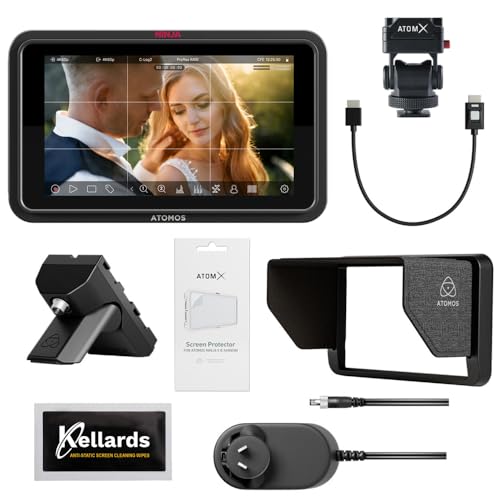
- 1500-nit touchscreen monitor
- Records up to 6K RAW
- Supports ProRes, DNx, H.265, and H.264
Best For: Professional HDMI production and monitoring workflows
Best All-in-One Audio Pick

- 4K video with up to four audio tracks
- Dual XLR inputs with phantom power
- USB streaming plus SD recording
Best For: Musicians, streamers, and studio creators needing flexible multi-source audio
Best Professional Studio Camcorder Bundle

- 4K recording with 20x optical zoom
- Dual XLR inputs and dual SD slots
- Includes wireless audio and production accessories
Best For: Interviews, events, livestreams, and professional video production
Best Budget Creator Starter Kit

- 5K video and 4K/60fps recording
- 270-degree flip touchscreen and Wi-Fi
- Includes mic, card, batteries, tripod, and remote
Best For: Beginners building a YouTube, podcast, or home-studio setup
Best All-in-One Monitor/Recorder – Atomos Ninja TX
For creators comparing camera external recorders for studio filming, the Atomos Ninja TX combines monitoring, recording, connectivity, and Camera to Cloud features in a compact 5.2-inch unit. Its bright touchscreen, locking 12G-SDI and HDMI connections, and broad codec support make it a flexible choice for studio workflows.
Best For: Studio filmmakers who need a bright monitor, professional inputs, multiple recording codecs, and integrated wireless uploading.
Pros:
- Records Apple ProRes RAW, ProRes, Avid DNx, H.265, and H.264 formats.
- Supports 4K60 input/output and up to 8K30 ProRes RAW recording.
- Includes a 1500-nit touchscreen, Wi-Fi 6, timecode sync, and USB-C connectivity.
Cons:
- Requires CFexpress Type B media for recording.
- Its feature-rich design may be more than needed for basic monitoring.
The Ninja TX is the most purpose-built option here for a studio camera rig that needs both a monitor and an external recorder. It is especially appealing when codec flexibility, high-brightness viewing, and connected workflows matter.
Best Integrated Studio Camera – Canon VIXIA HF G70
The Canon VIXIA HF G70 is a complete 4K camcorder rather than a standalone recorder, making it a practical option for studio filming setups that need a camera with built-in recording and output capabilities. It combines a 20x optical zoom, image stabilization, dual SD card slots, HDMI, and USB livestreaming.
Best For: Interviews, events, presentations, and studio shoots where a self-contained 4K camcorder is more useful than a separate recorder.
Pros:
- Captures 4K UHD video using a CMOS sensor and DIGIC DV6 processor.
- Offers a 20x optical zoom and hybrid image stabilization.
- Supports dual SD cards, HDMI output, and UVC livestreaming to a computer.
Cons:
- It is a camcorder, not a dedicated external camera recorder.
- Recording is listed in MP4, AVCHD, and H.264 formats rather than professional external-recorder codecs.
Choose the HF G70 when simplicity and dependable lens coverage are priorities. Its integrated zoom, autofocus, stabilization, and storage reduce the need to assemble a separate camera-and-recorder system.
Best Rack-Style Studio Recorder – Blackmagic HyperDeck Studio HD Mini
The Blackmagic Design HyperDeck Studio HD Mini is a dedicated studio recorder for setups using SDI, HDMI, USB, RCA, and SD-card media. For camera external recorders for studio filming, its fixed studio-oriented design suits control-room and rack-based workflows better than handheld monitoring applications.
Best For: Studio environments that need a dedicated recorder with SDI connectivity and SD-card recording.
Pros:
- Provides 3G-SDI video input along with HDMI, USB, RCA, and SD-card support.
- Designed as a dedicated studio recorder rather than a camera-mounted monitor.
- Includes a two-year warranty according to the supplied listing.
Cons:
- The supplied notes do not specify recording resolutions, codecs, or frame rates.
- Its studio form factor is less suited to compact, mobile camera rigs.
The HyperDeck Studio HD Mini is worth considering when your workflow is centered on studio hardware and SDI sources. Verify the required recording format and camera compatibility before purchase because those specifications are not detailed in the supplied information.
Best Camcorder Bundle – Canon VIXIA HF G70 Bundle
This Canon VIXIA HF G70 bundle gives studio filmmakers a ready-to-use 4K camcorder package with a 64GB memory card and shoulder bag. Its HDMI output can feed monitors or recorders, while dual SD slots support redundant recording or longer shoots.
Best For: Buyers who want a complete 4K camcorder kit for interviews, weddings, events, school performances, and studio production.
Pros:
- Includes the HF G70 camcorder, shoulder bag, and 64GB memory card.
- Records 4K video with a DIGIC DV6 processor and 20x optical zoom.
- Provides dual SD slots, HDMI output, touchscreen operation, and manual controls.
Cons:
- This is a camera bundle, not a dedicated external recorder.
- The supplied details do not identify the included memory card’s speed class or capacity beyond 64GB.
The bundle is a convenient starting point for studio or event video because the core camera accessories are included. It makes the most sense for users who need an integrated camera and want HDMI flexibility for an external monitoring or recording setup.
Professional Capture Pick – Blackmagic UltraStudio Mini Recorder 12G
For studio filming setups that need dependable computer capture, the Blackmagic Design UltraStudio Mini Recorder 12G is a focused external recorder with both 12G-SDI and HDMI inputs. It supports common video codecs up to UHD 4K60 and works with popular software such as DaVinci Resolve, Wirecast, vMix, and OBS.
Best For: Studio operators using SDI or HDMI cameras with Thunderbolt 4-equipped computers.
Pros:
- Accepts both 12G-SDI and HDMI sources.
- Supports video up to UHD 4K60.
- Outputs uncompressed or compressed 10-bit 4:2:2 YUV and 4:4:4 RGB quality.
- Compact design with Thunderbolt 4 output.
Cons:
- Its computer connection is Thunderbolt 4, so compatibility should be checked before purchase.
- It is an interface for sending video to a computer rather than a standalone camera.
This is the most purpose-built option here for professional studio capture, especially when your workflow already uses SDI, HDMI, and desktop production software.
Beginner Studio Camera – 4K 80MP Camcorder Webcam
If you need camera external recorders for studio filming but also want an all-in-one camera, this lightweight 4K camcorder combines video capture, webcam functionality, and built-in recording features. It records 4K at 30 FPS, includes an external microphone input, and supports USB webcam use for streaming or video calls.
Best For: Beginners creating YouTube videos, livestreams, family footage, or straightforward studio content.
Pros:
- Records 4K video at 30 FPS with an 80MP high-pixel lens.
- Works as a USB webcam and includes an external microphone input.
- Includes two batteries, a 32GB SD card, remote control, case, and Type-C cable.
- Lightweight design weighs less than 500g.
Cons:
- The stated battery runtime is about 75 minutes when recording at 4K/30FPS.
- Its 18x zoom is digital rather than optical.
- It is not water resistant.
This camcorder is a practical entry point for creators who want recording and webcam use in one compact package, rather than a dedicated professional capture interface.
Advanced Monitor-Recorder – Atomos Ninja TX GO 5-inch
For demanding camera external recorders for studio filming, the Atomos Ninja TX GO pairs a bright 5-inch touchscreen monitor with professional recording formats and wireless workflow features. It accepts HDMI input and can capture up to 6K RAW to compatible CFexpress Type B or USB-C storage.
Best For: Production teams that need on-camera monitoring, ProRes or RAW recording, and flexible storage or streaming options.
Pros:
- 1500-nit 5-inch touchscreen with professional monitoring tools.
- Records ProRes, ProRes RAW, Avid DNx, H.265, and H.264.
- Captures up to 6K RAW to CFexpress Type B or USB-C storage.
- Offers HDMI, Wi-Fi 6E, NDI support, and multiple power options.
Cons:
- Compatible storage drives, network adapters, and calibration probes may be sold separately.
- Its feature set may be more than needed for simple recording setups.
- It uses HDMI input rather than the 12G-SDI connection offered by the Blackmagic option.
The Ninja TX GO is the strongest choice for creators who want recording, monitoring, camera control, and modern post-production formats in a single professional monitor-recorder.
Best All-in-One Audio Pick – Zoom Q8n-4K
For creators comparing camera external recorders for studio filming, the Zoom Q8n-4K stands out as a compact video-and-audio solution. It records 4K video at 30fps while supporting up to four simultaneous audio tracks, with two XLR inputs and phantom power for microphones, instruments, or a mixer.
Best For: Musicians, solo filmmakers, streamers, and studio creators who prioritize flexible multi-source audio.
Pros:
- Records 4K video alongside up to four audio tracks.
- Two XLR inputs include phantom power for professional microphones and instruments.
- Supports local SD recording up to 512GB while streaming over USB.
- Flip-out screen, remote-control app, and swappable capsules support flexible setups.
Cons:
- Its wide-angle 2.3mm lens may be less suitable when you need strong telephoto reach.
- The 680g handy form factor is less feature-rich for advanced camcorder-style zoom workflows.
The Q8n-4K is a strong choice when clean, expandable audio matters as much as video resolution. Its XLR connectivity and four-track recording make it especially practical for controlled studio sessions and music-focused production.
Best Professional Studio Camcorder Bundle – Canon XA60
For camera external recorders for studio filming that also need professional framing and connectivity, the renewed Canon XA60 bundle offers a complete camcorder workflow. It combines 4K recording, a 20x optical zoom, dual XLR audio inputs, dual SD slots, and included wireless microphones and accessories.
Best For: Interviews, events, presentations, livestreams, education, journalism, and creators who want a ready-to-shoot professional package.
Pros:
- Records detailed 4K UHD video at up to 30fps with fast autofocus and manual controls.
- 20x optical zoom covers wide-angle through substantial telephoto framing.
- Detachable handle adds dual XLR inputs, a zoom control, record trigger, and tally lamp.
- Bundle includes a DJI Mic Mini system, 64GB card, lighting, lenses, tripods, and camera bag.
Cons:
- This renewed bundle is heavier and more involved than a compact creator camera.
- The included accessories may be more than needed for a minimal studio setup.
The XA60 is the most production-oriented option here for buyers who need optical zoom, professional audio inputs, and dependable recording flexibility. Its bundled microphones and accessories make it convenient for building a working studio or event kit quickly.
Best Budget Creator Starter Kit – 5K X70 Camcorder
For beginners seeking camera external recorders for studio filming, the X70 camcorder provides a broad set of creator features at an accessible, bundle-focused level. It records 5K video at 20fps or 4K at 60fps and includes an external microphone, memory card, two batteries, tripod, and remote.
Best For: Beginning YouTubers, vloggers, podcasters, and home-studio users who want a simple kit with webcam and Wi-Fi support.
Pros:
- Offers 5K/20fps and 4K/60fps recording modes.
- 270-degree rotatable touchscreen supports selfies, low-angle shots, and group filming.
- Includes an external microphone, 32GB card, two batteries, tripod, and remote control.
- Supports Wi-Fi control, webcam use, HD output, and recording while charging.
Cons:
- Manual focus may require more setup than autofocus for fast-moving subjects.
- Its 16x zoom is digital rather than a stated optical zoom system.
- The included 32GB card provides less storage than the Canon bundle’s listed 64GB card.
The X70 is appealing for entry-level studio and content setups where included accessories matter. Its flip screen, webcam support, and external microphone make it easy to start, while the manual-focus design is worth considering before recording dynamic subjects.
How We Picked the Best Camera External Recorders for Studio Filming
We evaluated these products for the needs of studio creators, including interview producers, livestreamers, educators, musicians, filmmakers, and small production teams. Key considerations included supported resolutions and codecs, input and output connections, monitoring features, storage workflow, power requirements, ease of setup, and suitability for continuous recording.
The selection includes dedicated HDMI monitor-recorders, professional studio decks, computer capture hardware, camcorders, and budget-oriented video cameras. Because these categories perform different jobs, the best option for one studio may not be the best for another.
Quick Comparison
| Best For | Recommended Type | What to Prioritize |
|---|---|---|
| On-camera monitoring and flexible recording | Atomos monitor-recorder | Codec support, HDR display, storage, battery life |
| Rack or desktop studio playback and capture | Blackmagic HyperDeck | Inputs, outputs, media format, deck controls |
| Computer-based production | UltraStudio capture device | Computer compatibility, connection standard, software support |
| Long-form shooting with built-in optics | Canon camcorder | Zoom range, stabilization, audio, recording reliability |
| Music, streaming, or simple creator setups | Zoom or consumer camcorder | Audio inputs, ease of use, webcam and streaming features |
Key Buying Factors for Camera External Recorders for Studio Filming
Recording Format and Resolution
Check whether the recorder supports the resolution, frame rate, and codec your cameras and editing system require. ProRes, DNx, and RAW options can provide more post-production flexibility, but they also require faster storage and more space than compressed formats.
Inputs, Outputs, and Signal Compatibility
HDMI is common in compact setups, while SDI is often preferred for longer cable runs and professional studio routing. Confirm the exact signal standard, including HD, 4K, frame rates, and whether the device can pass the signal to a monitor or switcher.
Monitoring and Recording Workflow
A built-in display is useful for focus, exposure, framing, and audio checks. For a fixed studio, a dedicated deck or computer capture device may be more convenient than an on-camera recorder. Also verify whether media is removable, network-enabled, or dependent on a host computer.
Audio and Power
Studio filming benefits from dependable audio inputs, headphone monitoring, and clear level controls. Consider whether the unit uses batteries, AC power, USB power, or a combination. For long sessions, continuous power and heat management are especially important.
Who Should Buy Which Camera External Recorders for Studio Filming?
Choose an Atomos Monitor-Recorder
Choose an Atomos model if you want an external monitor, advanced recording formats, and a portable workflow attached to a compatible camera.
Choose a Blackmagic Studio Recorder
A HyperDeck-style deck is better for studios that need physical controls, dependable media recording, and integration with monitors, switchers, or other fixed equipment.
Choose Computer Capture Hardware
An UltraStudio-type device makes sense when recording, switching, or streaming happens primarily inside a computer and you already have suitable production software.
Choose a Camcorder or Creator Camera
Camcorders are practical for operators who want an integrated lens, stabilization, long recording times, and fewer accessories. Budget creator cameras can work for basic streaming and vlogging, but check their actual connection and recording limitations before relying on them for professional production.