
Choosing a PTZ camera for video podcast studio setups can make filming simpler, faster, and more consistent. The right model helps you keep hosts framed, reduce camera handling, and deliver a more polished look on every recording.
In this roundup, we focus on practical features that matter for podcasts, from autofocus and tracking to zoom, connectivity, and streaming compatibility.
Best 10 PTZ Camera for Video Podcast Studio Picks for 2026
Dual-Camera AI PTZ for Streamers
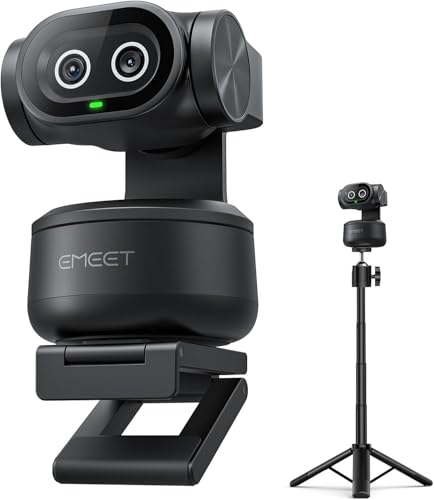
- 4K dual-camera design with AI autofocus
- 310° pan, 180° tilt, and gesture tracking
- 3-mic array with three sound modes
Best For: Solo podcasters and streamers who want tracking plus built-in audio
Broadcast-Ready NDI Zoom PTZ

- NDI HX3 with 4K 60fps output
- 20x optical zoom and Gen 3 AI tracking
- HDMI, USB, SDI, LAN, and PoE support
Best For: Studio production teams needing networked, multi-output PTZ control
Reliable 30x Tracking PTZ

- Built-in auto-tracking for live use
- 30x optical zoom for wider studios
- HDMI, SDI, NDI, USB, and IP outputs
Best For: Podcasters and broadcasters who need zoom reach and simple tracking
Premium AI Tracking 4K Pick
Studio 4K Camera, AI Auto Tracking 20X Zoom
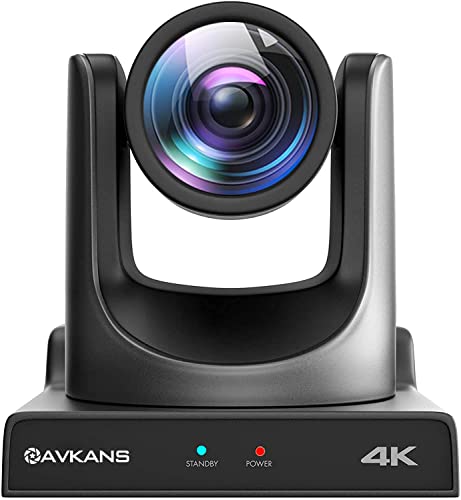
- AI auto-tracking with Presenter Lock
- 20X zoom with HDMI, SDI, USB, and IP
- 4K sensor for sharper studio video
Best For: podcast studios that also stream panels and interviews
Budget-Friendly Wide-Angle Option
4K PTZ Camera AI Auto Tracking 3X Optical Zoom

- AI tracking with face and humanoid recognition
- 92° wide-angle view for group framing
- HDMI 2.0 and USB 3.0 outputs
Best For: smaller podcast rooms and conference-table recordings
Pro Install Streaming Choice
4K PTZ Camera with NDI, Auto Tracking Camera
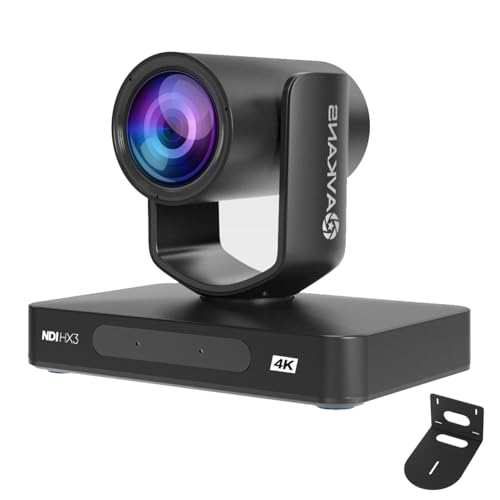
- NDI HX3 plus HDMI and SDI outputs
- 20X optical zoom with wide pan/tilt range
- Presenter, zone, and hybrid tracking modes
Best For: podcast studios with a pro AV workflow and live streaming
Budget AI Auto-Tracking Pick
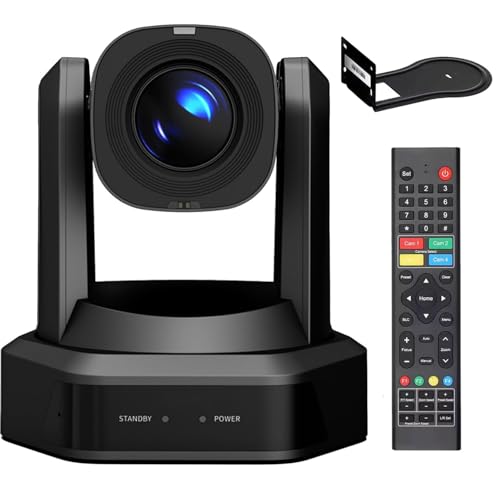
- 20x optical zoom for studio coverage
- AI auto-tracking with adjustable settings
- HDMI, LAN, and USB3.0 output with PoE
Best For: Smaller studios and streamers wanting affordable tracking and easy setup
Official NDI Power Pick

- 4K PTZ with 30x optical zoom
- Official NDI 6 / NDI HX3 certification
- AI Auto Tracking Gen 3 plus broad software compatibility
Best For: Higher-end podcast studios needing NDI, 4K, and long zoom reach
All-in-One Pro Connectivity Pick

- 4K/30fps over HDMI and USB
- Official NDI license with SDI, LAN, USB3.0, and PoE
- AI tracking plus auto-framing for single-speaker use
Best For: Podcast studios that need versatile outputs and easy production wiring
Dual-Camera AI PTZ for Streamers – EMEET PIXY Kit
If you want a PTZ camera for video podcast studio use that feels more like a smart content tool than a basic webcam, the EMEET PIXY Kit is built for that workflow. It combines 4K capture, AI-assisted autofocus, and automatic tracking with flexible framing controls, making it a strong fit for solo shows, interviews, and mixed-use studio setups.
Best For: Solo podcasters, streamers, and creators who want AI tracking, preset framing, and built-in audio in one compact kit.
Pros:
- Dual-camera design pairs a 4K main camera with an auxiliary AI camera for smarter autofocus and exposure.
- AI tracking and PTZ movement support 310° pan and 180° tilt for active on-camera movement.
- Includes a tripod with 360° swivel head and adjustable height for flexible studio angles.
- 3-mic array offers three sound modes for podcasts, live streams, and music recording.
Cons:
- Some advanced features are managed through EMEET STUDIO, so setup takes a little time.
- 4K and 1080p performance uses fixed field-of-view behavior in certain modes.
Overall, this is a practical pick if you want a compact podcast camera that handles framing and audio without adding extra gear. The feature set is especially appealing for creators who move between streaming, teaching, and recorded studio work.
Broadcast-Ready NDI Zoom PTZ – FoMaKo K600N
For a PTZ camera for video podcast studio environments that need broadcast-style connectivity, the FoMaKo K600N brings NDI HX3, 4K 60fps output, and 20x optical zoom into one package. It is aimed at larger production spaces where simultaneous outputs, remote control, and low-latency integration matter more than simple plug-and-play convenience.
Best For: Studio teams, churches, and live production setups that need NDI workflows and multiple output options.
Pros:
- Supports NDI HX3 with 4K 60fps output for low-latency network production.
- Offers multiple outputs including HDMI 2.0, USB, 3G-SDI, LAN, and PoE support.
- 20x optical zoom and adjustable PTZ speeds help frame wide rooms and close-ups.
- Gen 3 AI auto-tracking includes customizable tracking modes and sensitivity settings.
Cons:
- USB output is limited to 4K30 rather than 4K60.
- Its feature set is more complex than a simple studio webcam-style camera.
This model makes the most sense when your podcast studio is part of a larger multi-camera or networked workflow. If you need flexibility, zoom reach, and serious connectivity, it is a capable production camera.
Reliable 30x Tracking PTZ – PTZOptics Move SE 30x
The PTZOptics Move SE 30x is a solid PTZ camera for video podcast studio setups that prioritize dependable tracking and flexible control over flashy extras. With 30x optical zoom, built-in auto-tracking, and simultaneous outputs, it suits studios that want to cover seated hosts, guests, and wider room shots from one camera.
Best For: Podcasters, educators, and broadcasters who want long zoom reach and straightforward auto-tracking.
Pros:
- Built-in auto-tracking is designed for easy use in live broadcasts and conferencing.
- 30x optical zoom is useful for close framing in larger studio spaces.
- Simultaneous HDMI, SDI, NDI, USB, and IP outputs provide broad workflow compatibility.
- Multiple control methods include IR remote, network, RS-232, RS-485, and app control.
Cons:
- Records in 1080p60 rather than 4K.
- No image stabilization is listed.
For creators who value reach, consistency, and control, this is an easy camera to build around. It is especially appealing when your podcast space doubles as a classroom, studio, or live broadcast room.
NDI AI Auto-Tracking PTZ – Tenveo 4K 20X
If you need a PTZ camera for video podcast studio use with serious live-streaming flexibility, the Tenveo 4K NDI model combines AI auto-tracking, 20x optical zoom, and multiple output paths. It is designed for productions that may shift between podcast recording, online teaching, and direct-to-platform streaming without changing cameras.
Best For: Live podcast studios, churches, and conference-style setups that want AI tracking with NDI and PoE.
Pros:
- AI humanoid and face tracking supports presenter and autoframing modes.
- 4K 30fps and 1080p 60fps support with a Sony 1/2.8″ CMOS sensor.
- Multiple outputs include USB 3.0, HDMI, LAN/NDI, and PoE support.
- Supports RTMP, RTSP, and SRT for direct streaming workflows.
Cons:
- No built-in mic is included.
- 4K network streaming is not listed; NDI output is specified at 1080p.
This is a strong fit when your studio needs a camera that can live on the network and also plug into a traditional capture setup. The tracking and output options make it practical for teams that stream often and want fewer workflow compromises.
Premium AI Tracking 4K Pick – Studio 4K Camera, AI Auto Tracking 20X Zoom
If you want a PTZ camera for video podcast studio use that can also handle live production, this 4K AVKANS model brings together AI auto-tracking, 20X zoom, and multiple pro outputs. It’s built for situations where you want to stay framed on camera while switching between presenters or capturing different angles without constant manual adjustment.
Best For: podcast studios that also stream panels, interviews, or multi-speaker video sessions
Pros:
- AI auto-tracking with Presenter Lock can follow a chosen speaker and switch between presenters
- 20X zoom plus HDMI, SDI, USB, and IP outputs give it flexible studio integration
- 4K imaging with a 1/1.8-inch CMOS sensor is aimed at detailed, sharper video
- Supports control through OBS, vMix, Wirecast, StreamDeck, and joystick controllers
Cons:
- More camera than a simple plug-and-play podcast setup may need
- Best value comes when you’ll actually use the tracking and multiple outputs
- iOS app streaming is highlighted, so workflow may depend on your device ecosystem
This is a strong option if your studio needs one camera that can act like a production tool rather than just a webcam. The tracking, connectivity, and zoom range make it especially useful for polished podcast recordings and live streams.
Budget-Friendly Wide-Angle Option – 4K PTZ Camera AI Auto Tracking 3X Optical Zoom
For a PTZ camera for video podcast studio setups that need broad framing and simple connectivity, this TONGVEO model focuses on 4K capture, AI auto-tracking, and a wide 92° view. The 3X optical zoom is modest, but it can be a practical fit when your table, hosts, or guest seating stay relatively close to the camera.
Best For: smaller podcast rooms, conference-table recordings, and teaching-style studio layouts
Pros:
- AI tracking uses face and humanoid recognition to follow a main subject
- 92° wide-angle lens is helpful for capturing multiple people in one frame
- HDMI 2.0 and USB 3.0 outputs support flexible studio or conferencing use
- PTZ movement with presets makes it easier to return to saved framing positions
Cons:
- 3X optical zoom is limited compared with longer-range PTZ cameras
- USB output is listed at 1080P rather than full 4K
- May be less suited to large studios or distant camera placement
This model makes sense when your priority is broad coverage and easy setup rather than long-distance zoom. It’s a practical choice for compact video podcast studios that want AI tracking without moving into a more expensive pro-install category.
Pro Install Streaming Choice – 4K PTZ Camera with NDI, Auto Tracking Camera
If your PTZ camera for video podcast studio work needs to fit into a more advanced live-production workflow, this AVKANS model stands out for NDI HX3, HDMI, SDI, and AI auto tracking. It’s designed for users who want professional control, long cable runs, and support for multi-camera streaming setups.
Best For: podcast studios with a pro AV workflow and multi-camera live streaming
Pros:
- NDI HX3, HDMI 2.0, and SDI outputs support professional studio integration
- 20X optical zoom and 340° pan/120° tilt are suitable for larger spaces
- AI auto tracking includes presenter, zone, and hybrid tracking modes
- Supports NDI control over one Ethernet cable plus software like OBS and vMix
Cons:
- Feature set is geared toward advanced setups, not basic casual use
- More planning may be needed to take full advantage of NDI and SDI workflows
- Best fit when you already use or plan to use PTZ control and streaming tools
This is the most production-oriented option in the group, especially if your studio is part of a larger broadcast or streaming environment. The NDI support, tracking modes, and SDI output make it a strong pick for serious podcast creators.
Budget AI Auto-Tracking Pick – Runpu 20X PTZ for Streaming
If you’re building a PTZ camera for video podcast studio setup on a tighter budget, the Runpu RP-HD66A-20 focuses on the essentials: AI auto-tracking, 1080p up to 60fps, and multiple live-output options. It’s aimed at streamers and venues that want a straightforward camera with remote control, PoE support, and enough zoom to cover a host or guest from a fixed position.
Best For: Smaller podcast studios, worship spaces, and live streaming setups that want auto-tracking and flexible connectivity without jumping to a 4K model.
Pros:
- 20x optical zoom with a wide 60.7° field of view
- AI tracking can be adjusted for sensitivity, framing, and target behavior
- Simultaneous HDMI, LAN/Ethernet, and USB3.0 output, plus support for streaming protocols like SRT and RTMP
- PoE support and browser-based setup make installation simpler
Cons:
- 1080p resolution only, so it won’t suit users who want 4K capture
- The feature set is broad, but the camera is positioned as a budget option rather than a premium studio model
This is a practical fit if you want auto-tracking and multiple output paths for a podcast studio without overcomplicating the setup. The included remote functions, preset controls, and mounting options add flexibility for small productions.
Official NDI Power Pick – FoMaKo 4K 30x PTZ Camera
The FoMaKo K30NS is built for a PTZ camera for video podcast studio workflow where 4K capture, NDI, and strong optical zoom matter. With 30x optical zoom, AI auto-tracking Gen 3, and official NDI 6 / NDI HX3 certification, it’s designed for multi-camera productions that need smoother integration with streaming software and control gear.
Best For: Podcast studios and live production teams that want a higher-end PTZ with official NDI support, 4K capability, and long-range zoom.
Pros:
- 4K camera with 30x optical zoom and 15x digital zoom
- Official NDI 6 and NDI HX3 certification for streaming workflows
- AI Auto Tracking Gen 3 with adjustable tracking modes and target behavior
- Broad compatibility with vMix, OBS, Zoom, StreamYard, Wirecast, and more
Cons:
- Its feature set is more advanced than many small studios may need
- Like most pro PTZs, it makes the most sense when you plan to use NDI or multi-camera control
If your studio needs a camera that can grow with a more serious production chain, this model offers a lot of headroom. The mix of official NDI, strong zoom range, and tracking controls makes it especially useful for polished podcast and streaming setups.
All-in-One Pro Connectivity Pick – TONGVEO 4K NDI PTZ
The TONGVEO 4K NDI PTZ is aimed at a PTZ camera for video podcast studio setup where you want one camera to cover 4K, NDI, SDI, USB, and PoE without adding extra pieces. It delivers 4K/30fps over HDMI and USB, while network streaming supports up to 1080p, and its AI tracking plus auto-framing features help keep a single speaker centered on camera.
Best For: Studio creators who want a flexible, all-in-one PTZ for podcasting, streaming, and multi-output production.
Pros:
- 4K/30fps output via HDMI and USB, with network streaming up to 1080p
- Official NDI license included for streaming workflows
- AI auto-tracking and auto-framing modes for one-person coverage
- HDMI, SDI, USB3.0, LAN, and PoE support simplify studio wiring
Cons:
- Tracking is limited to one person at a time
- Notes specify it is not intended for high-speed motion
- NDI/network output tops out at 1080p rather than full 4K
This is a strong fit for creators who want flexible connectivity more than anything else. If your podcast studio needs clean integration with switchers, long cable runs, and common streaming software, this model covers a lot of ground in one package.
How We Picked the Best PTZ Camera for Video Podcast Studio
We prioritized cameras that fit real podcast workflows: dependable tracking, strong low-friction setup, and flexible output options for multi-camera or single-camera studios. We also weighed image quality, zoom range, resolution, and connectivity such as HDMI, USB, SDI, NDI, LAN, and PoE.
Quick Comparison
If you want the easiest plug-and-play experience, USB models are the simplest. If you need a more scalable studio or remote control, look for HDMI plus IP/NDI options. For larger rooms, higher optical zoom helps keep faces sharp without moving the camera.
Key Buying Factors for a PTZ Camera for Video Podcast Studio
Tracking and Autofocus
Auto-tracking can save time during solo recordings or host-led interviews, but it should be stable rather than overly aggressive. Fast, reliable autofocus also matters when people lean in, gesture, or switch seats.
Zoom and Field of View
Choose wide-angle coverage for tight desk setups and stronger optical zoom for larger tables or multi-host layouts. Optical zoom is preferable to digital zoom when you want to preserve detail.
Resolution and Frame Rate
4K is useful if you crop shots in post or want a future-proof studio camera. For smooth motion, 60fps can be helpful, though 30fps is still fine for many talking-head podcasts.
Connections and Workflow
Match the camera to your recording chain. USB is convenient for direct computer capture, HDMI works well with capture devices and switchers, and SDI or NDI is better for more advanced studio routing.
Power and Mounting
PoE can simplify cable management, especially in permanent setups. Also check whether the camera includes a tripod, ceiling/wall options, or presets for quick angle changes.
Who Should Buy Which PTZ Camera for Video Podcast Studio?
Solo creators and small podcast teams should lean toward simple USB or HDMI models with good autofocus and tracking. Growing studios and live streamers will usually get more value from NDI, SDI, and PoE support. If you record in larger rooms or want the cleanest close-ups, prioritize stronger optical zoom and preset controls. For a PTZ Camera for Video Podcast Studio use, the best choice is the one that fits your room size, workflow, and editing style—not just the highest specs on paper.