
Choosing a budget camera for multicamera live streaming is really about balancing image quality, control, and reliability across your full setup. The best value models make it easy to mix camera angles, switch sources smoothly, and stay compatible with your switcher or streaming software.
Whether you’re building a church rig, event broadcast, classroom stream, or creator studio, the right camera should give you clean output options, useful zoom, and enough flexibility to grow without overspending.
Best 10 Budget Camera for Multicamera Live Streaming Picks for 2026
Budget NDI PTZ
AI Auto Tracking 20X NDI Camera

- NDI HX2/HX3 with included license
- 20X optical zoom and AI tracking
- HDMI, SDI, USB, and NDI outputs
Best For: Church, worship, and event multicamera streaming
Compact AI Webcam
OBSBOT Tiny 2 Lite 4K PTZ Camera

- 4K/30fps and 1080p/60fps capture
- AI tracking with gesture control
- Custom presets and tracking zones
Best For: Desktop live streaming, teaching, and meetings
NDI PTZ with Auto Tracking
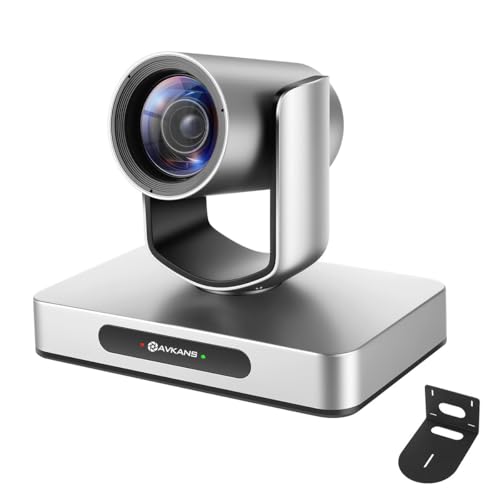
- 4K/30fps PTZ camera with official NDI
- HDMI, USB, NDI, and SDI output options
- AI auto tracking with multiple tracking modes
Best For: Churches and events needing PTZ control on a budget
Dual-Output Zoom Webcam

- USB and HDMI simultaneous output
- 4K USB capture with 10X zoom lens
- UVC plug-and-play compatibility
Best For: Teaching and small streaming rigs that need easy dual output
Best with Extra Features
Tenveo 4K NDI AI Auto-Tracking PTZ

- 4K 30fps and 1080p 60fps output
- NDI, HDMI, USB 3.0, and LAN connections
- 20X optical zoom with AI auto-tracking
Best For: Churches and live teams needing NDI multicamera control
Budget NDI PTZ – AI Auto Tracking 20X NDI Camera
If you need a budget camera for multicamera live streaming with serious flexibility, this AVKANS PTZ model is built around NDI HX2/HX3, HDMI, SDI, and USB output options. It’s a practical fit for churches, worship spaces, event teams, and studios that want one camera to work across OBS, vMix, Streamlabs, Wirecast, and ATEM-based setups.
Best For: Church and event teams that want NDI streaming plus long-cable SDI support and AI tracking.
Pros:
- NDI HX2/HX3 support with included NDI key/license
- 20X optical zoom for tighter framing in larger rooms
- HDMI, SDI, USB, and NDI outputs for mixed production setups
- Built-in AI auto tracking with customizable tracking modes
Cons:
- AI tracking is designed for one person, not fast-moving sports
- Full feature set may be more than a simple plug-and-play webcam user needs
Overall, this is a strong value option if your multicamera workflow depends on professional outputs and network-based streaming. The mix of NDI and SDI makes it especially useful when you want to stretch cable runs without adding extra gear.
Wireless Multicam – Mevo Start 1080p Streaming Camera
The Mevo Start is a straightforward budget camera for multicamera live streaming if you want wireless setup and app-based control. It records and streams in 1080p HD, can connect over Wi‑Fi, Ethernet, or LTE via smartphone, and supports up to three Mevo Start cameras for multi-angle broadcasts.
Best For: Creators who want a compact wireless camera for simple multicam streaming.
Pros:
- 1080p HD streaming and recording out of the box
- Supports Wi‑Fi, Ethernet, or smartphone LTE streaming
- App control with Auto-Director for easier operation
- Can connect up to three cameras for multicam setups
Cons:
- No image stabilization listed
- Fixed-focus lens limits manual optical control
For streamers who value speed and simplicity over advanced camera control, Mevo Start is an easy entry point. It fits mobile or fixed setups well when you want a compact system that can scale to multiple angles.
4K Tracking PTZ – 3X Optical Zoom Conference Camera
If you want a budget camera for multicamera live streaming with 4K capability, this TONGVEO PTZ model delivers HDMI 2.0 and USB 3.0 outputs plus AI auto tracking. It’s aimed at conference rooms, worship services, education, and broadcast-style production where you need a wide view, subject tracking, and straightforward device compatibility.
Best For: Rooms that need 4K HDMI output, AI tracking, and flexible control options.
Pros:
- 4K/30fps output via HDMI with 1080p over USB
- AI humanoid and face tracking for speakers or presenters
- 3X optical zoom with a 92° wide-angle lens
- Multiple control options, including IR remote and serial ports
Cons:
- USB output is limited to 1080p rather than 4K
- 3X zoom is modest compared with higher-zoom PTZ models
This is a solid choice when your priority is a clean tracked shot and simple integration into a streaming or conferencing workflow. The wide angle and 4K HDMI output make it especially useful for rooms where you need both coverage and detail.
Compact AI Webcam – OBSBOT Tiny 2 Lite 4K PTZ Camera
The OBSBOT Tiny 2 Lite is a compact option for a budget camera for multicamera live streaming when you want 4K quality in a small, easy-to-use package. It offers AI tracking, gesture control, and preset positioning, making it a good fit for desktop-based productions, meetings, teaching, and lightweight creator setups.
Best For: Desktop streamers and presenters who want AI tracking and simple camera control.
Pros:
- 4K at 30 fps and 1080p at 60 fps
- AI tracking with customizable tracking and non-tracking areas
- Gesture control for locking tracking and zooming
- Preset positions with separate parameters for each scene
Cons:
- Designed more for desktop and meeting use than larger-room PTZ installs
- Some advanced features are streamlined compared with higher-end models
For users who want a small camera that still feels pro, this model balances convenience with control. It’s especially appealing if your multicamera workflow includes teaching, presentations, or a desk-based live stream.
Portable 4K NDI All-Rounder – Go 4K Wireless Live Streaming Camera
If you want a budget camera for multicamera live streaming that still gives you room to grow, this AVKANS GO model is built around flexible connectivity and straightforward live-production features. It supports 4K recording, HDMI, USB, RTMP, RTMPs, NDI, and SRT, so it can fit into everything from a simple direct-to-platform setup to a more advanced multicam workflow.
Best For: Streamers, churches, and sports creators who want a compact camera with multiple output options and clean 4K capture.
Pros:
- 4K live streaming and simultaneous ISO recording to microSD.
- Multiple video outputs including HDMI, USB, RTMP/RTMPs, NDI, and SRT.
- 90-degree wide-angle lens with 3X optical zoom for flexible framing.
- Works with the AVKANS Live App for overlays, scoreboards, and other production tools.
Cons:
- Stability is best over Wi-Fi or wired Ethernet, not mobile data.
- MicroSD card is not included for ISO recording.
- Built-in app features are still evolving, according to the notes.
Overall, this is a practical choice if you want one camera that can handle streaming, recording, and multiple connection types without making your setup overly complex. It is especially appealing when you need a versatile entry point into multicamera production.
NDI PTZ with Auto Tracking – 4K HDMI PTZ Camera NDI
For a budget camera for multicamera live streaming in churches, schools, and event spaces, this AVKANS PTZ model gives you a useful mix of pro-style control and network-based workflow. It offers 4K at 30fps, NDI support, HDMI, USB, and SDI outputs, plus browser control and free Windows camera management software.
Best For: House-of-worship, education, and live event setups that want PTZ control, NDI, and auto tracking in one camera.
Pros:
- Official NDI 4K camera with NDI license included.
- HDMI, USB, NDI, and SDI outputs for flexible integration.
- AI auto tracking with presenter, zone, and hybrid tracking modes.
- Can be controlled from a web browser or camera management software.
Cons:
- Auto tracking is designed for one person, not fast-moving sports.
- Joystick controller is not included.
- Some advanced setup may be unnecessary for very simple one-camera streams.
This model makes sense when you want a more polished multicam broadcast feel without jumping straight to higher-end gear. The combination of PTZ control, NDI, and tracking tools is a strong fit for repeatable productions.
Dual-Output Zoom Webcam – HDMI 4K USB Camera
If your priority is a budget camera for multicamera live streaming with simple plug-and-play operation, this IFWATER model is a compact option with both USB and HDMI outputs. It supports 4K capture over USB, 1080P over HDMI, and a 5-50mm manual zoom/focus lens that adds a useful amount of framing control for desks, demos, and close-up teaching setups.
Best For: Online teaching, training, and lightweight streaming setups that need dual output and manual zoom control.
Pros:
- Simultaneous USB and HDMI output for monitor plus computer use.
- 4K USB output with H.264, MJPEG, or YUY2 options.
- 10X total zoom with a 5-50mm manual focus and zoom lens.
- UVC plug-and-play support for easy connection to computers and some devices.
Cons:
- HDMI output is limited to 1080P.
- Manual focus and zoom are less convenient than motorized controls.
- Better suited to static or slowly changing scenes than dynamic live events.
This is a sensible low-cost pick when you need a camera that can feed a PC and a display at the same time. It is less specialized for full PTZ productions, but its dual-output design makes it easy to work into a small multicamera setup.
Best with Extra Features – Tenveo 4K NDI AI Auto-Tracking PTZ
If you need a budget camera for multicamera live streaming, this Tenveo PTZ model stands out for its mix of 4K capture, NDI support, and multi-output flexibility. It’s built for productions that need camera movement, remote control, and clean integration with streaming workflows like OBS, YouTube, and live event setups.
Best For: Churches, auditoriums, and live-stream teams that want NDI-based multicamera control with 4K output.
Pros:
- 4K 30fps and 1080p 60fps video with a Sony 1/2.8" CMOS sensor
- NDI, HDMI, USB 3.0, and LAN outputs for flexible multicamera routing
- 20X optical zoom for tighter shots without digital zoom loss
- AI human and face auto-tracking with presenter and autoframing modes
Cons:
- No built-in microphone
- PoE requires a compatible PoE switch
- Best value is strongest for users who will use its network or PTZ features
Overall, this is a feature-rich option for teams that want a more professional multicamera streaming setup without moving straight into a high-end camera system. The combination of NDI, presets, and auto-tracking makes it especially practical for controlled live productions.
Easy Setup Starter – TONGVEO 1080p 60fps AI Tracking PTZ
This TONGVEO model is a practical budget camera for multicamera live streaming when you want straightforward HDMI and USB connectivity. It focuses on smooth 1080p 60fps capture, 20X optical zoom, and AI tracking, making it a useful fit for churches, webinars, and small production rooms.
Best For: Teams that want a simple plug-and-play PTZ camera for streaming and conferencing.
Pros:
- 1080p 60fps video with a 20X optical zoom lens
- AI tracking with single-person tracking and multi-person auto framing
- HDMI and USB 3.0 plug-and-play connectivity
- Up to 255 presets for faster camera switching
Cons:
- No network or NDI output listed in the supplied notes
- 1080p only, not 4K
- Best for smaller setups that prioritize ease of use over advanced routing
For buyers who want a dependable entry point into multicamera production, this camera keeps the workflow simple while still offering the core PTZ features that matter. Its preset recall and AI framing help reduce manual camera work during live streams.
Value 1080p Workhorse – Tenveo 1080p AI Tracking PTZ
If you’re shopping for a budget camera for multicamera live streaming, this Tenveo PTZ is a solid 1080p option with the connectivity and control features that production teams actually use. It combines 20X optical zoom, AI auto-tracking, and multiple output paths for church services, conference rooms, and live events.
Best For: Multicamera streams that need 1080p60, preset control, and flexible HDMI/USB/LAN connectivity.
Pros:
- 1080p 60fps output with a 20X optical zoom lens
- USB 3.0, HDMI, and LAN outputs for flexible streaming setups
- AI human and face auto-tracking with presenter and autoframing modes
- Up to 255 presets and silent pan/tilt movement
Cons:
- No built-in mic
- 1080p only, not 4K
- PoE needs a compatible switch to use
This is a strong middle-ground pick for teams that want broader connection options than a basic USB camera without stepping into a more expensive 4K model. It looks especially appealing for multi-angle productions that rely on presets and remote PTZ control.
How We Picked the Best Budget Camera for Multicamera Live Streaming
For a Budget Camera for Multicamera Live Streaming, the most important factors are output flexibility, dependable autofocus or auto-tracking, and compatibility with common workflows like OBS, Zoom, Teams, NDI, HDMI, USB, and SDI. We favored cameras that can work in a multi-angle setup without requiring a complicated or expensive control chain.
We also looked for practical streaming features such as optical zoom, wide field of view, low-latency connections, PoE support, and simultaneous outputs. In this category, small usability wins matter a lot because they reduce setup time and make live switching less stressful.
Quick Comparison
Some models are better suited for fixed room installations, while others lean toward portable creator use. PTZ cameras with higher optical zoom are usually the best fit for churches, auditoriums, and event stages. Compact webcams and wireless streaming cameras make more sense for smaller teams, mobile setups, or creators who need simpler operation. If you want the most flexible path, prioritize models that offer HDMI plus USB or LAN/NDI so you can adapt as your workflow changes.
Key Buying Factors for a Budget Camera for Multicamera Live Streaming
Outputs and Compatibility
Choose a camera that matches your switcher, capture card, or streaming platform. HDMI is the simplest baseline, while USB is convenient for direct computer use. NDI and LAN options are valuable if you want network-based routing and cleaner multicamera scaling. SDI can be useful in larger or more professional installs.
Zoom, Framing, and Tracking
Optical zoom matters more than digital zoom for stage, worship, and conference coverage. Auto-tracking helps when you need a speaker to stay framed without constant manual control. For smaller rooms, a wide-angle lens may be more useful than long zoom.
Image Quality and Frame Rate
Look for a clear path to 1080p60 or 4K if you want sharper motion and better cropping flexibility. In a multicamera setup, consistent color and exposure across cameras can matter more than headline resolution alone.
Control, Mounting, and Power
Easy preset control, remote operation, tripod or ceiling mounting, and PoE support can save time in permanent installs. If your setup needs to be moved often, pay close attention to size, power needs, and how quickly the camera can be deployed.
Who Should Buy Which Budget Camera for Multicamera Live Streaming?
If you’re running church services, conferences, or stage events, a PTZ model with NDI, HDMI, and strong zoom is usually the smartest value. If you’re a creator or small team, a wireless or USB-friendly camera may be enough and easier to manage. For desktop streaming, webinars, and hybrid meetings, a compact AI-tracking webcam can be the most cost-effective choice. The best Budget Camera for Multicamera Live Streaming is the one that fits your control style, room size, and expansion plans—not just the one with the biggest spec sheet.