
A dependable webcam can make meetings clearer, streaming more polished, and remote collaboration less frustrating. The best webcams under $300 balance image quality, microphone performance, ease of setup, and useful privacy features.
Our selection includes affordable 720p models, versatile 1080p cameras, and higher-frame-rate options for creators. Use the guide below to narrow the choices by workspace, video needs, and budget.
Best 10 Webcams Under 300 Picks for 2026
Best Overall

- 1080p video at 30 fps
- Autofocus and light adjustment
- Dual microphones and XSplit VCam
Best For: Video calls, streaming, and recording
Best for Privacy

- 1080p video with automatic correction
- Built-in rotating privacy shutter
- Noise-reducing microphone
Best For: Private, everyday video meetings
Best Wide-Angle Value

- 90-degree field of view
- Dual omnidirectional microphones
- Privacy cover and A-to-C adapter
Best For: Group calls and wider framing
Best Budget Pick
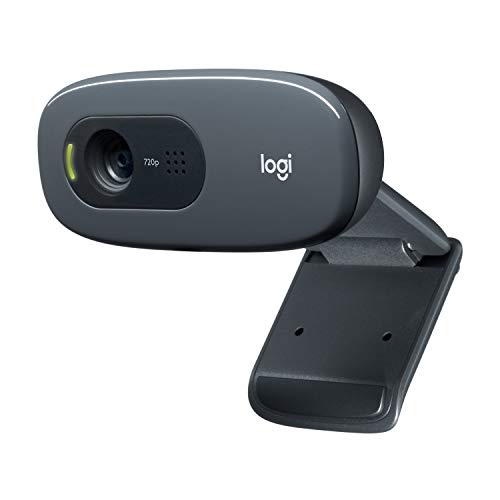
- 720p video at 30 fps
- Noise-reducing microphone
- Flexible universal mounting clip
Best For: Basic calls and affordable setups
Best for Smooth Streaming

- 1080p video at 60 fps
- Auto-framing and intelligent exposure
- USB-C with flexible mounting
Best For: Streaming, content creation, and polished video calls
Best for Wide-Angle Calls

- 1080p video at 30 fps
- 95° wide-angle lens
- Privacy shutter and dual microphones
Best For: Remote work, group calls, and shared spaces
Best for Flexible Video Modes

- 1080p at 30 fps or 720p at 60 fps
- Autofocus and light correction
- Includes three-month XSplit VCam license
Best For: Calls, streaming, and flexible capture settings
Reliable Everyday Pick

- 1080p Full HD video with automatic light balancing
- Built-in sliding privacy cover and microphone
- Plug-and-play USB-A compatibility
Best For: Everyday calls, remote work, and streaming
Best Heavy-Duty Pick
Gohero Pro Series 1080p Webcam

- 1080p video at 30 fps with a wide-angle lens
- Noise-reducing microphone and automatic light correction
- Includes USB-C adapter, tripod, and USB cable
Best For: Wide-angle calls, teaching, and streaming
Eco-Conscious Budget Choice

- 1080p wide-angle video with automatic light correction
- Noise-reducing microphone and sliding privacy cover
- Plug-and-play USB support with no extra drivers
Best For: Basic calls, online teaching, and casual streaming
Best Overall – Logitech C920x HD Pro
For shoppers comparing webcams under 300, the Logitech C920x HD Pro is a well-rounded choice for clear video calls, streaming, and recording. It combines 1080p video at 30 fps with autofocus, automatic lighting adjustment, and dual microphones.
Best For: Video calls, streaming, and desktop recording when you want dependable Full HD image quality.
Pros:
- Full HD 1080p video at 30 fps with crisp, detailed color.
- Autofocus and automatic lighting adjustment help maintain a sharp, bright image.
- Dual microphones capture natural-sounding audio.
- Includes a three-month XSplit VCam license for background removal, replacement, and blur.
Cons:
- Does not include a physical privacy shutter.
- Uses USB connectivity rather than USB-C.
The C920x is a strong all-purpose option if image quality matters more than newer privacy and port features. Its 1080p resolution and autofocus make it particularly versatile for meetings and content creation.
Best for Privacy – Logitech Brio 300
The Logitech Brio 300 is a practical pick among webcams under 300 for everyday meetings. Its 1080p video, automatic light correction, noise-reducing microphone, and built-in privacy shutter cover the features many remote workers use most.
Best For: Video meetings where privacy, simple setup, and clear everyday video are priorities.
Pros:
- 1080p HD resolution produces a natural-looking image.
- RightLight 2 automatic correction helps compensate for poor lighting.
- Rotating privacy shutter blocks the lens when the camera is not in use.
- Noise-reducing mono microphone helps suppress background sound.
Cons:
- Uses a fixed USB-C cable.
- Its microphone is mono rather than dual-microphone stereo.
The Brio 300 is especially appealing for work-from-home setups that need a physical privacy control. Certification for Zoom, Microsoft Teams, and Google Meet also makes it a straightforward meeting-room upgrade.
Best Wide-Angle Value – EMEET C960 1080p Webcam
The EMEET C960 stands out in the webcams under 300 category with a 90-degree field of view and a built-in privacy cover. It records 1080p video, includes two omnidirectional microphones, and supports USB Type-A connections with an included A-to-C adapter.
Best For: Group calls, presentations, and users who want a wider frame with flexible USB compatibility.
Pros:
- 1080p video with a 90-degree wide-angle lens.
- Two built-in omnidirectional microphones support clear communication.
- Removable privacy cover provides a simple lens-blocking option.
- Includes USB Type-A and A-to-C connection options.
Cons:
- Fixed focus works best within its stated 11.8- to 118.1-inch range.
- Best image performance depends on normal or good lighting.
- Not compatible with Windows Hello, tablets, TVs, or game consoles.
The C960 makes sense when a standard webcam feels too narrow, especially for multi-person calls. Its broad compatibility and included adapter add convenience, but users should plan for adequate lighting and a supported computer setup.
Best Budget Pick – Logitech C270 720p Webcam
If your needs are basic, the Logitech C270 is a straightforward option among webcams under 300. It provides 720p video at 30 fps, automatic light correction, a noise-reducing microphone, and a flexible clip for laptops, monitors, or shelves.
Best For: Simple video calls and users who want an affordable plug-and-play webcam.
Pros:
- 720p video at 30 fps is suitable for everyday calls.
- Automatic light correction helps improve brightness and contrast.
- Noise-reducing microphone supports clearer voice pickup up to 1.5 meters.
- Adjustable universal clip works with laptops, screens, monitors, or shelves.
Cons:
- 720p resolution is lower than the Full HD models in this roundup.
- Uses a fixed-focus lens.
- USB-A connectivity may require an adapter on some newer devices.
The C270 is best viewed as a dependable basic camera rather than a streaming upgrade. It is a sensible choice for occasional meetings when ease of use and low cost matter more than sharper 1080p detail.
Best for Smooth Streaming – Logitech StreamCam
For shoppers comparing webcams under 300, the Logitech StreamCam stands out with Full HD 1080p video at 60 fps. Its glass lens, autofocus, auto-framing, and exposure adjustment make it a strong choice for polished streams, video calls, and content creation.
Best For: Streaming, recording, and frequent video meetings where smooth motion and automatic framing matter.
Pros:
- Records Full HD 1080p video at 60 fps for smooth motion.
- Premium glass lens and smart autofocus provide crisp detail.
- Auto-framing and intelligent exposure help keep you centered and visible.
- Supports landscape or portrait mounting and connects through USB-C.
Cons:
- Its USB-C connection may require an adapter on devices without USB-C ports.
- The listed operating-system support starts at Windows 10 and macOS 10.14.
The StreamCam is the most feature-focused option here for creators who value 60 fps video and automated image adjustments. It is especially appealing for streaming and portrait-oriented content, while its software adds further control over focus and exposure.
Best for Wide-Angle Calls – Lenovo 300 FHD Webcam
Among webcams under 300, the Lenovo 300 FHD is a practical pick for remote work and group calls. It combines 1080p video at 30 fps with a 95-degree wide-angle lens, dual microphones, and a privacy shutter in a plug-and-play design.
Best For: Remote workers and families who need a wider view for meetings, presentations, or shared spaces.
Pros:
- Full HD 1080p resolution at 30 fps delivers detailed video.
- 95-degree wide-angle lens fits more people or room space in the frame.
- 360-degree rotation and tilt adjustment make positioning flexible.
- Integrated stereo dual microphones and a privacy shutter add everyday convenience.
Cons:
- Video is limited to 30 fps at 1080p.
- Uses USB 2.0 rather than a higher-bandwidth connection.
- The supplied details do not specify a particular autofocus system.
The Lenovo 300 FHD prioritizes practical meeting features over advanced creator controls. Its broad field of view, adjustable body, built-in microphones, and privacy shutter make it a sensible fit for straightforward conferencing and shared-frame use.
Best for Flexible Video Modes – Logitech C922x HD Pro
For buyers seeking webcams under 300 with versatile capture options, the Logitech C922x HD Pro offers 1080p at 30 fps or 720p at 60 fps. Autofocus, automatic light correction, stereo microphones, and background tools support calls, streaming, and casual recording.
Best For: Users who want a versatile webcam for video calls, streaming, and background effects without a green screen.
Pros:
- Offers Full HD 1080p at 30 fps or 720p at 60 fps.
- Autofocus and HD light correction help maintain clear video in low light.
- Dual stereo microphones capture natural sound for calls and recordings.
- Includes a three-month XSplit VCam license for background replacement, removal, and blur.
Cons:
- It has no privacy shutter.
- 60 fps capture is available at 720p rather than 1080p.
- The supplied details identify USB connectivity but do not specify the connector version.
The C922x is a well-rounded option for buyers who value both Full HD detail and a smoother 720p mode. Its automatic lighting adjustment and included virtual-background software make it particularly adaptable for mixed work and streaming use.
Reliable Everyday Pick – Logitech Brio 101
For shoppers comparing webcams under 300, the Logitech Brio 101 is a straightforward Full HD option for meetings, streaming, and remote work. It combines automatic light balancing, a built-in privacy cover, and plug-and-play USB-A connectivity.
Best For: Everyday video calls, remote work, and users who want a familiar Logitech webcam with privacy protection.
Pros:
- Records in 1080p Full HD with a 60-degree viewing angle.
- RightLight automatic brightness adjustment helps reduce shadows in low light.
- Integrated sliding privacy cover and built-in microphone.
- Works with Microsoft Teams, Zoom, Google Meet, Windows, macOS, and Chrome OS.
Cons:
- Uses USB-A rather than a native USB-C connection.
- Fixed focus limits manual focusing control.
- Its microphone supports mono audio.
The Brio 101 is a balanced choice for buyers who prioritize simple setup, privacy, and dependable 1080p video. The included USB-A cable may require an adapter with newer USB-C-only devices.
Best Heavy-Duty Pick – Gohero Pro Series 1080p Webcam
If you are comparing webcams under 300 for calls, teaching, or streaming, the Gohero Pro Series offers 1080p video at 30 frames per second with a wide-angle lens. Its noise-reducing microphone, automatic light correction, and included adapters make it flexible for different setups.
Best For: Budget-conscious users who need wide-angle video, noise reduction, and broad USB compatibility.
Pros:
- 1080p Full HD video at 30 frames per second.
- Wide-angle lens suits group calls, teaching, and streaming.
- Built-in noise-canceling microphone and automatic light correction.
- Plug-and-play support for USB 2.0, 3.0, 3.1, and OTG, with a USB-C adapter included.
Cons:
- Fixed focus does not provide manual focus adjustment.
- The supplied details do not specify a viewing-angle measurement.
- It is listed with a one-year warranty, but software compatibility is described broadly rather than by operating-system version.
The Gohero stands out for its wide-angle framing and included USB-C adapter, making it useful across several computers and mobile-style setups. It is a practical feature-focused option for calls and basic content creation.
Eco-Conscious Budget Choice – Shcngqio TWC29 1080p Webcam
Among webcams under 300, the Shcngqio TWC29 targets buyers who want essential 1080p features without a complicated setup. It includes a wide-angle lens, noise-reducing microphone, automatic light correction, and a sliding privacy cover for calls, streaming, and online teaching.
Best For: Basic video calls and streaming where wide-angle framing, privacy, and plug-and-play setup matter.
Pros:
- 1920-pixel 1080p video with a wide-angle lens.
- Automatic light correction adjusts brightness and color across lighting conditions.
- Built-in noise-reducing microphone and sliding privacy cover.
- Supports USB 2.0, 3.0, 3.1, and OTG connections without additional drivers.
Cons:
- Listed with a 90-day manufacturer warranty.
- Uses fixed focus and does not provide image stabilization.
- Video capture and file formats are listed as AVI rather than H.264.
The TWC29 covers the core webcam features needed for everyday calls and casual streaming, while its stated eco-conscious design may appeal to sustainability-minded shoppers. Its shorter warranty is worth considering before purchase.
How We Picked the Best Webcams Under 300
We focused on webcams that offer practical value for video calls, online classes, streaming, and content creation. Key considerations included resolution, frame rate, field of view, microphone quality, privacy controls, compatibility, mounting flexibility, and plug-and-play setup. We also included a range of price points so shoppers can avoid paying for features they will not use.
Quick Comparison
| What to Compare | Best For | What to Look For |
|---|---|---|
| Resolution | Sharper meetings and recordings | 1080p for most buyers; 720p for basic calls |
| Frame rate | Smoother motion | 30fps for meetings; 60fps for streaming and movement |
| Field of view | Solo or group framing | Narrower views for one person, wider views for shared spaces |
| Microphones | Clearer voice pickup | Dual microphones and noise reduction can help in busy rooms |
| Privacy | Everyday security | Built-in shutter or physical privacy cover |
Key Buying Factors for Webcams Under 300
Resolution and Frame Rate
For most video meetings, 1080p at 30fps provides a clear, natural-looking image without demanding excessive bandwidth. A 60fps webcam is more useful for streaming, demonstrations, gaming, or other footage with frequent movement. A 720p camera can still be adequate for casual calls, especially on slower connections.
Lighting and Image Processing
Resolution alone does not guarantee a good picture. Automatic light correction can improve faces in dim or unevenly lit rooms, while software controls may let you adjust exposure, framing, or color. Positioning the camera near a window or soft light usually makes a larger difference than upgrading resolution alone.
Audio, Compatibility, and Setup
Noise-reducing microphones are convenient, but a dedicated headset or microphone may sound better in echo-prone spaces. Check that the webcam supports your operating system and preferred meeting apps. USB plug-and-play models are generally the easiest to install, while USB-C connectivity may be more convenient for newer laptops.
Privacy and Mounting
A physical shutter or sliding cover is worthwhile if the camera stays connected. Also check whether the webcam includes a monitor clip, tripod thread, adjustable tilt, or a rotating mount. These details affect how easily you can maintain eye-level framing.
Who Should Buy Which Webcams Under 300?
For everyday meetings: Choose a 1080p webcam with automatic light correction and a reliable built-in microphone.
For budget calls: A basic 720p plug-and-play model is sufficient for occasional conversations and online classes.
For streaming and content creation: Prioritize 1080p at 60fps, flexible mounting, and dependable image processing.
For shared workspaces: Look for a wider field of view, dual microphones, and easy privacy protection.
For privacy-conscious buyers: Select a model with a physical shutter or cover, particularly if it remains attached to a home or office computer.