
The right conference-room camera can make meetings feel more natural, reduce setup friction, and help remote participants follow every speaker. This roundup compares 10 options ranging from compact huddle-room systems to advanced 360-degree cameras.
We focused on image quality, microphone coverage, speaker tracking, compatibility, and installation flexibility so you can match the camera to your room size, meeting platform, and budget.
Best 10 Webcams for Conference Rooms Picks for 2026
Best for Hybrid Collaboration

- 360° 1080p video with speaker tracking
- 18-foot 360° audio pickup
- Plug-and-play, expandable room system
Best For: Hybrid meetings requiring room-wide visibility
Best for Small Rooms
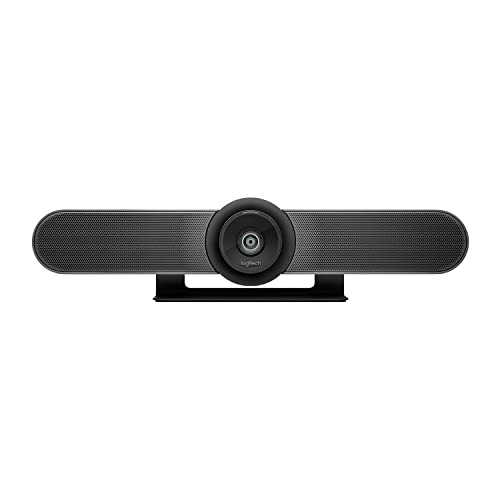
- 4K sensor with 120° wide view
- Beamforming microphones for small rooms
- USB BYOD and room-system support
Best For: Huddle rooms and small conference spaces
Best AI Framing Value
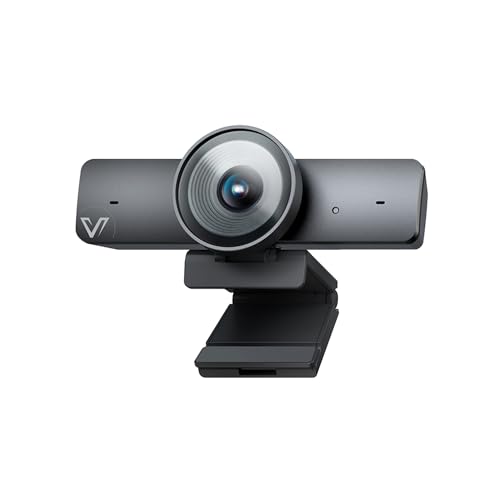
- 4K video with a 1/1.8-inch sensor
- AI framing and presenter tracking
- 120° view with integrated microphone
Best For: Small rooms needing automated camera composition
Best Compact Speakerphone Combo

- 1080p video with Carl Zeiss lens
- Integrated speakerphone and microphone
- Remote-controlled pan, tilt, and zoom
Best For: Small rooms and desktop-led conference calls
Best Gesture-Controlled System
4K PTZ Camera with Speakerphone
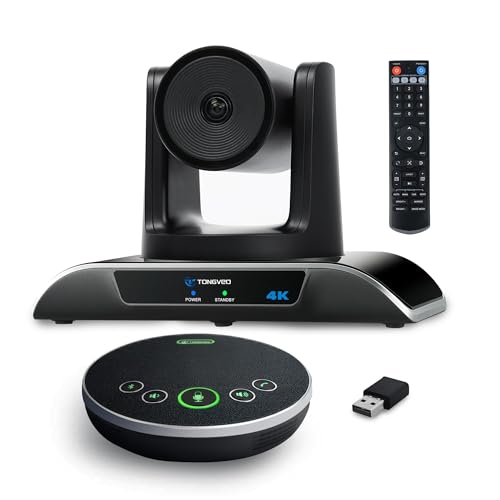
- 4K/30fps video with 120° wide-angle view
- AI tracking, gestures, remote, and presets
- Speakerphone with 16.4-foot pickup range
Best For: Flexible small and medium meeting spaces
Best Plug-and-Play Option
Focus 210 4K AI Conference Webcam

- 4K video with a 120° wide-angle lens
- AI framing and presenter tracking
- Built-in noise-canceling mics and privacy cover
Best For: Small rooms needing simple USB deployment
Best Optical-Zoom System
4K PTZ Camera with Bluetooth Speakerphone

- 4K/30fps video with 3x optical zoom
- AI face and human tracking with PTZ movement
- HDMI, USB, Bluetooth, and dongle connectivity
Best For: Small-to-medium rooms needing flexible outputs
Premium 4K Room Coverage

- 4K video with a 120° field of view
- 8-microphone array with 5-meter pickup
- AI framing, speaker tracking, and privacy shutter
Best For: Huddle rooms needing sharp video and integrated room audio
360-Degree Meeting View
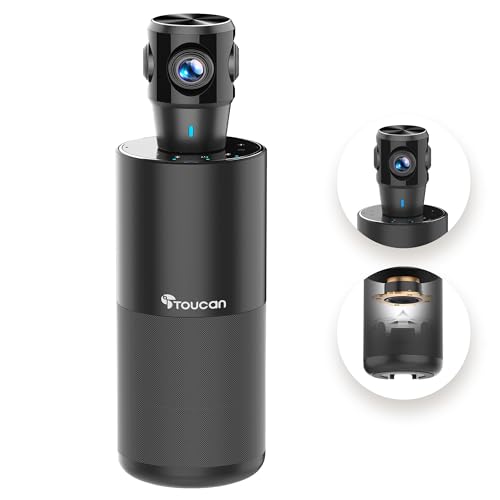
- 360° video captures participants around the room
- Four microphones and built-in Bluetooth speaker
- Plug-and-play compatibility with major platforms
Best For: Flexible meetings where attendees sit around the camera
Auto-Tracking PTZ System
TONGVEO AI PTZ Conference Camera

- AI tracking follows faces and presenters
- 3x optical zoom with HDMI and USB 3.0
- Wireless speakerphone with 5-meter pickup
Best For: Presentations and small-to-medium rooms with moving speakers
Best for Hybrid Collaboration – Meeting Owl 3
For teams comparing webcams for conference rooms, the Meeting Owl 3 stands out as an all-in-one option for interactive hybrid meetings. It combines 360° 1080p video, 360° audio pickup up to 18 feet, and AI-driven speaker tracking to show both the room and active participants.
Best For: Hybrid meetings in small to large rooms where natural speaker visibility and broad audio coverage matter.
Pros:
- 360° 1080p video and room view
- Automatically focuses on in-room speakers
- Audio pickup reaches up to 18 feet
- Plug-and-play USB setup with fleet management through The Nest
Cons:
- Expansion for larger spaces may require additional Owl devices or microphones
- Its 360° design may be more than needed for simple presenter-focused calls
The Meeting Owl 3 is a strong choice when remote participants need to follow a dynamic, multi-person discussion. Its ecosystem also provides a path to expand coverage as the room setup grows.
Best for Small Rooms – Logitech MeetUp
The Logitech MeetUp is a practical pick among webcams for conference rooms, especially for huddle and small rooms. Its 4K sensor, 120° field of view, beamforming microphones, and motorized pan/tilt provide broad coverage in an all-in-one design.
Best For: Small conference rooms and huddle spaces that need wide-angle video and integrated audio.
Pros:
- 4K video sensor with a 120° field of view
- 5x HD zoom and motorized pan/tilt
- Beamforming microphones capture voices up to 4 meters
- Supports USB BYOD use and room deployments for Teams, Zoom, or Google Meet
Cons:
- Expansion microphone is sold separately
- Designed primarily for small and huddle rooms rather than broad room-wide coverage
MeetUp balances image detail, wide framing, and straightforward installation. It is particularly useful when you want a dedicated room camera that can also connect directly to a laptop for bring-your-own-device meetings.
Best AI Framing Value – AV Access BizEye 90
The AV Access BizEye 90 brings AI-focused features to the webcams for conference rooms category. It combines a 1/1.8-inch CMOS sensor, 4K video at 30 fps, a 120° lens, auto framing, presenter tracking, and a built-in noise-reducing microphone.
Best For: Small meeting rooms and hybrid presenters who want automated framing with simple USB connectivity.
Pros:
- 4K video at 30 fps from a large 1/1.8-inch CMOS sensor
- AI auto framing, presenter tracking, and individual gallery modes
- 120° field of view with 5x digital zoom and ePTZ control
- Plug-and-play compatibility with Windows, macOS, Zoom, Teams, OBS, and Webex
Cons:
- Built-in microphone pickup is specified up to 3 meters
- Uses fixed focus rather than autofocus
- Some gesture features may require a firmware update
The BizEye 90 is a flexible USB camera for teams that value automated composition and high-resolution video. Its audio range makes it better suited to smaller spaces unless an external audio solution is added.
Best Compact Speakerphone Combo – Logitech BCC950
The Logitech BCC950 is a compact all-in-one choice for webcams for conference rooms, combining 1080p video with a full-duplex speakerphone. Its noise-canceling microphone is designed for conversations up to 8 feet away, while the remote and base controls simplify camera and call adjustments.
Best For: Small meeting spaces or desktop conference setups that need integrated video and speakerphone functions.
Pros:
- 1080p video at 30 fps with a Carl Zeiss lens
- Full-duplex speakerphone and noise-canceling microphone
- Pan, tilt, zoom, volume, mute, and call controls from the remote or base
- Plug-and-play USB connectivity with Windows and macOS
Cons:
- Audio pickup is specified up to 8 feet
- Its older 1080p design lacks the 4K resolution and advanced AI framing of newer models
- Best suited to smaller setups rather than large conference rooms
The BCC950 remains a straightforward option when ease of use and integrated audio are more important than advanced room coverage. It is a sensible fit for compact spaces and individual desktop-led meetings.
Best Gesture-Controlled System – 4K PTZ Camera with Speakerphone
For teams comparing webcams for conference rooms, this TONGVEO system combines a 4K PTZ camera with a separate speakerphone. Its wide 120° view, AI tracking, gesture controls, and remote-controlled presets make it suited to rooms where presenters or participants move around.
Best For: Small and medium meetings that need flexible camera positioning plus integrated wireless or USB audio.
Pros:
- 4K video at 30 fps with a 120° wide-angle field of view.
- AI auto-tracking, gesture control, remote control, and up to nine preset positions.
- Speakerphone offers noise-reduced stereo microphones, full-duplex audio, and a 16.4-foot pickup range.
- Supports USB-C, wireless dongle, and Bluetooth-style speakerphone connections, with Windows, Mac OS, and Chrome OS compatibility.
Cons:
- Its 5x zoom is digital rather than optical.
- The listed focus buttons on the remote do not apply to this version.
- Users must disable software mirroring if the camera menu appears flipped.
This is a feature-rich choice for rooms that benefit from hands-free tracking and multiple control options. Confirm that the computer and conferencing software support 4K to take advantage of its maximum resolution.
Best Plug-and-Play Option – Focus 210 4K AI Conference Webcam
Among webcams for conference rooms, the WYRESTORM Focus 210 emphasizes simple USB setup for small meeting spaces. AI auto framing, presenter tracking, a 120° view, and built-in microphones and speakers help keep meetings focused without manual camera adjustments.
Best For: Small conference rooms and offices that want a straightforward USB webcam for Zoom, Teams, or Webex.
Pros:
- 4K video with a 120° wide-angle lens designed to cover the meeting space.
- AI auto framing can include all attendees, while presenter tracking follows the active speaker.
- Dual AI noise-canceling microphones capture voices across distances up to 5 meters.
- USB plug-and-play setup and a physical privacy lens cover support shared-office use.
Cons:
- The product is specifically designed for small conference rooms.
- Its zoom is digital rather than optical.
- Audio and video are integrated into one compact webcam rather than a separately positionable system.
The Focus 210 is a practical fit when ease of deployment matters more than advanced PTZ controls. Its automatic framing and presenter tracking reduce the need for a dedicated operator, while the privacy cover adds a useful office safeguard.
Best Optical-Zoom System – 4K PTZ Camera with Bluetooth Speakerphone
For buyers evaluating webcams for conference rooms, this TONGVEO kit pairs a 4K AI-tracking PTZ camera with a wireless Bluetooth speakerphone. HDMI and USB 3.0 connectivity, 3x optical zoom, and pan-and-tilt movement make it adaptable for meetings, presentations, worship, medical, and education settings.
Best For: Small-to-medium rooms that need optical zoom, HDMI output, and flexible speakerphone connectivity.
Pros:
- 4K video at 30 fps with 3x optical zoom and 93° wide-angle coverage.
- AI human and face tracking follows a speaker or subject while maintaining framing.
- Supports HDMI output for 4K/30 video and USB 3.0 output up to 1080p.
- Speakerphone includes four omnidirectional microphones, a 16.4-foot pickup range, and USB, Bluetooth 5.0, or wireless-dongle connections.
Cons:
- The USB output is specified as 1080p, while 4K output is available through HDMI.
- The 93° field of view is narrower than some wider conference cameras.
- The system may require HDMI or USB connections to be selected based on the desired output.
This system stands out when optical zoom and HDMI flexibility are more important than an especially wide view. It offers a capable combination for rooms that alternate between video calls, presentations, streaming, and other specialized conferencing uses.
Premium 4K Room Coverage – Yealink UVC34
For teams comparing webcams for conference rooms, the Yealink UVC34 is an all-in-one option built around 4K video, wide room coverage, and integrated audio. Its 120° field of view, AI framing features, and long USB cable make it practical for flexible huddle-room setups.
Best For: Huddle rooms and small conference spaces that need sharp video, broad framing, and simple computer-based deployment.
Pros:
- 4K video with an 8MP sensor and 120° field of view.
- Integrated 8-microphone array offers up to 5-meter voice pickup.
- AI auto framing, speaker tracking, and face enhancement support natural meetings.
- Includes a 7-meter USB cable and certification for Microsoft Teams and Zoom.
Cons:
- Its wired USB setup may be less convenient for rooms that need a wireless installation.
- The system weighs about 1.62 kg, making it less portable than compact webcams.
The UVC34 stands out when image detail and room-wide audio matter more than a minimal desk footprint. Its automatic electric privacy shutter is an additional practical feature for organizations handling sensitive meetings.
360-Degree Meeting View – TOUCAN SC360
The TOUCAN SC360 takes a different approach to webcams for conference rooms by capturing meetings in 360 degrees. Its compact conference unit combines video, four noise-reduction microphones, and a speaker for teams that want participants visible from around the room.
Best For: Small or flexible meeting spaces where participants may sit around the camera and need broad visual coverage.
Pros:
- 360-degree capture helps show participants around the room.
- Includes four noise-reduction microphones and a built-in Bluetooth speaker.
- Plug-and-play operation supports PCs, Macs, tablets, Zoom, and Microsoft Teams.
- Includes a Type-C male-to-USB-A female OTG adapter for PC compatibility.
Cons:
- Video resolution is 1080p rather than 4K.
- Fixed-focus and autofocus specifications are both listed, so buyers should confirm the exact operating mode.
- Its 360-degree view may include more of the surrounding room than a directional camera.
The SC360 is most useful when a conventional forward-facing webcam would leave attendees out of frame. It favors inclusive room coverage and straightforward connectivity over higher-resolution imaging or optical zoom.
Auto-Tracking PTZ System – TONGVEO AI PTZ Conference Camera
For buyers seeking webcams for conference rooms with presentation flexibility, this TONGVEO system combines an AI-tracking PTZ camera with a Bluetooth conference speakerphone. HDMI and USB 3.0 outputs, 3x optical zoom, and 1080p at 60fps make it suited to rooms where speakers move or need to be shown clearly.
Best For: Small-to-medium meeting rooms, training sessions, and presentations with moving speakers or presenters.
Pros:
- AI face and humanoid tracking follows presenters automatically.
- 3x optical zoom, 350° horizontal rotation, and 180° vertical movement provide flexible framing.
- Supports simultaneous HDMI and USB 3.0 output at 1080p and 60fps.
- Wireless speakerphone provides 5-meter pickup and 6–8 hours of continuous operation.
Cons:
- Video is Full HD rather than 4K.
- The PTZ camera is wired, while the speaker is wireless, so setup involves separate connection considerations.
- The system is more involved than a basic USB webcam.
The TONGVEO is a strong choice when ordinary fixed webcams cannot keep a presenter framed. Its combined camera and speakerphone design supports larger meeting workflows, while direct HDMI connectivity can also work with a smart TV.
How We Picked the Best Webcams for Conference Rooms
We evaluated these Webcams for Conference Rooms by looking at the features that matter during real meetings: video resolution, field of view, microphone pickup, speaker tracking, audio output, software compatibility, and connection options. We also considered whether each model is better suited to a small huddle room, a medium conference room, or a more formal meeting space.
AI tracking and 360-degree views can make multi-person meetings easier to follow, while a wide-angle lens may be all you need for a compact room. Models with USB plug-and-play connections are generally simplest for everyday laptop-based calls; HDMI, Bluetooth, and dedicated speakerphone features add flexibility for more permanent installations.
Quick Comparison
| Best For | Look For | Recommended Feature |
|---|---|---|
| Small huddle rooms | Wide field of view and simple USB setup | Compact all-in-one design |
| Medium conference rooms | Strong microphones and wider coverage | Speaker tracking or multiple microphones |
| Large or flexible rooms | Room-filling audio and adjustable framing | PTZ control, optical zoom, or expansion support |
| Hybrid teams | Reliable platform compatibility | Zoom, Teams, or Google Meet certification |
Key Buying Factors for Webcams for Conference Rooms
Video Quality and Framing
1080p is usually sufficient for everyday calls, but 4K can provide sharper detail and more flexibility for digital cropping. Check the camera’s field of view against your table layout. A wide-angle lens helps include everyone in a small room, while PTZ models provide more control in larger spaces.
Microphone Coverage and Audio
Clear audio is often more important than maximum resolution. Look for published microphone pickup distances, noise reduction, echo cancellation, and speakerphone support. A built-in microphone may work well in a huddle room but struggle in a long conference room.
Tracking, Controls, and Connectivity
AI speaker tracking can automatically keep the active participant in frame, while 360-degree cameras provide a broader view of the room. Consider whether you need remote control, gesture control, Bluetooth, HDMI, or USB 3.0. Confirm that the camera works with the operating system and meeting software your organization uses.
Who Should Buy Which Webcams for Conference Rooms?
Choose a compact 1080p or wide-angle model for a small room where simplicity and price matter most. For medium rooms with several participants, prioritize strong microphone pickup, speaker tracking, and a wide field of view. Choose a 4K PTZ system when you need sharper video, adjustable framing, or installation flexibility. A 360-degree camera is a strong choice for collaborative rooms where people sit around the table and may speak from different directions.
Before buying, measure the room, count typical participants, and verify the available ports. The best camera is not necessarily the highest-resolution model—it is the one that captures every participant clearly while fitting your meeting workflow.