
Choosing the right webcam camera for podcast recording can make a small studio feel instantly more polished. The best models deliver sharp detail, reliable autofocus, clean color, and consistent framing without adding much setup time.
Whether you record solo interviews, co-hosted shows, or live video podcasts, the right webcam should fit your space, lighting, and workflow. This guide highlights the features that matter most before you buy.
Best 10 Webcam Camera for Podcast Recording Picks for 2026
Mini AI 4K Pick
OBSBOT Meet 2-4K Webcam for PC

- 4K video with a 1/2" sensor
- AI framing, autofocus, gesture control
- Dual noise-canceling mics and USB-C plug-and-play
Best For: Solo podcasters and creators who need a tiny, travel-friendly 4K webcam
Classic 4K Workhorse
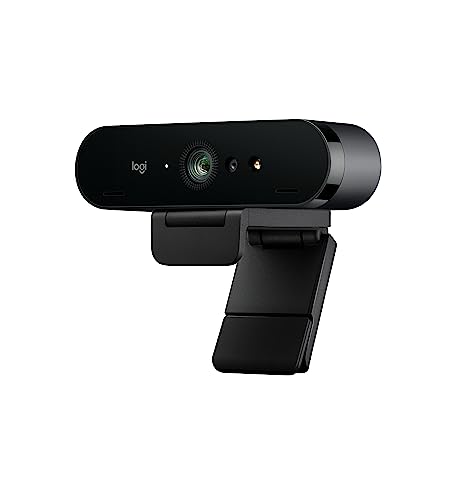
- Ultra 4K HD with 5x HD zoom
- RightLight 3 HDR for low light
- Dual mics and up to 90 fps
Best For: Podcasters who want dependable 4K video and easy compatibility
Tracking Creator Cam

- 4K video with a 1/1.3" sensor
- PTZ tracking keeps you in frame
- Directional mics and Stream Deck support
Best For: Podcasters and streamers who want tracking, modes, and pro-style control
Premium Control Pick
Logitech MX Brio Ultra HD 4K Webcam

- 4K at 30 fps or 1080p at 60 fps
- AI-enhanced image quality with fine tuning
- Show Mode and built-in privacy cover
Best For: Podcasters who want detailed image control and a polished studio look
AI PTZ Creator Pick

- Dual-camera AI tracking for moving subjects
- 0.2s PDAF and AI autofocus
- 3-mic array with podcast-friendly sound modes
Best For: Podcasters and streamers who move on camera
Budget Stream Classic
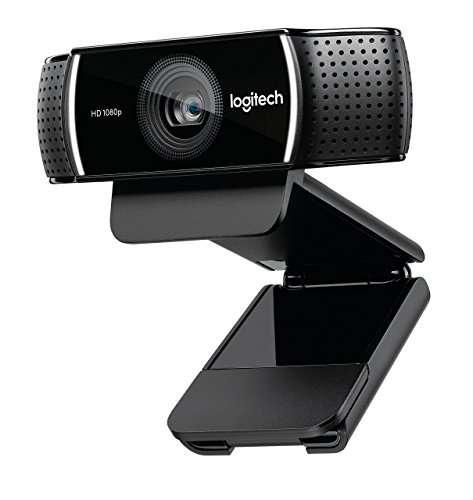
- 1080p video at 30 FPS
- Compact and lightweight for easy portability
- USB webcam with fixed focus
Best For: Budget-minded podcasters needing basic HD video
Privacy-Focused 4K Pick

- 4K/30fps webcam with CMOS sensor
- Dual mics and auto light correction
- Privacy cover with plug-and-play USB
Best For: Podcasters who want 4K video and privacy control
Premium Creator Pick
Insta360 Link 2C 4K Webcam for PC/Mac

- 4K sensor with HDR and low-light support
- PDAF autofocus plus auto framing
- AI noise-canceling mic and DeskView modes
Best For: Creators who want a polished, automated webcam setup for podcast recording
Framing Flex Pick
EMEET C60E Dual-Camera 4K Webcam

- Dual-camera setup for wide and close shots
- 1X to 11X hybrid zoom with PDAF
- Remote and software control for adjustments
Best For: Podcasters who want flexible framing for talking-heads, demos, or guest setups
Lighting Upgrade Pick
NexiGo N680E Pro 4K Webcam with Ring Light

- Built-in tri-tone ring light with adjustable brightness
- 4K sensor with 1080p 60FPS support
- PDAF autofocus and dual noise-canceling mics
Best For: Solo podcasters who want built-in lighting and simple plug-and-play recording
Mini AI 4K Pick – OBSBOT Meet 2-4K Webcam for PC
If you want a webcam camera for podcast recording that stays compact without giving up image quality, the OBSBOT Meet 2 is built for that kind of setup. Its 4K resolution, larger 1/2″ sensor, AI framing, autofocus, and dual noise-canceling mics make it a practical choice for solo hosts, guest interviews, and mobile creators who need an easy plug-and-play option.
Best For: Solo podcasters and mobile creators who want a tiny 4K webcam with AI framing and built-in mic cleanup.
Pros:
- 4K video with a 1/2″ CMOS sensor for clearer, brighter footage
- AI framing and autofocus help keep you centered and sharp
- Dual omni-directional noise-canceling mics reduce keyboard and ambient noise
- USB-C plug-and-play design with lightweight 40.5 g body
Cons:
- May get hot during use, which the maker says is normal
- No built-in storage, so it relies on your PC or Mac
Overall, this is a strong pick if portability matters and you want modern AI tools without a large camera footprint. It is especially appealing for creators who record from different locations and still want a polished on-camera look.
Classic 4K Workhorse – Logitech 4k Webcam
For a webcam camera for podcast recording that leans toward dependable, no-fuss performance, the Logitech 4K webcam remains a straightforward option. It offers Ultra 4K HD, RightLight 3 HDR, dual mics, and up to 90 fps, so it can handle both recording sessions and live streaming when you want consistent results in varied lighting.
Best For: Podcasters who want a proven 4K webcam with strong low-light handling and simple setup.
Pros:
- Ultra 4K HD resolution with 5x HD zoom
- RightLight 3 HDR helps in low light and backlit scenes
- Dual omni-directional mics help suppress background sound
- Three field-of-view presets and up to 90 fps for flexible use
Cons:
- Older 2017-style design compared with newer creator-focused webcams
- No special AI framing or PTZ movement features
This is a solid pick if you care more about reliable video quality than advanced creator controls. It fits well in a podcast studio where you want a familiar, widely compatible webcam that simply works.
Tracking Creator Cam – Insta360 Link 2 Pro
If your webcam camera for podcast recording needs to move with you, the Insta360 Link 2 Pro stands out with PTZ tracking and a large 1/1.3″ sensor. It is aimed at creators who want sharp 4K video, better low-light performance, and software-controlled features like DeskView, Whiteboard, and 4K Portrait Mode.
Best For: Podcasters and streamers who want AI tracking and a more flexible, camera-like recording experience.
Pros:
- 4K video with a large 1/1.3″ sensor for cleaner image quality
- Physically pans and tilts to keep you framed during movement
- Directional beamforming mics help isolate voice in busy spaces
- Works with Stream Deck plus gesture and smartphone control
Cons:
- Not compatible with ARM-based Windows systems
- Does not support Windows Hello Face Recognition
This is a strong choice if you want your camera to do more than sit on a monitor. The tracking and mode options make it useful for podcasters who also stream, demo products, or switch between seated and standing setups.
Premium Control Pick – Logitech MX Brio Ultra HD 4K Webcam
For a webcam camera for podcast recording where image tuning matters, the Logitech MX Brio gives you a more hands-on approach. It combines Ultra HD 4K, AI-enhanced image quality, fine controls for exposure and white balance, and a built-in privacy cover, making it a strong fit for creators who want to adjust the look of their recording setup.
Best For: Podcasters who want detailed image controls and a polished 4K look for recording or live calls.
Pros:
- Ultra HD 4K at 30 fps or 1080p at 60 fps
- AI-enhanced image quality improves face visibility in difficult light
- Fine controls let you adjust ISO, shutter speed, tint, and vibrance
- Show Mode and a built-in webcam cover add flexibility and privacy
Cons:
- Heavier and larger than ultra-compact alternatives
- Some advanced features depend on Logitech software
This model is best when you want more control over the final image than a basic webcam typically offers. It suits podcast setups where you may also share desk items, switch between meeting and streaming use, or fine-tune the look to match your room lighting.
AI PTZ Creator Pick – EMEET PIXY Dual-Camera 4K
If you want a webcam camera for podcast recording that can keep up with movement, the EMEET PIXY stands out for its dual-camera design, fast autofocus, and built-in audio modes. It is built for creators who need a sharper, more dynamic on-camera look without assembling a full multi-device setup.
Best For: Podcasters, streamers, and presenters who move on camera and want tracking plus integrated sound options.
Pros:
- Dual-camera AI design with a 4K main camera and auxiliary AI camera for face detection and exposure optimization
- PDAF and AI autofocus work together for fast 0.2s focusing
- 310° pan and 180° tilt with gesture control for smoother tracking
- 3-mic array includes Live, Noise Canceling, and Original Sound modes for recording flexibility
Cons:
- 4K mode locks the field of view, so framing is less adjustable than in lower resolutions
- Remote control support requires a separate accessory
- Tripod is sold separately
Overall, PIXY is a strong pick if your podcast setup benefits from automated framing, quick focus, and built-in microphone modes in a single compact camera. It is especially appealing for talk formats, demos, and creator studios where movement and presentation matter.
Budget Stream Classic – Logitech 1080p Pro Stream
Logitech 1080p Pro Stream Webcam for HD Video Streaming and Recording at 1080p 30FPS (Renewed)
Check Price On AmazonFor a straightforward webcam camera for podcast recording, the Logitech 1080p Pro Stream keeps things simple with 1080p video, USB connectivity, and a compact design. It is a practical choice when you want reliable HD capture for recordings and streaming without extra setup complexity.
Best For: Budget-minded creators who want a compact 1080p webcam for basic podcast recording and streaming.
Pros:
- 1080p video capture at 30 FPS for HD recording
- Compact, lightweight, and easy to travel with
- USB connectivity for broad compatibility with USB devices
- Fixed focus and automatic exposure simplify setup
Cons:
- Renewed listing may not appeal to buyers who want a brand-new unit
- No image stabilization
- Basic feature set compared with newer AI-tracking webcams
This model makes sense if your podcast workflow is mainly seated, consistent, and focused on dependable HD video. It is less advanced than premium creator webcams, but it covers the essentials at a simple level.
Privacy-Focused 4K Pick – EMEET NOVA 4K Webcam
If you want a webcam camera for podcast recording with clear 4K image quality and a simple privacy-first design, the EMEET NOVA is a solid option. It combines PDAF autofocus, auto light correction, and dual microphones in a compact USB webcam that is easy to place on a desk or tripod.
Best For: Podcasters and presenters who want 4K video, built-in mics, and a privacy cover.
Pros:
- 4K at 30 FPS with a CMOS sensor for high-resolution capture
- PDAF autofocus helps keep subjects sharp within its fixed focus range
- Dual omnidirectional microphones capture voice clearly up to about 8 feet
- Privacy cover and plug-and-play USB setup add convenience and control
Cons:
- Video defaults to 1080p unless you switch to 4K in software or supported apps
- No facial tracking or field-of-view adjustment
- Fixed 73° FOV may be less flexible for wider or tighter framing needs
For podcasting, NOVA works best when you want a clean, dependable image and straightforward audio in a secure package. It is less elaborate than tracking-focused models, but it delivers the basics very well for desk-based recordings.
Premium Creator Pick – Insta360 Link 2C 4K Webcam for PC/Mac
If you want a webcam camera for podcast recording with a more polished look, the Insta360 Link 2C is built around image quality and smart framing. Its 4K sensor, HDR, and PDAF autofocus help keep your face sharp and well exposed, while the AI noise-canceling mic and natural bokeh aim for a more studio-style result in busy rooms.
Best For: Podcasters and streamers who want 4K video, strong auto-framing, and convenient control features.
Pros:
- 4K image quality with HDR and better low-light performance
- PDAF autofocus keeps shots crisp and avoids blur
- AI noise-canceling mic helps reduce background noise
- DeskView, Whiteboard, gesture control, and remote smartphone control add flexibility
Cons:
- Not compatible with ARM-based Windows systems
- Does not support Windows Hello Face Recognition
For podcast setups that need a clean on-camera presence without a lot of manual tweaking, the Link 2C offers a strong mix of visuals, audio cleanup, and automation. It is especially appealing if you want one webcam to cover recording, calls, and streaming.
Framing Flex Pick – EMEET C60E Dual-Camera 4K Webcam
The EMEET C60E is a distinctive webcam camera for podcast recording if you want more control over framing and shot variety. Its dual-camera design combines a wide-angle view with a telephoto camera, and the 1X to 11X hybrid zoom can help you move between a full-table shot and a tighter talking-head view without physically moving the camera.
Best For: Podcasters, presenters, and streamers who want flexible wide-to-close framing.
Pros:
- Dual-camera system for wide scenes and close-up detail
- Max 11X hybrid zoom with PDAF autofocus
- Remote control and EMEET STUDIO support detailed adjustments
- Two microphones and plug-and-play USB convenience
Cons:
- Zoom is not supported in 4K, 60FPS, or YUY2 modes
- Best close-up distance is recommended at about 13.8 inches
If your podcast workflow includes guest shots, product demos, or changing camera angles, the C60E gives you unusual flexibility for a webcam. Its strength is framing control rather than simple point-and-shoot operation.
Lighting Upgrade Pick – NexiGo N680E Pro 4K Webcam with Ring Light
If lighting is your biggest challenge, this webcam camera for podcast recording adds a built-in ring light to help brighten your face without extra gear. The NexiGo N680E Pro also combines a 4K sensor, 1080p 60FPS support, PDAF autofocus, and dual noise-canceling mics, making it a practical all-in-one choice for recording sessions and live calls.
Best For: Podcasters and solo creators who want better lighting built into the webcam.
Pros:
- Built-in tri-tone ring light with stepless brightness control
- 4K sensor plus 1080p 60FPS recording support
- PDAF autofocus and dual noise-reducing microphones
- Privacy shutter and simple USB plug-and-play setup
Cons:
- Ring light may be unnecessary for already well-lit studios
- Single-camera design is less flexible than dual-camera models
For creators who want a cleaner face light without adding an external lamp, the N680E Pro is the most convenience-focused option here. It makes sense when you want quick, compact setup with strong basics for recording.
How We Picked the Best Webcam Camera for Podcast Recording
We focused on webcams that offer a strong mix of image quality, dependable autofocus, easy mounting, and useful software features for creators. For a Webcam Camera for Podcast Recording, consistency matters more than flashy specs, so we prioritized models that stay sharp, handle changing light well, and support simple plug-and-play use.
Quick Comparison
In this roundup, the main differences come down to sensor size, tracking features, microphone quality, and whether the camera is better suited to a fixed talking-head setup or a more dynamic podcast workflow. 4K models generally provide more flexibility for cropping and editing, while 1080p options can still be a smart value if your distribution is mostly standard video platforms.
Key Buying Factors for Webcam Camera for Podcast Recording
Video Quality and Sensor Size
A larger sensor usually improves low-light performance and reduces noise. If you record in a home office or a room with mixed lighting, this can matter more than resolution alone.
Autofocus and Framing
Good autofocus keeps your face sharp when you lean in or move. AI framing, tracking, and preset camera positions are especially useful for hosts who stand up, gesture often, or record with guests.
Audio Support
Built-in mics can help in a pinch, but they should be treated as backup audio. Most podcast setups will still sound better with a dedicated microphone, so webcam mic quality is a bonus rather than the main purchase driver.
Field of View and Lens Behavior
A wider field of view works well for multi-person framing or props on screen, while a narrower view often looks more polished for solo hosts. Look for cameras that avoid excessive distortion at the edges.
Lighting and Exposure Tools
HDR, auto light correction, and low-light tuning can make a major difference if your setup changes between day and night. These features help keep skin tones and backgrounds more balanced.
Who Should Buy Which Webcam Camera for Podcast Recording?
If you want the simplest path to a clean, professional look, choose a 4K webcam with strong autofocus and decent low-light performance. If you record primarily seated and rarely move, a straightforward model with solid image processing may be enough. If your show involves frequent movement, demos, or multiple framing styles, prioritize AI tracking, presets, and PTZ-style control. Creators on a tighter budget can still get good results from a 1080p option, especially when paired with proper lighting and a dedicated mic.