
The right video switcher can make a church livestream easier to produce, more engaging to watch, and simpler for volunteers to manage. The models in this roundup range from compact HDMI switchers to more advanced systems with PTZ control, SDI support, multiview screens, recording, and streaming features.
Whether you are upgrading a sanctuary setup or building a multi-camera worship production system, focus on the inputs, output workflow, audio connections, and control features your team will actually use.
Best 10 Video Switchers for Churches Picks for 2026
Best All-in-One Pick
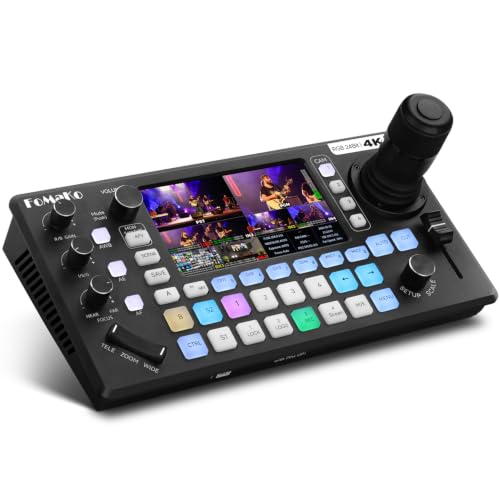
- Controls up to four PTZ cameras with AI tracking
- Combines switching, audio mixing, streaming, and recording
- Accepts four 4K HDMI inputs with 1080p60 output
Best For: Churches building a solo-operated PTZ production system
Best for Large HDMI Setups

- Connects and mixes up to eight HDMI sources
- Includes multiview monitoring, keying, effects, and AUX output
- Provides an 18-channel digital audio mixer
Best For: Churches with many HDMI cameras and presentation sources
Best Compact Streaming Pick

- Switches four HDMI sources in a lightweight unit
- Includes streaming, multiview, recording, and transitions
- Offers HDMI and stereo analog audio connectivity
Best For: Small church teams needing a portable four-camera streamer
Best for SDI and HDMI Flexibility

- Combines four SDI and four HDMI inputs
- Supports PTZ control, NDI|HX3, and browser management
- Records to USB or SD and streams over multiple protocols
Best For: Churches integrating SDI, HDMI, PTZ, and IP video sources
Best Direct-Streaming Pick
Osee GoStream Deck Pro 4-Ch HDMI Mixer

- Four HDMI inputs plus USB camera input
- Streams to three platforms over Ethernet
- Records to SD card while streaming
Best For: Churches wanting a compact, computer-independent streaming setup
Best All-in-One 1080p Pick
FoMaKo KC601 Pro HDMI Switcher

- Four-channel 1080p/60 HDMI switching
- Built-in monitor, recording, and USB streaming
- XLR audio, T-bar, effects, and scene presets
Best For: Churches running 1080p multi-camera services with integrated audio
Best Hybrid SDI/HDMI Pick
Osee GoStream Duet Video Mixer

- Four SDI and four HDMI inputs
- Supports NDI HX, USB-C, and playback sources
- Streams to three platforms with keying and transitions
Best For: Churches using mixed SDI, HDMI, and network video sources
Best 4K Church Production Pick

- 4K60 input and 4K loop-through
- Four-camera PTZ control with presets
- Advanced audio, streaming, and recording
Best For: Multi-camera church services needing advanced production features
Best Portable Option
Mixer Plus Compact Video Switcher

- Four HDMI inputs with 4-inch multiview screen
- PTZ control and scene presets
- PIP, keying, overlays, and flexible AUX output
Best For: Mobile church teams needing compact multi-camera production
Best Simple HD Workflow

- Four-input 1080p switching with touchscreen multiview
- USB 3.0 streaming and PTZ control
- PIP, chroma key, and logo overlay tools
Best For: Churches running straightforward multi-camera HD streams
Best All-in-One Pick – FoMaKo KC800 4K PTZ Switcher
The FoMaKo KC800 is a strong choice for churches seeking video switchers for churches with integrated PTZ control, live streaming, recording, and audio mixing. Its four 4K HDMI inputs, built-in 4D joystick, AI tracking, and on-device controls are designed to help a solo operator manage a multi-camera worship production.
Best For: Churches that want one device for PTZ camera control, switching, streaming, recording, and audio mixing.
Pros:
- Controls up to four PTZ cameras with VISCA/VISCA-over-IP, presets, and AI tracking.
- Offers four 4K HDMI inputs, multiple HDMI outputs, UVC connectivity, and extensive audio I/O.
- Records to USB or SD card without requiring a computer and can stream to multiple platforms.
- Includes a six-channel audio mixer with XLR inputs and 48V phantom power.
Cons:
- Its broad feature set may require more setup and training than a basic HDMI switcher.
- The listed program output is 1080p60 despite supporting 4K inputs.
The KC800 is particularly compelling when a church values integrated PTZ operation and PC-free production. It is more equipment than a small single-camera setup needs, but it can reduce the number of separate controllers, mixers, recorders, and streaming devices required.
Best for Large HDMI Setups – Roland V-8HD Video Switcher
The Roland V-8HD is a practical option for churches comparing video switchers for churches that rely on several HDMI cameras, presentation sources, or playback devices. It supports eight HDMI inputs, built-in multiview monitoring, effects, keying, audio mixing, and flexible output routing in a compact unit.
Best For: Churches with multiple HDMI sources and productions that need advanced compositing, monitoring, and routing.
Pros:
- Handles up to eight HDMI sources in a lightweight, compact design.
- Includes a built-in preview monitor plus support for an external display.
- Provides five-layer effects and keying, AUX output, macros, sequencing, and presets.
- Features an 18-channel digital audio mixer with effects and sync delay.
Cons:
- The supplied details describe HDMI connectivity rather than SDI or integrated streaming.
- Its advanced feature set may be more than a small volunteer-operated setup requires.
The V-8HD suits churches that already have an HDMI-centered workflow and need room to grow beyond four sources. Its monitoring, automation, keying, and AUX capabilities can support worship services, presentations, and broadcast-style productions, though streaming may require additional equipment.
Best Compact Streaming Pick – Blackmagic ATEM Mini Pro
The Blackmagic Design ATEM Mini Pro is a compact starting point for churches choosing video switchers for churches that need straightforward four-camera HDMI production. It combines switching, transitions, multiview, streaming, recording, and basic audio mixing in a lightweight unit.
Best For: Small churches, mobile teams, and services using up to four HDMI cameras or sources.
Pros:
- Provides four HDMI inputs in a small 1.2-pound form factor.
- Includes built-in streaming, multiview, recording, and an HDMI program output.
- Offers cut, mix, dip, wipe, DVE transitions, chroma key, and downstream keying.
- Combines two stereo analog inputs with a built-in six-input, two-channel audio mixer.
Cons:
- It has only four HDMI inputs, limiting larger multi-camera installations.
- The supplied specifications do not list PTZ camera control or XLR audio inputs.
- Additional equipment may be needed for more advanced audio and routing workflows.
The ATEM Mini Pro is an approachable fit when portability and integrated streaming matter more than a high input count. It gives a church team the core tools for a four-source service without the footprint of a larger production switcher.
Best for SDI and HDMI Flexibility – Tenveo PC500 4K Switcher
The Tenveo PC500 is aimed at churches looking for video switchers for churches that need both SDI and HDMI connectivity, PTZ control, recording, monitoring, and network streaming. Its combination of four SDI inputs, four HDMI inputs, PTZ support, NDI|HX3 compatibility, and 5.5-inch display is suited to more involved live-production systems.
Best For: Churches with mixed SDI/HDMI infrastructure, PTZ cameras, and professional network-streaming requirements.
Pros:
- Supports four SDI inputs, four HDMI inputs, USB input, and NDI|HX3.
- Controls up to four PTZ cameras with presets, camera adjustments, and cruise tracks.
- Supports UVC, SRT, RTMP, RTSP, and NDI|HX3 streaming, with browser-based control.
- Provides dual recording to SD card, USB disk, or HDD and includes a 5.5-inch monitoring screen.
Cons:
- Program output is specified as 1080p60 even though some inputs support 4K60.
- The more extensive SDI, IP, PTZ, and recording features may increase setup complexity.
- The supplied details list two microphone inputs rather than a larger integrated audio mixer.
The PC500 is a strong fit when a church needs to bridge existing SDI equipment with newer HDMI or network sources. Its PTZ management, browser control, recording options, and multiple streaming protocols make it flexible for a permanent worship-production installation.
Best Direct-Streaming Pick – Osee GoStream Deck Pro 4-Ch HDMI Mixer
For churches seeking video switchers for churches that can stream without depending on a production computer, the Osee GoStream Deck Pro combines HDMI and USB camera inputs with built-in recording, encoding, and network control. It is a compact option for worship services, presentations, and other live productions.
Best For: Churches and small production teams that want direct Ethernet streaming, local SD card recording, and tactile macro control.
Pros:
- Accepts four HDMI sources plus an additional USB camera input.
- Can record MP4 video to an SD card while streaming over USB.
- Streams to up to three platforms through its built-in Ethernet encoder.
- Eight physical macro buttons support quick switching, overlays, and scene transitions.
Cons:
- The supplied specifications identify HDMI and USB inputs but do not mention SDI connectivity.
- Its compact control surface may be less suitable for larger, more complex productions.
The GoStream Deck Pro is especially practical when a church values a self-contained workflow. Its combination of direct streaming, backup recording, multi-source layouts, and IP control helps reduce the need for extra hardware.
Best All-in-One 1080p Pick – FoMaKo KC601 Pro HDMI Switcher
The FoMaKo KC601 Pro is one of the more feature-rich video switchers for churches, combining a 5.5-inch monitor, four-channel HDMI switching, USB recording, audio connections, and streaming support in one unit. It is designed for 1080p production rather than 4K.
Best For: Worship teams that need integrated monitoring, XLR audio inputs, scene recall, and hands-on switching for multi-camera services.
Pros:
- Supports four HDMI inputs up to 1080p at 60fps.
- Includes a built-in monitor, USB 3.0 webcam output, and high-bitrate H.264 recording.
- Provides two professional XLR inputs, mic/line inputs, and monitoring outputs.
- Offers T-bar control, keying, PIP, logo overlays, transitions, and up to 10 saved scenes.
Cons:
- Does not support 4K video.
- The supplied notes do not specify the full length of the listed warranty and support coverage beyond a three-year limited warranty.
Choose the KC601 Pro when audio handling and operator control matter as much as video switching. Its built-in display and scene presets can simplify recurring church services, while the 1080p limitation should be considered before purchase.
Best Hybrid SDI/HDMI Pick – Osee GoStream Duet Video Mixer
Osee GoStream Duet Multiple Camera SDI and HDMI Live Stream Video Mixer Switcher
Check Price On AmazonChurches using a mix of camera types may find the Osee GoStream Duet a flexible choice among video switchers for churches. It accepts SDI, HDMI, USB-C, NDI HX, and playback sources, while supporting computer software, a built-in interface, and Bitfocus Companion control.
Best For: Churches with longer SDI camera runs, HDMI devices, or network video sources that want a scalable hybrid production setup.
Pros:
- Supports four SDI inputs, four HDMI inputs, USB-C, NDI HX, and SD/SSD playback sources.
- Offers landscape and portrait support for inputs and outputs.
- Includes multisource layouts, PIP, luma/chroma/pattern keying, DSK, and multiple transitions.
- Can stream to up to three platforms through Ethernet, a smartphone hotspot, or software such as OBS and vMix.
Cons:
- The supplied notes specify a one-year manufacturer warranty.
- NDI HX requires downloading the latest firmware to unlock the included license.
- Its broad source and control options may require more setup than a basic HDMI-only switcher.
The GoStream Duet stands out for churches that are moving beyond a simple HDMI setup. Its SDI and network-source support can accommodate varied installations, while the multiple control methods give production teams flexibility as their workflow develops.
Best 4K Church Production Pick – FoMaKo KC602
For churches seeking video switchers for churches with high-resolution sources, the FoMaKo KC602 combines four HDMI inputs, 4K60 input support, 1080p60 output, PTZ control, streaming, recording, and extensive audio mixing in one hardware-based unit.
Best For: Churches running multi-camera services that need 4K input support, PTZ control, direct recording, and advanced audio connections.
Pros:
- Accepts 4K60 input and provides 4K loop-through alongside 1080p60 output.
- Controls up to four PTZ cameras and stores up to nine presets.
- Supports USB UVC streaming, RTMP/RTMPS streaming, and 1080p60 USB recording.
- Offers XLR/TRS audio, 48V phantom power, five-band EQ, monitoring, and audio delay adjustment.
Cons:
- Its broad feature set and 31-button control panel may require more operator training than a simpler switcher.
- Output is limited to 1080p60 even though the inputs and loop-through support 4K.
The KC602 is the most production-focused option here, especially for church teams that want room to expand camera control, audio mixing, and streaming workflows.
Best Portable Option – Mixer Plus Compact Video Switcher
The Mixer Plus is a practical choice among video switchers for churches that value portability and built-in monitoring. It supports four HDMI sources, includes a 4-inch multiview screen, and adds broadcast tools such as PIP, chroma key, overlays, and PTZ control.
Best For: Small or mobile church production teams that need four-camera switching and multiview monitoring in a compact unit.
Pros:
- Combines four HDMI inputs with a built-in 4-inch multiview display.
- Provides 30 transition effects and four user-defined scene presets.
- Includes VISCA-over-IP PTZ control for up to four cameras, with four presets per camera.
- Offers PIP, chroma key, luma key, DSK, logo overlay, and a flexible AUX HDMI output.
Cons:
- The supplied notes do not specify 4K support or dedicated recording features.
- Its compact 4-inch display may be less comfortable for detailed monitoring than a larger external screen.
With its portable design and extensive compositing tools, Mixer Plus fits churches that need flexible live switching without building a large control setup.
Best Simple HD Workflow – FEELWORLD L2 Plus
The FEELWORLD L2 Plus is a straightforward HD choice among video switchers for churches. Its four HDMI inputs, touchscreen multiview, USB 3.0 webcam-style streaming, PTZ support, and logo-overlay tools cover the core needs of many worship and event broadcasts.
Best For: Churches producing 1080p live streams with multiple HDMI cameras and a small team that benefits from touchscreen operation.
Pros:
- Switches four 1080p HDMI sources with a 5.5-inch touchscreen and six-picture preview.
- Includes 15 transition effects and nine picture-in-picture modes.
- Supports USB 3.0 live streaming as a webcam source for platforms such as YouTube and Facebook.
- Offers VISCA PTZ control for up to eight cameras, plus chroma key and logo overlay.
Cons:
- Supports 1080p inputs and output rather than 4K workflows.
- Audio connectivity is centered on 3.5mm input and output, with fewer advanced mixing features described than the FoMaKo.
The L2 Plus makes a strong fit for churches that want capable HD switching and streaming without requiring the broader 4K and professional audio toolkit of a larger mixer.
How We Picked the Best Video Switchers for Churches
We compared these Video Switchers for Churches according to the features that matter during worship services and other live events: video input types, supported resolutions and frame rates, switching speed, multiview monitoring, audio connectivity, streaming and recording options, PTZ camera control, portability, and ease of use.
HDMI models are often the most practical choice for smaller churches because they work with many consumer and prosumer cameras. SDI-capable switchers can be a better fit for larger sanctuaries or installations requiring long cable runs. We also considered whether a switcher can support volunteer operators without requiring a complicated broadcast workflow.
Quick Comparison
| Priority | Look for | Best suited to |
|---|---|---|
| Simple livestreaming | HDMI inputs, USB output, built-in streaming | Small churches and volunteer teams |
| Multi-camera worship | Four or more inputs, multiview, transitions | Regular services with several camera angles |
| Long cable runs | SDI inputs and outputs | Larger sanctuaries and permanent installations |
| PTZ operation | Joystick control and camera presets | Fixed-camera church production |
| Professional production | Chroma key, overlays, audio mixing, recording | Media teams producing polished broadcasts |
Key Buying Factors for Video Switchers for Churches
Inputs and Camera Compatibility
Count the cameras you use now, then leave room for expansion. Check whether the switcher accepts your cameras’ HDMI or SDI signal, resolution, and frame rate. A mismatch can cause a black screen or force you to add converters.
Streaming, Recording, and Outputs
USB output is useful when the switcher must connect to a computer running streaming software. Built-in streaming can reduce equipment, while onboard recording provides a backup or makes it easier to archive services. Confirm whether the device records to USB storage, an SD card, or another medium.
Audio and Monitoring
Look for the audio connections your church already uses, such as XLR, balanced line inputs, or embedded HDMI audio. Multiview lets the operator check every source before switching, while a built-in screen can reduce the need for a separate monitor.
Control and Reliability
Large buttons, preview/program views, transition controls, and saved PTZ presets can help volunteers work confidently. For recurring services, prioritize stable operation and straightforward setup over features that will rarely be used.
Who Should Buy Which Video Switchers for Churches?
Choose a compact HDMI switcher if your church has a small production team, short cable runs, and a few cameras. It is usually the best balance of affordability and simplicity. A model with a built-in screen is especially useful when space is limited.
Choose a switcher with PTZ control if cameras are permanently mounted and one operator needs to frame speakers, musicians, and wide shots from the control position. Choose SDI support when cameras are far from the production desk or when your installation already uses broadcast cabling.
For churches producing more polished services, prioritize multiview, audio mixing, overlays, chroma key, recording, and flexible outputs. Finally, match the switcher to your volunteers’ experience: the best system is one the team can set up consistently and operate confidently every week.