
When it comes to seamless streaming and production, finding the right video switcher with multiview capabilities can make all the difference. You want a device that not only offers multiple inputs but also supports high resolutions and user-friendly controls. With so many options available, it’s essential to understand which features truly matter. Let’s explore the top contenders that could elevate your streaming experience to the next level.
Osee GoStream Duet Live Stream Video Mixer Switcher

The Osee GoStream Duet Live Stream Video Mixer Switcher is perfect for content creators who demand versatility and ease of use. Weighing just 1 kilogram, its compact design makes it easy to transport. With 16 ports, including 4 SDI and 4 HDMI inputs, you can seamlessly connect multiple cameras. It supports streaming to up to three platforms simultaneously, whether through Ethernet or a smartphone hotspot. You’ll love the built-in GUI and GoStream software for effortless control. Plus, with features like Chroma Key and various shifts, your streams will look professional. Enjoy a 1-year warranty for added peace of mind.
Best For: Content creators and live streamers looking for a versatile and professional video mixing solution.
Pros:
- Versatile Connectivity: Supports multiple input options with 4 SDI and 4 HDMI ports, allowing for seamless multi-camera setups.
- Simultaneous Streaming: Enables streaming to up to three platforms at once, enhancing audience reach.
- User-Friendly Control: Features a built-in GUI and compatible software for easy operation, catering to both beginners and advanced users.
Cons:
- Weight Consideration: While portable, some users may find 1 kilogram slightly heavy for extended handheld use.
- Learning Curve: New users may require time to familiarize themselves with all features and controls.
- Firmware Update Requirement: Certain features, like the free NDI HX license, require a firmware update to access.
Osee GoStream Deck HDMI Pro Live Streaming Video Mixer

For those looking to elevate their live streaming game, the Osee GoStream Deck HDMI Pro Live Streaming Video Mixer stands out with its multi-camera capabilities and seamless connectivity options. With four HDMI inputs and two outputs, you can easily connect multiple media sources. You’ll appreciate the two Type-C ports for webcams and SSDs, plus an Ethernet port for NDI streaming. Its audio control features allow for professional sound adjustments, while simultaneous streaming to three platforms keeps your audience engaged. Lightweight and compact, this mixer guarantees smooth operation with its user-friendly interface and built-in support, making it perfect for any live event.
Best For: The Osee GoStream Deck HDMI Pro is best for professionals and enthusiasts in live streaming, including educators, event organizers, and content creators who require a versatile and efficient video mixing solution.
Pros:
- Multiple Connectivity Options: With four HDMI inputs, two outputs, and Type-C ports, it allows for seamless integration of various media sources.
- Professional Audio Control: Equipped with advanced audio effects and monitoring features for high-quality sound management.
- Simultaneous Streaming Capability: Enables broadcasting to three platforms at once, enhancing audience reach and engagement.
Cons:
- Limited to HDMI Inputs: The reliance on HDMI connections may restrict compatibility with certain devices that use other formats.
- Weight and Size: At 1.1 pounds and compact dimensions, it may not be as portable as some users would prefer for mobile setups.
- Learning Curve: Users new to live streaming technology might find the feature set and controls initially complex to navigate.
OREI Quad Multi HDMI Viewer 4 in 2 Out Matrix Switcher

Looking for versatility in your streaming setup? The OREI Quad Multi HDMI Viewer 4 in 2 Out Matrix Switcher is your go-to solution. With four input ports and two outputs, you can easily switch between devices for dual-display setups. It supports up to 4K resolution, ensuring crisp visuals, and offers five display modes, including advanced Picture-in-Picture. Enjoy high-quality audio with LPCM and AC3/DTS formats, connecting seamlessly with various devices like consoles and streaming boxes. Control it effortlessly via the remote or front panel. Plus, you’ll benefit from a one-year warranty and lifetime tech support for peace of mind.
Best For: Those seeking a versatile HDMI switcher for dual-display setups, ideal for gamers, home entertainment enthusiasts, and security monitoring.
Pros:
- Supports high-resolution video up to 4K @ 30Hz, delivering crisp and clear visuals.
- Offers multiple display modes, including advanced Picture-in-Picture, enhancing viewing flexibility.
- Easy control options via remote, front panel, or RS-232, providing convenience in operation.
Cons:
- Limited to two output ports, which may not be sufficient for users with more extensive display needs.
- Some users may find the initial setup and configuration challenging without technical expertise.
- The IR remote control requires batteries, which are not included in the package.
Blackmagic Design ATEM Mini Pro HDMI Live Stream Switcher (SWATEMMINIBPR)

Maximize your live streaming potential with the Blackmagic Design ATEM Mini Pro HDMI Live Stream Switcher. Weighing just 1.2 pounds, this compact powerhouse features four HDMI inputs, allowing you to seamlessly switch between multiple cameras. With options like cut, mix, and wipe changes, you can create dynamic broadcasts. Its built-in 6-input audio mixer and multiview output enhance your production quality. Perfect for education, training, or eSports, the ATEM Mini Pro guarantees professional results. Plus, enjoy peace of mind with a 30-day return guarantee. With a stellar customer rating of 4.7 stars, you can’t go wrong with this switcher.
Best For: The Blackmagic Design ATEM Mini Pro is best for content creators, educators, and professionals looking to enhance their live streaming capabilities with a versatile and user-friendly switcher.
Pros:
- Compact and lightweight design, making it easy to transport.
- High-quality video output with 10-bit 4:2:2 YUV support for professional-grade broadcasts.
- Built-in audio mixer and multiview output streamline production processes.
Cons:
- Limited to HDMI inputs, which may not suit all hardware setups.
- Some users may find the learning curve steep for advanced features.
- No built-in recording capabilities without external drives connected via USB.
OREI HDMI Switcher 4 in 1 Out with Quad Screen Multiviewer

The OREI HDMI Switcher 4 in 1 Out with Quad Screen Multiviewer is an ideal solution for streamers who need to connect multiple devices to a single HD display. You can easily switch between four HDMI inputs, supporting resolutions up to 1080p. With five display modes and seamless operation via an IR remote or front panel buttons, it’s perfect for various setups. Plus, it supports DTS and Dolby audio for an enhanced experience. Weighing just 1.5 pounds, it’s compact and comes with a one-year warranty, ensuring peace of mind. Customer reviews rate it 4.4 out of 5 stars, highlighting its reliability.
Best For: Streamers and users needing to connect multiple HDMI devices to a single HD display.
Pros:
- Supports up to 1080p resolution for clear video quality.
- Easy switching between four HDMI inputs with remote control.
- Compact design weighing only 1.5 pounds, perfect for various setups.
Cons:
- Limited to 1080p resolution; does not support 4K.
- May require additional setup for optimal audio support.
- Some users may find the switching speed slower than desired in certain scenarios.
OREI Quad Multi HDMI Viewer 4 in 1 Out HDMI Switcher

For those seeking a seamless way to switch between multiple HDMI devices, the OREI Quad Multi HDMI Viewer 4 in 1 Out HDMI Switcher is an excellent choice. This device lets you connect up to four HDMI sources, displaying them on one output screen in stunning 4K resolution at 30Hz. You’ll appreciate its versatile audio support, handling formats like DTS and Dolby Digital while offering simultaneous digital and analog outputs. With five unique viewing modes and easy control via IR remote or front buttons, it’s perfect for gaming consoles, streaming devices, and more. Plus, it comes with a one-year warranty for peace of mind.
Best For: Those who want an efficient solution for connecting multiple HDMI devices to a single display without compromising on quality.
Pros:
- Supports high resolutions up to 4K @ 30Hz, providing excellent picture quality.
- Versatile audio compatibility with various formats, ensuring an immersive audio experience.
- User-friendly control options with both an IR remote and front-panel buttons for easy switching.
Cons:
- Limited to 4 HDMI inputs, which may not suffice for users with more devices.
- Maximum resolution is capped at 30Hz for 4K, which may not meet the needs of high-frame-rate gamers.
- No built-in streaming capabilities, requiring separate devices for streaming content.
OREI Quad Multi Viewer HDMI Switcher (4 Ports, 1080P)

If you’re looking for a versatile solution to manage multiple HDMI devices, the OREI Quad Multi Viewer HDMI Switcher is a fantastic choice. With four HDMI input ports, it supports seamless switching for up to 1080p and 2K@60Hz. Whether you’re connecting gaming consoles, Roku, or Blu-ray players, this switcher’s compatibility covers it all. You can easily switch between devices using the IR remote or front panel buttons. Plus, it includes a dual voltage power supply for international use. Backed by a one-year warranty, this switcher offers a reliable way to enhance your streaming and production experience.
Best For: Those who need to connect multiple HDMI devices to a single display, such as gamers, movie enthusiasts, and streaming users.
Pros:
- Supports seamless switching between four HDMI input sources without signal interruption.
- Compatible with a wide range of devices including gaming consoles, streaming devices, and Blu-ray players.
- Comes with a remote control for easy device selection and includes a one-year warranty for peace of mind.
Cons:
- Limited to 1080p and 2K@60Hz output, which may not meet the needs of users with 4K devices.
- The physical design may require some space for setup and might not be compact for all setups.
- Requires a power supply, which could be a hassle for users seeking a completely wireless solution.
OREI 4K Multi HDMI Viewer Quad Switcher (UHD-401MV)
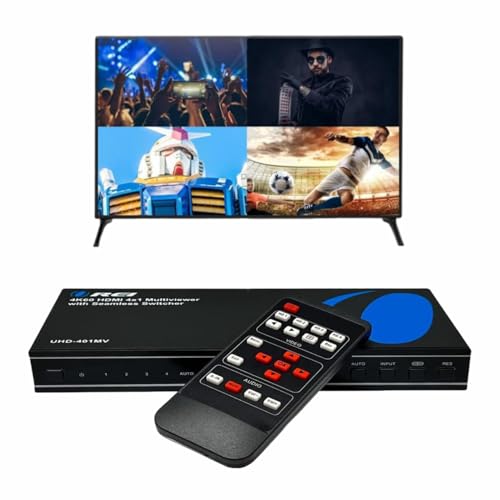
Offering seamless switching between multiple devices, the OREI 4K Multi HDMI Viewer Quad Switcher (UHD-401MV) is ideal for streamers who juggle various HDMI sources. With four input ports, this switcher supports stunning 4K@60Hz and 2K@60Hz resolutions, ensuring crisp visuals. You can choose from five display modes to fit your viewing needs. The integrated audio converter allows for simultaneous digital and analog audio output, compatible with popular formats like DTS and Dolby Digital. It’s perfect for gaming consoles, DVD players, and streaming devices. Plus, the included remote makes switching sources effortless, enhancing your streaming experience.
Best For: Streamers and gamers who need to seamlessly switch between multiple HDMI devices without sacrificing video quality.
Pros:
- Supports high resolutions: Offers seamless switching with 4K@60Hz and 2K@60Hz support for stunning visuals.
- Versatile audio compatibility: Works with various audio formats, allowing for rich sound experiences.
- Easy switching: The included remote control simplifies the process of changing between devices.
Cons:
- Limited audio output options: Only one audio source can output at a time, which may be restrictive for some users.
- Weight: At 2 pounds, it might be considered slightly heavier compared to other similar devices.
- Best Sellers Rank: While popular, it ranks #49 which may indicate stiff competition in the market.
RGBlink Mini Video Mixer Switcher with 4 x HDMI Inputs

The RGBlink Mini Video Mixer Switcher shines as the ideal choice for solo streamers seeking an efficient, user-friendly solution for live production. With four HDMI inputs, you can seamlessly switch between multiple sources, enhancing your stream’s visual appeal. The device supports real-time streaming to popular platforms like Facebook and YouTube, while its 6-picture preview feature keeps you organized. You’ll appreciate the built-in interchange effects and customizable picture-in-picture layouts, making your production more dynamic. Plus, the USB 3.0 output allows easy connection to any computer, ensuring compatibility with all your favorite streaming software.
Best For: Solo streamers looking for an efficient and user-friendly solution for live video production.
Pros:
- Supports real-time streaming to multiple platforms like Facebook and YouTube.
- Features 14 built-in transition effects and 9 customizable picture-in-picture layouts for dynamic productions.
- USB 3.0 output allows easy connection to computers, recognized as a webcam for seamless software compatibility.
Cons:
- Limited to 4 HDMI inputs, which may restrict more complex setups.
- Battery-powered design may lead to shorter operational time compared to AC-powered devices.
- Some users may find the learning curve for advanced features challenging.
Tenveo 4K60FPS HDMI Video Switcher Mixer

Streaming professionals seeking a versatile and powerful solution will find the Tenveo 4K60FPS HDMI Video Switcher Mixer an excellent choice. With its compact design and robust features, you can manage up to four cameras effortlessly. The switcher supports dual streaming on two platforms simultaneously, ensuring your content reaches a wider audience. Plus, the built-in media library and customizable presets streamline your workflow. You’ll appreciate the advanced audio processing capabilities, allowing for seamless mixing and monitoring. With a 3-year warranty and a 30-day money-back guarantee, it’s a reliable investment for any serious streamer or content creator.
Best For: Streaming professionals and content creators looking for a powerful video switcher with multi-camera support and advanced streaming capabilities.
Pros:
- Supports dual streaming on two platforms simultaneously, enhancing audience reach.
- User-friendly interface with ergonomic design, customizable presets, and a built-in media library for streamlined workflows.
- Advanced audio processing features enable seamless mixing and monitoring of multiple audio sources.
Cons:
- Limited to managing up to four cameras, which may not suffice for larger productions.
- Bulkier design compared to some portable alternatives, potentially impacting mobility.
- Initial learning curve for users unfamiliar with advanced streaming technology and features.
Factors to Consider When Choosing a Video Switcher With Multiview
When picking a video switcher with multiview, you’ll want to contemplate several key factors. Think about the input and output options, streaming capabilities, and how the audio management features fit your needs. Additionally, the user interface design and compatibility with your existing setup can make a big difference in your overall streaming experience.
Input and Output Options
Choosing the right video switcher with multiview capabilities hinges on understanding its input and output options. First, consider the number of input ports; having four or more lets you connect multiple media sources simultaneously. Next, check for support of various video formats and resolutions, like 4K @ 60Hz or 1080p, to guarantee compatibility with high-definition content. Evaluate the output options, such as HDMI, SDI, and USB, as these determine how the switcher connects to displays and recording devices. Additional connectivity features like Ethernet or USB-C ports can enhance integration with other devices. Finally, make certain the switcher supports both landscape and portrait orientations to accommodate different display setups and viewing preferences.
Streaming Capabilities
Understanding the input and output options of a video switcher sets the stage for evaluating its streaming capabilities. Look for switchers that support simultaneous streaming to multiple platforms, as this broadens your audience reach during live broadcasts. It’s vital to guarantee the switcher connects through various methods like Ethernet or USB, offering flexibility in your streaming approach. Compatibility with popular streaming software like OBS or vMix enhances integration and functionality, allowing for tailored setups. Consider models with dual streaming capabilities, which let you broadcast on two platforms simultaneously without sacrificing quality. Finally, evaluate output options such as USB and HDMI to ensure you can deliver high-quality video to your chosen streaming destination effectively.
Audio Management Features
Audio management features are vital for delivering a polished live streaming experience, especially when using a video switcher with multiview capabilities. You’ll want a switcher that offers multiple audio input options, like HDMI and 3.5mm microphone inputs, which allow for versatile audio sources. Advanced audio controls, including built-in equalizers, limiters, and faders, enable you to fine-tune audio levels for peak sound quality. Look for switchers that support simultaneous audio output formats—both digital and analog—to guarantee compatibility with various sound systems. Integrated audio mixing capabilities let you make real-time adjustments, essential for a balanced audio mix during events. A well-designed interface simplifies audio management, making it easier to switch between different audio feeds seamlessly.
User Interface Design
A well-designed user interface is just as important as robust audio management features when it comes to video switchers with multiview capabilities. An intuitive layout enhances your operational efficiency, letting you switch between multiple video sources seamlessly and with minimal delay. Look for a control panel that combines hard buttons and knobs, providing tactile feedback, especially in live settings where touch screens can be unreliable. Visual indicators like LED lights or on-screen displays help you quickly identify active inputs and outputs, reducing confusion. Built-in menu systems allow for navigation without a PC, offering flexibility and portability. Finally, customizable presets and macros can drastically speed up shifts and scene changes, vital for effective live streaming and broadcast applications.
Compatibility and Connectivity
When choosing a video switcher with multiview capabilities, it’s crucial to confirm compatibility with all your devices. Make sure the switcher supports multiple input sources, like HDMI and SDI, so you can connect gaming consoles, cameras, and computers seamlessly. Check for various output options, including HDMI, USB, and Ethernet, to ascertain it works with your display and streaming platforms. Look for features that allow smooth switching between inputs, especially for setups requiring multiview monitoring. Consider supported resolutions and frame rates, such as 4K at 60Hz or 1080p, to match your devices’ quality. Finally, verify audio support for formats like LPCM and Dolby Digital, guaranteeing thorough sound management across all connected devices.