
As a content creator, you know that the right tools can make all the difference in your streaming quality. Video switchers, in particular, are essential for enhancing your live broadcasts on YouTube. With so many options available, it can be tough to determine which one suits your needs best. Let’s explore the top contenders for 2026 that promise to elevate your streaming game.
Tenveo 4K60FPS HDMI Video Switcher Mixer

If you’re a content creator looking to elevate your YouTube streams, the Tenveo 4K60FPS HDMI Video Switcher Mixer is an excellent choice. Weighing just 1.5 kg, this compact device features a 5.5’’ FHD screen and supports up to four HDMI and SDI inputs. You’ll love its live streaming capabilities, allowing dual streaming across platforms and simultaneous recording at 1080P60FPS. The intuitive control panel lets you manage multiple cameras with ease while applying advanced video effects. Plus, with a three-year warranty and a 30-day money-back guarantee, you can invest confidently in enhancing your streaming setup.
Best For: Content creators and streamers looking for a versatile and high-quality video switching solution to enhance their live streaming experience.
Pros:
- Supports dual streaming and simultaneous recording, allowing for greater flexibility in content creation.
- Intuitive control panel and advanced video effects make it easy to manage multiple cameras and enhance production quality.
- Compact design and a 5.5’’ FHD screen facilitate portability and ease of use in various streaming setups.
Cons:
- May require a learning curve for new users unfamiliar with video switchers and mixing technology.
- Limited to four HDMI and SDI inputs, which may not be sufficient for larger productions.
- The weight of 1.5 kg might not be ideal for users seeking ultra-lightweight equipment for travel.
Osee GoStream Deck HDMI Pro Live Streaming Video Mixer Switcher

The Osee GoStream Deck HDMI Pro Live Streaming Video Mixer Switcher is an ideal choice for content creators looking to elevate their live streaming game. With four HDMI inputs and two outputs, you can easily connect multiple media sources. It supports simultaneous streaming to three platforms, ensuring your audience never misses a moment. The built-in audio control features professional effects, so you can enhance sound quality effortlessly. Plus, its hard control panel and auto-switching feature make shifting between angles seamless. Weighing just 1.1 pounds, this compact device is perfect for any live event, conference, or educational setting.
Best For: Content creators, educators, and event organizers seeking a professional solution for live streaming and multi-camera video mixing.
Pros:
- Supports simultaneous streaming to three platforms, maximizing audience reach.
- Equipped with professional audio control features, enhancing sound quality during broadcasts.
- Compact and lightweight design makes it suitable for portable use in various settings.
Cons:
- Limited to four HDMI inputs, which may not suffice for larger productions.
- The reliance on Ethernet for streaming may require stable internet connectivity.
- Some users may find the learning curve steep due to advanced features and controls.
Osee GoStream Duet 8 ISO Video Switcher

For content creators looking to elevate their YouTube streams, the Osee GoStream Duet 8 ISO Video Switcher stands out with its impressive 8-channel capability. You’ll appreciate the flexibility of 4x 4K-HDMI, 4x SDI, and NDI HX inputs, along with dual XLR microphone support for professional audio. Its ISO recording feature captures all inputs and outputs, making post-production a breeze. With built-in video playback and customizable graphics overlays, you can enhance viewer engagement easily. Plus, the user-friendly control panel guarantees smooth shifts during live events. With a 1-year warranty and multilingual support, you’re set for success!
Best For: Content creators, educators, and event organizers seeking a versatile and professional-grade video switching solution for live streaming and recording.
Pros:
- Supports a wide range of input options, including 4K-HDMI, SDI, and NDI HX, providing flexibility for various setups.
- ISO recording captures all video and audio inputs, simplifying post-production editing.
- User-friendly control panel with features like auto-switching and customizable graphics enhances live event production quality.
Cons:
- Requires a firmware upgrade for simultaneous use of all 8 channels, which may complicate initial setup.
- Limited to specific output formats (MP4 H.264 & H.265), which may not meet all users’ needs.
- While multilingual support is available, the warranty is only for one year, which may be a concern for long-term use.
Mixer Plus Compact Video Switcher with Built-in Screen

Looking to elevate your live streaming game? The Mixer Plus Compact Video Switcher is your perfect companion. With four HDMI inputs and a built-in 4-inch screen, it’s designed for portability and multitasking. You’ll enjoy seamless switching with zero latency and a variety of shift effects. The Multi View feature allows you to monitor all input sources simultaneously, making it easier to manage your production. Plus, advanced tools like PTZ camera control and customizable AUX output enhance your streaming experience. Compact and efficient, it’s a smart choice for YouTube, online classes, and events. Get ready to take your content to the next level!
Best For: Content creators, educators, and event organizers looking for a portable and efficient solution for live streaming and multi-camera setups.
Pros:
- Ultra-Compact Design: Easy to transport and set up, making it ideal for on-the-go streaming.
- Seamless Switching: Zero-latency switching with customizable transition effects enhances the viewing experience.
- Multi View Monitoring: Allows real-time previews of all input sources, improving production management.
Cons:
- Limited Screen Size: The 4-inch built-in screen may be too small for detailed monitoring during live events.
- Requires Familiarity with Features: Users may need time to learn and effectively utilize advanced tools like PTZ control and keying options.
- Customer Rating: A rating of 4.3 out of 5 stars suggests some users may have experienced issues or limitations.
RGBlink Mini Video Mixer Switcher with 4 x HDMI Inputs

Streamlining your live production experience, the RGBlink Mini Video Mixer Switcher with 4 x HDMI Inputs is ideal for solo streamers seeking professional quality without the complexity. With real-time streaming support for platforms like YouTube and Instagram, you can effortlessly switch among multiple high-definition inputs. It offers 14 built-in changeover effects and 9 picture-in-picture layouts, enhancing your broadcast. Plus, the USB 3.0 output connects to your computer, making it compatible with all streaming software. Weighing just 1 pound, this battery-powered device lets you produce stunning content anywhere, backed by a solid customer rating of 4.2 out of 5 stars.
Best For: Solo streamers looking for a user-friendly, professional-grade video mixer to enhance their live broadcasts.
Pros:
- Compact and lightweight: Weighs only 1 pound, making it highly portable for on-the-go streaming.
- Versatile streaming support: Compatible with major platforms like Facebook, YouTube, and Instagram for real-time broadcasting.
- Rich features: Offers 14 transition effects and 9 picture-in-picture layouts for dynamic content creation.
Cons:
- Limited to 4 HDMI inputs: May not be sufficient for users needing to connect more than four video sources.
- Battery powered only: Requires battery management for extended streaming sessions, which may not be ideal for all users.
- Learning curve: Despite its simplicity, some users may still find initial setup and operation challenging.
FoMaKo KC800 4K HDMI Multi-Camera Streaming Video Mixer Switcher
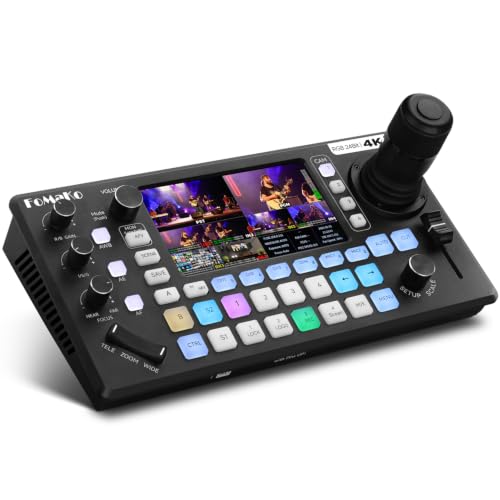
The FoMaKo KC800 4K HDMI Multi-Camera Streaming Video Mixer Switcher stands out as an ideal choice for content creators aiming for professional-quality productions. With its integrated 4D joystick PTZ camera controller and 5.5″ LCD screen, you can effortlessly manage multiple cameras. It supports 4K 60FPS input and offers true 24-bit RGB color for stunning visuals. The mixer’s 6-channel audio system, USB recording, and simultaneous streaming on three platforms enhance your production capabilities. Plus, its user-friendly interface and remote operation options make it easy to control. FoMaKo’s warranty and lifetime technical support guarantee you’re covered for any issues.
Best For: Content creators and live streamers seeking professional-quality video and audio production capabilities.
Pros:
- High-quality video output with support for 4K 60FPS input and true 24-bit RGB color.
- Versatile audio mixing with a 6-channel system and multiple input options, including XLR and HDMI.
- User-friendly interface featuring a 5.5″ LCD screen and remote operation capabilities for easy management.
Cons:
- Limited to 4 HDMI inputs, which may restrict users with more extensive camera setups.
- Requires USB 2.0 or SD card for recording, potentially adding extra costs for storage solutions.
- Streaming may be affected by network conditions, despite the adaptive bitrate feature.
Osee GoStream Duet Live Stream Video Mixer Switcher

For content creators seeking a versatile and powerful solution, the Osee GoStream Duet Live Stream Video Mixer Switcher stands out with its robust input options, including 4 SDI and 4 HDMI connections. Weighing just 1 kilogram, it’s compact yet packed with 16 ports for multiple streaming setups. You can stream to up to three platforms simultaneously, using Ethernet or smartphone hotspots, and control it via a built-in GUI or compatible software. Plus, its professional effects like Chroma Key and PIP elevate your streams. With a year warranty and a 30-day return policy, it’s a reliable choice for serious streamers.
Best For: Content creators and professional streamers looking for a versatile and efficient live streaming solution.
Pros:
- Supports multiple input options with 4 SDI and 4 HDMI connections, providing flexibility in setup.
- Allows simultaneous streaming to up to three platforms, enhancing reach and audience engagement.
- Features professional-grade effects like Chroma Key and PIP, elevating the quality of live streams.
Cons:
- The need for a firmware update to unlock the free NDI HX license may be inconvenient for some users.
- Limited to a maximum of 16 ports, which may not suffice for larger production setups.
- The compact design might limit cooling capabilities during extended use, potentially affecting performance.
FoMaKo 4K HDMI Video Mixer Switcher (M6)

Designed with versatility in mind, the FoMaKo 4K HDMI Video Mixer Switcher (M6) is an excellent choice for content creators who want to elevate their live streaming game. With four HDMI inputs supporting up to 4K 60FPS, you can seamlessly switch between multiple sources. Its 10.1-inch FHD touchscreen makes control intuitive, while dual network streaming guarantees you reach your audience effectively. You’ll love the 30+ transition effects and advanced features like professional chroma keying. Plus, with a one-year warranty and lifetime tech support, you can focus on what you do best—creating amazing content.
Best For: Content creators, educators, and streamers looking for a versatile and high-quality video mixing solution.
Pros:
- High-definition capabilities with support for 4K 60FPS and 1080p 60FPS, ensuring excellent video quality.
- Intuitive control via a 10.1-inch FHD touchscreen, making it user-friendly for live production.
- Advanced features such as professional chroma keying and dual network streaming for enhanced production value.
Cons:
- Price point may be higher compared to basic video switchers, which could be a consideration for budget-conscious users.
- Learning curve associated with advanced features and settings, potentially requiring time to master.
- Limited HDMI inputs compared to some professional-grade switchers, which may restrict input options for complex setups.
FoMaKo 4K HDMI Video Mixer Switcher

Looking to elevate your live streaming game? The FoMaKo 4K HDMI Video Mixer Switcher is your perfect companion. With 4K60FPS input and ultra-low latency, it guarantees high-quality capture and smooth broadcasts on platforms like YouTube and Facebook. You can control up to four PTZ cameras and switch angles effortlessly, thanks to the intuitive T-bar lever and backlit keypad. The 5.5-inch FHD LCD screen makes operation a breeze. Plus, with customizable recording options and professional audio mixing, you’re set for exceptional productions. With a 1-year warranty and lifetime support, you can stream confidently!
Best For: Live streamers, content creators, and event producers looking for high-quality video mixing solutions.
Pros:
- Supports 4K60FPS input and ultra-low latency for superior video quality.
- Intuitive control panel with a 5.5-inch FHD LCD screen enhances user experience.
- Offers professional audio mixing capabilities with up to 8 audio sources.
Cons:
- May have a steeper learning curve for beginners unfamiliar with video mixing equipment.
- Limited to 4 HDMI inputs, which may not suffice for larger productions.
- The warranty does not cover misuse or damage, limiting protection for accidental issues.
RGBlink Mini V3 Video Switcher

The RGBlink Mini V3 Video Switcher stands out as an ideal choice for content creators seeking a powerful yet user-friendly tool for live streaming on platforms like YouTube. With its 4K HDMI capabilities, you can effortlessly switch between four HDMI inputs, while the dual HDMI outputs enhance your streaming experience. You’ll love the 2.1″ touch screen and customizable features via TAO Cloud, allowing you to pay only for what you need. Plus, you can record directly to USB drives. Its compatibility with various devices and impressive shift effects make your streams more dynamic and engaging.
Best For: Content creators and live streamers looking for a versatile and intuitive video switching solution.
Pros:
- Easy to use with a user-friendly 2.1″ touch screen interface.
- Customizable features via TAO Cloud, allowing flexibility in feature selection.
- Supports recording directly to USB drives, enhancing content creation capabilities.
Cons:
- Monthly or lifetime activation fees may add to the overall cost.
- Limited to 4 HDMI inputs, which may not be sufficient for larger setups.
- Some users may require additional time to fully explore all features and settings.
Factors to Consider When Choosing a Video Switcher for YouTube
When choosing a video switcher for your YouTube channel, you’ll want to take into account several key factors. Think about the input and output options, streaming capabilities, and how well it manages audio. Additionally, the user interface design and portability can make a big difference in your overall experience.
Input/Output Options
Choosing a video switcher with the right input and output options is vital for enhancing your YouTube productions. Start by considering the number of HDMI and SDI inputs, as this determines how many cameras or sources you can connect at once. Look for models with USB outputs to simplify streaming to your computer or recording to external devices. It’s essential to guarantee the switcher supports various output resolutions, like 1080P60FPS or 4K60FPS, to keep your video quality high. Dual outputs can also be advantageous, allowing you to send different signals to multiple displays or platforms simultaneously. Finally, features like multi-view outputs help you monitor all input sources in real-time, greatly improving your live production experience.
Streaming Capabilities
Streaming capabilities play an essential role in your YouTube production setup, especially if you want to reach a wider audience. Look for a video switcher that can stream to multiple platforms simultaneously; some models offer dual or triple streaming via Ethernet or USB. Customizable streaming bitrates are vital too, allowing your broadcast to adapt to different network conditions. Make sure the switcher supports popular streaming protocols like RTMP/RTMPS for smooth integration with YouTube and Facebook. Pay attention to live streaming resolution, as some devices support up to 4K or 1080p at high frame rates. Finally, consider extra features like built-in media libraries and recording capabilities for easy post-production access.
Audio Management Features
While sound quality can make or break your live stream, selecting a video switcher with robust audio management features is vital. Look for switchers that support multiple audio inputs like HDMI, XLR, and 3.5mm jacks to handle various microphones and audio sources. Built-in audio mixing capabilities are important, so prioritize switchers that offer volume control, equalization, and audio effects for enhanced sound quality. Confirm your switcher can manage audio embedding and de-embedding for seamless integration of audio tracks. Professional features like phantom power for microphones and adjustable audio levels enhance your sound management. Finally, check for monitoring options, such as headphone outputs and audio level meters, to maintain real-time control during your broadcasts.
User Interface Design
Sound quality is just one piece of the puzzle when it comes to creating a professional live stream. A user-friendly interface with intuitive controls makes it easier for you to operate the switcher seamlessly, minimizing the learning curve. Look for models featuring a built-in touchscreen or LCD display, as these enhance real-time monitoring and access to settings. Customizable buttons streamline your workflow by allowing you to set shortcuts for frequently used features. Clear visual indicators like LED lights help you identify active inputs and outputs, preventing confusion during broadcasts. Finally, an ergonomic design with T-bars or dedicated knobs can facilitate smoother changes and adjustments, ensuring your streaming sessions run smoothly.
Portability and Size
When you’re planning to take your live streams on the road, portability and size become essential factors in choosing a video switcher. You’ll want a lightweight and compact model that makes transport and setup a breeze. Integrated screens, like a built-in display for real-time monitoring, can greatly enhance portability since they cut down on extra equipment. Additionally, verify the control panel is ergonomic and user-friendly, allowing you to operate it intuitively without cluttering your streaming space. Battery-powered options are a must, especially in locations where power access is limited. Finally, look for switchers that support multi-camera setups in a compact design, enabling you to manage multiple inputs effectively while keeping everything portable.
Recording Functions
Choosing the right video switcher for your YouTube channel means paying close attention to its recording functions. First, consider the recording capabilities, like supported formats (MP4 or TS) and maximum bitrate, as these affect your output quality. Look for dual recording features that let you record while streaming, making your content creation more efficient. It’s also wise to find devices that support external storage options, such as USB drives or SD cards, for easier data management. Evaluate whether the switcher offers ISO recording to capture all input channels separately for flexible post-production editing. Finally, assess the encoding methods (like H.264 or H.265) since they impact compression and footage quality during live broadcasts.
Warranty and Support
Considering the potential challenges that can arise during video production, it’s crucial to evaluate the warranty and support options for your video switcher. Look for a warranty period that suits your needs; some switchers offer just a 1-year warranty, while others extend up to 3 years. A 30-day risk-free trial is also a great feature, allowing you to test the switcher before fully committing. Check if the manufacturer provides lifetime technical support, which can be invaluable for troubleshooting. Additionally, a trade-in program can help you upgrade your equipment without a hefty investment. Finally, make sure customer service is accessible and multilingual, enhancing your support experience whenever issues or inquiries arise.