
If you want to elevate your YouTube live streaming game, choosing the right video switcher is essential. It can greatly impact your broadcast quality and viewer engagement. With so many options available, how do you decide which one fits your needs? In the following sections, we’ll explore the top contenders and critical features to evaluate, ensuring you make an informed choice for your next live production.
Osee GoStream Deck HDMI Pro Live Streaming Video Mixer Switcher

If you’re a content creator looking to elevate your YouTube live streaming game, the Osee GoStream Deck HDMI Pro Live Streaming Video Mixer Switcher is a standout choice. With 4 HDMI inputs and dual outputs, you can easily connect multiple media sources. The device also features audio control buttons and adjustable knobs for professional sound quality. You can simultaneously stream to three platforms, making it incredibly versatile. Plus, the built-in menu system allows for seamless production control. With graphics enhancements and auto-switching capabilities, you’ll create engaging broadcasts that captivate your audience. This switcher truly elevates your streaming experience!
Best For: Content creators and live streamers looking for a professional-grade video mixer to enhance their streaming quality and versatility.
Pros:
- Supports simultaneous streaming to three platforms, providing greater reach and audience engagement.
- Features professional audio control with effects like EQ and Limiter for high-quality sound.
- Offers graphics enhancements such as overlays and keying options to create visually engaging broadcasts.
Cons:
- May require a learning curve for users unfamiliar with live streaming equipment and software.
- The price point might be on the higher side for casual or beginner streamers.
- Limited to HDMI inputs, which may restrict compatibility with some devices or formats.
RGBlink Mini-pro Video Switcher for Live Streaming

The RGBlink Mini-pro Video Switcher is a standout choice for live streamers looking to elevate their broadcasts with its 4 x 4K HDMI inputs and versatile output options. You can effortlessly stream a 6-picture preview or program, integrating with software like OBS and Vmix. Its intuitive 2-inch touchscreen and 5-direction joystick make it easy to control layers, aspect ratios, and PTZ functions. With built-in Chroma Key for dynamic backgrounds and 14 shift effects, you’ll create engaging content. Plus, it supports PTZ camera control and audio embedding, giving you thorough control over your live production.
Best For: Live streamers and content creators looking for a versatile and user-friendly video switcher for high-quality broadcasts.
Pros:
- Multiple Inputs: Features 4 x 4K HDMI inputs for diverse video sources.
- User-Friendly Interface: Intuitive controls with a 2-inch touchscreen and joystick for easy operation.
- Dynamic Effects: Built-in Chroma Key and 14 transition effects for engaging live content.
Cons:
- Firmware Updates Required: Users must update to the latest firmware before use, which may be inconvenient.
- Compatibility Limitations: While it integrates with software like OBS and Vmix, some users may find limited support for other streaming platforms.
- Learning Curve: New users may need time to familiarize themselves with the advanced features and controls.
Osee GoStream Deck HDMI Pro Live Streaming Video Mixer Switcher
For those seeking a versatile and powerful tool for live streaming, the Osee GoStream Deck HDMI Pro Live Streaming Video Mixer Switcher stands out with its robust connectivity options. With four HDMI inputs and two outputs, you can easily connect multiple media sources. Its audio control features let you fine-tune sound with EQ and limiter settings, ensuring excellent audio quality. You can stream simultaneously to three platforms and utilize its user-friendly control panel for smooth operation. Plus, the built-in graphics and production enhancements like chroma keying elevate your stream’s professionalism. Overall, it’s a game-changer for any serious content creator.
Best For: The Osee GoStream Deck HDMI Pro Live Streaming Video Mixer Switcher is best for content creators looking for a professional-grade solution for live streaming with robust connectivity and audio control features.
Pros:
- Supports multiple media sources with 4 HDMI inputs and 2 outputs for versatile connectivity.
- Allows simultaneous streaming to three platforms, enhancing reach and audience engagement.
- Features advanced audio controls and production enhancements, ensuring high-quality streams.
Cons:
- May have a learning curve for beginners unfamiliar with live streaming technology.
- The need for additional equipment (like cameras and microphones) can increase overall setup costs.
- Limited portability due to its size and need for external power sources during use.
Osee GoStream Duet Live Stream Video Mixer Switcher

Osee GoStream Duet Live Stream Video Mixer Switcher stands out with its impressive ability to support multiple input options, making it ideal for content creators who need versatility in their live streams. With four SDI and four HDMI inputs, plus USB-C and NDI HX source compatibility, you can easily connect various devices. Weighing only 2.2 pounds, it’s portable yet powerful. You can stream to three platforms simultaneously, using built-in effects like Chroma Key and shifts such as MIX and WIPE. Plus, its user-friendly software works seamlessly with OBS and Vmix, making professional broadcasting accessible and affordable for you.
Best For: Content creators and live streamers seeking a versatile and affordable solution for professional broadcasting.
Pros:
- Supports multiple input options including 4 SDI and 4 HDMI, allowing for greater flexibility in device connections.
- Lightweight and portable design at only 2.2 pounds, making it easy to transport for on-the-go streaming.
- User-friendly software compatibility with popular platforms like OBS and Vmix, enabling seamless integration for effective streaming.
Cons:
- Limited to streaming on three platforms simultaneously, which may not meet the needs of some advanced users.
- Some users may require additional setup time to download the latest firmware for optimal performance.
- The compact dimensions may limit the number of physical controls compared to larger switchers, potentially impacting ease of use for some users.
Osee GoStream Duet 8 ISO Video Switcher

With its impressive 8-channel capability, the Osee GoStream Duet 8 ISO Video Switcher stands out as a top choice for content creators looking to elevate their YouTube live streaming experience. You’ll appreciate the versatility of its inputs, including 4K-HDMI, SDI, and NDI HX options, ensuring compatibility with various cameras and devices. The switcher supports professional audio with two XLR inputs and features like background overlays and multi-source layouts. Plus, its seamless auto-switching and built-in video players enhance your production quality. Weighing just 2.95 pounds, it’s portable yet powerful, making it ideal for any live event or studio setup.
Best For: Content creators and professionals looking for a versatile and high-quality video switcher for live streaming and production.
Pros:
- Supports multiple input options, including 4K-HDMI, SDI, and NDI HX, making it compatible with various devices.
- Offers professional audio capabilities with two XLR inputs and studio-grade preamps for excellent sound quality.
- Lightweight and portable design, perfect for on-the-go live events and studio setups.
Cons:
- Requires a firmware upgrade for simultaneous 8-channel inputs from 4 SDI and 4 HDMI, which may be inconvenient for some users.
- Limited built-in video playback options with only 2 players for MP4 formats.
- Customer rating of 4.3 out of 5 stars may indicate some room for improvement in user satisfaction.
Mixer Plus Compact Video Switcher with Built-in Screen
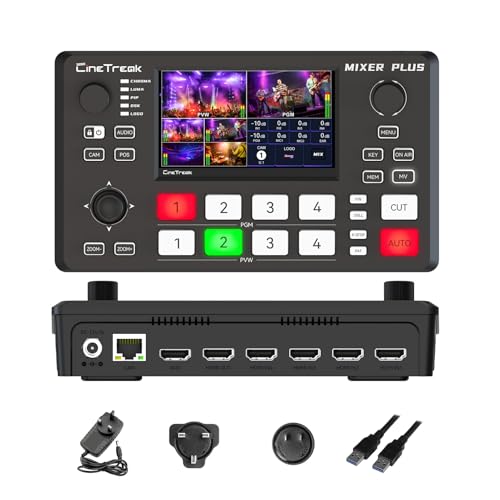
The Mixer Plus Compact Video Switcher is perfect for creators who need a versatile and portable solution for live streaming. With four HDMI inputs and a built-in 4-inch display, you can effortlessly switch between multiple cameras or sources. Its ultra-compact design makes it easy to transport, while the zero-latency switching and customizable changeover effects enhance your broadcasts. You’ll appreciate the multi-view monitoring feature that allows real-time previews and precise control with audio meters. Plus, the AUX HDMI output gives you flexibility for different production needs. Weighing only 3 pounds, it’s an essential tool for any content creator on the go.
Best For: Content creators, live streamers, and educators looking for a portable and versatile video switching solution.
Pros:
- Ultra-Compact Design: Lightweight and easy to transport, making it ideal for on-the-go production.
- Multi-Camera Switching: Supports up to 4 HDMI inputs with zero-latency switching for seamless transitions.
- Advanced Monitoring Capabilities: Real-time previews and audio level meters enhance control during live broadcasts.
Cons:
- Limited Built-in Display Size: The 4-inch screen may be small for detailed monitoring in larger setups.
- Fewer Inputs Compared to Larger Models: Only supports 4 HDMI inputs, which may not be sufficient for complex productions.
- Warranty Information: Product warranty details are not readily available, which may concern some users.
RGBlink mini-mx SDI Multi-Camera Video Switcher for Live Streaming

For content creators looking to elevate their live streaming game, the RGBlink mini-mx SDI Multi-Camera Video Switcher stands out as an exceptional choice. With its 10-channel broadcast capabilities and 4K HDMI/SDI support, you can connect multiple cameras effortlessly. The 5.5″ touchscreen simplifies switching, allowing you to access shifts and effects quickly. Plus, you can mix audio from various sources and control up to four PTZ cameras, all from one device. It’s compatible with OBS and YouTube, making it perfect for professional live streams. Make sure you update the firmware for peak performance before diving into your productions.
Best For: Content creators and live streamers seeking a professional-grade multi-camera switching solution for high-quality broadcasts.
Pros:
- 10-channel broadcast capabilities allow for seamless switching between multiple cameras.
- User-friendly 5.5″ touchscreen interface enables quick access to switching, transitions, and audio settings.
- Comprehensive audio mixing features support various audio sources, enhancing sound quality for live streams.
Cons:
- Firmware updates required prior to use may be inconvenient for immediate setups.
- Limited to four PTZ camera controls, which may not be sufficient for larger productions.
- Learning curve may exist for those unfamiliar with advanced video switching and production techniques.
Tenveo 4K HDMI Video Switcher Mixer

If you’re looking to elevate your YouTube live streaming game, the Tenveo 4K HDMI Video Switcher Mixer stands out with its impressive multi-camera management capabilities. With four HDMI and four SDI inputs, you can seamlessly switch between multiple cameras. It supports dual live streaming via Ethernet and is compatible with major platforms like YouTube and Twitch. The ergonomic control panel features a 5.5-inch FHD screen, making it user-friendly. Plus, with professional audio processing and advanced video effects, your broadcasts will look and sound amazing. Enjoy peace of mind with a three-year warranty and lifetime technical support.
Best For: Content creators and live streamers looking for a robust solution to manage multiple camera feeds and deliver high-quality broadcasts.
Pros:
- Supports dual live streaming and is compatible with major platforms like YouTube, Facebook, and Twitch.
- Ergonomic control panel with a 5.5-inch FHD screen for easy operation and monitoring.
- Advanced audio and video processing features, including 36 transition effects and professional audio mixing capabilities.
Cons:
- May require a learning curve for beginners unfamiliar with video switchers.
- Limited to 1080p recording via USB, which may not meet the needs of those seeking higher resolution options.
- The price point may be higher compared to basic streaming solutions.
YoloLiv YoloBox Extreme 4K Live Streaming Switcher

With 8 HDMI inputs and integrated NDI support, the YoloLiv YoloBox Extreme 4K Live Streaming Switcher is perfect for creators who want to elevate their live streaming game. You’ll appreciate the stunning 4K resolution on its assignable HDMI outputs and the vibrant 11.2-inch OLED touchscreen. Its 120Hz refresh rate guarantees a smooth interface, while the ISO recording feature allows for easy editing later. Plus, the MultiCam Instant Replay enhances viewer engagement, making it ideal for sports and events. With versatile connectivity options, including USB and NDI, you have everything you need for a professional production.
Best For: The YoloLiv YoloBox Extreme 4K Live Streaming Switcher is best for content creators, event producers, and sports broadcasters looking for a professional-grade live streaming solution.
Pros:
- High-quality video outputs with stunning 4K resolution enhance viewing experiences.
- Versatile connectivity options including multiple HDMI, USB, and NDI inputs cater to various production needs.
- Instant replay functionality allows for real-time highlights, increasing viewer engagement during live events.
Cons:
- Complex setup may require a learning curve for new users unfamiliar with live streaming equipment.
- Higher price point compared to entry-level switchers may not be suitable for hobbyists or budget-conscious creators.
- Limited ISO recording capabilities may restrict flexibility in post-production for certain users with extensive multi-camera setups.
RGBlink mini-Edge SDI Live Streaming Video Mixer Switcher

The RGBlink mini-Edge SDI Live Streaming Video Mixer Switcher stands out as an exceptional choice for content creators who demand versatility and professional quality in their live streams. With support for 4×4K HDMI and 4×3G SDI inputs, you can easily connect DSLRs or broadcast equipment. The 5.5″ screen and integrated PTZ control enhance your production capabilities, allowing for seamless multi-angle shots. Plus, its dual 2K HDMI outputs and UVC USB streaming make broadcasting on platforms like YouTube a breeze. The built-in audio mixer and remote management features guarantee your audio and visuals remain synchronized for a polished final product.
Best For: Content creators, churches, and event organizers seeking a versatile and professional live streaming solution.
Pros:
- Versatile input options with support for both HDMI and SDI, accommodating a wide range of cameras and equipment.
- Integrated PTZ control for cinematic multi-angle productions without the need for additional software.
- Remote management capabilities through TAO Cloud, allowing for seamless scene switching and audio monitoring.
Cons:
- Potential learning curve for users unfamiliar with advanced video mixing and production techniques.
- Limited onboard storage for recordings, requiring external solutions for extensive projects.
- Higher price point compared to basic streaming devices, which may not be justified for casual users.
Factors to Consider When Choosing a Video Switcher for YouTube Live
When choosing a video switcher for your YouTube live streams, you need to take into account several key factors. Think about the input and output options, as well as the streaming capabilities that best suit your needs. Don’t forget to evaluate the audio quality features, user interface design, and recording functionality to guarantee a smooth streaming experience.
Input and Output Options
Choosing the right input and output options for your video switcher can greatly impact your YouTube Live streaming experience. Start by considering the number of HDMI and SDI inputs; having multiple sources lets you create dynamic content and switch between cameras effortlessly. Verify the switcher supports various output options like HDMI, USB, and streaming protocols such as RTMP for seamless integration with live platforms. Multi-camera capabilities are essential for switching between angles in real-time, enhancing viewer engagement. Built-in recording features allow you to capture both program output and individual channels, which is handy for post-production. Finally, check for compatibility with external devices like PTZ cameras and audio interfaces to elevate your overall production quality.
Streaming Capabilities
While streaming capabilities are essential for a successful YouTube live broadcast, several factors can influence your choice of video switcher. First, consider whether the switcher allows simultaneous streaming to multiple platforms, as this can greatly boost your audience reach. Look for models that support various streaming protocols like RTMP and NDI for compatibility with different services. Also, evaluate the switcher’s ability to handle multiple video inputs—HDMI, SDI, or NDI—to accommodate diverse camera setups. Built-in recording and playback features are beneficial for reusing content post-stream. Finally, customizable output options, including multi-view monitoring and assignable outputs, provide better production control during your live events. These factors will help you create a more engaging broadcast.
Audio Quality Features
Audio quality can make or break your YouTube live stream, so it’s essential to select a video switcher that meets your sound needs. Look for high-quality audio inputs like XLR and TRS to capture professional sound from various microphones. Advanced audio processing features are vital, too; mixing, EQ adjustments, and the ability to embed and de-embed audio from HDMI and SDI signals can greatly enhance your broadcast. Make sure the switcher includes headphone outputs for real-time monitoring, ensuring sound levels are just right. Built-in audio effects like compressors and limiters improve clarity and prevent distortion. Finally, consider switchers that support multiple audio channels with independent control, allowing you to manage complex audio setups effectively.
User Interface Design
When planning a YouTube live stream, the functionality of your video switcher isn’t just about audio; the user interface plays a pivotal role in your overall production experience. A user-friendly interface with intuitive controls, like touchscreens or joysticks, speeds up your live production, giving you quick access to switching and effects. Customizable buttons and macros help streamline complex tasks, making shifts smoother. Multi-view monitoring lets you observe all input sources simultaneously, ensuring you manage and switch cameras effectively. Clear visual indicators for audio levels and video resolutions help maintain peak production quality. Finally, an integrated menu system supports easy navigation for settings, reducing stress during live events and allowing you to focus on delivering great content.
Recording Functionality
Choosing the right video switcher for your YouTube live stream involves more than just the user interface; recording functionality is essential for capturing high-quality content. Look for switchers that support recording options like PGM and ISO recording, allowing you to capture all video inputs and program outputs simultaneously. Direct recording to external storage devices, such as SD cards or USB drives, simplifies access and editing. Make certain the switcher can record in popular formats like MP4 or H.264, which are ideal for uploads. Built-in playback features can help you integrate recorded files into live productions seamlessly. Additionally, consider models that offer multi-channel audio recording, enhancing your stream’s overall quality with professional-grade sound.
PTZ Control Support
PTZ control support is a game-changer for enhancing your YouTube live streaming experience. With PTZ (Pan-Tilt-Zoom) capabilities, you can remotely adjust camera angles and zoom, adding versatility to your setup. Many video switchers seamlessly integrate with PTZ cameras, allowing you to save and recall presets for quick adjustments during broadcasts. This efficiency enhances your production quality, providing dynamic camera movements that engage viewers and create a more professional presentation. Look for switchers that support various protocols, like VISCA or NDI, to guarantee compatibility with a wide range of camera models. Some even feature built-in controls, letting you manage multiple angles from a single interface, simplifying your workflow and elevating your live streaming game.
Compatibility With Software
To maximize your YouTube live streaming experience, it’s vital to guarantee your video switcher is compatible with the software you plan to use. Verify it supports popular streaming platforms like OBS or vMix, as this can enhance your production capabilities and streamline your workflow. Look for switchers with built-in support for RTMP, RTMPS, or NDI protocols for seamless streaming to YouTube. A user-friendly interface is important, allowing for quick adjustments during live broadcasts. Additionally, confirm the switcher can handle various video formats and resolutions compatible with your software to prevent issues. Finally, opt for switchers that allow firmware updates via LAN or USB, guaranteeing ongoing compatibility with the latest features and improvements.