
When it comes to multi-camera production, having the right video switcher can make all the difference in your filming experience. These devices not only streamline your workflow but also enhance the overall quality of your content. Whether you’re a solo streamer or part of a larger team, there’s a switcher out there that fits your needs perfectly. Let’s explore some of the top options that can elevate your production game.
Osee GoStream Deck HDMI Pro Live Streaming Video Mixer Switcher

The Osee GoStream Deck HDMI Pro Live Streaming Video Mixer Switcher is an ideal choice for content creators looking to elevate their multi-camera productions. With 4 HDMI inputs and 2 outputs, you can easily connect multiple devices. The 2 Type-C ports allow for webcam and SSD connections, while the Ethernet port guarantees smooth live streaming. You’ll appreciate the audio control features, including adjustable knobs and professional effects. Plus, you can stream to three platforms simultaneously. The user-friendly control panel enhances your production, and the built-in graphics options let you add professional touches like logos and lower-thirds effortlessly.
Best For: Content creators and live streamers seeking a versatile and professional-grade video mixing solution for multi-camera productions.
Pros:
- Supports multiple HDMI inputs and outputs, allowing for seamless integration of various media sources.
- Professional audio control features ensure high-quality sound for live streaming.
- Simultaneously streams to three different platforms, broadening audience reach.
Cons:
- May have a steeper learning curve for beginners unfamiliar with video mixing equipment.
- Requires a stable internet connection for optimal streaming performance.
- Limited to specific software compatibility for PC streaming, which may restrict flexibility.
Blackmagic Design ATEM Mini Pro HDMI Live Stream Switcher (SWATEMMINIBPR)

For anyone diving into multicamera live streaming, the Blackmagic Design ATEM Mini Pro HDMI Live Stream Switcher (SWATEMMINIBPR) stands out with its impressive 4-camera multiview feature. This switcher lets you seamlessly shift between multiple sources using cuts, mixes, dips, wipes, and DVE effects. It also includes upstream keys for luma, linear, chroma, and pattern, along with a downstream keyer. You’ll appreciate the built-in 6-input, 2-channel audio mixer, making it perfect for various applications like business presentations and eSports. Plus, its HDMI and USB-C connections simplify your setup for streaming and recording.
Best For: The Blackmagic Design ATEM Mini Pro HDMI Live Stream Switcher is best for content creators, educators, and businesses looking to elevate their live streaming capabilities with a professional multicamera setup.
Pros:
- Versatile Multicamera Support: Easily switch between four HDMI sources for dynamic live streaming.
- Built-in Audio Mixer: Integrated 6-input, 2-channel audio mixer simplifies audio management during broadcasts.
- User-Friendly Interface: Intuitive controls and features like DVE transitions make it accessible for users of all skill levels.
Cons:
- Limited HDMI Inputs: Only four HDMI inputs may not be sufficient for larger productions requiring more cameras.
- No Built-in Recording: While it supports external drive recording, it lacks built-in recording capabilities, necessitating additional equipment.
- Power Supply Dependency: Requires an external power supply, which may not be ideal for on-the-go streaming situations.
Mixer Plus Compact Video Switcher with Built-in Screen
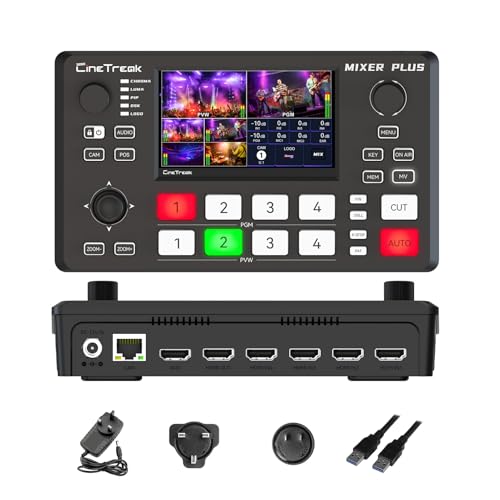
Ideal for content creators on the move, the Mixer Plus Compact Video Switcher offers a portable solution with its built-in 4-inch display and four HDMI inputs. This ultra-compact device supports multi-camera setups, making it perfect for live streaming, events, and online classes. You’ll benefit from zero-latency switching and 30 customizable alteration effects, along with advanced broadcast tools like PTZ camera control and chroma keying. Plus, the multi-view monitoring allows you to see all your inputs simultaneously. Weighing just 3 pounds, it’s a lightweight option that doesn’t compromise on features, making it a great addition to your production toolkit.
Best For: Content creators, live streamers, and educators looking for a portable and versatile video switching solution.
Pros:
- Ultra-Compact Design: Lightweight and portable, making it easy to transport for on-the-go productions.
- Multi-Camera Support: Can switch between up to 4 HDMI inputs with zero latency for seamless transitions.
- Advanced Features: Includes PTZ camera control, chroma keying, and multi-view monitoring for enhanced production capabilities.
Cons:
- Limited Built-in Display Size: The 4-inch screen may be small for detailed monitoring during complex productions.
- Best Sellers Rank: Currently ranked #200 in Audio & Video Selector Boxes, which may indicate competition from other devices.
- Weight Consideration: While lightweight, some users may prefer even lighter options for extensive travel.
Osee GoStream Duet Video Mixer Switcher

Streamlining your multi-camera production, the Osee GoStream Duet Video Mixer Switcher excels with its versatile input options, offering 4 SDI and 4 HDMI connections. Weighing just 2.2 pounds and measuring 4.2 x 10.6 x 1.94 inches, it’s portable yet powerful. You can control it via built-in GUI or GoStream software on both MAC and Windows. Plus, it supports streaming to up to three platforms simultaneously through Ethernet or smartphone hotspots. With effects like Chroma Key and changes such as DIP and WIPE, you’ll enhance your production quality without breaking the bank—making it a solid choice for any filmmaker.
Best For: The Osee GoStream Duet Video Mixer Switcher is best for filmmakers and content creators looking for an affordable, versatile solution for multi-camera live streaming.
Pros:
- Versatile Input Options: Supports 4 SDI and 4 HDMI connections for greater flexibility in camera setups.
- Simultaneous Streaming: Allows streaming to up to three platforms at once, enhancing audience reach.
- User-Friendly Control: Features built-in GUI and compatible software for easy operation on both MAC and Windows.
Cons:
- Limited Weight Capacity: Weighs 2.2 pounds, which may not be ideal for more extensive setups requiring heavier equipment.
- Firmware Updates Required: Some features, like the free NDI HX license, require the latest firmware download for optimal performance.
- No Built-in Recording: Lacks a built-in recording feature, necessitating external solutions for video capture.
FEELWORLD LIVEPRO L1 V1 Multi Camera Video Mixer Switcher

The FEELWORLD LIVEPRO L1 V1 Multi Camera Video Mixer Switcher stands out as an excellent choice for content creators and live streamers seeking a compact and efficient solution. With its 2-inch LCD display and 4 HDMI inputs, you can effortlessly switch between multiple camera angles in real time, all while supporting 1080p resolution. The USB 3.0 interface allows seamless connection to your computer, functioning like a built-in webcam for streaming. Plus, you can enhance your production with changeover effects and monitor six pictures simultaneously. Its lightweight design and remote operation capability make it a must-have for any live production setup.
Best For: The FEELWORLD LIVEPRO L1 V1 is best for content creators and live streamers looking for a compact and efficient multi-camera switching solution.
Pros:
- Supports real-time switching between 4 HDMI inputs, enhancing production flexibility.
- Lightweight and compact design, making it easy to transport and set up.
- Includes a USB 3.0 interface for direct connection to computers, simplifying streaming.
Cons:
- Limited to 1080p resolution, which may not meet the needs of those seeking 4K output.
- May require a learning curve for users unfamiliar with video mixing technology.
- Remote operation capability may be limited by network stability and speed.
Osee GoStream Duet Kit – Pro Live Streaming Multi-Camera Video Mixer

For live streamers seeking a versatile and portable solution, the Osee GoStream Duet Kit stands out as an excellent choice. This all-in-one kit combines a multi-camera video mixer, switcher, recorder, and player, all packaged in a compact design that weighs approximately 5kg. You’ll appreciate the 14-inch 1080×1920 monitor and silent fan, ideal for mobile setups. With 4 HDMI/SDI inputs and 2 USB ports, connecting your cameras and streaming software is seamless. Plus, it offers flexible power options, ensuring you stay powered up wherever you are. The robust design also allows for easy customization and stability during your productions.
Best For: Live streamers and content creators looking for a portable, all-in-one solution for multi-camera productions.
Pros:
- Compact and lightweight design (approximately 5kg) for easy mobility.
- Versatile connectivity with 4 HDMI/SDI inputs and 2 USB ports for seamless integration of cameras and software.
- Flexible power options, including AC, DC, and USB power bank compatibility, ensuring uninterrupted streaming.
Cons:
- Limited to 4 input sources, which may not be sufficient for larger productions.
- The 14-inch monitor size may be small for some users who prefer larger screens for monitoring.
- Additional equipment may require further customization and accessories not included in the kit.
RGBlink Mini V3 Video Switcher
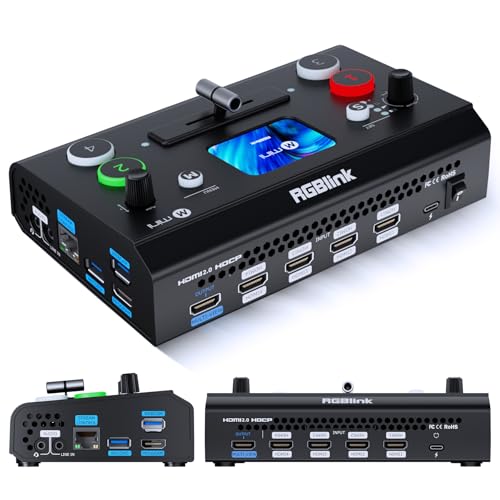
If you’re an entry-level content creator looking to elevate your live streaming game, the RGBlink Mini V3 Video Switcher is a standout choice. This 4K HDMI switcher features a 2.1″ touch screen and supports multi-camera live streaming. With four HDMI inputs and dual 1080P outputs, you can easily connect multiple sources. You can enhance your production with PTZ control, logo overlays, and creative shifts, all accessed through TAO Cloud activation. Plus, it records HD directly to USB drives. Just remember to update your firmware for peak performance, and you’ll be ready to create stunning content that captivates your audience.
Best For: Entry-level content creators looking to enhance their live streaming capabilities with a versatile and user-friendly video switcher.
Pros:
- Flexible activation options through TAO Cloud with both monthly and lifetime plans.
- Multi-camera live streaming capability allows for dynamic content creation.
- HD recording directly to USB drives supports up to 2TB for easy storage.
Cons:
- Some premium features require activation and may incur additional costs.
- Initial setup may involve multiple steps, including firmware updates and Ethernet connection.
- Limited to 1080P outputs, which may not meet the needs of all advanced users.
FEELWORLD L4 10.1 Inch Touch Screen Video Switcher

With its user-friendly 10.1-inch touchscreen, the FEELWORLD L4 video switcher is perfect for content creators looking to streamline their multi-camera productions. You’ll appreciate the intuitive menu and T-bar switching, letting you control everything with a simple touch or button press. Plus, it supports five input sources—four HDMI and one SDI—making live streaming a breeze. With resolutions up to 2160p@30, your output quality will impress. Enjoy features like chroma keying and logo overlays to enhance your videos further. The package includes all essentials, ensuring you’re ready to create stunning content right out of the box.
Best For: Content creators and live streamers seeking a versatile and user-friendly video switcher for multi-camera production.
Pros:
- Intuitive touchscreen interface allows for easy navigation and control during live productions.
- Supports multiple input sources (4 HDMI and 1 SDI) for flexible live streaming options.
- High output resolutions (up to 2160p@30) ensure impressive video quality for professional content.
Cons:
- Limited SDI input can restrict options for those with more extensive equipment setups.
- Touchscreen may be prone to fingerprints, requiring regular cleaning during use.
- No built-in recording functionality, which might limit some users needing to capture their streams directly.
RGBlink Mini Video Mixer Switcher with 4 x HDMI Inputs

The RGBlink Mini Video Mixer Switcher is perfect for solo streamers looking to elevate their live production quality. With 4 x HDMI inputs and 2K input/output, you can effortlessly stream across platforms like Facebook and YouTube. It allows you to display 6 pictures at once, enhancing your audience’s viewing experience. Plus, with 14 changeover effects and 9 picture-in-picture layouts, your streams will be dynamic and engaging. It connects via USB 3.0, recognized as a webcam for all streaming software. Remote control via LAN makes managing your setup simple, whether you’re using a phone or computer.
Best For: Solo streamers seeking to enhance their live production quality with versatile streaming capabilities.
Pros:
- Supports 2K input/output for high-quality streaming across multiple platforms.
- User-friendly remote control via LAN allows easy management from phones or computers.
- Versatile functionality with 14 transition effects and 9 picture-in-picture layouts to create engaging content.
Cons:
- Limited onboard recording capabilities, requiring higher models for this feature.
- No additional software needed for remote control, which may limit advanced features for some users.
- Lacks built-in storage, necessitating external devices for recording and archiving content.
FEELWORLD LIVEPRO L1 Multi Format Video Mixer Switcher

For content creators looking to elevate their live streaming and multi-camera production, the FEELWORLD LIVEPRO L1 stands out with its 4 HDMI inputs and USB 3.0 output. This versatile video mixer allows you to switch between multiple camera angles effortlessly, giving your audience diverse viewing options. You’ll appreciate the intuitive control panel featuring input selection buttons and a T-Bar with 14 transition effects for smooth switching. Plus, it connects easily to your computer as a built-in webcam, compatible with all major streaming software. With audio interfaces for speakers and headsets, the LIVEPRO L1 makes your production seamless and professional.
Best For: Content creators and live streamers seeking a versatile and user-friendly video mixer for multi-camera production.
Pros:
- Multiple Inputs: Supports 4 HDMI inputs, allowing for diverse camera angles and dynamic presentations.
- Seamless Transitions: Equipped with a T-Bar and 14 transition effects for smooth and professional signal switching.
- Easy Connectivity: Functions as a built-in webcam via USB 3.0, compatible with all major streaming software.
Cons:
- Limited HDMI Inputs: Only 4 HDMI inputs might be restrictive for larger productions requiring more camera feeds.
- Learning Curve: New users may need time to familiarize themselves with the control panel and features.
- Dependence on External Power: Requires a power adaptor for operation, which may limit mobility in certain setups.
Factors to Consider When Choosing a Video Switcher for Multi Camera Production
When you’re choosing a video switcher for multi-camera production, several key factors come into play. You’ll want to contemplate input and output options, streaming capabilities, and the user interface design to guarantee a smooth workflow. Don’t forget to think about audio control features and the switcher’s portability, as these elements can greatly impact your production efficiency.
Input and Output Options
Choosing the right input and output options is essential for any multi-camera production. First, consider the number of input choices available on the switcher; many models support multiple HDMI, SDI, or USB inputs, allowing you to connect various camera sources. Next, look for output capabilities that suit your streaming needs, like HDMI outputs for direct connections or USB outputs for webcam functionality with streaming software. Confirm the switcher supports your desired video resolutions, such as 1080p or 4K, to maintain high quality. Additionally, check for extra connectivity options, like Ethernet ports for streaming or remote control capabilities, which enhance flexibility during live productions. Some switchers even offer customizable output options to meet specific production requirements.
Streaming Capabilities
To maximize your production’s reach, consider a video switcher with strong streaming capabilities. Look for models that support simultaneous streaming to multiple platforms like YouTube, Facebook, and Zoom. Robust network connectivity options, such as Ethernet and USB outputs, guarantee seamless integration with your streaming software and devices. You’ll also want a switcher that offers various output formats, including HDMI, SDI, and USB, to connect to different media sources. Evaluate its ability to handle different resolutions and frame rates, as this can considerably enhance your video quality during live streams. Finally, check for built-in recording capabilities that let you capture streams directly onto SD cards or USB drives, making post-production and content repurposing much easier.
User Interface Design
Strong streaming capabilities set the stage for a successful multi-camera production, but the user interface design of your video switcher can make a significant difference in how smoothly the operation runs. A user-friendly interface is vital for quick, efficient operation, allowing you to switch seamlessly between camera inputs. Intuitive controls, like T-Bar and dedicated buttons, minimize the learning curve for new users. Visual indicators and real-time monitoring keep you aware of signal status, ensuring smooth shifts. Customizable layouts and touchscreens enhance accessibility, tailoring the interface to your workflow needs. Finally, clear labeling and organized menus are essential for rapid navigation, especially in high-pressure situations where timing is critical. Choose wisely to enhance your production experience.
Audio Control Features
When it comes to multi-camera production, effective audio control features in a video switcher can greatly enhance your overall production quality. Look for switchers with built-in audio mixers, allowing you to manage audio levels from various sources without external gear. Some models even offer professional effects like equalization, limiting, and fader controls to refine sound during live broadcasts. Dual audio inputs and headphone outputs let you monitor and record audio simultaneously, ensuring everything sounds perfect. Additionally, the ability to embed and de-embed audio from HDMI and analog sources provides flexibility in managing your audio setup. Finally, consider a switcher with remote control capabilities for audio adjustments, making your life easier during live events.
Portability and Weight
Effective audio control features are just one aspect of a video switcher’s overall performance. When choosing a switcher for multi-camera production, portability and weight are crucial. You’ll want a model that’s easy to transport, especially for events and on-site streaming. Lighter switchers allow for quick setups and adjustments during live events, enhancing your workflow. Look for compact designs that combine multiple functionalities, such as switching and monitoring, which can reduce equipment needs. A built-in display can further simplify your setup by eliminating external monitors. Additionally, consider power options; units that run on USB banks or AC adapters provide versatility for remote operations. Prioritizing portability will make your filming experience smoother and more efficient.