
When it comes to live streaming, the right video switcher can make all the difference in your broadcasts. You’ll find that features like multiple HDMI inputs and built-in audio mixers can enhance your production quality considerably. Whether you’re a beginner or a seasoned pro, choosing the right tool is essential for engaging your audience. Curious about which video switchers stand out in today’s market? Let’s explore the top options available.
Osee GoStream Deck HDMI Pro Live Streaming Video Mixer Switcher

If you’re a content creator looking to elevate your live streaming game, the Osee GoStream Deck HDMI Pro Live Streaming Video Mixer Switcher is your ideal companion. With 4 HDMI inputs and 2 outputs, you can connect multiple media sources effortlessly. Plus, the Type-C and Ethernet ports enhance your connectivity options. You’ll love the intuitive audio control features, allowing for professional-quality sound management. Stream simultaneously to three platforms, and utilize its advanced graphics capabilities for dynamic overlays. Its hard control panel and built-in menu make live production seamless, so you can focus on delivering engaging content without technical distractions.
Best For: Content creators and live streamers seeking a versatile and professional-grade video mixing solution.
Pros:
- Multiple connection options with 4 HDMI inputs and 2 outputs for enhanced media source integration.
- Professional audio control features with adjustable knobs and effects for high-quality sound management.
- Simultaneous streaming to three platforms allows for wider audience reach and engagement.
Cons:
- May have a learning curve for users unfamiliar with live streaming equipment.
- Limited to the number of HDMI inputs and outputs, which may not suit larger productions.
- Requires a stable internet connection for optimal streaming performance.
Blackmagic Design ATEM Mini Pro HDMI Live Stream Switcher (SWATEMMINIBPR)

The Blackmagic Design ATEM Mini Pro HDMI Live Stream Switcher is perfect for those looking to elevate their multicamera live streaming game. With four HDMI inputs, you can easily switch between multiple camera angles, enhancing your broadcasts. Enjoy seamless shifts like cuts, mixes, and wipes, thanks to its advanced effects. The built-in audio mixer allows for clear sound, while the multiview feature keeps everything organized. Ideal for various applications, from business presentations to esports events, it connects effortlessly via USB-C for recording or streaming. Plus, you’ll appreciate the included power supply with international adapters for global use.
Best For: The Blackmagic Design ATEM Mini Pro HDMI Live Stream Switcher is best for content creators, educators, and businesses looking to produce high-quality multicamera live streams.
Pros:
- Versatile Inputs: Supports up to 4 HDMI cameras for dynamic live streaming.
- Professional Transitions: Offers a variety of transitions and effects to enhance broadcasts.
- Integrated Audio Mixer: Built-in audio capabilities ensure clear sound quality during streams.
Cons:
- Limited HDMI Outputs: Only one HDMI output may restrict certain multi-display setups.
- Learning Curve: Requires time to master all features and functions effectively.
- No Built-in Storage: Relies on external drives for recording, which may necessitate additional purchases.
Osee GoStream Duet Live Stream Video Mixer Switcher

For live streamers seeking a versatile and powerful solution, the Osee GoStream Duet Live Stream Video Mixer Switcher stands out with its ability to support multiple input options, including 4 SDI and 4 HDMI sources. Weighing just 2.2 pounds and measuring 4.2 x 10.6 x 1.94 inches, it’s portable yet packed with features. You can stream to up to three platforms simultaneously, utilizing various effects like Chroma Key and Picture-in-Picture. Plus, it works seamlessly with OBS and Vmix. With an impressive 4.7-star rating from 125 reviews, it’s an affordable choice for elevating your live broadcasts.
Best For: Live streamers seeking a compact and feature-rich solution for professional-quality broadcasts across multiple platforms.
Pros:
- Versatile input options with 4 SDI and 4 HDMI sources for diverse connectivity.
- Supports streaming to up to three platforms simultaneously, enhancing audience reach.
- Lightweight and portable design makes it easy to transport for on-the-go streaming.
Cons:
- Limited to 4 input sources, which may not suffice for larger productions.
- Requires latest firmware download for NDI HX license, which could be a hurdle for some users.
- Some users may find the built-in GUI less intuitive compared to dedicated software interfaces.
Video Switcher for Live Streaming Multi Camera Mixer

Designed with versatility in mind, the Neolive R2 Plus Video Switcher is perfect for content creators who demand high-quality live streaming and multi-camera mixing. With 1080P at 60Hz resolution, it features four HDMI inputs and two outputs, allowing for seamless multiview monitoring. The 5.5-inch LCD screen and joystick control make it easy to manage your PTZ cameras. You can stream on platforms like TikTok and YouTube using RTMP, while also recording high-quality video via USB. With built-in shift effects and chroma key capabilities, this switcher is ideal for any event, from weddings to gaming sessions.
Best For: Content creators and live streamers looking for a versatile and high-quality multi-camera mixing solution for various events.
Pros:
- High-quality streaming and recording at 1080P resolution and 60fps ensures professional output.
- User-friendly control with a 5.5-inch LCD screen and joystick for easy PTZ camera management.
- Versatile compatibility for streaming on popular platforms like TikTok, YouTube, and Facebook, as well as for various event types.
Cons:
- Limited weight capacity may make it less portable for some users who need to transport it frequently.
- Customer rating of 4.0 stars suggests there may be some issues or concerns that could affect user satisfaction.
- Warranty information is not readily available, which may deter some potential buyers looking for assurance.
Mixer Plus Compact Video Switcher with Built-in Screen
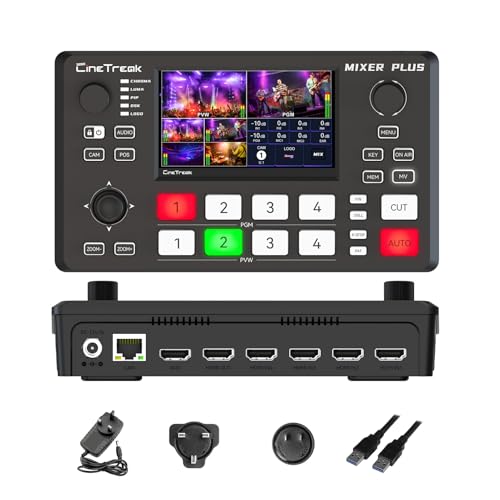
When you need a versatile solution for live streaming, the Mixer Plus Compact Video Switcher stands out with its ultra-compact design and built-in 4-inch display. With four HDMI inputs, you can effortlessly switch between multiple cameras, making it perfect for online classes, events, or YouTube streams. This device boasts zero-latency switching and 30 customizable changeover effects, ensuring smooth broadcasts. You’ll appreciate the multi-view monitoring feature, which allows you to see all input sources at once. Plus, with advanced tools like chroma key and PTZ camera control, you can elevate your production quality greatly. It’s a powerful tool in a portable package.
Best For: Live streamers, educators, and content creators who require a compact and efficient video switching solution for multi-camera setups.
Pros:
- Ultra-compact design allows for easy portability and setup in various environments.
- Zero-latency switching and customizable transition effects enhance the quality of live broadcasts.
- Multi-view monitoring enables real-time previews of all input sources for better production control.
Cons:
- Limited to four HDMI inputs, which may not suffice for larger productions.
- Built-in 4-inch display may be too small for detailed monitoring during complex setups.
- Some advanced features may require a learning curve for users unfamiliar with video switching technology.
Video Switcher for Live Streaming, Dual 4K HDMI Input Capture Card

Looking to elevate your live streaming game? The Dual 4K HDMI Input Capture Card is your go-to solution. With two 4K60 HDMI input ports, you can connect multiple devices like cameras or gaming consoles effortlessly. It outputs stunning 1080P at 60fps, ensuring compatibility with TVs and projectors. Plus, the built-in audio ports let you integrate microphones for clear commentary. The USB 3.0 interface guarantees fast data transfer and ultra-low latency for real-time streaming. Best of all, it’s plug-and-play with no need for drivers, making it perfect for any setup—whether you’re on Windows, MacOS, or Linux. Elevate your streams today!
Best For: Streamers and content creators looking for a high-quality, low-latency solution for live streaming with multiple input sources.
Pros:
- Dual 4K HDMI inputs allow for versatile connections with cameras and gaming devices.
- USB 3.0 interface ensures fast data transfer and ultra-low latency for real-time streaming.
- Plug-and-play design with broad compatibility across various operating systems and popular streaming software.
Cons:
- Limited to 1080P output, which may not meet the needs of those looking for 4K streaming.
- May require additional accessories for optimal audio setup, such as external microphones.
- Some users may find the lack of advanced features like video effects or transitions limiting for professional streams.
Tenveo 4K60FPS HDMI Video Switcher Mixer

The Tenveo 4K60FPS HDMI Video Switcher Mixer stands out as an exceptional choice for content creators seeking seamless multi-camera setups and high-quality live streaming. With four HDMI inputs and four SDI inputs, you can effortlessly switch between cameras. Its 5.5-inch FHD screen enhances your user experience, while dual live streaming capabilities allow you to broadcast on platforms like YouTube and Twitch. The advanced audio processing lets you control sound with precision, and the 36 changeover effects add flair to your streams. Plus, you’ll appreciate the three-year warranty and lifetime technical support for added peace of mind.
Best For: Content creators and live streamers looking for a versatile and high-quality video switching solution.
Pros:
- Seamless multi-camera switching with 4 HDMI and 4 SDI inputs for dynamic live productions.
- Advanced audio processing capabilities allow for detailed sound management and high-quality audio output.
- User-friendly interface with a 5.5-inch FHD screen and ergonomic control panel for easy navigation during live events.
Cons:
- Higher price point may be a barrier for beginners or casual users.
- Learning curve for those unfamiliar with video switchers and live production setups.
- Limited built-in storage as it relies on external drives for recording, which may require additional purchases.
Osee GoStream Duet Kit – Pro Live Streaming Multi-Camera Video Mixer Switcher

For content creators seeking a versatile and portable live streaming solution, the Osee GoStream Duet Kit stands out as an exceptional choice. This all-in-one mixer and switcher features a 14-inch 1080×1920 monitor and weighs only 5kg, ensuring easy transport. With 4 HDMI/SDI inputs, 2 HDMI outputs, and 2 USB ports, it provides flexible connectivity options. You can power it via AC, DC, or a USB power bank, making it adaptable for any situation. The robust cheese plate adds stability, while expandable side plates let you customize your setup with ease, ensuring your broadcasts are professional and seamless.
Best For: Content creators and live streamers looking for a portable and versatile all-in-one video mixing solution.
Pros:
- Lightweight and portable design makes it easy to transport for on-the-go streaming.
- Multiple connectivity options including 4 HDMI/SDI inputs and USB ports for enhanced flexibility.
- Customizable setup with expandable side plates and stable cheese plate for professional broadcasts.
Cons:
- The 14-inch monitor may be considered small for some users requiring larger displays.
- Limited to 4 inputs, which may not suffice for larger production needs.
- Battery life may vary depending on power source used, potentially affecting long streaming sessions.
Osee GoStream Duet 8 ISO Video Switcher

Streamline your live productions with the Osee GoStream Duet 8 ISO Video Switcher, designed for content creators who demand versatility and high-quality output. With eight channels including 4K-HDMI, SDI, and NDI HX inputs, you can connect a range of devices effortlessly. Record all inputs and program output in MP4 formats, while professional audio quality shines through dual XLR inputs. The user-friendly layout supports seamless changes and graphics overlays, perfect for podcasts, events, and more. Weighing just under three pounds, it’s portable yet powerful, making it an excellent choice for your next live broadcast.
Best For: Content creators, educators, and live event producers seeking a versatile and high-quality video switching solution.
Pros:
- Supports multiple input types (4K-HDMI, SDI, NDI HX), offering flexibility for various devices.
- High-quality audio capabilities with dual XLR inputs and 48V phantom power for professional sound.
- Lightweight and portable design, making it easy to transport for on-the-go live productions.
Cons:
- Requires firmware upgrades for simultaneous eight-channel inputs, which may be a hassle for some users.
- Limited to two built-in video players for playback, which may not suffice for more complex productions.
- Customer rating of 4.3 out of 5 stars indicates potential areas for improvement based on user feedback.
Roland V-8HD HD Video Switcher for Live Events

Engineered for versatility, the Roland V-8HD HD Video Switcher is an ideal choice for event producers and live streamers who demand high-quality visuals. Weighing just 5.1 pounds and measuring 12.48 x 7.6 x 2.76 inches, it’s portable yet powerful. You can mix up to eight HDMI sources and utilize its advanced effects engine for stunning compositions. Plus, the built-in multi-viewer display keeps you organized. With features like automated switching, an 18-channel audio mixer, and an eight-slot still store, you’ll elevate your broadcasts effortlessly. Its impressive customer rating of 4.5 stars reflects its reliability and performance.
Best For: Event producers and live streamers seeking high-quality visuals and versatile video mixing capabilities.
Pros:
- Advanced effects engine for stunning visual compositions.
- Built-in multi-viewer display helps keep broadcasts organized.
- Lightweight and portable design, making it easy to transport.
Cons:
- Limited to HDMI sources, which may restrict compatibility with other formats.
- Some users may find the learning curve steep for advanced features.
- External display support requires additional equipment for full functionality.
Factors to Consider When Choosing a Video Switcher for Live Streaming
When choosing a video switcher for live streaming, you should consider several key factors. Think about the input and output options, streaming capabilities, and audio control features that best suit your needs. Additionally, the user interface design and compatibility with your existing software can greatly impact your overall experience.
Input and Output Options
Choosing the right video switcher for live streaming hinges on understanding input and output options. First, consider the number and types of input ports, like HDMI, SDI, USB, and NDI, to guarantee compatibility with your video sources. Evaluate the output options—make sure they include HDMI, SDI, and USB outputs that align with your display or streaming needs. Look for support of multiple input formats and resolutions, such as 4K and 1080p, to accommodate various cameras and devices. Additionally, check if the switcher can handle simultaneous outputs to multiple platforms. Features like multiview output are also essential, allowing you to monitor all input sources at once for effective production management.
Streaming Capabilities
To maximize your live streaming experience, it’s vital to evaluate the streaming capabilities of your video switcher. Look for switchers that support simultaneous streaming to multiple platforms; this feature broadens your audience reach and engagement. Robust Ethernet connectivity is fundamental for stable streaming, especially when you’re broadcasting high-quality video content. Make certain the switcher supports various streaming protocols like RTMP, SRT, and NDI HX for compatibility with different services. Direct USB output can simplify integration with popular streaming software, enhancing your overall experience. Finally, verify that the switcher accommodates both landscape and portrait modes, allowing you to adapt to various content formats and platforms effortlessly. This guarantees your broadcasts look professional and polished.
Audio Control Features
Effective audio control features are essential for delivering a professional live streaming experience. Look for video switchers with built-in audio mixers that have multiple channels, allowing you to manage audio from various sources effectively. Switchers with professional audio processing capabilities, including EQ, limiting, and fader controls, can greatly enhance sound quality. Check for dedicated audio inputs like XLR or 3.5mm jacks for connecting high-quality microphones and external devices. Make sure the switcher includes audio monitoring outputs, such as headphone jacks, to monitor audio levels in real-time during your stream. Finally, examine the availability of audio effects and processing tools to enhance voice clarity and reduce background noise, ensuring a polished broadcast that engages your audience.
User Interface Design
A well-designed user interface is just as important as audio control features when it comes to live streaming. An intuitive navigation system with clear labeling helps you operate smoothly during broadcasts. Look for video switchers that offer visual feedback, like multi-view monitoring, so you can see all input sources at once, aiding your decision-making. Customizable control layouts let you arrange buttons to fit your workflow, enhancing your overall experience. User-friendly features, such as T-Bar controls and hard buttons for shifts, greatly reduce switching time, minimizing errors. Additionally, a built-in menu system or touchscreen interface can streamline your production process, allowing you to tweak settings quickly, even if you’re not an expert. Choose wisely to elevate your live streaming game!
Compatibility With Software
Choosing the right video switcher for live streaming hinges on its compatibility with your preferred software. Make sure the switcher works seamlessly with popular platforms like OBS, vMix, and Zoom. Look for models with USB output capabilities, as they enhance flexibility in your setup. It’s also essential to verify that the switcher supports multiple streaming services, like YouTube, Facebook, and Twitch, to reach your audience effectively. Don’t forget to check for any firmware updates that might improve compatibility with specific applications. Additionally, consider switchers that support NDI HX or RTMP protocols, expanding your options for networked video systems and remote streaming solutions. Compatibility is key to a smooth, professional broadcast.