
When you’re working with multi-camera setups, synchronization can make or break your project. You need reliable timecode devices to guarantee everything aligns perfectly in post-production. With various options available, from wireless solutions to specialized cables, it’s essential to choose the right one for your needs. Let’s explore the top timecode devices that promise high accuracy and efficiency, setting the stage for a seamless audio-visual experience.
Deity TC-1 Wireless Timecode Box 3 Kit

If you’re looking for a reliable solution to sync multiple cameras seamlessly, the Deity TC-1 Wireless Timecode Box 3 Kit stands out with its impressive timecode accuracy of 0.5ppm. With a 1 frame drift every 72 hours, you can rely on its precision. The kit utilizes Bluetooth 5.0 and 2.4G radio for wireless connectivity, boasting a maximum range of 250 feet. Its 1” OLED display makes navigation easy, while the USB-C charging guarantees you’re back in action within just 2 hours. Plus, enjoy up to 28 hours of battery life, making it perfect for extended shoots.
Best For: Filmmakers and content creators who need precise timecode synchronization for multiple cameras during extended shoots.
Pros:
- High timecode accuracy of 0.5ppm ensures reliable synchronization.
- Impressive battery life of up to 28 hours allows for long filming sessions without interruption.
- User-friendly 1” OLED display and on-board controls facilitate easy navigation and operation.
Cons:
- Limited range of connectivity may not suit larger filming setups.
- Charging time of 2 hours could be inconvenient during tight shooting schedules.
- Price point may be higher compared to other timecode solutions on the market.
Timecode Cable for Sound Devices and Sony Cameras

The HangTon timecode sync cable is an essential tool for filmmakers and audio engineers looking to streamline their multi-camera setups. This 30cm cable features a right angle BNC to Multi Micro USB connector, ensuring easy installation with your Sound Devices MIXPRE, Zoom F8, or Zaxcom recorders to Sony cameras like the FX3 and A7S III. Its male-to-female configuration allows seamless timecode synchronization, whether you’re shooting indoors or outdoors. With a one-year warranty and a top seller rank, this cable is a reliable choice for keeping your audio and video perfectly aligned, ensuring your projects flow smoothly every time.
Best For: Filmmakers and audio engineers seeking a reliable solution for timecode synchronization between audio recorders and Sony cameras.
Pros:
- High compatibility with multiple audio recorders and Sony camera models.
- Right angle connector design for easy installation and removal.
- Durable construction suitable for both indoor and outdoor use.
Cons:
- Limited cable length of 30cm may not be suitable for all setups.
- Specific to certain brands and models, reducing versatility.
- Potentially higher price point compared to generic cables.
Saramonic TC-NEO-KIT Timecode Generator (3-Pack)
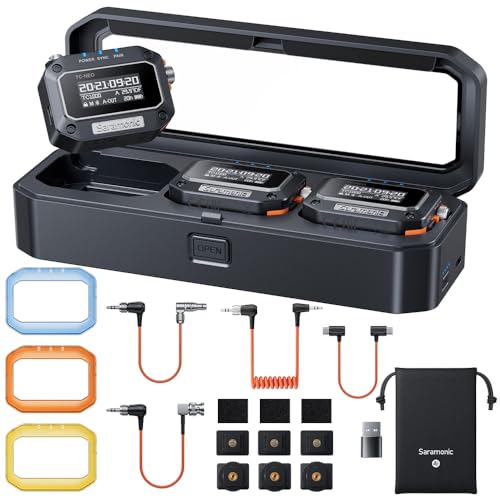
For professional video production teams looking to streamline their multi-camera setups, the Saramonic TC-NEO-KIT Timecode Generator (3-Pack) stands out as an essential tool. This kit includes three generators, all compatible with major brands like ARRI, RED, Canon, and Sony. With accurate SMPTE timecode syncing, you’ll eliminate post-production headaches. The versatile syncing modes and broad frame rate support guarantee you meet global standards. Plus, you can control up to 48 units wirelessly via Bluetooth or the Saramonic System app. The exclusive charging case offers up to 52.8 hours of power, keeping your workflow efficient and uninterrupted.
Best For: Professional video production teams seeking reliable timecode synchronization for multi-camera setups.
Pros:
- Accurate SMPTE timecode syncing eliminates post-production challenges, ensuring smooth editing.
- Supports multiple syncing modes and frame rates from 23.98 to 60FPS, accommodating various production needs.
- Wireless control via Bluetooth and app enhances workflow efficiency, allowing for seamless operation of up to 48 units.
Cons:
- Requires compatible devices for optimal functionality, which may limit use with certain equipment.
- Charging case may add bulk to equipment bags, potentially impacting portability.
- Initial setup may require learning curve for those unfamiliar with timecode systems or app controls.
Deity TC-1 KIT Wireless Timecode Box (3 PCS)

Designed for filmmakers and content creators working with multi-camera setups, the Deity TC-1 KIT Wireless Timecode Box stands out with its impressive ±0.5ppm timecode accuracy. This kit includes three units that operate over a 2.4G radio frequency, offering a maximum range of 250 feet. With Bit Connectify technology, you can control up to 20 TC-1 boxes from a distance, ensuring seamless synchronization. You’ll benefit from frame accuracy with less than 1 frame of drift in 72 hours. Plus, the locking 3.5mm TC connection and built-in scratch mic enhance compatibility with various devices for your projects.
Best For: Filmmakers and content creators working with multi-camera setups who require precise timecode synchronization.
Pros:
- High accuracy with ±0.5ppm timecode, ensuring precise synchronization in post-production.
- Extended control range of 250 feet and ability to manage up to 20 TC-1 boxes wirelessly.
- Built-in scratch mic and locking 3.5mm TC connection enhance compatibility with various devices.
Cons:
- Higher initial investment compared to single timecode solutions.
- Limited range for secondary RF sync at only 30ft may be restrictive in some setups.
- Potential learning curve for users unfamiliar with multi-device synchronization.
Tentacle Sync Timecode Cable for ARRI, Canon, Sony Cameras, and Recorders
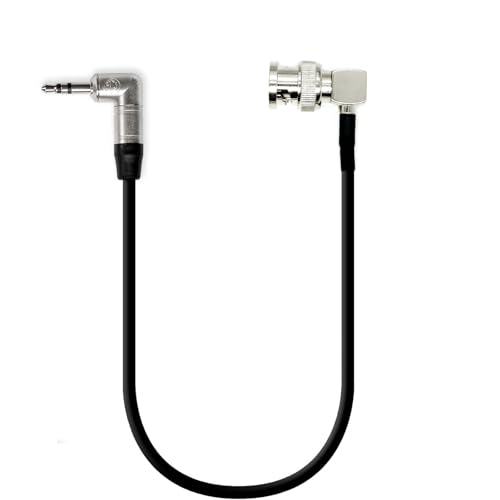
When you need reliable timecode synchronization for your multi-camera setup, the Tentacle Sync Timecode Cable stands out as an essential tool. This bi-directional cable features a 3.5 mm TRS jack to BNC connection and is compatible with ARRI, Canon, and Sony cameras, ensuring seamless integration. At 7.8 inches long, it’s both compact and efficient. The 90° right-angle BNC connector enables easy connections in tight spaces. Plus, it’s designed for both indoor and outdoor use, making it versatile for any shoot. With a high customer rating of 4.8 stars, you can trust its quality for your projects.
Best For: Professionals and enthusiasts in film and audio production who require reliable timecode synchronization for multi-camera setups.
Pros:
- Bi-directional compatibility allows for seamless integration with various camera brands like ARRI, Canon, and Sony.
- Compact design with a 7.8-inch length and a 90° right-angle BNC connector makes it ideal for tight spaces.
- High customer rating of 4.8 stars indicates strong user satisfaction and reliability.
Cons:
- Limited length of 7.8 inches may not be suitable for setups requiring longer cable runs.
- Male-to-male connectors may not fit all devices without additional adapters.
- Specific compatibility may exclude some camera models and brands not listed.
Alvin’s Cables Timecode Cable for Sony Cameras
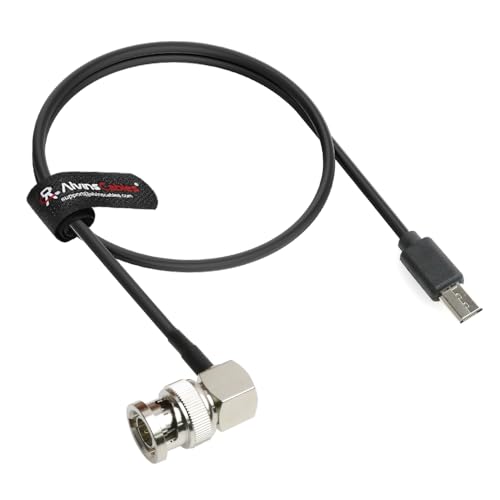
The Alvin’s Cables Timecode Cable stands out as an essential tool for filmmakers using Sony cameras like the FX3, FX30, A7S3, and A1. This 35cm (13.8 inches) coaxial cable features a right-angle BNC connector on one end and a Micro USB on the other, ensuring a secure connection. It’s designed for both indoor and outdoor use, making it versatile for various shooting environments. Each cable is rigorously tested for quality, and custom lengths are available. With a one-year warranty and a 30-day return policy, you can trust its reliability for perfect synchronization in your multi-camera setups.
Best For: Filmmakers and videographers using Sony cameras who need reliable timecode synchronization in their setups.
Pros:
- High Compatibility: Works seamlessly with a range of Sony cameras and professional audio devices.
- Quality Assurance: Each cable is rigorously tested for reliability, reducing the risk of malfunction during shoots.
- Custom Length Options: Available in custom lengths, catering to specific setup needs.
Cons:
- Limited Length: At 35cm (13.8 inches), the cable may be too short for some setups requiring longer distances.
- Specific Connector Type: The right angle BNC and Micro USB connectors may not suit all equipment configurations.
- Average Customer Rating: A 4.0 out of 5 stars rating suggests some users may have had issues with the product.
Tentacle 3.5mm TRS to BNC Timecode Cable for Canon and Sony Cameras
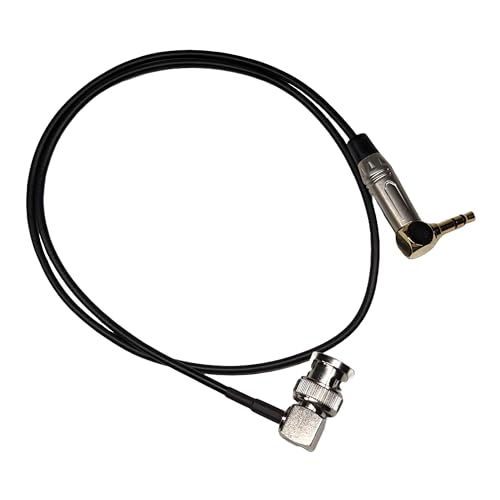
For filmmakers using Canon and Sony cameras, the Tentacle 3.5mm TRS to BNC Timecode Cable is an essential tool for achieving seamless timecode synchronization. This bi-directional cable connects your camera to devices like the Tentacle Sync or Deity TC-1, ensuring precise timecode transmission. With a 60cm length and a 90° right-angle BNC connector, it’s perfect for tight setups. It’s compatible with popular models like the C300 MK III and FX9, making it versatile for various filming scenarios. Plus, it’s been tested for reliability, so you can trust it to perform under pressure.
Best For: Filmmakers using Canon and Sony cameras who require reliable timecode synchronization for their projects.
Pros:
- Bi-directional functionality allows for easy timecode transmission to and from various devices.
- 90° right-angle BNC connector enhances flexibility in tight filming spaces.
- Tested for reliability, ensuring dependable performance during shoots.
Cons:
- Limited to specific camera models, which may not cater to all filmmakers’ needs.
- A length of 60cm may not be sufficient for all filming setups.
- Requires additional equipment (like Tentacle Sync or Deity TC-1) for optimal use, which may add to overall costs.
Timecode Cable for Tentacle Sync Timecode Generator

Choosing the SZJELEN Timecode Cable for the Tentacle Sync Timecode Generator elevates your multi-camera setup with its reliable 3.5mm TRS to 5 Pin connection. This 45 cm cable, weighing just 30 grams, is perfect for both indoor and outdoor use. It’s compatible with a range of devices, including Sound Devices recorders and Arri Alexa cameras, ensuring seamless integration. Its lightweight design and male-to-male connectors make setup a breeze. Tested for quality, this cable guarantees successful timecode transmission, helping you achieve perfect synchronization every time. With stellar customer feedback, it’s a top choice for professionals.
Best For: Professionals using multi-camera setups who require reliable timecode synchronization.
Pros:
- Lightweight design makes it easy to handle and set up in various shooting environments.
- Wide compatibility with popular devices such as Sound Devices recorders and Arri Alexa cameras.
- High-quality assurance with rigorous testing ensures reliable performance for timecode transmission.
Cons:
- Limited cable length of 45 cm may not be suitable for all setups, especially in larger productions.
- Male-to-male connectors may not fit all devices without additional adapters.
- Single customer review may not provide a comprehensive overview of long-term performance.
Deity TC-1 Wireless Timecode Box with BNC Cable

Designed for professionals working with multiple camera setups, the Deity TC-1 Wireless Timecode Box excels with its wireless timecode generator and impressive 250 ft range. With 2.4G radio technology, you’ll enjoy accurate timecode within ±0.5ppm. Its Bit Connectify Technology allows you to control up to 20 TC-1 units, giving you unparalleled flexibility. The built-in scratch mic even enables use with mirrorless or action cameras. Plus, the locking 3.5mm TC connection guarantees your cables stay secure. With minimal drift and SMPTE timecode support, syncing footage and audio becomes a breeze, enhancing your post-production workflow considerably.
Best For: The Deity TC-1 Wireless Timecode Box is best for professionals working with multiple camera setups who require precise timecode synchronization.
Pros:
- Wireless control allows for easy management of multiple TC-1 units from a distance of up to 250 ft.
- High accuracy with a timecode precision of ±0.5ppm and minimal drift for seamless post-production syncing.
- Versatile connectivity, including a locking 3.5mm TC connection and a built-in scratch mic for various camera types.
Cons:
- Limited range of secondary RF synchronization at only 30 ft between devices.
- Weight of 8 ounces may be considered heavy for some users who prioritize lightweight gear.
- Price point may be higher compared to basic timecode solutions on the market.
Timecode Cable for Deity Tentacle Sync to ARRI Alexa and RED Ranger Camera

The HangTon Timecode Cable stands out for filmmakers looking to synchronize multiple camera systems like the ARRI Alexa and RED Ranger seamlessly. With a 50cm length and a male-to-female configuration, this 5-pin short type cable connects your Deity Tentacle Sync or other compatible devices effortlessly. Its right-angle 3.5mm TRS to straight short 5-pin connectors guarantee a snug fit, minimizing strain during shoots. Rated 5.0 out of 5 stars by users, it’s perfect for both indoor and outdoor film production. Plus, with a one-year warranty, it’s a reliable choice for achieving flawless timecode syncing on your next project.
Best For: Filmmakers and production crews looking for reliable timecode synchronization between ARRI Alexa and RED Ranger cameras.
Pros:
- High Compatibility: Works seamlessly with a variety of devices including Deity Tentacle Sync and popular camera systems.
- User Friendly: Features a right-angle connector design that minimizes strain and enhances ease of use during shoots.
- Excellent Feedback: Highly rated with an average of 5.0 stars from users, indicating strong customer satisfaction.
Cons:
- Indoor Usage Only: Not designed for outdoor settings, which may limit its use in certain filming environments.
- Cable Length Limitations: At 50cm, it may not be suitable for setups requiring longer cable runs.
- Single Connector Type: Limited to the specific 3.5mm TRS to 5-pin configuration, restricting versatility with other connector types.
Factors to Consider When Choosing a Timecode Device for Multi Camera
When choosing a timecode device for your multi-camera setup, you’ll want to take into account several key factors. Think about how accurate the timecode needs to be, and whether the device is compatible with your cameras. Also, don’t overlook wireless connectivity options, power requirements, and cable connections to guarantee everything runs smoothly.
Timecode Accuracy Requirements
Choosing the right timecode device for a multi-camera setup hinges on several accuracy requirements that directly impact your production’s efficiency. You’ll want to guarantee your device meets the standard of ±0.5 parts per million (ppm) for precise synchronization. For long shoots, look for a generator with less than 1 frame drift every 72 hours to avoid post-production misalignments. It’s essential that the device supports SMPTE timecode, which simplifies syncing across different equipment. Additionally, devices offering multiple syncing modes, like master run and jam sync, provide flexibility in various filming scenarios. Finally, maintaining accurate timecode is vital for frame rates between 23.98 and 60 FPS, aligning with global broadcast and cinematic standards.
Device Compatibility Considerations
To guarantee smooth operation in a multi-camera setup, it’s crucial to take into account compatibility when selecting a timecode device. First, verify the device supports the specific timecode formats required by all your cameras and audio recorders, such as SMPTE timecode. Next, check for compatibility with the connectors your devices use, whether BNC, 3.5mm TRS, or Micro USB, to enable seamless integration. Verify that the timecode device can sync with multiple cameras simultaneously and supports various syncing modes for different shooting scenarios. Also, evaluate the power options and battery life, making sure the device can last throughout your shoot, especially during extended filming sessions. Proper compatibility helps prevent technical issues and keeps everything in sync.
Wireless Connectivity Options
As you plan your multi-camera setup, considering wireless connectivity options can greatly enhance your workflow. Look for timecode devices that utilize Bluetooth 5.0, offering a range of up to 250 feet, so you can place cameras flexibly without worrying about cables. Devices using 2.4GHz radio technology provide robust communication, reducing interference and ensuring reliable synchronization across multiple units. Pay attention to the number of channels supported; more channels allow for simultaneous syncing of several cameras, which is essential in multi-camera environments. Additionally, choose devices with app control for easy management of settings and remote monitoring. Features that let you control multiple timecode generators from a single unit can simplify your workflow, making your setup more efficient.
Power and Battery Life
Power and battery life are essential factors in selecting a timecode device for your multi-camera setup. You’ll want a device that can operate continuously for up to 28 hours on a single charge, especially for long shoots. Look for models that support USB-C charging; they typically recharge fully in about 2 hours, saving you time. Pay attention to power consumption too; lower consumption means longer operational periods, important for extended filming sessions. Some devices come with exclusive charging cases, allowing for multiple recharges and greatly extending battery life. Finally, verify your device has LED status indicators. These will help you monitor power levels and synchronization during your shoots, so you can focus on capturing the perfect footage.
Cable Connections and Length
When choosing a timecode device, the type and length of cable connections play a crucial role in guaranteeing seamless integration with your multi-camera setup. Make certain the device is compatible with the cable types your cameras and audio recorders require, like BNC or 3.5mm TRS. Consider cable length; shorter cables (30cm to 60cm) are easier to manage in compact setups, while longer cables (50cm or more) may suit larger productions. Pay attention to the connector gender and configuration—most timecode cables are male-to-female. Features like right-angle connectors can simplify installation in tight spaces, reducing disconnection risks. Finally, verify the cable’s design is suitable for both indoor and outdoor use, as environmental factors can impact performance during shoots.
Control Range Capabilities
Considering the vast distances often involved in multi-camera setups, control range capabilities are vital for maintaining synchronization among your devices. Look for timecode devices with Bluetooth 5.0 technology, which can offer up to 250 feet of control range, enhancing flexibility in larger filming environments. If you need even greater distance, consider systems utilizing advanced RF technology that can extend control range considerably—up to 600% more than standard Bluetooth options. It’s also essential to sync multiple devices from a single point; some systems can manage up to 20 devices simultaneously. Finally, prioritize high-quality sync devices that maintain less than 1 frame of drift over 72 hours, ensuring accuracy during extended shooting periods.