
If you’re looking to elevate your video production game in 2026, understanding the best SDI video switchers is essential. These tools can transform your live events and streaming projects, providing you with the flexibility and features necessary for seamless broadcasts. From advanced audio mixing to multi-camera capabilities, the right switcher can make all the difference. Let’s explore the top models that are setting the standard this year.
Osee GoStream Duet 8 ISO Video Switcher

The Osee GoStream Duet 8 ISO Video Switcher is perfect for professionals in education, live events, and corporate settings who need a versatile and powerful tool for streaming. With eight channels, you can connect multiple sources, including 4K-HDMI, SDI, and NDI HX inputs. ISO recording captures every input and output, ensuring you never miss a moment. Plus, the audio capabilities let you use professional microphones with phantom power. The user-friendly control panel, complete with auto-switching features, allows seamless changes. Whether you’re hosting a conference or a wedding, this switcher helps you deliver high-quality productions effortlessly.
Best For: The Osee GoStream Duet 8 ISO Video Switcher is best for professionals in education, live events, and corporate settings seeking a powerful streaming solution.
Pros:
- Supports multiple input configurations including 4K-HDMI, SDI, and NDI HX for versatile connectivity.
- ISO recording feature captures all video and audio inputs, ensuring high-quality content production.
- User-friendly control panel with auto-switching capabilities for seamless operation during live events.
Cons:
- Requires firmware upgrade for simultaneous 8-channel input, which may add complexity for users.
- Limited to 2 built-in video players for playback, which may not be enough for some users’ needs.
- The warranty is only one year, which may be considered short for professional equipment.
Osee GoStream Duet Kit – Pro Live Streaming Multi-Camera Video Mixer

For content creators seeking a versatile and powerful solution, the Osee GoStream Duet Kit stands out as an all-in-one Pro Live Streaming Multi-Camera Video Mixer. With 4 HDMI and SDI inputs, you can effortlessly switch between multiple sources. The 14-inch monitor and silent fan enhance your live streaming experience. Plus, its compact design, weighing just 5kg, makes it perfect for on-the-go productions. You’ll appreciate the flexibility of powering it through various sources, including USB power banks. With a stellar average rating of 4.8 out of 5 stars, this kit is a reliable choice for seamless, professional-quality streaming.
Best For: Content creators and live streamers seeking a portable and versatile multi-camera video mixing solution.
Pros:
- All-in-one package with a built-in monitor and silent fan for an enhanced streaming experience.
- Multiple input options (4 HDMI/SDI) allow for seamless switching between various sources.
- Compact and lightweight design (5kg) makes it highly portable for on-the-go productions.
Cons:
- Weight may still be considered heavy for some users who prioritize ultra-portability.
- Limited customer reviews (22 reviews) may not fully represent the product’s long-term reliability.
- Potential learning curve for users unfamiliar with video mixing and streaming software.
Osee GoStream Duet Live Stream Video Mixer Switcher

Designed for content creators and live streamers, the Osee GoStream Duet Live Stream Video Mixer Switcher offers an impressive array of input options, including 4 SDI and 4 HDMI ports. Weighing just 1 kilogram, its compact design (4.2D x 10.6W x 1.94H) makes it easy to transport. You can stream on up to three platforms simultaneously, whether through Ethernet or a smartphone hotspot. With built-in GUI and GoStream software, controlling your setup is seamless. Plus, you’ll enjoy professional effects like Chroma Key and PIP, ensuring your productions stand out. A 1-year warranty guarantees peace of mind.
Best For: Content creators and live streamers looking for a versatile and portable video mixer switcher.
Pros:
- Supports multiple input options, including 4 SDI and 4 HDMI ports, allowing for diverse setup configurations.
- Can stream on up to three platforms simultaneously, enhancing outreach capabilities.
- Features professional effects such as Chroma Key and PIP, elevating the production quality of live streams.
Cons:
- Limited to a 1-year manufacturer warranty, which may not be sufficient for heavy users.
- Requires firmware updates for certain features, which may complicate initial setup.
- The compact size could limit the number of connected devices without additional adapters or hubs.
Osee GoStream Duet 8 ISO Video Switcher
If you’re a content creator seeking versatility and efficiency, the Osee GoStream Duet 8 ISO Video Switcher stands out with its impressive array of input configurations. You’ll appreciate its 8 channels, featuring 4x 4K-HDMI, 4x SDI, and more. With ISO recording, you can capture all video inputs and audio directly to SSD. It supports professional audio with XLR mic inputs and offers customizable graphics overlays. The user-friendly control panel simplifies your operation, allowing for seamless changes during live events. Plus, enjoy the peace of mind with a 1-year warranty and responsive customer support for any inquiries.
Best For: Content creators and event producers looking for a versatile, high-quality video switching solution with multiple input options and professional audio capabilities.
Pros:
- Supports a wide range of input configurations including 4K-HDMI, SDI, and NDI HX.
- Features ISO recording for capturing all video and audio inputs directly to SSD.
- User-friendly control panel with auto-switching and graphics overlay options enhances live event production.
Cons:
- Firmware upgrade required for simultaneous use of all 8 channels, which may be an extra step for users.
- Limited to 2 built-in video players for MP4 playback, which may not suffice for larger productions.
- Requires a learning curve for new users unfamiliar with professional video switchers.
Blackmagic Design ATEM SDI Live Production Switcher (SWATEMMXEP)
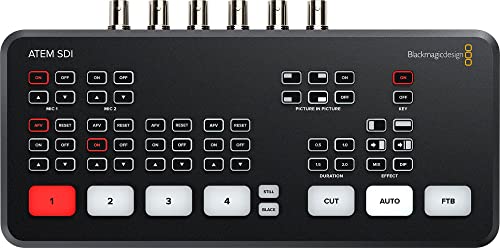
The Blackmagic Design ATEM SDI Live Production Switcher (SWATEMMXEP) is an ideal choice for professional content creators seeking top-tier video performance. With 4 x 3G-SDI inputs supporting 10-bit HD, you’ll enjoy superior video quality and real-time processing. Its Ethernet control allows for easy software updates and network integration, while the USB Type-C interface offers seamless streaming. You can mix audio effortlessly with a 6-input mixer featuring gain control and Fairlight enhancements. Plus, with a 30-day return policy and an impressive 4.4 out of 5 stars rating, it’s a reliable investment for any production environment.
Best For: Professional content creators and live production teams seeking high-quality video performance and advanced audio mixing capabilities.
Pros:
- Superior video quality with 4 x 3G-SDI inputs supporting 10-bit HD.
- Real-time processing with built-in frame rate and format converters for smooth video transitions.
- Versatile audio mixing capabilities with a 6-input mixer and Fairlight enhancements.
Cons:
- Weighs nearly 1 kg, which may be cumbersome for portable setups.
- Limited to 4 SDI inputs, which may not be sufficient for larger productions.
- No mention of wireless connectivity options, which could restrict usage in certain environments.
Wiistar 4×1 SDI Switcher with ReClock Technology

For professionals seeking reliable video switching solutions, the Wiistar 4×1 SDI Switcher with ReClock Technology stands out with its ability to support SD, HD, and 3G-SDI signals up to 1320 feet. This switcher features four SDI inputs and one output, ensuring seamless integration into your production setup. With its automatic input/output equalizer, it effortlessly switches between multiple standards. You’ll appreciate the memory function that recalls the last input after a restart, adding convenience. The compact design and coaxial BNC connectors make it easy to use. Plus, you can trust its solid warranty and return policy for peace of mind.
Best For: Professionals in video production who require reliable and versatile SDI switching capabilities.
Pros:
- Supports multiple video standards including SD, HD, and 3G-SDI.
- Automatic input/output equalizer for seamless switching.
- Memory function recalls the last input after a restart for added convenience.
Cons:
- Limited to one output, which may not be sufficient for larger setups.
- Average customer rating of 3.6 out of 5 stars suggests mixed feedback.
- May require specific coaxial BNC cables, which are not included.
RGBlink mini-Edge SDI Pro Live Streaming Video Mixer Switcher

Designed with versatility in mind, the RGBlink mini-Edge SDI Pro Live Streaming Video Mixer Switcher is perfect for content creators, event producers, and houses of worship seeking a robust solution for multi-camera live streaming. It supports 4×4K HDMI and 4×3G SDI inputs, accommodating everything from DSLRs to professional equipment. With dual 2K HDMI outputs and built-in UVC streaming, you can easily broadcast to platforms like Zoom and YouTube. Integrated LAN-based PTZ control allows for smooth cinematic productions, while audio mixing features guarantee your sound is just as polished as your video, making it an excellent choice for any live event.
Best For: Content creators, event producers, and houses of worship looking for a comprehensive solution for multi-camera live streaming.
Pros:
- Supports a wide range of input sources, including 4×4K HDMI and 4×3G SDI, making it versatile for various production environments.
- Integrated PTZ camera control enhances cinematic production capabilities with easy pan, tilt, and zoom functionality.
- Built-in audio mixing features allow for seamless integration of multiple audio sources, ensuring high-quality sound for live broadcasts.
Cons:
- May have a learning curve for users unfamiliar with video mixing technology and remote production setups.
- The price point may be higher compared to simpler live streaming solutions, which could deter budget-conscious users.
- Limited to specific streaming platforms; users may need additional setup for compatibility with other services.
Osee GoStream Duet Kit Pro Live Streaming Video Mixer Switcher
Osee GoStream Duet Kit Pro Live Streaming Video Mixer Switcher stands out as the perfect solution for content creators seeking an all-in-one, portable streaming setup. Weighing just 5kg, it features 4 HDMI and SDI inputs, a 14-inch 1080×1920 monitor, and multiple power options, making it incredibly versatile. The silent fan guarantees quiet operation, while the expandable cheese plates offer customization for additional equipment. With a solid average rating of 4.8 from users, it’s clear this kit excels in performance and convenience. Plus, you can enjoy peace of mind with a 1-year warranty and a 30-day return policy.
Best For: Content creators and live streamers looking for an all-in-one, portable video mixing solution.
Pros:
- Versatile with 4 HDMI/SDI inputs and multiple power options.
- Compact and lightweight design (5kg) for easy transport.
- High customer satisfaction with an average rating of 4.8 out of 5 stars.
Cons:
- Limited to 4 inputs, which may not suffice for larger productions.
- 14-inch monitor may be small for detailed monitoring in some setups.
- The weight, while portable, may still be cumbersome for some users compared to smaller devices.
Blackmagic Design ATEM SDI Extreme ISO Live Stream Switcher

The Blackmagic Design ATEM SDI Extreme ISO Live Stream Switcher stands out with its ability to record nine separate H.264 video streams in real time, making it an ideal choice for professional content creators and live event producers. Weighing just 2.3 kilograms, it supports up to nine layers, four upstream keyers, and two downstream keyers. You can enjoy multiview across 16 screens, enhancing your live production experience. With multiple 3G-SDI inputs and outputs, plus USB Type-C connectivity, streaming and recording are seamless. Whether for education, business presentations, or eSports, this switcher’s versatility guarantees your projects shine.
Best For: Professionals in content creation and live event production looking for a versatile live stream switcher.
Pros:
- Supports up to nine layers and multiple keyers for complex live streaming setups.
- Records nine separate H.264 video streams simultaneously, ideal for detailed post-production.
- Offers extensive connectivity options, including multiple 3G-SDI inputs and USB Type-C for recording and streaming.
Cons:
- Weight of 2.3 kilograms may be cumbersome for portable setups.
- Requires additional knowledge to fully utilize its advanced features, which may not be user-friendly for beginners.
- Limited to specific formats (H.264) for recording, potentially restricting flexibility in certain use cases.
Tenveo 4K60FPS HDMI Video Switcher Mixer

If you’re looking for a powerful solution to manage multiple video sources effortlessly, the Tenveo 4K60FPS HDMI Video Switcher Mixer stands out. This compact device weighs just 1.5 kg and features a 5.5’’ FHD screen, making it easy to keep track of your inputs. With four HDMI and four SDI inputs, plus USB recording capabilities, you can easily stream and record high-quality video. You’ll appreciate its dual streaming on two platforms and advanced audio management. The ergonomic control panel offers intuitive navigation, letting you create professional productions with ease using its customizable effects and presets.
Best For: Professionals and content creators who require a versatile and high-quality video switching solution for live streaming and recording.
Pros:
- Supports dual streaming on multiple platforms simultaneously, enhancing reach and engagement.
- User-friendly control panel with ergonomic design allows for easy navigation and quick scene transitions.
- Advanced audio management features enable mixing and monitoring of multiple audio sources for professional sound quality.
Cons:
- Limited to 1080P60FPS output, which may not meet the needs of those requiring higher resolution streaming.
- Weight of 1.5 kg may be a consideration for portable setups.
- Learning curve may be present for new users unfamiliar with advanced video mixing equipment.
Factors to Consider When Choosing an Sdi Video Switcher
When you’re choosing an SDI video switcher, you’ll want to contemplate several key factors. Think about the input and output ports, the video resolutions it supports, and its audio mixing capabilities. Also, don’t overlook the streaming features and user interface, as these can greatly impact your workflow.
Input and Output Ports
Choosing an SDI video switcher involves careful consideration of input and output ports, as these features greatly impact your production’s versatility. The number and type of input ports, like HDMI, SDI, and USB, determine how many video sources you can connect. Efficient output options are essential too—multiple HDMI and SDI outputs let you connect to various display devices or streaming platforms simultaneously. Confirm the supported resolutions and formats match your high-definition video sources. Also, check that your switcher can handle different video standards, such as SD and HD. Additional features like USB-C ports enhance connectivity for modern devices, making it easier to integrate with streaming software and other equipment.
Supported Video Resolutions
Supported video resolutions play an essential role in selecting an SDI video switcher, as they directly influence the quality of your output. Many switchers handle HD (1080p), while some advanced models support 4K (2160p). The most common formats include 720p, 1080i, and 1080p, with frame rates typically ranging from 24Hz to 60Hz, accommodating various broadcasting standards. If you’re aiming for high-quality output, consider switchers with 3G-SDI for higher bandwidth and resolutions up to 1080p60. For 4K support, look for 6G and 12G-SDI standards. Always check the maximum supported resolution and frame rate to verify compatibility with your source devices and output needs, as some switchers automatically adjust for seamless shifts across different formats.
Audio Mixing Capabilities
Audio mixing capabilities are fundamental for achieving a polished production, and a quality SDI video switcher should meet diverse audio needs. Look for switchers that offer multiple audio inputs, including XLR microphones and line-level sources, to guarantee versatility. Built-in audio mixers with features like gain control, EQ, and effects processing can greatly enhance your sound quality during live events. It’s vital to mix audio from various sources—like microphones, music tracks, and sound effects—simultaneously for a professional experience. Advanced features like audio-follow-video help synchronize audio tracks with the video feed, providing seamless shifts. Finally, support for monitoring audio levels with visual feedback guarantees you maintain peak sound quality throughout your broadcast.
Streaming Features and Compatibility
How do you guarantee your SDI video switcher meets your streaming needs? Start by checking its compatibility with popular streaming platforms like OBS, Vmix, and Zoom. This guarantees a smooth integration into your workflow. Look for switchers that allow simultaneous streaming to multiple platforms, maximizing your audience reach during live events. Built-in streaming capabilities, such as RTMP or NDI support, can save you from needing extra hardware. Also, USB output options simplify connecting to a computer for live streaming. Finally, evaluate the switcher’s ability to handle various input formats like SDI, HDMI, and USB, which enhances versatility and compatibility with different cameras and sources. Choose wisely to elevate your streaming experience!
User Interface and Control
When selecting an SDI video switcher, the user interface and control features play a significant role in your overall experience. A user-friendly interface with intuitive controls can greatly enhance your efficiency when managing complex switching tasks during live productions. Look for a control panel that includes a PVW/PGM bus and T-Bar for seamless changes and better input source monitoring. Customizable macros can also streamline repetitive tasks, improving your workflow in live streaming environments. Additionally, visual indicators and built-in GUI options provide real-time feedback, making it easier to execute precise cuts and changes. Finally, multi-layered displays, like multi-view outputs, help you monitor multiple sources at once, ensuring better coordination during your live events.
Portability and Design
Portability and design are key factors to evaluate if you need a video switcher that can keep up with your on-the-go lifestyle. If you often transport your gear for live events, look for models under 5 kg, making them easy to carry. A compact design that fits in standard carrying cases adds to the convenience for mobile streaming setups. Consider switchers with expandable cheese plates or mounting options for stability in diverse settings. Multiple power solutions, such as AC, DC, or USB power bank options, are essential for using your switcher in various locations without being tethered to wall outlets. Finally, a silent fan can enhance your sound quality, making it ideal for noise-sensitive environments.
Warranty and Support Options
While selecting an SDI video switcher, considering warranty and support options can greatly impact your long-term satisfaction with the product. Most warranties range from one to two years, giving you peace of mind against defects or malfunctions. Additionally, many manufacturers offer a return policy, often allowing returns within 30 days of delivery, which is essential for evaluating performance. Look for customer support options like multilingual assistance, online resources, and direct contact methods to resolve any issues you may encounter. You might also find extended service plans for additional coverage beyond the standard warranty. Finally, checking customer reviews and ratings can provide valuable insights into the effectiveness of the warranty and support services offered by the manufacturer.
Price and Value Comparison
Choosing the right SDI video switcher involves evaluating several key factors that can greatly impact your investment. First, think about the number of input and output ports; more connectivity options usually mean a higher cost but offer versatility for complex setups. Next, consider the recording capabilities—advanced features like ISO recording can justify a higher price for your post-production needs. Don’t overlook warranty lengths and customer support; better support can enhance the value of pricier models. Also, look for additional features like built-in streaming or advanced audio mixing, which can save you from purchasing extra equipment. Finally, research customer reviews to verify the price reflects the switcher’s reliability and performance.