
Choosing among the best SDI converters for gaming consoles depends on your console’s output, display or capture hardware, resolution, and cable distance. The right converter can help integrate modern HDMI systems with professional SDI equipment or older gaming hardware.
This roundup covers compact adapters, bidirectional converters, retro upscalers, loop-through models, and capture-focused devices. Use the guide below to narrow the options by compatibility, signal quality, latency, and intended setup.
Best 10 Sdi Converters for Gaming Consoles Picks for 2026
Professional SDI Flexibility
Micro Converter BiDirectional SDI/HDMI

- Bidirectional SDI and HDMI conversion
- Supports SD, HD, and 3G-SDI
- Includes international 5V power adapters
Best For: Portable mixed SDI/HDMI workflows
Long-Run SDI Monitoring

- SDI-to-HDMI conversion
- SDI loopout for pass-through
- Supports long SDI cable runs
Best For: SDI sources feeding HDMI displays
Retro Console Upscaling

- Supports four video input types
- Works with many classic consoles
- Outputs 720p or 1080p HDMI
Best For: Legacy consoles and HDMI displays
VGA and AV to SDI
Dual-Output Broadcast Converter
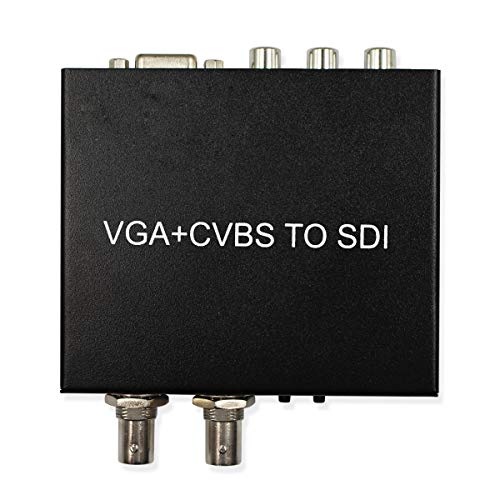
- Converts VGA or AV to SDI
- Supports SD, HD, and 3G-SDI
- Includes two SDI BNC outputs
Best For: VGA or composite sources entering SDI systems
Best Retro Console Scaler

- Converts AV, S-Video, and YPbPr to HDMI
- Zero-lag hardware line doubling
- Smoothing and pass-through display modes
Best For: Retro consoles connected to modern HDMI TVs
Best Professional BiDirectional Converter
Blackmagic Micro Converter SDI/HDMI 12G

- Bidirectional SDI and HDMI conversion
- HDMI 2.0 connectivity for professional displays
- Universal power supply with international adapters
Best For: Console setups using professional SDI and HDMI equipment
Best HDMI-to-SDI Console Converter

- Converts 4K HDMI to SD, HD, or 3G-SDI
- Dual SDI outputs for connected equipment
- HDMI loop-out supports a local display
Best For: HDMI consoles feeding SDI displays or recorders
Compact Bidirectional Pick
Blackmagic Design 12G Micro Converter

- Bidirectional SDI/HDMI conversion
- Compact and lightweight design
- 2-year warranty included
Best For: Small SDI and HDMI video setups
Streaming Capture Pick
HDSUNWSTD SDI Game Video Capture Card

- Captures up to 1080p60
- SDI loopout for pass-through
- Supports microphone and line-audio mixing
Best For: 1080p60 console livestreaming and recording
Format Flexibility Pick
Microware Mini 3G SDI to HDMI Adapter

- Supports SD, HD, and 3G-SDI
- Includes re-clocked SDI loop output
- Handles up to eight audio channels
Best For: SDI-to-HDMI installations with varied signal formats
Professional SDI Flexibility – Micro Converter BiDirectional SDI/HDMI
For buyers comparing sdi converters for gaming consoles, the Blackmagic Design Micro Converter is a compact option when a setup needs both SDI and HDMI connectivity. It supports SD, HD, and 3G-SDI plus HDMI input and output, and includes a universal power supply with international socket adapters.
Best For: Console or video setups that need bidirectional SDI/HDMI conversion in a portable metal enclosure.
Pros:
- Supports SD, HD, and 3G-SDI signals.
- Provides HDMI input and HDMI output connections.
- Includes a 5V universal power supply with international adapters.
Cons:
- Its listed HDMI interface may require additional console-specific cabling.
- The notes do not identify a dedicated gaming-console input or format feature.
This is the most versatile choice of the group for mixed HDMI and SDI workflows, particularly where bidirectional conversion and portability matter more than gaming-specific features.
Long-Run SDI Monitoring – 3G/HD/SD-SDI to HDMI Adapter
NAKVMN SDI to HDMI Adapter - 3G/HD/SD-SDI Input to HDMI Output - 1080P - Black - 1 Count
Check Price On AmazonThis adapter suits buyers seeking sdi converters for gaming consoles when the source is SDI and the display is HDMI. It accepts 3G-, HD-, and SD-SDI formats, offers an SDI loop output, and supports HDMI output for a television, monitor, or projector.
Best For: SDI sources that need HDMI display output and signal distribution over longer cable runs.
Pros:
- Supports 3G-SDI, HD-SDI, and SD-SDI input formats.
- Provides both HDMI output and SDI loopout.
- Lists cable-run support up to 300 feet for 3G-SDI, 500 feet for HD-SDI, and 1,000 feet for SD-SDI.
- Supports eight channels of 48 kHz digital audio.
Cons:
- It converts SDI to HDMI only, rather than HDMI to SDI.
- No power plug is included according to the supplied details.
- The listed warranty is a 30-day return period.
Choose this model when your console or production chain already provides SDI and you need a practical HDMI display feed with loop-through capability.
Retro Console Upscaling – Portta AH180 4-in-1 Converter
For classic systems, the Portta AH180 is a more direct fit among sdi converters for gaming consoles alternatives, although it outputs HDMI rather than SDI. It accepts composite, S-Video, component, and HDMI inputs, covering consoles such as the Wii, PS1/PS2, N64, GameCube, Sega Saturn, and Dreamcast.
Best For: Retro-console owners connecting legacy video outputs to modern HDMI televisions or monitors.
Pros:
- Supports AV/CVBS, S-Video, component, and HDMI inputs.
- Handles NTSC, PAL, and SECAM for CVBS and S-Video sources.
- Offers 720p or 1080p HDMI output with selectable 4:3 or 16:9 aspect ratios.
- Provides picture adjustments, overscan control, and settings memory.
Cons:
- It does not provide SDI input or output.
- Its primary use is legacy and retro video rather than SDI distribution.
If the goal is simply to connect older consoles to an HDMI display, the AH180 offers broader legacy-input support than the SDI-focused options in this roundup.
VGA and AV to SDI – Dual-Output Broadcast Converter
This HDSUNWSTD unit is worth considering when sdi converters for gaming consoles need to accept VGA or composite video and feed SDI equipment. It converts either VGA or AV video to SD-, HD-, or 3G-SDI and provides two BNC SDI outputs for monitors, projectors, or other compatible peripherals.
Best For: Console or computer sources with VGA or composite output that must be distributed to SDI displays or equipment.
Pros:
- Accepts VGA and AV/CVBS video inputs.
- Supports SD-SDI, HD-SDI, and 3G-SDI output.
- Provides two SDI BNC output ports.
Cons:
- It does not list HDMI input or output.
- The supplied details identify VGA and AV video inputs but do not specify gaming-console compatibility.
- The notes do not provide supported resolutions or audio specifications.
This converter makes the most sense in an older VGA or composite-based setup where dual SDI outputs are useful; HDMI-console owners will likely need a different connection path.
Best Retro Console Scaler – RetroScaler 2X Line Doubler
If you need SDI converters for gaming consoles but your setup uses older composite, S-Video, or component connections, this RetroScaler is a practical alternative for sending classic-console video to a modern HDMI TV. Its hardware line-doubling outputs 480p or 576p HDMI without added input lag.
Best For: Retro gamers using consoles such as N64, GameCube, SNES, PS1, PS2, Saturn, or Genesis with an HDMI display.
Pros:
- Supports AV, S-Video, and YPbPr inputs with 480p/576p HDMI output.
- Hardware line doubling is designed for zero-lag gameplay.
- Smoothing and pass-through modes accommodate 3D graphics or sharp pixel art.
- Includes a Micro-USB power cable and supports a 4:3 display setting.
Cons:
- Requires a stable 5V/1A power source; a wall adapter is not included.
- Outputs a typically 4:3 image, so TV settings may need manual adjustment.
- Designed for analog retro-console signals rather than SDI equipment.
This is the most gaming-focused option here, especially for players who prioritize responsive classic-console gameplay and flexible image processing over professional SDI connectivity.
Best Professional BiDirectional Converter – Blackmagic Micro Converter SDI/HDMI 12G
Blackmagic Design Micro Converter BiDirectional SDI/HDMI 12G with Power Supply CONVBDC/SDI/HDMI12G/P
Check Price On AmazonFor buyers comparing SDI converters for gaming consoles alongside professional video equipment, the Blackmagic Design Micro Converter provides bidirectional SDI and HDMI conversion. It is better suited to a console setup involving pro-style monitors, displays, or broader production workflows than to direct legacy-console upscaling.
Best For: Gaming or camera setups that need compact SDI/HDMI connectivity with professional displays or monitoring equipment.
Pros:
- Supports bidirectional conversion between SDI and HDMI.
- Includes an HDMI 2.0 input and HDMI output, plus SDI video connectivity.
- Compact design with a 5V universal power supply and international adapters.
- Compatible with SDI cameras, computers, professional HDMI monitors, projectors, and displays.
Cons:
- Its supplied notes do not identify legacy analog console inputs such as AV or component.
- More specialized than a simple HDMI adapter for ordinary console-to-TV use.
- The product information does not state gaming-specific latency performance.
This converter makes the most sense when your gaming setup shares equipment with professional video or camera systems. For older analog consoles, a dedicated scaler is likely a closer match.
Best HDMI-to-SDI Console Converter – Wiistar UHD to SDI Converter
Among SDI converters for gaming consoles, the Wiistar UHD to SDI Converter is useful when a console or other HDMI source needs to feed SDI-based displays, recorders, or broadcast equipment. It also provides HDMI loop-out, allowing a local HDMI screen to remain connected while SDI outputs carry the signal elsewhere.
Best For: HDMI-equipped consoles such as PS4 used with SDI displays, recording devices, or multi-display video setups.
Pros:
- Converts 4K UHD HDMI input to SD-SDI, HD-SDI, or 3G-SDI output.
- Provides two simultaneous SDI outputs for multiple connected devices.
- HDMI loop-out supports a mirrored HDMI display alongside SDI output.
- Compact, lightweight design with BNC connectivity for professional setups.
Cons:
- Converts HDMI to SDI rather than accepting older analog console connections.
- The supplied notes do not specify gaming latency.
- No warranty is listed in the product details.
This is a strong fit for HDMI-based console workflows that need SDI distribution or recording. It is less appropriate if your main goal is converting composite, S-Video, or component output from an older system.
Compact Bidirectional Pick – Blackmagic Design 12G Micro Converter
For buyers comparing SDI converters for gaming consoles, this Blackmagic Design micro converter is a compact option for converting between SDI and HDMI. It supports SDI HD devices and uses a single HDMI interface, making it suited to streamlined video setups where size matters.
Best For: Compact SDI-to-HDMI or HDMI-to-SDI setups using compatible HD video equipment.
Pros:
- Bidirectional SDI and HDMI conversion
- Compact micro-converter design
- Includes a 2-year warranty
- Lightweight at 0.19 kg
Cons:
- Only one channel is specified
- The supplied notes identify camera compatibility rather than direct game-console compatibility
- No gaming-specific capture features are listed
This is a practical choice when you need straightforward, bidirectional signal conversion in a small enclosure. Verify your console, display, and SDI format requirements before buying.
Streaming Capture Pick – HDSUNWSTD SDI Game Video Capture Card
Among SDI converters for gaming consoles, this HDSUNWSTD capture card is aimed at recording and livestreaming gameplay. It supports up to 1080p at 60 fps, offers SDI loopout, USB 3.0 connectivity, and microphone mixing for adding live voice commentary.
Best For: Xbox One and similar setups that need 1080p60 game capture, livestreaming, recording, and microphone mixing.
Pros:
- Supports up to 1080p60 video capture
- SDI loopout supports signal pass-through
- USB 3.0 connection with USB 2.0 compatibility
- Mixes line audio and microphone audio
Cons:
- Maximum listed resolution is 1080p at 60 fps
- Requires a computer for USB capture and streaming
- Only one SDI port is listed in the specifications
This is the most gaming-focused option in the group, especially for creators who want console footage and voice commentary in one workflow. Its 1080p60 ceiling may be limiting for newer higher-resolution gaming setups.
Format Flexibility Pick – Microware Mini 3G SDI to HDMI Adapter
For SDI converters for gaming consoles that need broad SDI format support, this Microware adapter converts SDI signals to HDMI. It supports SD, HD, and 3G-SDI standards, includes loop output, and can de-embed up to eight channels of 48 kHz audio.
Best For: Xbox-compatible SDI-to-HDMI installations using varied SDI formats and HDMI displays.
Pros:
- Supports SD, HD, and 3G-SDI signals
- Provides equalized and re-clocked loop output
- De-embeds up to eight channels of 48 kHz audio
- Supports 1080p 50, 59.94, and 60 formats
Cons:
- Conversion direction is SDI to HDMI rather than bidirectional
- Does not provide USB capture functionality
- A power plug is not included according to the specifications
This adapter is a strong fit for format-sensitive video chains and longer SDI runs, but it is better suited to signal conversion than direct computer-based game capture. Confirm the required power arrangement and console signal path before purchase.
How We Picked the Best Sdi Converters for Gaming Consoles
We focused on signal compatibility, supported resolutions, conversion direction, connection flexibility, and practical console use. The selection includes HDMI-to-SDI and SDI-to-HDMI adapters, bidirectional models, retro-video converters, and devices with loop-through or USB capture features.
We also considered whether each unit suits a simple living-room setup, a streaming station, a broadcast-style installation, or a mixed collection of modern and classic consoles. Features such as power requirements, audio handling, SDI output count, and latency can matter as much as headline resolution.
Quick Comparison
| Best For | Look For | Recommended Type |
|---|---|---|
| Modern HDMI consoles | HDMI-to-SDI conversion and supported HD formats | 3G-SDI or 12G-SDI converter |
| Professional video systems | Reliable SDI connectors, loop-through, and long cable support | Broadcast-style SDI adapter |
| Retro consoles | AV, S-Video, component, scaling, and low latency | Retro converter or line doubler |
| Streaming | USB capture, HDMI monitoring, and audio support | Converter with capture functionality |
| Flexible installations | Conversion in both directions | Bidirectional SDI/HDMI model |
Key Buying Factors for Sdi Converters for Gaming Consoles
Input and Output Compatibility
Check the console’s actual output before buying. Modern systems generally use HDMI, while older consoles may require composite, S-Video, component, or a separate scaler. An SDI-to-HDMI adapter cannot replace an HDMI-to-SDI converter, so confirm the signal path and direction.
Resolution, Refresh Rate, and SDI Bandwidth
3G-SDI commonly targets SD and HD workflows, while 12G-SDI is better suited to higher-bandwidth 4K signals when the connected devices support them. Verify resolution and refresh-rate compatibility on both the console and display or capture device; a converter cannot increase the source’s native detail.
Latency and Scaling
For gaming, low latency is essential. Retro upscalers should specify their scaling behavior and lag performance. A basic signal converter may preserve a compatible format but leave resolution changes to the display, whereas a dedicated line doubler can be more useful for older systems.
Audio and Power
Some converters carry embedded HDMI audio, while others accept separate analog audio or provide mixing features. Confirm how audio reaches the display or capture device. Also check whether the unit uses USB power, a dedicated adapter, or a professional power supply.
Who Should Buy Which Sdi Converters for Gaming Consoles?
Choose a Bidirectional Blackmagic-Style Converter for Flexibility
These models make sense when your setup alternates between HDMI and SDI sources or includes professional cameras, monitors, switchers, and capture equipment.
Choose a Compact HDMI-To-SDI Adapter for a Focused Setup
If you only need to connect an HDMI console to SDI infrastructure, a dedicated 3G or 12G converter can be simpler and easier to troubleshoot than a multifunction unit.
Choose a Retro Converter for Classic Consoles
For composite, S-Video, or component systems, prioritize input variety, scaling, low lag, and stable HDMI output. These features are usually more important than SDI bandwidth.
Choose a Capture-Oriented Model for Streaming
Gamers recording or streaming should look for USB 3.0 capture, 1080p60 support, audio compatibility, and a monitoring output. Confirm computer compatibility and whether the device supports the console’s chosen resolution before purchasing.