
When you’re immersed in video editing, choosing the right RAID enclosure can make a significant difference in your workflow. It’s all about speed and storage capacity, and the right setup can streamline your projects. From the rapid access of the TERRAMASTER D2-320 to the expansive options like the Yottamaster 5 Bay RAID, there’s a lot to contemplate. Let’s explore these top picks and see what suits your needs best.
TERRAMASTER D2-320 USB RAID Enclosure (Diskless)

If you’re a video editor in need of reliable and high-speed storage, the TERRAMASTER D2-320 USB RAID Enclosure is an excellent choice. With its USB 3.2 Gen 2 Type C interface, you get impressive data transfer rates of up to 10Gbps. You can configure it in RAID 0 for blazing read/write speeds of 521MB/s or even 1075MB/s with SSDs. Supporting up to 44TB of storage, it offers flexibility for your projects. The tool-free design makes drive installation a breeze, while the intelligent cooling system keeps your drives safe. This enclosure balances performance and convenience perfectly for your video editing needs.
Best For: Video editors and professionals seeking high-speed, reliable storage solutions for large projects.
Pros:
- High Data Transfer Rates: Achieves up to 10Gbps with USB 3.2 Gen 2, ensuring fast file transfers.
- Flexible Storage Configuration: Supports multiple RAID configurations including RAID 0, RAID 1, and JBOD for tailored storage needs.
- Tool-Free Design: Easy installation and swapping of drives thanks to the convenient push-lock mechanism.
Cons:
- Diskless Enclosure: Does not come with pre-installed drives, requiring additional purchase of HDDs or SSDs.
- Material Durability: Made from plastic, which may not be as durable as metal alternatives.
- Limited to Two Drives: Capacity is restricted to only two drives, which may not suffice for extensive data needs.
ACASIS 40Gbps 4-Bay Hard Drive Enclosure

The ACASIS 40Gbps 4-Bay Hard Drive Enclosure is an excellent choice for video editors who demand high performance and speed in their storage solutions. With dual-bay support for both SATA and NVMe drives, you can achieve impressive data transfer rates up to 40Gbps, perfect for handling large files. The 8K@60Hz video output enhances your editing experience, while the active cooling system guarantees peak performance during intense workloads. Its premium aluminum chassis provides durability, and the 96W power supply maintains consistent power. Plus, with various RAID modes, you can tailor storage to your needs, making it a versatile addition to your setup.
Best For: The ACASIS 40Gbps 4-Bay Hard Drive Enclosure is best for video editors and professionals seeking high-speed and versatile storage solutions for large file handling.
Pros:
- Supports both SATA and NVMe drives, providing flexible storage options.
- High data transfer rates of up to 40Gbps, ideal for large video files.
- Durable aluminum chassis and effective active cooling system for reliable performance.
Cons:
- Customer ratings are average at 3.7 out of 5 stars, indicating mixed reviews.
- Heavier weight (5.24 pounds) may not be ideal for portable use.
- Higher price point compared to standard enclosures without advanced features.
Aluminum 2 Bay Hard Drive RAID Enclosure with Cooling Fan

Designed for both personal and enterprise use, the Aluminum 2 Bay Hard Drive RAID Enclosure with Cooling Fan is an excellent choice for video editors seeking reliable storage solutions. It supports 2.5″/3.5″ SATA HDD/SSD with a maximum capacity of 20TB per drive. You can choose from four RAID modes: RAID 0, RAID 1, Normal, and JBOD. The built-in 2-inch cooling fan keeps your drives from overheating, though it operates at 40-50 decibels, which may not suit noise-sensitive environments. With USB 3.0 connectivity and a maximum transfer speed of 5Gbps, it’s perfect for efficient workflows.
Best For: Video editors and professionals seeking reliable and efficient storage solutions for large data files.
Pros:
- Supports up to 20TB per drive, providing ample storage for extensive projects.
- Offers multiple RAID modes (RAID 0, RAID 1, Normal, JBOD) for flexible data management.
- Equipped with USB 3.0 for fast data transfer speeds of up to 5Gbps.
Cons:
- Fan noise levels of 40-50 decibels may be disruptive in quiet environments.
- No RAID software available for MAC OS users, limiting compatibility for some.
- Designing RAID arrays without caution can lead to potential data loss.
Yottamaster 5 Bay RAID Hard Drive Enclosure
![Yottamaster 5 Bay RAID Hard Drive Enclosure, 150W Aluminum USB3.0 RAID HDD Enclosure for 3.5 & 2.5 Inch SATA HDD/SSD, Support 120TB(5x24TB) Direct Attached Storage DAS RAID1/5/10/JBOD/CLONE [FS5RU3]](https://m.media-amazon.com/images/I/41ulUJlSWJL._SL500_.jpg)
For video editors needing robust data management, the Yottamaster 5 Bay RAID Hard Drive Enclosure shines with its impressive capacity to support up to 110TB across five drives. This model accommodates both 2.5 and 3.5-inch SATA HDDs/SSDs, making it versatile for various projects. With multiple RAID configurations like 0, 1, and 5, you can tailor storage to your exact needs. Its aluminum alloy build guarantees durability and effective heat dissipation, while the 80mm fan keeps things cool. Compatible with Windows, Mac, and Linux, it’s perfect for demanding video workflows, enhancing your editing efficiency dramatically.
Best For: Video editors and corporate environments needing robust and reliable data storage solutions with high capacity.
Pros:
- Supports up to 110TB of storage, accommodating large projects and extensive media libraries.
- Multiple RAID configurations enhance data security and performance tailored to specific needs.
- Durable aluminum alloy construction with effective heat dissipation and low-noise cooling fan.
Cons:
- Heavier than some other enclosures, which may affect portability.
- Maximum RAID storage capacity is lower than the total drive capacity, potentially limiting usage.
- Requires additional setup and configuration for optimal use, which may not suit all users.
TERRAMASTER D4-320 External Hard Drive Enclosure (Diskless)

If you’re a video editor seeking efficient storage solutions, the TERRAMASTER D4-320 External Hard Drive Enclosure is a standout choice. This 4-bay USB 3.2 Gen2 enclosure supports up to 120TB, accommodating both 3.5-inch and 2.5-inch SATA HDDs and SSDs. With data transfer speeds reaching 10Gbps and a combined read/write speed of 1,016 MB/s with multiple drives, it enhances your workflow considerably. The tool-free design allows for easy installation, while its hot-swappable feature lets you replace drives without downtime. Plus, its noise-reducing technology guarantees a quieter editing environment, making it an ideal companion for your video projects.
Best For: Video editors and content creators looking for an efficient and high-capacity external storage solution.
Pros:
- High Capacity: Supports up to 120TB of storage with multiple drive compatibility.
- Fast Data Transfer: Achieves speeds up to 10Gbps and a combined read/write speed of 1,016 MB/s.
- User-Friendly Design: Tool-free installation and hot-swappable functionality for easy drive management.
Cons:
- Material Quality: Made of plastic, which may raise durability concerns.
- Weight: At 1.3 pounds, it may be less portable compared to lighter enclosures.
- No Built-in RAID: Lacks built-in RAID functionality for data redundancy options.
ORICO 5-Bay RAID External Hard Drive Enclosure

The ORICO 5-Bay RAID External Hard Drive Enclosure stands out as the perfect choice for video editors who need robust storage solutions. With support for various RAID modes like 0, 5, and 10, you can tailor your setup for speed or redundancy. It accommodates up to 110TB, making it ideal for large-scale projects. You’ll appreciate the USB 3.0 interface, delivering speeds up to 230MB/s, ensuring efficient data transfer. Plus, the aluminum alloy design and built-in cooling fan keep things stable under load. This enclosure not only enhances your workflow but also maintains a tidy workspace with its efficient power supply.
Best For: Video editors and data-heavy professionals who require high-capacity and flexible RAID storage solutions.
Pros:
- Supports various RAID configurations for optimal speed or redundancy.
- High capacity support of up to 110TB, ideal for large-scale projects.
- Efficient USB 3.0 interface allows for fast data transfer rates up to 230MB/s.
Cons:
- Requires a dedicated space due to its size and multiple drive bays.
- Initial setup may be complicated for users unfamiliar with RAID configurations.
- Potentially higher cost compared to non-RAID external drives.
Dual Bay Raid SSD Enclosure with Clone Mode & RAID 0/1

A Dual Bay RAID SSD Enclosure is perfect for video editors who need efficient data management and high-speed performance. With support for PCIe NVMe hard drives, you can choose between RAID 0 for speed or RAID 1 for data redundancy. The Clone Mode lets you duplicate disks directly, making backups a breeze. Its tool-free installation and compact, durable aluminum design guarantee easy SSD switching and portability. You’ll enjoy a blazing 20Gbps data transfer rate, handling large files effortlessly. Plus, it supports SSDs up to 16TB, making it ideal for your data-intensive projects. Elevate your editing workflow with this powerful enclosure.
Best For: Video editors and data professionals seeking efficient data management and high-speed performance.
Pros:
- Tool-free installation allows for easy SSD switching without the need for additional tools.
- Supports multiple RAID modes (0, 1, JBOD) for flexibility in performance or data protection.
- Blazing 20Gbps data transfer rate enables quick handling of large files, ideal for data-intensive tasks.
Cons:
- External power supply may be required for high-capacity SSDs, which could limit portability.
- Only compatible with PCIe NVMe drives, restricting options for users with other types of SSDs.
- Compact size might lead to overheating if not properly ventilated, despite aluminum casing.
4 Bay Hard Drive RAID Enclosure with Cooling Fan

For video editors who demand speed and reliability, the 4 Bay Hard Drive RAID Enclosure with Cooling Fan is an excellent choice. Supporting up to 80TB across four 2.5/3.5 inch SATA drives, it’s perfect for both personal and enterprise use. Its aluminum-alloy construction and built-in 2-inch fans guarantee efficient cooling, although the fan noise might be noticeable for the noise-sensitive. With eight RAID modes, including RAID 0 and 5, you can easily customize your setup. Plus, the JMS567+JMB393 chip enables lightning-fast data transfer speeds of up to 5Gbps. Enjoy seamless compatibility with Windows, Mac, and Linux systems.
Best For: Video editors and professionals who require high-speed and reliable storage solutions for large data sets.
Pros:
- Supports up to 80TB of storage across four 2.5/3.5 inch SATA drives, ideal for extensive data needs.
- Efficient cooling system with built-in fans ensures optimal performance during heavy usage.
- High data transfer speeds of up to 5Gbps facilitate quick file transfers and enhance workflow efficiency.
Cons:
- Fan noise levels may be distracting for those sensitive to sound, ranging from 40-50 decibels.
- Incorrect RAID configuration can lead to potential data loss, requiring careful setup and management.
- Switching RAID modes necessitates returning to NORMAL first, which could be inconvenient during setup changes.
OWC Mercury Elite Pro Quad RAID Ready (JBOD) 4-Bay Storage Enclosure
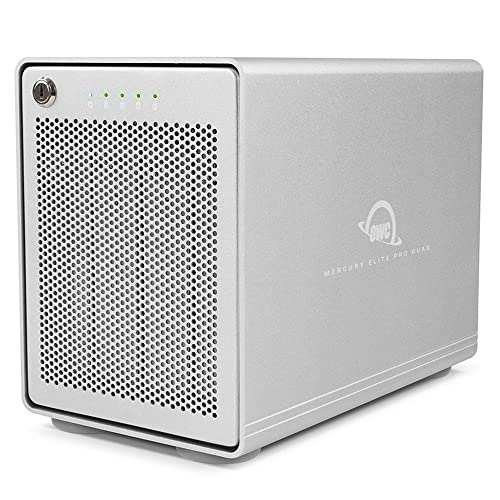
Designed for video editors who need reliable and fast storage, the OWC Mercury Elite Pro Quad RAID Ready (JBOD) 4-Bay Storage Enclosure offers impressive performance with speeds up to 947MB/s. You’ll enjoy its USB-C interface, compatible with both Mac and Windows PCs equipped with Thunderbolt 3. The enclosure features four universal drive bays, supporting both 2.5 and 3.5 drives, allowing you to customize your storage needs. Connecting is easy with the included USB-C cable, ensuring enhanced performance. Plus, you also get a 1-Year OWC Limited Warranty for peace of mind. Elevate your editing workflow with this robust storage solution.
Best For: Video editors and professionals requiring fast, reliable storage solutions for intensive workflows.
Pros:
- High performance with speeds up to 947MB/s, ideal for handling large video files.
- Versatile compatibility with both Mac and Windows PCs equipped with USB-C or Thunderbolt 3.
- Customizable storage options with four universal drive bays supporting 2.5 and 3.5 drives.
Cons:
- SoftRAID software is not included, which may be needed for advanced RAID configurations.
- Limited warranty of only 1 year, which may be shorter than some users expect for a storage solution.
- Potentially high cost compared to single drive solutions, depending on the drives used.
Yottamaster VN400RU3 4 Bay RAID Hard Drive Enclosure

The Yottamaster VN400RU3 4 Bay RAID Hard Drive Enclosure stands out as an excellent choice for video editors who demand high-capacity, reliable storage solutions. With support for up to 88TB, you can easily manage large video files. Its hardware RAID configurations, including RAID 0, 1, 5, and more, offer flexibility for data redundancy. You’ll appreciate the fast data transfer rates of up to 5Gbps via USB 3.0, compatible with both Windows and Mac. Plus, the aluminum design features effective cooling and hot-swapping capabilities for convenience. Overall, it’s a robust option for enhancing your video editing workflow.
Best For: Video editors and professionals who require high-capacity, reliable storage solutions for managing large video files.
Pros:
- Supports up to 88TB capacity, providing ample space for extensive media libraries.
- Flexible RAID configurations (RAID 0, 1, 5, etc.) for enhanced data redundancy and security.
- Fast data transfer speeds of up to 5Gbps via USB 3.0, ensuring efficient workflow.
Cons:
- Limited to SATA HDD/SSDs, which may not accommodate other types of drives.
- Aluminum construction can be prone to scratches and dents over time.
- Requires external power source, which may limit portability compared to other solutions.
Factors to Consider When Choosing a Raid Enclosure for Video Editing
When you’re choosing a RAID enclosure for video editing, you’ll want to contemplate several key factors. Think about your storage capacity requirements, the data transfer speed you need, and the available RAID configuration options. Don’t forget to assess the cooling system efficiency and the build material quality to guarantee you get the best performance.
Storage Capacity Requirements
Choosing the right RAID enclosure for video editing hinges on understanding your storage capacity requirements. First, determine the maximum storage you need, which can range from 20TB to over 110TB based on the number of bays and drive support. Assess how many drives you plan to use, as enclosures typically offer configurations like 2-bay or 4-bay setups, allowing for scalable solutions. Make certain the enclosure supports both 2.5-inch and 3.5-inch SATA HDDs/SSDs to accommodate various storage needs. Additionally, consider the RAID configurations available; RAID 0 offers speed while RAID 1 provides redundancy, impacting effective storage capacity. By carefully evaluating these factors, you can ascertain you select an enclosure that meets your video editing demands efficiently.
Data Transfer Speed
Data transfer speed plays a pivotal role in video editing, directly influencing how quickly you can access and manipulate large files. High-speed RAID configurations, like RAID 0, can exceed 500MB/s, which boosts your workflow efficiency considerably. Look for enclosures that support USB 3.2 Gen2, offering data transfer rates up to 10Gbps—this can cut down your backup and file transfer times notably. If you’re tackling demanding video editing tasks, consider NVMe SSDs in RAID setups that deliver speeds up to 40Gbps for quick file access and real-time playback. Also, verify your enclosure has effective heat dissipation mechanisms to prevent overheating during sustained high-speed operations, as this can impact performance and reliability.
RAID Configuration Options
Understanding the various RAID configuration options can greatly impact your video editing workflow. If you need high performance, RAID 0 is ideal, as it stripes data across drives for faster read/write speeds. For data security, consider RAID 1, which mirrors data on two drives, protecting your valuable projects from drive failures. RAID 5 offers a balance, combining striping with parity for recovery from a single drive failure while enhancing read performance. If you want both speed and redundancy, RAID 10 (1+0) is perfect for high-demand environments. Alternatively, JBOD (Just a Bunch of Disks) allows independent drive usage, granting flexibility, but lacks the redundancy and performance benefits of RAID configurations. Choose wisely for your editing needs!
Cooling System Efficiency
When setting up your RAID enclosure for video editing, you can’t overlook the importance of an efficient cooling system. High-performance drives generate significant heat during intensive tasks, which can lead to performance throttling or even drive failure. Look for enclosures with built-in cooling fans that operate quietly to minimize distractions in your studio. Effective heat dissipation is enhanced by designs featuring multiple ventilation holes and materials like aluminum that conduct heat well. Some models even include intelligent temperature control systems that adjust fan speeds based on internal heat levels, ensuring ideal cooling without unnecessary noise. Regularly monitoring temperatures within the enclosure helps prevent overheating, prolonging drive lifespan and maintaining consistent data transfer speeds during your editing sessions.
Build Material Quality
Choosing the right build material for your RAID enclosure can make a significant difference in your video editing experience. High-quality materials affect durability, heat dissipation, and overall performance during demanding tasks. For instance, aluminum alloy enclosures provide excellent heat conductivity, crucial for maintaining ideal temperatures during long editing sessions. A sturdy construction also protects your hard drives from physical shocks, ensuring their safety. Additionally, enclosures designed with noise-reducing features can create a quieter workspace, which is important in video editing studios. Finally, consider the weight of the enclosure; lighter materials can enhance portability, making it easier to set up your editing station on-location. Prioritizing build material quality will elevate your editing workflow.
Compatibility With Systems
Compatibility with various systems is vital for the smooth operation of your RAID enclosure in video editing. Confirm the enclosure works seamlessly with operating systems like Windows, Mac OS, and Linux for peak functionality. Look for enclosures that support USB interfaces, such as USB 3.2 or USB-C, to achieve high data transfer rates important for handling large video files. Additionally, consider enclosures compatible with both SATA HDDs and SSDs, giving you the flexibility to choose the best storage solution for your needs. It’s also significant to verify compatibility with your video editing software, as certain programs may require specific file systems or RAID configurations. Finally, make sure the enclosure supports the storage capacity and RAID setups necessary for your projects.
Portability and Design
Portability and design play an essential role in selecting a RAID enclosure for video editing, especially for professionals who often need to work on the move. You’ll want a lightweight, compact enclosure that’s easy to transport. Look for durable materials like aluminum, which not only enhances portability but also improves heat dissipation during intensive tasks. Opt for tool-free designs for quick installation and drive swapping, saving you valuable time on the go. A smaller footprint, ideally around 4.69 x 8.74 x 6.06 inches, makes it convenient to place next to your laptop or mobile setup. Finally, integrated cooling solutions like low-noise fans are crucial to keep your drives running smoothly during demanding editing sessions.