
When it comes to video production, having the right tools can make all the difference. PTZ controllers offer precision and control that can elevate your filming experience. Whether you’re handling live events or streaming sessions, choosing the right controller is essential. From customizable joystick controls to real-time monitoring features, there’s a lot to take into account. Let’s take a closer look at some of the best options available and how they can enhance your workflow.
AVKANS Pro PTZ Camera Joystick Controller with 5-inch Touch Screen

The AVKANS Pro PTZ Camera Joystick Controller with its 5-inch Touch Screen is perfect for churches and video production teams looking for an intuitive and versatile solution. With easy installation via Power over Ethernet, you’ll only need a single cable for setup. This controller supports multiple protocols, ensuring compatibility with various camera brands. You’ll enjoy extensive control over camera movements, auto focus, and custom settings through 6 user-defined keys. The simplified user interface allows you to manage network and camera parameters effortlessly. Plus, the free NDI license makes it an excellent choice for testing NDI functionalities in your productions.
Best For: Churches and video production teams seeking an intuitive and versatile camera control solution.
Pros:
- Easy installation with Power over Ethernet (PoE) using a single cable.
- Supports multiple protocols for compatibility with various camera brands.
- User-friendly interface with a 5-inch touch screen for effortless management of settings.
Cons:
- NDI functionality requires a license, which may not be ideal for all users.
- Potential bugs when previewing NDI feeds due to variations in RTSP URL formats.
- Limited to managing up to 100 camera shortcuts, which may not suffice for larger setups.
FoMaKo KC608 Pro NDI PTZ Camera Controller (Black)
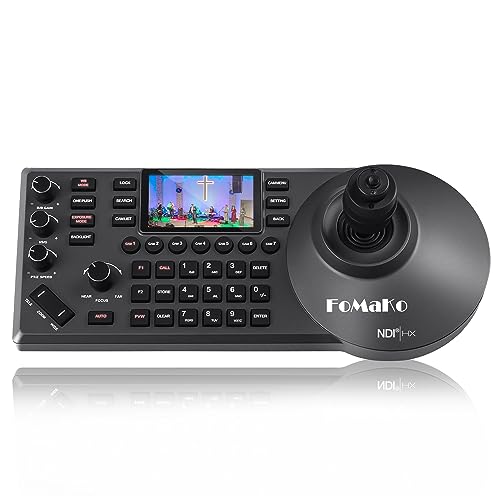
For professionals seeking seamless control over multiple PTZ cameras, the FoMaKo KC608 Pro NDI PTZ Camera Controller (Black) stands out with its PoE-powered design and ergonomic layout. It features a 4D precision joystick, allowing you to effortlessly maneuver up to 255 cameras using its seven selection shortcuts. The built-in LCD preview and backlit keys enhance usability in low-light settings. Plus, it’s compatible with major protocols like VISCA and PELCO, making integration a breeze. With a 3-year warranty and 24/7 support, you can trust the FoMaKo KC608 for your AV live streaming and production needs.
Best For: Professionals in the AV live streaming and production industry who need reliable control over multiple PTZ cameras.
Pros:
- Ergonomic design enhances user comfort during long sessions of operation.
- Supports multiple protocols (VISCA, PELCO-P & D), ensuring compatibility with a wide range of cameras.
- Built-in LCD preview and backlit keys facilitate easy operation in low-light environments.
Cons:
- Weight of 3.85 pounds may be cumbersome for some users during transport.
- Price point may be higher compared to basic camera controllers, potentially limiting access for smaller organizations.
- Limited to 255 cameras, which might not be sufficient for larger installations requiring more extensive control.
Tenveo NDI PTZ Camera Joystick Controller

Designed specifically for live streaming and event production, the Tenveo NDI PTZ Camera Joystick Controller stands out with its 7-inch LCD Quad-Screen that allows you to monitor up to four camera feeds in real-time. You’ll appreciate the 4D Joystick, offering variable-speed PTZ adjustments for precise control. With compatibility for NDI, VISCA, and other protocols, it integrates seamlessly with your existing setup. You can manage up to 255 cameras, track recordings, and replay movements effortlessly. Plus, Tenveo’s excellent customer support guarantees you have help whenever you need it, making this controller a solid choice for any professional environment.
Best For: The Tenveo NDI PTZ Camera Joystick Controller is best for professionals in live streaming, event production, and video conferencing who require precise camera control and monitoring capabilities.
Pros:
- Quad-Screen Monitoring: View and manage up to four camera feeds simultaneously, enhancing your ability to monitor dynamic environments.
- Versatile Compatibility: Supports multiple protocols (NDI, VISCA, Onvif, Pelco-D/P), ensuring integration with various cameras and streaming platforms.
- Excellent Customer Support: Comes with a 3-year warranty, lifetime technical support, and a 30-day money-back guarantee for peace of mind.
Cons:
- Limited Resolution on Quad-Screen: The Quad-Screen only supports up to 720P30, which may not meet the needs of all users looking for higher resolution.
- AI Auto Tracking Requires Firmware Upgrade: Users may need to invest time in updating firmware to access certain advanced features like AI tracking.
- Learning Curve: New users may face a learning curve when mastering the joystick controls and features for optimal use.
Tenveo NDI PTZ Camera with Joystick Controller Bundle

If you’re looking to elevate your video production game, the Tenveo NDI PTZ Camera with Joystick Controller Bundle is an exceptional choice. This bundle features a powerful AI Auto Tracking PTZ camera with impressive 30X optical zoom and 8X digital zoom, ensuring high-quality 1080P video. The joystick controller, equipped with a 7” LCD Quad-Screen, lets you manage up to four camera feeds effortlessly. With ultra-low latency and broad connectivity options, it’s perfect for live events like weddings and conferences. Plus, you get a three-year warranty and lifetime support, ensuring your investment is protected and your filming experience is seamless.
Best For: The Tenveo NDI PTZ Camera with Joystick Controller Bundle is best for churches, event organizers, and educators looking for a high-quality solution for live streaming and video production.
Pros:
- AI Auto Tracking enables seamless subject tracking during live events.
- Multiple Connectivity Options including SDI, HDMI, USB3.0, and PoE for versatile setup.
- Joystick Controller with a 7” LCD Quad-Screen allows for real-time monitoring and management of multiple camera feeds.
Cons:
- Higher Price Point compared to basic camera setups, which may not suit all budgets.
- Learning Curve for users unfamiliar with PTZ camera operation and joystick controls.
- Audio Device Not Included, requiring additional investment for complete audio-visual setup.
FoMaKo PTZ Camera with 20x Optical Zoom and AI Auto-Tracking
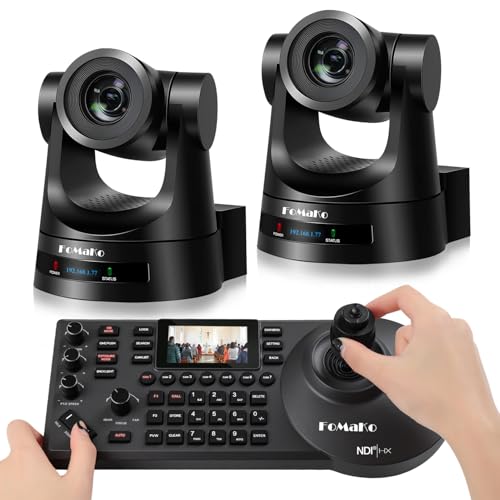
The FoMaKo PTZ Camera with 20x Optical Zoom and AI Auto-Tracking stands out as an ideal choice for live event producers and educators seeking high-quality video production. With its HD 1080p video quality and customizable AI tracking features, you’ll capture every moment seamlessly. The camera supports multiple control protocols, making it versatile for various setups, from churches to esports events. Plus, you can easily integrate it with software like vMix and OBS for live streaming. The built-in Gravity Sensor allows for diverse mounting options, ensuring you can adapt it to any environment for peak performance.
Best For: Live event producers and educators seeking high-quality video production with advanced tracking features.
Pros:
- High Video Quality: Delivers HD 1080p video with smooth motion, suitable for various applications.
- Customizable AI Tracking: Offers multiple tracking modes and sensitivity settings for enhanced performance during events.
- Versatile Control Options: Compatible with various control protocols and software, ensuring easy integration into different setups.
Cons:
- NDI Upgrade Limitations: NDI upgrade is only available upon request, which may not suit all users.
- Learning Curve: The variety of features and control options may require time to fully master.
- Price Point: May be considered expensive compared to basic PTZ cameras with fewer features.
PTZ Controller Camera POE Network Joystick with 5 Inch LCD Screen
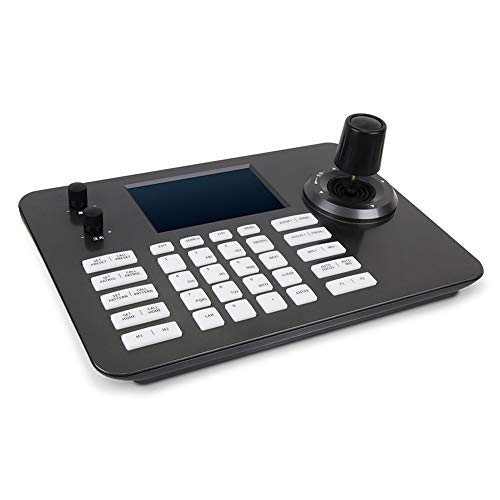
For professionals seeking seamless control in video production, the Hsility PTZ Controller stands out with its intuitive 4D joystick and 5-inch LCD screen. This POE network joystick is compatible with Linux systems and supports up to 999 IP PTZ cameras simultaneously. Its ergonomic design guarantees you can easily manage zoom and PTZ functions, while the tough aluminum alloy construction protects against damage. Whether you’re filming in government, education, or security, this controller’s preset patrol patterns and AB scan capabilities enhance your shooting experience. With a solid customer rating, it’s a reliable choice for any serious videographer.
Best For: Professionals in video production, security, and live event management who require advanced control over multiple PTZ cameras.
Pros:
- Multi-compatible with standard network protocols, allowing for versatile use with various systems.
- Ergonomic design featuring a 4D joystick and knob buttons for intuitive control of zoom and PTZ functions.
- Durable construction made of tough aluminum alloy, ensuring longevity and protection against damage.
Cons:
- Weighty at 2.2 pounds, which may be cumbersome for extended use or transport.
- Limited resolution at 480p on the LCD screen, which may not meet the needs of high-definition video production.
- Customer support details are not explicitly provided, which may lead to difficulties in resolving issues.
Tenveo NDI PTZ Camera Controller for Live Streaming
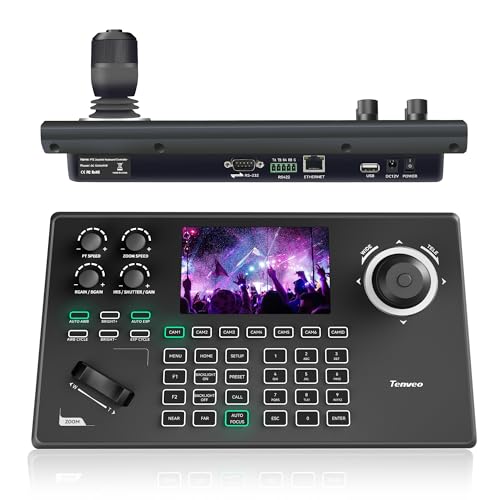
Designed with live streaming in mind, the Tenveo NDI PTZ Camera Controller (KB200MAX) stands out as the ideal choice for churches, broadcasters, and event organizers seeking seamless control over multiple cameras. Its 5-inch LCD screen and 4D joystick offer precise control, while the built-in NDI license simplifies camera operations. You can manage up to 255 PTZ cameras and switch quickly between seven, perfect for platforms like OBS and Zoom. With advanced recording features and easy connectivity options, this controller enhances your live streaming experience. Plus, Tenveo backs it up with a three-year warranty and lifetime technical support.
Best For: The Tenveo NDI PTZ Camera Controller is best for churches, broadcasters, and event organizers looking for efficient multi-camera control during live streaming.
Pros:
- User-friendly design with a 5-inch LCD screen and 4D joystick for precise camera control.
- Supports multiple protocols (NDI, VISCA, Pelco-D, Pelco-P), allowing compatibility with various PTZ cameras.
- Comprehensive support including a three-year warranty, lifetime technical assistance, and a 30-day money-back guarantee.
Cons:
- May have a learning curve for users unfamiliar with PTZ camera systems or advanced features.
- Limited to Tenveo cameras for some functionalities, potentially restricting options for users with existing camera equipment from other brands.
- Higher price point compared to basic camera controllers, which could be a consideration for budget-conscious users.
Tenveo NDI PTZ Camera Joystick Controller

With its intuitive 4D joystick control and real-time preview on a 5” LCD screen, the Tenveo NDI PTZ Camera Joystick Controller is perfect for video production professionals seeking seamless camera management. You can smoothly pan, tilt, zoom, and adjust settings like Iris and backlight with ease. This controller allows you to manage up to 255 PTZ cameras, enabling quick selection for seven, which speeds up your operations during events. It’s compatible with various protocols and offers multiple connection options, making setup effortless. Plus, with a 3-year warranty and lifetime support, you’ll have peace of mind while filming.
Best For: The Tenveo NDI PTZ Camera Joystick Controller is best for video production professionals and organizations needing precise control for live events, streaming, and conferencing.
Pros:
- Intuitive Control: The 4D joystick enables smooth and precise camera movements, enhancing operational efficiency.
- High Compatibility: Supports multiple protocols and connection options, making it versatile for various setups.
- Comprehensive Support: Comes with a 3-year warranty and lifetime technical support for peace of mind.
Cons:
- Learning Curve: May require time for users to fully understand all features and settings.
- Limited Quick Selection: Quick selection is limited to seven cameras, which may be restrictive for larger setups.
- Size of LCD: The 5” screen may be small for some users during complex operations.
KATOVJJTS PTZ Camera Controller with 5.5″ LCD Screen Preview

The KATOVJJTS PTZ Camera Controller stands out for its 5.5″ LCD screen, making it an excellent choice for video producers and live streamers who need real-time video preview capabilities. With support for 4K UHD input/output and NDI functionality, you can effortlessly manage multiple camera setups. The 4D joystick allows you to control movements, focus, and zoom speed, ensuring precision in your shots. Plus, its compatibility with various protocols like VISCA and PELCO enhances connectivity. You’ll appreciate the simplified installation with POE and HDMI output, making this controller an invaluable tool for your video production needs.
Best For: Video producers and live streamers who require real-time video preview and precise control over multiple PTZ cameras.
Pros:
- Supports 4K UHD input/output and NDI functionality for high-quality video production.
- Equipped with a 4D joystick for precise control over camera movements, focus, and zoom.
- Simplified installation with POE and HDMI output, allowing for easy multi-camera setups.
Cons:
- The 5.5″ screen size may be small for some users needing extensive monitoring.
- Limited to specific protocols, which may restrict compatibility with certain camera brands.
- The reliance on Ethernet for power and connectivity may require additional cabling infrastructure.
TONGVEO PTZ Camera Joystick Controller with LCD Screen
![TONGVEO PTZ Camera Joystick Controller with 5'' LCD Screen Preview, 4D Joystick, Built-in NDI License, Support PoE, VISCA, Pelco-D/P for Church Worship, Live Events, Streaming & Broadcast [windows]](https://m.media-amazon.com/images/I/41aax7g64YL._SL500_.jpg)
For anyone involved in professional broadcasting or live events, the TONGVEO PTZ Camera Joystick Controller stands out with its built-in 5-inch LCD Real-Time Preview Screen, allowing you to confirm shots effortlessly. Its 4D Variable-Speed Joystick guarantees precise camera movements, while the included NDI License supports low-latency control and preset calling. You can record sequences with the Track Recording function, enabling smooth automatic replays. With compatibility for multiple protocols, you can manage up to 255 cameras and switch between seven quickly. Utilizing Power over Ethernet (PoE) technology simplifies your setup, making it perfect for dynamic live streaming and field production.
Best For: Professionals involved in broadcasting and live event production who require precise control and multi-camera management.
Pros:
- Built-in 5-inch LCD Screen for real-time shot confirmation.
- Track Recording function allows for smooth automatic replay of camera movements.
- Multi-protocol compatibility supports a wide range of camera systems and up to 255 cameras.
Cons:
- May require technical knowledge for initial setup and configuration.
- Limited to specific firmware versions for full functionality with TONGVEO cameras.
- The price point may be higher compared to basic camera controllers.
Factors to Consider When Choosing a Ptz Controller for Video Production
When you’re selecting a PTZ controller for video production, you’ll want to take into account several key factors. Make certain it’s compatible with your camera brands and supports the necessary control protocols. Also, pay attention to the user interface design, joystick precision, and available connectivity options to guarantee a smooth experience.
Compatibility With Camera Brands
To guarantee a seamless video production experience, it is crucial to choose a PTZ controller that aligns with your camera brands. Confirm the controller supports multiple protocols like VISCA, Pelco-D/P, and NDI for compatibility across various models. If you plan on expanding your setup, look for controllers that can manage up to 255 PTZ cameras. Features like Power over Ethernet (PoE) simplify installation and reduce cable clutter, making your setup more efficient. A built-in LCD screen can enhance operational efficiency by providing real-time video previews. Finally, consider whether the controller integrates easily with popular live streaming software, confirming smooth operation across different camera systems and enhancing your overall filming experience.
Control Protocol Support
Control protocol support plays an essential role in selecting the right PTZ controller for your video production needs. It determines how well the controller integrates with various camera brands and models, ensuring smooth operation. Common protocols like VISCA, Pelco-D, Pelco-P, and NDI standardize control over pan, tilt, zoom, and other functions. If you choose a controller that supports multiple protocols, you’ll gain flexibility in managing different PTZ cameras, making it easier to adapt to various production environments. Some advanced controllers even support protocols like Onvif and RS232/RS422/RS485, enhancing compatibility with networked and serial camera systems. By opting for robust protocol support, you’ll effortlessly switch between camera systems without needing extra hardware or software adjustments.
User Interface Design
Choosing the right PTZ controller hinges considerably on user interface design, as a well-crafted interface can streamline your workflow and enhance overall performance during video production. A user-friendly interface with a touch screen of at least 5 inches simplifies setup and operation during live events. Ergonomic design features, like wrist rests and well-placed buttons, guarantee comfort and efficiency, allowing you to control camera functions for longer periods without fatigue. The ability to manage multiple camera feeds simultaneously, especially with quad-screen displays, allows for real-time monitoring and quick adjustments. Customizable settings, including user-defined keys and presets, enhance responsiveness, while clear visual feedback and intuitive joystick controls guarantee precise adjustments, facilitating smooth shifts and maintaining focus on your subjects.
Joystick Precision and Ergonomics
Precision and ergonomics are paramount when selecting a PTZ controller for video production, as they directly impact your ability to execute smooth and accurate camera movements. Look for controllers with high-quality 4D joysticks that offer variable-speed adjustments in panning, tilting, and zooming; this guarantees you can fine-tune your shots with ease. Ergonomic designs, featuring wrist rests or thoughtful layouts, can greatly reduce fatigue during long sessions. Customizable joystick sensitivity settings are a bonus, allowing you to tailor responsiveness to your shooting scenarios. Tactile feedback is essential for precise adjustments, especially during live events. Additionally, consider controllers that let you manage multiple cameras effortlessly, enhancing your production’s dynamic capabilities.
Connectivity Options Available
Connectivity is an essential factor when selecting a PTZ controller for video production, as it directly influences compatibility with your camera systems. Consider options like RS232, RS422, RS485, and Ethernet (IP) connections, which can affect how well your controller integrates with various cameras. Many controllers support Power over Ethernet (PoE), allowing you to power and transfer data through a single cable, simplifying installation. Verify the controller supports multiple communication protocols—like VISCA, Pelco-D, and NDI—for greater flexibility. If you’re working on complex setups, look for controllers that can manage multiple cameras, with some capable of controlling up to 255. Additionally, features like IP auto-discovery can greatly ease the setup process.
Video Preview Features
Once you’ve verified your PTZ controller has the right connectivity options, it’s time to contemplate the video preview features that will enhance your production experience. A larger LCD screen, around 7 inches, lets you view multiple camera feeds in real time, boosting your visibility during live events. High-definition capabilities, like 1080P30 or 4K UHD, guarantee you get clear visuals for precise monitoring and adjustments. Built-in video preview features provide instant feedback, helping you avoid blind spots and facilitating smooth changes. Look for support for various streaming protocols, such as NDI and RTSP, to seamlessly manage feeds from different camera brands. Finally, touch screen integration simplifies navigation, making it easier to switch between settings and camera feeds efficiently.
Budget and Warranty Considerations
When you’re choosing a PTZ controller for video production, budget and warranty considerations play an essential role in guaranteeing you get the best value for your investment. Establish a budget that balances features with performance, as prices can vary considerably by brand and functionality. Aim for controllers that come with at least a three-year warranty, demonstrating the manufacturer’s confidence in their product’s durability. Additionally, a 30-day money-back guarantee allows you to test the controller risk-free. Don’t overlook the importance of customer support and training resources; they can be invaluable for troubleshooting and maximizing your equipment. Finally, review user feedback and ratings to guarantee you’re making a well-informed decision on your purchase.