
A large projection screen deserves a mount that keeps the image aligned, supports the projector securely, and offers enough adjustment for your room layout. The right choice depends on more than load capacity alone.
We’ve gathered 10 projector mounts for large screens, covering adjustable ceiling mounts, telescoping wall hangers, and L-brackets for mounting compatible screens. Use the guide below to match the hardware to your projector, ceiling, and installation needs.
Best 10 Projector Mounts for Large Screens Picks for 2026
Heavy-Duty Choice
Amer Universal Large-Format Ceiling Mount

- Supports up to 25 kg
- ±25° tilt and 360° swivel
- Adjustable pole and cable management
Best For: Large-format projectors needing high load capacity
Wall-Clearance Solution
Elite Screens 6-Inch L-Brackets

- Extends compatible screens 6 inches
- Supports up to 75 lb
- Welded-metal pair with hardware
Best For: Compatible Elite Screens needing obstruction clearance
Precision Alignment Pick
Peerless-AV PRG-UNV Precision Mount
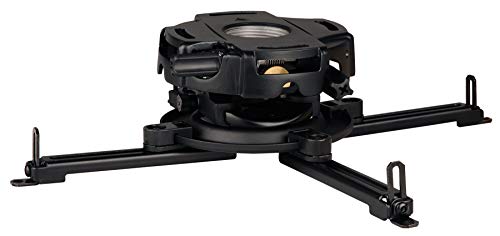
- Supports up to 50 lb
- Precision gear alignment system
- Pre-assembled ceiling-mount design
Best For: Multimedia projectors requiring precise alignment
Long-Drop Flexibility
SCREENPRO Adjustable Ceiling Mount

- 55–79-inch adjustable height
- Supports up to 33 lb
- Tilt, swivel, rotation, and cable management
Best For: Home or office setups needing a long projector drop
Best for High Ceilings
23–42in Extendable Ceiling Mount

- 23–42-inch adjustable drop
- 360° rotation and 90° tilt
- 11-pound capacity with adapters
Best For: High-ceiling, single-hole projector setups
Heavy-Duty Wall Pick
HT30 Telescopic Projector Hanger

- Supports up to 110 pounds
- 150–1040mm telescopic adjustment
- Wall mount with anti-detachment screws
Best For: Heavy projectors in offices, theaters, and meeting rooms
Most Versatile Design
25–39in Ceiling and Wall Mount

- 42-pound steel load capacity
- Ceiling or wall installation options
- Quick-release hook and cable management
Best For: Flexible installations with three- or four-hole projectors
Flexible Screen Clearance

- Supports up to 80 pounds
- 3.7–10.3-inch wall clearance
- Wall- or ceiling-mount options
Best For: Projector screens needing adjustable clearance
Precision Ultra-Short-Throw Setup
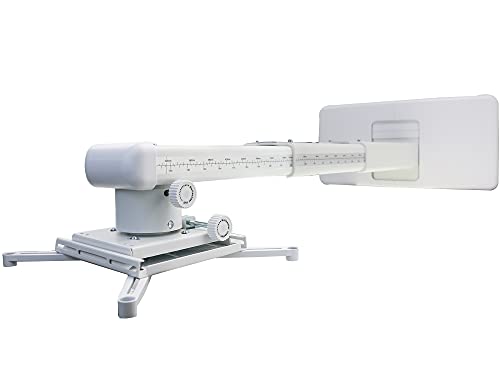
- 12.8–29.13-inch extension
- 33-pound load capacity
- Three-direction adjustment
Best For: Ultra-short-throw projector alignment
Heavy-Duty Screen Hanging

- Up to 132 pounds per pair
- 1.5–10-inch wall adjustment
- Works on wood, brick, or concrete
Best For: Large, removable projector screens
Heavy-Duty Choice – Amer Universal Large-Format Ceiling Mount
Amer Universal Projector Mount Kit Large Format Ceiling Projectors incl Adjustable Pole
Check Price On AmazonFor projector mounts for large screens, the Amer Universal Projector Mount Kit is a strong option when you need substantial weight capacity and flexible positioning. Its locking ball joint supports up to 25 kg, with tilt, swivel, height adjustment, and built-in cable management for a cleaner installation.
Best For: Large-format ceiling projectors and installations requiring high load capacity and adjustable drop length.
Pros:
- Supports projectors weighing up to 25 kg.
- Offers up to ±25° tilt and 360° swivel adjustment.
- Includes adjustable poles ranging from 127.77 mm to 577.7 mm.
- Includes cable management and M3–M6 mounting fasteners.
Cons:
- Its 5.1-pound weight may require careful ceiling installation.
- The mounting points are limited to a 380 mm diameter pattern.
With its high capacity and included height-adjustment hardware, this mount is well suited to demanding large-screen setups, provided the ceiling structure and projector mounting pattern are compatible.
Wall-Clearance Solution – Elite Screens 6-Inch L-Brackets
Among projector mounts for large screens, the Elite Screens ZVMAXLB6-W is designed to create extra wall clearance rather than attach directly to a projector. Its pair of welded-metal L-brackets positions compatible Elite Screens models up to 6 inches away from the wall.
Best For: Compatible Elite Screens installations where whiteboards, furniture, corners, or other obstructions require additional clearance.
Pros:
- Provides up to 6 inches of screen extension from the wall.
- Supports screens weighing up to 75 lb when properly installed.
- Uses reinforced, single-piece welded-metal construction.
- Includes two brackets and installation hardware.
Cons:
- Designed for select Elite Screens series rather than universal screen compatibility.
- Chains for extended drops are sold separately.
- This is a screen bracket, not a ceiling mount for a projector.
This kit is a practical clearance accessory for supported Elite Screens models, but buyers should verify screen compatibility and structural support before installation.
Precision Alignment Pick – Peerless-AV PRG-UNV Precision Mount
For projector mounts for large screens, accurate image alignment can be as important as load capacity. The Peerless-AV PRG-UNV uses precision gearing and two adjustment knobs to help fine-tune projector positioning, while its universal spider adapter supports multimedia projectors up to 50 lb.
Best For: Ceiling-mounted multimedia projectors where repeatable, precise image alignment is a priority.
Pros:
- Supports projectors up to 50 lb or 22 kg.
- Precision gears enable accurate image alignment.
- Two adjustment knobs simplify positioning.
- Pre-assembled design and wrench-access slots can speed installation.
Cons:
- The supplied notes do not specify tilt, swivel, or height-adjustment ranges.
- Compatibility still depends on the projector mounting pattern.
The PRG-UNV stands out for alignment control rather than extensive motion adjustment, making it a sensible choice when precise setup is central to a ceiling-mounted projection system.
Long-Drop Flexibility – SCREENPRO Adjustable Ceiling Mount
For projector mounts for large screens, the SCREENPRO Universal Ceiling Bracket is useful when the projector must hang well below the ceiling. Its retractable column adjusts from 55 to 79 inches, while the mounting arms, tilt, swivel, and rotation controls support flexible positioning.
Best For: Home or office installations needing a long adjustable drop and support for projectors up to 33 lb.
Pros:
- Adjusts from 55 to 79 inches in height.
- Supports projectors weighing up to 33 lb.
- Provides 30° tilt, 10° swivel, and 360° rotation.
- Includes quick-release hooks and hidden cable management.
Cons:
- Its 33-pound capacity is lower than some heavy-duty alternatives.
- The very long drop may require especially careful structural installation.
- Mounting arms accommodate patterns from 3.7 to 19 inches, so compatibility should be checked.
This mount is a flexible long-drop solution with useful positioning controls, particularly for rooms where a standard short ceiling mount cannot place the projector correctly.
Best for High Ceilings – 23–42in Extendable Ceiling Mount
For projector mounts for large screens installed in rooms with tall ceilings, this extendable ceiling model offers a 23–42-inch drop. Its adjustable ball head and broad compatibility make it practical for home, office, and other single-hole projector installations.
Best For: High-ceiling setups needing a long, adjustable drop.
Pros:
- Extends from 23 to 42 inches for high-ceiling installations.
- Provides 360° horizontal rotation and 90° vertical adjustment.
- Supports up to 11 pounds and includes thread adapters and mounting hardware.
Cons:
- Its 11-pound capacity may not suit heavier large-screen projectors.
- Compatibility is centered on projectors using a single mounting hole.
This mount is a flexible choice when installation height and easy angle adjustment matter most. Verify your projector’s mounting thread and weight before purchase.
Heavy-Duty Wall Pick – HT30 Telescopic Projector Hanger
For projector mounts for large screens in meeting rooms, theaters, and offices, this telescopic wall hanger emphasizes load capacity and fine positioning. Its arm adjusts from 150mm to 1040mm, while multi-angle controls help align the image with the screen.
Best For: Heavy projectors requiring a wall-mounted, adjustable support arm.
Pros:
- Supports projectors weighing up to 110 pounds.
- Telescopic length adjusts from 150mm to 1040mm.
- Includes multi-angle adjustment and anti-detachment screws.
Cons:
- Offers limited adjustment angles of ±5° in the listed directions.
- Designed for wall mounting rather than ceiling installation.
- It is not water resistant.
The HT30-BLK stands out for heavy-duty installations where a wall-mounted arm and precise positioning are priorities. Confirm that your wall and mounting surface can support the combined load.
Most Versatile Design – 25–39in Ceiling and Wall Mount
Among projector mounts for large screens, this steel model is useful when installation flexibility is important. It can function as a flush ceiling, telescoping ceiling, or wall mount, with a 42-pound capacity and adjustable reach for compatible three- or four-hole projectors.
Best For: Users who want one mount for ceiling or wall installation.
Pros:
- Supports projectors up to 42 pounds.
- Offers three installation configurations: flush ceiling, telescoping ceiling, and wall mount.
- Provides 25–39 inches of ceiling height adjustment and 20.5–27.9 inches of wall extension.
- Includes a quick-release hook, mounting hardware, and cable-management features.
Cons:
- Does not support vaulted ceilings.
- Adjustment is more limited than some models, with 60° rotation and 15° tilt.
- Compatibility is specified for three- or four-hole projectors.
This is a strong all-purpose option for rooms where the mounting location may change or where a substantial projector needs extra support. Check the hole spacing and ceiling type before installation.
Flexible Screen Clearance – PUTORSEN 12-Inch L-Brackets
For shoppers comparing projector mounts for large screens, the PUTORSEN 12-inch L-brackets offer a straightforward way to hang many manual or spectrum projector screens. Their steel construction, adjustable wall clearance, and wall- or ceiling-mount installation options make them useful when a screen needs to clear a corner, chalkboard, or television.
Best For: Home, classroom, or office setups needing adjustable screen clearance and broad compatibility.
Pros:
- Supports screens weighing up to 80 pounds.
- Adjusts screen placement from 3.7 to 10.3 inches from the wall.
- Supports wall- and ceiling-mount installation methods.
- Includes two brackets, mounting hardware, and a user manual.
Cons:
- Designed for projector screens rather than mounting the projector itself.
- Screen compatibility is described broadly, so buyers should verify their screen’s mounting points.
Choose this set when adjustable clearance and flexible installation matter more than a telescoping projector arm. The two-year manufacturer warranty is an added reassurance for a basic screen-mounting solution.
Precision Ultra-Short-Throw Setup – NC Telescopic Wall Mount
Among projector mounts for large screens, the NC telescopic wall mount is aimed at ultra-short-throw projectors that need precise positioning. Its extension adjusts from 12.8 to 29.13 inches, while three-direction adjustment and fine-tuning knobs help users align the projected image.
Best For: Ultra-short-throw projector installations requiring extended reach and detailed image alignment.
Pros:
- Telescopes from 12.8 to 29.13 inches from the wall.
- Supports up to 33 pounds.
- Provides vertical, horizontal, and angle adjustments.
- Universal mounting plate has four adjustable arms.
Cons:
- Maximum spacing between projector mounting holes must be under 12.5 inches.
- Its 33-pound capacity is lower than some heavy-duty screen brackets.
- The supplied details identify it as a wall mount, not a ceiling mount.
This mount is a practical fit when projector placement and fine alignment are the main priorities. Confirm the projector’s mounting-hole spacing and weight before ordering, especially for larger equipment.
Heavy-Duty Screen Hanging – Mount-It! 12-Inch L-Brackets
For large projection screens, the Mount-It! MI-631WHT provides a pair of heavy-duty L-brackets designed to hang most projector screens. The hooks move along a 12-inch bracket, allowing the screen to sit 1.5 to 10 inches from the wall, while included hardware supports installation on wood stud, brick, or concrete walls.
Best For: Large home, office, classroom, or presentation screens needing a high-capacity hanging solution.
Pros:
- Each bracket supports up to 66 pounds, for a stated total screen capacity of 132 pounds.
- Adjusts screen placement from 1.5 to 10 inches from the wall.
- Compatible with wood stud, brick, and concrete walls.
- Screen can be hung and removed while the brackets remain installed.
Cons:
- Designed for hanging projector screens rather than mounting projectors.
- Hardware is supplied, but wall type and fastener suitability should still be confirmed.
This is the strongest choice of the three for shoppers prioritizing stated load capacity. Its removable-screen design also suits spaces that alternate between movie viewing, presentations, and open-wall use.
How We Picked These Projector Mounts for Large Screens
We focused on mounts suited to larger home theaters, conference rooms, classrooms, and presentation spaces. Key considerations included stated weight capacity, adjustment range, mounting style, compatibility with universal projector patterns, and the practical needs of longer-throw or ceiling-mounted installations.
Because mounting hardware varies by projector and surface, product specifications should be checked before purchase. A mount’s advertised capacity is only one part of a safe installation; the ceiling or wall structure, fasteners, and projector attachment points must also be appropriate.
Quick Comparison
| Mount type | Best for | Main advantage | Watch for |
|---|---|---|---|
| Adjustable ceiling mount | Dedicated theater or media room | Flexible height and alignment | Ceiling structure and cable routing |
| Telescoping wall mount | Rooms without suitable ceiling access | Convenient reach and positioning | Stud or masonry strength |
| Screen L-brackets | Large fixed-frame or roll-up screens | Simple screen installation | These support the screen, not the projector |
| Precision gear mount | Frequent alignment adjustments | Fine-tuning after installation | Higher cost and projector compatibility |
Key Buying Factors for Projector Mounts for Large Screens
Weight Capacity and Mounting Pattern
Confirm the projector’s weight, including any attached accessories, stays comfortably below the mount’s rated limit. Then check the mount’s universal arms or plate against the projector’s threaded mounting points. “Universal” does not guarantee compatibility with every chassis.
Drop Length and Adjustment Range
Longer extension poles can help clear ceiling obstructions and achieve the correct image height, especially with high ceilings or large screens. Look for independent tilt, rotation, and roll adjustment so you can square the image without repeatedly relocating the hardware.
Ceiling or Wall Construction
Install into a structural ceiling, joist, stud, or properly rated masonry anchor rather than relying on drywall alone. For drop ceilings, use a suitable support system and safety cable where required. Wall-mounted options need enough clearance for the projector, cables, ventilation, and lens movement.
Image Geometry and Ventilation
Choose a mount that lets the projector sit at the correct throw height and angle. Excessive tilt may force digital keystone correction, which can reduce image quality. Leave the manufacturer’s recommended ventilation clearance around the projector.
Installation and Maintenance
Consider whether the mount includes hardware, a pole, cable-management features, or a security provision. Accessible adjustment points make future lamp, filter, cable, or projector servicing easier.
Who Should Buy Which Projector Mounts for Large Screens?
For a Permanent Home Theater
Choose a sturdy adjustable ceiling mount with enough drop length for your screen and seating arrangement. A precision-adjustment model is especially useful when accurate alignment matters.
For an Office or Meeting Room
A telescoping wall hanger can simplify installation where ceiling access is limited. Prioritize a compact design, dependable locking hardware, and a capacity that leaves a comfortable safety margin.
For a High Ceiling or Unusual Layout
Look for an extendable ceiling mount with a longer pole and broad tilt and rotation adjustment. Measure the finished distance from the mounting surface to the projector before ordering.
For Mounting a Large Projection Screen
Select L-brackets only when you need to hang the screen itself. They are useful for compatible fixed-frame or roll-up screens, but they do not replace a projector mount. Match bracket spacing and capacity to the screen’s frame and installation surface.