
Choosing among plotter printers for small businesses means balancing print width, accuracy, speed, operating costs, and available workspace. The right machine can produce professional CAD drawings, posters, plans, decals, or signage without outsourcing every job.
This roundup includes wide-format inkjet printers, vinyl cutters, a multifunction model, desktop equipment, and compatible plotter paper. Use the guide below to match capabilities and running costs to your business’s actual workload.
Best 10 Plotter Printers for Small Businesses Picks for 2026
Best Multifunction Pick

- 24-inch color large-format printing
- Flatbed scanning and direct enlargements
- Wi-Fi, Ethernet, USB, and cloud support
Best For: Small offices needing printing, scanning, and copying
Best Value Vinyl Cutter

- 34.3-inch maximum paper feed
- Adjustable pressure and cutting speed
- Imports SVG and PDF files
Best For: Windows-based signs, labels, decals, and crafts
Best for Durable Technical Prints

- 24-inch color large-format printing
- Water-resistant five-color ink
- Automatic media detection and color calibration
Best For: Plans, posters, signs, and job-site documents
Best Wide-Format Vinyl Cutter

- 53.1-inch maximum paper feed
- 49.6-inch maximum cutting width
- USB, U-Disk, and COMPIM interfaces
Best For: Wide signs, decals, banners, and heat-transfer work
Best Plotter Paper Supply
ACYPAPER 36-Inch CAD Paper Rolls

- Four 36-inch by 150-foot rolls
- 20 lb. bond paper with 96 brightness
- Made for compatible CAD and inkjet plotters
Best For: Architecture, engineering, and design offices needing wide-format paper
Best Vinyl Cutting Bundle

- Handles media up to 34 inches wide
- Dual blades support cutting, drawing, and scoring
- Includes starter vinyl, transfer tape, and software
Best For: Small sign shops and businesses making decals or vinyl graphics
Best Office Document Printer

- Prints, scans, copies, and duplexes
- Wireless connectivity with a 225-sheet tray
- Handles documents up to 8.5 by 14 inches
Best For: Home offices and small teams printing routine color documents
Best Overall
HP DesignJet T210 24-Inch Plotter Printer

- 24-inch roll printing for CAD, posters, and signage
- HP Click workflow software with error checking and auto-nesting
- Two-year HP Care Pack with onsite support included
Best For: Small businesses needing versatile technical and large-format printing
Best Compact Option
Epson SureColor T3170 Wireless Plotter
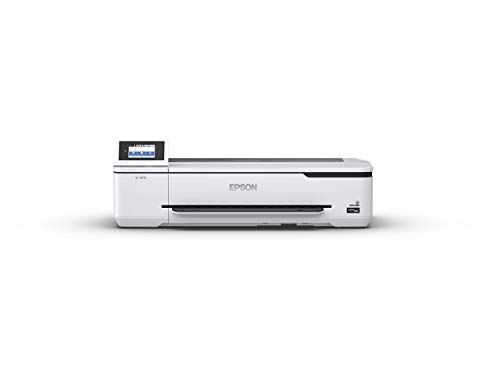
- Desktop-friendly 24-inch wide-format design
- A1/D-size prints in about 34 seconds
- Wireless and Wi-Fi Direct printing
Best For: Small offices with limited space and wireless printing needs
Best for Supported Workflows
HP DesignJet T230 24-Inch Plotter

- 24-inch media support with roll and sheet feeding
- Ethernet, USB, Wi-Fi, and remote control options
- Two-year HP Care Pack included
Best For: Connected offices printing CAD, maps, posters, and signage
Best Multifunction Pick – Canon imagePROGRAF TC-21M
For small businesses comparing plotter printers for small businesses, the Canon imagePROGRAF TC-21M stands out as a versatile 24-inch multifunction option. It combines large-format color printing with flatbed scanning, copying, USB flash-drive printing, and cloud connectivity.
Best For: Small offices that need large-format printing plus scanning and copying in one machine.
Pros:
- Prints roll media up to 24 inches wide and supports sizes through A1.
- Flatbed scanner enables direct enlargements and copying.
- Supports USB, Ethernet, Wi-Fi, cloud printing, and cloud scanning.
- Automatic sheet feeder holds up to 100 letter-size or 50 11-by-17-inch sheets.
Cons:
- Uses simplex printing rather than automatic duplexing.
- Its 2.7-inch touchscreen and 8 color pages-per-minute speed may feel limited for higher-volume work.
The TC-21M is a practical choice when space and equipment budgets favor one machine that handles printing, scanning, and copying. Its 2,400-by-1,200-dpi resolution and broad media support add flexibility for plans, posters, labels, and office documents.
Best Value Vinyl Cutter – VEVOR 34-Inch Vinyl Cutter
Businesses focused on signs, labels, decals, or heat-transfer projects may prefer this VEVOR machine over an inkjet model. As plotter printers for small businesses go, it offers a 34.3-inch maximum feed, adjustable cutting controls, and support for common design-file formats.
Best For: Windows-based sign-making, decoration, label, craft, and heat-transfer work.
Pros:
- Accepts material up to 34.3 inches wide with a 30.7-inch maximum cutting width.
- Adjustable cutting pressure from 20 to 500 grams and speed from 20 to 800 mm per second.
- Supports SVG and PDF imports, installed fonts, USB, and COMPIM connections.
- Double spring pinch rollers and roughened steel rollers are designed to improve feed stability.
Cons:
- This is a monochrome vinyl cutter, not a full-color large-format printer.
- It is listed as compatible with Windows computers and has no stated warranty.
The 34-inch VEVOR is best suited to businesses where precise cutting matters more than photographic or color output. Its adjustable controls and included supplies make it a capable entry point for signage and specialty-material workflows.
Best for Durable Technical Prints – Canon imagePROGRAF TM-240
The Canon imagePROGRAF TM-240 is a strong candidate for small businesses that need dependable 24-inch output. Its five-color ink set, 2,400-by-1,200-dpi maximum resolution, and water-resistant ink are useful for technical documents, posters, and signage that may encounter outdoor conditions.
Best For: Offices, contractors, and design teams producing sharp plans, signs, posters, and job-site documents.
Pros:
- Prints up to 24 inches wide on banner, glossy photo, high-resolution, and plain paper.
- Water-resistant ink is formulated for fine lines, sharp text, and outdoor applications.
- Automatic media detection identifies media type, length, and width.
- Supports Ethernet, USB, and Wi-Fi connectivity and includes a two-year manufacturer warranty.
Cons:
- At 88.2 pounds, it is relatively heavy for a small office.
- Its listed output speed is up to 3.2 pages per minute for a 24-by-36-inch sheet, so it is not intended for rapid bulk production.
- The supplied specifications describe basic scanning rather than a multifunction flatbed design.
The TM-240 prioritizes clean, consistent output and durability over compactness. Color calibration, a high-density printhead, and water-resistant ink make it particularly appealing when professional-looking technical or outdoor prints are central to the business.
Best Wide-Format Vinyl Cutter – VEVOR 53-Inch Plotter
For businesses producing especially wide decals, banners, or signs, this 53-inch VEVOR cutter provides substantially more working width than compact vinyl plotters. It combines a floor-stand design with adjustable cutting controls and support for several Windows file formats and interfaces.
Best For: Sign shops and decorators that need wide-format vinyl cutting for advertising, labels, crafts, and heat-transfer projects.
Pros:
- Handles material up to 53.1 inches wide with a 49.6-inch maximum cutting width.
- Offers adjustable cutting pressure from 20 to 500 grams and speed from 20 to 800 mm per second.
- Includes USB, U-Disk, and COMPIM connectivity and supports SVG and PDF imports.
- Double spring pinch rollers and roughened steel rollers are designed to help maintain feed stability.
Cons:
- It is a cutter rather than a full-color printer.
- The supplied notes state that it is not compatible with Mac systems.
- Warranty coverage is listed as none, so buyers should account for that risk.
The 53-inch VEVOR makes sense when maximum cutting width is the priority. Its large footprint and Windows-only compatibility require planning, but the capacity suits businesses handling oversized signage and other wide vinyl applications.
Best Plotter Paper Supply – ACYPAPER 36-Inch CAD Paper Rolls
For small businesses comparing plotter printers for small businesses, dependable paper stock is just as important as the printer itself. The ACYPAPER rolls offer a practical supply of wide-format bond paper for CAD drawings, plans, and other large-format inkjet work.
Best For: Architecture, engineering, and design offices that need a steady supply of wide-format printing paper.
Pros:
- Includes four 36-inch by 150-foot rolls on 2-inch cores.
- 20 lb. (80 GSM) paper balances flexibility with everyday durability.
- 96 brightness supports clear, detailed prints with strong contrast.
- Designed for compatible plotters and wide-format inkjet printers.
Cons:
- Uncoated bond paper is intended for technical and document printing rather than premium photo output.
- Requires a compatible wide-format printer and 2-inch core setup.
This is a straightforward replenishment option for businesses that already have a compatible plotter. The four-roll package can help reduce reorder frequency while supporting routine CAD and plan-printing workflows.
Best Vinyl Cutting Bundle – VEVOR 34-Inch Vinyl Cutter
Businesses evaluating plotter printers for small businesses may need cutting capability rather than conventional document printing. This VEVOR bundle combines a 34-inch vinyl cutter with dual blades, adjustable settings, starter materials, and SignMaster software for signs, decals, stickers, and other cut-media projects.
Best For: Small sign shops, makers, and commercial users producing vinyl graphics, decals, stickers, and transfer designs.
Pros:
- Supports media up to 34 inches wide and 1 mm thick.
- Dual-blade design can draw and cut or score without manual blade swaps.
- Adjustable 20–500 gf force and speed settings suit different materials.
- Includes sticker rolls, transfer tape, and licensed SignMaster software.
Cons:
- It is a vinyl cutter, not a conventional inkjet printer for paper documents.
- At 42.7 pounds, it requires a stable, dedicated workspace.
- Software and listed compatibility focus on Windows 7–11 and macOS systems.
With contour detection, pinch rollers, and claimed ±0.1 mm accuracy, this model is aimed at repeatable cutting tasks. It is a better fit for businesses whose output is adhesive graphics or heat-transfer media rather than CAD paper prints.
Best Office Document Printer – HP OfficeJet Pro 8125
For a small business considering plotter printers for small businesses but mainly printing everyday documents, the HP OfficeJet Pro 8125 is a compact office alternative. It combines color printing with scanning, copying, duplex printing, an automatic document feeder, and wireless connectivity.
Best For: Home offices and small teams printing reports, presentations, flyers, and routine business documents.
Pros:
- Prints up to 20 pages per minute in black and 10 in color.
- Includes automatic two-sided printing, scanning, copying, and a one-sided ADF.
- 225-sheet input tray and 2.7-inch touchscreen support regular office workflows.
- Supports wireless printing through dual-band Wi-Fi and the HP app.
Cons:
- Maximum media size is limited to 8.5 by 14 inches, so it is not a wide-format plotter.
- Requires original HP chips or circuitry in compatible cartridges.
- Instant Ink becomes a paid monthly service after the included three-month trial unless canceled.
This all-in-one makes sense when a business needs versatile office functionality instead of oversized CAD output. Its document-focused size and features are convenient, but buyers needing 24- or 36-inch plans should choose a true wide-format system instead.
Best Overall – HP DesignJet T210 24-Inch Plotter Printer
For small businesses seeking plotter printers for small businesses, the HP DesignJet T210 combines 24-inch roll printing with workflow tools aimed at CAD, technical drawings, posters, and other large-format jobs. Its included two-year onsite support plan adds practical reassurance for a busy office.
Best For: Architects, engineers, construction professionals, and businesses printing technical drawings, blueprints, maps, posters, signage, or sewing patterns.
Pros:
- Supports media rolls up to 24 inches wide and offers sheet and roll feeding.
- Includes automatic horizontal cutting and multi-size project handling.
- HP Click software provides PDF error checking, alerts, auto-nesting, and drag-and-drop file submission.
- Includes a two-year HP Care Pack with onsite support.
Cons:
- The optional automatic sheet feeder is required for sheets up to 13 by 19 inches.
- Uses HP 712 ink cartridges and an HP 713 printhead.
- At 59.9 pounds, it is less convenient to move than a compact desktop model.
The T210 is a strong all-around choice when reliable CAD and poster output, automated media handling, and included support matter more than a minimal footprint.
Best Compact Option – Epson SureColor T3170 Wireless Plotter
The Epson SureColor T3170 is a practical pick among plotter printers for small businesses that need wide-format output without dedicating much floor space. Its desktop-friendly design, touchscreen, and wireless connectivity support convenient office printing.
Best For: Small offices that need A1/D-size prints, wireless operation, and a compact printer for technical or general office work.
Pros:
- Prints accurate A1/D-size documents in approximately 34 seconds.
- Compact 20-by-38-by-9-inch design can fit on a desktop; an optional stand is available.
- Supports integrated wireless and router-free Wi-Fi Direct printing.
- High-capacity cartridges hold up to 50 mL of color ink and 80 mL of black ink.
Cons:
- The optional stand is sold separately.
- Its listed maximum media size is 24 inches, but the supplied details do not specify the full range of supported roll or sheet workflows.
- Coverage is a one-year limited warranty rather than the two-year support included with the HP options.
Choose the T3170 when workspace efficiency and wireless access are priorities. It offers wide-format capability in a notably compact package, though buyers should account for the separate stand and shorter warranty.
Best for Supported Workflows – HP DesignJet T230 24-Inch Plotter
The HP DesignJet T230 is designed for small businesses that need a network-ready 24-inch plotter for CAD, maps, posters, or signage. It combines roll and sheet feeding, an automatic cutter, and broad device compatibility with an included two-year Care Pack.
Best For: Technical line drawings, GIS maps, graphics, posters, signage, and offices that value Ethernet, USB, Wi-Fi, and remote control options.
Pros:
- Handles media up to 24 inches wide with sheet feed, roll feed, and automatic horizontal cutting.
- Offers Ethernet, USB, Wi-Fi, app, remote, and touchscreen control options.
- Includes a two-year HP Care Pack and starter ink cartridges.
- Designed to use 95% less ink for routine maintenance than other competitor plotter printers, according to the supplied product notes.
Cons:
- The automatic sheet feeder for sheets up to 13 by 19 inches is optional.
- Requires HP 712 genuine ink cartridges and an HP 713 printhead.
- Its listed print speed is approximately 1.7 pages per minute, with an initial page time of about 35 seconds.
The T230 is a sensible fit for connected offices that need flexible media handling and wide-format color output. Its included support and network connectivity make it particularly practical for shared business workflows.
How We Picked These Plotter Printers for Small Businesses
We selected products across the main categories small businesses commonly consider: 24-inch CAD and poster printers, desktop wide-format models, multifunction equipment, vinyl cutters, and plotter media. We prioritized practical factors such as maximum media width, connectivity, workflow versatility, warranty or service coverage, ease of use, and suitability for occasional or recurring business production.
Because a vinyl cutter and an inkjet plotter serve different purposes, this list is not a direct performance ranking. A cutter is designed for adhesive vinyl and other roll media, while a wide-format printer produces full-color drawings, plans, graphics, and posters. Confirm the product type before buying.
Quick Comparison
| Best For | What to Look For | Relevant Picks |
|---|---|---|
| CAD plans and technical drawings | 24-inch width, precise line output, roll handling | Canon imagePROGRAF TM-240, HP DesignJet T210, HP DesignJet T230 |
| Posters and color graphics | Wide-format inkjet output, wireless connectivity, compatible media | Canon imagePROGRAF TC-21M, Epson SureColor T3170 |
| Vinyl decals and signage | Cut width, adjustable force, dual blades, speed controls | VEVOR 34-inch and 53-inch cutter models |
| Small desktop workflows | Compact footprint and simple setup | Epson SureColor T3170 |
Key Buying Factors for Plotter Printers for Small Businesses
Print or Cut Function
First decide whether you need an inkjet printer, a vinyl cutter, or both. Printers are better for colored documents and posters; cutters are intended for shaping vinyl and similar materials. A multifunction printer can also help when scanning and copying are part of the workflow.
Width, Media, and Workspace
Twenty-four-inch models suit many architectural, engineering, and construction documents while remaining more manageable than larger equipment. A 34- or 53-inch cutter can handle bigger signs but requires suitable floor space, feed clearance, and storage for rolls.
Operating Cost and Maintenance
Compare ink or blade replacement costs, included media, maintenance requirements, and expected print volume. Use paper designed for wide-format inkjet printers, and check whether the machine supports the roll sizes and paper weights you already use.
Connectivity and Support
Wireless connectivity simplifies placement and mobile workflows, while dependable drivers and software compatibility matter for CAD files and cutting designs. Warranty length, onsite service, and replacement-part availability can be especially valuable for a small team that cannot afford extended downtime.
Who Should Buy Which Plotter Printers for Small Businesses?
Choose a 24-inch wide-format inkjet model if your business regularly produces CAD plans, construction drawings, maps, or posters. A desktop wide-format printer is a sensible choice when space is limited and production volumes are moderate. Consider a multifunction model if scanning, copying, and printing need to happen at one workstation.
Choose a vinyl cutter if your core work involves lettering, decals, window graphics, labels, or custom signs. Select a wider cutter only when your jobs justify the added footprint and material costs. If you need both printed graphics and cut vinyl, plan for a two-machine workflow or verify that a proposed device truly supports both functions rather than assuming “plotter” means printer and cutter.