
The best plotter printer for a home studio depends on more than maximum paper width. Your ideal model should match your workspace, print volume, media requirements, connectivity needs, and the type of work you create.
We compared compact wide-format printers with larger 24- and 36-inch DesignJet and imagePROGRAF models to help you choose a practical setup for CAD plans, artwork, photography, posters, and mixed creative projects.
Best 10 Plotter Printers for Home Studios Picks for 2026
Best Multifunction Pick

- 24-inch wide-format output through A1 sizes
- Flatbed scanning, copying, and enlargements
- USB, cloud, Wi-Fi, and Ethernet support
Best For: Home studios needing large-format printing plus scanning and copying
Best Compact Plotter
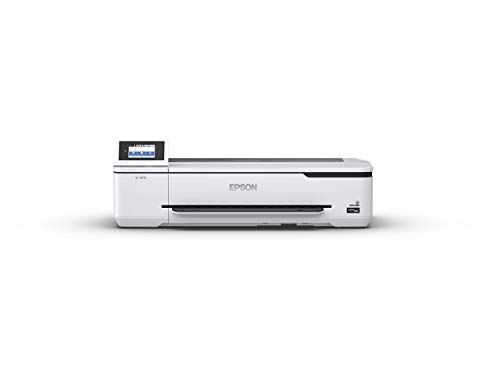
- Compact 24-inch desktop-friendly design
- A1/D-size prints in a stated 34 seconds
- Wireless and Wi-Fi Direct printing
Best For: Space-conscious studios printing wide-format documents
Best for Technical Lines

- Sharp lines and text at up to 2400 x 1200 dpi
- Water- and UV-resistant five-color ink
- Calibration supports consistent color output
Best For: Technical drawings, posters, signs, and durable wide-format documents
Best for Photo Studios

- Six-color photo ink and 5760 x 1440 dpi resolution
- Borderless printing up to 11 x 17 inches
- Built-in scanner, copier, and specialty-paper feed
Best For: Photo and craft studios printing detailed creative work
Best Value for Home CAD

- 24-inch roll printing with optional sheet feeding
- HP Click supports error checking and auto-nesting
- Wi-Fi, Ethernet, USB, and HP Smart connectivity
Best For: Home CAD, poster, map, and sewing-pattern printing
Best Warranty Package

- Includes a two-year HP Care Pack
- Handles media rolls up to 24 inches wide
- Automatic cutter and network connectivity included
Best For: Home studios prioritizing warranty coverage and 24-inch CAD printing
Best for Extra-Wide Prints

- Prints on rolls up to 36 inches wide
- Includes feeder, stand, and media bin
- Automatically switches between sheet and roll media
Best For: Dedicated home studios producing extra-wide CAD drawings and posters
Best 24-Inch CAD Workhorse
- Prints on rolls up to 24 inches wide
- HP Click supports easy multi-size jobs
- Includes 2-year onsite support
Best For: Home CAD, poster, map, and sewing-pattern printing
Best for Extra-Wide Studio Prints

- Supports rolls up to 36 inches wide
- Includes sheet feeder and media bin
- Prints up to 82 A1/D pages per hour
Best For: Large CAD plans, maps, posters, and technical renders
Best for Fast Secure Multi-Size Printing

- Prints up to 120 A1/D pages per hour
- Automatically switches between roll and sheet media
- Supports varied specialty media
Best For: Fast mixed-size technical, poster, signage, and map printing
Best Multifunction Pick – Canon imagePROGRAF TC-21M
For home studios that need more than printing, the Canon imagePROGRAF TC-21M is a versatile choice among plotter printers for home studios. Its 24-inch format supports roll media up to 24 inches wide and sizes through A1, while the flatbed scanner, copier, USB port, and cloud features make it useful for enlargements, reproductions, and everyday studio output.
Best For: Home studios needing large-format printing plus scanning and copying.
Pros:
- Flatbed scanner supports direct enlargements from smaller originals.
- Prints from a USB flash drive and supports cloud printing and scanning.
- Handles roll media up to 24 inches wide and sheet sizes through A1.
- Automatic sheet feeder holds up to 100 letter-size sheets or 50 11 x 17-inch sheets.
Cons:
- Its 38-inch width requires substantial workspace.
- Simplex operation does not provide automatic two-sided printing.
The TC-21M stands out when workflow flexibility matters as much as print size. It is a practical all-in-one studio machine rather than a print-only plotter, with Wi-Fi, Ethernet, and USB connectivity to fit different setups.
Best Compact Plotter – Epson SureColor T3170
The Epson SureColor T3170 is designed for studios that want wide-format output without a bulky floor-standing setup. As plotter printers for home studios go, it combines a compact 24-inch desktop-friendly design with A1/D-size printing, a touchscreen, high-capacity cartridges, and wireless or Wi-Fi Direct connectivity.
Best For: Space-conscious home studios printing technical drawings, layouts, and wide-format documents.
Pros:
- Produces A1/D-size prints in a stated 34 seconds.
- Compact design can fit on a desktop or optional stand.
- 4.3-inch color touchscreen simplifies print operation.
- Supports wireless, Wi-Fi Direct, USB, and Ethernet connections.
Cons:
- Print-only design lacks a built-in scanner or copier.
- Sheet capacity is limited to 30 sheets.
- Optional stand is sold separately.
The T3170 is a strong fit when footprint and straightforward operation are priorities. Its 24-inch media capability keeps it suitable for wide-format studio work, while wireless printing makes it convenient for computers, tablets, and smartphones.
Best for Technical Lines – Canon imagePROGRAF TM-240
The Canon imagePROGRAF TM-240 is a 24-inch large-format printer focused on clean lines, sharp text, and durable output. It is one of the more specialized plotter printers for home studios, using a five-color ink set, 2400 x 1200 dpi maximum color resolution, and water- and UV-resistant ink for posters, signs, and technical documents.
Best For: Home studios producing technical drawings, posters, signs, and detailed large-format documents.
Pros:
- Printhead and fine ink droplets are designed for clean lines and sharp text.
- Water- and UV-resistant ink suits some outdoor-oriented applications.
- Printer calibration helps maintain consistent color over time.
- Supports Ethernet, USB, and Wi-Fi connectivity.
Cons:
- At 88.2 pounds, it is substantially heavier than desktop-oriented options.
- Its 38.5-inch width and 29.4-inch depth demand dedicated space.
- Listed sheet capacity is limited to one sheet.
The TM-240 makes the most sense for users who value line quality and output durability over compactness. Its heavier chassis and dedicated footprint are easier to justify when a home studio regularly produces signage, construction documents, or other detailed wide-format work.
Best for Photo Studios – Epson Expression Photo XP-980
The Epson Expression Photo XP-980 is a smaller wide-format all-in-one aimed at photo-focused home studios. While it tops out at 11 x 17 inches rather than the larger sizes of dedicated plotters, its six-color Claria Photo HD ink system, 5760 x 1440 dpi resolution, borderless printing, scanner, and copier make it a capable option among plotter printers for home studios focused on photography and creative projects.
Best For: Photo and craft studios printing detailed borderless images up to 11 x 17 inches.
Pros:
- Six-color ink system is designed for professional-quality photos.
- Prints borderless images up to 11 x 17 inches.
- Flatbed scanner and copier add all-in-one versatility.
- Separate plain- and photo-paper trays plus a specialty-paper rear feed improve media flexibility.
Cons:
- Maximum 11 x 17-inch size is smaller than 24-inch plotter formats.
- The system is designed for Epson Genuine Cartridges.
- Its Wi-Fi-only printer connectivity may be less flexible for wired studio networks.
The XP-980 is best viewed as a compact photo wide-format printer rather than a conventional engineering plotter. Its small footprint and rich color system make it attractive for image-heavy creative work where 11 x 17-inch output is sufficient.
Best Value for Home CAD – HP DesignJet T210
HP DesignJet T210 Large Format 24-inch Plotter Printer, for Easy CAD & Poster Prints (8AG32D)
Check Price On AmazonThe HP DesignJet T210 is a practical choice among plotter printers for home studios that need accurate technical drawings, posters, maps, or sewing patterns without stepping up to a larger 36-inch machine. It supports 24-inch rolls, offers both roll and sheet feeding, and includes workflow tools designed to reduce setup and paper waste.
Best For: Home studios producing CAD drawings, professional patterns, posters, and other precise wide-format color prints.
Pros:
- Prints on media rolls up to 24 inches wide and supports sheets up to 13 by 19 inches with the optional feeder.
- HP Click provides PDF error checking, alerts, auto-nesting, and drag-and-drop file submission.
- Supports Wi-Fi, Gigabit Ethernet, USB, HP-GL/2, and remote printing through the HP Smart app.
- Automatic horizontal cutter and multi-size printing help simplify repeat jobs.
Cons:
- The automatic sheet feeder is an optional accessory rather than included equipment.
- It uses HP 712 ink cartridges and an HP 713 printhead.
- Its 24-inch maximum width may not suit studios producing extra-wide drawings or posters.
Choose the T210 when you want a capable, relatively compact 24-inch plotter for a home workspace. Its software and connectivity are particularly useful for mixed project files, while the optional sheet feeder leaves room to tailor the setup to your workflow.
Best Warranty Package – HP DesignJet T230
The HP DesignJet T230 is a strong fit for plotter printers for home studios when warranty coverage matters. Like the T210, it handles 24-inch rolls and optional wide sheets, but this configuration includes a two-year Care Pack and supports the same roll, sheet, and automatic-cutting workflow for technical and graphic projects.
Best For: Home architects, engineers, makers, and designers who want 24-inch wide-format printing with extended warranty support.
Pros:
- Includes an HP two-year Care Pack for added coverage beyond a standard limited warranty.
- Prints technical drawings, blueprints, posters, maps, signage, and sewing patterns on media up to 24 inches wide.
- Roll feed, sheet feed, and an automatic horizontal cutter support varied print jobs.
- Offers Wi-Fi, Ethernet, USB, touchscreen, and mobile or remote control options.
Cons:
- The automatic sheet feeder for up to 13-by-19-inch sheets is optional.
- It is limited to 24-inch-wide media, unlike the 36-inch T630.
- HP OEM 712 cartridges and the HP 713 printhead are specified for use.
The T230 is worth considering when service protection is a priority for a home studio that relies on its plotter. It provides the core capabilities needed for professional wide-format work while adding a two-year warranty package for greater ownership confidence.
Best for Extra-Wide Prints – HP DesignJet T630
The HP DesignJet T630 is the most capable option here for home studios that need plotter printers with extra-wide output. Its 36-inch roll capacity, included automatic sheet feeder, stand, and media bin make it better suited to larger drawings, posters, and maps than compact 24-inch models.
Best For: Home architecture, engineering, and construction studios producing wide technical drawings, renders, posters, and maps.
Pros:
- Supports media rolls up to 36 inches wide and sheets up to 13 by 19 inches.
- Includes an automatic sheet feeder, stand, media bin, spindle, and automatic sheet/roll switching.
- HP Click offers PDF error checking, alerts, auto-nesting, and drag-and-drop file preparation.
- Provides Wi-Fi, Gigabit Ethernet, USB, touchscreen, and printing from common CAD applications.
Cons:
- At 123 pounds and 52 inches wide, it requires substantially more studio space than the 24-inch models.
- It has a higher setup and handling burden because of its larger stand-mounted format.
- The included warranty is one year, shorter than the T230’s supplied two-year Care Pack.
Select the T630 if 24-inch output would constrain your projects. The included feeder and stand make it a more complete large-format setup, but its footprint and weight mean it is best for a dedicated home studio rather than a compact desk area.
Best 24-Inch CAD Workhorse – DesignJet T210
For home studios that handle technical drawings, sewing patterns, posters, or maps, the HP DesignJet T210 is a practical entry point among plotter printers for home studios. It supports rolls up to 24 inches wide, includes roll and sheet feeding, and uses HP Click software to simplify multi-size print jobs.
Best For: Home architects, engineers, designers, and makers producing CAD drawings, blueprints, posters, maps, or sewing patterns.
Pros:
- Supports media rolls up to 24 inches wide.
- Includes HP Click tools for PDF error checking, alerts, and auto-nesting.
- Offers roll feed, sheet feed, and an automatic horizontal cutter.
- Includes a 2-year HP Care Pack with onsite support.
Cons:
- The automatic sheet feeder for sheets up to 13 by 19 inches is optional.
- It has 500MB of memory and a listed speed of up to 59 A1/D prints per hour.
- It requires HP 712 ink cartridges and an HP 713 printhead.
The T210 is a sensible choice when a home studio needs wide-format capability without moving up to a 36-inch machine. Its software and remote printing support also help reduce setup friction for occasional or varied projects.
Best for Extra-Wide Studio Prints – DesignJet T650
The HP DesignJet T650 is a strong fit for home studios that need more width and higher throughput. As plotter printers for home studios go, its 36-inch roll capacity, included sheet feeder, automatic roll/sheet switching, and 1GB of memory make it well suited to larger technical drawings, maps, posters, and renders.
Best For: Studios producing extra-wide CAD drawings, construction plans, maps, posters, and precise technical renders.
Pros:
- Handles media rolls up to 36 inches wide.
- Includes an automatic sheet feeder and media bin for sheets up to 13 by 19 inches.
- Prints up to 82 A1/D-size pages per hour according to the supplied specifications.
- Provides Gigabit Ethernet, USB 2.0, and Wi-Fi connectivity.
Cons:
- Its listed dimensions are 52 inches wide by 37 inches high, requiring substantial studio space.
- It uses HP 712 cartridges and an HP 713 printhead.
- It is a dedicated print-only device rather than a multifunction printer.
The T650 makes the most sense when 24-inch media is too limiting and the studio has room for a larger-format workflow. Its included accessories and automatic media handling reduce manual intervention during mixed-size jobs.
Best for Fast Secure Multi-Size Printing – DesignJet T870
The HP DesignJet T870 is designed for home studios that want fast, flexible wide-format output with automated media handling. It supports 24-inch rolls, included sheet feeding, automatic roll/sheet switching, and a range of compatible paper and specialty media, making it one of the more versatile plotter printers for home studios.
Best For: Productive design studios printing technical drawings, renders, posters, signage, maps, and mixed media projects.
Pros:
- Prints up to 120 A1/D-size pages per hour according to the supplied specifications.
- Includes automatic roll/sheet switching, a media bin, and a horizontal cutter.
- Supports banner, photo, film, glossy, self-adhesive, coated, and bond media.
- Includes a 2-year Care Pack with onsite and phone support.
Cons:
- It weighs 82 pounds and measures 43 inches wide by 37 inches high.
- It supports rolls up to 24 inches wide rather than the 36-inch width available from the T650.
- It uses the T800-series HP 738 ink cartridges and HP 739 printhead.
The T870 is a compelling option for studios prioritizing speed and media flexibility over maximum roll width. Its automatic switching and included support package are particularly useful for frequent, varied print runs.
How We Picked the Best Plotter Printers for Home Studios
We evaluated these models by looking at maximum print width, intended workload, print quality, connectivity, ease of use, media handling, footprint, and support options. We also considered the different needs of home studios: limited floor space, occasional large-format jobs, color-sensitive creative work, and the need to avoid paying for commercial-level capacity that will rarely be used.
The selection includes desktop wide-format options, multifunction printers, 24-inch CAD and poster machines, and larger 36-inch models for users who routinely produce architectural drawings, banners, or oversized artwork.
Quick Comparison
| Best For | Recommended Type | Why It Fits |
|---|---|---|
| Compact creative studios | Desktop wide-format printer | Smaller footprint and simpler setup |
| CAD plans and posters | 24-inch plotter | Useful width without requiring a large commercial workspace |
| High-volume or oversized work | 36-inch plotter | Handles larger drawings and graphics with fewer tiling compromises |
| Photos and mixed media | Wide-format photo or multifunction printer | More flexibility for creative and document workflows |
Key Buying Factors for Plotter Printers for Home Studios
Print Width and Workspace
A 24-inch printer is often the most balanced choice for a home studio because it supports common CAD sheets, posters, presentation boards, and artwork while remaining easier to place. Choose a 36-inch model only if you regularly need full-size plans or very wide graphics, and measure doorways, desks, and clearance before buying.
Ink System and Output Quality
For technical drawings, prioritize sharp lines, dependable text, and economical everyday printing. For artwork and photography, pay closer attention to color handling, resolution, ink configuration, and the media types supported. A multifunction model may be worthwhile if scanning or copying is part of your workflow.
Media Handling and Connectivity
Roll support, automatic sheet feeding, media bins, and reliable wireless or network printing can save time. Check whether the printer accepts the paper sizes and finishes you actually use, rather than judging flexibility by maximum width alone.
Operating Cost and Support
Compare replacement ink capacity, printhead requirements, maintenance routines, and warranty coverage. Onsite support can be especially valuable when a large printer is difficult to transport or your studio depends on predictable turnaround.
Who Should Buy Which Plotter Printers for Home Studios?
Choose a compact desktop model if space is limited and your work is mostly occasional posters, graphics, or photo prints. Choose a 24-inch Canon or HP plotter for a versatile home design studio producing CAD plans, presentations, and medium-sized artwork. Choose a 36-inch HP DesignJet if oversized drawings and graphics are central to your business and you have room for a floor-standing setup. Choose a multifunction or photo-focused option if scanning, copying, or high-quality photographic output matters as much as technical plotting.