
Choosing among the best optical disc duplicators depends on more than advertised speed. Target count, supported formats, copy-protection features, and whether you need a standalone tower or portable USB drive all affect the right fit.
This roundup covers 10 options for home users, small businesses, media professionals, and organizations producing multiple copies of CDs, DVDs, Blu-ray discs, or archival M-Discs.
Best 10 Optical Disc Duplicators Picks for 2026
Best Multi-Copy Tower

- Standalone 1-to-3 duplication
- Up to 24x DVD and 52x CD-R writing
- Supports M-Disc and compatible copy-protected DVD video
Best For: Small-batch duplication and archival media
Best Portable Drive
USB 3.0/Type-C External DVD Burner

- Slim, portable computer-connected design
- USB 3.0 and Type-C interfaces
- Reads and writes common CD/DVD formats
Best For: Laptop-based disc reading and occasional burning
Best Single-Copy Tower

- Standalone one-to-one copying
- M-Disc and supported DVD copy protection
- Lifetime support plus one-year warranty
Best For: Business and archival single-copy workflows
Best High-Output Tower

- Creates up to five copies per cycle
- Standalone LCD-controlled operation
- Supports common CD/DVD and dual-layer media
Best For: Professional batch CD and DVD duplication
High-Capacity Blu-ray Tower
1-to-5 Blu-ray Disc Duplicator
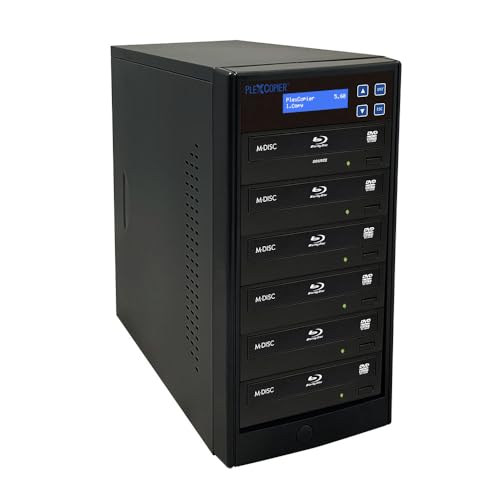
- Duplicates up to five target discs
- Supports Blu-ray, BDXL, M-Disc, CD, and DVD
- Windows and macOS compatibility
Best For: Higher-volume Blu-ray and DVD duplication
Portable USB Burner

- USB 3.0 and USB-C connectivity
- Plug-and-play CD/DVD burning
- Supports Windows, macOS, and Linux
Best For: Portable single-disc CD/DVD tasks
Reliable Three-Target Copier
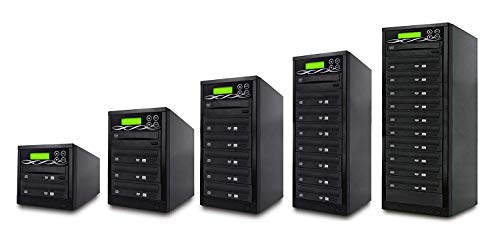
- Copies to three target discs
- Supports DVD, dual-layer DVD, and CD media
- Includes verify, compare, and test functions
Best For: Routine small-batch DVD/CD production
Best M-Disc 1-to-5 Tower

- Standalone operation requires no PC
- Supports M-Disc DVD recording
- Duplicates one disc to five targets
Best For: Business users needing archival media support
Best Format-Flexible Tower
Standalone 1-to-5 CD/DVD Duplicator

- Standalone design needs no PC
- Handles several specialized CD formats
- Creates mix-compilation audio CDs
Best For: Audio and CD-format duplication workflows
Best High-Volume Tower
24X SATA 1-to-7 CD/DVD Duplicator

- Copies one master to seven discs
- Supports M-Disc archival recording
- Writes DVDs at up to 24x
Best For: Businesses handling larger duplication batches
Best Multi-Copy Tower – 1-to-3 M-Disc DVD Duplicator
PlexCopier 24X 1 to 3 CD DVD M-Disc Supported Duplicator Copier Tower with Free Copy Protection
Check Price On AmazonThis 1-to-3 tower is a practical choice among optical disc duplicators when you need three copies per cycle without connecting a computer. It supports DVD writing up to 24x, CD-R writing up to 52x, and M-Disc DVD media for long-term archiving.
Best For: Small-batch DVD and CD duplication, M-Disc archiving, and creating copy-protected DVD video copies with supported OptoDisc MID media.
Pros:
- Standalone operation requires no PC.
- Duplicates up to three discs at once.
- Supports M-Disc DVD media and up to 24x DVD writing.
- Can create supported copy-protected DVD video copies.
Cons:
- Will not copy encrypted discs.
- Copy-protection capability requires compatible OptoDisc MID media.
- Its plastic enclosure weighs about 14 pounds.
Choose this PlexCopier when three simultaneous targets offer the right balance of throughput and footprint. It is more purpose-built than a computer-based drive, but buyers should confirm their media and source discs are compatible.
Best Portable Drive – USB 3.0/Type-C External DVD Burner
This slim Amicool drive is a computer-connected option for buyers who want portable optical disc access rather than a dedicated tower. Its USB 3.0 and USB Type-C interfaces support plug-and-play use on compatible Windows, macOS, and Linux computers.
Best For: Laptop users who need a lightweight CD/DVD reader, writer, and burner for travel, home, or office use.
Pros:
- Compact design includes a built-in cable.
- Offers both USB 3.0 and USB Type-C connectivity.
- Supports common DVD+R, DVD-R, CD-R, and CD-RW media.
- Works with Windows, macOS, and Linux computers.
Cons:
- Requires a computer and does not operate as a standalone duplicator.
- Does not support Blu-ray, DVD-RAM, or ChromeOS.
- Direct USB connection may be needed for adequate power.
This drive suits occasional disc burning and reading, especially when portability matters. It is not the right choice for multi-disc optical disc duplicators or standalone batch copying, and it is intended for computers rather than TVs, tablets, consoles, or car stereos.
Best Single-Copy Tower – 1-to-1 M-Disc DVD Duplicator
PlexCopier 24X 1 to 1 CD DVD M-Disc Supported Duplicator Copier Tower with Free Copy Protection
Check Price On AmazonThis 1-to-1 PlexCopier is a straightforward standalone choice among optical disc duplicators when one copy per cycle is sufficient. It supports DVD writing up to 24x, CD-R writing up to 52x, and M-Disc DVD recording without requiring a PC.
Best For: Businesses and users who need dependable single-disc duplication, M-Disc archiving, and supported copy-protected DVD video production.
Pros:
- Standalone operation eliminates the need for a computer.
- Supports M-Disc DVD media for archival recording.
- Offers up to 24x DVD and 52x CD-R write speeds.
- Includes lifetime technical support and a one-year parts-and-labor warranty.
Cons:
- Produces only one target copy per cycle.
- Will not copy encrypted discs.
- Copy-protected DVD video creation requires compatible OptoDisc media.
This tower is a sensible fit when ease of operation and support matter more than high-volume output. Its single-target design keeps the workflow simple, while M-Disc support adds an archival option for compatible media.
Best High-Output Tower – 1-to-5 SATA DVD Duplicator
For higher-volume jobs, this five-target BestDuplicator provides one-to-five standalone duplication without a computer. Its LCD interface, automatic format detection, and test, verify, and compare functions are designed to simplify repeat CD and DVD production.
Best For: Professional or organizational workflows that need up to five DVD copies per cycle across common CD and DVD media formats.
Pros:
- Burns up to five target discs per cycle.
- Standalone design does not require a computer.
- Supports DVD+/-R, DVD+/-RW, dual-layer DVD, CD-R, and CD-RW media.
- Includes test, verify, compare, auto-analysis, and self-diagnostic functions.
Cons:
- Its approximately 26-pound tower is relatively heavy.
- Will not copy encrypted discs.
- Designed for CD/DVD duplication rather than Blu-ray media.
This is the strongest throughput choice in the group for users who regularly need several physical copies at once. The verification tools and broad listed media support add useful safeguards, but its size and weight make it less suitable for casual or portable use.
High-Capacity Blu-ray Tower – 1-to-5 Blu-ray Disc Duplicator
PlexCopier 1 to 5 Blu-ray BD BDXL M-Disc CD DVD Duplicator Copier Tower with FREE Copy Protection
Check Price On AmazonFor buyers comparing optical disc duplicators for larger copying jobs, this PlexCopier tower provides five target drives and supports Blu-ray, BDXL, M-Disc, CD, and DVD media. Its tower form is better suited to a dedicated workstation than occasional portable use.
Best For: Home offices, media teams, and users who need multi-disc Blu-ray and DVD duplication.
Pros:
- Copies to up to five target discs at once.
- Supports Blu-ray, BDXL, M-Disc, CD, and DVD formats.
- Offers listed write speeds of up to 52x for supported media.
- Compatible with Windows and macOS systems.
Cons:
- At 17 pounds, it is not designed for easy portability.
- Its multi-drive tower format may be more equipment than occasional users need.
This is the most capable option here for higher-volume optical duplication and broader disc-format support, provided you have room for a dedicated tower.
Portable USB Burner – Slim External CD/DVD Drive
This portable optical disc duplicator-style drive is a practical choice for laptops and desktops that lack an internal optical drive. It connects through USB 3.0 or USB-C and supports plug-and-play CD/DVD reading and burning.
Best For: Mobile users who need occasional CD or DVD burning, playback, backups, or software installation.
Pros:
- Includes both USB 3.0 Type-A and USB-C connectivity.
- Plug-and-play operation requires no drivers.
- Supports up to 24x CD and 8x DVD read/write speeds.
- Works with Windows, macOS, and Linux.
Cons:
- Does not support Blu-ray, 3D, or 4K discs.
- It is a single external drive rather than a multi-target duplicator.
- Windows 11 requires a media player for playback.
Choose this BRIGHTSHOW drive for portability and everyday CD/DVD tasks, but look to a dedicated tower if simultaneous multi-disc duplication is your priority.
Reliable Three-Target Copier – DVD/CD Disc Duplicator
For straightforward optical disc duplicators with dedicated burners, this BestDuplicator model can copy to three targets and supports common DVD and CD blank-media standards. Its built-in functions also cover testing, verification, comparison, and source-disc analysis.
Best For: Small offices, schools, and users who regularly produce several DVD or CD copies per job.
Pros:
- Duplicates to three target discs simultaneously.
- Supports DVD+/-R, DVD+/-RW, dual-layer DVD, CD-R, and CD-RW media.
- Includes Copy, Test, Verify, and Compare functions.
- Includes password protection, self-diagnostics, and a one-year warranty.
Cons:
- Supports DVD and CD media but not Blu-ray.
- Its listed maximum DVD speed is 16x, below the listed CD maximum.
This is a balanced dedicated duplicator for routine DVD/CD production, especially when verification and administrative controls matter more than Blu-ray support.
Best M-Disc 1-to-5 Tower – 24X SATA CD/DVD Duplicator
This standalone optical disc duplicator is designed for businesses that need to copy one master CD or DVD to five discs without using a computer. It supports up to 24x DVD writing, 52x CD-R writing, M-Disc DVD media, and optional free copy protection for DVD video copies made with compatible OptoDisc MID media.
Best For: Business users who need archival M-Disc support and five-disc duplication capacity.
Pros:
- Operates independently without a PC.
- Supports up to 24x DVD and 52x CD-R write speeds.
- Can record to long-life M-Disc DVD media.
- Offers free copy protection for compatible DVD video copies.
Cons:
- Cannot copy encrypted or copy-protected source discs.
- Its 17-pound tower design takes up dedicated workspace.
- Copy-protection functionality requires compatible OptoDisc MID media.
Choose this PlexCopier when M-Disc recording and standalone operation matter more than compactness. Its five-target layout suits recurring business duplication tasks, while the stated encryption limitation should be considered before purchase.
Best Format-Flexible Tower – Standalone 1-to-5 CD/DVD Duplicator
This standalone optical disc duplicator is a practical choice for copying one disc to five targets without a computer. It supports up to 24x DVD writing, recognizes common CD formats and special formats such as CD-TEXT and ISRC, and can compile tracks from multiple sources onto a single audio CD.
Best For: Users who need broad CD format support and mix-compilation audio CD creation.
Pros:
- Works without a PC.
- Recognizes common CD formats plus CD-TEXT, ISRC, and over-burned CDs.
- Can compile multiple tracks from different sources onto one audio CD.
- Includes a stated one-year warranty.
Cons:
- Will not copy discs with copy-protection features.
- The supplied specifications list up to 24x DVD writing but do not state a CD-R write speed.
- Its tower form factor is less convenient where desk space is limited.
The Optodisc OPTO-S5T-DVD-BK is a strong fit for audio-focused duplication workflows, especially when format recognition and compilation features are useful. Confirm your source media is not protected before relying on it for a specific project.
Best High-Volume Tower – 24X SATA 1-to-7 CD/DVD Duplicator
For larger duplication batches, this standalone optical disc duplicator copies one master to up to seven discs at a time. It supports up to 24x DVD and 52x CD-R writing, M-Disc DVD recording, and free copy protection for DVD video copies made with compatible OptoDisc MID media.
Best For: Businesses needing higher-volume seven-disc duplication with M-Disc support.
Pros:
- Handles up to seven target discs in one duplication cycle.
- Operates without requiring a PC.
- Supports M-Disc DVD media for archival recording.
- Offers up to 24x DVD and 52x CD-R write speeds.
Cons:
- Cannot copy encrypted discs.
- At 22 pounds, it is a relatively heavy tower.
- Copy-protection creation requires compatible OptoDisc MID media.
This PlexCopier model is the better match when seven simultaneous copies can reduce production time. Its larger capacity is useful for business workflows, but buyers should account for the tower’s weight and the restriction against copying encrypted sources.
How We Picked These Optical Disc Duplicators
We compared the selected Optical Disc Duplicators by practical capacity, supported media, operating style, connectivity, and intended workload. The list includes standalone towers with one to seven target drives, plus portable external drives for users who need occasional disc reading or burning from a computer.
We also considered features that influence day-to-day use, including SATA drive architecture, advertised write speed, Blu-ray and BDXL support, M-Disc compatibility, included copy-protection tools, and ease of setup. Because specifications and included accessories can vary, verify the seller’s current listing before purchase.
Quick Comparison
| Type | Best For | Main Advantage | Watch For |
|---|---|---|---|
| 1-to-1 tower | Small copying jobs | Lower cost and compact capacity | Slower batch production |
| 1-to-3 or 1-to-5 tower | Regular duplication | Good balance of throughput and price | Requires dedicated workspace |
| 1-to-7 tower | Higher-volume production | More copies per cycle | Higher upfront cost and power use |
| Blu-ray tower | HD video and large data sets | Supports Blu-ray, BDXL, and often DVD/CD | Blank media costs more |
| Portable USB drive | Occasional burning or reading | Compact and computer-powered | Usually not a true multi-target duplicator |
Key Buying Factors for Optical Disc Duplicators
Target Count and Workload
The number of target drives determines how many copies can be produced in one cycle. A 1-to-1 model suits occasional duplication, while 1-to-3 and 1-to-5 systems are better for recurring business, event, educational, or archival work. Choose a 1-to-7 unit when reducing operator time matters more than minimizing cost.
Disc Formats and Capacity
Confirm whether you need CD, DVD, Blu-ray, BDXL, or M-Disc support. A DVD-only tower cannot handle Blu-ray projects, and not every drive supports every blank-disc capacity. M-Disc compatibility is useful for long-term archival workflows, but the media must also be rated for the required format and speed.
Standalone Operation Versus USB Connectivity
Standalone towers copy directly from a source disc or supported source drive without requiring a computer. Portable USB models are more convenient for laptops and occasional jobs, but they typically depend on software and a host computer. Check whether the computer has USB-A, USB-C, or requires an adapter.
Speed, Reliability, and Controls
Advertised 24X speeds are maximum ratings, not guaranteed results for every disc. Real-world performance depends on media quality, source data, drive condition, and verification settings. Look for straightforward controls, status displays, burn verification, and reliable cooling if the unit will run repeated batches.
Who Should Buy Which Optical Disc Duplicators?
Choose a 1-to-1 duplicator for light home, office, or occasional project use. Choose a 1-to-3 or 1-to-5 tower for routine duplication with a sensible balance of throughput and cost. Choose a 1-to-7 model for organizations or businesses producing larger batches regularly.
Choose a Blu-ray duplicator when your projects include HD video, BDXL, or large data archives. Choose a portable external drive when you mainly need a compact CD/DVD reader-writer for a laptop rather than a dedicated production system.