
Small businesses often need reliable, repeatable disc production without investing in a full replication service. The right duplicator can streamline event media, training materials, customer deliverables, archives, and promotional content.
This roundup compares 10 standalone optical disc duplicators across copying speed, target capacity, media compatibility, and ease of use, helping you match production volume and disc format to your workflow.
Best 10 Optical Disc Duplicators for Small Businesses Picks for 2026
Best Standalone Archival Pick
24X 1-to-1 DVD/M-Disc Duplicator

- Standalone operation requires no PC
- Supports M-Disc archival media
- Up to 24x DVD and 52x CD-R writing
Best For: Small offices needing one-at-a-time archival disc duplication
Best Three-Disc Value
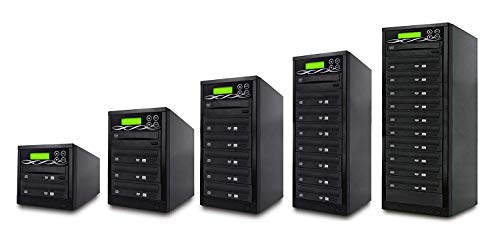
- Copies to three discs simultaneously
- Supports broad DVD and CD media formats
- Includes verify, compare, and password features
Best For: Routine small-business DVD and CD production
Best Ease-of-Use Pick

- Automatically starts after disc detection
- Works without a computer
- Supports M-Disc and high write speeds
Best For: Small offices wanting simple one-to-one duplication
Best Multimedia Backup Pick
Flash, Blu-ray, DVD & CD Duplicator

- Copies across flash media and optical discs
- Supports Blu-ray, DVD, and CD workflows
- Automatically spans oversized data across discs
Best For: Mixed-media backup and archiving tasks
Compact Starter
Standalone 1-to-1 DVD/CD Duplicator

- Standalone operation requires no PC.
- Supports up to 24x DVD and 52x CD-R writing.
- Handles common CD formats and M-Disc DVD media.
Best For: Small offices needing occasional one-to-one CD/DVD duplication
Batch Builder
1-to-5 Standalone CD/DVD Duplicator

- Duplicates up to five target discs in a run.
- Works without a PC and writes DVDs up to 24x.
- Supports audio CD compilation from multiple tracks.
Best For: Small-batch CD/DVD production and audio compilation
Format Flex
Standalone 1-to-1 Blu-ray/DVD/CD Duplicator

- Copies Blu-ray, BDXL, DVD, CD, and M-Disc media.
- Runs standalone without a PC.
- Writes BD-R up to 16x, DVD up to 24x, and CD-R up to 52x.
Best For: Small businesses needing one-to-one Blu-ray and optical-media duplication
Best Standalone 1-to-7 DVD Tower

- Standalone copying with no PC required
- DAO, TAO, and Mix Tape audio modes
- Up to 24x DVD and 52x CD-R writing
Best For: Small businesses duplicating standard discs and audio CDs
Best Protected-Disc Option

- Standalone 1-to-7 duplication
- Creates protected DVD-video copies with OptoDisc MID media
- Supports M-Disc and up to 24x DVD writing
Best For: DVD-video production and archival M-Disc workflows
Best High-Volume Blu-ray Tower

- Eleven target drives for larger batches
- Supports Blu-ray, M-Disc, DVD, and CD media
- Standalone operation with automatic format recognition
Best For: Higher-volume businesses copying multiple disc formats
Best Standalone Archival Pick – 24X 1-to-1 DVD/M-Disc Duplicator
PlexCopier 24X 1 to 1 CD DVD M-Disc Supported Duplicator Copier Tower with Free Copy Protection
Check Price On AmazonFor small businesses seeking optical disc duplicators for small businesses, this standalone 1-to-1 tower offers straightforward disc-to-disc copying without a computer. It supports DVD and CD media, M-Disc recording, and up to 24x DVD or 52x CD-R write speeds.
Best For: Small offices, professional duplication tasks, and businesses that need M-Disc archival support.
Pros:
- Operates without a PC.
- Supports M-Disc DVD media for long-term archival recording.
- Offers up to 24x DVD and 52x CD-R write speeds.
- Includes lifetime technical support and a one-year parts-and-labor warranty.
Cons:
- Copies only one target disc at a time.
- Will not copy encrypted discs.
- Copy-protection functionality requires compatible OptoDisc MID media.
This is a practical choice when reliability, standalone operation, and archival compatibility matter more than producing multiple copies simultaneously.
Best Three-Disc Value – 1-to-3 DVD/CD Duplicator
This 1-to-3 tower is designed for small businesses that need to make several DVD or CD copies in one run. Its built-in burners, automatic source-disc analysis, verification tools, and broad blank-media support make it a practical production-focused option.
Best For: Offices and businesses producing up to three DVD or CD copies per duplication cycle.
Pros:
- Duplicates to three target discs at once.
- Supports DVD±R, DVD±RW, dual-layer DVD, CD-R, and CD-RW media.
- Includes copy, test, verify, and compare functions.
- Password protection helps prevent unauthorized use.
Cons:
- Write speeds are limited to up to 16x for optical media.
- Designed for DVD and CD duplication rather than Blu-ray.
- Plastic enclosure may be less substantial than heavier-duty tower designs.
Choose this model if throughput is more important than compactness: three built-in targets can reduce the number of duplication cycles for routine DVD and CD jobs.
Best Ease-of-Use Pick – AutoDupe 24X DVD/CD Tower
PlexCopier AutoDupe Easy to USE STANDALONE 24X 1 to 1 CD DVD Burner Writer Drive Duplicator Tower
Check Price On AmazonFor buyers who want optical disc duplicators for small businesses with minimal setup, the AutoDupe tower starts copying automatically after detecting a master and blank disc. It runs without a PC, supports M-Disc DVDs, and reaches up to 24x DVD or 52x CD-R write speeds.
Best For: Small offices and users who prioritize simple, automatic one-to-one duplication.
Pros:
- Standalone design does not require a computer.
- Automatically begins duplication when discs are detected.
- Supports M-Disc DVD recording.
- Offers up to 24x DVD and 52x CD-R write speeds.
Cons:
- Handles only one target disc at a time.
- Will not copy encrypted discs.
- Does not list the copy-protection feature included with the other PlexCopier model.
The simplified AutoDupe workflow makes this a good fit for occasional or recurring one-to-one jobs where staff should not need to navigate complex controls.
Best Multimedia Backup Pick – Flash, Blu-ray, DVD & CD Duplicator
This standalone unit expands beyond traditional disc copying by handling USB drives, memory cards, CDs, DVDs, and Blu-ray media. It can copy among flash media and discs, span oversized source data across multiple discs, and operate without software or a host computer.
Best For: Small businesses backing up mixed flash-media and optical-disc content.
Pros:
- Supports USB, CF, SD, Micro SD, and MS media.
- Copies between flash media, CDs, DVDs, and Blu-ray discs.
- Includes disc spanning for source data larger than a single disc.
- Standalone operation improves convenience and avoids a computer connection.
Cons:
- DVD write speed reaches 16x and Blu-ray write speed reaches 8x.
- Its broader media workflow may be unnecessary for businesses needing only DVD/CD duplication.
- Flash-to-disc copying supports one flash-memory type in the reader at a time.
This is the most versatile option in the group for mixed-media workflows, especially when business files arrive on memory cards or USB drives as well as optical discs.
Compact Starter – Standalone 1-to-1 DVD/CD Duplicator
Vinpower Digital Standard 1 to 1 Target 24x DVD CD Disc Duplicator Tower SATA Optical Drives - Black
Check Price On AmazonFor small businesses needing optical disc duplicators for small businesses without adding a dedicated computer, this 1-to-1 tower offers straightforward standalone copying for common CDs and DVDs. It supports up to 24x DVD and 52x CD-R writing, while also accommodating M-Disc DVD media.
Best For: Small offices, gaming businesses, and personal users producing one copy at a time.
Pros:
- Operates without a PC.
- Supports common CD formats, including CD-TEXT, ISRC, and over-burned CDs.
- Supports M-Disc DVD media and can create free copy-protected DVD Video copies with compatible OptoDisc MID media.
- Offers up to 24x DVD and 52x CD-R write speeds.
Cons:
- Duplicates only one target disc at a time.
- Will not copy encrypted, copy-protected discs.
- Its listed hardware interface is SATA, which may be less convenient for users expecting a USB-connected tower.
This is a practical entry-level choice when simplicity and broad CD/DVD format support matter more than high-volume production. Its standalone design keeps the workflow accessible, but businesses duplicating many discs at once should consider a multi-target model.
Batch Builder – 1-to-5 Standalone CD/DVD Duplicator
Businesses that need several copies per run can use this 1-to-5 tower to produce multiple CDs or DVDs without a computer. It combines standalone operation with up to 24x DVD and 52x CD-R writing, plus audio compilation from multiple source tracks.
Best For: Small businesses, event teams, and gaming-related operations that need batch duplication.
Pros:
- Copies to up to five target discs simultaneously.
- Runs as a standalone duplicator without a PC.
- Supports common CD formats, including CD-TEXT, ISRC, and over-burned CDs.
- Can compile multiple tracks into a single audio CD.
Cons:
- Will not copy discs with copy-protection features, including typical protected movies and TV shows.
- The supplied specifications list a USB hardware interface but also describe Serial ATA connectivity, so buyers should verify their intended setup.
- Its stated use case emphasizes gaming rather than a broad range of professional workflows.
Compared with a one-to-one tower, the five-target layout is the stronger fit for routine small-batch production. It is especially useful when staff need a simple appliance-style workflow and occasional audio compilation, provided the source discs are not encrypted or copy-protected.
Format Flex – Standalone 1-to-1 Blu-ray/DVD/CD Duplicator
PlexCopier 1 to 1 Blu-ray BD BDXL M-Disc CD DVD Duplicator Copier Tower with Free Copy Protection
Check Price On AmazonFor small businesses that work with higher-capacity optical media, this standalone tower supports Blu-ray, BDXL, DVD, CD, and M-Disc formats. It writes single-layer BD-R at up to 16x, DVDs at up to 24x, and CD-R at up to 52x.
Best For: Businesses producing one Blu-ray, DVD, or CD copy at a time from compatible, non-encrypted source media.
Pros:
- Duplicates Blu-ray as well as DVD and CD discs.
- Supports BDXL and M-Disc media.
- Operates without a PC.
- Can create free copy-protected DVD Video copies with compatible OptoDisc MID media.
Cons:
- Handles one target disc at a time.
- Will not copy encrypted discs.
- BD-R single-layer writing is listed at up to 16x, slower than its maximum DVD and CD-R rates.
This model is the most versatile option in the group for businesses handling Blu-ray alongside standard optical formats. Its one-to-one capacity suits lower-volume jobs, while its broad media support can reduce the need for separate Blu-ray and DVD/CD equipment.
Best Standalone 1-to-7 DVD Tower – M-Disc Audio Flexibility
For small businesses seeking optical disc duplicators for small businesses, this standalone 1-to-7 tower offers a practical way to copy CDs and DVDs without tying up a computer. Selectable write speeds and multiple audio-copy modes add useful control for routine duplication jobs.
Best For: Small businesses producing standard CD/DVD copies, audio compilations, or archival M-Disc media without a PC.
Pros:
- Standalone operation requires no computer.
- Supports M-Disc and selectable write speeds up to 24x for DVD and 52x for CD-R.
- Offers DAO, TAO, and Mix Audio Compilation modes for flexible audio CD projects.
- Drive firmware can be upgraded for selected brands.
Cons:
- Cannot copy discs with copy-protection features, including many retail movies and TV shows.
- Its 22-pound tower footprint may require dedicated workspace.
This is a capable choice when independent operation and audio-copy flexibility matter most. It is less suitable for protected commercial media, which the system cannot duplicate.
Best Protected-Disc Option – 1-to-7 DVD Tower with M-Disc
This 1-to-7 tower is designed for businesses that want standalone optical disc duplication with an added DVD-video copy-protection feature. It supports M-Disc media and writes DVDs up to 24x and CD-Rs up to 52x, making it a versatile production tool for compatible source discs.
Best For: Small businesses creating DVD-video copies with OptoDisc MID media and preserving data on archival-grade M-Disc media.
Pros:
- Operates independently without a PC.
- Can create copy-protected DVD-video copies when using OptoDisc MID media.
- Supports M-Disc DVD recording for long-term archival projects.
- Offers up to 24x DVD and 52x CD-R write speeds.
Cons:
- Will not copy encrypted discs with copy protection.
- The copy-protection feature is specifically tied to OptoDisc MID media.
- At 22 pounds, it is not especially portable.
Among optical disc duplicators for small businesses, this model stands out for combining standalone operation with a specialized DVD-video protection capability. Confirm media compatibility and source-disc permissions before purchasing.
Best High-Volume Blu-ray Tower – 1-to-11 BD-Certified Copier
Businesses handling larger duplication batches may prefer this 1-to-11 standalone tower, which provides eleven target drives for simultaneous copying. Its BD-certified burners support Blu-ray, M-Disc, DVD, and CD media, while the controller automatically recognizes the source-disc format.
Best For: Small businesses with higher-volume duplication needs across Blu-ray, DVD, CD, and M-Disc formats.
Pros:
- Eleven target slots support larger batch runs.
- Supports BD-R, M-Disc, DVD formats, dual-layer DVD, CD-R, and CD-RW media.
- Fully standalone design requires no computer.
- Automatic source-format recognition and a tactile ESC/ENT controller simplify operation.
Cons:
- At 43 pounds, it is substantially heavier than smaller towers.
- The listed optical write speed is up to 24x, so some jobs may take time despite the high target count.
- Its larger capacity may be unnecessary for occasional, low-volume copying.
This is the strongest fit for operations that value throughput and broad media compatibility over compactness. The eleven-target layout can reduce repeated batches, while the heavy tower design favors a permanent workstation.
How We Picked the Best Optical Disc Duplicators for Small Businesses
We focused on standalone towers that can copy discs without requiring a computer for every job. The selection covers 1-to-1 units for occasional production, multi-target systems for faster batch work, and models supporting DVD, CD, Blu-ray, flash media, or M-Disc formats. We also considered burner count, stated write speed, copy-protection features, source-media flexibility, and the practical needs of small offices with limited staff and workspace.
Advertised speed is only one part of performance. Actual results vary by media quality, source content, burner condition, and whether verification is enabled. Compatibility and ease of operation can matter more than maximum speed for many businesses.
Quick Comparison
| Best For | Recommended Configuration | Why It Matters |
|---|---|---|
| Occasional copying | 1-to-1 DVD/CD tower | Lower cost and simpler operation |
| Small batch production | 1-to-3 or 1-to-5 target model | More copies per cycle without excessive capacity |
| Higher-volume work | 1-to-7 or 1-to-11 target model | Improves throughput when demand is consistent |
| Long-term archiving | M-Disc-compatible duplicator | Supports compatible archival media |
| Mixed media workflows | Flash-and-disc multimedia model | Copies selected memory-card, USB, and disc formats |
| High-definition content | Blu-ray-capable system | Handles Blu-ray media when capacity or format requires it |
Key Buying Factors for Optical Disc Duplicators for Small Businesses
Target Count and Workload
The target count indicates how many blank discs can be written at once. A 1-to-1 model is appropriate for sporadic jobs, testing, or very small runs. For recurring orders, a 1-to-3 or 1-to-5 unit offers a useful balance of cost and throughput. Choose 1-to-7 or 1-to-11 capacity only when your workflow can keep the tower supplied and the extra burners will be used regularly.
Supported Formats
Confirm whether you need CD, DVD, Blu-ray, BDXL, M-Disc, or non-disc sources. A DVD/CD duplicator will not replace a Blu-ray system, and a multimedia unit may be preferable if your team also copies USB drives or memory cards. Check both source and destination compatibility before ordering.
Verification, Copy Protection, and Controls
Disc verification can identify failed copies before they reach customers. Copy-protection features may be useful for authorized distribution workflows, but they do not make unauthorized copying permissible. Look for clear menus, status indicators, and standalone operation if less-technical staff will use the equipment.
Space, Noise, and Consumables
Multi-drive towers require stable desk space, ventilation, and access to blank media. Budget for compatible discs, failed-media waste, maintenance, and backup storage for master content. Higher-capacity towers may produce more heat and fan noise than compact 1-to-1 models.
Who Should Buy Which Optical Disc Duplicators for Small Businesses?
Choose a 1-to-1 DVD/CD tower for occasional copying, small offices, demonstrations, or teams that value a compact and straightforward setup. Choose a 1-to-3 or 1-to-5 model for routine training discs, client deliverables, events, or internal distribution where several copies are needed per session. Choose a 1-to-7 or 1-to-11 system for organizations with steady batch demand and enough staff to load and unload media efficiently.
Choose M-Disc support when archival longevity is a priority and your chosen blank media is compatible. Choose Blu-ray or BDXL support for high-capacity video, imaging, or data projects. If your workflow includes USB and memory-card sources alongside optical media, a multimedia duplicator may reduce the need for separate equipment. For most small businesses, the best choice is the model that matches normal batch size—not the one with the highest advertised burner count.