
When it comes to video editing, having a reliable NAS can make all the difference in your workflow. You need a solution that offers high-capacity storage, fast transfer speeds, and robust security. With so many options available, choosing the right NAS can be overwhelming. In this guide, we’ll highlight the 10 best NAS systems specifically designed for video editing studios, ensuring your projects run smoothly and efficiently. Let’s explore your top picks.
UGREEN NAS DH4300 Plus 4-Bay Desktop Network Attached Storage

The UGREEN NAS DH4300 Plus is the perfect choice for video editing studios looking for a reliable and spacious storage solution. With a massive 120TB capacity, it can easily store your extensive media collection, including millions of photos and thousands of videos. You’ll appreciate the 8GB LPDDR4X RAM and 2.5GbE network port for fast performance and seamless connectivity across devices. Plus, automatic backups and remote access guarantee your data is always safe and accessible. Its user-friendly setup and advanced photo management features make it ideal for both novice and experienced editors. Elevate your workflow with this efficient NAS solution.
Best For: Video editing studios and home users looking for a reliable, high-capacity storage solution for media files.
Pros:
- High Capacity: Supports up to 120TB of storage, accommodating extensive media collections.
- Fast Performance: Equipped with 8GB RAM and a 2.5GbE network port for quick file transfers and seamless connectivity.
- User-Friendly: Simple setup and remote access features make it accessible for both novice and experienced users.
Cons:
- Disks Not Included: Storage disks must be purchased separately, adding to the initial investment cost.
- No Virtual Machine Support: Limited to Docker support, which may not meet all user needs.
- Entry-Level Design: While suitable for home use, it may lack advanced features required by professional studios.
UGREEN NAS DXP2800 2-Bay Desktop Network Attached Storage

For small teams and video editing enthusiasts looking to enhance their workflow, the UGREEN NAS DXP2800 offers a powerful 2-bay solution that balances performance and usability. With a storage capacity of up to 76TB, you can efficiently back up files, photos, and videos. Its AI-powered photo album feature intelligently organizes your images and removes duplicates, optimizing storage space. Unlike cloud storage, it requires just a one-time purchase, ensuring cost efficiency and enhanced data security. Powered by a 12th Gen Intel N100 processor, it transfers files quickly, and with 24/7 support, you’ll have assistance whenever you need it.
Best For: Small teams and video editing enthusiasts looking for a powerful and user-friendly storage solution.
Pros:
- Supports up to 76TB of storage, allowing for extensive file backups and media organization.
- AI-powered photo album feature efficiently organizes images and removes duplicates.
- One-time purchase model provides better cost efficiency and enhanced data security compared to cloud storage.
Cons:
- Limited to 2-bay configuration, which may not be sufficient for larger teams with higher storage needs.
- Requires compatible third-party hard drives for optimal performance.
- Initial setup and configuration may be complex for users new to NAS systems.
Music Software Bundle for Recording and Production

Recording and production enthusiasts will find the Music Software Bundle invaluable, especially with its lifetime access to an extensive suite of tools. This bundle includes powerful DAW software, perfect for producing, recording, editing, mixing, and mastering your music. With drag-and-drop functionality, it’s user-friendly for both beginners and pros. You’ll also get exceptional VST audio plugins and virtual instruments, enhancing your sound quality considerably. The 10GB of sound packs offers a diverse range of drum kits, samples, and loops, ensuring you have everything you need for immediate music creation. Plus, the 64GB USB drive provides ample storage for your projects.
Best For: Recording and production enthusiasts looking for a comprehensive, lifetime-access music software solution.
Pros:
- Includes powerful DAW software with user-friendly drag-and-drop functionality.
- Offers a wide range of high-quality VST audio plugins and virtual instruments.
- Comes with 10GB of diverse sound packs for immediate music creation.
Cons:
- May have a learning curve for complete beginners unfamiliar with music production software.
- Limited to the sounds and samples included, requiring additional purchases for more variety.
- USB drive storage may not be sufficient for large-scale projects over time.
Synology 12 Bay DiskStation DS3622xs+ (Diskless)

Designed for video editing studios that demand high performance, the Synology 12 Bay DiskStation DS3622xs+ (Diskless) delivers exceptional speed and scalability. With over 260,000 4K random read IOPS, you’ll experience blazing-fast sequential read speeds of 4,700 MB/s and write speeds of 2,400 MB/s. Powered by a 6-core Intel Xeon processor and expandable memory up to 48 GB, it’s built for intensive workflows. Networking options like 10/25GbE and Fibre Channel support guarantee seamless collaboration. Plus, you can scale it up to 36 drive bays, making it perfect for backup, video management, or virtual machines. Enjoy a 5-year warranty for peace of mind.
Best For: Video editing studios and businesses that require high-speed data transfer and scalability for intensive workflows.
Pros:
- Exceptional Performance: Achieves over 260,000 4K random read IOPS with impressive sequential read and write speeds.
- Expandable Storage: Can scale up to 36 drive bays with two DX1222 expansion units, accommodating growing data needs.
- Robust Networking Options: Offers 10/25GbE networking and Fibre Channel support for seamless collaboration and connectivity.
Cons:
- Diskless Design: Requires separate purchase of hard drives, which may increase initial setup costs.
- High Power Consumption: The powerful hardware may lead to increased energy costs compared to less intensive solutions.
- Advanced Setup Required: May require technical expertise for optimal configuration and setup, which could be challenging for less experienced users.
WavePad Free Audio Editor for Music and Sound Tracks
![WavePad Free Audio Editor – Create Music and Sound Tracks with Audio Editing Tools and Effects [Download]](https://m.media-amazon.com/images/I/B1HPw+BmlXS._SL500_.png)
WavePad Free Audio Editor stands out as an excellent choice for musicians and sound designers looking to elevate their audio projects. You can edit music and audio tracks using various tools, adjusting levels with envelope, equalization, and leveling options. Enhance your creations with special effects, and modify speed, duration, or voice for a unique sound. Batch Processing allows you to work efficiently, while the NCH Sound Library offers additional resources. You can even create customized ringtones and burn audio directly to disc for easy sharing. Download WavePad today for a versatile audio editing experience that meets all your needs!
Best For: WavePad Free Audio Editor is best for musicians and sound designers seeking a comprehensive and user-friendly audio editing solution.
Pros:
- Offers a wide range of editing tools for precise audio manipulation.
- Includes special effects and customization options for unique sound creation.
- Supports batch processing for efficiency and time-saving in audio projects.
Cons:
- Some advanced features may be limited in the free version compared to paid software.
- Learning curve may be steep for beginners unfamiliar with audio editing.
- Occasional performance issues reported on older hardware configurations.
Synology RackStation RS2423+ NAS Server with 144TB HDD Storage

The Synology RackStation RS2423+ NAS Server stands out as the ideal choice for video editing studios that demand high-capacity storage and reliable performance. With a powerful Ryzen V1780B CPU and support for up to 144TB via 12 HDDs, you’ll manage large video files seamlessly. Its 32GB DDR4 ECC memory enhances stability, while extensive backup solutions like Active Backup for Business keep your data secure. You can also customize installation and upgrades to fit your studio’s needs. Plus, its surveillance capabilities guarantee that your footage remains protected, making it a smart investment for any video editing operation.
Best For: Video editing studios that require high-capacity storage and reliable performance for managing large video files.
Pros:
- High storage capacity of up to 144TB, perfect for handling large video files and projects.
- Powerful performance with a Ryzen V1780B CPU and 32GB DDR4 ECC memory for enhanced stability and speed.
- Comprehensive backup solutions ensure data security and availability through features like Active Backup for Business.
Cons:
- Installation and upgrades require separate purchases and installation, which may add to the initial setup time and cost.
- Limited native support for certain video editing software, which may necessitate additional configuration.
- Potential overkill for smaller studios or users with less demanding storage needs, leading to unnecessary expense.
QNAP TVS-h874X 8 Bay Desktop NAS

For video editing studios that demand high performance and speed, the QNAP TVS-h874X 8 Bay Desktop NAS stands out with its powerful Intel Core i9 processor and 64GB DDR4 RAM. This diskless configuration allows you to customize your storage needs. With dual M.2 PCIe Gen4x4 NVMe SSD slots, you can enhance cache acceleration or create SSD storage pools for faster access. The dual 10GbE and quad 2.5GbE ports guarantee seamless connectivity, while multiple USB 3.2 Gen 2 ports facilitate quick data transfers. Plus, 4K media playback and real-time transcoding elevate your multimedia handling capabilities.
Best For: Video editing studios and professionals seeking high-performance storage solutions for demanding projects.
Pros:
- Powerful Intel Core i9 processor and 64GB DDR4 RAM for exceptional performance.
- Dual M.2 PCIe Gen4x4 NVMe SSD slots for enhanced cache acceleration and faster access to data.
- 4K media playback and real-time transcoding capabilities for superior multimedia handling.
Cons:
- Diskless configuration may require additional investment in hard drives for complete functionality.
- Higher price point compared to entry-level NAS options, which may not fit all budgets.
- Complex setup may be challenging for users unfamiliar with NAS systems.
Synology RackStation RS2423RP+ NAS Server

Engineered for small to medium-sized businesses, the Synology RackStation RS2423RP+ NAS Server stands out with its robust Ryzen V1780B CPU and impressive 32GB of ECC memory, making it a powerhouse for video editing studios. With a massive 192TB storage capacity and 10GbE LAN ports, you can efficiently manage large video files and guarantee fast data transfers. Its DSM operating system simplifies file sharing and synchronization for your on-site and remote teams. Plus, with advanced security features like AES-256 encryption, your data remains protected. Whether for backups or surveillance, this NAS is a smart choice for streamlining your workflow.
Best For: Small to medium-sized businesses and video editing studios seeking a reliable and scalable storage solution.
Pros:
- High storage capacity of 192TB allows for extensive file management and backups.
- Fast data transfer speeds are enabled by 10GbE LAN ports, ideal for large video files.
- Robust security features like AES-256 encryption ensure data protection and compliance with regulations.
Cons:
- Installation required for hard drive and memory upgrades, which may be a drawback for less tech-savvy users.
- Higher cost compared to entry-level NAS solutions may deter budget-conscious businesses.
- Potential overkill for smaller operations that do not require extensive storage or processing power.
Synology DS925+ 4-Bay NAS Bundle with 4X 4TB Seagate Ironwolf HDDs

Looking for a robust solution to handle your video editing needs? The Synology DS925+ 4-Bay NAS Bundle is an excellent choice, featuring a powerful AMD Ryzen V1500B processor and 4GB of expandable RAM. With four hot-swappable drive bays and included 4TB Seagate Ironwolf HDDs, you’ll enjoy ample storage for your projects. Its dual 2.5 GbE LAN ports guarantee fast data transfer, while M.2 NVMe slots offer additional caching options. Perfect for small to medium-sized studios, this NAS supports various applications, including virtualization and backup, making it a versatile asset for enhancing your workflow.
Best For: The Synology DS925+ 4-Bay NAS Bundle is best for small to medium-sized businesses and creative professionals seeking a reliable storage solution for data-intensive applications like video editing and virtualization.
Pros:
- High Performance: Equipped with an AMD Ryzen V1500B processor for efficient multitasking and processing power.
- Expandable Storage: Four hot-swappable bays and support for up to nine drives with an expansion unit, allowing for significant storage growth.
- Fast Connectivity: Dual 2.5 GbE LAN ports enable quick data transfer speeds, ideal for demanding workflows.
Cons:
- Initial Cost: The upfront investment may be high for smaller businesses or individual users.
- Limited RAM Out of the Box: Comes with only 4GB of RAM, which may require additional investment for expansion to handle more intensive tasks.
- Potential Overkill for Casual Users: Features may be excessive for users with basic storage needs, making it more suited for professional environments.
Synology RackStation RS3621xs+ NAS Server
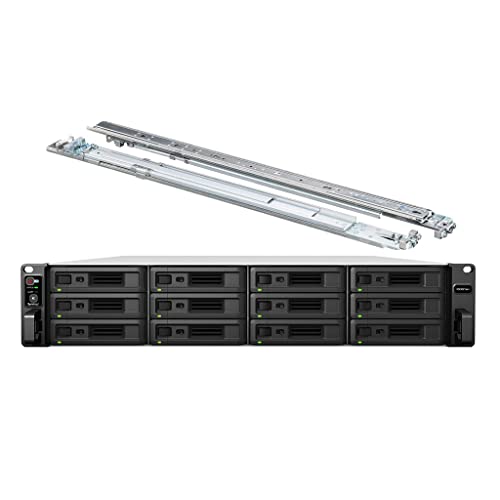
The Synology RackStation RS3621xs+ NAS Server stands out as an exceptional choice for video editing studios that demand high performance and robust data security. With its powerful Xeon D-1541 CPU and 64GB DDR4 ECC memory, it effortlessly handles intense, multi-user workloads. You can expand storage up to 144TB using 12 drives, ensuring ample space for your projects. The NAS supports advanced Btrfs file systems that enhance data integrity, while multiple LAN ports provide speedy network connectivity. Plus, the included Synology DSM operating system offers a user-friendly experience, making installation and management a breeze for your studio’s needs.
Best For: The Synology RackStation RS3621xs+ is best for video editing studios and small to medium businesses that require high-performance, secure, and scalable storage solutions.
Pros:
- High-performance with an 8-core Xeon CPU and 64GB ECC memory, ideal for handling intense workloads.
- Scalable storage capacity of up to 144TB with 12 drive bays, accommodating large projects and data archives.
- Robust data integrity features through the Btrfs file system and user-friendly management with Synology DSM.
Cons:
- Higher initial investment compared to lower-capacity NAS options, which may not be suitable for smaller businesses or home users.
- Installation complexity for hard drives and memory upgrades, requiring some technical knowledge.
- Limited to specific hardware configurations, which might restrict customization for advanced users.
Factors to Consider When Choosing Nas for Video Editing Studio
When you’re choosing a NAS for your video editing studio, several key factors come into play. You’ll want to contemplate storage capacity, data transfer speed, and compatibility with your editing software. Additionally, think about backup options and how scalable the NAS is for future growth.
Storage Capacity Requirements
Choosing the right storage capacity for your NAS is vital in a video editing studio, especially since projects can demand anywhere from 1TB for smaller endeavors to over 10TB for larger, high-resolution works. For instance, editing 4K video can require about 375GB for just one hour of footage. A NAS with higher capacity allows you to store multiple projects, raw footage, and various versions of edited videos without running out of space. As your projects grow, the ability to scale your storage is important. Additionally, look for NAS models with extensive data management features, like automatic backups and synchronization, to protect your valuable video data from loss or corruption. Make sure your storage keeps pace with your creative demands.
Data Transfer Speed
Data transfer speed plays a critical role in your video editing studio, as it directly impacts how efficiently you can import and export large files. Higher sequential read and write speeds, measured in MB/s, allow faster access to your media assets, reducing waiting times during editing sessions. Look for NAS solutions with 10GbE or higher connectivity, which can greatly enhance data transfer rates and support seamless collaboration among multiple users. An ideal benchmark is transferring a 1GB file in about 3 seconds, ensuring fast data handling for your workflows. Additionally, utilizing NVMe SSDs for cache acceleration in your NAS can dramatically improve data throughput, optimizing video editing tasks and enhancing real-time playback capabilities.
Compatibility With Software
Having a fast data transfer speed sets the stage for an efficient video editing workflow, but it’s just as important to confirm your NAS is compatible with your editing software. First, make sure the NAS supports your operating system and the necessary file formats to avoid any hiccups. Look for devices that provide high-speed connectivity, like 10GbE or higher, to handle those large video files seamlessly. You’ll also want to check that your NAS offers ample storage capacity for ongoing projects. If your editing software benefits from virtualization, consider NAS solutions that support those technologies. Finally, explore available plugins or integrations that enhance functionality with your software, ensuring smooth collaboration and workflow among your team members.
Backup and Recovery Options
When it comes to video editing, ensuring your NAS has robust backup and recovery options can save you from potential disasters. Look for systems that offer extensive backup solutions, like snapshot replication and automated backups, to protect your data integrity. Support for multiple backup protocols, such as Active Backup for Business, can streamline the process for large video files, making your workflow smoother. Advanced encryption methods are essential to safeguard sensitive projects during backups. Additionally, opt for devices that allow for easy data restoration, so you can quickly recover projects in case of accidental deletion or hardware failure. With the right backup and recovery options, you’ll have peace of mind while focusing on your creative work.
Scalability for Growth
As your video editing projects grow in complexity and size, scalability becomes a key factor in choosing the right NAS. You’ll want a system that allows for future growth without major overhauls. Look for NAS solutions that support expansion units, enabling you to considerably increase your storage capacity as larger video files and projects arise. Choose models with multiple drive bays—some even support up to 36—to add hard drives as your needs expand. Additionally, consider the ability to upgrade memory and processing power, as enhanced RAM and CPU capabilities will improve performance when multitasking with demanding editing software. High-speed networking options, like 10GbE or dual 2.5GbE ports, will further streamline your workflow.
Security Features Needed
Choosing the right NAS for your video editing studio goes beyond just scalability; security features play an essential role in protecting your valuable content. You should prioritize advanced encryption methods like AES-256 to shield sensitive video files from unauthorized access and guarantee compliance with data protection regulations. Implement user access controls to restrict file permissions, allowing only authorized personnel to view or edit specific projects.
Regular backup solutions, such as snapshot replication, safeguard against data loss, offering secure recovery options. Look for NAS devices with strong network security features, including firewall settings and VPN support, to protect your data during transmission. Finally, secure remote access capabilities enable you to manage and edit projects from anywhere while maintaining data privacy and integrity.