
When you’re stepping into the world of live streaming, the hardware you choose can make or break your broadcast. From high-definition webcams to reliable capture cards, finding the right equipment is vital for delivering quality content. This guide highlights ten top options tailored to various streaming needs. Ready to explore which devices can elevate your streaming game? Let’s uncover the essentials that can help you connect with your audience more effectively.
Insta360 Link 2 PTZ 4K Webcam for PC/Mac

The Insta360 Link 2 PTZ 4K Webcam is perfect for content creators and professionals who demand high-quality video during live streaming or video calls. With its 1/2″ sensor, you’ll enjoy stunning 4K visuals and excellent low-light performance. The AI tracking feature pans and tilts to keep you in focus, while advanced noise-canceling technology guarantees clear audio. Plus, gesture control lets you manage streaming and video calls effortlessly. Compatible with popular software like Zoom and Twitch, it also offers customizable settings through its advanced desktop software. With all these features, the Insta360 Link 2 is an essential tool for your content creation.
Best For: Content creators and professionals seeking high-quality video and audio for live streaming, video calls, and gaming.
Pros:
- Premium Image Quality: Delivers stunning 4K visuals with HDR and excellent low-light performance.
- AI Tracking: Automatically pans and tilts to keep subjects in frame, enhancing the user experience during calls and streams.
- Gesture Control: Allows for easy management of calls and streaming functions without needing to use a mouse or keyboard.
Cons:
- Compatibility Limitations: Not compatible with ARM-based Windows systems or Windows Hello Face Recognition.
- Weight: At 15.2 ounces, it may be heavier than other webcams, potentially affecting portability.
- Privacy Mode: Automatically tilts down after inactivity, which may disrupt users if not managed properly.
Logitech MX Brio Ultra HD 4K Streaming Webcam

If you’re a content creator looking to elevate your streaming quality, the Logitech MX Brio Ultra HD 4K Streaming Webcam stands out with its exceptional image clarity. With Ultra HD 4K at 30fps or 1080p at 60fps, you’ll capture stunning visuals. Its advanced sensor boasts 70% larger pixels, enhancing sharpness. AI enhancements guarantee fantastic face visibility in low light, while integrated noise-reducing microphones deliver clear audio. Plus, collaboration tools like Show Mode make sharing notes effortless. Its built-in privacy cover and USB-C compatibility offer added convenience for any setup. Elevate your streaming game with the MX Brio.
Best For: Content creators, streamers, and professionals seeking high-quality video and audio for their online presence.
Pros:
- Exceptional Ultra HD 4K resolution for stunning visuals.
- AI-enhanced features improve low light performance and audio clarity.
- Versatile collaboration tools like Show Mode for easy sharing during calls.
Cons:
- Higher price point compared to standard webcams.
- Requires a compatible USB-C port for optimal connectivity.
- May need additional software for full customization features.
Logitech StreamCam Premium Webcam for Streaming and Content Creation

For streamers and content creators looking to elevate their broadcasts, the Logitech StreamCam Premium Webcam stands out with its impressive full HD 1080p resolution at 60 fps. You’ll enjoy sharp, natural video and smooth motion, thanks to its premium glass lens and smart autofocus. The auto-framing feature keeps you centered, while intelligent exposure adapts to different lighting conditions. It’s optimized for platforms like OBS and Streamlabs OBS, making streaming to Twitch or YouTube a breeze. Plus, with versatile mounting options and fast USB-C connectivity, this webcam is perfect for any setup, whether for gaming or video calls.
Best For: Streamers and content creators looking for high-quality video performance in their broadcasts.
Pros:
- Full HD 1080p at 60 fps: Provides sharp, natural video quality with smooth motion.
- Smart Autofocus and Auto-Framing: Keeps users centered with vibrant image quality, adjusting to different lighting conditions.
- Versatile Connectivity and Mounting Options: Easy to set up with USB-C connection and compatible with various mounting setups.
Cons:
- Limited to Full HD Resolution: May not meet the needs of users looking for 4K streaming capabilities.
- Weight and Size: At 10.2 ounces, it may be heavier than some other compact webcams on the market.
- Compatibility Limitations: While it works well with many platforms, some users may encounter issues with less popular software.
All-in-One Live Streaming Camera (1080p HD, Renewed)

Looking to elevate your live streaming game? The All-in-One Live Streaming Camera delivers stunning 1080p HD video and allows you to control features like Auto-Director directly from your smartphone. This renewed camera, inspected to look and work like new, supports multicam setups, connecting up to three cameras for dynamic broadcasts. Plus, it integrates seamlessly with popular streaming protocols, letting you go live on platforms like YouTube, Twitch, and Facebook effortlessly. Weighing just 8.2 ounces, it’s compact and portable. With a solid 4.5-star rating from users, this camera is a fantastic choice for serious streamers.
Best For: Streamers looking for a high-quality, user-friendly camera that supports multicam setups and various streaming platforms.
Pros:
- High-definition streaming with 1080p HD video quality for clear visuals.
- Intelligent app control allows for easy management of camera features from a smartphone.
- Compact and lightweight design makes it portable for on-the-go streaming.
Cons:
- Pre-owned condition may not appeal to all buyers who prefer new products.
- Battery requirement might be inconvenient for users who prefer plug-in options.
- Limited to specific streaming protocols, which may not suit all user needs.
Elgato 4K S External Capture Card for PS5, Xbox, Switch, PC, Mac

The Elgato 4K S External Capture Card stands out as an ideal choice for streamers and gamers seeking high-quality broadcasts across multiple platforms, including PS5, Xbox Series X/S, Switch, PC, and Mac. With its 4K60 capture capability, you’ll enjoy cinematic quality with crisp details and vivid colors. Plus, it supports high frame rates like 1440p120 or 1080p240. HDR10 support enhances your visuals further, allowing for stunning HDR content capture. The USB-C connection guarantees fast data transfer, while the analog audio input lets you include in-game chat or commentary effortlessly. Experience near-zero latency for a smooth gaming experience.
Best For: Streamers and gamers looking for high-quality capture and broadcast capabilities across multiple gaming platforms.
Pros:
- 4K60 capture provides cinematic quality with stunning detail and color.
- Supports high frame rates like 1440p120 and 1080p240 for smooth gameplay.
- Near-zero latency ensures a seamless gaming experience without interruptions.
Cons:
- Limited to external use, which may require additional setup space.
- Compatibility concerns may arise with some older devices or software.
- Price point may be higher compared to basic capture cards.
Elgato Facecam 4K Studio Webcam

Capture stunning 4K video at 60 FPS with the Elgato Facecam 4K Studio Webcam, making it an exceptional choice for streamers and content creators who demand superior quality. This webcam features uncompressed video and HDR support, guaranteeing vivid colors and sharp details through its advanced Sony STARVIS 2 CMOS sensor. You can customize your visuals with Elgato’s free Camera Hub software and add standard 49mm lens filters for that DSLR-like touch. Built with eco-friendly materials, it’s designed for durability and includes built-in flash memory to save your settings. Plus, its USB-C connectivity guarantees seamless compatibility with both PC and Mac systems.
Best For: Streamers, content creators, and video professionals seeking high-quality video solutions.
Pros:
- Uncompressed 4K video at 60 FPS ensures exceptional visual clarity.
- Customization options with Camera Hub software and 49mm lens filters enhance creative control.
- Eco-friendly construction and built-in flash memory for reliable performance and sustainability.
Cons:
- May be priced higher compared to standard webcams.
- Requires USB-C connectivity, which may necessitate additional adapters for some users.
- Limited to 49mm lens filters, which may restrict certain creative options.
Elgato Stream Deck MK.2 Studio Controller

For content creators seeking to streamline their live streaming experience, the Elgato Stream Deck MK.2 Studio Controller stands out with its 15 customizable LCD keys. You can connect it via USB to both Mac and PC, making it versatile for any setup. With one-touch operation, you’ll effortlessly trigger single or multiple actions, like launching social media posts, adjusting audio, or muting your mic. The immediate visual feedback guarantees you know when commands are executed successfully. Plus, it works seamlessly with popular applications like OBS, Twitch, and Discord, enhancing your workflow in film editing, music production, and more.
Best For: Content creators, streamers, and professionals looking to enhance their workflow with customizable controls.
Pros:
- Customizable LCD keys allow for personalized shortcuts tailored to individual workflows.
- Immediate visual feedback ensures users know when commands have been successfully executed.
- Compatibility with popular applications streamlines operations across various platforms like OBS, Twitch, and Discord.
Cons:
- Requires a USB connection, limiting portability compared to wireless options.
- The learning curve may be steep for beginners unfamiliar with customizable hotkeys.
- Limited to 15 keys, which may not be sufficient for more complex setups or workflows.
EMEET PIXY Dual-Camera AI-Powered PTZ Camera 4K
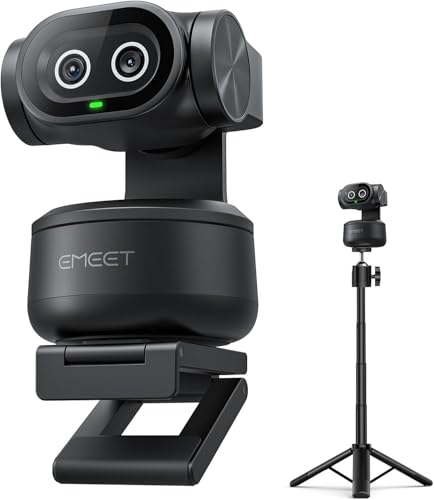
Looking to elevate your live streaming game? The EMEET PIXY Dual-Camera AI-Powered PTZ Camera 4K is your perfect partner. With a 4K main camera and an auxiliary AI camera, you’ll capture stunning video with flawless skin tones and rapid autofocus at 0.2 seconds. Its intelligent tracking and gesture control keep you in frame, while the adjustable tripod lets you shoot from various angles. Enjoy crystal-clear audio with its 3-mic array, and easily manage settings via EMEET STUDIO software. Whether you’re streaming live or recording, this camera guarantees a professional touch every time.
Best For: Content creators and live streamers looking for high-quality video and audio with advanced tracking features.
Pros:
- Rapid autofocus with a focusing speed of just 0.2 seconds for flawless video.
- Intelligent tracking and gesture control keep the subject perfectly framed during movement.
- Crystal-clear audio provided by a 3-mic array, enhancing the overall streaming experience.
Cons:
- Higher price point compared to standard webcams may not be suitable for all budgets.
- Requires setup and adjustment that might be complex for beginners.
- Limited to 4K streaming at 30FPS, which may not meet all users’ preferences for frame rates.
Acer USB 3.0 Video Capture Card for Streaming

The Acer USB 3.0 Video Capture Card is perfect for streamers who demand high-quality video without the hassle of complicated setups. With 4K input and 1080P@60Hz output, it guarantees vibrant colors thanks to YUY2 technology. You’ll love the mic-in feature for easy commentary, perfect for gaming or online classes. Its plug-and-play design means you can set it up in seconds, and its lightweight construction makes it highly portable for on-the-go streaming. Plus, it’s compatible with a wide range of devices and streaming platforms, so you won’t face any compatibility issues. Acer’s customer support is always ready to help, too!
Best For: Streamers and content creators looking for high-quality video capture with minimal setup time and excellent compatibility.
Pros:
- Plug-and-play design allows for quick and easy setup without the need for additional drivers.
- YUY2 technology provides richer colors and better image quality for streaming and recording.
- Lightweight and portable, making it ideal for outdoor live streams and on-the-go recordings.
Cons:
- Limited to 1080P@60Hz output, which may not meet the needs of users wanting higher resolutions for output.
- The mic-in feature may lack advanced audio options for professional setups.
- Some users may find the device’s compatibility limited to specific applications or devices.
Logitech Mevo Core Wireless Live Streaming Camera

Designed for content creators who demand high-quality production, the Logitech Mevo Core Wireless Live Streaming Camera offers an impressive 4K video capability paired with a compact design. It features a versatile interchangeable lens system and is optimized for the Mevo Multicam ecosystem. With built-in Wi-Fi 6E, you can connect seamlessly and control multiple cameras through the Mevo Multicam app. Enjoy broadcast-quality 4K30p streaming to platforms like YouTube and Twitch, along with HD audio from its three-mic array. The built-in battery lasts up to 6 hours, making it perfect for on-the-go production without distractions.
Best For: Content creators and live streamers seeking high-quality 4K video production in a compact and versatile camera.
Pros:
- Broadcast-quality 4K30p streaming to popular platforms like YouTube and Twitch.
- Built-in Wi-Fi 6E allows for seamless connectivity and control of multiple cameras.
- Portable design with a battery life of up to 6 hours, ideal for on-the-go production.
Cons:
- Limited battery life when streaming at lower resolutions, which may require power sources for extended use.
- Weight of 2.12 pounds may be heavier than some users prefer for handheld shooting.
- Interchangeable lens system may require additional investment in lenses for optimal performance.
Factors to Consider When Choosing Live Streaming Hardware for Broadcast
When you’re choosing live streaming hardware for broadcast, you need to take into account several key factors. Video resolution quality and audio clarity can make or break your stream, while compatibility with different platforms guarantees you reach your audience. Don’t forget about control options and portability, as these features can enhance your overall streaming experience.
Video Resolution Quality
Choosing the right video resolution quality is essential for an engaging live streaming experience. Higher resolutions like 4K or Full HD 1080p deliver sharper images and more detail, keeping your viewers hooked. With 4K, you get that cinematic quality and vivid colors, enhancing the overall viewing experience. On the other hand, lower resolutions like 720p can compromise clarity, making your stream appear less professional. Additionally, consider the frame rate—higher frame rates, such as 60fps, provide smoother visuals, especially for fast-paced content. Be mindful that streaming platforms support various resolutions and frame rates, so verify your hardware is compatible with the intended services to optimize your broadcast quality. This way, you can create a fascinating experience for your audience.
Audio Clarity Features
To guarantee your live stream captivates your audience, audio clarity is just as critical as video quality. Look for hardware that incorporates advanced audio processing technologies, like AI noise-canceling algorithms, to cut down background noise and enhance clarity. Integrated microphones with beamforming capabilities can further reduce ambient noise for clearer voice capture. Make sure the equipment supports multiple audio input options, including analog and digital sources, giving you flexibility with external audio devices. Real-time audio monitoring features are essential, allowing you to adjust levels and quality before and during your broadcast. Finally, consider devices with dual-microphone setups for rich, clear audio, even in noisy environments. Prioritize these features to elevate your streaming experience.
Streaming Compatibility Options
Audio clarity plays a significant role in your live streaming success, but it’s equally important to guarantee your hardware is compatible with various platforms and systems. Make sure your streaming hardware supports major platforms like Zoom, Twitch, YouTube, and Microsoft Teams for versatile broadcasting options. Check that it works seamlessly with operating systems such as Windows, macOS, and Linux to avoid any functionality issues. Look for devices that utilize USB-C connectivity for faster data transfer and easy integration with modern computers. It’s also essential to verify that your hardware supports common streaming protocols like RTMP and NDI for smooth integration with streaming software. Finally, consider devices that allow multicam support for enhanced production quality and flexibility.
Control and Customization
When selecting live streaming hardware, having control and customization options can greatly enhance your broadcasting experience. Look for hardware that features programmable buttons or keys to streamline your workflow and improve user experience during live broadcasts. Choose devices that come with software for fine-tuning video and audio settings, allowing you to adjust aspects like auto-focus, exposure, and noise reduction based on your streaming environment. Opt for equipment that supports gesture control or app-based management for hands-free operation and quick adjustments. Ascertain the hardware integrates well with popular streaming software for advanced features like scene switching and multi-action triggers. Finally, consider devices with built-in presets for different shooting angles and lighting conditions to maintain consistent visual quality.
Portability and Design
Control and customization options can enhance your live streaming experience, but portability and design are just as important. When selecting live streaming hardware, consider the weight and dimensions; lighter options are easier to transport for on-the-go broadcasting. A compact design allows for versatile mounting and fits into various setups, enhancing usability in different environments. Look for devices with built-in battery power to enable extended use without relying on external outlets, perfect for outdoor streaming. Wireless connectivity options like Wi-Fi or Bluetooth can reduce cable clutter and allow flexible camera placement. Finally, evaluate the ease of setup; user-friendly designs streamline the process, letting you kick off your live stream quickly and efficiently.
Connectivity Types Available
Selecting the right connectivity type is essential for guaranteeing your live streaming setup meets your needs. USB connectivity is perfect for webcams and capture cards, offering plug-and-play functionality for user-friendliness and portability. If you want high-definition video, HDMI output is a must, as it’s commonly used to connect cameras to capture cards or monitors in professional setups. For greater mobility, consider wireless options like Wi-Fi, which allow seamless streaming without physical cables. If you’re looking for low-latency video transmission, NDI (Network Device Interface) support is ideal for connecting multiple devices over local networks. Finally, verify compatibility with streaming protocols like RTMP and SRT to enhance your flexibility in delivering content across various platforms.
Price and Warranty Considerations
Understanding the price and warranty considerations is essential to making an informed decision about your live streaming hardware. First, compare prices across different models to ascertain you’re getting the best value for the features you need. Don’t forget to check the warranty terms; a longer warranty offers peace of mind against defects or malfunctions. Look for products with clear return policies, allowing you to return or exchange items if they don’t meet your expectations. Also, consider any additional costs, like accessories or software, which can impact your overall setup price. Investing in higher-priced equipment often means better longevity and quality, potentially saving you money on replacements or upgrades down the line.