
Old negatives and slides can fade, but the right scanner makes it easy to preserve them as digital files. If you want a simple way to bring family archives back to life, a Kodak film and slide scanner is a practical place to start.
Below, we focus on the features that matter most for speed, image quality, and everyday usability so you can choose the right model with confidence.
Best 10 Kodak Film and Slide Scanner Picks for 2026
Editor’s Pick

- 22MP scanner for negatives and slides
- 5-inch LCD with built-in preview/editing
- Saves to SD or connects by USB/HDMI
Best For: Home users who want an all-in-one scanner for easy digitizing
Budget-Friendly Pick

- Uses your smartphone camera for capture
- Supports 35mm negatives and color slides
- Collapsible cardboard design for easy storage
Best For: Casual scanning, family fun, and low-cost experimentation
Most User-Friendly
HP Film & Slide Scanner 7" Touch

- 7-inch touch screen for easy previewing
- 13MP sensor for color and B&W scans
- Supports 135, 126, and 110 film formats
Best For: Beginners who want a large touchscreen and simple controls
Viewing Pick
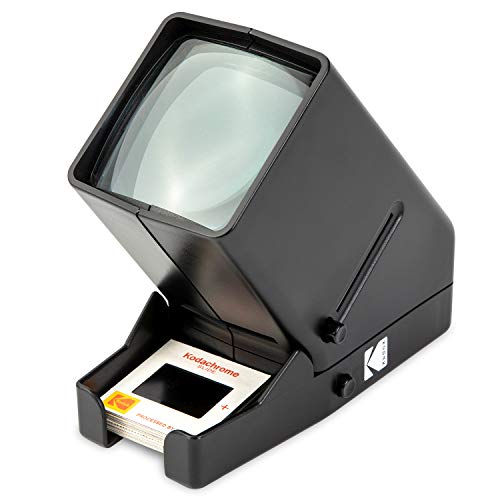
- 3X magnification for closer inspection
- LED backlighting for clear viewing
- Battery-powered and portable
Best For: Viewing and sorting slides before digitizing
Standalone Value Pick
Magnasonic FS71 24MP Film Scanner

- Scans 35mm, 110, 126, and Super 8 media.
- 5" LCD preview with HDMI viewing support.
- No-computer workflow with quick-loading trays.
Best For: Users who want an easy standalone scanner for mixed film and slides.
Convenience Pick

- Handles 135mm, 110mm, and 126mm film and slides.
- Direct SD/SDHC saving with no computer needed.
- Quick-feeding tray and one-touch editing.
Best For: Families digitizing mixed slides and negatives with minimal setup.
Legacy Format Pick
KODAK SCANZA Digital Film & Slide Scanner

- Handles 35mm, 126, 110, Super 8, and 8mm media.
- Built-in 3.5" LCD with tilt and brightness control.
- Includes adapters and one-touch scan-and-save controls.
Best For: Users with older mixed-format film collections who want a compact built-in-screen scanner.
Fast Touchscreen Scanner
HP Film & Slide Scanner HPFS500

- 5-inch touchscreen with on-device preview and editing
- Supports 135, 126, and 110 slides and negatives
- USB-C power and SD card saving for simple standalone use
Best For: Users who want a quick, touchscreen-based scanner for common old film formats
Classic All-in-One Scanner
KODAK SCANZA Film & Slide Scanner

- Supports 35mm, 126, 110, Super 8, and 8mm formats
- Includes adapters, cables, and cleaning brush
- 3.5-inch LCD and one-touch controls keep scanning simple
Best For: Buyers who want a bundled, easy-to-use scanner for multiple vintage film formats
Compact Starter Scanner
KODAK Mini Digital Film & Slide Scanner

- Compact scanner for 135, 126, 110, Super 8, and monochrome film
- 2.4-inch LCD supports scan, edit, view, and save tasks
- Includes adapters plus cleaning wand, USB cable, and TV cable
Best For: Casual users who want a small, easy scanner for basic film digitizing
Editor’s Pick – KODAK Slide N Scan 22MP
If you want a Kodak film and slide scanner that makes digitizing old memories straightforward, this model is built for convenience. The 22MP sensor, 5-inch LCD, and quick-feed trays let you preview, edit, and convert negatives and slides on the device without needing a computer for the core workflow.
Best For: People who want a self-contained scanner for quickly converting mixed slide and negative formats at home.
Pros:
- 22MP capture with support for 135, 110, and 126 film plus 50mm slides
- 5-inch LCD makes previewing, gallery viewing, and basic editing easy
- Quick-loading trays and included adapters help speed up batch scanning
- Can save directly to SD or SDHC cards and connect via USB or HDMI
Cons:
- SD or SDHC card is not included
- Designed for straightforward use, so it focuses on simple onboard editing rather than advanced software tools
This is a strong choice if you want a practical all-in-one Kodak scanner for home archiving and easy sharing. It balances format support, screen size, and simple operation better than novelty-style options.
Budget-Friendly Pick – KODAK Mobile Film Scanner
If you’re looking for a Kodak film and slide scanner that’s more about fun and experimentation than full-scale digitizing, this mobile model keeps things simple. It uses your smartphone camera, a cardboard platform, and an LED backlight to help you view and capture 35mm negatives and slides.
Best For: Casual users, families, and anyone who wants an inexpensive way to play with old film using a phone.
Pros:
- Works with a smartphone camera instead of a dedicated scanning unit
- Supports 35mm color negatives, black-and-white negatives, and color slides
- Collapsible cardboard design is lightweight and easy to store
- Includes a battery-powered LED backlight and free Android app
Cons:
- Resolution depends on your phone camera and how well you focus
- Best suited as a novelty or practice tool rather than a professional converter
This scanner makes sense if you want an affordable, low-tech way to explore old film without committing to a dedicated machine. It’s easy to carry and easy to use, but image quality will depend heavily on the phone you pair with it.
Most User-Friendly – HP Film & Slide Scanner 7" Touch
This Kodak film and slide scanner alternative from HP is aimed at users who want a larger touchscreen and a simple on-device workflow. The 7-inch touch LCD, quick-feed tray, and built-in editing tools make it easy to preview and convert film without relying on extra software.
Best For: Beginners or anyone who wants a larger screen and touch controls for scanning at home.
Pros:
- 7-inch touch LCD makes previewing and editing more intuitive
- 13MP CMOS sensor captures both color and black-and-white images
- Quick-feed tray with 50mm adapter supports 135, 126, and 110 formats
- USB and HDMI connections add flexible transfer and display options
Cons:
- Lower resolution than the 22MP Kodak model
- Media type listing is less straightforward than some dedicated film scanners
For shoppers who value ease of use over maximum resolution, this is a very approachable film-to-digital converter. The bigger touch display and on-screen tools make it feel less technical than many scanners in this category.
Viewing Pick – KODAK 35mm Slide Viewer
If you mainly want to inspect old film rather than digitize it, this Kodak film and slide scanner alternative is really a viewer, not a conversion device. It uses bright LED lighting and 3X magnification to make 35mm slides and negatives easier to see in detail.
Best For: People who want a portable battery-powered viewer for sorting and examining slides before scanning.
Pros:
- 3X magnification helps enlarge small slide and negative images
- Daylight LED illumination gives clear backlit viewing
- Battery operation makes it portable for use anywhere
- Dedicated slide slot and film input simplify quick viewing
Cons:
- Does not function as a true digital scanner for saving image files
- Focused on 35mm viewing, so it is narrower in scope than scanner models
This is a good companion tool if you need to review old film quickly before deciding what to preserve. It’s simple, portable, and effective for viewing, but it won’t replace a scanner when you need digital files.
Standalone Value Pick – Magnasonic FS71 24MP Film Scanner
If you want a Kodak film and slide scanner alternative that keeps the process simple, the Magnasonic FS71 is built for quick, no-computer scanning. It handles 35mm, 110, 126, and Super 8 film plus 135/126/110 slides, and it saves images as high-resolution JPEGs with onboard adjustments for brightness, RGB color, flip, and mirror.
Best For: Home users who want a straightforward standalone scanner for mixed film and slide collections.
Pros:
- Scans negatives and slides in multiple formats, including 35mm, 110, 126, and Super 8.
- 5″ LCD lets you preview scans directly on the unit, with HDMI output available for a larger screen.
- No computer or driver setup required, which keeps operation simple.
- Fast-loading trays help each scan finish in less than 5 seconds.
Cons:
- SD card is not included, even though the unit supports expandable storage up to 128GB.
- HDMI cable is not included.
- Minimum system support listed is Windows 7 if you do connect it to a computer.
This is a practical pick if you want a self-contained scanner that focuses on speed, format flexibility, and easy viewing. It is less about advanced editing and more about getting old photos digitized efficiently.
Convenience Pick – KODAK Slide N Scan Max
The KODAK Slide N Scan Max is a strong Kodak film and slide scanner choice if you want fast tray-fed digitizing with direct SD saving. It handles 135mm, 110mm, and 126mm film, supports both slides and color or black-and-white negatives, and offers one-touch editing plus a tilting design that can double as a photo frame.
Best For: Families digitizing mixed slide and negative collections who want quick, computer-free operation.
Pros:
- Supports 135mm, 110mm, and 126mm formats for mixed collections.
- Direct SD/SDHC card saving up to 32GB avoids the need for a computer.
- Quick-feeding tray supports continuous scanning without repositioning.
- One-touch editing simplifies resizing, conversion, and adjustments.
Cons:
- SD/SDHC card is not included.
- Storage support is limited to 32GB cards.
- USB-C is the listed connection type, so it may not suit every older setup.
This model leans into convenience: fast feeding, simple controls, and direct file saving. It is a good fit when you want to get through a stack of family media without a lot of setup or software work.
Legacy Format Pick – KODAK SCANZA Digital Film & Slide Scanner
If you are shopping for a Kodak film and slide scanner that can handle a wide range of older formats, the renewed SCANZA is built for quick JPEG conversion and easy onboard control. It supports 35mm, 126, 110, Super 8, and 8mm negatives and slides, with a 3.5″ color display, included adapters, and one-step scan-and-save controls.
Best For: Users with varied legacy film formats who want a compact scanner with built-in display and adapters.
Pros:
- Supports a broad range of formats, including 35mm, 126, 110, Super 8, and 8mm.
- Built-in 3.5″ TFT LCD includes adjustable brightness and tilt.
- Comes with multiple film inserts and adapters for flexible use.
- One-touch buttons and tray guidance make scanning straightforward.
Cons:
- Sold as renewed, not new.
- SD card is not included, though it supports cards up to 128GB.
- Warranty is limited to 90 days.
The SCANZA remains appealing if your archive includes several older formats and you want a scanner that is easy to operate right out of the box. Its compact design and built-in screen make it a practical at-home digitizing tool.
Fast Touchscreen Scanner – HP Film & Slide Scanner HPFS500
If you want a Kodak film and slide scanner alternative that prioritizes speed and simplicity, the HPFS500 is built around a 5-inch touch screen, quick-load tray, and direct-to-SD workflow. It supports 135, 126, and 110 slides and negatives, so it works well for families with mixed old film formats who want a computer-free way to digitize memories.
Best For: People who want an easy standalone scanner with a large touchscreen and broad support for common slide and negative formats.
Pros:
- 5-inch all-angle LCD touch screen lets you preview and edit scans on the device.
- Supports 135, 126, and 110 slides plus negative strips for flexible home archiving.
- 13MP CMOS sensor with 22MP interpolation gives it solid detail for old color and B&W film.
- USB-C power and SD card saving make it simple to use without a computer.
Cons:
- Limited to the film formats listed in the product notes.
- SD card is not mentioned as included.
- May be more device-focused than users who want deep desktop editing tools.
This is a practical choice if you want straightforward film conversion with modern controls and minimal setup. The touchscreen interface and quick-load tray make it especially appealing for batch digitizing at home.
Classic All-in-One Scanner – KODAK SCANZA Film & Slide Scanner
The KODAK SCANZA is a Kodak film and slide scanner made for turning older film into JPEG files quickly, with support for 35mm, 126, 110, Super 8, and 8mm negatives and slides. Its 3.5-inch LCD, one-touch buttons, and included adapters make it a strong pick if you want a dedicated converter that keeps the process simple.
Best For: Users who want a dedicated film scanner with wide format support and bundled accessories.
Pros:
- Supports 35mm, 126, 110, Super 8, and 8mm film formats.
- 3.5-inch LCD with adjustable brightness and tilt for easier viewing.
- Includes multiple film inserts/adapters plus HDMI, USB, video cable, AC adapter, and cleaning brush.
- One-touch buttons and tray guidance simplify the scan-and-save process.
Cons:
- SD card is not included.
- Not compatible with film types outside the listed formats.
- Uses a smaller screen than larger-touch display models.
This model stands out for convenience and completeness, especially if you want a package with cables and cleaning tools included. It is a solid option for people who value broad format compatibility over advanced editing features.
Compact Starter Scanner – KODAK Mini Digital Film & Slide Scanner
If you’re shopping for a Kodak film and slide scanner in a smaller, simpler form factor, the KODAK Mini Digital Film & Slide Scanner is a compact all-in-one option for 135, 126, 110, Super 8, and monochrome negatives and slides. Its 2.4-inch LCD, easy-load adapters, and SD-card workflow make it a practical pick for casual home digitizing.
Best For: People who want a compact, budget-friendly scanner for basic at-home film conversion.
Pros:
- Supports 135, 126, 110, Super 8, and monochrome film and slides.
- Easy-load adapters help speed up repeated scanning sessions.
- 2.4-inch LCD lets you scan, edit, view, and save without a computer.
- Includes a universal power source, cleaning wand, USB cable, and TV cable.
Cons:
- Smaller 2.4-inch display is less roomy than larger-screen scanners.
- SD card capacity is limited to 32GB in the supplied notes.
- Internal memory is very small at up to 128MB.
This scanner is best when you want a straightforward, compact converter rather than a more feature-heavy unit. It covers the essential formats and keeps operation simple, which is useful for occasional film digitization.
How We Picked the Best Kodak Film and Slide Scanner
We prioritized scanners that are easy to load, support common legacy formats, and offer a straightforward path from film to digital. For a Kodak Film and Slide Scanner, that means paying attention to resolution claims, supported film sizes, screen quality, file-saving options, and how much manual editing is required after scanning.
We also favored models that fit different use cases, from simple viewing and novelty scanning to dedicated desktop digitizing. That mix matters because some buyers want convenience and speed, while others want better control over image output.
Quick Comparison
Not every scanner is built for the same job. Basic viewers are best for checking old slides quickly, smartphone-based options are the most portable, and dedicated standalone units are better when you need to digitize a large archive. If you expect to scan often, prioritize a larger display, direct SD-card saving, and support for your specific film formats.
Key Buying Factors for a Kodak Film and Slide Scanner
Supported Film Types
Make sure the scanner handles the formats in your collection. Many Kodak Film and Slide Scanner options support 35mm negatives and slides, while some also work with 110, 126, Super 8, or 8mm film.
Resolution and Output Quality
Higher megapixel ratings can help capture more detail, but real-world results also depend on sensor quality, lighting, and conversion software. If you plan to print photos later, look for stronger resolution and consistent color handling.
Display and Ease of Use
A larger LCD or touch screen can make alignment, cropping, and previewing much easier. This is especially helpful if you are scanning in batches or working with older, curled film.
Saving and Connectivity
Some units save directly to an SD card, while others connect through USB or rely on a smartphone. Choose the workflow that best matches how you plan to organize and back up your files.
Speed Versus Control
Fast-feed scanners are useful for large jobs, but manual models may offer more control over framing and viewing. If your archive includes mixed conditions, a scanner with adjustable settings is often the safer choice.
Who Should Buy Which Kodak Film and Slide Scanner?
If you want the simplest all-around option, choose a standalone Kodak Film and Slide Scanner with a large screen and broad format support. If portability matters more than convenience, a smartphone-based scanner can be a budget-friendly novelty tool. If you mainly want to inspect old slides without digitizing everything right away, a viewer is the least expensive route.
For large family archives, look for a model designed for quick loading, direct file saving, and minimal setup. For occasional use, a compact scanner may be enough as long as it matches your film sizes and gives you a clear preview before saving.