
A reliable mount keeps a heavy projector stable, aligned, and safely out of the way. The right choice depends on more than weight capacity: installation surface, adjustment range, projector dimensions, and cable access all matter.
We compared 10 heavy-duty projector mounts for home theaters, offices, classrooms, meeting rooms, and large-format installations. Use the guide below to narrow the options by mounting style, load rating, flexibility, and setup needs.
Best 10 Heavy Duty Projector Mounts Picks for 2026
Precision Alignment Pick
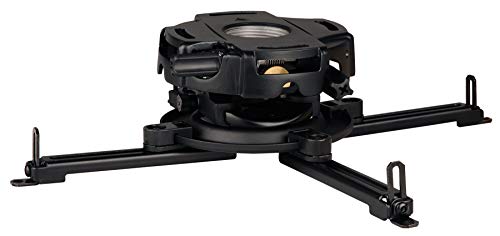
- 50-pound weight capacity
- Precision gear alignment controls
- Pre-assembled ceiling-mount design
Best For: Installations requiring fine projector image alignment
Maximum-Capacity Choice
Mount-It! PRO 77 lb Ceiling Mount
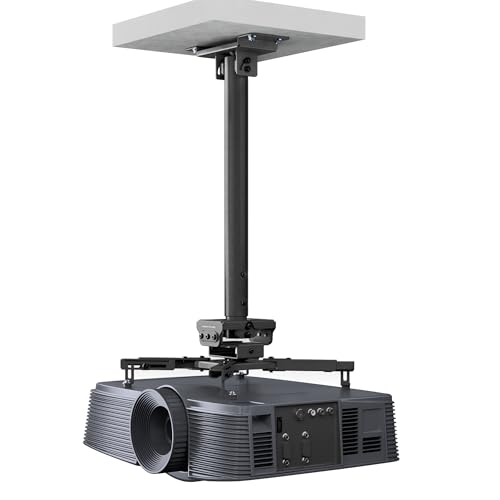
- Supports up to 77 pounds
- 23.8- to 35.6-inch adjustable drop
- Steel construction with broad projector compatibility
Best For: Large commercial projectors and permanent installations
Portable Floor Stand
Adjustable Heavy-Duty Projector Mount

- Adjusts to 48.2 inches
- 360-degree rotation with non-slip base
- Supports devices up to 11 pounds
Best For: Portable and temporary projection setups
Compact Ceiling Mount

- Supports up to 55 pounds
- 7.09- to 9.84-inch height range
- Fine tilt and zero-shift locking controls
Best For: Short-drop ceiling installations with heavier projectors
Best Heavy-Duty Ceiling Mount
Amer Universal Large-Format Projector Mount

- Supports up to 25 kg
- ±25° tilt and 360° swivel
- Adjustable pole height with cable management
Best For: Large projectors on flat ceilings
Best High-Capacity Wall Mount
FlowFluid HT30 Telescopic Projector Hanger

- Supports up to 110 pounds
- Telescopic range up to 1040 mm
- Multi-angle alignment adjustments
Best For: High-capacity wall installations
Best Versatile 3-in-1 Mount
WALI Universal Projector Mount

- Ceiling and wall installation options
- Supports up to 44 pounds
- ±15° tilt and ±8° swivel
Best For: Flexible home, office, and classroom setups
Best Heavy-Duty Tray Mount
Adjustable 3-in-1 Projector Mount

- Rotating, tilting tray for flexible positioning
- 11.8- to 21.1-inch height adjustment
- Ceiling, recessed, or wall installation
Best For: Home and office setups needing a sturdy tray and concealed cable management
Best Quick-Release Mount
Full-Motion Ceiling and Wall Projector Mount

- Supports 5.2- to 14-inch mounting-hole spacing
- 13.8- to 21-inch telescoping height range
- Quick-release plate with included drilling template
Best For: Flexible home, classroom, or conference-room installations
Best Extended-Reach Mount
Full-Motion 30-Pound Projector Bracket
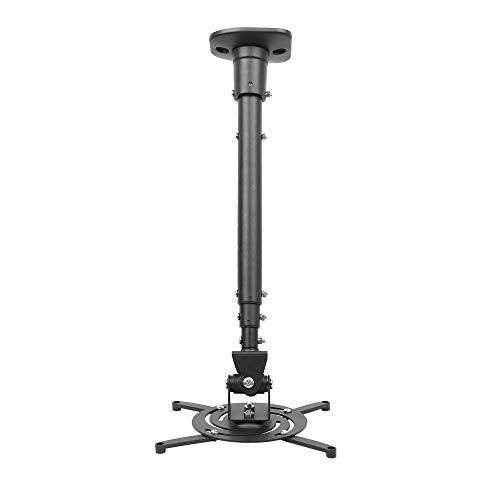
- 30-pound capacity with heavy-duty steel construction
- 23- to 43.6-inch extendable reach
- Tilt, swivel, and rotation adjustments
Best For: Rooms needing long ceiling extension and high load capacity
Precision Alignment Pick – PRG-UNV Gear Projector Mount
For heavy duty projector mounts that prioritize precise image alignment, the Peerless-AV PRG-UNV combines a 50-pound load capacity with gear-driven adjustment. Its pre-assembled design and wrench-access slots also help simplify ceiling installation.
Best For: Commercial or home theater installations using projectors up to 50 pounds where accurate alignment matters.
Pros:
- Supports projectors weighing up to 50 pounds.
- Precision gears and two adjustment knobs enable accurate alignment.
- Pre-assembled design and horizontal wrench access can speed installation.
Cons:
- Ceiling-mount installation is less flexible than a portable floor stand.
- The supplied notes do not specify a height-adjustment range.
The PRG-UNV is a strong choice when alignment control is more important than portability. Its universal spider adapter and aluminum construction suit a range of multimedia projector setups.
Maximum-Capacity Choice – Mount-It! PRO 77 lb Ceiling Mount
Among heavy duty projector mounts, the Mount-It! PRO stands out with a 77-pound capacity and thick-gauge steel construction. Its adjustable drop and broad mounting pattern make it suitable for substantial commercial and high-end residential projectors.
Best For: Permanent commercial installations and high-end home theaters using large, heavy projectors.
Pros:
- Supports up to 77 pounds.
- Adjustable 23.8- to 35.6-inch drop accommodates varied ceiling heights.
- Independent tilt, swivel, and 360-degree rotation allow post-installation alignment.
- Steel tubing and a reinforced ceiling plate are designed to resist flex and vibration.
Cons:
- Its long adjustable drop may be excessive for low-ceiling rooms.
- The heavy-duty steel design is intended for permanent installation rather than portability.
This is the capacity-focused option in the group. The wide 5.1- to 18.5-inch mounting range and extensive adjustment controls help accommodate many full-size LCD and DLP projectors.
Portable Floor Stand – Adjustable Heavy-Duty Projector Mount
This adjustable floor stand offers a practical alternative to ceiling-mounted heavy duty projector mounts. It raises the projector from approximately 35 to 48.2 inches, rotates 360 degrees, and uses a non-slip base for flexible home, office, outdoor, and gaming setups.
Best For: Portable projection, temporary setups, and devices with a centered 1/4-inch bottom screw hole.
Pros:
- Height adjusts up to 48.2 inches with 360-degree rotation.
- Non-slip padding helps stabilize the stand at different heights and angles.
- Works with compatible projectors, cameras, and webcams.
- Portable design suits home theaters, presentations, outdoor movies, and gaming.
Cons:
- Supports only up to 11 pounds, far less than the ceiling mounts in this roundup.
- Compatibility depends on having a 1/4-inch bottom-center screw hole.
- It is a floor stand, so it uses valuable floor space.
Choose this model for flexibility rather than maximum load capacity. Confirm the device’s mounting hole and weight before buying, especially when using a larger projector.
Compact Ceiling Mount – LC1825 55 lb Projector Mount
The LC1825 is one of the more compact heavy duty projector mounts, supporting up to 55 pounds while providing a 7.09- to 9.84-inch height range. Its knob-controlled tilt and zero-shift locking mechanism are designed to make alignment easier and more stable over time.
Best For: Ceiling installations needing a relatively short drop, fine tilt control, and support for projectors up to 55 pounds.
Pros:
- Supports up to 55 pounds.
- Stepless 7.09- to 9.84-inch height adjustment suits shorter ceiling drops.
- Provides plus-or-minus 10-degree tilt and 360-degree horizontal rotation.
- Aluminum-alloy construction includes a zero-shift locking mechanism.
Cons:
- The short height range may not suit installations requiring a long projector drop.
- It is designed for ceiling mounting rather than portable use.
The LC1825 balances substantial capacity with a compact profile. Its universal mounting pattern and tool-free knob adjustment make it a useful choice when the projector must stay close to the ceiling.
Best Heavy-Duty Ceiling Mount – Amer Universal Large-Format Projector Mount
Amer Universal Projector Mount Kit Large Format Ceiling Projectors incl Adjustable Pole
Check Price On AmazonFor large-format projectors, the Amer AMRP150H is a heavy duty projector mount with a 25 kg capacity, a locking ball joint, and broad positioning control. Its adjustable pole system also helps accommodate different ceiling heights.
Best For: Large projectors installed from flat ceilings where strong support, cable management, and flexible positioning are priorities.
Pros:
- Supports projectors up to 25 kg.
- Offers ±25-degree tilt and 360-degree swivel adjustment.
- Height adjusts from 127.77 mm to 577.7 mm with included poles.
- Includes built-in cable management and M3–M6 mounting fasteners.
Cons:
- Its 5.1-pound weight may require careful installation.
- The 380 mm mounting-point diameter requires projector mounting points to fall within the stated spacing.
The locking ball joint and generous weight rating make this a practical choice for substantial ceiling-mounted projectors. Confirm the projector’s mounting pattern and available ceiling clearance before buying.
Best High-Capacity Wall Mount – FlowFluid HT30 Telescopic Projector Hanger
The FlowFluid HT30-BLK is a heavy duty projector mount designed for wall installation, combining a telescopic arm with a claimed 110-pound load capacity. Its adjustment system is suited to meeting rooms, offices, theaters, and other spaces that need precise screen alignment.
Best For: High-capacity wall mounting when extended reach, multi-angle adjustment, and a rigid aluminum-and-iron construction are useful.
Pros:
- Supports up to 110 pounds.
- Telescopic length adjusts from 150 mm to 1040 mm.
- Provides horizontal and vertical adjustment for alignment.
- Includes slide-slot installation, anti-detachment screws, and tightly fitting tubes.
Cons:
- It is a wall mount rather than a ceiling-mount option.
- The product is not water resistant.
- The substantial load rating makes secure wall installation especially important.
With its unusually high stated capacity and long telescopic range, the HT30-BLK is aimed at demanding installations. Verify wall structure, projector compatibility, and the required extension before installation.
Best Versatile 3-in-1 Mount – WALI Universal Projector Mount
The WALI PM-003-W is a heavy duty projector mount that supports flush-ceiling, telescoping-ceiling, and wall installation. Its high-grade steel construction handles up to 44 pounds, while adjustable pole lengths help fit several common mounting layouts.
Best For: Home theaters, offices, or classrooms that need one projector mount platform for ceiling and wall installation.
Pros:
- Supports up to 44 pounds.
- Works with mounting-hole distances from 9 to 12.6 inches.
- Offers ±15-degree tilt and ±8-degree swivel adjustment.
- Includes adjustable lengths for both ceiling and wall configurations.
Cons:
- It does not support vaulted ceilings or regular drywall.
- Its adjustment range is more limited than some larger-format mounts.
- Installation requires suitable wood studs, concrete, brick, or another supported surface.
The WALI stands out for installation flexibility rather than maximum capacity. Its three mounting configurations make it a useful choice when the room layout may change, provided the mounting surface meets the stated requirements.
Best Heavy-Duty Tray Mount – Adjustable 3-in-1 Projector Mount
For shoppers comparing heavy duty projector mounts, the Salange 3-in-1 stands out for its broad tray, adjustable height, and flexible ceiling or wall installation. Its steel construction supports AV equipment up to 30 pounds according to the product description, while built-in cable management helps maintain a cleaner setup.
Best For: Home or office installations needing a tray-style mount with multiple mounting options and generous device support.
Pros:
- 360-degree rotating tray with 0-90-degree tilt adjustment.
- Height adjusts from 11.8 to 21.1 inches for varied room layouts.
- 3-in-1 design supports recessed, telescoping-arm, and wall mounting.
- Concealed cable management helps reduce visible wire clutter.
Cons:
- The tray-style design may be bulkier than a compact projector-only bracket.
- Installation requires suitable wooden studs or concrete mounting surfaces.
This is a practical choice when stability, tray space, and installation flexibility matter more than a minimalist profile. Check the projector’s dimensions and mounting method before buying, since the supplied specifications describe both a 30-pound tray capacity and a 22-pound listed maximum.
Best Quick-Release Mount – Full-Motion Ceiling and Wall Projector Mount
This PropVue model is one of the more flexible heavy duty projector mounts for regular or mini projectors. It combines a telescoping arm, quick-release plate, and full-motion adjustment, with compatibility for mounting-hole distances from 5.2 to 14 inches and a stated capacity of up to 16.4 pounds.
Best For: Home theaters, classrooms, and conference rooms that need straightforward installation and adjustable viewing angles.
Pros:
- Fits projectors with mounting-hole distances from 5.2 to 14 inches.
- Height adjusts from 13.8 to 21 inches.
- 360-degree swivel head and up to 180-degree tilt range support flexible aiming.
- Quick-release system, drilling template, and included hardware simplify installation.
Cons:
- Its 16.4-pound capacity is lower than the 30-pound ratings of some alternatives.
- The mount is not water resistant.
Choose this mount when adjustability and convenient projector removal are priorities. Its capacity is suitable for many regular and mini projectors, but heavier equipment should be checked carefully against the stated 16.4-pound limit.
Best Extended-Reach Mount – Full-Motion 30-Pound Projector Bracket
For installations that need substantial reach, this DYNAVISTA bracket is a strong contender among heavy duty projector mounts. Its steel construction supports up to 30 pounds, and the extendable arm can position the projector from 23 to 43.6 inches from the ceiling, depending on the configuration.
Best For: Home and office rooms requiring a high-capacity mount with long extension and broad positioning control.
Pros:
- Supports up to 30 pounds with heavy-duty steel construction.
- Provides 25-degree up/down tilt, 90-degree left/right swivel, and 360-degree rotation.
- Extendable arm reaches 43.6 inches and collapses to 23 inches.
- Pre-assembled design and quick-release hooks can simplify setup and removal.
Cons:
- Its long arm may be excessive for rooms with low ceilings or short projection distances.
- The product notes specify compatibility with projectors whose mounting holes are 12.1 inches or less apart.
- Screws must be tightened carefully to help prevent shaking.
This mount makes the most sense when ceiling-to-projector distance is a central requirement. Before installation, verify the projector’s mounting-hole spacing and ensure the ceiling structure can safely support the assembly and equipment.
How We Picked the Best Heavy Duty Projector Mounts
We focused on mounts designed for demanding projector installations, prioritizing stated weight capacity, support for universal projector patterns, adjustment options, and practical installation formats. The selection includes ceiling, wall, and floor models so you can match the mount to the room rather than forcing one layout to fit every application.
We also considered features that affect day-to-day use, including tilt and swivel adjustment, telescoping height, extension arms, cable management, installation flexibility, and suitability for home or commercial environments. Always confirm the manufacturer’s specifications and mounting hardware before installation.
Quick Comparison
- Best for precision alignment: A gear-adjustable mount such as the Peerless-AV PRG-UNV.
- Best for high-capacity installations: A mount rated for 55 to 77 pounds, such as the Mount-It! PRO or LC1825.
- Best for large-format projectors: The Amer Universal Projector Mount Kit with an adjustable pole.
- Best for avoiding ceiling installation: A wall hanger or adjustable floor stand.
- Best for flexible home setups: A 3-in-1 ceiling-and-wall model with adjustable height.
Key Buying Factors for Heavy-Duty Projector Mounts
Weight Capacity and Safety Margin
Choose a mount whose rated capacity comfortably exceeds the projector’s total installed weight, including any attached lens, adapter, or accessory. Do not treat the maximum rating as a target. For overhead installations, verify that the ceiling structure, anchors, and fasteners are also rated for the load.
Projector Compatibility
Check the projector’s mounting-hole pattern, body dimensions, and center of gravity. Universal arms are convenient, but they must reach the mounting points without blocking vents, controls, lens movement, or cable ports. Large-format projectors may require a dedicated kit or a broader support platform.
Adjustment and Alignment
Tilt, swivel, rotation, and height adjustment make it easier to square the image and compensate for imperfect installation. Gear-driven adjustment is especially useful when precise alignment matters or when the projector will be serviced regularly.
Mounting Location and Reach
Measure the distance from the mounting surface to the projector and screen. Telescoping poles and adjustable arms help with high ceilings or changing room layouts, while wall and floor stands can be better choices when the ceiling cannot support an overhead load.
Installation and Cable Management
Look for clear hardware requirements, accessible adjustment points, and provisions for routing power and video cables. A clean cable path reduces strain on connectors and produces a safer, more professional installation.
Who Should Buy Which Heavy Duty Projector Mounts?
Choose a precision ceiling mount for a permanent home theater, classroom, or presentation room where accurate image alignment is important. Choose a high-capacity model for heavier commercial or large-format projectors, but confirm structural support first.
Choose a wall mount when ceiling access is limited or you want the projector positioned close to a wall. Choose a floor stand for temporary, portable, or rental setups that need height adjustment without drilling into the building.
Choose a 3-in-1 mount when you want installation flexibility across ceiling and wall positions. Before buying any of these Heavy Duty Projector Mounts, compare the projector’s exact weight and mounting pattern with the product specifications, then verify that the included hardware suits your mounting surface.