
Managing multiple consoles, TVs, monitors, and sound systems can quickly turn into a cable-management headache. The best HDMI matrix switches for gaming consoles simplify that setup by routing several sources to one or more displays while preserving the resolution, refresh rate, HDR, and audio features your system supports.
This roundup compares 10 options across 4K and 8K performance, port layouts, audio extraction, downscaling, EDID management, and control features. Whether you are connecting a PS5, Xbox Series X, gaming PC, or streaming device, the right matrix switch can make switching between rooms and screens much easier.
Best 10 Hdmi Matrix Switches for Gaming Consoles Picks for 2026
Premium 8K Routing
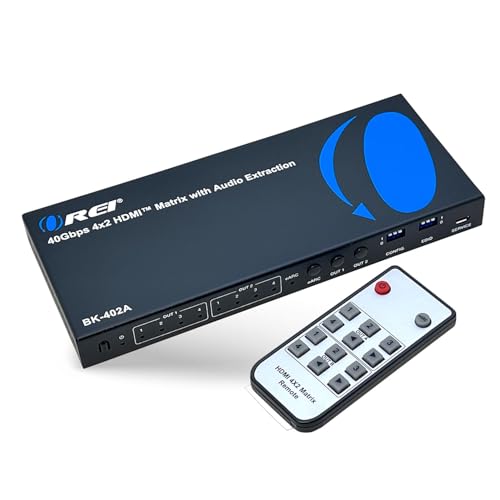
- 40Gbps HDMI 2.1 bandwidth
- 4K/120Hz, VRR, and ALLM support
- eARC, optical, and 3.5mm audio outputs
Best For: Multi-console, two-display gaming setups
High-Speed Single-Display Switch

- Four inputs and one output
- Supports 4K/120Hz and 8K/60Hz
- VRR, ALLM, QFT, remote, and auto-switching
Best For: Multiple consoles connected to one display
Whole-Room AV Control
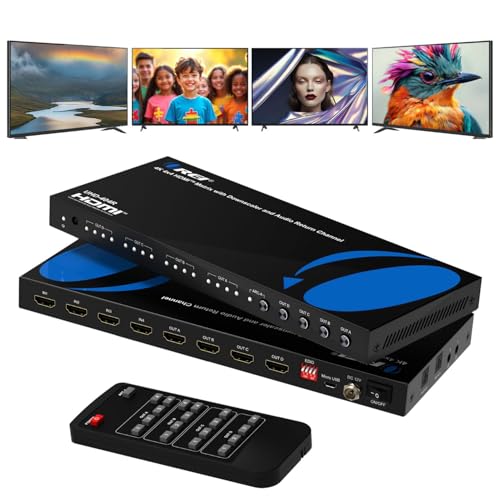
- Four inputs and four independently routed outputs
- 4K/60Hz, HDR, and HDCP 2.2 support
- ARC plus optical and 3.5mm audio extraction
Best For: Multi-display 4K/60Hz gaming and home theaters
Budget Multi-Display Mirroring

- Two inputs and four mirrored outputs
- 4K/60Hz, HDR10, and HDCP 2.2 support
- 1080p downscaling plus SPDIF and 3.5mm audio
Best For: Mirroring one console feed across multiple displays
Professional Multi-Display Control

- Routes up to eight sources to eight displays
- 4K@30Hz with 4K-to-1080p downscaling
- WebGUI, LAN, RS-232, IR, and preset control
Best For: Large multi-display gaming and AV installations
4K60 Console Routing

- Supports 4K@60Hz and 18Gbps bandwidth
- Downscales 4K for mixed 1080p displays
- Supports HDR, HDCP 2.2, and 7.1-channel audio
Best For: Multi-display 4K console gaming setups
Best 4K60 Audio-Ready Pick

- 4K@60Hz with 18Gbps bandwidth
- Optical, analog, and ARC audio support
- Downscales 4K to 1080p on one output
Best For: Multi-console 4K60 setups with flexible audio and mixed-resolution displays
Best Large-Setup Controller

- Four inputs and four outputs
- Panel, IR, and RS232 control
- Stores and recalls up to 16 display scenes
Best For: Multi-display gaming rooms and centrally managed installations
Best Compact 4K60 Value

- 4K@60Hz with 18Gbps bandwidth
- Keeps one output at 4K while downscaling another
- Includes ARC, optical, and 3.5mm audio outputs
Best For: 4K60 console setups with one 4K and one 1080p display
Premium 8K Routing – OREI 4×2 HDMI 2.1 Matrix
For shoppers comparing HDMI matrix switches for gaming consoles, the OREI 4×2 is a feature-rich option for routing four HDMI sources to two displays. HDMI 2.1 support, 40Gbps bandwidth, 4K at 120Hz, VRR, and ALLM make it well suited to current-generation gaming setups.
Best For: Gamers who need two-display routing, high refresh rates, and flexible audio extraction.
Pros:
- Supports up to 8K at 60Hz and 4K at 120Hz with HDMI 2.1.
- Includes VRR, ALLM, and FVA for smoother, lower-latency gameplay.
- Offers eARC, optical, and 3.5mm audio output options.
- Can route four sources independently to two displays.
Cons:
- eARC requires compatible eARC-enabled TV and soundbar equipment.
- Its advanced features may be more than needed for a single-display setup.
Choose this model when your console setup includes multiple HDMI 2.1 sources, two screens, or a sound system that benefits from eARC and audio de-embedding.
High-Speed Single-Display Switch – 4-Port HDMI 2.1 Switch
If you are evaluating HDMI matrix switches for gaming consoles but only need one display, this 4-in-1-out HDMI 2.1 switch provides a straightforward way to connect multiple sources. It supports 8K at 60Hz, 4K at 120Hz, VRR, ALLM, and QFT for compatible gaming equipment.
Best For: Players connecting several consoles or media devices to one high-refresh-rate display.
Pros:
- Connects up to four HDMI sources to one display.
- Supports 8K at 60Hz, 4K at 120Hz, and up to 48Gbps bandwidth.
- Includes VRR, ALLM, and QFT gaming features.
- Offers remote control and signal-detection auto-switching.
Cons:
- It has one HDMI output, so it cannot independently feed multiple displays.
- 8K/60Hz and 4K/120Hz operation requires suitable HDMI 2.1 cables and compatible devices.
- Auto-switching may not work as expected with devices left in standby mode.
This is a practical choice for a one-TV or one-monitor gaming station, especially if you want to avoid repeatedly unplugging PS5, Xbox, PC, or streaming-device cables.
Whole-Room AV Control – OREI 4×4 HDMI Matrix
The OREI UHD-404R is a useful pick among HDMI matrix switches for gaming consoles when several sources must be shared across several screens. Its four inputs and four outputs allow independent routing, while 4K at 60Hz, HDR, ARC, and audio extraction cover common home-theater and gaming needs.
Best For: Home theaters, multi-room setups, or gaming spaces with up to four HDMI displays.
Pros:
- Routes four HDMI sources independently to four displays.
- Supports 4K at 60Hz, 18Gbps bandwidth, HDR, and HDCP 2.2.
- Provides optical and 3.5mm audio extraction plus ARC on Output A.
- Uses a durable metal enclosure and includes an IR remote.
Cons:
- It does not provide the HDMI 2.1 4K/120Hz features found on newer gaming-focused models.
- ARC audio functionality is limited to Output A.
Consider this matrix if your consoles and displays primarily use 4K/60Hz and you value broad routing flexibility over the latest high-refresh HDMI 2.1 specifications.
Budget Multi-Display Mirroring – 2×4 HDMI Matrix with Audio
For a simpler option among HDMI matrix switches for gaming consoles, this 2×4 model connects two HDMI sources and mirrors the selected signal across four displays. It supports 4K at 60Hz, HDR10, downscaling on Output 1, and separate SPDIF and 3.5mm audio outputs.
Best For: Gaming or presentation setups that need the same console image on multiple screens.
Pros:
- Distributes one selected source to four displays simultaneously.
- Supports 4K at 60Hz, HDR10, HDCP 2.2, and 3D.
- Output 1 can downscale 4K to 1080p for mixed-display setups.
- Includes button and IR-remote source selection.
Cons:
- All four outputs show the same image; split-screen and extended-display modes are not supported.
- It supports only two HDMI inputs.
- Downscaling is limited to 1080p and is assigned to Output 1.
This model makes sense when synchronized viewing matters more than independent display control—for example, showing one console feed on a TV, monitor, projector, and other screens at once.
Professional Multi-Display Control – OREI 8×8 HDMI Matrix
For demanding HDMI matrix switches for gaming consoles setups, this OREI model is designed to connect multiple sources to multiple displays. It supports up to eight HDMI inputs and eight outputs, with flexible control options and downscaling for mixed-resolution screens.
Best For: Large gaming rooms, AV installations, and multi-display setups that need independent routing and centralized control.
Pros:
- Routes up to eight HDMI sources independently to eight displays.
- Supports 4K at 30Hz and downscales 4K content to 1080p for compatible displays.
- Offers front-panel, IR, RS-232, LAN, and WebGUI control, plus eight preset scenes.
- Supports Dolby Atmos, DTS:X, and up to 7.1-channel LPCM audio.
Cons:
- Its 4K support is limited to 30Hz.
- The 8×8 design may be more equipment than a typical home gaming setup requires.
Choose this matrix when you need extensive source and display routing, rack-mountable hardware, and installation-friendly control options. It is less suited to gaming setups that prioritize 4K at 60Hz.
Compact Audio-Ready Switcher – FERRISA 4×2 HDMI Matrix
This FERRISA model is a practical option among HDMI matrix switches for gaming consoles when you need to connect several sources to two displays. It also extracts audio through optical or 3.5mm outputs, making it useful for routing console sound to separate audio equipment.
Best For: Home gaming and entertainment setups with up to four HDMI sources, two displays, and separate optical or stereo audio.
Pros:
- Connects up to four HDMI sources to two displays.
- Supports 4K, 1080p, 3D, deep color, and HD audio formats.
- Provides optical and 3.5mm audio extraction outputs.
- Includes EDID management, IR remote control, and compatibility with PS3, PS4, PS5, and Xbox.
Cons:
- Both displays must use the same resolution at the same time.
- It supports HDMI 1.4b and HDCP 1.4 rather than newer HDMI standards.
- The notes specify that the AAA battery for the remote is needed separately.
This is a straightforward choice for console owners who want two-screen distribution and flexible audio extraction. Confirm your console, display, and audio formats before buying, especially if you need newer HDR or Dolby Vision features.
4K60 Console Routing – OREI 4×4 HDMI Matrix
For gaming-focused systems that need higher refresh-rate 4K output, this OREI is a strong fit among HDMI matrix switches for gaming consoles. It routes four HDMI sources to four displays, supports 18Gbps bandwidth, and can downscale 4K content for 1080p screens.
Best For: Console setups using 4K displays, mixed 4K and 1080p screens, and independent content routing across multiple rooms or monitors.
Pros:
- Supports 4K at 60Hz with up to 18Gbps bandwidth.
- Routes four HDMI sources independently to four displays.
- Handles mixed-resolution displays with 4K-to-1080p downscaling.
- Supports HDR, HDCP 2.2, Dolby Vision, HDR10+, and up to 7.1-channel audio.
Cons:
- The supplied notes do not list advanced network or WebGUI control.
- It is designed for multi-display installations and may be unnecessary for a single-screen console setup.
This model is the most suitable of the three for 4K60 gaming environments, particularly when displays have different capabilities. Its 4×4 layout offers meaningful expansion without the larger footprint of an 8×8 matrix.
Best 4K60 Audio-Ready Pick – OREI 4×2 HDMI Matrix with ARC
For gamers building a multi-console setup, the OREI UHDS-402A is one of the more flexible hdmi matrix switches for gaming consoles. It connects four HDMI sources to two displays, supports 4K at 60Hz with 18Gbps bandwidth, and includes useful audio extraction, ARC, EDID, and downscaling features.
Best For: Gaming rooms using multiple consoles, a 4K display, and a second 1080p screen or separate audio system.
Pros:
- Supports 4K@60Hz, HDR formats, and 18Gbps bandwidth.
- Independently routes four sources to two displays.
- Provides optical and analog audio extraction, ARC, and 4K-to-1080p downscaling.
Cons:
- Does not support 4K@120Hz, VRR, or ALLM.
- Requires suitable HDMI cables for stable 4K@60Hz performance.
This is a strong choice when 4K60 gaming and audio flexibility matter more than newer 4K120 console features. Its downscaler is especially useful for mixing a 4K TV with an older 1080p display.
Best Large-Setup Controller – Yinker 4×4 HDMI Matrix
The Yinker HD414 suits gaming centers and larger entertainment systems that need four inputs and four outputs. Among hdmi matrix switches for gaming consoles, it stands out for its front-panel controls, LCD status screen, IR remote, RS232 control, EDID management, and saved display scenes.
Best For: Multi-console gaming rooms, demonstrations, or installations with several displays and centralized control.
Pros:
- Routes four HDMI sources to four displays simultaneously or individually.
- Offers panel, IR, and RS232 control with a backlit button panel and LCD.
- Supports EDID management, 4K@30Hz, and 1080p@60Hz downscaling.
Cons:
- Limited to 4K@30Hz rather than 4K@60Hz.
- Cannot create a 2×2 video wall.
- Cannot be directly mounted in a 1U rack cabinet.
Choose this model when output quantity and control options are more important than high-refresh-rate 4K gaming. Its scene memory and power-off memory can simplify repeatable setups with multiple screens.
Best Compact 4K60 Value – OREI 4×2 HDMI Matrix UHD-402D
The OREI UHD-402D is a practical option for gamers who want 4K60 switching without giving up compatibility with a 1080p secondary screen. It connects four sources to two displays and combines 18Gbps performance with HDR, audio outputs, ARC, EDID, and straightforward button or remote control.
Best For: Console setups that pair a 4K gaming display with a 1080p TV, monitor, or capture-oriented secondary screen.
Pros:
- Supports 4K@60Hz, 4:4:4 color, HDR, and 12-bit deep color.
- Downscales 4K to 1080p while retaining 4K on the main output.
- Includes ARC, optical and 3.5mm audio outputs, and front-panel or IR control.
Cons:
- Provides two outputs rather than four.
- Does not list support for 4K@120Hz, VRR, or ALLM.
This model offers a balanced feature set for modern 4K60 console systems. Its independent downscaling makes it particularly useful when every connected display does not support the same resolution.
How We Picked the Best Hdmi Matrix Switches for Gaming Consoles
We evaluated these models by looking at the features that matter most in multi-console setups: HDMI input and output counts, supported resolution and refresh rate, HDR and HDCP compatibility, audio extraction, ARC or eARC support, downscaling, EDID control, and remote-management options. We also considered whether each switch suits a simple living-room setup or a more complex gaming and home-theater installation.
Port configuration is especially important. A 4×2 model can send multiple sources to two displays, while a 4×4 switch provides more flexible routing. Larger 8×8 units are better suited to dedicated media rooms, offices, or whole-home installations.
Quick Comparison
- Best for advanced 8K setups: Choose an 8K-capable model with HDMI 2.1 support and 4K at 120Hz compatibility.
- Best for flexible home theaters: A 4×4 matrix offers multiple inputs and outputs for routing consoles, streaming devices, and displays.
- Best for compact installations: A 4×2 switch balances useful routing with a smaller footprint and simpler cabling.
- Best for older 4K systems: Models supporting 4K at 30Hz or 60Hz can work well with standard TVs and previous-generation consoles.
Key Buying Factors for Hdmi Matrix Switches for Gaming Consoles
Resolution and Refresh Rate
Check the switch against the gaming modes you actually use. A 4K 60Hz model is suitable for many TVs and consoles, but PS5, Xbox Series X, and gaming PCs may benefit from 4K at 120Hz. If you want future-ready performance, look for HDMI 2.1 and 8K support, while confirming that the product supports the required bandwidth rather than only listing a high maximum resolution.
Inputs, Outputs, and Routing
Count every source and display you plan to connect, then leave room for expansion. A matrix switch is more flexible than a basic HDMI switch because it can route different inputs to separate outputs. Make sure the switching method, remote, front-panel controls, or app interface fits your setup.
Audio Features
Audio extraction can send sound to a soundbar, AV receiver, powered speakers, or headphones through optical, analog, or other outputs. ARC and eARC support may simplify TV audio connections, but compatibility depends on the television, receiver, cables, and selected EDID mode.
EDID, HDR, and Downscaling
EDID management helps resolve handshake problems when connected displays have different capabilities. Downscaling is useful when sending one source to both a 4K display and an older 1080p screen. Confirm support for HDR formats and HDCP versions if you use protected streaming content.
Who Should Buy Which Hdmi Matrix Switches for Gaming Consoles?
Choose a 4×2 model if you have several consoles but only need two displays. It is a practical choice for a living room, desk, or gaming room where space and cost matter.
Choose a 4×4 model if you want independent control over multiple TVs, monitors, or projectors. This is the most versatile category for a growing console collection or home theater.
Choose an 8K or HDMI 2.1 model if you use current-generation consoles at high refresh rates or want more headroom for future devices. Verify cable quality and display compatibility before buying.
Choose an 8×8 model for a larger, permanently installed system with many sources and displays. Features such as RS-232, WebGUI, and advanced EDID control are most valuable when the switch is part of a broader AV setup.