
Choosing the right HDMI matrix switch for dual displays can simplify a home theater, gaming setup, conference room, or multi-source workstation. The best models let you route different HDMI sources to two screens while preserving the resolution, HDR, and audio features your equipment supports.
This roundup compares 10 matrix switches across 2×2, 3×2, 4×2, and 4×4 configurations, including options with 4K or 8K support, downscaling, ARC or eARC, audio extraction, EDID management, and remote control.
Best 10 Hdmi Matrix Switches for Dual Displays Picks for 2026
Best Overall
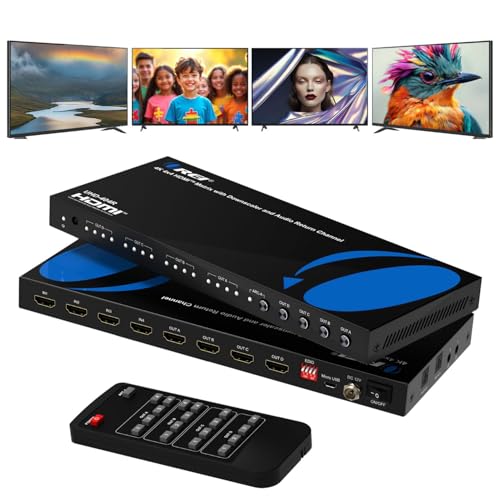
- 4K@60Hz and 18Gbps bandwidth
- Four independent HDMI outputs
- ARC, optical, and 3.5mm audio extraction
Best For: Expandable home theaters and multi-display AV systems
Best Compact Value

- Three inputs and two HDMI outputs
- 4K@60Hz, HDR10, and 18Gbps support
- Optical and 3.5mm audio extraction
Best For: Compact dual-display entertainment systems
Best for 8K Gaming
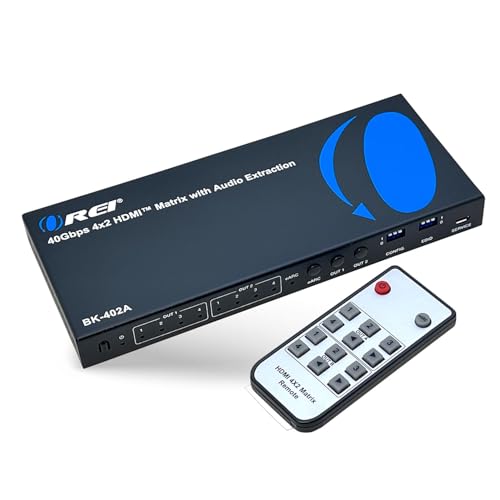
- 8K@60Hz and 4K@120Hz support
- 40Gbps bandwidth with VRR and ALLM
- eARC, optical, and 3.5mm audio extraction
Best For: HDMI 2.1 gaming and high-refresh-rate displays
Best Audio Flexibility

- Four inputs and two independent outputs
- 4K@60Hz, HDR, and 18.5Gbps support
- Dual optical and 3.5mm audio outputs
Best For: Dual displays with flexible extracted-audio connections
Best Feature-Rich Pick

- 4K@60Hz with 18Gbps bandwidth
- Audio extraction, ARC, and HDR support
- Independent downscaling for mixed displays
Best For: Home theaters and AV setups needing flexible audio and display routing
Best for Larger Installations

- Routes four sources to four displays
- Panel, IR, and RS232 control
- Stores up to 16 display scenes
Best For: Conference rooms and multi-display AV installations
Best 4K Flexibility

- Four HDMI inputs and four outputs
- Downscales 4K for 1080p displays
- 18Gbps, HDR, and HDCP 2.2 support
Best For: Expandable multi-display systems with mixed resolutions
Best Dual-Display 4K Pick

- 4K at 60Hz with 18Gbps bandwidth
- Downscales for simultaneous 4K and 1080p
- Adds ARC and audio extraction
Best For: Modern dual-display systems with mixed resolutions
Best Overall – OREI 4×4 4K HDMI Matrix
For shoppers comparing HDMI matrix switches for dual displays, the OREI UHD-404R is a flexible choice when you also want room to expand. Its four inputs and four independently routable outputs support 4K at 60Hz, while ARC and dedicated audio extraction add useful home-theater connectivity.
Best For: Home theaters, conference rooms, classrooms, and installations that may need more than two display outputs.
Pros:
- Supports 4K at 60Hz with 18Gbps bandwidth, HDMI 2.0, and HDCP 2.2.
- Routes four HDMI sources independently to four displays.
- Includes ARC plus optical and 3.5mm audio outputs.
- Metal enclosure, remote control, and support for HDR and several surround formats.
Cons:
- Its four-output design may be more hardware than a simple dual-display setup requires.
- ARC audio return is limited to Output A.
This is a strong all-purpose option if you want dual-display capability today but value extra routing capacity and flexible audio connections for a larger AV system.
Best Compact Value – SIGRAPID 3×2 4K HDMI Matrix
The SIGRAPID 3×2 is a compact option for HDMI matrix switches for dual displays when three source devices are enough. It supports 4K at 60Hz, HDR10, 3D, and 18Gbps transmission, with automatic 4K-to-1080p downscaling for mixed-resolution displays.
Best For: Smaller entertainment setups using up to three HDMI sources and two displays.
Pros:
- Supports 4K at 60Hz, HDMI 2.0b, HDCP 2.2, HDR10, and 3D.
- Provides two HDMI outputs for dual-display routing.
- Offers optical and 3.5mm audio extraction with selectable audio modes.
- Can downscale 4K content to 1080p for compatible mixed-resolution setups.
Cons:
- Only three HDMI inputs are available.
- Automatic downscaling is specified for 4K to 1080p only.
- The lower-resolution display must connect to the OUTA port for downscaling.
Its small footprint and practical audio features make it appealing for a basic dual-display arrangement, provided your display wiring matches the stated downscaling requirement.
Best for 8K Gaming – OREI 4×2 HDMI 2.1 Matrix
If you need HDMI matrix switches for dual displays with next-generation video support, the OREI BK-402A stands out with HDMI 2.1, 40Gbps bandwidth, and up to 8K capability. It also supports 4K at 120Hz, VRR, and ALLM for compatible gaming and high-frame-rate setups.
Best For: Gaming consoles, high-refresh-rate displays, and AV systems built around HDMI 2.1 sources.
Pros:
- Supports up to 8K@60Hz and 4K@120Hz with 40Gbps bandwidth.
- Includes VRR, ALLM, and FVA for smoother, lower-latency video.
- Routes four HDMI inputs independently to two displays.
- Supports eARC plus optical and 3.5mm audio extraction.
Cons:
- eARC requires both the TV and soundbar to support eARC.
- Its advanced HDMI 2.1 feature set may be unnecessary for basic 4K/60Hz equipment.
This is the most future-oriented choice in the group for dual-display gaming, especially when high refresh rates and modern audio formats matter more than minimizing cost or size.
Best Audio Flexibility – ENBUER 4×2 4K HDMI Matrix
The ENBUER 4×2 is worth considering among HDMI matrix switches for dual displays if audio extraction and EDID control are priorities. It connects four 4K sources to two displays, supports 4K at 60Hz and HDR, and provides both optical and 3.5mm audio outputs.
Best For: Dual-display setups that need multiple audio-output options and manual EDID management.
Pros:
- Connects four HDMI sources to two displays with independent switching.
- Supports 4K@60Hz, HDR, HDMI 2.0b, HDCP 2.2, and RGB 4:4:4.
- Provides two optical and two 3.5mm audio outputs.
- Includes EDID management and IR remote control.
Cons:
- The EDID setting applies to Output A and may require restarting the switch after configuration.
- The supplied notes do not specify HDMI 2.1 features such as 4K at 120Hz.
Choose this model when your priority is connecting several HDMI sources while sending extracted audio to different devices; its EDID procedure deserves attention during setup.
Best Feature-Rich Pick – OREI 4×2 HDMI Matrix
For shoppers comparing HDMI matrix switches for dual displays, the OREI UHDS-402A combines four HDMI inputs with two independently switchable outputs. It supports 4K at 60Hz with 18Gbps bandwidth, HDR formats, audio extraction, ARC, and mixed-resolution output through 4K-to-1080p downscaling.
Best For: Home theaters, conference rooms, and setups requiring audio extraction or mixed 4K and 1080p displays.
Pros:
- Routes up to four sources to two displays independently.
- Supports 4K@60Hz, 4:4:4, Dolby Vision, HDR10+, and HLG.
- Provides optical and analog audio outputs plus ARC.
- Includes EDID modes and independent 4K-to-1080p downscaling.
Cons:
- Does not support 4K@120Hz, VRR, or ALLM.
- Stable 4K@60Hz performance requires suitable HDMI cables under 30 feet.
This is a strong all-around choice when dual-display flexibility and audio routing matter more than high-refresh-rate gaming features.
Best for Larger Installations – Yinker 4×4 HDMI Matrix
The Yinker 4×4 is worth considering among HDMI matrix switches for dual displays when you need room to connect more sources and screens. It can route four inputs to four outputs simultaneously or individually, with panel, IR, and RS232 control plus EDID scene management.
Best For: Lecture halls, conference rooms, monitoring systems, and multi-display installations using 4K at 30Hz or 1080p at 60Hz.
Pros:
- Offers four HDMI inputs and four HDMI outputs.
- Supports individual or simultaneous source distribution.
- Provides panel buttons, IR remote, and RS232 control.
- Includes EDID management, LCD status display, and memory for 16 display scenes.
Cons:
- Maximum 4K resolution is 30Hz.
- It is not a video wall controller and cannot create a 2×2 TV wall.
- The enclosure cannot be directly mounted in a 1U rack cabinet.
Choose this model for control depth and expansion rather than 4K high-refresh performance, especially where multiple displays and saved configurations are useful.
Best Compact 4K Option – OREI 2×2 HDMI Matrix
If you only need two sources and two displays, the OREI UHDS-202 keeps the setup simple while still delivering 4K@60Hz. This compact matrix includes EDID management, HDR support, IR control, and digital and analog audio extraction, making it a practical option for dual-display AV routing.
Best For: Compact home theater and monitor setups with two HDMI sources, two outputs, and extracted stereo or surround audio.
Pros:
- Supports 4K@60Hz with 18Gbps bandwidth and 4:4:4 video.
- Offers two HDMI inputs and two HDMI outputs with IR source selection.
- Supports HDR, HDCP 2.2, and up to 7.1-channel formats.
- Includes optical and analog audio outputs with smart EDID management.
Cons:
- It will not extend PC monitors.
- Its two-input, two-output design is less expandable than larger matrices.
- Audio extraction is specified for digital and analog output rather than HDMI extension.
This is the most straightforward pick of the three for a smaller dual-display system where 4K@60Hz and audio extraction are priorities.
Best 4K Flexibility – OREI 4×4 HDMI Matrix
If you need HDMI matrix switches for dual displays but also want room to expand, the OREI UHD-404 provides four inputs and four outputs. Its downscaling support helps integrate 4K and 1080p screens, while EDID and HDR support suit more demanding home theater, presentation, and multi-screen setups.
Best For: Users who need flexible routing for multiple sources and displays, including mixed 4K and 1080p screens.
Pros:
- Routes up to four HDMI sources to four displays.
- Can downscale 4K content to 1080p for compatible displays.
- Supports 4K at 60Hz, HDR, HDCP 2.2, and up to 18Gbps bandwidth.
- Supports stereo and 7.1-channel digital audio formats.
Cons:
- Its four-output design may be more than needed for a simple two-display system.
- Requires an AC adapter and additional HDMI cables.
The UHD-404 is the most expandable choice here. Choose it when you want independent or identical content across several displays and need the flexibility to mix 4K and 1080p outputs.
Best Audio Extraction Value – FERRISA 4×2 HDMI Matrix
For a straightforward dual-display setup, this FERRISA 4×2 matrix connects four HDMI sources to two displays and adds optical, stereo, and headphone audio outputs. It is a practical option for home theater or office systems, though both displays must use the same resolution at the same time.
Best For: Budget-conscious users who need two-display switching with separate audio extraction.
Pros:
- Connects four HDMI sources to two HDMI displays.
- Provides optical, 3.5mm stereo, and headphone audio outputs.
- Includes EDID management and an IR remote control.
- Supports 4K, 3D, 1080p, and deep color up to 12-bit.
Cons:
- Cannot display different resolutions on the two outputs simultaneously.
- Supports HDMI 1.4b and HDCP 1.4 rather than newer HDMI 2.0 features.
- Does not support Dolby DD/DD+ or Dolby Vision.
This matrix is best when audio routing matters as much as video switching. Its resolution limitation makes it less suitable for mixed-resolution dual-display installations, but it can work well with matched screens.
Best Dual-Display 4K Pick – OREI 4×2 HDMI Matrix
The OREI UHD-402D is purpose-built for dual-display systems, combining four HDMI inputs with two outputs, 4K at 60Hz support, and 18Gbps bandwidth. Its built-in downscaler can send 1080p to one compatible display while preserving a 4K output on the other, making it a strong fit for HDMI matrix switches for dual displays.
Best For: Dual-display 4K setups that need mixed-resolution support, audio extraction, and ARC.
Pros:
- Supports four sources and two displays with 4K at 60Hz output.
- Downscales 4K to 1080p while maintaining the main 4K output.
- Offers 18Gbps bandwidth, HDR, HDCP 2.2, and 12-bit deep color.
- Includes ARC support on HDMI Output A plus optical and 3.5mm audio outputs.
Cons:
- Only provides two HDMI outputs, so it is not designed for larger display arrays.
- Power is supplied through the included USB charger and USB-A to USB-C cable.
Among these options, the UHD-402D offers the most targeted feature set for modern dual-display use. Its downscaler and ARC support reduce compatibility compromises, while front-panel buttons and the remote simplify everyday switching.
How We Picked the Best Hdmi Matrix Switches for Dual Displays
We focused on the features that have the greatest effect on compatibility and everyday use: input and output count, supported resolution and refresh rate, HDR and HDCP handling, audio extraction, EDID control, downscaling, and installation flexibility. We also included several layouts because a compact 2×2 switch suits a smaller setup, while a 4×4 model is better for multiple sources and displays.
Specifications should be matched to the entire signal chain. A switch advertised as 8K will not create 8K output if the source, cable, or display supports only 4K. Likewise, features such as ARC, eARC, optical audio, and Dolby or multichannel pass-through vary by model.
Quick Comparison
- Best for larger systems: Choose a 4×4 matrix when you need flexible routing among several sources and displays.
- Best general-purpose layout: A 4×2 switch supports multiple sources while feeding two screens.
- Best for compact installations: A 2×2 or 3×2 model can reduce cost and cable clutter.
- Best for future-proofing: Look for HDMI 2.1, 8K support, high refresh rates, and eARC if your equipment requires them.
- Best for mixed displays: Prioritize downscaling and reliable EDID management when one screen has lower capabilities than the other.
Key Buying Factors for Hdmi Matrix Switches for Dual Displays
Inputs, Outputs, and Routing
Count every device you plan to connect, including game consoles, streaming players, Blu-ray players, computers, and receivers. A 4×2 model is usually the most versatile choice for two displays, while a 4×4 model adds the ability to distribute sources to four outputs.
Resolution, Refresh Rate, and HDR
For 4K gaming, check for 4K at 60Hz and the required color format. Gamers using newer consoles or PCs should verify whether HDMI 2.1 features, 4K at 120Hz, VRR, or 8K are supported. HDR and HDCP compatibility also matter for protected streaming content.
Audio and EDID Features
Audio extraction can send sound to a soundbar, amplifier, or headphones without relying on the display. ARC or eARC may simplify TV audio connections. EDID controls help the switch negotiate a stable format, while downscaling can allow a 4K source to work with a 1080p display in a mixed-resolution setup.
Control and Installation
IR remotes are convenient for everyday switching, while front-panel buttons help when the remote is unavailable. RS-232 control is useful in commercial or automated installations. Also check cable length, power requirements, ventilation, and whether the unit remembers the last selected input.
Who Should Buy Which Hdmi Matrix Switches for Dual Displays?
Choose a 2×2 model for a simple office, bedroom, or living-room setup with two sources and two displays. Choose a 3×2 model if you need one additional source without moving to a larger enclosure. Choose a 4×2 model for the best balance of capacity and price in most dual-display systems. Choose a 4×4 model when multiple displays, projectors, or zones require independent routing. If your system includes a modern gaming console, 8K television, or eARC sound system, prioritize the model whose HDMI version and audio specifications explicitly match those devices.