
When it comes to video production, having the right external RAID solution can make a significant difference in your workflow. You’ll want a system that not only accommodates large files but also guarantees speed and reliability. With various options available, it’s essential to weigh factors like capacity, connectivity, and data protection. Let’s explore some of the top choices that could elevate your editing experience and help you manage your projects more effectively.
LaCie Rugged Raid Shuttle 8TB External Hard Drive
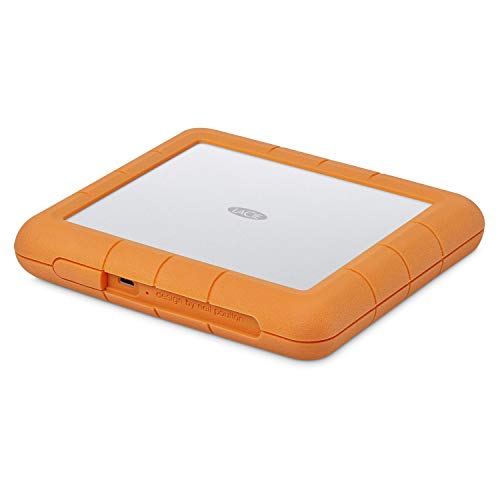
The LaCie Rugged Raid Shuttle 8TB External Hard Drive is the perfect external RAID solution for video production professionals who need reliability and portability. With a massive 8TB capacity, it easily accommodates all your footage. Its flat design makes packing a breeze, while its rugged construction guarantees it withstands drops, shocks, dust, and even water. You can effortlessly configure RAID 0/1 using the step-by-step wizard, optimizing for performance or redundancy. Plus, the self-encrypting password system secures your projects from unauthorized access. Enjoy a complimentary month of Adobe Creative Cloud, enhancing your editing experience with essential apps.
Best For: Video production professionals seeking a reliable and portable external RAID solution for storing large amounts of footage.
Pros:
- Rugged construction protects against drops, shocks, dust, and water, ensuring durability in challenging environments.
- Large 8TB capacity allows for extensive storage of video files and projects.
- Self-encrypting password system provides enhanced security for protecting sensitive data.
Cons:
- Higher price point compared to standard external hard drives without RAID capabilities.
- Weight may be less portable than smaller, non-RAID drives, making it less convenient for some users.
- Limited compatibility with older USB standards may require additional adapters for use with older devices.
OWC ThunderBay 4 RAID Storage Enclosure

Designed for video production professionals, the OWC ThunderBay 4 RAID Storage Enclosure offers a robust solution for managing large files with ease. With a data transfer rate of up to 1527MB/s, it supports up to four 3.5-inch or 2.5-inch drives without the need for adapters. You can configure it with various RAID options like 0, 1, 4, 5, and 10, thanks to the included SoftRAID Premium software. Compatible with both Mac and Windows systems via Thunderbolt (USB-C), it weighs 8.6 pounds and measures 13.1 x 10.3 x 8.5 inches. Elevate your storage game today!
Best For: Video production professionals who require efficient management of large files and high-speed data transfer.
Pros:
- High data transfer rate of up to 1527MB/s for quick access to large files.
- User-configurable RAID options (0, 1, 4, 5, 10) for flexibility in data protection and performance.
- Compatible with both Mac and Windows systems via Thunderbolt (USB-C), making it versatile for different users.
Cons:
- Heavier than some portable options, weighing 8.6 pounds, which may affect portability.
- No drives included, requiring separate purchase of hard drives to use the enclosure.
- Limited to four drives, which may not suffice for users with extensive storage needs.
OWC ThunderBay 4 0TB Four-Bay Thunderbolt 40Gb/s RAID Storage Enclosure
For video professionals seeking high-speed data transfer, the OWC ThunderBay 4 is a standout choice. This four-bay Thunderbolt enclosure offers impressive sustained performance up to 1527MB/s, making it ideal for handling large video files. You can easily configure it in multiple RAID modes—0, 1, 4, 5, or 1+0—tailoring it to your workflow needs. It supports both 3.5-inch and 2.5-inch drives without additional adapters, ensuring versatility. Plus, the ultra-quiet, heat-dissipating aluminum chassis keeps everything running smoothly. With dual Thunderbolt 3 ports, you’re set for peak connectivity and speed, boosting your video production workflow efficiently.
Best For: Video professionals seeking high-speed data transfer and flexible RAID configurations.
Pros:
- High-speed performance: Achieves sustained data transfer rates up to 1527MB/s.
- Versatile drive support: Compatible with both 3.5-inch and 2.5-inch drives without the need for adapters.
- Multiple RAID configurations: Offers customizable RAID modes (0, 1, 4, 5, 1+0) to suit various workflow needs.
Cons:
- No pre-installed drives: Comes as a 0TB enclosure, requiring users to purchase drives separately.
- Price point: May be considered expensive compared to standard storage solutions.
- Size and weight: The aluminum chassis, while heat-dissipating, adds bulk, which may not be ideal for portable setups.
OWC 32.0TB Mercury Elite Pro Dual RAID USB 3.1 / eSATA Storage Solution

If you’re a video producer seeking robust storage solutions, the OWC 32.0TB Mercury Elite Pro Dual RAID USB 3.1 / eSATA Storage Solution stands out with its impressive capacity and versatile RAID configurations. This dual bay enclosure supports RAID 0 for maximum throughput up to 407MB/s, ideal for HD video workflows. Alternatively, switch to RAID 1 for added data security. With connectivity options like USB 3.2 and eSATA, you’ll enjoy fast transfer speeds. The aluminum design guarantees durability, while intelligent power management conserves energy. Plus, it comes with a one-year warranty, making it a smart investment for your production needs.
Best For: Video producers and content creators seeking high-capacity, reliable storage solutions with versatile RAID configurations.
Pros:
- Supports multiple RAID modes, including RAID 0 for maximum speed and RAID 1 for data security.
- Fast transfer speeds with USB 3.2 and eSATA connectivity options.
- Durable aluminum design with intelligent power management for energy efficiency.
Cons:
- Requires two 3.5-inch SATA drives for full functionality, which may increase initial costs.
- Performance may vary based on RAID configuration and drive speeds.
- Limited to a 1-year warranty for the product itself, with additional warranty only on the enclosure.
LaCie 2big RAID 48TB External Hard Drive

The LaCie 2big RAID 48TB External Hard Drive stands out with its impressive capacity and speed, making it an excellent choice for photographers, indie filmmakers, and YouTubers looking to streamline their video production workflow. With speeds up to 550MB/s and enterprise-class 7200 RPM drives, you’ll experience efficient data transfer and storage. It’s compatible with USB-C and USB 3.0, ensuring easy integration with your setup. Plus, the simple step-by-step wizard lets you configure RAID 0 or 1 for performance or redundancy. With a five-year warranty and Rescue Data Recovery Services, you can trust its reliability for your valuable projects.
Best For: Photographers, indie filmmakers, and YouTubers seeking high-capacity and high-speed external storage solutions.
Pros:
- High Capacity: Offers an impressive 48TB of storage, ideal for large video files and extensive photo libraries.
- Fast Data Transfer: Achieves speeds up to 550MB/s, enhancing workflow efficiency.
- Easy RAID Configuration: User-friendly wizard for configuring RAID 0 or 1, making it suitable for performance or redundancy.
Cons:
- Price Point: Higher cost compared to standard external hard drives.
- Weight and Size: Bulkier design may not be portable for on-the-go use.
- Limited Compatibility: While it supports USB-C and USB 3.0, it may not be compatible with older connection types.
G-Technology 28TB G-RAID with Thunderbolt 3 Storage System
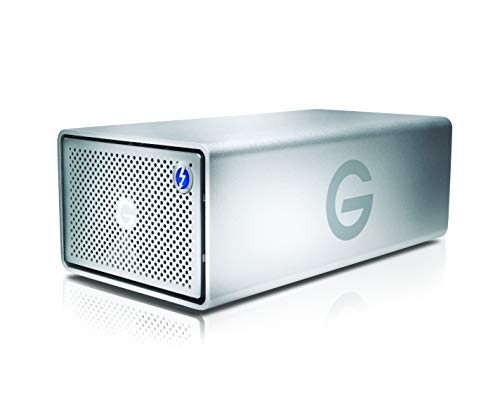
Designed for professionals in video production, the G-Technology 28TB G-RAID with Thunderbolt 3 offers a robust solution with its dual removable enterprise-class 7200RPM hard drives. This storage system delivers a massive 28TB capacity, ensuring you have ample space for all your video files. Its solid, all-aluminum enclosure not only provides durability but also allows for easy stacking. With dual Thunderbolt 3 ports and a USB-C port supporting USB 3.1 Gen 2, you’ll experience high-speed data transfers, making your workflow smoother. Trust the G-RAID to enhance your production efficiency and keep your data secure.
Best For: Professionals in video production who require reliable, high-capacity storage solutions for their video files.
Pros:
- Ample Storage Capacity: With 28TB of space, it can accommodate large video files and projects.
- High-Speed Connectivity: Dual Thunderbolt 3 ports and USB-C with USB 3.1 Gen 2 support ensure fast data transfer rates.
- Durable Design: The all-aluminum enclosure is sturdy and stackable, providing both protection and organization.
Cons:
- Price Point: May be considered expensive for casual users or those with lower storage needs.
- Weight: The solid construction makes it heavier than some plastic alternatives, which might affect portability.
- Limited Compatibility: Thunderbolt 3 and USB-C connections may require adapters for older systems or devices.
LaCie 2big RAID 40TB External Hard Drive

For photographers, indie filmmakers, and YouTubers seeking a robust storage solution, the LaCie 2big RAID 40TB External Hard Drive stands out with its impressive capacity and speed. With up to 40TB of storage and speeds reaching 550MB/s, you can easily manage large files. Its hot-swappable IronWolf Pro drives guarantee reliable performance at 7200 RPM, making it perfect for demanding workflows. Plus, the easy RAID 0/1 configuration allows you to customize for speed or redundancy. With a five-year warranty and Rescue Data Recovery Services, you’ll have peace of mind knowing your data is protected against unforeseen issues.
Best For: Photographers, indie filmmakers, and YouTubers seeking a reliable and high-capacity storage solution.
Pros:
- High storage capacity of up to 40TB, ideal for managing large files.
- Fast data transfer speeds of up to 550MB/s, enhancing workflow efficiency.
- Easy RAID 0/1 configuration for customizable speed and data redundancy.
Cons:
- Customer rating of only 3.2 out of 5 stars, indicating mixed feedback.
- Weighs 6.17 pounds, which may be considered heavy for portable use.
- Full refund policy only applies to damaged or defective products, with potential additional fees for misrepresented conditions.
LaCie 2big RAID 16TB External Hard Drive

Photographers, indie filmmakers, and YouTubers will find the LaCie 2big RAID 16TB External Hard Drive an exceptional choice for their video production needs. With up to 440MB/s speeds and 7200 RPM enterprise-class drives, it guarantees quick access to your files. The USB-C connectivity makes it compatible with both Mac and PC desktops. You can easily configure RAID 0 or 1 using a step-by-step wizard, optimizing for performance or redundancy. Plus, the hot-swappable IronWolf Pro drives enhance reliability. Backed by a five-year limited warranty, including Rescue Data Recovery Services, it’s a solid investment for your creative projects.
Best For: Photographers, indie filmmakers, and YouTubers looking for high-capacity and high-speed storage solutions.
Pros:
- Fast data transfer speeds of up to 440MB/s enhance productivity.
- Easy configuration of RAID 0 or 1 for tailored performance or redundancy.
- Hot-swappable IronWolf Pro drives offer increased reliability and convenience.
Cons:
- Higher price point compared to standard external hard drives.
- Limited to desktop use due to its design.
- Available storage capacity may vary, potentially leading to confusion.
OWC ThunderBay 4 16TB RAID Storage Solution
The OWC ThunderBay 4 16TB RAID Storage Solution stands out as an ideal choice for video editors seeking high-speed performance and reliable data management. With dual Thunderbolt 3 ports, you’ll enjoy up to 1106MB/s real-world sustained performance, making file transfers a breeze. It’s compatible with both 3.5 and 2.5 drives, so you won’t need any adapters. Plus, you can configure it in various RAID options like RAID 0, 1, 4, 5, or 1+0, tailored to your needs. The included SoftRAID Premium software offers robust tools for managing your RAID arrays, ensuring your data stays secure and accessible.
Best For: Video editors and professionals looking for high-speed, reliable RAID storage solutions.
Pros:
- Up to 1106MB/s real-world sustained performance for fast file transfers.
- Compatible with both 3.5 and 2.5 drives without the need for additional adapters.
- User-configurable RAID options (0, 1, 4, 5, 1+0) to suit various data protection needs.
Cons:
- Higher initial investment compared to standard external drives.
- Requires some technical knowledge to configure RAID settings effectively.
- Limited to Thunderbolt 3 connections, which may not be compatible with all systems.
OWC ThunderBay 8 Eight-Bay Thunderbolt RAID Storage Enclosure

Designed for video professionals who demand high-speed performance and reliability, the OWC ThunderBay 8 Eight-Bay Thunderbolt RAID Storage Enclosure stands out with its dual Thunderbolt 3 ports. You can easily connect up to six units, achieving a massive 1,152TB storage capacity. It’s compatible with eight universal 2.5 or 3.5-inch SSDs and HDDs, making it versatile for your needs. Plus, it’s plug-and-play ready, so you won’t need any drivers. The included OWC SoftRAID Premium supports multiple RAID configurations, ensuring your data is safe. With a one-year warranty, you can have peace of mind while focusing on your projects.
Best For: Video professionals who require high-speed performance and reliable data storage solutions.
Pros:
- Dual Thunderbolt 3 ports enable daisy-chaining of multiple units for expansive storage capacity.
- Plug-and-play ready design eliminates the need for additional drivers, simplifying setup.
- Bundled with OWC SoftRAID Premium, offering multiple RAID configurations for enhanced data security.
Cons:
- Higher initial investment compared to standard storage solutions.
- Limited to eight drive bays, which may not satisfy those needing even larger capacities.
- Requires compatible SSDs or HDDs, which may add to overall costs if upgrading drives.
Factors to Consider When Choosing an External Raid for Video Production
When you’re choosing an external RAID for video production, several key factors come into play. You’ll want to evaluate your storage capacity needs, the speed and performance you require, and the RAID configuration that best suits your workflow. Additionally, make sure the RAID is compatible with your devices and check its durability and reliability for long-term use.
Storage Capacity Requirements
Selecting the right external RAID solution for video production hinges on understanding your storage capacity requirements. Video projects can demand anywhere from 1TB to over 40TB, largely depending on resolution and length. For instance, 4K footage averages around 375MB per minute, quickly consuming storage space. Don’t forget about backup strategies; RAID configurations often duplicate data for redundancy, effectively doubling your storage needs. As project file sizes grow due to raw footage and effects, opting for a RAID system with capacities over 16TB becomes essential. Additionally, consider choosing a system that allows for expandable storage, so you can accommodate future projects and the increasing file sizes common in video production. This foresight will save you headaches down the line.
Speed and Performance
After determining your storage capacity needs, it’s time to focus on speed and performance, which are vital in video production. High-demand workflows require data transfer rates reaching up to 1527MB/s for smooth playback and editing. RAID configurations like RAID 0 can boost performance by striping data across multiple drives, enhancing read/write speeds essential for handling large video files. Opt for enterprise-class 7200 RPM drives to guarantee sustained performance and reliability during professional editing tasks. Additionally, consider your connectivity options; Thunderbolt 3 offers up to 40Gb/s, making it ideal for rapid data movement. Configurable RAID options also help you balance performance and data redundancy, guaranteeing your workflow remains efficient while safeguarding against potential data loss.
RAID Configuration Options
Choosing the right RAID configuration can greatly impact your video production workflow. If you need speed for high-resolution editing, RAID 0 might be your best bet, as it stripes data across multiple drives for faster read and write speeds. However, if data safety is your priority, consider RAID 1, which mirrors your data on two drives, ensuring your projects stay safe even if one drive fails. For a balance of performance and redundancy, RAID 5 or RAID 10 utilizes parity data to protect against drive failures while maintaining high-speed access. User-configurable options let you adjust your setup based on your specific needs, and easy-to-use wizards simplify the reconfiguration process when project demands change.
Compatibility With Devices
When you’re diving into video production, confirming your external RAID system is compatible with your setup is essential for a seamless workflow. Start by checking compatibility with your primary operating system, whether it’s Mac or PC, to avoid connectivity headaches. Look for supported connection types like USB-C or Thunderbolt, as these greatly impact data transfer speeds. Make sure the RAID enclosure can accommodate the hard drive sizes you plan to use, whether they’re 2.5 or 3.5 inches. Additionally, consider the maximum number of drives the enclosure supports, which affects storage capacity and RAID configuration options. Finally, verify the RAID system meets the data transfer rates necessary for your high-resolution video editing tasks, especially if you’re working with 4K or higher formats.
Durability and Reliability
Since video production often takes place in demanding environments, durability and reliability are essential factors to evaluate when selecting an external RAID system. Look for features like drop, shock, dust, and water resistance to withstand harsh conditions. Hot-swappable drives are a game-changer, letting you replace failed drives without any downtime during critical shoots. Guarantee the RAID system includes enterprise-class drives that spin at 7200 RPM for consistent performance with large video files. Opt for RAID configurations like RAID 1, which provide data redundancy and protect against data loss in case of a drive failure. Finally, a robust warranty and data recovery services can give you peace of mind, assuring support in case of any hardware issues or data loss incidents.
Price and Warranty Considerations
Finding the right external RAID system for video production involves weighing several key factors, especially price and warranty considerations. Start by comparing the initial price against the storage capacity; higher capacities usually come with a premium. Look for systems that offer at least a one-year warranty, with some extending coverage up to five years, which can be essential for data recovery. Don’t forget to evaluate any included data recovery services, as they can save you money if a drive fails. Also, consider the total cost of ownership, including software subscriptions needed for RAID management. Finally, strike a balance between price and performance specs, like data transfer rates, to guarantee your RAID solution meets your production needs efficiently.