
Choosing a camera with clean HDMI for podcasts can make your setup look far more professional without adding complicated video gear. The right model gives you a clean feed to your capture device or switcher, so overlays, menus, and status icons stay out of the shot.
In this roundup, we focused on cameras that balance image quality, reliable HDMI output, and practical features for real podcast workflows, including autofocus, zoom, audio options, and long-session stability.
Best 10 Camera with Clean HDMI for Podcasts Picks for 2026
Premium 24/7 Streaming Pick
Hollyland VenusLiv Air 4K Streaming Camera
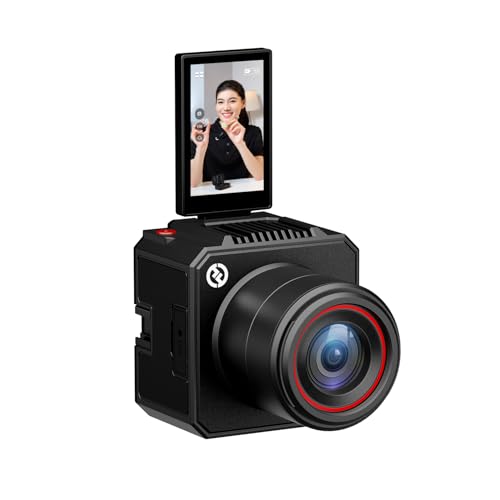
- 4K30 HDMI output for multi-camera podcast workflows
- 1/1.3-inch CMOS sensor with F1.05 lens
- AI tuning, presets, and app/desktop control
Best For: Podcasters and streamers who need clean HDMI support and long-session reliability
Most Flexible Output Pick
NearStream VM20 Pro 4K Streaming Camera

- USB-C, RJ45, HDMI, and wireless AV outputs
- 10x optical zoom for tighter podcast framing
- 8-mic array plus MicroSD backup recording
Best For: Multi-purpose podcast and streaming setups that need many connection options
Compact Audio-First Pick

- 4K/30p recording with a 150° wide-angle lens
- Built-in X/Y mics handle up to 120dB SPL
- USB webcam mode for simple streaming
Best For: Musicians and solo podcasters who want portable recording with strong onboard audio
Pro Streaming Pick
SynthMeet ST-600A 4K 60fps Streaming Camera

- 4K 60fps with HDR auto light correction
- TOF autofocus keeps faces sharp in motion
- HDMI, SDI, USB 3.0, and IP outputs
Best For: Podcasts, live streams, and conference-style recording
Budget HDMI Option
MOKOSE C100 4K HDMI Wide-Angle Camera
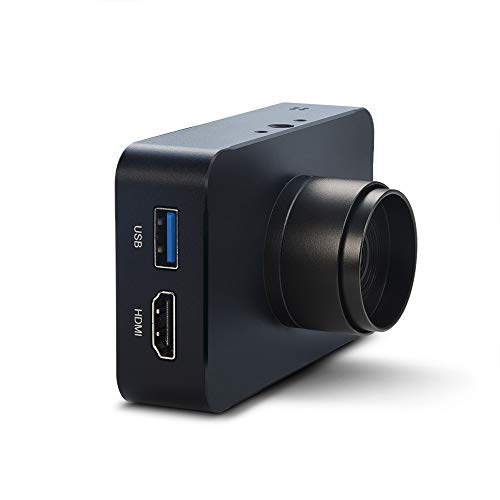
- 4K/30fps HDMI output for capture workflows
- 85° wide-angle manual lens with no distortion
- Compact aluminum body with flexible mounting
Best For: Small podcast setups and manual-framing streaming
Ultra-Close Manual Zoom Pick
4K USB HDMI Camera with 5-50mm Zoom

- 4K USB output with simultaneous HDMI
- 5-50mm manual focus zoom lens
- UVC plug-and-play for major platforms
Best For: Manual framing and dual-output studio use
Fast Autofocus Dual-Output Pick

- Fast autofocus with 0.4-second claim
- USB-C and HDMI simultaneous display
- 48MP sensor with 4K capture
Best For: Podcasters wanting autofocus and dual output
Best All-Round 4K Pick

- USB and HDMI simultaneous output
- 4K USB capture with 10X zoom
- UVC plug-and-play for common platforms
Best For: Flexible podcast and teaching setups
Premium 24/7 Streaming Pick – Hollyland VenusLiv Air 4K Streaming Camera
If you want a camera with clean HDMI for podcasts that can also handle long streaming sessions, the Hollyland VenusLiv Air is built around that use case. It combines a 1/1.3-inch CMOS sensor, an F1.05 lens, 4K30 output, and HDMI connectivity for multi-camera workflows, while also adding app and desktop control for easier tuning during production.
Best For: Creators who want a dedicated podcast or live-stream camera with clean HDMI-style workflow support, strong low-light performance, and remote control tools.
Pros:
- 4K30 output with HDMI for switcher-based or monitored podcast setups
- Large 1/1.3-inch CMOS sensor and F1.05 lens for soft background blur and clean low-light footage
- AI tuning plus saved presets make it easier to dial in repeatable looks
- Built for 24/7 streaming with air-cooling for uninterrupted sessions
Cons:
- Designed primarily as a streaming camera rather than a general-purpose hybrid camera
- Many advanced effects are tied to the companion app or desktop software
- Best value depends on whether you need its streaming-specific tools
Overall, this is the strongest fit if your podcast setup needs dependable HDMI output and creator-friendly controls in one package. Its image quality and cooling system make it especially appealing for regular on-camera shows and live productions.
Smart Tracking Choice – EMEET PIXY Dual-Camera 4K PTZ Kit
The EMEET PIXY is a strong camera with clean HDMI for podcasts if you also want automated framing and easy repositioning. Its dual-camera AI system, 4K main sensor, and PTZ motion make it better suited to hosts who move around or want the camera to follow them without much manual adjustment.
Best For: Podcast hosts, solo presenters, and small studios that want AI tracking, quick autofocus, and built-in audio.
Pros:
- Dual-camera AI system with 4K main imaging and fast PDAF/AI autofocus
- PTZ movement with 310° pan and 180° tilt for flexible framing
- 3-mic array with three sound modes, including noise canceling for podcasts
- Control software adds presets, privacy mode, and whiteboard mode
Cons:
- Streaming-focused design may be more camera than some simple podcast setups need
- Remote control support is sold separately
- Audio versatility is good, but serious studio users may still prefer external microphones
PIXY stands out when framing convenience matters as much as image quality. For podcasting, it gives you useful automation and built-in audio tools that can simplify a small production setup.
Most Flexible Output Pick – NearStream VM20 Pro 4K Streaming Camera
If your priority is a camera with clean HDMI for podcasts plus flexible connectivity, the NearStream VM20 Pro is built for mixed studio workflows. It offers 4K via USB-C, RTSP over RJ45, 1080p HDMI output, and wireless AV through the included NA20 transceiver, so it can adapt to simple desk setups or more complex production chains.
Best For: Podcast studios, churches, classrooms, and live creators that need multiple output options and long-range flexibility.
Pros:
- Multiple connection paths: USB-C, RJ45/RTSP, HDMI, and wireless AV
- 10x optical zoom helps with tighter podcast framing or close-ups
- 8-mic array with AI noise reduction and external mic support
- MicroSD recording up to 1TB adds a useful backup option
Cons:
- HDMI output is limited to 1080p, not 4K
- Wireless AV relies on the included transceiver rather than standard Wi-Fi
- Zoom-focused design may be more camera than a basic podcast desk really needs
This model is a practical choice if you want one camera that can plug into almost any podcast or streaming workflow. The mix of zoom, audio features, and output flexibility makes it especially useful for setups that may grow over time.
Compact Audio-First Pick – Zoom Q2n-4K Video Recorder
The Zoom Q2n-4K is a compact option for creators who want a camera with clean HDMI for podcasts in a simple, portable body. It records 4K video, uses a wide 150-degree lens, and includes built-in X/Y stereo microphones designed to handle louder sound without distortion, which makes it useful for music-based shows and on-the-go recording.
Best For: Musicians, podcasters, and solo creators who want a pocket-sized camera with strong built-in audio and easy USB streaming.
Pros:
- 4K/30p video with a 150-degree wide-angle lens
- Built-in X/Y stereo mics rated to 120dB SPL for loud environments
- USB webcam mode for direct streaming to platforms like YouTube and Twitch
- Pocket-sized body with a built-in tripod mount for fast setup
Cons:
- Fixed-focus design is less flexible than autofocus cameras
- No image stabilization is listed
- Audio is strong, but it may not replace a dedicated studio mic for every podcast
This is the simplest pick in the group if portability and built-in audio matter more than advanced camera control. It works best for creators who want a quick, compact recorder that can also stream without much setup.
Pro Streaming Pick – SynthMeet ST-600A 4K 60fps Streaming Camera
If you need a camera with clean HDMI for podcasts, the SynthMeet ST-600A is built for live streaming and conference-style recording with 4K 60fps output, HDR auto light correction, and fast TOF autofocus. Its HDMI, SDI, USB 3.0, and IP connections give you flexibility whether you are feeding a capture card, a switcher, or a computer-based production setup.
Best For: Podcasters and creators who want a flexible 4K camera with clean-looking video output for studio-style streaming and recording.
Pros:
- 4K at 60fps with HDR auto light correction for smooth, detailed video.
- TOF real-time autofocus helps keep subjects sharp during recording.
- HDMI, SDI, USB 3.0, and IP outputs support different podcast and streaming setups.
- Dual noise-reducing microphones can pick up voices within about 6 meters.
Cons:
- More of a production camera than a simple plug-and-play webcam.
- Requires a setup that can take advantage of its multiple outputs.
Overall, this is a strong choice if your podcast setup needs clean HDMI-style output plus pro-level flexibility. The zoom range, autofocus, and dual-stream support make it better suited to creators who want room to grow beyond a basic webcam.
Budget HDMI Option – MOKOSE C100 4K HDMI Wide-Angle Camera
For a camera with clean HDMI for podcasts on a tighter budget or smaller desk setup, the MOKOSE C100-3.2MM offers HDMI output, 4K/30fps video in HDMI mode, and a 3.2mm no-distortion wide-angle manual lens. It is a compact, mount-friendly option for anyone who wants a direct feed into a monitor or capture card for streaming and recording.
Best For: Podcasters and streamers who want a compact HDMI camera with a wide-angle view and manual control.
Pros:
- 4K/30fps HDMI output with support for multiple lower resolutions and frame rates.
- 3.2mm wide-angle lens with an 85° field of view.
- Compact aluminum body with dual 1/4-inch screw threads for flexible mounting.
- USB support and HDMI playback make it useful for monitoring and live streaming workflows.
Cons:
- Manual focus means it is less hands-off than autofocus cameras.
- No-distortion lens is wide, but it is not a zoom-based solution.
This model makes sense if you want a straightforward HDMI camera for podcasting with a clean, wide framing look. Its manual lens and compact design are practical, but it is best for users who are comfortable dialing in focus and composition themselves.
Production-Ready Choice – NearStream VM20 4K Streaming Camera with Zoom
If you are looking for a camera with clean HDMI for podcasts and want more than a basic single-camera setup, the NearStream VM20 is aimed at professional streaming workflows. It delivers 4K via USB, 1080p via HDMI, and IP streaming through RJ45, with hybrid zoom and remote control for flexible framing during interviews, panels, or studio productions.
Best For: Podcast studios that need flexible output options, remote framing control, and room for multi-camera production.
Pros:
- Multiple outputs including USB, HDMI, and Ethernet for different production workflows.
- 40x hybrid zoom gives you broad framing flexibility for larger rooms.
- 8-MEMS mic array with AI noise canceling and 3.5mm audio input.
- Remote control and multi-camera support are useful for more complex podcast setups.
Cons:
- HDMI output is 1080p rather than 4K.
- Designed for software-based workflows, not simple consumer plug-and-play use.
For podcast teams that want a more production-ready camera, the VM20 is the most flexible option here. The mix of output types, zoom range, and remote control makes it especially appealing when your show needs consistent framing and easy scaling to multiple cameras.
Ultra-Close Manual Zoom Pick – 4K USB HDMI Camera with 5-50mm Zoom
If you want a camera with clean HDMI for podcasts but also need close-up control, this ELP model is built around a 5-50mm manual zoom lens and simultaneous USB/HDMI output. It can deliver 4K via USB at up to 30fps and uses a UVC-compatible plug-and-play design, which makes it practical for creator setups, computer use, and monitoring-style workflows.
Best For: Creators who need manual zoom, 4K USB output, and HDMI at the same time for podcast or studio-style use.
Pros:
- 4K USB output with simultaneous HDMI display support
- 5-50mm variable focus lens for manual framing and close-up work
- UVC plug-and-play compatibility for Windows, macOS, Linux, Android, and Raspberry Pi
- Includes both Type-C and HDMI cables in the box
Cons:
- Manual focus means it is less convenient than autofocus options
- HDMI output details are less podcast-focused than the USB workflow
- Designed more like a flexible industrial/technical camera than a traditional webcam
This is a strong fit if your priority is adjustable framing and reliable dual-output connectivity rather than simple point-and-shoot operation. For podcasting, it makes the most sense in setups where the camera stays fixed and you want fine control over zoom and focus.
Fast Autofocus Dual-Output Pick – MOKOSE 4K USB HDMI Webcam
For a camera with clean HDMI for podcasts, this MOKOSE dual-output model stands out because it combines HDMI plus USB-C connectivity with fast autofocus and a 48MP sensor. It can capture UHD footage up to 3840×2160 at 30fps, while its HDMI and Type-C outputs can display simultaneously for a more flexible recording or monitoring setup.
Best For: Podcasters and presenters who want fast autofocus and simultaneous USB/HDMI output.
Pros:
- Fast autofocus with claimed 0.4-second focusing speed
- USB-C and HDMI simultaneous display support
- 48MP sensor with UHD capture up to 4K 30fps
- Manual or automatic adjustment of sharpness, saturation, and exposure
Cons:
- No audio, so you will still need a separate microphone for podcasts
- Digital zoom only, not optical zoom
- Focus and image controls may be more advanced than a basic webcam buyer needs
If your podcast setup values quick subject tracking and easy framing, this is the most straightforward pick in the group. The clean dual-output design makes it especially useful when you want one feed for the computer and another for display or monitoring.
Best All-Round 4K Pick – IFWATER 10X USB HDMI Camera
If you need a camera with clean HDMI for podcasts and want extra flexibility, this IFWATER unit gives you USB and HDMI simultaneous output plus a 5-50mm manual zoom lens. It is aimed at live streaming, teaching, video conferencing, and close-up work, with 4K USB output at 3840×2160 30fps and multiple video format options.
Best For: Podcast setups that need dual output, 4K USB capture, and manual zoom control.
Pros:
- USB and HDMI simultaneous output for flexible monitoring
- 4K USB output up to 3840×2160 at 30fps
- 5-50mm manual focus lens with 10X total zoom
- UVC plug-and-play compatibility with several operating systems
Cons:
- HDMI output is listed at 1080P, not 4K
- Manual focus is less convenient than autofocus for changing scenes
- Best suited to fixed-position setups rather than handheld use
This is the most versatile option if you want a dual-output camera that can handle podcasting, teaching, and close-up framing. The mix of zoom control and 4K USB output makes it practical when your content style changes from face-cam to detail shots.
How We Picked the Best Camera with Clean HDMI for Podcasts
We prioritized models that are genuinely useful as a Camera with Clean HDMI for Podcasts, not just cameras that happen to include an HDMI port. That means steady output, usable autofocus or manual control, and features that support longer recording or live sessions.
We also looked for flexibility: cameras that can work for solo hosts, two-person desks, live streaming, guest interviews, and studio environments where HDMI, USB, or IP output may be part of the setup.
Quick Comparison
For simple podcasting, compact all-in-one cameras are easiest to set up. For studios that want more control, PTZ and zoom-capable models are better because they can frame hosts from a distance and adapt to changing layouts. If you need hybrid use for music, tutorials, or close-up demos, look for models with stronger lens control and multiple output options.
Key Buying Factors for a Camera with Clean HDMI for Podcasts
Clean HDMI Output
Make sure the camera can send a clean feed without on-screen icons. If you plan to use a capture card, switcher, or live production software, this is the core requirement.
Autofocus and Framing
Fast, reliable autofocus helps keep speakers sharp during movement. PTZ presets, zoom range, and face tracking are especially useful in podcast rooms where people shift positions.
Low-Light Performance
Many podcast spaces use soft lighting rather than full studio lighting. A larger sensor, good aperture, and strong noise handling can make a visible difference.
Audio and Connectivity
Even if you use external mics, built-in audio can be helpful for backup or solo use. Also check for HDMI, USB, and network options if you want one camera to handle multiple workflows.
Session Length and Reliability
Podcasts can run long. Look for cameras designed for continuous operation, with stable power options and thermal performance that won’t interrupt recording.
Who Should Buy Which Camera with Clean HDMI for Podcasts?
If you want the easiest path to a polished podcast image, choose a compact streaming camera with clean HDMI and good autofocus. If you host from a fixed studio, a PTZ model with presets and zoom can be worth the extra cost. Creators who also livestream, teach, or shoot product close-ups should favor cameras with flexible output modes and manual control. And if you mainly need a simple, dependable Camera with Clean HDMI for Podcasts, prioritize the most stable model that matches your lighting, distance, and framing needs rather than chasing the highest resolution alone.