
Choosing the right setup for overhead desk recording can make your tutorials, unboxings, and product demos look much more polished with less effort.
Below, we focus on flexible mounts, webcams, document cameras, and lighted phone rigs that help you capture steady top-down footage with better framing and visibility.
Best 10 Camera for Overhead Desk Recording Picks for 2026
Top Pick for Flexible Overhead Setups

- 6-inch dimmable ring light
- Flexible arm for top-down angles
- Works with phones and lightweight cameras
Best For: Lightweight overhead recording with built-in lighting
Top Pick for Teaching and Demos
OKIOCAM S2 Pro Document Camera

- 13MP sensor with 4K capture
- Autofocus plus smart pointer support
- Built-in light for dim rooms
Best For: Teaching, demos, and document presentation
Best Heavy-Duty Arm

- 22-inch arm offers extra reach
- Clamp and pads improve stability
- Supports phones, webcams, and lights
Best For: Long-reach overhead mounting for lightweight gear
Best Simple Webcam Kit
Pro HD 1080p Webcam with Tripod

- 1080p/30fps webcam with tripod
- Auto-focus and low-light correction
- Dual mics for clearer calls
Best For: Simple plug-and-play desk recording and video calls
Portable Overhead Lighting Rig
Overhead Phone Mount with 60 LED Light
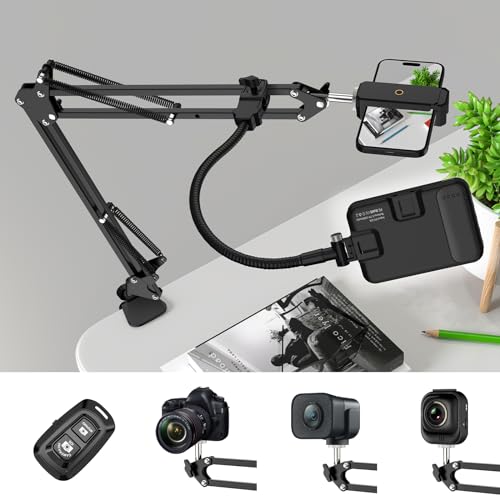
- 360° ball head for flexible overhead angles
- 60 LED light with 3 modes and 10 brightness levels
- Reinforced clamp mount with wireless remote
Best For: Desk creators who want overhead mounting plus adjustable lighting
Flexible Desk Arm Mount
Overhead Camera Mount with Ballhead

- 360° ballhead with adjustable arm positioning
- Works with phones, webcams, lights, and microphones
- Clamp-mounted steel and ABS desk stand
Best For: Lightweight overhead recording with multiple small devices
Ring Light Overhead Starter Kit
10" Ring Light with Overhead Mount
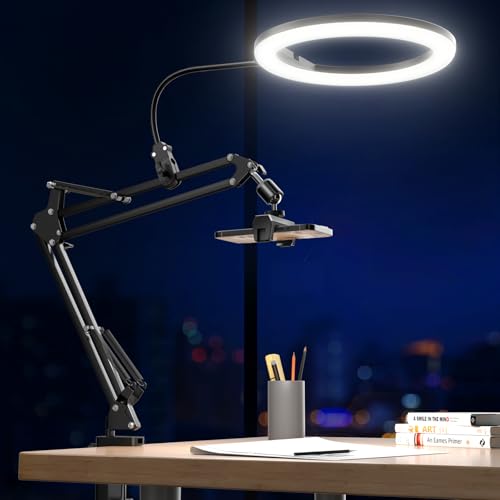
- 10" ring light with 3 colors and 10 brightness levels
- Overhead mount adjusts easily at multiple angles
- Double-spring metal bracket with space-saving clamp
Best For: Evenly lit overhead desk recording with a ring light
Overhead Mount With Super Clamp
NEEWER 22" Magic Arm Desk Clamp

- Holds gear up to 500g
- 22-inch arm with 360° ball heads
- Fits desks and round tubes
Best For: Flexible top-down recording with phones, webcams, and lightweight cameras
Ring Light Desk Recorder
Evershop 10" Overhead Phone Mount

- Built-in 10-inch ring light
- 30 lighting combinations
- 30-inch arm for top-down shots
Best For: Overhead phone recording with added lighting for tutorials and livestreams
Heavy-Duty Desk Mount
UBeesize 360° Adjustable Overhead Arm

- Supports gear up to 5.5 lbs
- 15 to 35-inch adjustable height
- Tool-free clamp for desks up to 2.6 inches
Best For: Stable overhead recording with heavier cameras and multi-device setups
Top Pick for Flexible Overhead Setups – Ring Light Overhead Mount
If you want a camera for overhead desk recording that can also handle lighting, this flexible mount is a practical all-in-one option. The articulating arm, ball joints, and included ring light make it easier to frame top-down shots for cooking, crafting, tutorials, and live streams without building a more complex rig.
Best For: Creators who want a simple overhead desk setup with built-in lighting for phones, webcams, and lightweight cameras.
Pros:
- 6-inch ring light with 3 lighting modes and 10 brightness levels per mode
- Flexible arm, ball joints, and clamp support top-down recording at different angles
- Wide device compatibility for iPhone, Logitech webcams, compact cameras, and action cameras
- Extra flexible clip arm adds more mounting combinations for teaching and content creation
Cons:
- Maximum load is 3 lbs, so it is not for heavy-duty cameras
- Desk clamp fits surfaces up to 5.2 cm thick
- Best suited to lightweight gear rather than full-size rigs
This is a good fit if you need a camera for overhead desk recording and want lighting plus mounting flexibility in one package. It is especially useful when portability and quick setup matter more than heavy payload capacity.
Top Pick for Teaching and Demos – OKIOCAM S2 Pro Document Camera
For a camera for overhead desk recording focused on documents, demos, and teaching, the OKIOCAM S2 Pro is built for clean presentation work. Its 13MP 4K sensor, autofocus, and integrated LED light help capture papers, objects, and live demonstrations with clear detail and minimal setup.
Best For: Teachers, presenters, and remote demonstrators who need a high-resolution overhead document camera.
Pros:
- 13MP sensor records up to 4K UHD at 30 fps
- Autofocus and OKIOPoint smart pointer support interactive presenting
- Built-in LED light helps in dimly lit spaces
- Works with Windows, Mac, and Chromebooks plus common meeting apps
Cons:
- Primarily designed for document and presentation use, not general-purpose filming
- Uses USB-connected software features for the full presentation experience
- Heavier and more desktop-oriented than small clamp mounts
If your priority is sharp overhead visuals rather than a flexible multi-use arm, this is one of the strongest presentation-focused choices. It is especially well matched to classroom, remote teaching, and step-by-step demo workflows.
Best Heavy-Duty Arm – SMALLRIG 22" Magic Arm Clamp
If you need a camera for overhead desk recording with a more rugged mounting solution, this SMALLRIG magic arm gives you extra reach and clamp stability. The 22-inch arm and crab clamp are useful for POV shots, webcams, action cameras, and other lightweight accessories where adjustable positioning matters.
Best For: Creators who want a longer, more adjustable overhead clamp arm for lightweight gear.
Pros:
- Long 22-inch arm provides more reach than typical magic arms
- Anti-deflection interface and anti-slip pads improve stability
- Clamp opens wide enough for desks and some round tubes
- Includes phone holder, 1/4-inch screws, and a 3/8-inch adapter for flexibility
Cons:
- Load capacity is limited to 600g/21oz
- Heavy phones may require shorter arm extension to reduce slippage
- Does not include a camera or light, only the mounting kit
This is a strong choice when stability and positioning range matter more than built-in features. It works well as a mounting foundation for a customized overhead desk recording setup with lightweight devices.
Best Simple Webcam Kit – Pro HD 1080p Webcam with Tripod
For buyers who want a straightforward camera for overhead desk recording without specialized arms, this webcam kit keeps the setup simple. It combines a 1080p webcam, included tripod, autofocus, and a wide-angle lens, making it a practical pick for calls, recording, and basic desk coverage.
Best For: Users who want an easy plug-and-play webcam with a tripod for flexible desk placement.
Pros:
- 1080p video at 30 fps for smooth recording and calls
- Includes tripod plus monitor clip for placement options
- Auto-focus, low-light correction, and wide-angle lens improve everyday use
- Dual noise-cancelling microphones add clearer audio for meetings
Cons:
- Not a dedicated overhead document camera
- Best for basic desk use rather than pro presentation workflows
- Resolution is 1080p, not 4K
This is the most convenient option if you want a webcam kit that can adapt to different desk setups quickly. It is a solid fit for general recording, video calls, and light content creation where simplicity matters.
Portable Overhead Lighting Rig – Overhead Phone Mount with 60 LED Light
If you need a camera for overhead desk recording that also handles lighting, this combo keeps the setup simple. The 360° rotatable ball head lets you fine-tune angles, while the 60 LED light offers three color modes and 10 brightness levels to help you match the scene to your desk work, cooking, or tutorial setup.
Best For: Creators who want an overhead mount with built-in, adjustable lighting for desk videos and live sessions.
Pros:
- 360° rotatable ball head for flexible overhead angle adjustment
- Built-in 60 LED light with 3 modes and 10 brightness levels
- Metal tubing, reinforced base, and rubber-padded clamp for added stability
- Includes a wireless remote for more convenient use
Cons:
- Designed for phones, tablets, laptops, and computers rather than heavier cameras
- Clamp-based setup may not suit every desk thickness or surface
This is a practical pick if you want one overhead desk recording solution that combines support and illumination. The portable design and retractable arms make it easier to store than bulkier rigs, while the adjustable color temperature gives you more control over how your footage looks.
Flexible Desk Arm Mount – Overhead Camera Mount with Ballhead
This camera for overhead desk recording is built for users who want a simple arm mount with broad mounting options. The adjustable desk stand, overhead holding arm, and 360° ballhead make it easier to position a webcam, phone, light, or small camera at the angle your setup needs.
Best For: People who need a lightweight overhead mount for webcams, phones, lights, and compact recording setups.
Pros:
- 360° ballhead and adjustable arm help dial in the shot
- Supports multiple devices including smartphones, webcams, microphones, and video lights
- Steel and ABS construction with non-slip, rotatable design
- Compact desktop footprint with clamp mounting
Cons:
- Maximum load is limited to 0.5 kg
- Holding arm length and height range may be tight for larger overhead setups
For lighter gear and smaller desk rigs, this mount offers a lot of flexibility without taking up much space. Its strength is adaptability: you can swap between different devices and adjust the height and angle to suit recording, streaming, drawing, or crafting.
Ring Light Overhead Starter Kit – 10" Ring Light with Overhead Mount
If your camera for overhead desk recording also needs better light, this ring light setup is a straightforward option. The overhead mount, phone holder, and adjustable cantilever design let you position the light quickly, while 3 color modes and 10 brightness levels give you plenty of control over the look of your footage.
Best For: Desk creators who want an overhead phone mount with a full-size ring light for clearer, evenly lit recordings.
Pros:
- 10″ ring light with 3 colors and 10 brightness levels
- Overhead mount and cantilever stand adjust in multiple angles
- Double springs and metal bracket provide stable support
- C-clamp design helps save desk space
Cons:
- Best suited to phones, webcams, digital cameras, and similar lighter gear
- Requires desk edge space for the clamp mount
This is a strong choice when even lighting matters as much as overhead placement. The combination of flexible positioning and shadow-reducing ring light makes it useful for cooking demos, crafts, makeup, and other close-up desk work.
Overhead Mount With Super Clamp – NEEWER 22" Magic Arm Desk Clamp
If you want a camera for overhead desk recording that can handle more than just a phone, this NEEWER magic arm is built for flexible top-down setups. The 22-inch articulating arm, super clamp, and multiple 360° ball-head joints make it a practical choice for static recording, streaming, or overhead photography on a desk.
Best For: Creators who need an adjustable overhead mount for phones, webcams, action cameras, microphones, or small cameras.
Pros:
- Supports gear up to 500g, including smartphones, webcams, action cameras, and small cameras.
- 22-inch articulating arm with 360° dual ball heads gives you lots of positioning freedom.
- Clamp grips flat surfaces and round tubes, so it works on desks, stands, poles, and more.
- Anti-twist pins and non-slip pads help keep the setup steadier during recording.
Cons:
- Best suited to static situations rather than setups that move around a lot.
- Maximum weight is limited to 500g, so heavier gear is not a fit.
- Does not include lighting, so you may need a separate light for the best results.
Overall, this is a versatile overhead desk mount for creators who need adjustability and broad device compatibility. It is especially useful if your recording workflow changes between phones, webcams, mics, and lighter cameras.
Ring Light Desk Recorder – Evershop 10" Overhead Phone Mount
For a camera for overhead desk recording that also solves lighting, this Evershop ring light mount is designed for bright, evenly lit top-down content. The flexible arm, desk clamp, and phone holder make it a straightforward option for tutorials, live streams, Zoom calls, and other recording setups where lighting matters as much as framing.
Best For: Desk creators who want an overhead phone mount with built-in lighting for recording, streaming, and tutorials.
Pros:
- 10-inch ring light provides soft, even light that reduces harsh shadows.
- 3 color modes and 10 brightness levels give 30 lighting combinations.
- 30-inch arm extends for overhead shots and top-down recording.
- Strong clamp fits desks up to 2.4 inches thick and is built for stable use.
Cons:
- USB powered, so you need a suitable power adapter for best brightness.
- Primarily aimed at smartphones rather than larger cameras.
- Ring light design may not be ideal if you only want a mount without lighting.
This is a smart pick if you want a tidy all-in-one desk setup for overhead phone recording. It is less about heavy-duty camera support and more about giving you controlled light plus a stable filming position.
Heavy-Duty Desk Mount – UBeesize 360° Adjustable Overhead Arm
If you need a camera for overhead desk recording with stronger load support, this UBeesize overhead mount is built for heavier creator gear. The adjustable arm, 1/4″ ball head, and tool-free clamp make it useful for product shots, cooking tutorials, Zoom meetings, and other tabletop recordings where stability matters.
Best For: Creators who want a sturdy overhead desk mount for DSLRs, webcams, smartphones, ring lights, or microphones.
Pros:
- Supports up to 5.5 lbs, which is more than many lightweight desk mounts.
- 360° positioning with a ball head and articulating arm makes overhead framing easy.
- Adjusts from 15 to 35 inches to suit compact desks and different shooting angles.
- Rubber-padded clamp fits tables up to 2.6 inches thick and installs without tools.
Cons:
- Heavier and more studio-oriented than a simple phone-only stand.
- Not water resistant, so it should stay in indoor content-creation setups.
- May be more mount than some casual users need for basic phone recording.
Overall, this is the most robust option in the group for creators who want a stable overhead recording arm with room for heavier devices. It is a strong pick if your desk setup needs one mount that can handle multiple gear types.
How We Picked the Best Camera for Overhead Desk Recording
We prioritized stability, adjustability, image clarity, and ease of setup. For a Camera for Overhead Desk Recording, the best option depends on whether you need a simple phone mount, a webcam arm, or a dedicated document camera. We also considered lighting support, clamp strength, compatibility, and how well each design fits a cluttered desk.
Quick Comparison: Which Type Fits Your Workflow?
Document cameras are best for teachers, presenters, and anyone showing papers or flat products in real time. Overhead phone mounts suit creators who film social clips, crafting, and hands-on demos. Webcam arm systems work well for streamers and hybrid desk setups, while lighted kits add convenience if your recording space needs built-in illumination.
Key Buying Factors for a Camera for Overhead Desk Recording
Mount Stability and Reach
Look for a rigid arm, secure clamp, and enough extension to center the subject without wobble. Longer arms are useful, but only if they hold position under the weight of your camera or phone.
Image Quality and Focus
If sharp detail matters, choose a camera with dependable autofocus, strong resolution, and usable low-light performance. For document-style recording, text clarity is often more important than extreme frame rates.
Lighting and Glare Control
Built-in ring lights can simplify setup, but they are not always necessary. If you already have room lighting, a good mount may be enough. For reflective surfaces, adjustable light placement matters more than raw brightness.
Compatibility and Workflow
Make sure the mount fits your phone, webcam, or camera and supports the angles you need. USB cameras are convenient for computer-based recording, while phone mounts are ideal for app-based filming and quick uploads.
Who Should Buy Which Camera for Overhead Desk Recording?
If you want the easiest all-in-one option, choose a lighted phone mount. If you need the most professional top-down capture for documents or lessons, a dedicated document camera is usually the smarter buy. If your goal is streaming, content creation, or product demos, a flexible overhead arm with a webcam or phone can offer the best balance of price and versatility.
For buyers comparing a Camera for Overhead Desk Recording, the right choice usually comes down to three things: what you record, how much desk space you have, and whether you want a simple portable setup or a more permanent studio-style rig.