
Choosing a camera for multicamera podcast recording is about more than image quality. You need dependable connectivity, easy switching, and a setup that fits your room, crew, and workflow.
This guide highlights the features that matter most so you can build a smoother, more professional podcast video system without overspending on tools you will not use.
Best 10 Camera for Multicamera Podcast Recording Picks for 2026
Wireless 3-Cam Podcast Kit
Mevo Start 3-Pack Wireless Live Streaming Cameras

- Syncs up to three cameras for multi-angle shooting
- Records and streams in 1080p HD
- App control with Auto-Director and Wi‑Fi operation
Best For: Wireless multi-camera podcast setups with quick app-based control
Complete 2-Person Podcast Kit
Movo 2-Cam Video Podcast Equipment Kit
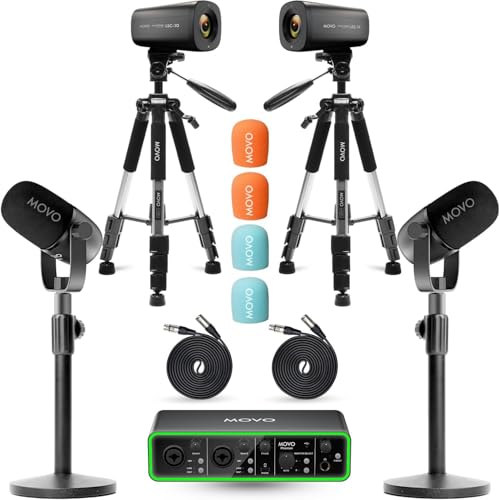
- Includes two 4K cameras, two mics, and an audio interface
- Bundled tripods and desk stands
- Built for co-hosted shows and interviews
Best For: Two-host podcasts that want a complete video and audio bundle
Multi-Cam Production Switcher

- Switches between up to four video sources
- Creates five customizable multi-source scenes
- Streams and records with built-in audio tools
Best For: Podcasters with existing cameras who need live switching and scene control
Broadcast-Ready Multicam Choice
Blackmagic Studio Camera 4K for Live Production

- SDI in/out for live switching setups
- Talkback, tally, and ATEM control support
- XLR audio inputs with phantom power
Best For: studio podcasters and live producers using SDI workflows
Wireless App-Controlled Pick
Mevo Start Multicamera Live Streaming Camera

- Syncs up to three cameras in the Mevo app
- Auto-Director helps manage angle changes
- Runs up to six hours on battery
Best For: portable podcasters and streamers wanting wireless multicam control
Flexible 4K Creator Camera
NearStream VM20 Pro Wireless Ready

- 4K USB-C, RTSP, HDMI, and wireless AV options.
- 10x optical zoom plus MicroSD backup recording.
- 8-mic array with AI noise reduction and mic input.
Best For: Mixed podcast and streaming setups that need flexible connectivity.
3-Camera Podcast Bundle
NearStream VM33 Multi-Angle Kit
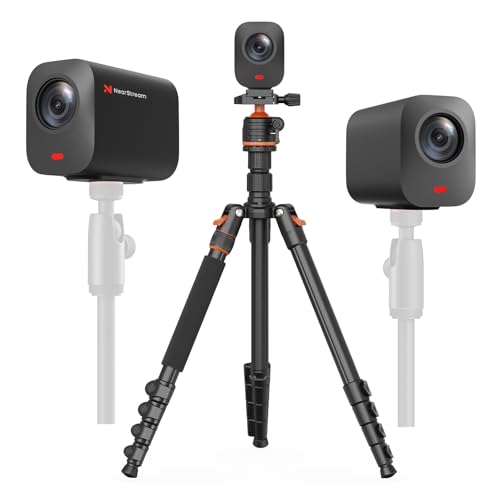
- Three-camera bundle for multi-angle podcasting.
- Each camera offers 2K video and 40x hybrid zoom.
- Includes one adjustable tripod for the kit.
Best For: Multi-angle podcast teams that want a ready-made three-camera setup.
Wireless 3-Cam Podcast Kit – Mevo Start 3-Pack Wireless Live Streaming Cameras
If you want a camera for multicamera podcast recording that can be set up quickly and controlled from a phone, this Mevo Start 3-pack is built for that workflow. It supports syncing up to three cameras for multi-angle shooting, records and streams in 1080p HD, and uses Wi‑Fi so you can avoid running cables across the studio.
Best For: Creators who want a wireless 3-camera setup for podcasts, live streams, and simple multi-angle productions.
Pros:
- Syncs up to three Mevo Start cameras for multi-angle recording
- Streams and records in 1080p HD
- Wireless Wi‑Fi operation keeps the setup cable-light
- Mevo Multicam app offers app-based camera control and Auto-Director features
Cons:
- Sold as a 3-pack, so it may be more camera than a basic two-person podcast needs
- Designed around wireless control and app workflow rather than a traditional wired studio setup
- Not water resistant
For a podcaster who values fast setup and flexible framing, this bundle makes a strong case as a camera for multicamera podcast recording. The tradeoff is that it is centered on the Mevo app ecosystem, so it fits best when you want a streamlined mobile-controlled system.
Complete 2-Person Podcast Kit – Movo 2-Cam Video Podcast Equipment Kit
This Movo bundle is a practical camera for multicamera podcast recording if you want a complete two-person studio in one purchase. It combines two 4K UHD cameras, two XLR dynamic microphones, an audio interface, desk stands, and tripods, so you can focus on recording instead of sourcing every piece separately.
Best For: Two-host podcasts, interviews, and small studios that want a ready-made video-and-audio package.
Pros:
- Includes two 4K UHD cameras for multi-angle podcast video
- Comes with two XLR dynamic microphones and a 2-channel USB audio interface
- Bundled tripods and desk stands simplify setup
- Designed as a complete podcast setup for two
Cons:
- Built specifically around a 2-person workflow
- May be less flexible if you already own cameras or microphones
- Higher all-in-one bundle may be more than a simple solo setup needs
If you want one purchase that covers both image and sound, this bundle is easy to recommend for a multicamera podcast recording setup. It is especially appealing for co-hosted shows because the cameras, microphones, and interface are meant to work together right out of the box.
Smart 4K PTZ Podcast Camera – EMEET PIXY Dual-Camera 4K Kit
The EMEET PIXY is a different take on a camera for multicamera podcast recording: instead of adding multiple fixed cameras, it gives you a smart dual-camera PTZ system with AI tracking and a 4K main sensor. That makes it a strong option when you want automated framing, quick focus, and adjustable angles without building a larger camera rig.
Best For: Solo creators, presenters, and podcasters who want automated framing with 4K PTZ flexibility.
Pros:
- Dual-camera design with a 4K main imaging camera and AI assist camera
- PDAF and AI autofocus are designed for fast 0.2s focusing
- PTZ movement offers 310° pan and 180° tilt for flexible framing
- Three-mic array includes multiple sound modes for podcasts and recordings
Cons:
- It is a single-camera solution rather than a true multi-camera kit
- Some features depend on EMEET STUDIO software
- 4K output is tied to specific frame-rate limits noted in the product details
For creators who want smart framing instead of multiple separate cameras, this model is compelling. It is best viewed as an automated podcast camera that can reduce setup complexity while still delivering 4K capture and useful tracking tools.
Multi-Cam Production Switcher – RØDE RØDECaster Video S
If your camera for multicamera podcast recording needs a central control point, the RØDECaster Video S is the kind of gear that ties the whole show together. It switches between up to four sources, builds custom scenes, handles audio through studio-grade preamps, and can stream or record for later editing.
Best For: Podcasters and streamers who already have cameras and want a compact switcher for live production.
Pros:
- Switches between up to four video sources
- Supports five customizable multi-source scenes
- Includes studio-grade audio inputs with Revolution Preamps
- Can stream via Wi‑Fi or Ethernet and record to external USB storage
Cons:
- Does not include cameras, so it is not an all-in-one starter kit
- Works best when paired with existing video sources and audio gear
- More of a production switcher than a standalone camera solution
This is a strong choice if your podcast setup is already camera-based and you need a way to switch angles cleanly. Rather than replacing cameras, it helps you manage a multi-camera production with more control and polish.
Broadcast-Ready Multicam Choice – Blackmagic Studio Camera 4K for Live Production
If you want a camera for multicamera podcast recording that feels closer to a broadcast rig than a simple webcam, the Blackmagic Design Studio Camera 4K is built for that job. It supports SDI input and output, talkback, tally indicators, and ATEM-based CCU control, which makes it a strong fit for controlled studio setups where cameras stay fixed and need to integrate cleanly with switching gear.
Best For: Studio podcasters and live producers who want SDI-based multicamera recording with broadcast-style control.
Pros:
- SDI input/output with support for multiple SDI rates, including 12G-SDI
- Talkback, tally indicators, and ATEM SDI CCU control for live production workflows
- Interchangeable Active MFT lens mount with iris, focus, and zoom control on supported lenses
- Built-in XLR audio inputs with phantom power for more flexible studio audio
Cons:
- Requires more production gear than a simple plug-and-play podcast camera
- Not water resistant and designed for stationary live production use
- No image stabilization, so it is best kept on a tripod or fixed mount
Overall, this is a serious multicamera option for creators who already work with SDI switchers and want a camera body designed around live production rather than casual recording. It is especially appealing when you need consistent framing, external audio, and hands-on broadcast control.
Voice-Tracked Two-Camera Bundle – NearStream AI Multicam Podcast Kit
For a camera for multicamera podcast recording that aims to simplify switching, this NearStream kit is built around audio-directed automation. The bundle pairs two VM33 wireless streaming cameras with a wireless lav mic system, and the app can manage camera switching, Audio Tracking Director, PiP layouts, overlays, and streaming settings for a two-camera show.
Best For: Podcasters and interview creators who want an easier dual-camera setup with voice-tracked switching.
Pros:
- Audio-directed switching helps follow the active speaker during podcasts and interviews
- Includes two wireless cameras, two tripods, and a wireless lav mic system in one bundle
- Supports 2K local recording and 1080p live streaming
- 10x optical zoom and up to 40x hybrid zoom for flexible framing
Cons:
- Best suited to a two-camera workflow rather than larger multicam productions
- Wireless app-based control may not suit users who prefer traditional camera operation
- Designed around streaming and recording workflows, so it is more specialized than a general-purpose camera
This kit is a practical shortcut for creators who want multicamera podcast coverage without assembling every piece separately. The combination of voice-tracked switching, wireless cameras, and included audio gear makes it especially useful for conversational content where fast, clean angle changes matter.
Wireless App-Controlled Pick – Mevo Start Multicamera Live Streaming Camera
The Mevo Start is a flexible camera for multicamera podcast recording when you want wireless control and easy expansion. It supports syncing up to three cameras through the Mevo Multicam app, records and streams in 1080p HD, and can run from battery power for up to six hours, making it a portable option for creators who need a simpler multi-angle setup.
Best For: Portable podcasters and streamers who want wireless multicam control with minimal cabling.
Pros:
- Syncs up to three Mevo Start cameras for multi-angle streaming
- Wireless app control with Auto-Director for easier scene management
- Built-in battery supports up to six hours of use
- 1080p HD recording and streaming with built-in mic support or external audio sources
Cons:
- Limited to 1080p rather than higher-resolution capture
- Designed around smartphone-style control, not broadcast-style camera workflows
- Best when used with the Mevo ecosystem for multicamera setups
Mevo Start works well for creators who value convenience, wireless setup, and app-based control over pro-video complexity. For podcast teams that want to move quickly and keep cable clutter down, it offers a straightforward way to build a compact multicamera recording system.
AI Voice-Tracked Podcast Kit – NearStream VM33 Dual-Cam Auto Director
If you want a camera for multicamera podcast recording that can reduce hands-on switching, this NearStream kit is built around voice-tracked automation. The two VM33 cameras work with the AWM28T wireless lavalier mic so the active speaker can drive angle changes for interviews, webinars, talk shows, and live streams.
Best For: Podcasters, interview teams, and streamers who want automated speaker-based switching with a compact two-camera setup.
Pros:
- AI Voice-Tracked Auto Director follows the active speaker using the included wireless mic.
- Two VM33 cameras support host-and-guest framing, wide shots, and product demos.
- 10x optical zoom and QHD 1440p local recording add flexibility for close-ups and backup capture.
- NearStream App control supports overlays, audio mixing, and RTMP/RTSP/NDI workflows.
Cons:
- Only two cameras are included, so larger productions may need expansion elsewhere.
- Advanced automation depends on the included mic and app workflow.
This is a strong fit if you want multicam recording with less manual switching and a guided speaker-following workflow. It is especially practical for smaller studios that value simplicity, zoom range, and streaming flexibility.
Flexible 4K Creator Camera – NearStream VM20 Pro Wireless Ready
For a camera for multicamera podcast recording that can also work as a standalone creator or backup angle, the VM20 Pro focuses on connection flexibility. It offers 4K USB-C output, RJ45 RTSP streaming, HDMI output, and included wireless AV support through the NA20 transceiver, making it adaptable to mixed studio setups.
Best For: Podcasters, educators, and live streamers who need one camera that can plug into different recording and streaming workflows.
Pros:
- 4K resolution with a 1/2-inch CMOS sensor and 10x optical zoom.
- Multiple output options: USB-C, RJ45 RTSP, HDMI, and wireless AV via NA20.
- Built-in 8-mic array with AI noise reduction and external mic support.
- MicroSD recording up to 1TB for local backup capture.
Cons:
- HDMI and wireless AV are limited to 1080p output.
- Wireless AV depends on the included NA20 transceiver rather than standard Wi-Fi.
If your podcast setup needs a camera that can move between USB, network, HDMI, and wireless workflows, this model is unusually versatile. It is best suited to users who value recording backup, clean cable management, and one camera that can adapt to several roles.
3-Camera Podcast Bundle – NearStream VM33 Multi-Angle Kit
If your priority is a camera for multicamera podcast recording with more angle coverage, this 3-pack VM33 bundle gives you a straightforward way to build a three-camera studio. Each camera offers 2K video and 40x hybrid zoom, so you can cover wide shots, close-ups, and guest angles in podcasts, interviews, church services, and livestreams.
Best For: Teams that want an easy three-camera package for multi-angle recording and streaming.
Pros:
- Three VM33 cameras support dynamic multi-angle shooting right out of the box.
- 40x hybrid zoom helps capture both wide and tighter framing.
- Included heavy-duty tripod adds adjustable support from 21″ to 72″.
- Simple USB-based camera connections keep the bundle straightforward.
Cons:
- Video is 2K, not 4K.
- Bundle includes one tripod for three cameras, so additional mounts may be needed.
This bundle makes sense when you want more coverage than a basic two-camera kit without piecing together every part separately. It is a practical choice for studios that need multi-angle recording with minimal setup guesswork.
How We Picked the Best Camera for Multicamera Podcast Recording
We focused on cameras and kits that make multicamera podcast recording practical for real creators: stable video performance, simple setup, flexible inputs or wireless control, and features that support long sessions. We also favored options that fit different production styles, from plug-and-play kits to more advanced studio builds.
Quick Comparison
Some options are all-in-one bundles for fast setup, while others are better as part of a larger production chain. If you want the simplest path, choose a kit with cameras, audio, and switching in one package. If you already have microphones and a mixer, a dedicated Camera for Multicamera Podcast Recording with strong output options may be the better value.
Key Buying Factors for Camera for Multicamera Podcast Recording
Video Resolution and Framing Flexibility
For most podcasts, 1080p is enough, but 4K gives you more room to crop in post or create multiple framing looks from one shot. Pay attention to zoom range, autofocus speed, and whether the camera can handle close-up and wide framing in the same room.
Connectivity and Switching
Check whether the camera supports HDMI, USB, Wi-Fi, Ethernet, or app-based control. For multicam workflows, reliable output and easy switching matter more than headline specs. If you are building a live show, look for systems that support multi-input switching or auto-directing.
Audio Integration
A great image still falls flat with poor sound. Some bundles combine cameras with microphones and interfaces, which can simplify sync and reduce setup time. If you already own audio gear, make sure your camera setup integrates cleanly with your existing recorder or switcher.
Control, Presets, and Automation
Presets, AI tracking, and remote control can save time during recording. These features are especially useful for solo hosts and small teams who need consistent framing across multiple angles without constantly adjusting cameras by hand.
Who Should Buy Which Camera for Multicamera Podcast Recording?
Solo creators and small teams should prioritize ease of use, app control, and preset framing. Production-focused users should look for professional outputs, switcher compatibility, and stronger zoom or sensor performance. If you want a full starter system, an all-in-one bundle is the fastest way to launch. If you are upgrading an existing studio, choose a standalone camera or switcher that fills the exact gap in your setup.
In short, the best Camera for Multicamera Podcast Recording is the one that matches your space, your editing style, and how much automation you want during every episode.