
The best camera external recorders can extend a camera’s capabilities with higher-quality codecs, larger monitoring screens, scopes, and more flexible recording options. They are useful for filmmakers, creators, interview shooters, and production teams working with HDMI or SDI video.
Our 2026 roundup compares 10 monitor-recorders, capture devices, and portable video recorders across professional cinema, mirrorless, studio, and budget-friendly setups. Use the guide below to match features such as resolution, input type, media support, recording format, and portability to your workflow.
Best 10 Camera External Recorders Picks for 2026
Best ProRes RAW Monitor

- 1500-nit 5.2-inch HDR touchscreen
- Records ProRes and ProRes RAW
- Camera control and professional monitoring tools
Best For: HDMI-camera users who need RAW recording and an integrated field monitor
Best Studio Deck
Blackmagic HyperDeck Studio HD Mini

- HDMI and 3G-SDI connectivity
- Records digital video to SD cards
- Includes a two-year warranty
Best For: Studio setups needing a connected SD-card recorder with SDI
Best 4K HDMI Recorder

- ProRes RAW capture up to 8K 30p
- Supports ProRes, DNxHD, and H.265
- Lightweight 360 g monitor-recorder
Best For: Creators needing flexible codecs and high-resolution HDMI recording
Best Computer Capture Unit
Blackmagic UltraStudio Mini Recorder 12G

- 12G-SDI and HDMI inputs
- Supports UHD 4K60 video
- Thunderbolt 4 output for computer workflows
Best For: Streaming and software capture with HDMI or SDI sources
Best All-Around Pick
Atomos Ninja 5.2-inch 4K Monitor
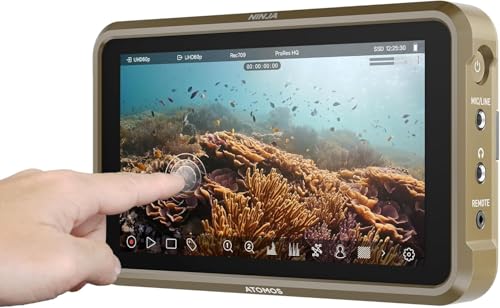
- 4Kp60 recording with ProRes, DNxHD, and H.265
- Up to 6Kp30 ProRes RAW with compatible cameras
- Lightweight monitor with AtomOS 11 workflow tools
Best For: Flexible HDMI recording and monitoring
Best for Scopes
Blackmagic Video Assist 5-inch 3G

- Combines monitor, recorder, scopes, and viewfinder
- Bright 2500-nit 5-inch LCD display
- Includes focus assist, HDR, and 3D LUT support
Best For: Scope-driven monitoring on camera rigs
Best Connected Upgrade

- 6K RAW capture to CFexpress Type B or USB-C
- 1500-nit touchscreen with camera-control tools
- Wi-Fi 6E, NDI, HDMI, and cloud workflow support
Best For: Connected 6K RAW production workflows
Best Standalone 4K Recorder

- Standalone recording up to 4K30
- 4K60 HDMI passthrough
- H.264/H.265 and pause/resume support
Best For: No-PC HDMI recording from cameras, consoles, and laptops
Best Pro Camera Monitor

- 4K60 professional recording
- Includes 240GB SSD
- 5.2-inch monitor with AtomOS 11
Best For: Production recording with DSLR, cinema, and mirrorless cameras
Best Compact 1080p Recorder
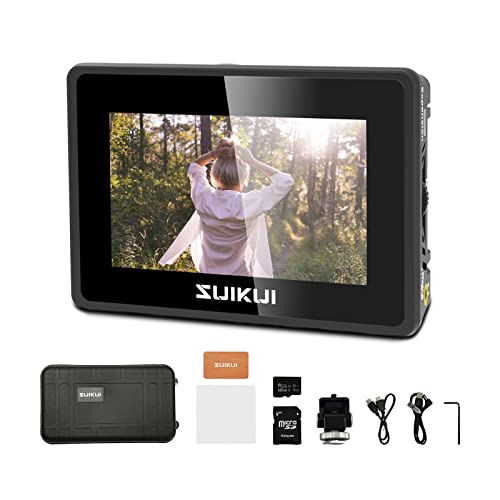
- Unlimited 1080p30 H.264 recording
- 3.5-inch, 600-nit display
- Focus and exposure assist tools
Best For: Portable Full HD camera monitoring and recording
Best ProRes RAW Monitor – Atomos Ninja RAW
The Atomos Ninja RAW is a strong choice for camera external recorders when you want a bright on-camera monitor, camera controls, and direct ProRes or ProRes RAW recording. It records to CFexpress Type B media or external USB-C storage and includes tools for exposure and focus monitoring.
Best For: Mirrorless and HDMI-camera users who need ProRes RAW recording and professional monitoring in a compact setup.
Pros:
- Bright 1500-nit, 5.2-inch HDR touchscreen
- Records ProRes and ProRes RAW, including ProRes RAW HQ
- Camera control for start/stop, ISO, shutter, aperture, and white balance
- Includes waveform, focus peaking, false color, and Onion Skin tools
Cons:
- Some storage and network accessories are sold separately
- Requires a compatible HDMI or USB-C camera for full functionality
With flexible power options and support for major editing platforms, the Ninja RAW is a versatile production recorder for users building a professional camera-monitoring workflow.
Best Studio Deck – Blackmagic HyperDeck Studio HD Mini
The Blackmagic Design HyperDeck Studio HD Mini is a studio-focused option among camera external recorders, with HDMI, SDI, USB, and RCA connectivity. It uses SD cards for digital video and is compatible with cameras including the Canon EOS R5, Sony A7S III, and Nikon Z6 II.
Best For: Studio and desktop video setups that need a connected recorder with SDI and HDMI support.
Pros:
- Supports HDMI, 3G-SDI, USB, and RCA connections
- Records digital video to SD cards
- Compatible with several popular mirrorless cameras
- Includes a two-year warranty
Cons:
- Weighs 953 g, making it less suited to lightweight mobile rigs
- Supplied notes do not specify supported recording codecs or resolutions
This is a practical choice when connectivity and studio integration matter more than a compact, camera-top form factor.
Best 4K HDMI Recorder – Atomos Ninja Ultra
The Atomos Ninja Ultra combines a 5.2-inch monitor with advanced recording, making it a capable choice for camera external recorders. It supports ProRes RAW up to 8K 30p, 6K 60p, and 4K 120p, alongside ProRes, DNxHD, and H.265 recording.
Best For: Camera operators who want flexible codec choices and high-resolution HDMI recording in a lightweight monitor-recorder.
Pros:
- Supports ProRes RAW capture up to 8K 30p
- Offers ProRes, DNxHD, and H.265 codec options
- Can record 4Kp60 ProRes RAW and H.265 simultaneously for Camera to Cloud workflows
- Lightweight 360 g design
Cons:
- Connectivity is centered on HDMI
- Full high-resolution recording depends on camera compatibility
The Ninja Ultra is a flexible pick for creators who need more than basic HDMI capture, particularly when RAW, high frame rates, or simultaneous recording workflows are important.
Best Computer Capture Unit – Blackmagic UltraStudio Mini Recorder 12G
The Blackmagic Design UltraStudio Mini Recorder 12G is designed to send video to a computer rather than function as a standalone field recorder. It accepts 12G-SDI and HDMI sources, supports common codecs up to UHD 4K60, and connects through Thunderbolt 4 for use with software such as DaVinci Resolve, Wirecast, vMix, and OBS.
Best For: Live streaming, software capture, and computer-based production workflows using HDMI or SDI sources.
Pros:
- Supports 12G-SDI and HDMI inputs
- Handles video up to UHD 4K60
- Works with DaVinci Resolve, Wirecast, vMix, and OBS
- Supports uncompressed and compressed 10-bit 4:2:2 YUV and 4:4:4 RGB
Cons:
- Requires a computer with Thunderbolt 4 output support
- Not described as a standalone media recorder
Choose this compact unit when your camera external recorder needs are really computer-capture needs, such as streaming, monitoring, or recording directly into production software.
Best All-Around Pick – Atomos Ninja 5.2-inch 4K Monitor
For camera external recorders that balance monitoring, recording, and portability, the Atomos Ninja is a versatile choice. It supports 4K HDMI recording at up to 60p, with Apple ProRes, Avid DNxHD, and H.265 recording options, plus ProRes RAW recording up to 6Kp30 with compatible cameras.
Best For: HDMI-camera users who want a lightweight monitor-recorder with professional codecs and a straightforward touchscreen workflow.
Pros:
- Records up to 4Kp60 and supports up to 6Kp30 ProRes RAW.
- Supports Apple ProRes, Avid DNxHD, and H.265/HEVC formats.
- Lightweight 210 g design with a 5.2-inch, 1000-nit display.
- AtomOS 11 adds improved responsiveness, memory management, and workflow tools.
Cons:
- Uses HDMI connectivity, so camera compatibility should be checked before purchase.
- The listed native display resolution is 1920×1080 despite support for 4K input and recording.
The Ninja is a strong general-purpose option when you want recording flexibility without adding much weight to a camera rig. Its codec support and workflow features make it especially practical for creators moving between cameras and editing systems.
Best for Scopes – Blackmagic Video Assist 5-inch 3G
Blackmagic Design Video Assist 5'' 3G Portable Monitor, Recorder, Scope, and Viewfinder
Check Price On AmazonThe Blackmagic Design Video Assist combines a 5-inch LCD monitor, recorder, professional scopes, and viewfinder functions in one portable unit. For camera external recorders, it is geared toward users who value exposure and focus tools alongside basic field monitoring.
Best For: Consumer broadcast and compatible camera users who need professional scopes, focus assistance, and a bright touchscreen-style monitoring setup.
Pros:
- Combines monitor, recorder, scopes, and viewfinder functions.
- Includes professional scopes and focus-assist features.
- Offers a bright 2500-nit, 5-inch LCD display.
- Supports HDR and 3D LUT picture-quality tools.
Cons:
- At 771 g, it is substantially heavier than the compact Atomos Ninja listed here.
- The supplied details identify HDMI and USB connectivity but do not specify recording codecs.
- Its maximum listed display resolution is 1920×1080.
This Video Assist is best viewed as a monitoring-focused recorder for productions where scopes and focus tools matter. Its high-brightness screen can be useful in demanding viewing conditions, though the heavier body may be less appealing for lightweight rigs.
Best Connected Upgrade – Atomos Ninja TX GO
Atomos Ninja TX GO 5-inch Camera Monitor-Recorder, HDMI CFexpress Wi-Fi HDR Touchscreen ProRes RAW
Check Price On AmazonAmong camera external recorders, the Atomos Ninja TX GO stands out for its combination of 6K RAW capture, wireless connectivity, and modern media options. It records to CFexpress Type B or USB-C storage and supports HDMI, Wi-Fi 6E, NDI, and direct cloud-oriented workflows.
Best For: Videographers who want a bright touchscreen monitor-recorder with ProRes RAW, wireless capabilities, and flexible external storage.
Pros:
- Captures up to 6K RAW to CFexpress Type B or compatible USB-C storage.
- Supports ProRes, ProRes RAW, Avid DNx, H.265, and H.264.
- Provides a bright 1500-nit, 5-inch touchscreen with camera-control and focus tools.
- Includes HDMI input/output, Wi-Fi 6E, NDI support, and two USB-C ports.
Cons:
- Compatible storage, network adapters, and calibration probes may require separate purchases.
- At 0.7 kg, it is heavier than the smaller Atomos Ninja model.
- Some cloud services and features, including Frame.io and Dropbox access, are listed as sold separately.
The Ninja TX GO is the most connectivity-focused option in this lineup. It makes the most sense for users who can take advantage of 6K RAW, wireless or NDI workflows, and multiple storage choices rather than needing only a basic HDMI recorder.
Best Standalone 4K Recorder – UHD Pro
The ClonerAlliance UHD Pro is a practical choice among camera external recorders when you want standalone 4K HDMI recording without a computer. It records to USB storage or a TF card, supports H.264 and H.265, and provides 4K60 passthrough for monitoring or playback.
Best For: Users who need a flexible, no-PC recorder for cameras, laptops, game consoles, conferencing, or other HDMI sources.
Pros:
- Records up to 4K30 and supports 4K24 cinematic recording.
- 4K60 HDMI passthrough with less than 90ms latency.
- Supports H.264 and H.265 codecs, pause/resume recording, scheduling, and audio-only capture.
- Works with several file systems and includes Windows editing and conversion software.
Cons:
- Does not support HDCP-protected content, Dolby audio formats, or HDR during recording.
- Included editing software is for Windows only.
- Smart TVs and TV antennas cannot be used as video sources.
With broad HDMI compatibility and simple standalone operation, the UHD Pro is well suited to home recording, gaming, presentations, and archival tasks. Its format and source restrictions are worth checking before purchase.
Best Pro Camera Monitor – Atomos Ninja 5.2
The Atomos Ninja combines a 5.2-inch camera monitor with external recording for HDMI-output DSLR, cinema, and mirrorless cameras. This bundle includes a 240GB SSD and records up to 4K60 in professional Apple ProRes, Avid DNxHD, or H.265 formats.
Best For: Camera operators who want an on-camera monitor, professional recording codecs, and a compact workflow for production use.
Pros:
- Records up to 4Kp60 in Apple ProRes, Avid DNxHD, and H.265.
- Supports up to 6Kp30 Apple ProRes RAW with compatible equipment.
- Includes a 240GB SSD and a battery eliminator with USB-C PD power cable.
- AtomOS 11 adds interface responsiveness and memory-management improvements.
Cons:
- Designed for HDMI-output cameras rather than broad standalone source compatibility.
- The included SSD provides 240GB of storage, which may be limited for high-bitrate recording.
- RemoteView and wireless sharing features depend on compatible Atomos devices and network conditions.
The Ninja is the more production-oriented option in this group, pairing monitoring with high-quality recording formats. It makes the most sense for DSLR, mirrorless, and cinema-camera users who value workflow tools over simple archival recording.
Best Compact 1080p Recorder – RH35 Monitor
The RH35 is a compact option for camera external recorders when Full HD capture and on-camera monitoring are enough. Its 3.5-inch display records HDMI video as H.264 1080p30 to a microSD card or USB flash drive while offering useful exposure and focus tools.
Best For: Shooters who need an affordable-feeling, lightweight monitor-recorder for 1080p camera, meeting, gaming, medical, or computer-recording applications.
Pros:
- Captures unlimited H.264 1080p30 video from an HDMI source.
- Accepts 1080p60 HDMI input and output.
- Compact 3.5-inch, 120g design with 600-nit brightness.
- Includes peaking, zebra, waveform, focus assist, exposure assist, and false color.
Cons:
- Recording is limited to 1080p30 rather than 4K.
- The 800×480 display resolution is modest for detailed monitoring.
- Only one HDMI port is listed.
The RH35 favors portability and practical monitoring aids over high-resolution capture. It is a sensible fit for Full HD workflows, but users requiring 4K recording or a larger, sharper preview should consider a more advanced recorder.
How We Picked the Best Camera External Recorders
We selected these Camera External Recorders based on the features that most affect real-world production: input and output compatibility, supported resolutions and frame rates, recording codecs, media options, monitoring tools, power requirements, build quality, and portability. The list includes dedicated on-camera monitor-recorders, studio decks, HDMI capture devices, and more affordable solutions for streaming or basic recording.
Compatibility matters most. Before buying, confirm that the recorder supports your camera’s output, signal type, frame rate, color format, and preferred storage media. A recorder may be capable of 4K internally but still be limited by the camera’s HDMI or SDI output.
Quick Comparison
| Best For | Look For | Typical Advantage |
|---|---|---|
| Professional field production | ProRes RAW, bright display, camera control | Higher-quality capture and better exposure monitoring |
| Mirrorless and DSLR cameras | HDMI input, compact design, SSD or CFexpress support | Portable recording with an improved on-camera view |
| Studio and rack workflows | SDI, HDMI, balanced connectivity, long recordings | Reliable operation in fixed installations |
| Streaming and computer capture | USB or HDMI capture, H.264/H.265 encoding | Simple transfer, streaming, and archival recording |
| Budget monitoring and capture | 1080p support, basic recording controls | Lower cost for straightforward video workflows |
Key Buying Factors for Camera External Recorders
Inputs, Outputs, and Camera Compatibility
Check whether you need HDMI, SDI, or both. HDMI is common on mirrorless and DSLR cameras, while SDI is preferred for longer cable runs and professional production. Also verify passthrough outputs, audio connections, timecode support, and whether the recorder can send a clean feed to another display or switcher.
Resolution, Frame Rates, and Codecs
Choose a recorder that matches your intended delivery format. 4K support is useful for cropping and mastering, while high frame rates benefit slow motion. ProRes and ProRes RAW can preserve editing flexibility but require more storage. H.264 and H.265 create smaller files and are often more practical for streaming, review, and long recordings.
Storage, Power, and Recording Time
Confirm whether the device uses SSDs, CFexpress cards, SD cards, or external storage. Estimate storage needs before purchasing, especially for high-bitrate or RAW recording. Battery plates, USB-C power, and mains operation can make a major difference when moving between handheld, tripod, and studio setups.
Monitoring Tools and Usability
A good screen should be bright enough for the shooting environment and large enough to judge focus. Focus peaking, waveform, vectorscope, false color, zebras, LUT support, HDR viewing, touchscreen controls, and camera control can improve consistency more than resolution alone.
Who Should Buy Which Camera External Recorders?
Choose a compact HDMI monitor-recorder if you shoot with a mirrorless or DSLR camera and want better monitoring plus higher-quality files. A ProRes RAW-capable model is the stronger choice for filmmakers who grade heavily or need maximum post-production flexibility. Studio-focused users should prioritize SDI connectivity, dependable power, passthrough options, and sustained recording rather than the lightest design.
For streaming, lectures, gameplay, or simple archival capture, an H.264 or H.265 HDMI recorder may be more convenient and affordable than a cinema monitor-recorder. Buyers who only need basic 1080p capture can save money with a simpler portable display-recording unit. Finally, remember to budget for compatible media, batteries, cables, mounting hardware, and any required adapters.