
When you’re looking to enhance your live streaming and production setup, choosing the right portable video switcher is essential. With various options available, each offering unique features, it can be overwhelming to determine which one fits your needs. From compact designs to advanced functionalities, there’s a lot to take into account. Let’s explore the top contenders that can elevate your content creation game and make your live broadcasts seamless.
AVMATRIX Shark S6 Plus Portable Video Switcher

The AVMATRIX Shark S6 Plus Portable Video Switcher is an excellent choice for live streamers who need versatility and ease of use. With its 17.3″ Full HD IPS screen, you’ll enjoy clear visuals while managing six channels of SDI and HDMI inputs. It supports RTMP streaming to platforms like YouTube and Twitch, and you can record directly to USB or SD card in various formats. The dual XLR inputs with phantom power guarantee high-quality audio, while features like chroma key and programmable macros enhance your production capabilities. Control up to six PTZ cameras effortlessly, making your streams professional and engaging.
Best For: Live streamers and content creators seeking a versatile and user-friendly video switching solution with advanced features.
Pros:
- Multiple Inputs: Supports 6-channel SDI/HDMI inputs for flexible video source integration.
- High-Quality Streaming: RTMP streaming capabilities enable seamless broadcasting to popular platforms.
- Advanced Production Features: Includes tools like chroma key, picture-in-picture, and programmable macros for enhanced production value.
Cons:
- Portability Limitations: The 17.3″ screen may be cumbersome for travel compared to smaller switchers.
- Learning Curve: Advanced features may require time to learn for new users unfamiliar with video production tools.
- Power Supply Requirements: Needs a specific DC power range, which may be inconvenient in certain setups.
RGBlink Mini Video Mixer Switcher with 4 x HDMI Inputs

For solo streamers looking to elevate their live production quality, the RGBlink Mini Video Mixer Switcher with 4 x HDMI Inputs stands out as an ideal choice. It offers real-time streaming for popular platforms like Facebook and YouTube, ensuring your content reaches a wide audience. With 14 built-in changeover effects and 9 picture-in-picture layouts, you can create engaging visuals effortlessly. Its USB 3.0 output connects seamlessly to your computer, recognized as a webcam for all streaming software. Plus, the lightweight design and battery-powered option make it incredibly portable, allowing you to take your live shows anywhere.
Best For: Solo streamers looking to enhance their live production quality with versatile streaming options.
Pros:
- Easy to use with built-in transition effects and picture-in-picture layouts.
- Lightweight and battery-powered, making it highly portable for on-the-go streaming.
- USB 3.0 output allows for seamless connection to computers and compatibility with all streaming software.
Cons:
- Limited to 4 HDMI inputs, which may not be sufficient for larger setups.
- The reliance on battery power may be a concern for extended streaming sessions.
- Some users may require additional time to familiarize themselves with all features.
RGBlink Mini V3 Video Switcher for Live Streaming
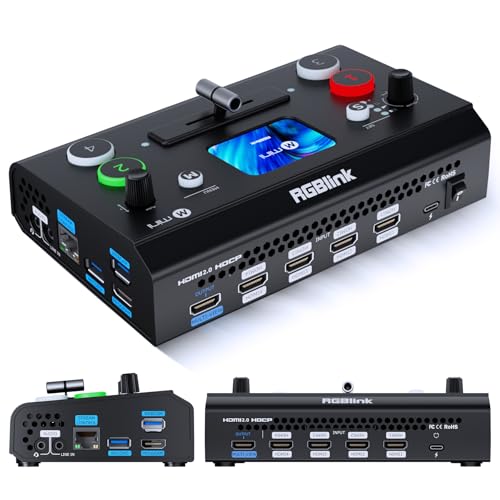
Looking to elevate your live streaming game? The RGBlink Mini V3 Video Switcher is a powerful 4K HDMI switcher that’s perfect for you. With four HDMI inputs, dual 1080P outputs, and customizable features via TAO Cloud, it offers great flexibility. You can easily record to USB drives, utilize PIP layouts, and apply chroma key overlays. The 2.1″ touch screen and UVC webcam mode make it user-friendly and instantly recognizable on platforms like YouTube and Facebook. Plus, with a one-year warranty and a solid return policy, you’ll have peace of mind as you enhance your streaming setup.
Best For: Streamers and content creators looking for a versatile and user-friendly video switching solution for high-quality live broadcasts.
Pros:
- Customizable features through TAO Cloud, allowing users to pay only for needed functions.
- User-friendly interface with a 2.1″ touch screen and UVC webcam mode for seamless integration with streaming platforms.
- Versatile recording options with support for USB drives and various effects like PIP layouts and chroma key overlays.
Cons:
- Additional costs for premium features may add up, depending on the chosen plan.
- Limited to HDMI connections, which may not suit all devices without adapters.
- Requires internet connectivity for full functionality and TAO Cloud access.
Mixer Plus Compact Video Switcher with Built-in Screen

Ideal for content creators and professionals on the go, the Mixer Plus Compact Video Switcher with Built-in Screen streamlines live streaming with its ultra-compact design and real-time Multi View monitoring. With 4 HDMI inputs, you can effortlessly switch between multiple sources without any latency. The 4-inch built-in screen lets you preview all inputs simultaneously, ensuring you’re always on point. Plus, advanced features like PTZ camera control and customizable AUX outputs enhance your production capabilities. Weighing in at just 3 inches high, this switcher packs a professional punch, making it a top choice for events, classes, and streaming on platforms like YouTube and Zoom.
Best For: Content creators and professionals seeking a portable and efficient solution for live streaming and multi-camera setups.
Pros:
- Ultra-compact design allows for easy transport and setup anywhere.
- Zero-latency switching with customizable transition effects enhances live production quality.
- Built-in screen provides real-time Multi View monitoring of all input sources.
Cons:
- Limited to 4 HDMI inputs, which may not suffice for larger productions.
- The 4-inch screen size may be too small for detailed monitoring in certain situations.
- Some advanced features may require additional setup or technical knowledge to utilize effectively.
Osee GoStream Duet Kit Pro Live Streaming Multi-Camera Video Mixer

The Osee GoStream Duet Kit Pro Live Streaming Multi-Camera Video Mixer is perfect for content creators who need a powerful yet portable solution for live streaming. With four HDMI and SDI inputs, you can easily connect multiple cameras, while the 14-inch monitor provides a clear view of your production. Its all-in-one design includes a silent fan and robust cheese plates for stability. Weighing just 5kg, it’s designed for easy transport. Plus, it offers versatile power options, making it adaptable to any environment. With a 4.8-star rating, it’s a reliable choice for seamless multi-camera streaming.
Best For: Content creators and live streamers looking for a portable and versatile multi-camera video mixer solution.
Pros:
- All-in-one package with built-in monitor and silent fan for streamlined production.
- Multiple connectivity options with 4 HDMI/SDI inputs and USB ports for flexibility in setup.
- Lightweight and compact design makes it easy to transport for mobile live streaming.
Cons:
- Limited to 4 inputs, which may not be sufficient for larger productions.
- Weight of 5kg may still be cumbersome for some users on the go.
- Dependence on power sources, as it requires external power for operation unlike some battery-operated alternatives.
Osee GoStream Deck Pro Live Streaming Video Mixer Kit

For live streamers seeking a reliable and versatile solution, the Osee GoStream Deck Pro Live Streaming Video Mixer Kit stands out with its all-in-one design and four HDMI inputs. Weighing less than 5kg, it’s portable and perfect for on-the-go productions. You’ll appreciate its extensive connectivity options, including USB-C I/O and support for popular streaming software like OBS and Zoom. The compact design guarantees stability, while the built-in power options let you switch seamlessly. With a 1-year warranty and solid customer ratings, this mixer is a smart choice for elevating your live streaming experience.
Best For: Live streamers looking for a portable and versatile video mixer with multiple HDMI inputs and extensive connectivity options.
Pros:
- Compact and lightweight design makes it easy to transport for mobile live streaming.
- Supports popular streaming software like OBS, Vmix, and Zoom, enhancing compatibility with various setups.
- Built-in power options provide flexibility with AC, DC, and USB power-bank connectivity.
Cons:
- Limited to 4 HDMI inputs, which may not suffice for larger productions.
- Weight of less than 5kg may still be considered bulky for some users compared to smaller alternatives.
- Niche market appeal might limit its use for users outside of live streaming applications.
Tenveo 4K HDMI Video Switcher Mixer

Looking for a versatile solution to elevate your live streaming game? The Tenveo 4K HDMI Video Switcher Mixer is your go-to choice. Weighing just 1.5 kg and compact at 6.5D x 10.6W x 2.2H inches, it’s easy to transport. With 4 HDMI inputs, dual streaming capabilities, and USB recording, you can manage multiple sources effortlessly. The intuitive control panel allows you to create stunning scenes with advanced video effects and instant replay features. Plus, its 3-year warranty and 30-day money-back guarantee guarantee you’re covered. Transform your production with this powerful mixer that supports up to 1080p60fps recording.
Best For: Live streamers and content creators looking for a compact and versatile HDMI video switcher with advanced features.
Pros:
- Dual streaming capabilities allow for simultaneous broadcasting on multiple platforms.
- User-friendly control panel with ergonomic design and intuitive controls for seamless operation.
- Supports multiple camera and audio inputs, enhancing the production quality of live streams.
Cons:
- Limited to 1080p60fps recording, which may not meet the needs of users requiring higher resolutions.
- Weighs 1.5 kg, which may be slightly heavy for some users needing a highly portable option.
- Potential learning curve for users unfamiliar with video switchers and streaming technology.
FEELWORLD LIVEPRO L1 V1 Multi Camera Video Mixer Switcher

When you need a compact solution for multi-camera live streaming, the FEELWORLD LIVEPRO L1 V1 Multi Camera Video Mixer Switcher stands out. Weighing only 500 grams, it features four HDMI inputs supporting 1080p and a USB 3.0 output, making it perfect for single-person operation. You can switch between cameras in real-time, enhancing your production quality effortlessly. Plus, with exciting video effects and real-time monitoring of six images, your streams will be dynamic and engaging. It’s compatible with various devices, ensuring versatility in your setup. Enjoy a 30-day return policy and reliable support for peace of mind.
Best For: The FEELWORLD LIVEPRO L1 V1 Multi Camera Video Mixer Switcher is best for content creators and live streamers who require a compact and efficient solution for multi-camera production.
Pros:
- Real-Time Switching: Easily switch between four HDMI inputs for dynamic live streaming.
- Compact Design: Lightweight and portable, perfect for single-person operations.
- Versatile Compatibility: Works with a wide range of devices including cameras, computers, and gaming consoles.
Cons:
- Limited Display Size: The 2-inch LCD may be small for detailed monitoring during live productions.
- No Built-in Storage: Lacks internal storage for recording directly on the device.
- Single Output Type: Only has a USB 3.0 output, which may limit connectivity options for some users.
Osee GoStream Deck Pro HDMI Live Stream Switcher

The Osee GoStream Deck Pro HDMI Live Stream Switcher is perfect for content creators who demand versatility and control during live productions. With 4 HDMI inputs and 2 outputs, you can easily connect multiple media sources and monitors. The intuitive control panel enhances your efficiency, while 8 customizable macro buttons let you pre-configure operations for quick access. Extensive audio control, including headphone and microphone inputs, guarantees your sound quality remains exceptional. Plus, professional transition effects and features like the MultiSource capability elevate your video production. Regular firmware updates keep your switcher running smoothly for every live event.
Best For: Content creators seeking a versatile and efficient live streaming solution with comprehensive audio and video control.
Pros:
- Versatile Connectivity: Offers 4 HDMI inputs and 2 outputs for connecting multiple media sources and monitors.
- Customizable Features: Includes 8 macro buttons for pre-configured operations, enhancing workflow efficiency.
- Professional Quality: Supports various transition effects and comprehensive audio control for high-quality live productions.
Cons:
- SD Card Not Included: Requires a separate purchase of an SD card for file playback and recording.
- Complexity for Beginners: May have a learning curve for users unfamiliar with live streaming equipment.
- Firmware Updates Needed: Regular updates are necessary to maintain optimal performance, which may be inconvenient for some users.
FEELWORLD L4 Video Mixer Switcher with 10.1″ LCD Touch Screen

Designed for video creators who need flexibility and control, the FEELWORLD L4 Video Mixer Switcher stands out with its impressive 10.1″ LCD touch screen. You’ll appreciate its multi-camera capabilities, supporting 4 HDMI and 1 SDI input, perfect for medium to large live broadcasts. The user-friendly interface allows effortless switching with a T-bar and buttons, making it accessible for beginners. Plus, it connects to computers via USB 3.0 for seamless streaming on platforms like YouTube and Facebook. With features like Chroma Key, Picture in Picture, and 13 changes, this switcher is ideal for various events, from weddings to sports.
Best For: Video creators and streamers looking for a versatile and user-friendly solution for live broadcasting events.
Pros:
- Multi-camera support with 4 HDMI inputs and 1 SDI input, allowing for dynamic live streaming setups.
- User-friendly interface with a 10.1″ LCD touch screen for easy control and navigation, suitable for beginners.
- Versatile features including Chroma Key, Picture in Picture, and various transition effects for enhanced production quality.
Cons:
- Limited to specific input types (HDMI and SDI), which may not accommodate all devices without additional adapters.
- Size and portability may be an issue for those needing a more compact solution for mobile streaming.
- Some advanced features may have a learning curve for users unfamiliar with video mixing technology.
Factors to Consider When Choosing a Portable Video Switcher
When you’re choosing a portable video switcher, you’ll want to contemplate several key factors. Input and output options, streaming capabilities, and audio management features can make a big difference in your setup. Don’t forget to think about the control interface design and the weight of the device for easy portability.
Input and Output Options
Choosing the right portable video switcher hinges on understanding its input and output options, since these features directly impact your live streaming setup. Look for switchers with multiple HDMI and SDI ports, allowing you to connect various video sources simultaneously. The number of input channels can vary—some switchers support as few as four inputs, while others offer six or more, enhancing your multi-camera setups. For outputs, consider switchers with multiple HDMI and SDI options for direct connections to monitors or streaming platforms. Auxiliary outputs can provide customizable feeds, giving you more control during live productions. USB outputs are also helpful for seamless integration with computer systems, making streaming and recording easy through popular software applications.
Streaming Capabilities
Streaming capabilities are essential factors to evaluate in a portable video switcher, particularly if you want to reach a wider audience. Look for switchers that support RTMP streaming, allowing you to broadcast directly to popular platforms like YouTube, Facebook, and Twitch. Models with dual streaming capabilities enable you to stream simultaneously on multiple platforms, maximizing your reach. Verify the switcher can handle various video formats, especially those supporting high-definition streaming, such as 1080p60 or 4K. Built-in recording features are another plus, letting you save streams directly to USB drives or SD cards for later use. Investing in a switcher with these capabilities will enhance your live production and streamline your streaming process.
Audio Management Features
Audio management features play an essential role in guaranteeing your live streams sound professional and engaging. When choosing a portable video switcher, look for models with dual XLR/TRS balanced inputs and phantom power to support professional microphones. This enhances your audio quality markedly. Verify the switcher has audio mixing capabilities to seamlessly manage both embedded and external audio sources during production. Features like audio embedding and de-embedding help integrate various audio inputs while maintaining sound fidelity. It’s also important to have support for multiple audio input types, such as 3.5mm and microphone inputs, for flexibility. Finally, check for audio level meters and volume control options, as these are vital for monitoring and adjusting audio levels in real-time.
Control Interface Design
When it comes to live production, having a user-friendly control interface can make all the difference in your efficiency. If you’re a solo streamer, look for a design that allows you to manage multiple inputs and shifts seamlessly. Touchscreens can enhance your experience, offering intuitive navigation and real-time monitoring in a compact format. Customizable macro buttons let you access frequently used functions quickly, streamlining your workflow. Make sure the layout of buttons and knobs is organized logically to minimize confusion and speed up switching between sources and audio control. An ergonomic design also matters; it should allow for quick adjustments and provide visual feedback, greatly improving your overall effectiveness during live streaming tasks.
Portability and Weight
A user-friendly control interface sets the stage for effective live production, but the portability and weight of your video switcher are just as important. When choosing a portable model, aim for something under 5 kg to enhance your mobility during on-the-go streaming. A compact design is essential; it should fit comfortably in your carry setup without sacrificing functionality. Additionally, look for switchers with battery operation capabilities, allowing you to work in locations without immediate power access. A built-in display is also beneficial for real-time monitoring, reducing the need for extra equipment. Evaluate the dimensions carefully to guarantee it integrates seamlessly with your other gear, making your live production experience smoother and more efficient.
Video Quality Support
Video quality is vital in live streaming, and selecting the right portable video switcher can greatly impact your broadcast. When choosing a switcher, consider the maximum resolution it supports; many modern options offer up to 4K (3840 x 2160) for stunning clarity. You’ll also want to look for switchers that handle various frame rates, like 60 frames per second (fps), to guarantee smooth playback during fast-paced content. It’s essential that the switcher supports multiple video formats, such as MP4 and TS, for seamless compatibility. Additionally, check for dual streaming capabilities to broadcast to multiple platforms simultaneously without losing quality. Finally, verify it can manage different input sources, like HDMI and SDI, to maintain versatility while delivering high-quality video.
Price and Warranty
Choosing the right portable video switcher involves more than just evaluating features; price and warranty are essential factors that can considerably influence your decision. Start by comparing prices across different models to guarantee you’re getting the best value for your investment. Don’t forget to check the warranty periods, which typically range from 1 to 3 years, providing peace of mind regarding reliability. Be aware of any additional costs for software upgrades or feature activations that might not be included in the initial price. Look for warranty coverage that includes both parts and labor, as this can impact your total cost of ownership. Finally, consider manufacturers that offer satisfaction guarantees, allowing you to test the product before fully committing.
Compatibility With Software
How can you confirm your portable video switcher will work seamlessly with your favorite streaming software? First, make sure it supports UVC webcam mode, which allows smooth integration with platforms like OBS, Zoom, and Teams. Look for switchers that include RTMP streaming capabilities, letting you connect directly to YouTube, Facebook, and Twitch. It’s also essential to verify compatibility with various audio management systems, especially those supporting XLR inputs for better sound control. Check if the switcher connects via USB 3.0, enhancing its versatility for live streaming and video conferencing. Finally, consider models that allow cloud activation of features, enabling you to access premium functions tailored to your specific software needs. This will maximize your streaming experience.