
If you’re looking to upgrade your home entertainment setup, choosing the right HDMI video switcher can make a significant difference. With options that support advanced resolutions and multiple devices, you’ll find the best fit for your needs. Whether you’re a gamer or a movie buff, the latest models offer features that enhance your viewing experience. But which ones truly stand out in 2026? Let’s explore the top contenders that could transform your entertainment space.
Anker 4K HDMI Switch (4 in 1 Out)

If you’re looking for a versatile solution to connect multiple devices seamlessly, the Anker 4K HDMI Switch (4 in 1 Out) is perfect for you. This compact switch lets you connect up to four devices like your laptop, gaming console, or projector, all while delivering stunning 4K@60Hz resolution. With its easy one-click switching and remote control, you’ll enjoy hassle-free changes between devices. It’s lightweight at just 83 grams, making it easy to move around. Plus, with an 18-month warranty and excellent customer support, you can trust Anker to enhance your home entertainment experience. Get ready for smooth streaming!
Best For: Those looking for a reliable and efficient way to connect multiple HDMI devices for seamless switching and high-quality audio-visual performance.
Pros:
- Supports high-resolution output: Delivers stunning 4K@60Hz video along with HDR and 3D compatibility.
- Easy switching: Features remote control and one-click functionality for effortless device changes.
- Lightweight and portable: At just 83 grams, it’s easy to move and set up in different locations.
Cons:
- No HDMI cables included: Requires separate purchase of HDMI cables to connect devices.
- Limited to one output: Only allows connection to one display at a time, which may not suit users needing multiple outputs.
- Dependent on USB-C power: Requires a power source via USB-C, which may limit placement options.
Anker HDMI Switch, 4K@60Hz HDMI Switcher (2 in 1 Out)

The Anker HDMI Switch, 4K@60Hz HDMI Switcher (2 in 1 Out) is perfect for gamers and media enthusiasts who want seamless shifts between devices. With its sleek design and easy-to-use single button, you can effortlessly switch between your laptop, gaming console, or projector. It supports stunning resolutions up to 4K@60Hz, enhancing your viewing experience with HDR and 3D capabilities. Just keep in mind that to enjoy 4K60, your HDMI cables should be under 3.3 feet. Backed by an 18-month warranty and excellent customer support, this switcher is a top choice for anyone looking to elevate their home entertainment setup.
Best For: Gamers and media enthusiasts seeking a seamless way to switch between multiple devices.
Pros:
- Easy transitions between devices with a single button.
- Supports high resolutions up to 4K@60Hz with HDR and 3D capabilities.
- Backed by an 18-month warranty and friendly customer support.
Cons:
- HDMI CEC is not supported, limiting certain automatic features.
- To achieve 4K@60Hz, HDMI cables must be shorter than 3.3 feet.
- Limited to 2 input ports, which may not suit users with multiple devices.
Osee GoStream Deck HDMI Pro Live Streaming Video Mixer Switcher

For content creators seeking a reliable and versatile live streaming solution, the Osee GoStream Deck HDMI Pro stands out with its multi-camera video mixing capabilities and NDI updatable features. With four HDMI inputs and two outputs, you can easily connect multiple media sources. Its audio control buttons and professional effects guarantee exceptional sound quality. Plus, you can stream simultaneously to three platforms, making it perfect for live events or conferences. The user-friendly hard control panel simplifies operation, while the built-in menu system allows you to navigate without a PC. Overall, it’s an excellent choice for enhancing your streaming experience.
Best For: Content creators, educators, and professionals looking for a reliable and versatile live streaming solution.
Pros:
- Multi-camera mixing capabilities enable seamless transitions between sources for dynamic presentations.
- Simultaneous streaming to three platforms allows broad audience engagement across popular channels.
- User-friendly control panel simplifies operation, making it accessible for users of all skill levels.
Cons:
- Limited to HDMI inputs, which may restrict compatibility with certain devices.
- Weight and dimensions might be less portable for on-the-go streaming needs.
- Audio effects may require some learning curve for optimal usage, potentially intimidating for beginners.
UGREEN HDMI Switch 5 in 1 Out 4K@60Hz

Looking to connect multiple gaming devices to a single TV input without hassle? The UGREEN HDMI Switch 5 in 1 Out is your solution. With support for 4K@60Hz, it seamlessly connects up to five devices like your PS5, Xbox, and Nintendo Switch. This switch guarantees stable video transmission with no frames lost, thanks to its USB-powered design. You can control it from up to 33 feet away using the remote, or choose devices manually. Plus, it’s compatible with various HDMI devices, making it a versatile addition to your home entertainment setup. Enjoy effortless switching and enhanced gameplay!
Best For: Gamers and home entertainment enthusiasts looking to connect multiple devices to a single TV input effortlessly.
Pros:
- Supports high-resolution 4K@60Hz for stunning video quality.
- USB-powered design ensures stable performance without image loss.
- Remote control functionality allows for easy switching from a distance.
Cons:
- Does not support automatic switching between devices.
- Power adapter is not included, requiring an external power source.
- No HDMI cables provided in the package.
Blackmagic Design ATEM Mini Pro HDMI Live Stream Switcher (SWATEMMINIBPR)

Designed for content creators and educators, the Blackmagic Design ATEM Mini Pro HDMI Live Stream Switcher (SWATEMMINIBPR) offers a seamless way to manage multiple camera feeds with its 4-camera multiview feature. Weighing just 1.2 pounds, it’s compact yet powerful, supporting various alteration options like cut, mix, and wipe. You’ll appreciate the built-in 6-input audio mixer and multiple HDMI inputs for versatile connectivity. Perfect for live streaming, education, or business presentations, it excels in any setting. With a customer rating of 4.7 out of 5 stars, it’s a reliable choice for enhancing your streaming experience.
Best For: Content creators, educators, and businesses looking for a reliable and versatile live streaming solution.
Pros:
- Compact and lightweight design makes it easy to transport.
- Supports multiple camera feeds with a 4-camera multiview feature.
- Built-in audio mixer enhances sound quality and simplifies audio management.
Cons:
- Limited to HDMI inputs, which may not suit all setups.
- May require additional accessories for optimal functionality.
- The learning curve for beginners unfamiliar with live streaming equipment.
RGBlink Mini V3 Video Switcher with Customizable Features
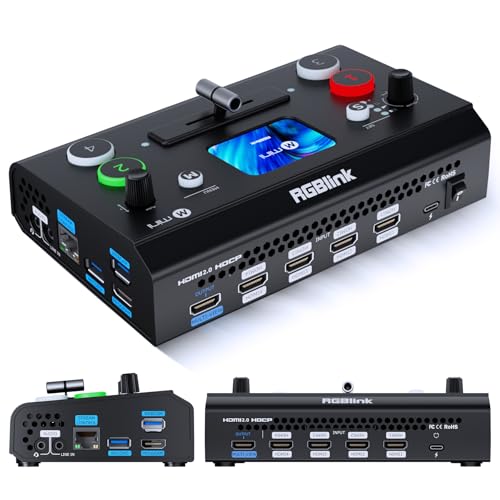
The RGBlink Mini V3 Video Switcher stands out as the ideal choice for content creators seeking flexibility and customization in their video production. With its 4K HDMI capabilities, you can easily switch between four inputs and enjoy dual HDMI outputs. The 2.1″ touch screen simplifies navigation, while TAO Cloud activation lets you access premium features like PTZ control and logo overlays. You can record directly to USB drives and utilize various effects, including PIP layouts and chroma key overlays. Compatible with multiple devices, the Mini V3 guarantees a seamless experience for your live streams and recordings.
Best For: Content creators and live streamers looking for a customizable and flexible video switching solution.
Pros:
- Customizable features through TAO Cloud allow users to pay only for what they need.
- Multiple input and output options support a variety of devices, enhancing versatility in live production.
- Recording capabilities to USB drives and a range of effects make it ideal for professional video production.
Cons:
- Premium features require additional subscription fees, which may not be budget-friendly for all users.
- Firmware updates and internet connectivity are necessary for full functionality, which could be inconvenient.
- Limited warranty period of just one year may not provide enough coverage for heavy users.
Tenveo 4K HDMI Video Switcher Mixer

For content creators and live streamers seeking high-quality production capabilities, the Tenveo 4K60FPS HDMI Video Switcher Mixer stands out with its ability to handle dual streaming on two platforms simultaneously. Weighing just 1.5 kg and featuring a 5.5’’ FHD screen, this compact device easily fits into any setup. With four HDMI inputs—two supporting 4K60FPS—you can manage multiple cameras effortlessly. Its USB recording capability allows for simultaneous streaming and recording in stunning 1080P. You’ll appreciate the intuitive control panel and advanced video effects that elevate your broadcasts, making the Tenveo an essential tool for any serious content creator.
Best For: Content creators and live streamers looking for a compact, high-quality video switcher with advanced features for enhanced production.
Pros:
- Intuitive control panel with ergonomic design for easy operation.
- Supports dual streaming on two platforms simultaneously, enhancing reach.
- Advanced video effects and multi-camera support for professional-quality productions.
Cons:
- Limited to 1080P output for streaming, which may not meet all high-end needs.
- Bulkiness in comparison to simpler switchers may affect portability.
- The price point may be higher than basic video switchers, potentially deterring budget-conscious users.
UGREEN 8K HDMI Switch 5 in 1 Out Splitter

If you’re a gamer or multimedia enthusiast looking to streamline your setup, the UGREEN 8K HDMI Switch 5 in 1 Out Splitter is a perfect choice. This HDMI 2.1 switcher supports ultra-HD 8K@60Hz, ensuring crystal-clear visuals for your favorite devices, like PS5, Xbox, and Blu-ray players. With five input ports and one output port, you can easily connect multiple devices and switch between them using the remote control or a one-click button. Enjoy smooth, low-latency gaming with HDR support and up to 40Gbps bandwidth. Plus, it comes with a 24-month warranty for peace of mind.
Best For: Gamers and multimedia enthusiasts seeking a high-quality HDMI switcher for multiple devices.
Pros:
- Supports ultra-HD 8K@60Hz resolution for stunning visuals.
- Convenient remote control for easy switching from up to 33 FT away.
- Backward compatibility with various resolutions and high refresh rates for gaming.
Cons:
- Requires a constant connection to a power adapter for operation.
- Limited to manual switching; does not support automatic switching.
- Input HDMI cables should be within 1m, which may limit installation options.
FoMaKo KC800 4K HDMI Multi-Camera Streaming Video Mixer Switcher
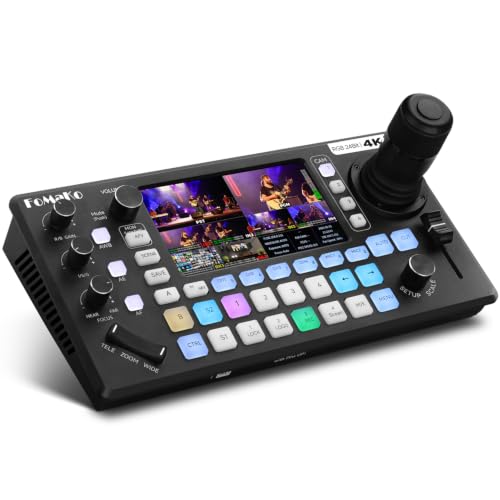
Designed for content creators and live streamers seeking versatility, the FoMaKo KC800 4K HDMI Multi-Camera Streaming Video Mixer Switcher stands out with its integrated 4D joystick PTZ camera controller. It supports 4K 60FPS input and 1080p 60FPS output, delivering stunning 24-bit RGB color accuracy. With a thorough 6-channel audio mixing system, you can connect various microphones and record directly to USB or SD card. Stream on multiple platforms simultaneously and enjoy customizable bitrates for seamless performance. The user-friendly interface allows for easy operation, while FoMaKo’s warranty and support guarantee you’re covered for any issues.
Best For: Content creators and live streamers looking for a versatile and high-quality video mixing solution.
Pros:
- Comprehensive 6-channel audio mixing system with multiple input options.
- Supports streaming to multiple platforms simultaneously with customizable bitrates.
- User-friendly interface with shortcut systems for easy operation.
Cons:
- Limited to 4 HDMI inputs, which may not be sufficient for larger setups.
- Requires a USB or SD card for recording, which may add extra cost.
- The learning curve for new users unfamiliar with video mixing technology.
OREI 8K 2×1 HDMI Switch

The OREI 8K 2×1 HDMI Switch stands out as an excellent choice for gamers and home theater enthusiasts looking to elevate their viewing experience. With support for stunning resolutions up to 8K@60Hz and a remarkable bandwidth of 48Gbps, it’s perfect for high-performance devices like the PlayStation 5 and Xbox Series X. You’ll appreciate the flexible auto and manual switching options, ensuring seamless changes between sources. Plus, it’s compatible with various audio formats, enhancing your sound experience. Durable and reliable, the OREI switch comes with a 1-year warranty, giving you peace of mind as you enjoy your favorite content.
Best For: Gamers and home theater enthusiasts seeking an advanced HDMI switch to enhance their viewing and listening experience.
Pros:
- Supports high resolutions up to 8K@60Hz and a bandwidth of 48Gbps for stunning visuals.
- Flexible switching options with both auto and manual modes for seamless transitions between devices.
- Wide compatibility with various devices, including gaming consoles, 4K TVs, and Blu-ray players.
Cons:
- Limited HDMI cable length support of up to 10 ft, possibly requiring special cables for longer runs.
- Requires USB power, which may add to cable management considerations.
- Some users may find the price point higher compared to basic HDMI switches.
Factors to Consider When Choosing an HDMI Video Switcher
When you’re picking an HDMI video switcher, there are several key factors to keep in mind. Consider the number of ports and the resolutions it supports, as these will directly impact your setup. Don’t forget to check for remote control features and compatibility with your devices for a seamless experience.
Number of Ports
Choosing the right number of ports on your HDMI video switcher can greatly impact your media experience. The number of ports determines how many devices you can connect at once, with common options being 2, 4, or 5 input ports. If you’ve got multiple gaming consoles, PCs, or media players, a 4-in-1 HDMI switcher is perfect for you. For extensive setups, consider a switcher with more than five ports to enjoy greater flexibility and less hassle from frequent cable swapping. Don’t forget to check the output ports as well; most have one, but some models offer additional outputs for multi-display setups. Selecting the right number of ports enhances your media setup‘s efficiency and convenience.
Supported Resolutions
Getting the right number of ports is just the start; supported resolutions play a significant role in your HDMI video switcher’s performance. You’ll find options ranging from standard 1080p to ultra-high-definition 8K@60Hz, giving you flexibility based on your needs. If you’re into high-definition gaming or streaming, look for switchers that support 4K@60Hz, which delivers stunning visuals. Don’t forget to check for HDR compatibility, as some models support HDR10 or Dolby Vision for richer colors and contrast. Keep in mind that using HDMI cables longer than 3.3 feet can affect 4K@60Hz signal quality. For an exceptional experience, consider advanced models that feature variable refresh rates (VRR) and dynamic HDR for smoother gameplay during fast-paced action.
Remote Control Features
Remote control features can greatly enhance your experience with an HDMI video switcher, offering convenience and accessibility in managing multiple sources. With many models providing remote controls featuring one-click functionality, you can effortlessly switch between devices without needing to reach for the actual switcher. The effective range typically extends up to 33 feet, allowing you to manage your setup from various spots in the room. Plus, some devices come with LED indicators that confirm active ports, giving you visual feedback as you switch. This is especially useful since not all HDMI switches support automatic switching, making remote control capabilities invaluable for manual device selection. Enjoy smoother transitions and a more user-friendly experience!
Switching Methods
When managing multiple HDMI devices, the method you use to switch between them can greatly impact your overall experience. You’ll find that HDMI video switchers generally offer manual switching, letting you choose the input source with a button or remote. Some models feature auto-switching, automatically selecting the active source when it’s powered on, which adds convenience. Look for one-click functionality to make changes between devices effortless. LED indicators can help you quickly identify the active input, enhancing visibility. If you prefer a more flexible setup, consider switchers with remote control capabilities, allowing you to switch sources from up to 33 feet away, making your home entertainment experience even more enjoyable.
Compatibility With Devices
Choosing the right HDMI video switcher hinges on compatibility with your devices. Make certain the switcher works with all your gadgets, like gaming consoles, laptops, projectors, and TVs. Check the specifications for supported resolutions; you’ll want a model that handles 4K@60Hz or even 8K@60Hz for stunning visuals. Also, pay attention to the number of input and output ports, as this dictates how many devices you can connect at once. Some switchers have limitations on HDMI CEC support, impacting your ability to control everything with one remote. Finally, verify the switcher’s HDMI version matches your devices; HDMI 2.1, for example, supports advanced features like VRR and higher bandwidth for enhanced performance.
Build Quality and Design
Build quality and design are crucial factors in selecting an HDMI video switcher that meets your needs. A robust build guarantees durability and longevity, so look for devices made from quality materials that can withstand regular use. If you need to transport your switcher frequently, a compact and lightweight design is essential for portability. Intuitive control features, like well-placed buttons and accessible ports, make for quick and easy operation during live events or presentations. Don’t underestimate aesthetics; a sleek, professional look enhances your home theater setup. Additionally, sturdy housing helps prevent overheating, guaranteeing reliable performance in high-demand situations like gaming or streaming. Prioritizing these aspects will enhance your overall entertainment experience.
Warranty and Support
While considering an HDMI video switcher, warranty and support play an essential role in ensuring your investment is protected. A longer warranty period, ideally between 18 months to 3 years, offers added peace of mind regarding durability. Look for models with a return policy, like a 30-day guarantee, so you can return it if it doesn’t meet your expectations. The quality of customer support is equally important; friendly and responsive service can greatly enhance your experience and help with troubleshooting. Some brands even provide lifetime technical support and trade-in programs for long-term users. Finally, reading customer reviews can give you valuable insights into others’ experiences with warranty claims and support, helping you make an informed decision.
Price and Value
When investing in an HDMI video switcher, price and value are key factors that can greatly impact your decision. Prices can vary widely, with models ranging from under $30 to over $300. To determine value, compare features like the number of input/output ports and supported resolutions, such as 4K@60Hz or 8K@60Hz. Higher-priced switchers often include advanced functionalities like multi-platform streaming and enhanced audio support, which might be worth it for frequent users. Check customer ratings and reviews to gauge satisfaction and reliability. Finally, consider the long-term value of a solid warranty and responsive customer support, as these can save you money on repairs or replacements down the line. Choose wisely for your entertainment needs!