
When it comes to capturing events, the right broadcast camera can make all the difference in delivering stunning visuals. You’ll want a camera that not only offers high resolution but also impressive zoom capabilities and seamless connectivity. With so many options available, it can be overwhelming to choose the best one for your needs. Let’s explore the top 10 broadcast cameras that can elevate your event coverage to a whole new level.
AVKANS NDI Camera with 20X Zoom for Live Events

If you’re looking for a versatile camera that excels in live event settings, the AVKANS NDI Camera with 20X Zoom is your best choice. It captures stunning 1080P video at 60fps, ensuring real color and excellent low-light performance. With multiple connectivity options like NDI, HDMI, and SDI, you can easily integrate it into your setup. The 20X optical zoom helps you focus on every detail, while the AI auto-tracking feature keeps your subjects in frame. Plus, it works seamlessly with popular streaming software, making it ideal for churches, weddings, and broadcasts. Enjoy hassle-free setup and robust support, too!
Best For: The AVKANS NDI Camera with 20X Zoom is best for churches, schools, and live event organizers looking for high-quality streaming solutions.
Pros:
- High-quality video with up to 1080P 60fps and excellent low-light performance.
- Versatile connectivity options including NDI, HDMI, SDI, and USB, allowing for seamless integration into various setups.
- AI auto-tracking feature that ensures subjects remain in frame, enhancing the viewing experience.
Cons:
- Limited cable length for HDMI connections, which may restrict setup flexibility.
- iOS-only streaming app may not cater to users with Android devices.
- Initial learning curve for using the CMS software and setup process may require time and training.
8K Ultra HD Video Camera Camcorder
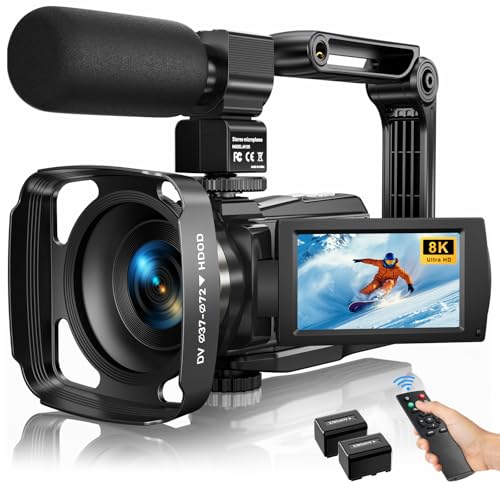
The 8K Ultra HD Video Camera Camcorder stands out as the perfect choice for content creators and event organizers looking to capture stunning visuals with exceptional clarity. With its impressive 8K resolution at 15FPS and options for 6K, 5K, and 4K, you’ll never miss a detail. The 88MP image resolution and 18X digital zoom enhance your shots, while the 3-inch rotatable touch screen makes navigation a breeze. You can enjoy creative modes like time-lapse and slow motion, plus built-in Wi-Fi for quick sharing. With included accessories and 24/7 tech support, this camcorder is ready for any event.
Best For: Content creators, event organizers, and vloggers looking for high-quality video production with advanced features.
Pros:
- High Resolution: Captures 8K video at 15FPS, ensuring exceptional clarity and detail.
- Versatile Creative Modes: Offers various recording options including time-lapse and slow motion for dynamic content creation.
- Comprehensive Package: Comes with essential accessories like an external microphone and a stabilizer, plus 24/7 technical support.
Cons:
- Lower Frame Rate at 8K: Limited to 15FPS when shooting in 8K, which may not be suitable for fast-paced action.
- Not Water-Resistant: Lacks protection against water, making it less ideal for outdoor or wet conditions.
- Requires Nonstandard Batteries: Uses two nonstandard batteries, which may be inconvenient for users seeking easy replacements.
Tenveo 4K PTZ Camera for Live Streaming and Video Conference
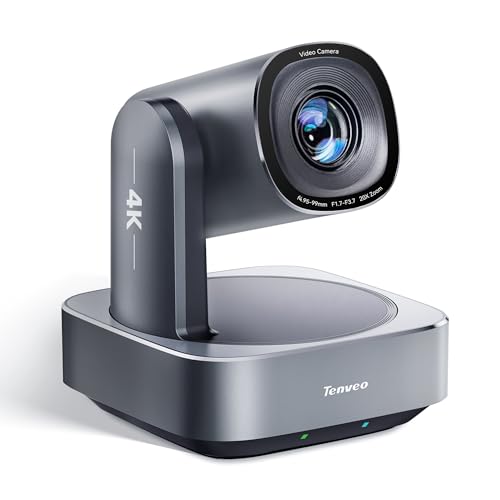
For event organizers seeking high-quality live streaming and video conferencing, the Tenveo 4K PTZ Camera stands out with its impressive 4K resolution at 30fps and advanced intelligent tracking features. With a 20X optical zoom and a 63° viewing angle, it captures every detail. The AI humanoid and face auto-tracking guarantee your subjects remain centered, even during movement. Plus, it’s easy to control with a 350° pan and 180° tilt via remote. Compatibility with platforms like Zoom and Teams simplifies setup. Backed by a three-year warranty and lifetime support, you can trust Tenveo for your event needs.
Best For: Event organizers and professionals seeking a reliable and high-quality camera for live streaming and video conferencing.
Pros:
- Exceptional 4K video quality at 30fps for clear and detailed visuals.
- Advanced AI tracking features ensure subjects are always centered and in focus.
- Wide compatibility with popular streaming platforms like Zoom, Skype, and Teams.
Cons:
- The price point may be higher compared to standard cameras.
- Requires a stable internet connection for optimal performance with IP streaming.
- Initial setup may be complex for users unfamiliar with PTZ cameras.
TONGVEO Conference Room PTZ Camera System with 20X Optical Zoom
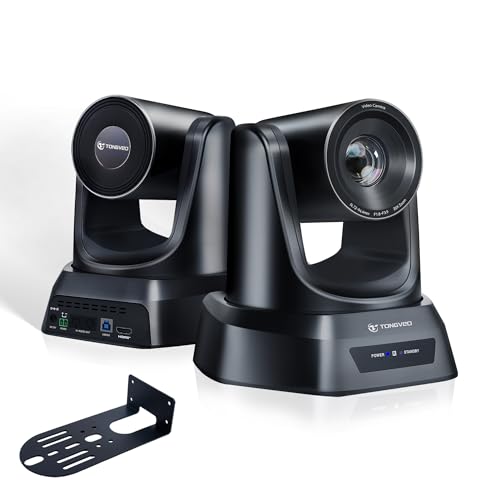
Looking to elevate your event broadcasting? The TONGVEO Conference Room PTZ Camera System with 20X Optical Zoom is a game-changer. It captures stunning 1080P video at 60fps, ensuring smooth motion and sharp detail. With AI auto-tracking, you won’t miss a moment, as it adjusts pan, tilt, and zoom automatically. You can connect via HDMI or USB to platforms like Zoom and YouTube. Its 350° pan and 180° tilt enhance flexibility, while 255 preset positions streamline your workflow. Plus, with a professional CMOS sensor, enjoy excellent low-light performance. Plug-and-play setup makes it a breeze to use!
Best For: The TONGVEO Conference Room PTZ Camera System is best for professional event organizers and businesses seeking high-quality video broadcasting solutions.
Pros:
- 20X Optical Zoom provides clear images of distant subjects without loss of quality.
- AI Auto Tracking automatically adjusts camera angles, ensuring seamless coverage of speakers.
- Plug-and-play setup allows for easy installation and quick start without the need for drivers.
Cons:
- Weighing 2.74 kg, it may not be the most portable option for on-the-go broadcasting.
- Limited to HDMI and USB connectivity, which may not suit all users’ needs.
- The reliance on presets may require initial setup time to optimize for different events.
Tenveo NDI PTZ Camera with AI Humanoid & Face Auto-Tracking

Designed specifically for live streaming and video conferencing, the Tenveo NDI PTZ Camera with AI Humanoid & Face Auto-Tracking stands out for its exceptional dual tracking capabilities. With FHD 1080P resolution at 60FPS and a 20X optical zoom, you’ll capture every detail. Its AI tracking guarantees millisecond-level response, maintaining focus even when subjects are temporarily blocked. You can choose between presenter and auto-framing modes for versatile applications. Supporting multiple video outputs and protocols, it easily connects to various streaming platforms. Plus, with a 3-year warranty and lifetime technical support, you won’t have to worry about any hassles.
Best For: The Tenveo NDI PTZ Camera is best for churches, educational institutions, and businesses seeking high-quality video conferencing and live streaming solutions.
Pros:
- Exceptional Tracking: Features advanced AI humanoid and face auto-tracking for precise focus on subjects.
- High-Quality Video: Offers FHD 1080P resolution at 60FPS and a powerful 20X optical zoom for detailed imagery.
- Versatile Connectivity: Supports multiple output channels and streaming protocols, making it compatible with various platforms.
Cons:
- Weight and Size: At 1.37 kg and relatively compact dimensions, it may require sturdy mounting solutions for optimal use.
- Initial Setup Complexity: Some users may find the setup process intricate, especially for multi-camera sync capabilities.
- Limited Distance on USB: The effective distance for USB connection is only 15m, which may restrict placement options in larger venues.
kimire Full HD 1080P Video Camera Camcorder

The kimire Full HD 1080P Video Camera Camcorder stands out as an excellent choice for event organizers and enthusiasts who need reliable video quality without breaking the bank. With a resolution of 1080P and 24MP still images, your recordings will look stunning. The 3-inch LCD with 270° rotation makes framing shots easy, while the 16X digital zoom captures distant details. Plus, you can record while charging, ensuring you won’t miss a moment. Weighing just 0.54 kg, it’s portable and user-friendly. With over 7,300 reviews averaging 4.1 stars, it’s proven to be a popular option for capturing unforgettable events.
Best For: Event organizers and video enthusiasts looking for an affordable camcorder with reliable video quality.
Pros:
- Versatile Shooting Options: Offers both automatic and manual shooting modes for various filming needs.
- Convenient Recording Features: Allows recording while charging and includes a pause function for easier editing.
- Portable Design: Weighs only 0.54 kg and features a 3-inch LCD screen with 270° rotation for easy handling.
Cons:
- Limited Battery Life: Only provides 60-90 minutes of recording time per battery charge.
- Digital Zoom Limitations: 16X digital zoom may not match the clarity of optical zoom options found in higher-end models.
- No Included SD Card: Requires a separately purchased SD card for storage, which is not included in the package.
8K Video Camera Camcorder with 88MP UHD and WiFi

If you’re passionate about capturing high-quality video for events, the 8K Video Camera Camcorder with 88MP UHD and WiFi is your ideal companion. With its stunning 8K Ultra HD recording at 15FPS, you’ll never miss a detail. The advanced 6-axis gyroscope autofocus and 18X digital zoom guarantee crisp shots, while the 3-inch touch screen rotates 270° for easy framing. WiFi connectivity lets you control it remotely via the iSmart DV2 app. Plus, IR night vision allows for low-light capturing. With features like face detection and anti-shake, this camcorder is perfect for creating memorable event footage effortlessly.
Best For: This camcorder is best for videographers and content creators seeking high-resolution video and versatile recording features for events and low-light conditions.
Pros:
- Stunning 8K Ultra HD video recording provides exceptional detail for high-quality footage.
- IR night vision capability allows for effective shooting in low-light environments.
- Remote control functionality via WiFi and the iSmart DV2 app offers convenience and flexibility in operation.
Cons:
- Limited 15FPS frame rate in 8K may not be suitable for fast-paced action shots.
- No included tripod or LED light, which may require additional purchases for optimal use.
- Learning curve for advanced features may be challenging for beginners unfamiliar with camcorders.
8K 64MP Video Camera Camcorder with Night Vision and 18X Zoom
Capture every moment of your event with the 8K 64MP Video Camera Camcorder, perfect for anyone seeking high-quality footage in any lighting condition. With its impressive 18X digital zoom and IR night vision, you’ll never miss a shot, whether it’s day or night. The 3-inch rotating IPS touch screen makes it easy to frame your shots, while features like slow motion and time lapse add creative flair. Plus, enjoy seamless connectivity with WiFi support and HDMI output. With two batteries and a 64GB SD card included, you’re ready for any occasion, ensuring you capture every cherished memory effortlessly.
Best For: Anyone looking for a versatile camcorder that delivers high-quality video and image capture in various lighting conditions, perfect for vlogging, events, and wildlife.
Pros:
- High-resolution 8K video and 64 MP photo capabilities for stunning image quality.
- IR night vision and 18X digital zoom allow for exceptional low-light performance and distant shots.
- Multifunctional features like slow motion, loop recording, and WiFi support enhance usability and creativity.
Cons:
- Fixed focus may limit some users in achieving specific depth-of-field effects.
- The 3-inch screen may be small for some users when composing shots or reviewing footage.
- Limited to 256GB maximum SD card expansion, which may not suffice for high-volume recording sessions.
Prisual NDI PTZ Camera Gen 5 (30X Optical Zoom, AI Auto Tracking)

For those seeking a reliable solution for live events, the Prisual NDI PTZ Camera Gen 5 stands out with its impressive 30X optical zoom and AI auto tracking capabilities. This camera, certified on the NewTek platform, guarantees seamless performance with multiple streaming interfaces like NDI, HDMI, and USB 3.0. Its silent synchronous belt system keeps distractions at bay, making it ideal for worship settings. With easy setup via Power over Ethernet (PoE) and compatibility with popular software like OBS and vMix, you’ll appreciate its user-friendly design. Plus, you get a 3-year warranty and expert support for peace of mind.
Best For: The Prisual NDI PTZ Camera Gen 5 is best for churches, educational institutions, and live event productions that require high-quality video streaming and tracking capabilities.
Pros:
- Seamless Integration: Certified on the NewTek platform with multiple streaming interfaces, ensuring compatibility with various software and hardware.
- AI Auto Tracking: The camera automatically tracks presenters, allowing for more dynamic and engaging live events without manual adjustments.
- User-Friendly Setup: Plug-and-play installation with Power over Ethernet simplifies the setup process, making it accessible for users of all skill levels.
Cons:
- Higher Price Point: Compared to standard cameras, the advanced features may come at a higher cost, which could be a consideration for budget-conscious users.
- Size and Weight: Its dimensions may not be suitable for extremely compact setups or portable use.
- Limited to Specific Use Cases: While versatile, its optimal performance is tailored for specific environments like churches and educational settings, which may not suit all users.
W & O Vlogging Camera with 180° Rotating Lens

The W & O Vlogging Camera with its 180° rotating lens is perfect for content creators who need a portable and user-friendly option for capturing spontaneous moments. Measuring just 5.35 × 1.56 inches, it fits easily in your pocket or bag. The one-button recording simplifies your setup, making it ideal for beginners. With a built-in 2000mAh battery, you can record for up to 7 hours, ensuring you don’t miss any action. The included 32GB memory card means you’re ready to go right out of the box. Plus, you’ll enjoy hassle-free customer support and an 18-month warranty for peace of mind.
Best For: Content creators and travelers looking for a portable, easy-to-use camera for spontaneous video recording.
Pros:
- Compact and lightweight design for easy portability.
- One-button recording feature makes it beginner-friendly.
- Long battery life with 7 hours of continuous recording.
Cons:
- Image quality is not on par with DSLR cameras.
- Limited storage capacity with a 32GB memory card.
- May lack advanced features for professional videography.
Factors to Consider When Choosing a Broadcast Camera for Events
When you’re choosing a broadcast camera for events, several key factors come into play. You’ll want to take into account video resolution, zoom capabilities, and connectivity options to guarantee you capture high-quality footage. Additionally, evaluating tracking features and the user interface can make a big difference in how smoothly you operate the camera during your event.
Video Resolution Importance
Clarity in video resolution plays a pivotal role in the effectiveness of broadcast cameras for events. Higher resolutions like 4K and 8K provide stunning detail that captivates viewers, especially in large venues where standard 1080P may fall short. With higher resolution, you gain flexibility in post-production, allowing for cropping and zooming without compromising image quality—essential for live coverage. Additionally, as audiences increasingly expect high-quality visuals, using cameras with superior resolutions can elevate your event’s production value and professionalism. Remember, streaming at varying resolutions is also key to accommodating different devices and internet speeds. Ultimately, investing in high-resolution capabilities guarantees you capture every moment in stunning clarity, enhancing viewer engagement and satisfaction.
Zoom Capabilities Overview
Choosing the right zoom capabilities in a broadcast camera can greatly enhance your event coverage, especially when you need to capture distant subjects with clarity. Look for cameras with optical zoom ranging from 18X to 30X, as this maintains image quality while allowing for impressive close-ups. Opt for optical zoom instead of digital to avoid compromising your footage. Many modern cameras also feature AI auto-tracking, which keeps subjects in focus even during movement, making your coverage more dynamic. Additionally, consider the effective distance for zooming; some cameras support long cable runs for SDI connections up to 100 meters. Don’t forget to check stabilization features to guarantee smooth, professional-quality footage during those action-packed moments.
Connectivity Options Available
Connectivity options are essential for guaranteeing your broadcast camera adapts to various event setups. When choosing a camera, consider HDMI, SDI, USB, and IP connections for flexibility. Multi-output capabilities, like simultaneous HDMI and USB streaming, let you integrate seamlessly with live streaming software and hardware switchers. It’s also wise to look for cameras that support NDI protocols, which provide low-latency video transmission over standard networks—perfect for live events. Confirm compatibility with popular streaming platforms like OBS, Zoom, and vMix to streamline your workflow. Features like Power over Ethernet (PoE) can simplify your setup by delivering both power and data through a single cable, cutting down on cable clutter and making your production more efficient.
Tracking Features Evaluation
When evaluating tracking features for broadcast cameras, it’s crucial to focus on how well they can keep up with dynamic presenters and changing scenes. Look for AI humanoid and face auto-tracking capabilities that maintain focus, even when presenters move or are temporarily blocked. Multiple tracking modes, like presenter and auto-framing modes, adapt to various event needs, enhancing viewer engagement. The ability to set and recall multiple camera angle presets improves workflow efficiency, allowing quick adjustments without manual repositioning. Also, investigate response time for tracking; millisecond-level performance keeps subjects framed correctly during fast-paced presentations. Finally, verify the camera supports simultaneous output streams while maintaining tracking, which enhances production quality in live broadcasts.
User Interface Usability
A user-friendly interface can make all the difference in efficiently operating broadcast cameras during events. You’ll want intuitive controls that let you access settings quickly, minimizing the need for extensive training. Features like remote access and web interfaces enhance usability, allowing for rapid adjustments when everything’s happening live. Look for cameras offering presets for various positions and settings; they’ll streamline your workflow and enable you to shift between angles seamlessly. AI auto-tracking and smart framing can also lessen your manual workload, ensuring subjects stay in focus. Finally, clear documentation and on-screen guides boost your confidence, speeding up setup and facilitating a smoother production experience. Choosing the right interface makes all the difference in capturing those unforgettable moments.