
As you explore the evolving landscape of church streaming in 2026, you’ll find that selecting the right broadcast camera is essential for capturing each moment with clarity. With technology advancing at a rapid pace, you’ll encounter models that offer exceptional features tailored for live events. Let’s take a closer look at the top options available, ensuring you make an informed choice that elevates your church’s streaming experience. What will you discover?
Logitech MX Brio Ultra HD 4K Streaming Webcam

If you’re looking to elevate your church streaming experience, the Logitech MX Brio Ultra HD 4K Streaming Webcam is an exceptional choice. With its ultra HD 4K resolution at 30fps or 1080p at 60fps, you’ll capture every detail with stunning clarity. The advanced sensor boasts 70% larger pixels for sharp images, even in low light, thanks to AI-enhancements that improve face visibility. Integrated dual microphones reduce background noise, ensuring clear audio. Plus, its Show Mode allows you to share notes seamlessly. Compatible with major platforms and equipped with privacy features, it’s a perfect fit for your church’s streaming needs.
Best For: Those looking to enhance their streaming quality for church services or online meetings with exceptional video and audio clarity.
Pros:
- Ultra HD 4K resolution provides stunning image quality, making your streaming visually appealing.
- AI-enhanced low light performance ensures clear visibility of faces, even in dim lighting conditions.
- Integrated privacy cover offers peace of mind between meetings by protecting your privacy.
Cons:
- Higher price point compared to standard webcams may be a consideration for budget-conscious users.
- Potential overkill for casual users who may not need 4K resolution for simple video calls.
- Requires USB-C compatibility, which may necessitate additional adapters for some devices.
Insta360 Link 2 PTZ 4K Webcam for PC/Mac

The Insta360 Link 2 PTZ 4K Webcam is an excellent choice for churches looking to enhance their streaming experience, thanks to its AI tracking feature that guarantees speakers remain in focus as they move. With 4K visuals and HDR capabilities, your broadcasts will have premium image quality, even in low light. The AI noise-canceling microphone guarantees clear audio by filtering out background noise. You can easily control the camera using gestures or the Link Controller, making it user-friendly for streaming services or video calls. Plus, it’s compatible with major platforms like Zoom and Teams, guaranteeing seamless integration.
Best For: Churches looking to enhance their streaming experience with high-quality video and audio.
Pros:
- Exceptional 4K image quality with HDR and low-light performance for vibrant broadcasts.
- AI tracking feature ensures that speakers remain in focus while moving around, enhancing viewer engagement.
- User-friendly controls via gestures and the Link Controller make it easy to operate during live streams.
Cons:
- Not compatible with ARM-based Windows systems or Windows Hello Face Recognition.
- Requires a stable internet connection for optimal performance during video calls.
- Privacy mode may not be suitable for all users who prefer constant camera readiness.
AVKANS NDI Camera with 20X Zoom for Live Events

For churches seeking a reliable solution for live streaming, the AVKANS NDI Camera with its impressive 20X optical zoom is an excellent choice. You’ll enjoy stunning 1080P video at 60fps, even in low light. With its easy setup via web browser and support for multiple streaming platforms, you can quickly get started. The camera’s compatibility with NDI and SDI connections guarantees versatility for your live events. Plus, you can control it from the AVKANS Live Multicam App on your iOS devices. With customer support and a 30-day return policy, you’ll feel confident in your investment.
Best For: Churches and organizations looking for a reliable and high-quality live streaming solution.
Pros:
- Supports 1080P video at 60fps with excellent low light performance.
- Easy to set up and control via web browser or the AVKANS Live Multicam App.
- Versatile compatibility with multiple streaming platforms and connection types.
Cons:
- Limited cable run distance for HDMI compared to SDI.
- Requires a reliable internet connection for optimal performance with NDI.
- The initial setup may be challenging for users unfamiliar with NDI technology.
Tenveo 4K NDI PTZ Camera

Designed specifically for seamless video conferencing and live streaming, the Tenveo 4K NDI PTZ Camera stands out as an excellent choice for churches looking to enhance their online services. With stunning 4K resolution at 30fps and 20X optical zoom, you’ll capture every detail. It offers multiple video output options, including HDMI and USB3.0, and supports popular streaming protocols like RTMP and SRT. Advanced AI tracking keeps your subjects in focus, even when obstructed. Plus, with a 3-year warranty and extensive customer support, you can trust that Tenveo has your back for all your streaming needs.
Best For: Churches and organizations looking to enhance their online services with high-quality video streaming and conferencing capabilities.
Pros:
- High-quality video output: Delivers stunning 4K resolution at 30fps and 1080P at 60fps with a 20X optical zoom, ensuring every detail is captured.
- Advanced tracking features: AI humanoid and face auto-tracking keeps subjects in focus, even when obstructed, providing a professional streaming experience.
- Versatile connectivity options: Supports multiple video output interfaces and streaming protocols, making it compatible with various platforms and setups.
Cons:
- Limited effective distance for USB and HDMI: USB effective distance is capped at 15m and HDMI at 30m, which may require additional equipment for larger setups.
- Higher initial investment: The advanced features and technology may lead to a higher cost compared to basic camera options.
- Setup complexity: While remote assistance is available, the initial setup may be complex for users unfamiliar with video conferencing technology.
Elgato Facecam 4K Studio Webcam

Streamers and content creators looking for exceptional video quality will find the Elgato Facecam 4K Studio Webcam to be a standout choice. It captures stunning 4K resolution at 60 FPS, ensuring your streams and videos are vibrant and detailed. Thanks to its Sony STARVIS 2 CMOS sensor, you’ll enjoy sharp visuals and rich colors. With Elgato’s free Camera Hub software, you can customize your visuals, even adding lens filters for that DSLR-like flair. Plus, its eco-friendly design and USB-C connectivity make it a reliable and sustainable option for both PC and Mac users.
Best For: Streamers, content creators, and video professionals seeking high-quality video solutions.
Pros:
- Captures stunning 4K resolution at 60 FPS for vibrant and detailed streams.
- Customizable visuals with Elgato’s free Camera Hub software and lens filter compatibility.
- Eco-friendly design with low-waste materials and built-in flash memory for saving settings.
Cons:
- Requires a USB-C connection, which may need an adapter for older devices.
- Limited to 49mm lens filters, which may restrict some creative options.
- Higher price point compared to standard webcams on the market.
TONGVEO 4K AI PTZ Camera with Auto Tracking and 20X Optical Zoom
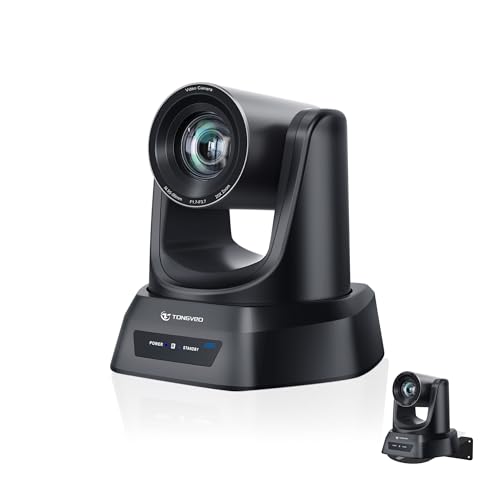
The TONGVEO 4K AI PTZ Camera with Auto Tracking and 20X Optical Zoom is perfect for churches looking to enhance their livestreaming capabilities. It delivers stunning 4K video and can capture details from up to 80 feet, making it ideal for worship services and presentations. With AI auto-tracking, the camera follows speakers effortlessly using advanced recognition technology. You’ll appreciate the multiple control options via remote or software for easy operation. Setup is a breeze with plug-and-play connectivity, and it’s compatible with major streaming platforms. Plus, robust after-sales support guarantees smooth performance during all your events.
Best For: Churches and organizations seeking high-quality livestreaming solutions for worship services, presentations, and events.
Pros:
- Crystal-clear 4K video and 20X optical zoom for detailed imagery from a distance.
- AI auto-tracking technology ensures smooth video operation by following speakers automatically.
- Easy plug-and-play setup with compatibility for major streaming platforms like OBS, Zoom, and Facebook Live.
Cons:
- Higher price point compared to standard cameras, which may not fit all budgets.
- Learning curve for users unfamiliar with advanced camera controls and settings.
- Limited portability due to its design for stationary use in specific environments.
EMEET PIXY Dual-Camera AI-Powered PTZ Camera 4K
For churches looking to elevate their streaming quality, the EMEET PIXY Dual-Camera AI-Powered PTZ Camera 4K stands out with its advanced AI features and dual-camera system. This camera combines a 4K main imaging sensor with a swift 0.2s autofocus, guaranteeing crystal-clear video. Its intelligent tracking and gesture control make live adjustments seamless. An adjustable tripod allows versatile shooting angles, while a 3-mic array delivers remarkable audio quality. With EMEET STUDIO software, you can easily control settings and create shot lists, enhancing your streaming experience. The PIXY’s capabilities guarantee your services are captured with clarity and professionalism.
Best For: Churches and organizations seeking to enhance their live streaming quality with professional-grade video and audio capabilities.
Pros:
- High-quality video: The 4K main imaging sensor and fast autofocus ensure clear and professional-looking broadcasts.
- Intelligent tracking: AI-powered features allow for smooth motion tracking and automatic adjustments during live streams.
- Versatile setup: The adjustable tripod and universal screw compatibility make it easy to position the camera for various shooting angles.
Cons:
- Price point: The advanced features may come at a higher cost compared to standard webcams.
- Complexity for beginners: Some users may find the software and features overwhelming if they are not tech-savvy.
- Limited compatibility: While the camera fits many devices, certain older models may require additional adapters or may not be fully supported.
AVKANS AI Auto Tracking PTZ Camera for Live Streaming

When it comes to seamless church streaming, the AVKANS AI Auto Tracking PTZ Camera stands out with its advanced AI auto tracking feature, making it ideal for worship services and live events. With 20X optical zoom and the ability to output via HDMI, SDI, and USB3.0, you can easily connect it to various setups. You’ll enjoy stunning video quality up to 1080P at 60fps, ensuring every moment is captured clearly. Plus, it’s user-friendly, compatible with popular streaming software, and offers excellent customer support. This camera truly elevates your streaming experience, helping you engage your congregation like never before.
Best For: The AVKANS AI Auto Tracking PTZ Camera is best for churches, media ministries, and live event producers seeking a reliable and high-quality streaming solution.
Pros:
- Advanced AI Auto Tracking: The camera can follow a single presenter automatically, enhancing viewer engagement without manual adjustments.
- High-Quality Video Output: Offers 1080P resolution at 60fps, providing crystal-clear images for live streaming.
- Versatile Connectivity: Supports HDMI, SDI, and USB3.0 outputs, making it compatible with various streaming setups and software.
Cons:
- Limited Tracking Capability: Can only track one person at a time, making it unsuitable for multi-subject scenarios or fast-moving subjects.
- Distance Limitations: While SDI output supports long cable runs, it may require additional equipment for optimal performance over extended distances.
- Not Ideal for Fast Action: The camera’s tracking features may struggle with quick movements, potentially missing key moments in dynamic environments.
FoMaKo PTZ Camera with 20x Optical Zoom and AI Auto-Tracking
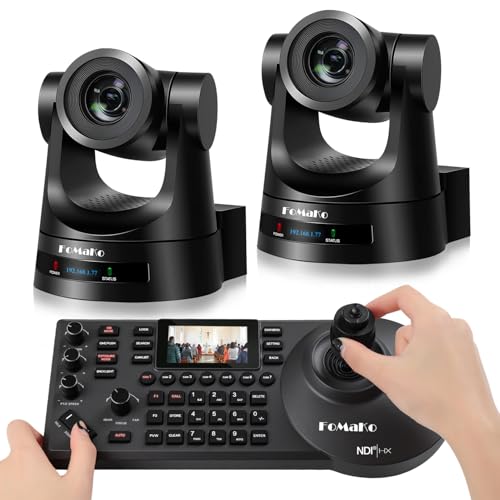
Ideal for churches seeking to enhance their live streaming capabilities, the FoMaKo PTZ Camera with 20x Optical Zoom and AI Auto-Tracking delivers exceptional video quality and advanced tracking features. With HD 1080p resolution and H.264/H.265 encoding, you’ll capture smooth video even under low bandwidth. Its customizable AI tracking options allow you to tailor the camera’s performance to your needs. Plus, with easy setup and multiple control protocols, integrating this camera into your existing system is a breeze. The durable design and versatile mounting options make it a reliable choice for any church event or service.
Best For: Churches and organizations looking to enhance their live streaming capabilities with high-quality video and advanced tracking features.
Pros:
- Exceptional video quality with HD 1080p resolution and smooth motion even at low bandwidth.
- Customizable AI tracking options that allow for tailored performance based on specific needs.
- Versatile mounting options and easy setup, making it a reliable choice for various events and services.
Cons:
- NDI upgrade requires a request, which may involve additional steps for users.
- Potential learning curve for users unfamiliar with advanced tracking and control protocols.
- Limited to specific video production software compatibility, which may restrict some users’ options.
Tenveo NDI PTZ Camera Bundle for Live Streaming

The Tenveo NDI PTZ Camera Bundle is perfect for churches seeking high-quality live streaming solutions. With its 30X optical and 8X digital zoom, you’ll capture every moment in stunning detail. The AI auto tracking feature intelligently follows speakers, ensuring no one is left out of the frame. Plus, the included joystick controller with a 7” LCD quad-screen allows you to monitor up to four feeds simultaneously. Connectivity options like HDMI, USB3.0, and PoE make integration seamless. Enjoy peace of mind with a three-year warranty and lifetime tech support. Elevate your church’s streaming experience with this all-encompassing bundle!
Best For: Churches and organizations looking for a reliable, high-quality live streaming solution that offers advanced camera features and easy integration.
Pros:
- Excellent zoom capabilities with 30X optical and 8X digital zoom for capturing detailed footage.
- AI auto tracking feature ensures speakers are always in focus during live events.
- Comprehensive connectivity options like HDMI, USB3.0, and PoE for seamless integration with existing setups.
Cons:
- The initial setup may require technical expertise to fully utilize all features.
- The bundle may be more expensive compared to basic streaming solutions.
- Limited audio device options as audio devices are not included with the package.
Factors to Consider When Choosing a Broadcast Camera for Church Streaming
When choosing a broadcast camera for church streaming, there are several key factors to contemplate. You’ll want to take into account video resolution quality, low light performance, and audio capture quality to guarantee a polished production. Don’t forget to check for auto tracking features and available connectivity options, as these can greatly enhance your streaming experience.
Video Resolution Quality
Choosing the right video resolution quality for your church streaming setup is essential, especially since it greatly affects how your congregation experiences the service online. For high-definition visuals, 1080p and 4K are popular options. Opting for 4K allows viewers to appreciate finer details, like facial expressions, enriching their connection to the service. When considering frame rates, 30fps is standard for 4K, while 60fps is recommended for smoother motion in 1080p. These choices enhance the overall viewing experience. Additionally, incorporating advanced image processing technologies, such as HDR, can considerably improve video quality by balancing light and dark areas, making your stream more visually appealing. Prioritizing these factors guarantees your broadcast is both clear and engaging for your audience.
Low Light Performance
Capturing high-quality video during church services often means dealing with low light conditions, especially in spaces that rely on ambient lighting to create a certain atmosphere. To guarantee your broadcasts remain clear, look for cameras with advanced sensors that reduce noise while maintaining image quality. AI-enhanced image processing can double the clarity of faces in dim settings. Additionally, features like auto-exposure and noise reduction are essential for adapting to fluctuating lighting during services. Cameras that allow you to adjust ISO and shutter speed provide greater control over your shots. Finally, opt for models with larger pixel sizes, as they tend to excel in low light, resulting in sharper, more vibrant images for your congregation to enjoy.
Audio Capture Quality
Good audio quality is just as important as clear visuals when streaming church services. High-quality sound is essential for effective communication, as poor audio can lead to misunderstandings and disengagement. When choosing a broadcast camera, look for integrated microphones with noise-canceling capabilities to reduce background distractions and enhance clarity. Dual beamforming microphones are particularly useful, focusing on the speaker while suppressing ambient noise. Additionally, the ability to connect external audio devices like lapel mics or mixers can greatly improve sound quality, especially in larger spaces or with multiple speakers. Cameras that offer adjustable audio settings, including gain control and various recording modes, allow you to customize the audio according to your church’s unique acoustic environment.
Auto Tracking Features
When it comes to enhancing your church’s streaming experience, auto tracking features can make a notable difference. These features use AI to automatically follow and frame subjects, ensuring they stay in focus during live broadcasts. Many broadcast cameras utilize advanced algorithms that can recognize human shapes and faces, allowing for precise tracking even in dynamic church settings. You’ll also find customizable tracking settings, letting you adjust sensitivity and speed to fit specific needs. Some cameras offer gesture control or remote operation, making shifts between speakers seamless. With auto tracking capabilities, you can considerably reduce the need for manual camera operators, making live streaming more accessible for smaller church teams or volunteer-based setups.
Connectivity Options Available
Choosing the right connectivity options for your broadcast camera is essential to guarantee a smooth streaming experience for your church services. Look for cameras that support multiple connections like HDMI, USB 3.0, and LAN (NDI) to assure compatibility with various setups. Power over Ethernet (PoE) capability can simplify installation by delivering both power and data through a single cable. Make sure the camera supports protocols such as RTMP, RTSP, and SRT for seamless streaming to popular platforms. Additionally, check for simultaneous output options—NDI, HDMI, SDI, and USB—to facilitate multi-camera setups. Finally, evaluate how easy it is to configure the camera through web interfaces or CMS software, as this greatly enhances user experience and operational efficiency.
Ease of Use
After ensuring your broadcast camera has the right connectivity options, the next step is to evaluate its ease of use. Look for cameras that offer plug-and-play setups to minimize technical difficulties during installation and operation. Features like remote control and software integration can enhance your experience and simplify real-time adjustments during live events. Cameras with AI auto-tracking capabilities reduce the need for manual adjustments, letting you focus on other aspects of the service. It’s also wise to take into account models that support multiple video output options for compatibility with your existing audio-visual equipment. Finally, choose cameras with user-friendly interfaces and clear documentation, so volunteers or staff with varying technical skills can operate them effectively.
Budget Considerations
Establishing a budget for your church’s broadcast camera isn’t just about the price tag; it involves considering various factors that contribute to a complete streaming setup. Start by including not only the camera cost but also lenses, audio equipment, and essential accessories. Think long-term—investing more upfront can lead to better durability and lower maintenance costs. Don’t overlook financing options or grants available for churches, which can ease the initial financial burden. Additionally, factor in software subscription costs for streaming services, as these can vary widely. Finally, evaluate the potential return on investment; better streaming quality can help you reach and engage a larger congregation, making your investment worthwhile.