
As a video editor, you know the importance of speed and reliability in your workflow. In 2026, there are several high-speed RAID solutions that can meet your demands. From the impressive Glyph Blackbox PRO series to G-Technology’s robust RAID arrays, each option offers unique features tailored for 8K video editing. Want to find out which systems stand out and could enhance your projects? Let’s explore the top choices available this year.
Glyph Blackbox PRO RAID Thunderbolt 3 Desktop 32 TB

If you’re a filmmaker or VFX artist working with 8K footage, the Glyph Blackbox PRO RAID Thunderbolt 3 Desktop with 32TB of storage is an ideal solution for your high-speed data needs. This powerful device features dual 16TB drives, ensuring ample space for your projects. With Thunderbolt 3 and USB-C 3.2 Gen 2 ports, you get lightning-fast performance on both Mac and Windows systems. You can easily switch between RAID 0 for speed and RAID 1 for data protection using the built-in hardware selector. Plus, its fan-assisted aluminum case keeps everything cool and quiet during intense editing sessions.
Best For: Filmmakers, VFX artists, and media professionals working with 8K footage who need high-speed and reliable storage solutions.
Pros:
- High storage capacity of 32TB, accommodating large projects and extensive media files.
- Versatile connectivity options with Thunderbolt 3 and USB-C 3.2 Gen 2 for fast data transfer on both Mac and Windows systems.
- Flexible RAID configuration options allow users to prioritize speed or data protection easily.
Cons:
- Higher price point compared to standard external drives, which might not be suitable for all budgets.
- Limited to Thunderbolt 3 and USB-C connections, potentially requiring adapters for older systems.
- Fan-assisted cooling may introduce noise, which could be disruptive in quiet environments.
Highpoint RocketStor 6628A Thunderbolt 3 Hardware RAID Enclosure

The Highpoint RocketStor 6628A Thunderbolt 3 Hardware RAID Enclosure is an excellent choice for video editors who demand high-speed performance and reliability. With its two Thunderbolt USB-C ports, you’ll enjoy a blazing 40Gb/s bandwidth, delivering performance up to 2,700MB/s. This enclosure supports up to eight 10TB or larger spindle HDDs, giving you ample storage for your projects. The integrated SAS/SATA hardware RAID technology guarantees your data is both secure and accessible, making it perfect for handling large video files. If you’re serious about video editing, the RocketStor 6628A is a top-tier solution you won’t want to miss.
Best For: Video editors and professionals who require high-speed data transfer and reliable storage solutions.
Pros:
- Supports high-performance speeds of up to 2,700MB/s, ideal for handling large video files.
- Ample storage capacity for up to eight 10TB or larger HDDs, accommodating extensive projects.
- Integrated SAS/SATA hardware RAID technology ensures data security and accessibility.
Cons:
- Higher price point compared to standard storage solutions, which may not be suitable for budget-conscious users.
- Requires Thunderbolt 3 compatibility, limiting use with older devices.
- Potentially complex setup for users unfamiliar with RAID configurations.
Glyph Blackbox PRO RAID Thunderbolt 3 Desktop 8 TB
Designed specifically for creative professionals in photography and video, the Glyph Blackbox PRO RAID Thunderbolt 3 Desktop 8 TB stands out with its impressive 40 Gbps Thunderbolt 3 connectivity. Featuring dual 4TB 7,200 RPM drives, it delivers exceptional performance for your demanding workflows. You can easily switch between RAID 0 for speed and RAID 1 for data protection using the built-in hardware selector. Its fan-assisted aluminum case guarantees cool operation while minimizing noise during extended use. With USB-C 3.2 Gen 2 ports, it’s compatible with both Mac and Windows, making setup seamless and optimized for top-tier performance.
Best For: Creative professionals in photography and video who require high-speed storage solutions.
Pros:
- High-speed Thunderbolt 3 connectivity allows for 40 Gbps workflows, enhancing productivity.
- Versatile RAID configuration options provide the choice between fast performance and secure data protection.
- Fan-assisted cooling design ensures quiet operation during extended use, making it suitable for professional environments.
Cons:
- Higher price point compared to standard external drives may be a consideration for budget-conscious users.
- Weight of the unit may make it less portable for on-the-go professionals.
- Limited storage options may not meet the needs of users requiring larger capacities beyond 8TB.
Glyph Blackbox PRO RAID USB‑C Desktop Drive 32 TB
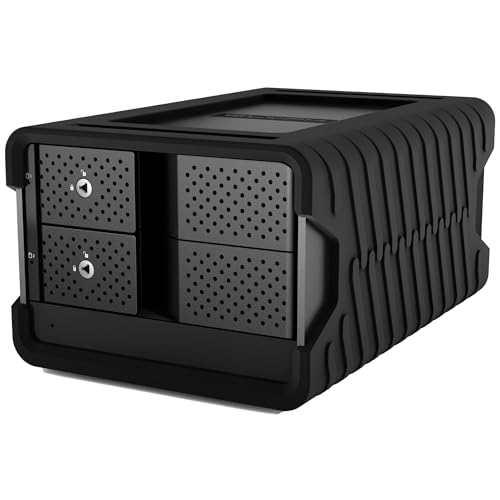
For video editors and content creators who demand high performance and reliability, the Glyph Blackbox PRO RAID USB‑C Desktop Drive is an exceptional choice. With a massive 32TB capacity from dual 16TB 7,200 RPM drives, it’s perfect for heavy-duty video production and enterprise backups. Its USB-C 3.2 Gen 2 interface allows for speedy data transfer at 10 Gbps. You can easily switch between RAID 0 for speed or RAID 1 for redundancy without any software hassle. The rugged aluminum chassis and fan-assisted cooling guarantee peak performance, making it a reliable partner for your 24/7 workloads.
Best For: Video editors and content creators who require high performance and reliability for heavy-duty projects and enterprise backups.
Pros:
- High Capacity: Massive 32TB storage with dual 16TB drives allows for extensive data storage.
- Fast Data Transfer: USB-C 3.2 Gen 2 interface supports speeds up to 10 Gbps for efficient file handling.
- Versatile RAID Options: Easily switch between RAID 0 for speed and RAID 1 for redundancy without software.
Cons:
- Weight: At 10.6 pounds, it may be less portable compared to lighter alternatives.
- Customer Ratings: Mixed reviews with an average of 3.2 out of 5 stars may indicate inconsistent performance.
- Limited Warranty Information: Warranty specifics available only upon request, which may not provide immediate clarity for potential buyers.
Glyph Blackbox PRO RAID Thunderbolt 3 Hub Desktop Drive 8 TB

High-speed performance and versatility make the Glyph Blackbox PRO RAID Thunderbolt 3 Hub Desktop Drive 8TB an ideal choice for creative professionals. With dual 4TB drives spinning at 7,200 RPM, you can easily switch between RAID 0 for speed and RAID 1 for redundancy, thanks to its onboard controller. The integrated I/O expansion, including DisplayPort, SD reader, and dual Thunderbolt 3 ports, supports 40 Gbps transfer speeds, boosting your workflow. Built with a durable aluminum enclosure and active fan cooling, it promises reliable performance whether you’re on set or in the studio, ensuring your projects run smoothly every time.
Best For: Creative professionals requiring high-speed and reliable storage solutions for their projects.
Pros:
- High-speed performance: Dual 4TB drives with 7,200 RPM deliver fast data access and transfer speeds.
- Versatile RAID configuration: Easily switch between RAID 0 for speed and RAID 1 for data redundancy without additional software.
- Extensive connectivity options: Includes DisplayPort, SD reader, and dual Thunderbolt 3 ports for enhanced workflow efficiency.
Cons:
- Higher price point: May be more expensive compared to standard external drives.
- Size and weight: The rugged aluminum enclosure may make it less portable for on-the-go professionals.
- Active cooling noise: The fan may produce noise during operation, which could be distracting in quiet environments.
G-Technology G-Speed ES 4TB eSATA RAID Array

The G-Technology G-Speed ES 4TB eSATA RAID Array stands out as an ideal solution for professional content creators seeking reliable, high-performance storage. With a scalable capacity up to 32TB and hot-swappable 7200 RPM drives, it effortlessly meets demanding workflows. You’ll enjoy speeds exceeding 600MB/second, making it perfect for multi-stream SD and uncompressed HD video. Setup is straightforward, and you can easily configure it in various RAID levels, including RAID 0 and 5. Weighing 12.57 pounds, it’s robust yet manageable for your workstation. Plus, the manufacturer’s warranty offers peace of mind for your investment in quality storage.
Best For: Professional content creators who require high-speed, reliable storage for demanding video workflows.
Pros:
- High Performance: Supports speeds exceeding 600MB/second, suitable for multi-stream SD and uncompressed HD video.
- Scalable Storage: Capacity can be expanded up to 32TB by connecting multiple units.
- Flexible RAID Configurations: Easily configurable in various RAID levels (0, 1, 5, 10, JBOD) to suit different needs.
Cons:
- Weight: At 12.57 pounds, it may be heavier than other portable storage options.
- Interface Limitation: Primarily relies on eSATA connectivity, which may not be compatible with all systems without additional adapters.
- No Built-in Redundancy for RAID 0: While offering high speed, RAID 0 does not provide data redundancy, increasing risk of data loss.
G-Technology G-SPEED eS PRO 8 TB SAS RAID Array
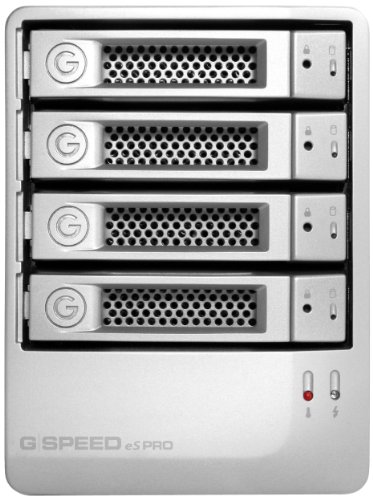
Designed specifically for professional content creators, the G-Technology G-SPEED eS PRO 8 TB SAS RAID Array delivers exceptional performance and efficiency for your video editing needs. With a whisper-quiet aluminum enclosure and four hot-swappable drives, it offers scalability up to 16 TB. The 12Gbit mini-SAS connectivity ensures high-speed data transfer, making it perfect for multi-stream SD, ProRes 422, uncompressed HD, and 2K DPX workflows. Its advanced 2-port RAID controller, with 512MB RAM, supports multiple RAID levels, guaranteeing data safety. This RAID array is a reliable choice, helping you streamline your editing process while maintaining performance.
Best For: Professional content creators and video editors seeking a high-performance, reliable storage solution for their projects.
Pros:
- High-speed data transfer with 12Gbit mini-SAS connectivity ensures efficient workflows.
- Scalable storage capacity of up to 16 TB to accommodate growing project needs.
- Hot-swappable drives allow for easy maintenance and upgrades without downtime.
Cons:
- Higher initial cost compared to standard external hard drives.
- Limited to specific RAID levels, which may not suit all user preferences.
- Requires a compatible setup with PCIe for optimal performance.
G-Technology G-Speed ES 4 TB eSATA RAID Array

If you’re a professional content creator seeking a reliable storage solution, the G-Technology G-Speed ES 4 TB eSATA RAID Array stands out with its impressive speeds exceeding 600MB/second. This RAID array supports various configurations, including RAID 0, 1, 5, 10, and JBOD, making it versatile for your workflow. With a spacious 4TB capacity, you can scale up to 32TB, accommodating even the most demanding projects. Its whisper-quiet aluminum enclosure houses four hot-swappable 7200 RPM drives, ensuring peak performance. Plus, the built-in Web GUI allows for easy monitoring and configuration, keeping your storage organized and efficient.
Best For: Professional content creators looking for a high-speed, reliable RAID storage solution for demanding workflows.
Pros:
- Impressive speeds exceeding 600MB/second, ideal for multi-stream video editing.
- Scalable storage capacity up to 32TB, accommodating large projects without hassle.
- Versatile RAID configurations (0, 1, 5, 10, JBOD) allow customization based on specific workflow needs.
Cons:
- Heavy weight at 15.62 pounds, making it less portable than some alternatives.
- Customer reviews indicate low satisfaction, with a rating of only 1.0 out of 5 stars.
- Discontinued by manufacturer could raise concerns about long-term support and availability.
G-Technology G-SPEED eS PRO 8 TB Mini-SAS RAID Array
For video editing professionals demanding reliability and speed, the G-Technology G-SPEED eS PRO 8 TB Mini-SAS RAID Array stands out with its impressive 8 TB storage capacity, easily scalable to 16 TB. This high-speed, low-cost RAID solution is optimized for multi-stream SD, ProRes 422, uncompressed HD, and 2K DPX workflows. You’ll appreciate its 12Gbit mini-SAS connectivity for efficient data transfer and the included 2-port G-Tech PCIe x8 IOP RAID controller with 512MB RAM. Plus, the whisper-quiet aluminum enclosure features four hot-swappable drives, making maintenance and upgrades a breeze. It’s perfect for your professional content creation needs.
Best For: Video editing professionals seeking reliable, high-capacity storage solutions for demanding workflows.
Pros:
- High-speed performance optimized for multi-stream SD, ProRes 422, uncompressed HD, and 2K DPX workflows.
- Scalable storage capacity from 8 TB to 16 TB to accommodate growing project needs.
- Whisper-quiet aluminum enclosure with hot-swappable drives for easy maintenance and upgrades.
Cons:
- Higher initial investment compared to standard external storage options.
- Requires technical knowledge to configure and manage RAID levels effectively.
- Limited to connectivity options primarily supporting mini-SAS, which may not suit all setups.
Factors to Consider When Choosing a High Speed Raid for Video
When choosing a high-speed RAID for your video editing needs, you should consider several key factors. Think about your storage capacity requirements, the RAID configuration options available, and how well it connects with your existing setup. Performance, speed, and cooling features also play an essential role in ensuring your RAID system meets your demands.
Storage Capacity Requirements
Choosing the right storage capacity for your high-speed RAID system is essential, especially in the domain of video editing. When considering your needs, factor in the resolution and length of your footage. For instance, a standard 4K video requires about 375 GB per hour, while 8K can demand up to 1 TB. This makes adequate capacity important. RAID configurations vary, offering options from 4 TB to over 32 TB, providing flexibility based on your project’s requirements. Don’t forget to think about future storage needs, as projects often expand. Scalability is critical; select a RAID that allows you to easily add drives or units, ensuring you can accommodate your growing storage demands over time.
RAID Configuration Options
Selecting the right RAID configuration is essential for achieving ideal performance in video editing. If speed is your priority, RAID 0 might be your best bet, as it stripes data across multiple drives for high performance. However, remember it lacks redundancy, so data loss is possible if a drive fails. Alternatively, RAID 1 offers data safety through mirroring, but it won’t boost your speed. If you want both, consider RAID 5, which combines speed and redundancy, but requires at least three drives. RAID 10 takes it a step further, providing performance and redundancy through a mix of striping and mirroring, though it needs four drives. Finally, hardware RAID configurations can simplify management and enhance performance with dedicated controllers.
Connectivity and Compatibility
To guarantee your high-speed RAID solution meets the demands of video editing, it’s essential to prioritize connectivity and compatibility. Make sure your RAID supports the latest standards like Thunderbolt 3 or USB-C 3.2 Gen 2 for ideal data transfer speeds. Compatibility with both Mac and Windows is vital, enabling seamless integration into various workflows. Look for RAID systems that offer multiple connectivity options, such as USB-A and DisplayPort, to enhance expansion capabilities. Aim for bandwidth capabilities of 40Gb/s or higher to effectively handle demanding video tasks. Finally, verify that the RAID enclosure supports hot-swappable drives, allowing for easy maintenance and upgrades without downtime—essential for continuous video production.
Performance and Speed
When evaluating high-speed RAID solutions for video editing, performance and speed are paramount, especially as video files grow larger and more complex. High-speed configurations like RAID 0 can exceed data transfer speeds of 2,700MB/s, making them perfect for 8K workflows. The interface you choose greatly impacts performance; Thunderbolt 3 and USB-C 3.2 Gen 2 can deliver maximum bandwidths of 40Gb/s and 10Gb/s, respectively. Opt for hard drives with a rotational speed of 7,200 RPM to enhance read/write speeds, which are essential for smooth editing and playback. Integrated RAID controllers allow you to balance performance and redundancy with various RAID levels, ensuring your setup meets your specific editing needs while maintaining speed and reliability.
Cooling and Design Features
Effective cooling and thoughtful design are essential factors in choosing a high-speed RAID solution for video editing, as they play a significant role in maintaining system reliability and performance. During intensive workloads, effective cooling systems prevent overheating, ensuring your RAID operates smoothly. Look for solutions with fan-assisted cooling mechanisms housed in aluminum enclosures; they efficiently dissipate heat while remaining quiet. Durability is also vital, so opt for RAID systems made from rugged materials that can withstand demanding environments like on-set filming. Active cooling components can extend the lifespan of your drives by keeping ideal temperatures, vital for prolonged usage. A well-engineered cooling solution safeguards data integrity and enhances performance by allowing drives to reach maximum speeds.