
When it comes to video editing, having the right RAID storage solution can make all the difference. You need speed, capacity, and reliability to handle large files and complex projects. In 2026, several options stand out that cater specifically to these needs. Curious about which RAID systems can elevate your editing workflow? Let’s explore the top contenders that could transform your workstation.
SanDisk Professional G-RAID Shuttle 4-Bay Thunderbolt 3 RAID Array (80TB)
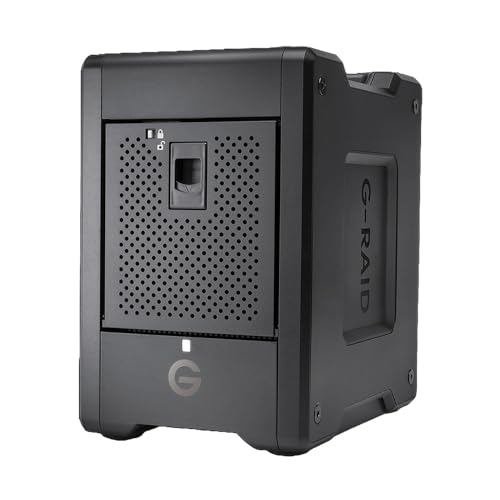
If you’re a video editor handling extensive media libraries, the SanDisk Professional G-RAID Shuttle 4-Bay Thunderbolt 3 RAID Array is your ideal solution. With 80TB of storage, featuring four 20TB removable Ultrastar enterprise-class hard drives, it meets demanding workflow needs effortlessly. You’ll benefit from impressive data transfer speeds of up to 800MB/s write and 640MB/s read in RAID 5, perfect for 4K and 8K editing. Its built-in hardware RAID offers flexible configurations, including RAID 0, 1, 5, and more, ensuring data redundancy and performance. Plus, with dual Thunderbolt 3 ports, you’ll enjoy seamless connectivity and fast access to your content.
Best For: Video editors and professionals managing extensive media libraries who require high-capacity storage and fast data transfer speeds.
Pros:
- High storage capacity with 80TB, accommodating large media libraries and projects.
- Impressive data transfer speeds of up to 800MB/s write and 640MB/s read, enhancing editing efficiency.
- Flexible RAID configurations allow for custom setups, balancing performance and data security.
Cons:
- Higher cost compared to standard storage solutions, which may not fit every budget.
- Weight and size may not be ideal for portable use, making it less convenient for on-the-go editing.
- Limited to Thunderbolt 3 and USB-C connectivity, which may require adapters for older systems.
SanDisk Professional G-RAID Shuttle 8-Bay Thunderbolt 3 RAID Array
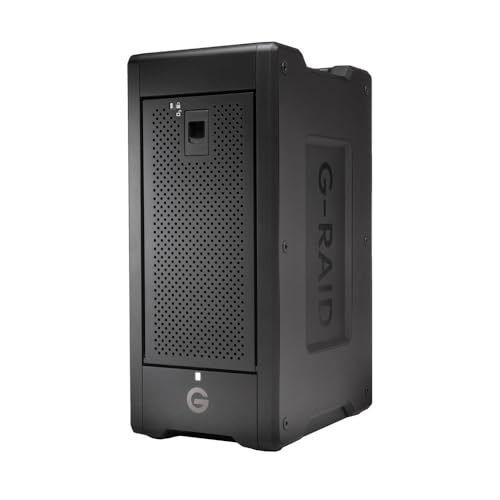
The SanDisk Professional G-RAID Shuttle 8-Bay Thunderbolt 3 RAID Array is the ultimate solution for video editors who demand high performance and massive storage capacity. With up to 160TB of removable HDD, it’s designed for both on-location and studio workflows. You’ll experience impressive read speeds of up to 1900MB/s and write speeds of 2000MB/s, supporting multi-stream 4K, 8K, and VR editing effortlessly. The dual Thunderbolt 3 ports let you daisy-chain additional devices, while USB power delivery charges your MacBook. Plus, with a pre-configured RAID 5 and a 5-year warranty, it’s a reliable choice for serious projects.
Best For: Video editors and content creators who require high performance and large storage capacity for demanding workflows.
Pros:
- High Performance: Offers read speeds up to 1900MB/s and write speeds up to 2000MB/s, ideal for multi-stream editing.
- Large Capacity: Supports up to 160TB of removable HDD, accommodating extensive video projects.
- Flexible RAID Options: Pre-configured RAID 5 with the ability to switch to various RAID configurations for customized performance.
Cons:
- Cost: High initial investment may not be feasible for casual users or small projects.
- Weight: The transportable design may be cumbersome for frequent travel.
- Limited USB-C Speed: While it supports USB-C, the speed is capped at 10Gbps compared to Thunderbolt 3’s 40Gbps.
Western Digital 20TB My Book Duo Desktop RAID External Hard Drive

For video editors who need ample storage and fast access to large files, the Western Digital 20TB My Book Duo Desktop RAID External Hard Drive stands out with its impressive 20 TB capacity and speeds reaching up to 360MB/s. This HDD features USB 3.1 connectivity and comes RAID-0 ready, ensuring you can maximize both speed and storage. With two USB 3.0 hub ports, you can easily connect additional devices. Plus, its 256-bit AES hardware encryption and included backup software keep your data secure. Weighing 5.25 pounds, it’s a reliable and efficient choice for your editing workflow.
Best For: Video editors and content creators who require large storage capacity and fast access to large files.
Pros:
- Massive 20 TB capacity ideal for storing extensive media libraries.
- Fast read speeds of up to 360MB/s enhance workflow efficiency.
- Robust security features including 256-bit AES encryption and password protection.
Cons:
- Weight of 5.25 pounds may make it less portable compared to smaller drives.
- RAID-0 configuration may pose a risk of data loss if one drive fails.
- Limited to USB 3.1 which may not be as future-proof as newer interfaces.
SanDisk Professional 44TB G-RAID Mirror Drive with Thunderbolt 3 Interface

With 44TB of storage and lightning-fast Thunderbolt 3 connectivity, the SanDisk Professional G-RAID Mirror Drive is an ideal choice for video editors who need reliable, high-capacity solutions. Equipped with 7200RPM Ultrastar enterprise-class hard drives, it guarantees exceptional performance for mission-critical tasks. The Pro-Blade SSD Mag slot provides a speedy 10Gbps for quick content offloading and editing, saving you valuable time. Plus, you can easily daisy-chain up to five additional devices thanks to its Thunderbolt 3 interface. The hardware switch lets you effortlessly toggle between RAID modes, delivering flexibility without the hassle of software installation.
Best For: Video editors and professionals who require high-capacity, reliable storage solutions for mission-critical tasks.
Pros:
- High-speed Thunderbolt 3 connectivity enables fast data transfers and daisy-chaining of multiple devices.
- Equipped with 7200RPM Ultrastar enterprise-class hard drives for exceptional performance and reliability.
- Hardware switch allows easy switching between RAID modes without the need for software installation.
Cons:
- The high capacity and enterprise-class performance may come at a premium price point.
- Limited portability due to its size and weight, making it less ideal for mobile use.
- May require additional power sources or adapters for full functionality in some setups.
LaCie Rugged Raid Shuttle 8TB External Hard Drive
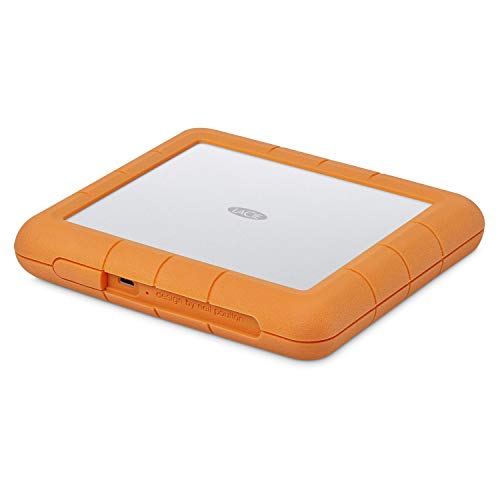
Ideal for video editors on the go, the LaCie Rugged Raid Shuttle 8TB External Hard Drive combines portability with robust protection against the elements. Its flat design makes it easy to pack in gear bags, while the rugged construction guarantees it’s drop, shock, dust, and water-resistant. You can easily configure RAID 0 or 1 using a user-friendly wizard, optimizing for performance or redundancy as needed. Plus, the self-encrypting password system keeps your projects secure from unauthorized access. With a complimentary month of Adobe Creative Cloud, it’s a perfect companion for your video editing needs.
Best For: Video editors and creative professionals who need a portable and durable storage solution.
Pros:
- Rugged construction ensures protection against drops, shocks, dust, and water.
- Configurable RAID options provide flexibility for either performance optimization or data redundancy.
- Includes a complimentary month of Adobe Creative Cloud, enhancing video and photo editing capabilities.
Cons:
- Higher price point compared to standard external hard drives.
- Weight may be a concern for some users looking for ultra-portable options.
- Available storage capacity may vary, potentially affecting usability.
LaCie 2big RAID 48TB External Hard Drive

The LaCie 2big RAID 48TB External Hard Drive stands out as an excellent choice for photographers, indie filmmakers, and YouTubers who demand both speed and reliability in their video editing workflows. With a massive 48TB capacity and speeds up to 550MB/s, it’s built for performance. You can easily configure RAID 0 or RAID 1 using a simple wizard, offering options for optimization or data redundancy. Its hot-swappable IronWolf Pro drives guarantee long-lasting reliability, and the five-year limited warranty, which includes Rescue Data Recovery Services, adds peace of mind. Plus, it’s compatible with USB-C and USB 3.0 computers, making it very versatile.
Best For: Photographers, indie filmmakers, and YouTubers seeking high-capacity and high-speed external storage solutions.
Pros:
- High storage capacity of 48TB, ideal for large video files and extensive photo libraries.
- Fast data transfer speeds of up to 550MB/s, enhancing workflow efficiency.
- Easy RAID configuration options for performance optimization or data redundancy.
Cons:
- Higher price point compared to standard external hard drives.
- May require additional setup time for RAID configuration, which could be complex for some users.
- Weight and size may be less portable, making it less convenient for on-the-go use.
OWC ThunderBay 8 Eight-Bay Thunderbolt RAID 5 Storage Enclosure

Designed for video editors who crave speed and reliability, the OWC ThunderBay 8 Eight-Bay Thunderbolt RAID 5 Storage Enclosure delivers lightning-fast data transfer rates of up to 40Gb/s. With eight universal drive bays, you can easily mix 2.5 or 3.5-inch SSDs and HDDs. The dual Thunderbolt 3 ports allow for daisy-chaining up to six units, expanding your storage capacity to an impressive 1,152TB. Plus, it’s plug-and-play ready, requiring no additional drivers. The included OWC SoftRAID Premium software supports various RAID configurations, making it compatible with both Mac and Windows systems. Enjoy up to a one-year warranty for peace of mind.
Best For: Video editors and content creators seeking high-speed, reliable storage solutions for large files and projects.
Pros:
- High-speed data transfer: Offers lightning-fast transfer rates of up to 40Gb/s.
- Versatile drive compatibility: Supports both 2.5 and 3.5-inch SSDs and HDDs for flexible storage options.
- Daisy-chaining capability: Allows connection of up to six units for expanded storage capacity.
Cons:
- Cost: The initial investment may be high for some users.
- Limited to Thunderbolt connections: Requires Thunderbolt 3 ports, which may not be available on all devices.
- No drives included: Users need to purchase drives separately for functionality.
CPU Solutions Express 4K Video Editing PC (Ryzen 9 9950X, 64GB DDR5 RAM)

For video editors who demand top-tier performance, the CPU Solutions Express 4K Video Editing PC with its Ryzen 9 9950X processor is a game-changer. With 16 cores and 32 threads, it tackles demanding tasks effortlessly, reaching Max Boost speeds of 5.7 GHz. The 64GB DDR5 RAM guarantees rapid multitasking, while the 2TB M.2 NVMe 4.0 SSD provides quick access to large video files. The Quadro RTX 2000 ADA graphics card enhances visuals with its 16GB dedicated memory. Its efficient cooling system keeps the PC quiet during intense workloads. Plus, you get a 1-year warranty for peace of mind.
Best For: Professional video editors and content creators seeking high-performance computing for 4K video editing.
Pros:
- Exceptional Processing Power: The Ryzen 9 9950X with 16 cores and 32 threads ensures seamless handling of demanding video editing tasks.
- Ample Memory and Storage: 64GB DDR5 RAM and a 2TB M.2 NVMe SSD provide rapid multitasking and quick access to large files.
- High-Quality Graphics: The Quadro RTX 2000 ADA graphics card with 16GB dedicated memory enhances visual performance for editing and rendering.
Cons:
- Price Point: Premium components may lead to a higher price compared to entry-level editing PCs.
- Limited Expandability: While expandable to 192GB, the motherboard may restrict future upgrades compared to larger systems.
- Mini Tower Design: The compact design could limit airflow and upgrade options compared to full-sized towers.
SanDisk Professional G Raid Project 2 16TB Hard Drive and 1TB PRO-Blade SSD Bundle

If you’re a video editor working with 4K, 8K, or VR content, the SanDisk Professional G-Raid Project 2 16TB Hard Drive and 1TB PRO-Blade SSD Bundle is tailor-made for your workflow. With a massive 16TB capacity and RAID 0 configuration, this bundle delivers peak performance for demanding tasks. The Pro-Blade SSD Mag offers high-speed content offloading, making editing a breeze. Plus, the Thunderbolt 3 interface guarantees quick transfers while allowing you to daisy-chain up to five devices. It’s also compatible with USB Type-C iPads, enhancing your creative workflow with seamless production app integration.
Best For: Video editors and content creators working with 4K, 8K, and VR content who require high-capacity storage and fast data transfer speeds.
Pros:
- High storage capacity of 16TB, ideal for large video files and projects.
- RAID 0 configuration ensures optimal performance for demanding workloads.
- Thunderbolt 3 interface allows for rapid data transfers and daisy-chaining of multiple devices.
Cons:
- RAID 0 offers no redundancy, meaning data is at risk if one drive fails.
- Higher price point compared to standard external hard drives.
- Limited compatibility with devices lacking Thunderbolt 3 or USB Type-C ports.
SanDisk Professional 24TB G-RAID Mirror 2-Bay Array for Data Backup and Storage

The SanDisk Professional 24TB G-RAID Mirror 2-Bay Array is an ideal choice for video editors seeking reliable data redundancy and fast access speeds. With its RAID 1 configuration, it automatically creates duplicate copies of your data, ensuring safety. You can offload, copy, or edit content using the included 1TB PRO-BLADE SSD at impressive speeds of 10Gbps. Plus, the Thunderbolt 3 interface supports data transfer rates up to 40Gbps, making it perfect for managing large files. If needed, you can easily switch modes to RAID 0 or JBOD, adapting to your workflow without any software downloads.
Best For: Video editors and content creators seeking reliable data redundancy and high-speed access for large files.
Pros:
- RAID 1 configuration provides automatic data duplication for enhanced safety.
- Thunderbolt 3 connectivity allows for blazing-fast data transfer speeds up to 40Gbps.
- Flexible RAID configuration options (RAID 0 or JBOD) enable customization based on workflow needs.
Cons:
- Higher initial investment compared to traditional storage solutions.
- Requires external power supply, which may limit portability.
- Limited to two-bay design, potentially restricting overall storage capacity expansion.
Factors to Consider When Choosing Raid Storage for Video Editing Workstation
When choosing RAID storage for your video editing workstation, consider several key factors. You’ll want to assess your storage capacity needs, data transfer speeds, and the RAID configuration that best suits your workflow. Additionally, guarantee the system offers connectivity compatibility and meets your reliability and durability standards.
Storage Capacity Requirements
Choosing the right RAID storage for your video editing workstation hinges on understanding your storage capacity requirements. You’ll need to evaluate the total capacity necessary to manage extensive media libraries, often ranging from 8TB to 160TB. High-resolution formats like 4K and 8K demand considerably more space, so larger RAID configurations are essential for handling multiple projects simultaneously. Don’t just focus on your current needs; consider future projects that may involve higher resolution footage or longer timelines. Efficient data management is key, so look for RAID setups that offer redundancy to protect your crucial footage while ensuring you have enough space for ongoing work. Balance performance with capacity, as higher-capacity drives might lead to slower access speeds if not configured properly.
Data Transfer Speeds
Data transfer speeds play an essential role in how efficiently you can edit video, especially with large files and high-resolution content. When choosing a RAID storage solution, consider that RAID configurations can greatly impact read and write speeds. Opt for setups like RAID 0 for faster performance, though it sacrifices redundancy. For demanding workflows, aim for RAID systems offering write speeds above 800MB/s and read speeds over 640MB/s. Additionally, select interfaces like Thunderbolt 3, which can achieve up to 40Gbps, enabling seamless editing of 4K and 8K footage. Ultimately, make sure your RAID system supports high sequential read and write speeds, ideally exceeding 1,000MB/s, to enhance rendering and real-time playback efficiency.
RAID Configuration Options
As you explore RAID configuration options for your video editing workstation, it’s crucial to weigh the balance between performance and data protection. RAID 0 can boost your read and write speeds by striping data across multiple drives, but it offers no redundancy. If data safety’s a priority, RAID 1 mirrors your data on two drives, ensuring access if one fails. For a mix of both, consider RAID 5, which uses striping with parity and can handle a single drive failure. RAID 10 combines RAID 1 and RAID 0 benefits, providing speed and redundancy but requires at least four drives. Alternatively, JBOD maximizes storage without RAID benefits, making it less ideal for video editing. Choose wisely based on your needs!
Connectivity Compatibility
When you’re selecting a RAID storage solution for your video editing workstation, connectivity compatibility plays an essential role in ensuring seamless performance. Look for options that offer multiple connectivity types, like Thunderbolt 3 and USB-C, to support various devices and maximize data transfer speeds. Dual Thunderbolt 3 ports are a game changer, allowing you to daisy-chain units for expanded storage and improved workflow. Make sure to check compatibility with the latest USB standards, such as USB 3.1 or USB 3.2, to guarantee peak performance with your computers and peripherals. Also, consider backward compatibility with older interfaces like Thunderbolt 2 or USB 3.0. Finally, evaluate power delivery features, as some devices can charge your laptop during editing sessions.
Reliability and Durability
Choosing the right RAID storage solution goes beyond just connectivity; reliability and durability are key factors that can make or break your video editing workflow. Handling large files and long-term projects demands data integrity. RAID configurations like RAID 1 and RAID 5 provide necessary redundancy, guaranteeing your data is mirrored or can be reconstructed in case of drive failure. Opt for enterprise-class hard drives designed for continuous use, as they enhance durability and performance. High-speed data transfer rates, especially with Thunderbolt interfaces, improve efficiency and reduce the risk of data loss. Finally, regular maintenance and monitoring of your RAID system, such as checking drive health and performing backups, are essential to guarantee long-term reliability and durability in your editing environment.
Security Features
While selecting RAID storage for your video editing workstation, security features should be at the forefront of your decision-making process. Look for solutions that offer built-in hardware encryption, like 256-bit AES, to keep your sensitive data safe from unauthorized access. Password protection can add an extra layer of security, ensuring only you can access your files. Additionally, opt for RAID configurations with redundancy options, such as RAID 1 or RAID 5, which automatically create duplicate copies to protect against drive failures. Backup software is essential for facilitating regular data backups, minimizing the risk of loss. Finally, consider warranty options that include data recovery services, giving you peace of mind in case of critical data loss situations.
Budget Considerations
Security features are just one piece of the puzzle when it comes to selecting RAID storage for your video editing workstation. When budgeting, you need to account for both the initial investment and ongoing costs like maintenance and drive replacements. High-capacity RAID systems, such as 80TB or 160TB, can be pricier than smaller options, but you’ll often find a better cost-per-terabyte ratio with larger setups. Investing in faster drives and advanced RAID configurations can greatly boost your workflow, especially with 4K and 8K projects. Don’t forget to take into account additional costs for data redundancy and backup solutions, which can protect against data loss and save money in the long run. Finally, think about future expansions to maximize long-term value.