
When you’re working with 8K video, having the right RAID storage solution can make all the difference in your filmmaking workflow. With options that offer high speeds and customizable configurations, you can guarantee your data handling is efficient and secure. As you explore the top choices available, you’ll find features that align with your specific needs. Let’s take a closer look at what’s out there and how these solutions can enhance your editing process.
Western Digital 20TB My Book Duo Desktop RAID External Hard Drive

If you’re a content creator working with 8K video, the Western Digital 20TB My Book Duo Desktop RAID External Hard Drive is an excellent choice for your storage needs. With its massive 20TB capacity, you won’t have to worry about running out of space for your high-resolution files. The USB 3.1 interface offers speedy read speeds up to 360MB/s, ensuring quick access to your footage. Plus, its RAID-0 configuration enhances performance right out of the box. Security features like 256-bit AES encryption and password protection keep your data safe, while the included backup software simplifies your workflow. It’s a solid investment for any filmmaker.
Best For: Content creators and filmmakers who require large storage capacity and fast access speeds for high-resolution files.
Pros:
- Massive 20TB capacity ideal for storing extensive collections of photos, videos, and documents.
- High-speed performance with up to 360MB/s sequential read speeds for efficient data access.
- Built-in security features including 256-bit AES hardware encryption and password protection to keep data safe.
Cons:
- Relatively heavy at 5.25 pounds, making it less portable compared to smaller drives.
- RAID-0 configuration may pose a risk of data loss if one drive fails, requiring careful management.
- Return policy may involve restocking fees for misrepresented conditions or customer misuse.
ACASIS 40Gbps 4-Bay Hard Drive Enclosure

The ACASIS 40Gbps 4-Bay Hard Drive Enclosure is an ideal choice for video professionals who demand high-speed data transfer and ample storage for 8K video projects. This versatile RAID enclosure supports both SATA and NVMe drives, allowing you to maximize storage with up to 78TB. With data transfer rates reaching 40Gbps in RAID mode, you can handle large video files effortlessly. It features an aluminum chassis for durability, a built-in cooling fan to manage heat, and 8K@60Hz video output to enhance your editing experience. Plus, responsive customer support guarantees you get help whenever needed.
Best For: Video professionals who require high-speed data transfer and substantial storage capacity for 8K video projects.
Pros:
- Supports both SATA and NVMe drives, maximizing storage capabilities up to 78TB.
- High data transfer rates of up to 40Gbps in RAID mode, ideal for handling large video files.
- Durable aluminum chassis and built-in cooling fan ensure reliable performance during demanding workloads.
Cons:
- Customer ratings are mixed with an average of 3.7 out of 5 stars from 6 reviews.
- Heavier design at 5.24 pounds may not be ideal for portable use.
- Limited to a maximum of 8TB per NVMe bay, which may not satisfy users needing larger SSD capacities.
LaCie Rugged Raid Shuttle 8TB External Hard Drive
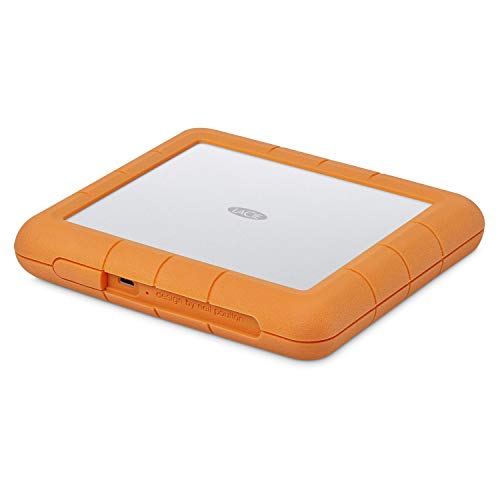
For video professionals working with 8K content, the LaCie Rugged Raid Shuttle 8TB External Hard Drive stands out as an essential tool. Its 8TB capacity guarantees you have ample space for high-resolution files, while the flat design makes it easy to pack. With rugged construction, it’s drop, shock, dust, and water-resistant, perfect for on-the-go shoots. You can easily configure RAID 0 or 1 using the step-by-step wizard for performance or redundancy. Plus, the self-encrypting password system keeps your projects secure. Don’t forget the one-month complimentary Adobe Creative Cloud membership to enhance your editing workflow!
Best For: Video professionals working with 8K content who need a reliable and portable storage solution.
Pros:
- Rugged construction: Drop, shock, dust, and water-resistant design ensures durability during on-the-go shoots.
- Flexible RAID configuration: Easily switch between RAID 0 for performance or RAID 1 for redundancy using a user-friendly wizard.
- Security features: Self-encrypting password system protects sensitive projects from unauthorized access.
Cons:
- Weight: The rugged design may add extra weight compared to non-rugged alternatives.
- Price: Higher cost compared to standard external hard drives without RAID features.
- Available storage capacity may vary: Actual usable space can be less than the advertised 8TB due to formatting and system files.
OWC ThunderBay 4 0TB Four-Bay Thunderbolt 40Gb/s RAID Storage Enclosure

Designed for creative professionals working with 8K video, the OWC ThunderBay 4 0TB Four-Bay Thunderbolt 40Gb/s RAID Storage Enclosure delivers exceptional speed and versatility. With dual Thunderbolt 3 ports, you’ll enjoy up to 1527MB/s sustained performance, ensuring efficient data transfer. It supports both 3.5-inch and 2.5-inch drives, eliminating the need for extra adapters. You can customize your storage setup with multiple RAID configurations, including RAID 0, 1, 4, 5, and 1+0 (10). Plus, its ultra-quiet, heat-dissipating aluminum chassis allows for effective operation, making it an ideal choice for your demanding filmmaking workflow.
Best For: Creative professionals working with high-resolution video who require fast and reliable data storage solutions.
Pros:
- High-speed performance: Achieves up to 1527MB/s sustained data transfer speeds.
- Versatile drive compatibility: Supports both 3.5-inch and 2.5-inch drives without the need for additional adapters.
- Customizable RAID configurations: Offers multiple RAID modes for tailored storage solutions.
Cons:
- No pre-installed drives: Comes as a 0TB enclosure, requiring users to purchase drives separately.
- Price point: May be considered expensive for users with basic storage needs.
- Limited to Thunderbolt devices: Requires compatible Thunderbolt connections for optimal performance.
OWC ThunderBay 4 Thunderbolt RAID Storage Enclosure
OWC ThunderBay 4 stands out as an ideal choice for video professionals who demand high performance and flexibility in their storage solutions. With data transfer rates of up to 1527MB/s and support for both 3.5-inch and 2.5-inch drives, you can easily configure your storage with RAID options like 0, 1, 4, 5, and 1+0. This four-bay enclosure is compatible with Mac and Windows systems, connecting seamlessly via Thunderbolt. Plus, it includes a three-year subscription to SoftRAID Premium software, enhancing your workflow. Weighing 8.6 pounds, it balances portability with robust performance, making it a reliable addition to your filmmaking toolkit.
Best For: Video professionals who require high-performance and flexible storage solutions for their projects.
Pros:
- High data transfer rates of up to 1527MB/s for efficient file handling.
- Supports both 3.5-inch and 2.5-inch drives without the need for adapters.
- Includes a three-year subscription to SoftRAID Premium software for enhanced functionality.
Cons:
- Weighs 8.6 pounds, which may affect portability for some users.
- Higher initial investment compared to single-bay storage solutions.
- Limited to Thunderbolt connectivity, which may not be compatible with all systems.
SanDisk Professional G-RAID Shuttle 8-Bay Thunderbolt 3 RAID Array (160TB)
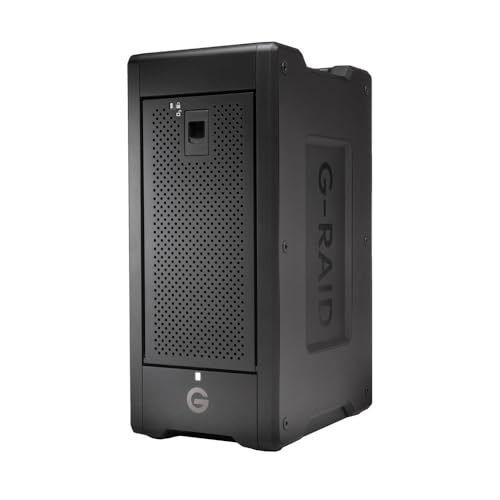
The SanDisk Professional G-RAID Shuttle 8-Bay Thunderbolt 3 RAID Array stands out as an exceptional choice for video professionals seeking robust storage solutions for 8K projects. With a massive capacity of up to 160TB and read speeds reaching 1900MB/s, you’ll breeze through demanding workflows. Its transportable design makes it perfect for both on-location shoots and studio use. Pre-configured with RAID 5 for balanced performance, you can customize it to suit your needs. Dual Thunderbolt 3 ports allow daisy-chaining of additional devices, while USB Power Delivery supports charging your MacBook, streamlining your setup. Plus, it’s backed by a 5-year warranty.
Best For: Video professionals and content creators who require high-capacity, high-speed storage solutions for 8K and demanding workflows.
Pros:
- High storage capacity of up to 160TB with removable HDDs for flexibility.
- Impressive read and write speeds of up to 1900MB/s and 2000MB/s, respectively, facilitating efficient data transfer.
- Dual Thunderbolt 3 ports enable daisy-chaining of multiple devices, enhancing connectivity options.
Cons:
- The initial cost may be high for budget-conscious users.
- Weight and size may make it less portable for users who travel frequently.
- Limited to specific RAID configurations, which may not suit all user preferences.
UGREEN NASync DXP4800 Plus 4-Bay Desktop NAS

For those working with high-resolution 8K video, the UGREEN NASync DXP4800 Plus 4-Bay Desktop NAS stands out with its impressive 10GbE connectivity and up to 136TB storage capacity. Powered by an Intel Pentium Gold 8505 CPU and 8GB DDR5 RAM, it guarantees super-fast transfers—backing up 1GB in less than a second. This diskless NAS offers centralized storage, automatic backups, and advanced encryption for secure private cloud access. Plus, it features an AI-powered photo album for easy organization. With a user-friendly app and compatibility with various platforms, it’s perfect for small offices and collaborative projects. Enjoy peace of mind with a 2-year warranty and 24-hour support.
Best For: Small offices and collaborative projects that require high-capacity storage and fast data transfer speeds.
Pros:
- Super-fast data transfers with 10GbE connectivity, allowing for quick backups and file sharing.
- Centralized storage with automatic backups and advanced encryption for data security and ownership.
- User-friendly app for easy setup and compatibility across various platforms, enhancing user experience.
Cons:
- Diskless design may require additional purchases of hard drives for full functionality.
- Initial setup might be complex for users unfamiliar with NAS systems.
- Limited built-in processing power compared to higher-end options, which may affect performance under heavy workloads.
UGREEN NAS DXP8800 Plus 8-Bay Desktop NAS

Engineered specifically for professionals working with high-resolution 8K video, the UGREEN NAS DXP8800 Plus 8-Bay Desktop NAS stands out with its robust Intel i5 1235u 10-core CPU and dual 10GbE ports. You’ll appreciate its impressive storage capacity of up to 256TB, thanks to eight SATA and two M.2 NVMe drive bays. With support for multiple RAID levels and download speeds reaching 2500MB/s, it’s built for high-performance tasks. The all-in-one NAS app simplifies your workflow, while advanced security features like encryption and multi-factor authentication protect your data. Just remember, storage drives aren’t included and need to be purchased separately.
Best For: Professionals working with high-resolution 8K video who require robust storage and high-speed data transfer capabilities.
Pros:
- High-performance with Intel i5 1235u 10-core CPU and dual 10GbE ports for fast download speeds up to 2500MB/s.
- Large storage capacity of up to 256TB with support for multiple RAID levels ensuring data redundancy and performance.
- Advanced security features including encryption and multi-factor authentication to protect sensitive data.
Cons:
- Diskless design means that storage drives must be purchased separately, potentially increasing overall costs.
- May require technical knowledge to set up and manage for optimal performance and security.
- Physical size may not be suitable for all workspaces, especially smaller environments.
UGREEN NAS DXP6800 Pro 6-Bay Desktop NAS
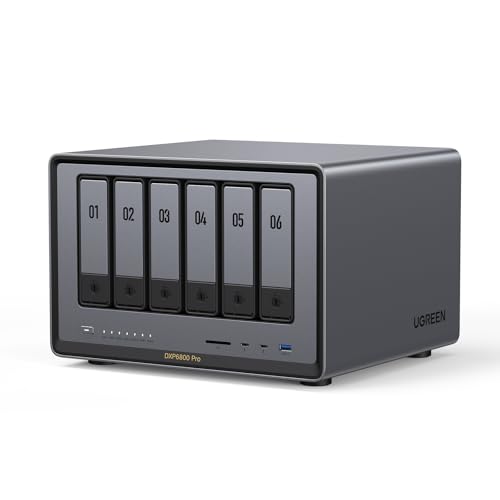
Designed specifically for professionals dealing with high-resolution content, the UGREEN NAS DXP6800 Pro 6-Bay Desktop NAS delivers the performance needed for 8K video production. With its Intel i5 1235u 10-Core CPU and 8GB DDR5 RAM, you can expect lightning-fast processing. It offers a massive storage capacity of up to 196TB, supporting various RAID configurations for ideal data management. Dual 10GbE network ports enable impressive download speeds, while built-in security features, including encryption and multi-factor authentication, protect your data. Plus, it seamlessly integrates with popular operating systems, making it an excellent choice for filmmakers like you.
Best For: Professionals and businesses requiring high-performance storage solutions for 8K video production and large data management.
Pros:
- Supports massive storage capacity of up to 196TB with various RAID configurations for optimal data management.
- Dual 10GbE network ports enable download speeds of up to 2500MB/s, ensuring fast data transfer.
- Built-in security features, including encryption and multi-factor authentication, protect sensitive data.
Cons:
- Storage hard drives are not included and must be purchased separately, increasing initial setup cost.
- The product may be overkill for casual users or small businesses with less demanding storage needs.
- Requires a certain level of technical knowledge for optimal setup and management.
OWC ThunderBay 8 Eight-Bay Thunderbolt RAID 5 Storage Enclosure

The OWC ThunderBay 8 Eight-Bay Thunderbolt RAID 5 Storage Enclosure is an ideal choice for video professionals needing high-speed data transfer and robust storage solutions for 8K video projects. With eight universal drive bays, you can use either 2.5 or 3.5-inch SSDs or HDDs. Its dual Thunderbolt 3 ports allow you to daisy-chain up to six units, achieving an impressive 1,152TB capacity. Plus, it’s plug-and-play ready—no drivers required. Bundled with OWC SoftRAID Premium, it supports multiple RAID configurations, ensuring your data’s safety. Enjoy seamless compatibility with both Mac and Windows, backed by a one-year OWC limited warranty.
Best For: Video professionals and content creators who require high-speed data transfer and extensive storage for 8K video projects.
Pros:
- Supports up to eight universal 2.5 or 3.5-inch SSDs/HDDs for flexible storage options.
- Dual Thunderbolt 3 ports allow for daisy-chaining multiple units, expanding storage capacity significantly.
- Plug-and-play ready with no drivers needed, ensuring ease of use and quick setup.
Cons:
- Initial investment may be high due to the cost of the enclosure and additional drives.
- Limited to RAID configurations supported by the bundled software, which may not meet all user preferences.
- Requires adequate space and power supply for multiple daisy-chained units, which may not be suitable for all setups.
Factors to Consider When Choosing RAID Storage for 8K Video
When you’re choosing RAID storage for 8K video, you need to weigh several factors carefully. Consider your storage capacity requirements, data transfer speeds, and RAID configuration options that best suit your workflow. Don’t forget about compatibility and the importance of cooling and durability to guarantee smooth performance.
Storage Capacity Requirements
Storage capacity is a critical factor in choosing RAID solutions for 8K video production. When working with 8K footage, you’ll find that it can consume around 1TB of storage for every 10 minutes at high bitrates. To effectively manage multiple projects, aim for a RAID system with at least 20TB of usable storage. While compression techniques like ProRes RAW or H.265 can help reduce space requirements, you’ll still need ample capacity for uncompressed formats. For long-term archiving, consider a RAID setup in the 40TB to 80TB range to store projects and backups. Ultimately, plan for future growth by selecting a RAID solution that supports expansion, ensuring you can accommodate increasing storage needs as your 8K production demands rise.
Data Transfer Speeds
Choosing the right RAID storage solution for 8K video editing hinges on understanding data transfer speeds, as they directly impact your workflow. For peak performance, look for speeds of at least 2000MB/s to guarantee smooth playback and editing. RAID configurations can enhance these speeds considerably; for example, RAID 0 can double your speed by striping data across multiple drives. Utilizing Thunderbolt 3 technology, which offers data transfer speeds up to 40Gbps, is ideal for managing large 8K files. Additionally, consider SSDs in your RAID setup for faster read and write speeds compared to traditional HDDs. Finally, verify your RAID storage supports high-speed interfaces like USB 3.1 or Thunderbolt to prevent bottlenecks during data transfer.
RAID Configuration Options
Selecting the right RAID configuration for 8K video editing can greatly impact your workflow. If speed is your priority, RAID 0 offers maximum performance, but remember, it lacks redundancy—one drive failure means data loss. For protection, consider RAID 1, which mirrors data across two drives, ensuring you retain a copy if one fails. RAID 5 strikes a balance, providing both performance and fault tolerance by using parity for recovery from a single drive failure. If you anticipate multiple drive issues, RAID 6 supports two simultaneous failures, ideal for large 8K files. Finally, RAID 10 combines RAID 0 and 1 benefits, delivering speed and redundancy, making it perfect for high-performance editing environments. Choose wisely based on your specific needs.
Compatibility With Workflows
When working with 8K video, compatibility with your editing workflow is vital. First, confirm your RAID storage system supports high-speed data transfer rates of at least 40Gbps to handle large file sizes and bandwidth demands. Look for compatibility with multiple interfaces like Thunderbolt 3 and USB-C, making it easy to integrate with various editing systems. Consider RAID configurations that balance performance and redundancy, such as RAID 0 for speed and RAID 1 or 5 for data security. It’s also important to choose storage solutions capable of multi-stream playback for smooth editing. Finally, verify that the RAID enclosure accommodates removable drives for easy upgrades and maintenance, meeting your high-capacity storage needs for 8K content.
Cooling and Durability
As you plunge into the world of 8K video editing, prioritizing cooling and durability in your RAID storage becomes essential. Effective cooling solutions, like built-in fans and heat-dissipating designs, help maintain peak performance during demanding tasks. Excessive heat can cause hardware failure or throttling, so focus on systems with active cooling features. Durability is equally important; choose RAID units made from rugged materials that can withstand rigorous workflows and potential impacts. A well-designed enclosure, particularly those with premium aluminum chassis, enhances heat management. Additionally, RAID configurations with redundancy protect against data loss, ensuring performance remains stable even if a drive fails. By considering these factors, you’ll maximize efficiency and longevity in your 8K video editing process.