
When you’re working on video editing projects, the importance of choosing the right RAID storage solution can’t be overstated. You need speed and reliability to keep your workflow smooth and efficient. With a variety of options available, from portable drives to large RAID arrays, it’s essential to find the perfect fit for your needs. Let’s explore the top solutions that can elevate your editing experience and protect your valuable footage.
LaCie Rugged Raid Shuttle 8TB External Hard Drive
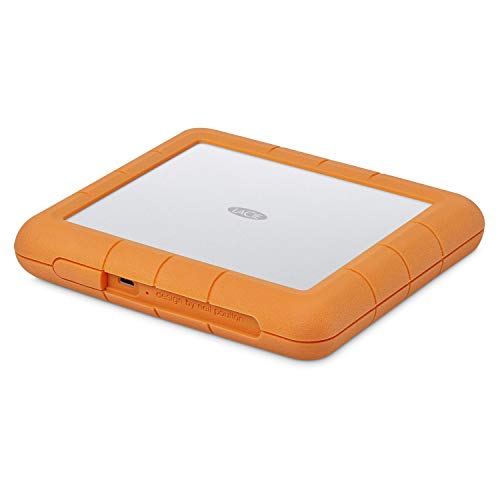
The LaCie Rugged Raid Shuttle 8TB External Hard Drive is an excellent choice for video editors who need a reliable and portable storage solution. With a huge 8TB capacity, it offers ample space for your projects. Its flat design makes packing easy, while its rugged construction guarantees it’s drop, shock, dust, and water-resistant. You can easily configure RAID 0/1 for maximum performance or redundancy using the step-by-step wizard. Plus, the self-encrypting password system keeps your work secure. To top it off, you get a complimentary month of Adobe Creative Cloud, perfect for enhancing your editing experience.
Best For: Video editors and creative professionals looking for a reliable, portable storage solution with high capacity and security features.
Pros:
- Ample 8TB capacity provides plenty of space for large projects and files.
- Rugged construction ensures durability against drops, shocks, dust, and water.
- Self-encrypting password system offers enhanced security for sensitive data.
Cons:
- Higher price point compared to standard external hard drives.
- Limited compatibility with older USB interfaces may require adapters.
- Weight may be a factor for those needing ultra-lightweight solutions.
OWC ThunderBay 4 RAID Storage Enclosure

For video editors looking for a reliable and high-performance storage solution, the OWC ThunderBay 4 RAID Storage Enclosure stands out with its impressive data transfer rate of up to 1527MB/s. This four-bay enclosure supports both 3.5-inch and 2.5-inch drives, making it versatile for your setup. You can easily configure RAID options like 0, 1, 4, or 5 to fit your needs. Compatible with both Mac and Windows systems, it seamlessly connects via Thunderbolt (USB-C). With a solid customer rating of 4.0 stars, it’s clear that the ThunderBay 4 meets the demands of serious video editors.
Best For: Video editors and professionals seeking a high-performance RAID storage solution with flexible configuration options.
Pros:
- High data transfer rate: Achieves speeds up to 1527MB/s, ideal for handling large video files.
- Versatile drive support: Compatible with both 3.5-inch and 2.5-inch drives without the need for adapters.
- User-configurable RAID options: Offers a range of RAID configurations (0, 1, 4, 5, 1+0) to suit different data protection and performance needs.
Cons:
- Weight: At 8.6 pounds, it may be cumbersome for portable setups.
- No drives included: The enclosure is sold without hard drives, requiring additional investment.
- Limited to Thunderbolt connectivity: May not be suitable for users without Thunderbolt (USB-C) ports on their devices.
LaCie 2big RAID 48TB External Hard Drive

With a massive 48TB capacity and speeds of up to 550MB/s, the LaCie 2big RAID External Hard Drive is tailor-made for photographers, indie filmmakers, and YouTubers who need efficient and reliable storage solutions for their video editing projects. Featuring 7200 RPM enterprise-class drives, it guarantees quick access to your data. You can easily configure RAID 0 or 1 using a step-by-step wizard, allowing for performance optimization or redundancy. Compatible with USB-C and USB 3.0 computers, the LaCie 2big also boasts hot-swappable drives and a five-year warranty, including Rescue Data Recovery Services for added peace of mind.
Best For: Photographers, indie filmmakers, and YouTubers seeking reliable and high-capacity storage for video editing projects.
Pros:
- High Capacity: 48TB of storage allows for extensive media file storage.
- Fast Speeds: Data transfer speeds of up to 550MB/s enhance workflow efficiency.
- RAID Configuration: Easy setup with options for performance optimization or redundancy.
Cons:
- Price Point: Higher cost compared to standard external hard drives.
- Weight: Heavier than typical portable drives, making it less convenient for travel.
- Complexity for Beginners: RAID configuration may be challenging for users unfamiliar with the technology.
LaCie 2big RAID 40TB External Hard Drive

Ideal for photographers, indie filmmakers, and YouTubers, the LaCie 2big RAID 40TB External Hard Drive combines vast storage capacity with impressive speeds up to 550MB/s. With 40TB of desktop storage and easy RAID 0/1 configuration, it offers flexibility for speed, capacity, and data redundancy. The hot-swappable IronWolf Pro drives spin at 7200 RPM, ensuring reliable performance for your demanding workflows. Compatible with USB-C and USB 3.0, it seamlessly integrates with both Mac and PC systems. Plus, you’ll enjoy peace of mind with a five-year limited warranty and Rescue Data Recovery Services against unexpected data loss.
Best For: Photographers, indie filmmakers, and YouTubers seeking high-capacity storage with fast data transfer speeds.
Pros:
- Massive 40TB storage capacity suitable for large files and projects.
- Fast data transfer speeds up to 550MB/s for efficient workflows.
- Five-year limited warranty and data recovery services ensure protection against data loss.
Cons:
- Customer rating of 3.2 out of 5 stars indicates mixed feedback.
- Weighs 6.17 pounds, which may be less portable than smaller external drives.
- Additional fees may apply for returns under certain conditions, potentially complicating the return process.
OWC ThunderBay 4 0TB Four-Bay Thunderbolt 40Gb/s RAID Storage Enclosure
The OWC ThunderBay 4 is perfect for video editors who demand high-speed data transfer and flexibility in storage options. With dual Thunderbolt 3 ports, you’ll experience impressive speeds up to 1527MB/s for seamless workflows. This four-bay enclosure supports both 3.5-inch and 2.5-inch drives without needing extra adapters, making it incredibly versatile. You can configure it in various RAID modes, including 0, 1, 4, 5, and 1+0 (10), to suit your project’s needs. Plus, its ultra-quiet, heat-dissipating aluminum chassis guarantees reliable performance while keeping your workspace peaceful. The ThunderBay 4 is an essential tool for any serious video editor.
Best For: The OWC ThunderBay 4 is best for professional video editors seeking high-speed data transfer and flexible storage configurations.
Pros:
- High-speed performance: Achieves up to 1527MB/s sustained transfer speeds, enhancing workflow efficiency.
- Versatile drive compatibility: Supports both 3.5-inch and 2.5-inch drives without the need for additional adapters.
- Multiple RAID configurations: Offers various RAID modes (0, 1, 4, 5, and 1+0) for customizable data protection and performance.
Cons:
- No pre-installed drives: Comes as a 0TB enclosure, requiring users to purchase drives separately.
- Higher price point: May be more expensive compared to other storage solutions that offer less performance.
- Limited to Thunderbolt connections: Requires compatible Thunderbolt devices, potentially limiting usability with other systems.
OWC ThunderBay 4 16TB RAID Storage Solution
For video editors seeking high-speed data transfer, the OWC ThunderBay 4 16TB RAID Storage Solution stands out with its impressive real-world sustained performance of up to 1106MB/s. This four-bay Thunderbolt RAID storage solution supports both 3.5 and 2.5 drives without needing an adapter, offering great flexibility. You can easily configure it in RAID 0, 1, 4, 5, or 1+0 (10) to suit your specific needs. Plus, it comes with SoftRAID Premium, an enterprise-grade software for managing your RAID arrays, along with a three-year subscription. Experience speed and reliability that elevate your video editing workflow.
Best For: Video editors and content creators needing high-speed, reliable storage solutions for large files.
Pros:
- High-speed performance with real-world sustained speeds of up to 1106MB/s.
- Flexible drive compatibility allowing the use of both 3.5 and 2.5 drives without adapters.
- Configurable RAID options (RAID 0, 1, 4, 5, 1+0) to suit various data management needs.
Cons:
- Higher initial investment compared to standard external hard drives.
- Requires Thunderbolt 3 connection which may limit compatibility with older devices.
- Limited to four-bay configuration, which may not be sufficient for users needing more storage capacity.
OWC ThunderBay 4 24TB RAID Storage Solution
When you need a robust storage solution for video editing, the OWC ThunderBay 4 24TB RAID stands out with its impressive real-world sustained performance of up to 1007MB/s. This four-bay Thunderbolt RAID supports both 3.5 and 2.5 drives without requiring any adapters. You can easily configure it in various RAID setups, including RAID 0, 1, 4, 5, and 1+0, tailored to your needs. Plus, it comes with SoftRAID Premium software, making it simple to create and manage your RAID arrays. With a three-year subscription included, you’re set for reliable performance and support for your video projects.
Best For: Video editors and content creators who require high-speed, reliable storage solutions for large files and complex projects.
Pros:
- High Performance: Achieves real-world sustained speeds of up to 1007MB/s, ideal for video editing.
- Versatile Drive Compatibility: Supports both 3.5 and 2.5 drives without the need for adapters.
- Flexible RAID Configurations: User-configurable in multiple RAID setups for tailored data protection and performance.
Cons:
- Price Point: May be more expensive compared to standard external storage options.
- Size and Weight: The four-bay design may be bulkier than single-drive alternatives, making it less portable.
- Software Dependency: Requires the use of SoftRAID Premium software for optimal setup and management, which may have a learning curve for new users.
OWC ThunderBay 4 8TB RAID Storage Solution
Designed specifically for video editors, the OWC ThunderBay 4 8TB RAID Storage Solution offers impressive performance with real-world sustained speeds of up to 1074MB/s. This four-bay Thunderbolt RAID solution supports both 3.5 and 2.5-inch drives without the need for adapters, giving you flexibility in choosing your storage. You can easily configure it in various RAID setups—RAID 0, 1, 4, 5, or 1+0—tailoring it to your specific needs. Plus, it comes with SoftRAID Premium software, a three-year subscription that helps you create, monitor, and manage your RAID arrays efficiently. It’s a powerful tool for your video editing workflow.
Best For: The OWC ThunderBay 4 8TB RAID Storage Solution is best for video editors and content creators seeking high-performance, configurable storage solutions.
Pros:
- High-speed performance: Achieves real-world sustained speeds of up to 1074MB/s, enhancing editing efficiency.
- Flexible drive compatibility: Supports both 3.5 and 2.5-inch drives without requiring adapters.
- Customizable RAID configurations: Offers multiple RAID setups (0, 1, 4, 5, 1+0) to suit different data protection and performance needs.
Cons:
- Higher price point: May be more expensive compared to traditional storage options.
- Requires Thunderbolt 3 connectivity: Limited to users with compatible Thunderbolt 3 ports, which may not be available on all systems.
- Software subscription: The included SoftRAID Premium software is a subscription service, which may incur additional costs after three years.
SanDisk Professional G-RAID Shuttle 8-Bay Thunderbolt 3 RAID Array
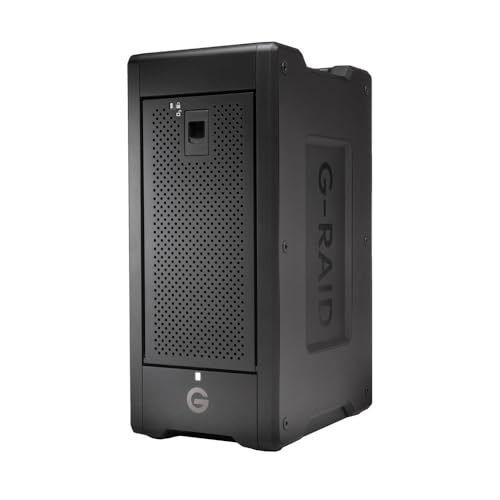
The SanDisk Professional G-RAID Shuttle 8-Bay Thunderbolt 3 RAID Array stands out as an ideal solution for video editors who demand high performance and reliability in their workflows. With a massive capacity of up to 160TB, it supports multi-stream 4K, 8K, and VR editing effortlessly. You’ll benefit from impressive read speeds of up to 1900MB/s and write speeds reaching 2000MB/s through Thunderbolt 3. Plus, its dual ports allow daisy-chaining of additional devices. Configurable in various RAID options, you can tailor it to your needs. Backed by a 5-year warranty, it’s a trustworthy companion for your demanding projects.
Best For: Video editors and content creators who require high-capacity, high-speed storage solutions for demanding workflows.
Pros:
- High Performance: Achieves read speeds up to 1900MB/s and write speeds up to 2000MB/s, ideal for 4K and 8K editing.
- Flexible RAID Options: Pre-configured RAID 5 with the ability to switch to multiple RAID configurations for tailored performance.
- Daisy-Chaining Capability: Dual Thunderbolt 3 ports allow connection of up to 5 additional devices, enhancing workflow efficiency.
Cons:
- Price Point: The high-performance features may come at a premium cost, making it less accessible for casual users.
- Weight and Portability: While designed for transport, the unit may be heavier compared to smaller storage solutions, impacting mobility.
- Complex Setup: Users may require technical knowledge to configure RAID settings optimally, which could be challenging for beginners.
OWC Mercury Elite Pro 16TB 2 Bay RAID Enclosure

For video editors seeking a reliable and versatile storage solution, the OWC Mercury Elite Pro 16TB 2 Bay RAID Enclosure stands out. It supports two 3.5-inch SATA 7200 RPM hard drives and offers four RAID configurations—RAID 0 for speed, RAID 1 for safety, SPAN for capacity, and JBOD for independent use. With connectivity options like USB 3.2 Gen 1 and eSATA, you can achieve impressive transfer speeds of up to 750 MB/s. Plus, it comes with all necessary cables and guides, ensuring you’re ready to go. Backed by a 1-Year OWC Limited Warranty, it’s a solid choice for your editing needs.
Best For: Video editors and production studios looking for a reliable and versatile storage solution with configurable RAID options.
Pros:
- Supports multiple RAID configurations for flexibility in speed, safety, and capacity.
- High-speed connectivity options with USB 3.2 Gen 1 and eSATA for efficient data transfer.
- Includes all necessary accessories for easy setup and operation.
Cons:
- Limited to two 3.5-inch hard drives, which may not suffice for larger storage needs.
- Slightly bulky design may not be ideal for portable use.
- The maximum throughput may not meet the demands of very high-resolution video editing.
Factors to Consider When Choosing RAID Storage for Video Editing
When you’re choosing RAID storage for video editing, several key factors come into play. You’ll want to take into account your storage capacity needs, the data transfer speeds you require, and the RAID configuration that best suits your workflow. Additionally, guarantee compatibility with your systems and weigh the reliability and warranty options available.
Storage Capacity Requirements
Choosing the right storage capacity for your video editing RAID system is essential, especially since your projects’ resolution and length can greatly influence your needs. For high-definition editing, you’ll want at least 1TB to 4TB of storage. However, if you’re working with 4K or higher resolutions, aim for 8TB or more to handle larger file sizes and multiple projects simultaneously. Don’t forget about future growth; selecting a RAID system with expandable capacity means you won’t have to upgrade as your storage demands increase. Additionally, consider how different RAID configurations impact storage utilization. RAID 0 offers speed, while RAID 1 provides redundancy, ensuring your critical video files remain safe without using excessive storage space.
Data Transfer Speeds
Data transfer speeds play a crucial role in video editing, impacting everything from loading times to playback smoothness. Higher speeds enable quicker access to your footage, which is essential for seamless editing, especially with high-resolution files. Opt for RAID configurations like RAID 0, as they can greatly boost read and write speeds, often exceeding 1000MB/s. This is particularly important when working with multi-stream 4K or 8K video. Don’t overlook the connectivity interface; Thunderbolt 3 usually outperforms USB 3.0, offering faster data transfer rates. When selecting your RAID storage, make sure it can sustain high speeds during peak workloads, as this will enhance your overall productivity and keep your editing flow uninterrupted.
RAID Configuration Options
With data transfer speeds established as a key factor in your editing workflow, the next step is to evaluate the various RAID configuration options available. RAID 0 boosts performance by striping data across multiple drives, but it lacks redundancy. If data security is your priority, RAID 1 mirrors your data on two drives, although it cuts your storage capacity in half. For a balance of redundancy and performance, consider RAID 5, which requires at least three drives and distributes parity information. RAID 10 combines the advantages of both RAID 0 and RAID 1, needing at least four drives for exceptional performance and redundancy. Choose a configuration that suits your workflow, weighing the trade-offs between speed and data protection.
Compatibility With Systems
When selecting a RAID storage solution for video editing, you’ll want to verify compatibility with your system to avoid any frustrating connectivity issues. First, check that the RAID system works with your operating system, whether it’s Mac or PC, and confirm the specific version. Next, look for supported connection interfaces like USB-C or Thunderbolt, as these can notably affect data transfer speeds. It’s also wise to take into account whether the RAID setup accommodates both 3.5-inch and 2.5-inch drives, giving you more flexibility in storage options. Ascertain the RAID enclosure can handle multiple drives without extra adapters, simplifying your setup. Finally, opt for systems that integrate seamlessly with popular video editing software to enhance your workflow and minimize compatibility problems.
Reliability and Warranty
Selecting a reliable RAID storage solution is essential for video editing, especially since hardware failures can lead to significant setbacks. Prioritize systems with a robust warranty, as extended coverage gives you peace of mind against potential failures. Look for RAID solutions featuring hot-swappable drives, which allow easy replacements without downtime—crucial during critical projects. Evaluate RAID configurations, like RAID 1, that offer redundancy to protect your large files from data loss. Don’t forget to check reliability ratings and user feedback; high customer satisfaction often indicates better performance. Finally, confirm the RAID storage includes data recovery services as part of the warranty, invaluable for restoring lost footage due to accidental deletions or hardware malfunctions.