
When it comes to video editing, having the right NAS can make all the difference in your workflow. You need a device that offers speed, efficiency, and ample storage to handle large files seamlessly. Asustor’s top models provide just that, with features designed specifically for content creators. But which ones truly stand out? Let’s explore the best options that can elevate your editing experience.
Asustor Lockerstor 4 Gen3 AS6804T NAS for Video & Content Creators

The Asustor Lockerstor 4 Gen3 AS6804T NAS is designed specifically for video and content creators who demand high performance and reliability. With its powerful quad-core AMD Ryzen CPU, you’ll experience seamless multitasking with a base clock of 2.3 GHz and turbo speeds up to 3.8 GHz. It boasts 16GB of server-grade DDR5 RAM, expandable to 64GB, ensuring fast data processing. The four M.2 slots for NVMe SSDs and PCIe 4.0 support double your performance, making editing effortless. Plus, with multiple USB and Ethernet ports, connectivity is a breeze, keeping your workflow smooth and efficient.
Best For: The Asustor Lockerstor 4 Gen3 AS6804T NAS is best for video and content creators seeking high performance and efficient data management.
Pros:
- High-performance quad-core AMD Ryzen CPU for seamless multitasking.
- Expandable RAM up to 64GB with server-grade DDR5 for fast data processing.
- Multiple connectivity options, including 10-Gigabit Ethernet and USB4 for enhanced workflow.
Cons:
- Diskless design requires separate purchase of hard drives or SSDs.
- AMD USB4 support is currently limited to specific external storage devices and NAS models.
- Higher initial investment compared to standard NAS options.
Asustor AS5402T 2 Bay NAS
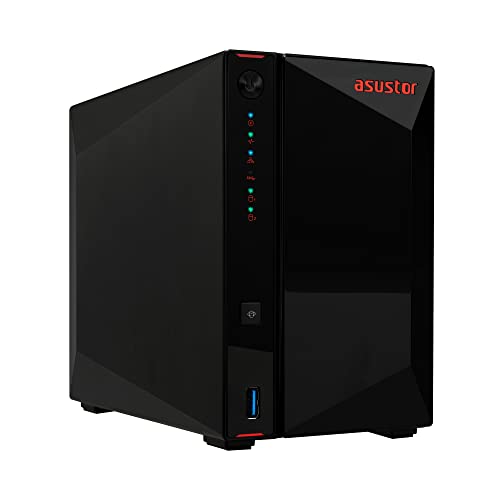
Designed for video editors and creative professionals, the Asustor AS5402T 2 Bay NAS excels with its powerful Intel Quad-Core CPU, ensuring smooth performance during demanding tasks. With 4GB of DDR4 RAM and four M.2 NVMe SSD slots, you can enjoy fast data access and ample storage for your projects. The two 2.5GbE ports provide excellent networking options, while the USB 3.2 Gen 2 ports allow for quick transfers. Weighing just 3.31 pounds, it’s compact yet efficient. Whether you’re cloud storing or live streaming, this NAS has the features to enhance your workflow and keep you productive.
Best For: Creative professionals and video editors looking for a high-performance NAS for efficient data storage and access.
Pros:
- Powerful Intel Quad-Core CPU for smooth performance during demanding tasks.
- Four M.2 NVMe SSD slots provide fast data access and ample storage capacity.
- Dual 2.5GbE ports enhance networking capabilities for seamless data transfers.
Cons:
- Limited to two bays, which may restrict storage expansion compared to larger models.
- 4GB of RAM may not be sufficient for users with extremely high workloads or multiple simultaneous tasks.
- Price point may be higher than entry-level NAS devices, making it less accessible for budget-conscious users.
Asustor FLASHSTOR 12 Pro Gen2 FS6812X NAS for Video & Content Creators

For video and content creators looking to elevate their editing capabilities, the Asustor FLASHSTOR 12 Pro Gen2 FS6812X NAS is a standout option thanks to its impressive twelve M.2 slots that allow for high-speed NVMe SSD storage. Powered by an AMD Quad-Core Ryzen processor and equipped with 16GB of server-grade DDR5 RAM, it supports up to 64GB for seamless multitasking. With dual 10-Gigabit Ethernet and USB 4.0 ports, connectivity is robust, ensuring quick data transfers. This diskless NAS is perfect for 4K editing and enhances your workflow, making it an ideal choice for serious content creators.
Best For: Video and content creators seeking high-speed, efficient storage solutions for 4K editing and multitasking.
Pros:
- High-Speed Storage: Twelve M.2 slots for NVMe SSDs ensure rapid data access and transfer rates.
- Powerful Performance: Equipped with an AMD Quad-Core processor and expandable RAM up to 64GB for seamless multitasking.
- Robust Connectivity: Dual 10-Gigabit Ethernet and multiple USB 4.0 ports facilitate quick and efficient data transfers.
Cons:
- Diskless Configuration: Users must purchase their own storage drives, which can increase initial setup costs.
- Limited CPU Compatibility: V3000 series CPUs do not support direct connect USB4 host-to-host networking.
- Targeted User Base: Primarily designed for video and content creators, which may not appeal to general consumers.
Asustor Drivestor 4 Gen 2 AS1204T NAS (Diskless)

With its powerful 1.7GHz quad-core processor, the Asustor Drivestor 4 Gen 2 AS1204T NAS (Diskless) stands out as an excellent choice for video editors who need smooth 4K transcoding. This 4-bay NAS features superfast 2.5-Gigabit Ethernet, ensuring quick data transfers and efficient collaboration. You’ll appreciate its 1 GB DDR4 RAM, which supports seamless performance while editing. Installation is a breeze, thanks to its tool-free setup. Plus, with three USB 3.0 ports, you’ll have plenty of connectivity options for backup solutions, making it a versatile addition to your video editing workflow.
Best For: Video editors and content creators looking for a powerful NAS solution that supports smooth 4K transcoding and efficient data management.
Pros:
- Powerful 1.7GHz quad-core processor for efficient 4K video transcoding.
- Superfast 2.5-Gigabit Ethernet for quick data transfers and enhanced connectivity.
- Tool-free installation for easy setup and three USB 3.0 ports for additional connectivity options.
Cons:
- Diskless design requires users to purchase and install their own hard drives.
- Limited to 1 GB DDR4 RAM, which may not be sufficient for very high-demand applications.
- No built-in redundancy features, which may pose a risk for data loss without proper backup solutions.
Asustor Drivestor 4 Pro Gen2 AS3304T v2, 4 Bay NAS

The Asustor Drivestor 4 Pro Gen2 AS3304T v2 stands out as an excellent choice for video editors seeking a cost-effective home media server. With its powerful Realtek RTD1619B 1.7GHz quad-core processor and 2 GB DDR4 RAM, you’ll experience smooth transcoding of 4K videos. The diskless design allows you to customize storage according to your needs. Plus, its superfast 2.5-Gigabit Ethernet guarantees quick file transfers, while Wake on LAN and WAN features keep your workflow seamless. With Btrfs/iSCSI snapshots and tool-free installation, this NAS truly enhances your video editing experience without breaking the bank.
Best For: The Asustor Drivestor 4 Pro Gen2 AS3304T v2 is best for video editors looking for a cost-effective and efficient home media server.
Pros:
- Smooth 4K video transcoding thanks to the powerful quad-core processor.
- Customizable storage options with its diskless design for tailored performance.
- Superfast 2.5-Gigabit Ethernet for quick file transfers and seamless workflow.
Cons:
- Requires user-provided drives, which may incur additional costs.
- Limited RAM with only 2 GB, which might not be sufficient for more demanding tasks.
- No built-in drives means initial setup could take extra time and effort.
Asustor FLASHSTOR 6 Gen2 FS6806X NAS for Video & Content Creators
Engineered specifically for video and content creators, the Asustor FLASHSTOR 6 Gen2 FS6806X NAS stands out with its impressive six M.2 slots for NVMe SSDs, enabling lightning-fast data transfer essential for 4K editing. Powered by an AMD Quad-Core Ryzen processor, this NAS delivers a robust 2.3GHz performance, ensuring your workflow remains smooth. With 8 GB of DDR5-4800 RAM and ECC support, you’ll enjoy enhanced reliability. Connectivity is exceptional, featuring a 10-Gigabit Ethernet port and multiple USB options. This diskless NAS is perfect for video professionals demanding high-speed storage solutions for their creative needs.
Best For: Video professionals and content creators who require high-speed storage solutions for 4K editing.
Pros:
- High-speed data transfer with six M.2 slots for NVMe SSDs, supporting PCIe 4.0 x4.
- Robust performance powered by an AMD Quad-Core Ryzen processor with a clock speed of 2.3GHz.
- Exceptional connectivity options, including a 10-Gigabit Ethernet port and multiple USB ports.
Cons:
- Diskless configuration requires additional purchase of M.2 SSDs, which can increase overall cost.
- Limited compatibility with certain external devices due to reliance on AMD’s current USB4 driver.
- Potentially higher power consumption due to the powerful processor and multiple SSDs in use.
Asustor Lockerstor 4 Gen2 NAS (AS6704T)
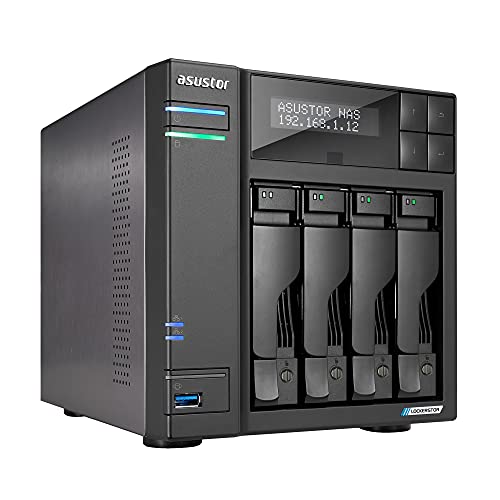
For video editors seeking high performance and expandability, the Asustor Lockerstor 4 Gen2 NAS (AS6704T) stands out with its impressive combination of features. This 4-bay NAS offers 4 M.2 NVMe slots for lightning-fast storage options and supports memory expansion up to 16GB, ensuring smooth editing workflows. Powered by an Intel Celeron N5105 quad-core processor, it delivers reliable performance with bursts up to 2.90 GHz. Plus, with dual 2.5GbE network capabilities, you can enjoy speedy file transfers. Its two USB 3.2 Gen 2×1 ports further enhance connectivity, making it an excellent choice for your video editing needs.
Best For: Video editors and content creators seeking high performance and expandability in their storage solutions.
Pros:
- High-speed storage options with 4 M.2 NVMe slots for enhanced performance.
- Expandable memory up to 16GB ensures smooth multitasking and efficient workflows.
- Dual 2.5GbE network capabilities provide faster file transfer speeds for large video files.
Cons:
- Initial cost may be high compared to entry-level NAS options.
- Limited to Intel Celeron processor, which may not meet the needs of very intensive computing tasks.
- Requires additional investment for 10GbE upgrade, which may be necessary for optimal performance in larger setups.
UGREEN NAS DH4300 Plus 4-Bay Desktop NASync

Looking for a reliable storage solution for your video editing projects? The UGREEN NAS DH4300 Plus 4-Bay Desktop NASync is a perfect fit, offering a whopping 120TB capacity. This entry-level NAS supports seamless connections across devices, ensuring your media is always accessible. With 8GB of RAM and a 2.5GbE network port, you’ll experience quick file transfers and efficient backups. Plus, its AI photo management helps organize your visuals intelligently. Security is exceptional, featuring advanced encryption. At just $629.99, it’s a cost-effective alternative to cloud storage, saving you thousands over time. Get ready to enhance your editing workflow!
Best For: The UGREEN NAS DH4300 Plus is best for video editors and home users seeking a robust and cost-effective storage solution for large media files and intelligent photo management.
Pros:
- High capacity of 120TB allows for extensive media storage, perfect for video editing projects.
- User-friendly features such as quick NFC connection, simple setup, and remote access make it easy to use.
- Advanced security with encryption ensures your data remains private and protected from third-party access.
Cons:
- Storage disks not included, requiring additional investment for complete setup.
- Limited support for virtual machines, which may be a drawback for users needing virtualization capabilities.
- Initial cost of $629.99 may be a barrier for budget-conscious consumers compared to other storage options.
Asustor Lockerstor 6 Gen3 NAS (AS6806T)

The Asustor Lockerstor 6 Gen3 NAS (AS6806T) stands out as the ideal choice for video editors who need robust performance and fast data access. Powered by a Quad-Core AMD Ryzen Embedded V3C14 CPU, it offers a base clock speed of 2.3 GHz, turboing up to 3.8 GHz. With six bays and four M.2 NVMe slots, you can maximize storage capacity. The dual 10-Gigabit and 5-Gigabit Ethernet ports guarantee speedy connectivity, while USB4 and USB 3.2 ports provide additional flexibility. Plus, its Wake on LAN and WAN features keep your workflow seamless and efficient.
Best For: Video editors and creative professionals seeking high-performance storage solutions with fast data access capabilities.
Pros:
- High performance with a Quad-Core AMD Ryzen CPU and turbo boost capabilities for demanding tasks.
- Flexible storage options thanks to six bays and four M.2 NVMe slots for maximum capacity and speed.
- Excellent connectivity with dual 10-Gigabit and 5-Gigabit Ethernet ports, along with USB4 for rapid data transfer.
Cons:
- Diskless design may require additional investment in drives to get started.
- Potential overkill for casual users or those with less intensive storage needs.
- Higher price point compared to basic NAS solutions, which may not be justified for all users.
Asustor Drivestor 2 Gen 2 AS1202T Network Attached Storage

If you’re diving into video editing and need a reliable storage solution, the Asustor Drivestor 2 Gen 2 AS1202T is an excellent choice thanks to its powerful Realtek RTD1619B 1.7GHz quad-core processor. This 2-bay, diskless NAS guarantees smooth transcoding of 4K videos, making your editing process efficient. With superfast 2.5-Gigabit Ethernet and three USB 3.0 ports, you can easily connect and transfer files. The 1 GB DDR4 RAM supports your multitasking needs, while features like Wake on LAN and tool-free installation simplify your setup. Get ready to elevate your video editing workflow with this outstanding NAS!
Best For: Video editors and content creators looking for a powerful, efficient storage solution for 4K video transcoding and file management.
Pros:
- Powerful Performance: Equipped with a Realtek RTD1619B 1.7GHz quad-core processor for smooth 4K video transcoding.
- Fast Connectivity: Features superfast 2.5-Gigabit Ethernet and three USB 3.0 ports for quick file transfers.
- User-Friendly Setup: Tool-free installation and support for Wake on LAN/WAN simplify the setup process.
Cons:
- Diskless Design: Requires separate hard drives for storage, which may add to initial costs.
- Limited RAM: 1 GB DDR4 RAM may not be sufficient for users with heavy multitasking needs.
- No Built-in Storage: Users need to purchase drives separately, which can be inconvenient for some.
Factors to Consider When Choosing Asustor NAS for Video Editing
When you’re choosing an Asustor NAS for video editing, it’s essential to take into account several key factors. You’ll want to assess processor performance, RAM capacity, and storage expansion options to guarantee smooth workflows. Additionally, think about the connectivity features and supported video formats that will best meet your editing needs.
Processor Performance Importance
Choosing the right processor for your Asustor NAS is essential for a seamless video editing experience, as it directly impacts rendering and encoding speeds. A powerful quad-core processor, with a base clock speed of 2.3 GHz and turbo speeds reaching up to 3.8 GHz, enables you to handle multiple tasks smoothly. Opt for advanced architectures like AMD Ryzen or Intel Celeron, which are better suited for demanding applications and faster transcoding of high-resolution videos. Additionally, consider systems supporting PCIe 4.0 for quicker data transfer rates, vital when working with large video files. Remember, pairing a strong processor with ECC RAM enhances data integrity during intensive sessions, minimizing the risk of data corruption and ensuring a reliable workflow.
RAM Capacity Considerations
While a powerful processor is essential for video editing, having sufficient RAM capacity is equally important for a smooth and efficient workflow. For most applications, you should aim for at least 16GB of RAM, but going for 32GB or more is ideal, especially for demanding tasks like 4K or multi-camera editing. Higher RAM capacity allows for smoother multitasking and faster rendering times, making it vital when handling large files. Consider utilizing server-grade ECC RAM for enhanced stability and data integrity during intensive sessions, which reduces the risk of crashes. Also, verify your Asustor NAS supports expandable RAM options, so you can adapt to future software needs as they evolve. This foresight can greatly improve your editing experience.
Storage Expansion Options
With a solid RAM foundation in place, the next critical aspect to contemplate is how you’ll expand your storage. Consider the number of M.2 NVMe slots available; more slots can greatly boost read and write speeds for those large video files you’re working with. Look for NAS devices that support PCIe 4.0, as this doubles your data transfer rates, essential for smooth editing and rendering. Additionally, aim for a model with a maximum RAM capacity of 64GB of server-grade ECC RAM to manage intensive tasks. Multiple Ethernet ports, especially 10-Gigabit connections, enhance data access and collaboration. Finally, tool-free installation makes upgrades easier, allowing you to adjust your storage solutions quickly as your projects evolve.
Connectivity Features Required
For ideal video editing performance, connectivity features in an Asustor NAS are vital. Look for devices with multiple high-speed Ethernet ports, like dual 10-Gigabit or 5-Gigabit options, to guarantee fast data transfers during your editing tasks. USB4 connectivity is another important factor, offering up to 40 Gbps for seamless connections with external storage devices. Consider NAS systems that support Wake on LAN and Wake on WAN features, allowing for convenient remote access and management of your video files. Additionally, having multiple M.2 NVMe SSD slots can greatly enhance read/write speeds, making a noticeable difference in your workflow. Finally, confirm compatibility with PCIe 4.0 technology, as it doubles the performance capabilities needed for handling large video files efficiently.
Supported Video Formats
When selecting an Asustor NAS for video editing, it’s vital to take into account the supported video formats that align with your workflow. Look for NAS devices that handle popular formats like MP4, MOV, AVI, and MKV, as these are widely used in the industry. If you’re focused on high-quality production, guarantee compatibility with raw formats such as ProRes and DNxHR, which offer excellent fidelity for post-production. Additionally, opt for NAS systems that support high-efficiency video coding (HEVC or H.265) for efficient storage. It’s important to choose a model that can manage 4K and 8K formats, along with various frame rates like 24, 30, and 60 fps, guaranteeing smooth editing and playback across your projects.
User Interface Usability
Choosing the right Asustor NAS for video editing hinges on the usability of its user interface, as a well-designed system can streamline your workflow. A user-friendly interface enhances efficiency, letting you navigate and manage files quickly. Look for NAS systems with customizable dashboards to prioritize tools and applications that matter most to your editing tasks. The availability of mobile and web apps provides remote access, so you can work seamlessly from any device. Additionally, support for drag-and-drop file management simplifies organizing and transferring large video files, saving you time on mundane tasks. A responsive, intuitive interface improves your overall experience, making it easier for both beginners and experienced editors to utilize the NAS effectively.
Cooling System Efficiency
A reliable cooling system in your Asustor NAS is essential for maintaining peak performance, especially during the demanding processes of video editing. Effective cooling helps manage the heat generated by high-performance components, preventing overheating during long editing sessions. When choosing a NAS, consider larger units with multiple fans and thermal vents, as they dissipate heat more efficiently. Opting for models that support M.2 NVMe SSDs can also enhance thermal management due to their compact design, improving airflow. Look for NAS devices with built-in thermal sensors that automatically adjust fan speeds, keeping temperatures in safe ranges. Additionally, selecting NAS with aesthetic heat dissipation designs can boost cooling efficiency, increasing the reliability and lifespan of your storage system.