
If you’re serious about video editing, having the right NAS can make all the difference. Synology offers a range of models designed specifically for creative professionals like you. From the compact DS223 to the robust DS925+, these devices provide the storage and speed you need. But which one fits your unique workflow best? Let’s explore the top options that can elevate your editing experience.
Synology 2-Bay NAS DS223 (Diskless)

If you’re a video editor looking for a reliable and efficient storage solution, the Synology 2-Bay NAS DS223 (Diskless) is an excellent choice. This NAS offers centralized data storage, ensuring you maintain 100% ownership of your files. You can easily access your data across multiple platforms, streamlining your editing process. With simple file sharing features, keeping your clients and collaborators updated becomes hassle-free. Plus, the built-in data protection options safeguard your media libraries and business documents. It even supports intelligent surveillance features, making it a versatile tool for both creative and security needs. Upgrade your workflow with the DS223!
Best For: Video editors and creative professionals seeking a reliable and efficient centralized storage solution.
Pros:
- Centralized data storage ensures 100% ownership of files, giving users greater control.
- Multi-platform access allows seamless integration into various editing workflows.
- Built-in data protection features safeguard important media libraries and documents.
Cons:
- Diskless design means users need to purchase hard drives separately, which can increase initial setup costs.
- Limited performance compared to higher-end NAS models may not meet the needs of very large projects.
- Requires setup and configuration, which might be challenging for less tech-savvy users.
Synology 4-Bay DiskStation DS925+ (Diskless)

The Synology 4-Bay DiskStation DS925+ (Diskless) is an excellent choice for video editors who need fast and reliable data access, thanks to its impressive sequential read/write speeds of up to 522/565 MB/s. With dual 2.5GbE ports, you’ll enjoy swift network transfers and enhanced redundancy. This NAS supports drives on Synology’s official compatibility list, ensuring you get the best performance. It also features built-in file and photo management, data protection, and virtualization solutions, making it versatile for various creative tasks. Plus, you’re backed by a 3-year limited hardware warranty, giving you peace of mind in your investment.
Best For: Video editors and creative professionals who require fast and reliable data access for their projects.
Pros:
- High sequential read/write speeds of up to 522/565 MB/s for efficient data handling.
- Dual 2.5GbE ports provide fast network transfers and increased redundancy.
- Versatile functionality with built-in file management, data protection, and virtualization solutions.
Cons:
- Diskless design means you must purchase drives separately, adding to initial costs.
- Limited compatibility as it only supports drives on Synology’s official compatibility list.
- Potentially complex setup for users unfamiliar with NAS configurations and networking.
Synology 2-Bay DiskStation DS223j (Diskless)

For video editors seeking a reliable and cost-effective storage solution, the Synology 2-Bay DiskStation DS223j (Diskless) stands out with its secure private cloud feature, ensuring you maintain 100% ownership of your data. You can easily access your files from multiple platforms, making collaboration effortless. The DS223j simplifies file sharing and syncing, keeping your clients and colleagues aligned. With extensive data protection features, you can back up your media library or documents to various destinations, safeguarding your creations. Plus, you’ll find plenty of support resources, including the Synology knowledge center and helpful YouTube tutorials, to guide you through setup.
Best For: Video editors and professionals seeking a reliable and cost-effective private cloud storage solution.
Pros:
- Secure private cloud ensures 100% data ownership and control over your files.
- Multi-platform access allows for easy collaboration and file sharing from anywhere.
- Comprehensive data protection features enable reliable backups of media libraries and documents.
Cons:
- Diskless design requires separate purchase of hard drives for operation.
- Limited performance compared to higher-end models, which may affect large file handling.
- Initial setup may require technical knowledge, potentially complicating the process for some users.
Synology DS925+ 4-Bay NAS Bundle with 16TB Storage
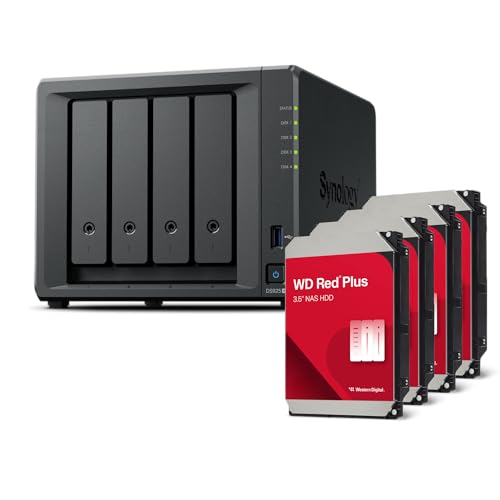
Designed with video editors in mind, the Synology DS925+ 4-Bay NAS Bundle offers a robust 16TB of storage that assures you can easily manage large video files and projects. Powered by an AMD Ryzen V1500B processor and 4GB of DDR4 ECC memory, this NAS guarantees smooth performance even during demanding tasks. With four hot-swappable drive bays, you can expand your storage seamlessly. Dual 2.5 GbE LAN ports and M.2 NVMe slots provide excellent connectivity options. Whether for data storage, virtualization, or backup, this NAS is perfect for small to medium-sized businesses looking to enhance their creative workflow.
Best For: Video editors and small to medium-sized businesses seeking efficient storage and performance for large files and projects.
Pros:
- High Storage Capacity: Offers 16TB of storage with the capability to expand up to nine drives.
- Powerful Performance: Equipped with an AMD Ryzen V1500B processor and 4GB of DDR4 ECC memory for smooth multitasking.
- Flexible Connectivity: Features dual 2.5 GbE LAN ports and M.2 NVMe slots for enhanced data transfer and caching options.
Cons:
- Initial Memory Limitations: Comes with only 4GB of RAM, which may require an upgrade for more intensive tasks.
- Cost: Higher initial investment compared to basic NAS solutions.
- Complex Setup: May require advanced knowledge for optimal configuration and management.
Synology 2-Bay DiskStation DS225+ (Diskless)

Looking for a compact yet powerful solution for centralized data management? The Synology 2-Bay DiskStation DS225+ (Diskless) is your go-to choice. Weighing only 2.87 pounds and measuring 9.14 x 4.25 x 6.5 inches, it fits snugly in any workspace. With up to 282/217 MB/s sequential read/write throughput, you’ll enjoy fast and stable data transfers. You can store up to 40 TB of data, ensuring complete ownership and multi-platform access. Plus, with Synology DiskStation Manager, you’ll have extensive tools for file management, sharing, and data protection. It’s perfect for video editing and beyond!
Best For: Users seeking a compact and efficient NAS solution for centralized data management and storage.
Pros:
- Fast Performance: Offers up to 282/217 MB/s sequential read/write throughput for quick data transfers.
- High Storage Capacity: Supports up to 40 TB of data, allowing for extensive file storage and retrieval.
- User-Friendly Management Tools: Comes with Synology DiskStation Manager for easy file management, sharing, and protection.
Cons:
- Diskless Model: Does not include hard drives, requiring separate purchase for complete setup.
- Limited Built-in Features: May not have extensive built-in applications compared to more advanced NAS models.
- Weight and Size: While compact, it may still be heavier and bulkier than other portable storage solutions.
Synology 5-Bay DiskStation DS1525+ (Diskless)

The Synology 5-Bay DiskStation DS1525+ (Diskless) is an ideal choice for video editors seeking a powerful yet flexible storage solution. With support for drives from the official compatibility list, you can scale your storage up to 300 TB using two DX525 expansion units. Its impressive performance delivers up to 1,181/1,180 MB/s sequential read/write speeds, ensuring stable data transfers for your large video files. Plus, built-in 2.5GbE ports provide fast connectivity, and it supports 10GbE for even better performance. Backed by a 3-year limited hardware warranty, this NAS is a reliable option for your creative projects.
Best For: Video editors and creative professionals looking for a high-capacity, high-performance storage solution.
Pros:
- Supports up to 300 TB of raw storage with the addition of DX525 expansion units, providing ample space for large projects.
- Impressive sequential read/write speeds of up to 1,181/1,180 MB/s, ensuring efficient data transfers.
- Built-in 2.5GbE ports and support for 10GbE enhance connectivity options for faster performance.
Cons:
- Diskless design means users must purchase drives separately, which can increase initial setup costs.
- Requires some technical knowledge to set up and configure, which may be challenging for less experienced users.
- Limited to official compatibility list for drives, potentially restricting options for expansion.
Synology DS223j 2-Bay Diskstation NAS with 8TB Bundle

For video editors seeking a reliable and efficient storage solution, the Synology DS223j 2-Bay Diskstation NAS with an 8TB bundle stands out with its powerful 4-core CPU and ample storage capacity. With two 4TB Seagate IronWolf drives, you’ll have plenty of space for your projects. It’s designed to store, share, and protect your files, plus it supports collaboration with clients and colleagues from anywhere. Connectivity options include a 1GbE LAN port and two USB 3.2 Gen 1 ports, ensuring seamless integration with your existing setup. Whether for personal or professional use, this NAS meets diverse media needs.
Best For: Video editors and professionals seeking a reliable, high-capacity storage solution for their media projects and collaborations.
Pros:
- Powerful Performance: Features a 4-core 1.7 GHz CPU for efficient processing and data management.
- Ample Storage Capacity: Comes with 8TB of storage using two 4TB Seagate IronWolf drives, ideal for large media files.
- Remote Accessibility: Facilitates safe access and sharing of files from anywhere, enhancing collaboration.
Cons:
- Limited Memory: Only 1 GB of RAM may restrict performance for heavily multitasking users.
- Single LAN Port: Only one RJ-45 1GbE LAN port could limit network redundancy.
- No SSD Cache Support: Lacks SSD caching capabilities for faster data access speeds.
UGREEN NAS DH4300 Plus 4-Bay Desktop NASync

Designed for entry-level users, the UGREEN NAS DH4300 Plus 4-Bay Desktop NASync stands out as an ideal solution for home storage needs, especially for media enthusiasts and casual video editors. With a massive 120TB capacity, it allows you to store millions of photos, songs, and movies effortlessly. The 8GB LPDDR4X RAM and 2.5GbE network port guarantee quick data transfers, while the 4K HDMI support enhances your viewing experience. Plus, it offers automatic backups and multi-device connectivity, making file sharing a breeze. You’ll appreciate the user-friendly setup, secure private storage, and intelligent AI photo management for organized memories.
Best For: The UGREEN NAS DH4300 Plus is best for entry-level home users seeking a cost-effective and efficient solution for media storage and management.
Pros:
- High storage capacity of 120TB supports extensive media libraries and file collections.
- User-friendly setup and quick file sharing across multiple devices enhance accessibility and convenience.
- Advanced AI photo management features help in organizing and backing up images intelligently.
Cons:
- Storage disks are not included, requiring additional investment for complete setup.
- Limited to Docker support, lacking virtual machine capabilities which may limit advanced users.
- Entry-level design may not meet the needs of high-end users or those requiring robust performance and features.
UGREEN NAS DXP2800 2-Bay Desktop Network Attached Storage

Small teams and video editing enthusiasts will find the UGREEN NAS DXP2800 2-Bay Desktop Network Attached Storage an excellent choice for their needs. With support for up to 76TB of storage, you can efficiently back up files, photos, and videos. Its AI-powered photo album feature organizes your images by recognizing faces, scenes, and locations while eliminating duplicates. Unlike cloud storage, the one-time purchase offers long-term value and enhanced data security. Powered by a 12th Gen Intel N100 processor, it transfers files quickly. Plus, you’ll benefit from a 2-year warranty and 24/7 specialist support for peace of mind.
Best For: Small teams and video editing enthusiasts looking for efficient storage solutions with advanced features.
Pros:
- Supports up to 76TB of storage, ideal for backing up large files and media libraries.
- AI-powered photo album feature that organizes images and removes duplicates for efficient storage management.
- One-time purchase model provides long-term value and enhanced data security compared to ongoing cloud storage fees.
Cons:
- Initial setup may be complex for users unfamiliar with NAS systems.
- Limited to two bays, which may not be sufficient for users needing extensive storage expansion.
- Performance may vary depending on the quality of third-party hard drives used.
Synology BeeStation 4TB Personal Cloud Storage Device (BST150-4T)

The Synology BeeStation 4TB Personal Cloud Storage Device (BST150-4T) is an ideal choice for families and small teams who need a straightforward and efficient way to manage their digital assets. With its built-in hard drive, you can centralize data from multiple devices without any subscription fees. Setup is a breeze—just scan a QR code, and you’re good to go! Access and share files on web, desktop, or mobile devices, and enjoy personalized storage for friends and family. Plus, you can edit files on the desktop while syncing progress across all devices, making collaboration seamless.
Best For: Families and small teams looking for an easy-to-use personal cloud storage solution without subscription fees.
Pros:
- Easy Setup: Quick and simple QR code setup with no technical expertise required.
- Multi-Device Access: Store, access, and share files seamlessly across web, desktop, and mobile devices.
- File Synchronization: Edit files on desktop while syncing progress across all devices for effective collaboration.
Cons:
- Average Customer Rating: Currently holds a 3.8 out of 5 stars based on customer reviews.
- Weight and Size: Weighs 3.3 pounds and has dimensions that may require more space than smaller alternatives.
- Potential Restocking Fees: Higher restocking fees may apply for damaged returns, which could deter some buyers.
Factors to Consider When Choosing a Synology NAS for Video Editing
When choosing a Synology NAS for video editing, you need to evaluate several key factors. Think about your storage capacity requirements, the performance and speed you’ll need for smooth editing, and the connectivity options available. Additionally, don’t overlook data protection features and how easily you can expand or upgrade your system in the future.
Storage Capacity Requirements
Storage capacity plays an essential role in video editing, as projects can demand vast amounts of space. You might find that your projects require hundreds of gigabytes to several terabytes, especially when dealing with high-resolution footage. For instance, 4K video editing can consume up to 1TB of storage for just a few hours of raw footage. It’s vital to think about the number of simultaneous projects and the file formats you’ll use; uncompressed videos take up considerably more space than compressed ones. Opting for a NAS with scalable storage lets you expand as your needs grow. Additionally, a multi-bay NAS enables you to set up RAID configurations, enhancing both data redundancy and maximizing your storage efficiency.
Performance and Speed
Choosing the right Synology NAS for video editing hinges on performance and speed, as these factors directly impact your workflow efficiency. Aim for a NAS with high sequential read/write speeds of at least 522 MB/s to guarantee smooth file transfers and editing. Dual 2.5GbE ports can greatly enhance network transfer speeds, minimizing latency when accessing large video files. Make sure you have sufficient RAM, ideally 4 GB or more, to handle multiple streams without slowdowns. Compatibility with M.2 NVMe slots allows for fast storage upgrades, improving your data access speeds. Finally, consider utilizing RAID configurations for data redundancy and improved read/write speeds, assuring your large video projects remain safe and efficiently accessible throughout the editing process.
Connectivity Options Available
Connectivity options play an integral role in your video editing setup, especially when selecting a Synology NAS. Consider models with dual 2.5GbE ports to boost network transfer speeds and add redundancy for smoother file access. Look for NAS devices that feature M.2 NVMe slots, which enhance performance during intensive editing tasks by allowing for additional caching or storage pools. Make sure your NAS includes USB 3.2 Gen1 ports for fast connections to external drives or devices, making data transfers and backups quick and efficient. Finally, check compatibility with various third-party hard drives for flexible storage expansion while maintaining performance. Evaluating the maximum sequential read/write throughput is vital, as higher speeds can greatly improve your editing workflow.
Data Protection Features
When it comes to video editing, having robust data protection features in your Synology NAS is essential for safeguarding your projects. Look for automated backup options that secure your critical editing files from hardware failures or accidental deletions. Incorporating RAID configurations provides redundancy, ensuring your data remains intact by mirroring it across multiple drives. Snapshot technology allows you to quickly restore previous versions of files, minimizing the impact of corruption or unwanted changes. Additionally, consider encryption options to protect sensitive video projects during transmission and storage. Finally, extensive data management tools will help you organize and protect large video files, streamlining your workflow and enhancing collaboration within your editing team.
Expandability and Upgrade Options
As you explore options for a Synology NAS tailored for video editing, expandability and upgrade potential play an essential role in guaranteeing your setup can grow with your evolving needs. Start by considering the number of drive bays; more bays mean greater storage capacity and future expansion. Look for models with hot-swappable drives, which allow for easy upgrades without downtime. Evaluate the maximum RAM capacity, as higher RAM can considerably enhance performance for demanding editing applications. Compatibility with M.2 NVMe SSDs for caching is also vital, boosting data access speeds. Finally, verify the NAS features dual or multiple Ethernet ports to handle large video files and maintain a seamless editing experience. These factors will help you make a wise investment.