
When you’re editing video, the right NAS device can make all the difference in your workflow. With high storage capacity, rapid transfer speeds, and solid data protection, these devices can enhance your efficiency considerably. Whether you’re collaborating on a project or managing large files, the choice of NAS is essential. So, what are the top options available to you? Let’s explore some of the best NAS devices designed specifically for video workflows.
Synology 4-Bay DiskStation DS423 (Diskless)

If you’re a video professional looking for a reliable storage solution, the Synology 4-Bay DiskStation DS423 is an excellent choice. Weighing just 4.87 pounds, its compact dimensions make it easy to fit into any workspace. With a solid 4.5-star rating from 832 reviews, it stands out in the market. This NAS device allows secure remote access to your files, ensuring you can share media effortlessly. Plus, with robust data protection features, you can backup your critical projects while safeguarding against malware. Its capability to support up to 30 IP cameras also makes it a versatile option for video surveillance needs.
Best For: Video professionals and users needing a reliable network-attached storage solution for secure file access and data protection.
Pros:
- Secure remote access to files and media, enabling effortless sharing.
- Robust data protection features including backups and snapshots for malware defense.
- Versatile support for video surveillance, accommodating up to 30 IP cameras.
Cons:
- Diskless design requires additional purchases for drives to operate.
- Initial setup may require some technical knowledge for optimal configuration.
- Limited support for older IP camera models may necessitate additional investments for compatibility.
UGREEN NAS DH4300 Plus 4-Bay Desktop NASync

The UGREEN NAS DH4300 Plus 4-Bay Desktop NASync is an excellent choice for content creators seeking a cost-effective solution for managing large media files. With a capacity of up to 120TB, you can store countless photos, songs, and movies. Its 8GB LPDDR4X RAM and 2.5GbE network port guarantee smooth performance, while 4K HDMI support enhances your viewing experience. You’ll appreciate the quick NFC connection and straightforward setup, making file sharing across devices a breeze. Plus, its secure storage keeps your data private, and advanced encryption guarantees your information remains safe from third-party access.
Best For: Content creators and home users seeking a cost-effective, high-capacity solution for managing and storing large media files securely.
Pros:
- Large storage capacity of up to 120TB, accommodating millions of photos, songs, and movies.
- User-friendly features including quick NFC connection, simple setup, and remote access from various devices.
- Advanced security measures with encryption to protect data from third-party access.
Cons:
- Storage disks not included, requiring additional purchase for full functionality.
- Limited support for virtualization, as it only supports Docker but not virtual machines.
- Entry-level NAS, which may not meet the needs of users requiring advanced enterprise features.
UGREEN NAS DXP2800 2-Bay Desktop Network Attached Storage

Designed for small teams and video editing enthusiasts, the UGREEN NAS DXP2800 2-Bay Desktop Network Attached Storage stands out with its impressive 76TB storage capacity. You’ll find it user-friendly, especially if you’re shifting from cloud storage or external drives. Its AI-powered photo album organizes your images, recognizing faces and scenes while eliminating duplicates. Plus, you’ll save money with a one-time purchase, avoiding ongoing cloud fees. With a 12th Gen Intel N100 processor, transferring a 1GB file takes only about 3 seconds. Enjoy peace of mind with a 2-year warranty and 24/7 specialist support for any issues that arise.
Best For: Small teams and video editing enthusiasts looking for an efficient and user-friendly network storage solution.
Pros:
- Impressive storage capacity of up to 76TB, accommodating large files and backups.
- AI-powered photo organization feature that intelligently sorts images and removes duplicates.
- Fast file transfer speeds with a 12th Gen Intel N100 processor, transferring 1GB files in about 3 seconds.
Cons:
- Initial cost may be a barrier for some users compared to subscription-based cloud services.
- Limited compatibility with specific hard drive brands, which may restrict options for some users.
- Requires setup and maintenance, which might be challenging for less tech-savvy individuals.
QNAP TS-464-8G-US 4 Bay High-Performance Desktop NAS

For video professionals seeking a reliable and efficient storage solution, the QNAP TS-464-8G-US 4 Bay High-Performance Desktop NAS stands out with its impressive dual 2.5GbE ports. Powered by a quad-core Intel Celeron N5105/N5095 processor and 8GB DDR4 RAM, it delivers fast performance for demanding tasks. The dual M.2 PCIe Gen3x2 NVMe SSD slots enhance speed, enabling cache acceleration and optimized data access. With multiple USB 3.2 Gen 2 ports, you can enjoy rapid transfer speeds. Plus, centralized storage and seamless backups for Windows and Mac guarantee your important files are secure and easily accessible.
Best For: Video professionals and teams requiring fast, reliable, and centralized storage solutions for large file transfers and backups.
Pros:
- High-performance with a quad-core Intel Celeron processor and 8GB DDR4 RAM for demanding tasks.
- Dual 2.5GbE ports enable accelerated file sharing and improved transfer speeds.
- Flexible storage options with dual M.2 PCIe Gen3x2 NVMe SSD slots for cache acceleration and optimized data access.
Cons:
- Limited to 4 bays, which may not be sufficient for larger storage needs.
- Initial setup may require technical knowledge for optimal configuration.
- Price point might be higher compared to simpler NAS solutions.
UGREEN NASync DXP4800 Plus 4-Bay Desktop NAS

With its powerful Intel Pentium Gold 8505 5-Core CPU and impressive 136TB storage capacity, the UGREEN NASync DXP4800 Plus 4-Bay Desktop NAS is an excellent choice for small offices and collaborative teams focused on video workflows. You’ll experience super-fast transfers, backing up 1GB in less than a second thanks to its 10GbE and USB ports. The diskless design allows for flexibility with various hard drives, and the AI-powered photo album makes organizing your media a breeze. Plus, with advanced encryption and centralized storage, your data remains secure, ensuring peace of mind during collaborative projects.
Best For: Small offices and collaborative teams focused on video workflows and efficient media organization.
Pros:
- Super-fast data transfers with the ability to back up 1GB in less than a second using 10GbE or USB ports.
- Flexible storage options due to its diskless design, compatible with various third-party hard drives.
- Advanced security features including encryption and centralized storage for safe collaboration.
Cons:
- Diskless design means additional costs for purchasing hard drives separately.
- Limited to 4 bays, which may not be sufficient for larger data storage needs.
- Initial setup may require more technical knowledge for optimal configuration and use.
Synology 4-Bay DiskStation DS925+ (Diskless)

The Synology 4-Bay DiskStation DS925+ (Diskless) stands out for video professionals who need robust performance and reliability. With impressive sequential read/write speeds of up to 522/565 MB/s, you’ll experience seamless data transfers. The dual 2.5GbE ports enhance network speeds and provide added redundancy for added peace of mind. You can easily manage files and photos while enjoying solid data protection, virtualization, and surveillance solutions. Plus, this NAS is compatible with officially supported drives, allowing you to customize your setup. Backed by a 3-year limited hardware warranty, it’s a trustworthy choice for your video editing needs.
Best For: Video professionals seeking robust performance and reliability in data management.
Pros:
- High-speed performance with sequential read/write speeds of up to 522/565 MB/s for seamless data transfers.
- Dual 2.5GbE ports provide enhanced network speeds and increased redundancy.
- Versatile functionality with built-in file and photo management, data protection, and solutions for virtualization and surveillance.
Cons:
- Diskless design requires additional investment in compatible drives.
- Limited features for users who do not require advanced virtualization or surveillance solutions.
- Potentially complex setup for those unfamiliar with NAS configurations.
Synology RackStation RS3621xs+ NAS Server
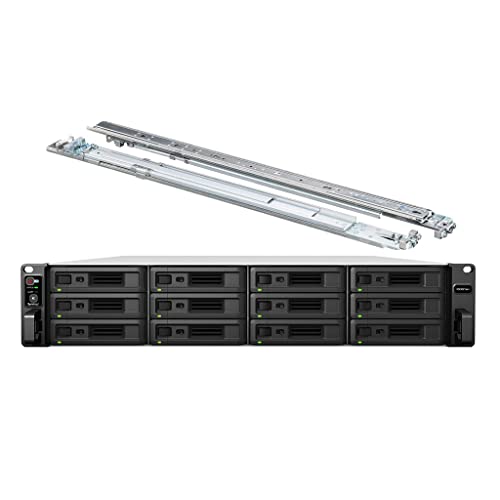
High-performance scalability makes the Synology RackStation RS3621xs+ an ideal choice for small and medium businesses that rely on intense, data-driven video workflows. Powered by an 8-core Xeon D-1541 CPU and 64GB of DDR4 ECC memory, it handles demanding multi-user workloads effortlessly. With a massive 144TB storage capacity and advanced Btrfs file system, your data remains secure and accessible. The NAS features 4 x 1GbE and 2 x 10GbE LAN ports for fast network connectivity, ensuring smooth data transfers. Installation is straightforward with the included rail kit, letting you focus on what really matters—your video projects.
Best For: The Synology RackStation RS3621xs+ is best for small and medium businesses that require high-performance, scalable storage solutions for data-driven video workflows.
Pros:
- High-performance: Equipped with an 8-core Xeon CPU and 64GB of ECC memory, it efficiently handles demanding multi-user workloads.
- Massive storage capacity: Offers up to 144TB storage with advanced data integrity features through the Btrfs file system.
- Fast network connectivity: Includes multiple LAN ports (4 x 1GbE and 2 x 10GbE) for rapid data transfers and improved network performance.
Cons:
- Initial setup required: Hard drives and memory upgrades must be installed separately, which may require additional time and effort.
- Rackmount design: Being a 12-bay rackmount NAS, it may not be suitable for environments with limited rack space.
- Higher cost: The enterprise-level features and performance may come at a premium compared to consumer-grade NAS solutions.
Synology RackStation RS2423RP+ NAS Server

For small to medium-sized businesses and branch offices looking for a robust storage solution, the Synology RackStation RS2423RP+ NAS Server stands out with its impressive Ryzen V1780B 4-Core CPU, capable of handling demanding video workflows. With 32GB of DDR4 ECC memory and up to 192TB of storage across 12 HDDs, it offers scalability for your growing needs. The 10GbE LAN ports facilitate fast data transfer, while the DSM operating system simplifies management. Plus, with surveillance capabilities for up to 50 IP cameras, you’ll enhance security effortlessly. Its redundant power supply guarantees reliability, keeping your data secure and accessible.
Best For: Small to medium-sized businesses and branch offices seeking a scalable and secure NAS solution for file management and surveillance.
Pros:
- High performance: Powered by a Ryzen V1780B CPU and 32GB DDR4 ECC memory, ensuring efficient handling of demanding tasks.
- Large storage capacity: Offers up to 192TB of storage with 12 HDDs, accommodating growing data needs.
- Surveillance capabilities: Supports up to 50 IP cameras with advanced video analytics, enhancing security measures.
Cons:
- Installation required: Hard drives and memory upgrades are sold separately and require installation.
- Initial cost: The upfront investment may be significant for smaller businesses.
- Complexity for beginners: The DSM operating system may have a learning curve for users unfamiliar with NAS management.
Synology DS925+ 4-Bay NAS Bundle with 16TB Seagate Ironwolf HDDs

Designed for video professionals and small to medium-sized businesses, the Synology DS925+ 4-Bay NAS Bundle offers impressive performance with its AMD Ryzen V1500B processor and dual 2.5 GbE LAN ports. With four hot-swappable drive bays and a total of 16TB from four 4TB Seagate Ironwolf HDDs, you’ll have ample storage for your projects. Expandable up to nine drives, this NAS supports both data storage and virtualization. The two M.2 NVMe slots allow for enhanced speed, while USB 3.2 Gen1 ports guarantee quick file transfers. It’s an excellent choice for optimizing your video editing workflow.
Best For: Video professionals and small to medium-sized businesses seeking efficient storage and virtualization solutions.
Pros:
- High performance with AMD Ryzen V1500B processor and dual 2.5 GbE LAN ports for fast data access.
- Ample storage capacity of 16TB with the option to expand up to nine drives for future needs.
- Versatile applications including data storage, virtualization, and video surveillance, making it suitable for various business environments.
Cons:
- Initial cost may be high for small businesses with limited budgets.
- Limited RAM of 4GB may require upgrading for more intensive applications or larger workloads.
- Dependence on compatible third-party HDDs may complicate storage expansion for users unfamiliar with NAS systems.
MINISFORUM N5 Air 5-Bay Desktop NAS (Diskless)
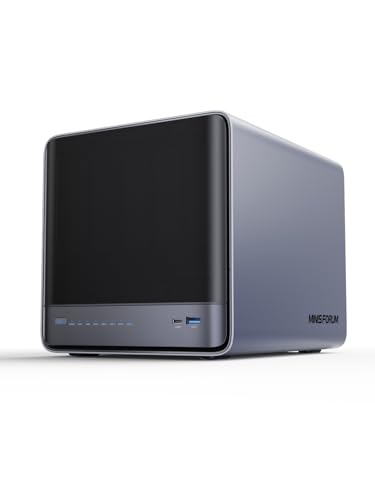
The MINISFORUM N5 Air 5-Bay Desktop NAS is a game-changer for video professionals who demand both power and flexibility. With an AMD Ryzen 7 255 CPU and Radeon 780M graphics, it guarantees smooth multi-user access and rapid file retrieval. You can expand your storage up to 174TB across five SATA HDDs and three M.2 NVMe SSDs, while various RAID modes enhance data security. Its dual 10GbE and 5GbE ports support high-speed transfers, and the innovative design makes upgrades a breeze. Running on MinisCloud OS, it’s compatible with multiple devices and supports 8K video output for your editing needs.
Best For: Video professionals and content creators who require high performance, extensive storage, and flexible upgrade options.
Pros:
- High processing power with an AMD Ryzen 7 CPU and Radeon graphics for efficient multi-user access and file retrieval.
- Expandable storage options with a maximum capacity of 174TB and various RAID modes for enhanced data security.
- Innovative design with easy RAM and SSD upgrades, along with high-speed network connectivity options.
Cons:
- Diskless configuration requires additional investment in HDDs and SSDs to reach maximum storage capacity.
- The compact design may limit airflow in certain environments, requiring careful placement for optimal cooling.
- Some users may find the setup and configuration process complex if unfamiliar with NAS systems.
Factors to Consider When Choosing NAS for Video Workflows
When choosing a NAS for your video workflows, you need to take into account several key factors. Think about your storage capacity requirements, transfer speed specifications, and network connectivity options. Also, verify the NAS has robust data protection features and is compatible with your editing software.
Storage Capacity Requirements
Choosing the right NAS for video workflows hinges on understanding your storage capacity requirements. Video files are large; a single 4K movie can easily exceed 100GB. Consequently, you’ll need a NAS that supports high-capacity drives. Opting for a NAS with around 120TB can potentially store 80.6K movies, making it ideal for extensive video libraries. Additionally, consider how many users and devices will access the NAS simultaneously, as this impacts storage needs and performance. Implementing RAID configurations can enhance data protection, safeguarding your projects against drive failures. Finally, confirm your NAS supports multiple drives and offers scalability options, allowing you to accommodate the growing size and complexity of your video projects over time.
Transfer Speed Specifications
To optimize your video workflows, understanding transfer speed specifications is essential, as they directly affect how quickly you can access and edit your files. Higher transfer speeds reduce wait times during editing and rendering, making your process more efficient. Look for NAS devices with network interfaces like 2.5GbE or 10GbE, which notably enhance data transfer rates. Additionally, consider models that support SSD caching or NVMe drives for rapid read/write speeds, vital for high-resolution video editing. RAID configurations can also boost both transfer speeds and data redundancy, allowing for simultaneous access in multi-user environments. Pay attention to sequential read/write speeds measured in MB/s; faster rates translate to smoother handling of large video files during production.
Network Connectivity Options
While evaluating NAS devices for video workflows, it’s essential to take into account the network connectivity options available. Look for NAS units with dual or multiple 2.5GbE or 10GbE ports to boost file transfer speeds and enhance collaboration among users. High-speed connections like 10GbE facilitate rapid data transfers, ensuring seamless streaming and editing of high-resolution videos. Make sure the NAS supports link aggregation, combining multiple connections for greater bandwidth and redundancy. Also, consider systems featuring USB 3.2 Gen 2 or higher ports for quick data transfers from external drives, perfect for offloading large projects. Finally, evaluate compatibility with various network protocols, such as SMB, NFS, or AFP, to optimize performance across different environments and devices.
Data Protection Features
When working with video workflows, ensuring the safety and integrity of your data is just as important as having fast network connectivity. Look for NAS devices that offer robust data protection features. Backup solutions are essential, allowing you to store media and documents in multiple locations to prevent data loss. Advanced snapshot capabilities help you recover files from specific points in time, protecting against malware without losing recent data. RAID configurations provide significant redundancy for data recovery if a hard drive fails, which is critical for preserving your video files. Opt for secure private cloud options to maintain control over your data and utilize encryption protocols like AES-256 to safeguard sensitive video files both at rest and in transit.
Compatibility With Software
Choosing the right NAS for video workflows hinges on ensuring compatibility with your editing software. Make sure the NAS supports the specific applications you plan to use, as some may require particular operating systems or network protocols for peak performance. Check for compatibility with common file formats and codecs since this can influence playback and editing efficiency. Look for NAS solutions that integrate seamlessly with popular media management software, making it easier to organize and access your video files. Additionally, assess the NAS’s ability to handle multiple connections and high data transfer speeds, which are essential for collaborative editing. Verify support for features like transcoding or direct streaming to enhance compatibility with various devices and software in video production.
RAID Configuration Support
Understanding RAID configuration support is vital for optimizing your NAS when working with video workflows. RAID (Redundant Array of Independent Disks) enhances data security and performance by distributing data across multiple drives. For video editing, consider common RAID levels like RAID 0 for speed, RAID 1 for mirroring, and RAID 5/6 for a balance of performance and protection. RAID 10 combines the benefits of RAID 0 and RAID 1, making it perfect for intensive tasks. The choice of RAID considerably impacts read/write speeds; RAID 5 often outperforms RAID 1 while keeping your data safe. Confirm your NAS supports your desired RAID levels and offers flexibility for future reconfiguration or expansion as your video projects grow.
Scalability for Growth
As video projects grow in complexity and size, scalability becomes an essential factor in selecting a NAS system. You’ll want a solution that supports multiple drive bays and offers expansion options, making it easy to add new drives as your storage needs increase. Look for NAS systems that can handle RAID configurations; they provide redundancy and performance improvements, enabling smooth scalability without significant downtime. High capacity limits are vital too—opt for systems supporting 120TB or more to future-proof against rising demands. Finally, evaluate the ability to connect additional NAS units or integrate cloud storage, enhancing flexibility and supporting larger video workflows as your projects evolve. Choose wisely to guarantee your NAS meets future challenges.
Cooling and Noise Levels
When working with video projects, effective cooling and manageable noise levels are essential factors in selecting a NAS device. High-performance components generate significant heat during intensive tasks like video rendering, so a robust cooling system is vital to prevent overheating. Look for NAS units that incorporate multiple fans and heat sinks to maintain ideal temperatures, promoting longevity and consistent performance. Adjustable fan speeds can also be a game-changer, letting you balance cooling efficiency and noise based on your workflow. Choosing a NAS with strong thermal management enhances performance stability during long editing sessions, reducing the risk of thermal throttling that could disrupt your productivity. Prioritizing these features will create a more pleasant and efficient editing environment.