
If you’re serious about video editing, you know performance is key. A NAS with 10GbE connectivity can transform your workflow, offering fast file transfers and ample storage. But with so many options out there, how do you choose the right one? We’ll explore the top contenders that promise to elevate your editing experience and meet your creative demands. You’ll want to stick around for the insights that could make all the difference.
QNAP TVS-h874X-i9 Desktop NAS

The QNAP TVS-h874X-i9 Desktop NAS is an excellent choice for video editors who need robust performance and speed. Powered by an Intel Core i9 processor with 24 threads and 64GB of DDR4 RAM, it can handle demanding tasks with ease. With eight bays for storage, you can customize your setup using diskless configurations. Enjoy lightning-fast data transfers through dual 10GbE ports and quad 2.5GbE ports. Plus, its dual M.2 PCIe Gen4 SSD slots offer cache acceleration, enhancing your workflow. The HDMI output supports 4K playback, ensuring your multimedia content looks stunning while you edit.
Best For: Video editors and professionals needing high-performance storage solutions for demanding tasks.
Pros:
- High-performance Intel Core i9 processor with 24 threads for efficient multitasking.
- Fast data transfer speeds with dual 10GbE and quad 2.5GbE ports for optimal connectivity.
- Dual M.2 PCIe Gen4 SSD slots for enhanced cache acceleration and storage flexibility.
Cons:
- Diskless configuration means additional costs for purchasing drives separately.
- Limited HDMI output at 4K @30Hz may not meet all high-resolution display needs.
- Higher initial investment compared to entry-level NAS solutions.
QNAP 5 Bay High-Performance NASbook (TBS-h574TX-i3-12G-US)

For video editors seeking a robust and efficient storage solution, the QNAP 5 Bay High-Performance NASbook (TBS-h574TX-i3-12G-US) stands out with its dual Thunderbolt 4 ports, enabling lightning-fast data transfers. Powered by an Intel Core i3-1320PE processor and 12GB of DDR4 RAM, it handles multitasking with ease. With five E1.S bays supporting NVMe SSDs, you can enjoy impressive storage performance. It also features 10GbE connectivity for rapid file sharing, while HDMI 1.4b supports 4K playback and transcoding. Multiple USB ports enhance collaboration, making it ideal for seamless integration between Mac and Windows users.
Best For: Video editors and creative professionals seeking a high-performance storage solution for seamless data transfer and multimedia playback.
Pros:
- Dual Thunderbolt 4 ports provide lightning-fast data transfer speeds, ideal for large video files.
- Impressive storage performance with five E1.S bays supporting NVMe SSDs, ensuring quick access to data.
- 4K media playback and real-time transcoding capabilities enhance multimedia editing and viewing experiences.
Cons:
- Non-expandable RAM may limit performance for heavy multitasking beyond the onboard 12GB.
- Limited to E1.S and M.2 SSDs, which may restrict user options for storage expansion.
- Higher price point compared to traditional NAS solutions, making it less accessible for casual users.
UGREEN NAS DXP8800 Plus 8-Bay Desktop NAS

Looking for a powerful NAS that can handle your video editing needs? The UGREEN NAS DXP8800 Plus is an 8-bay desktop powerhouse featuring an Intel i5 1235u 10-core CPU and 8GB DDR5 RAM. With a built-in 128GB SSD for the system and dual 10GbE ports, it delivers impressive download speeds of up to 2500MB/s. You can store up to 256TB using multiple RAID configurations, ensuring flexibility and security. Plus, its all-in-one NAS App simplifies management, while advanced data protection features keep your projects safe. Just remember to purchase your storage drives separately for a complete setup!
Best For: Professionals and businesses looking for a high-performance NAS solution capable of handling demanding video editing tasks and large storage capacities.
Pros:
- Fast download speeds of up to 2500MB/s due to dual 10GbE ports.
- Supports multiple RAID configurations for flexibility and data protection.
- All-in-one NAS App simplifies management and enhances user experience.
Cons:
- Storage drives are not included and must be purchased separately.
- Diskless design may require additional setup time for users unfamiliar with NAS configurations.
- Higher initial investment compared to basic NAS solutions.
UGREEN NASync DXP4800 Plus 4-Bay Desktop NAS

UGREEN NASync DXP4800 Plus 4-Bay Desktop NAS stands out with its powerful Intel Pentium Gold 8505 5-Core CPU and impressive 136TB storage capacity, making it an excellent choice for video editors and small teams needing fast, reliable access to large files. With 8GB DDR5 RAM and multiple connectivity options, including 10GbE, you’ll experience lightning-fast transfers—backing up 1GB in under a second. The diskless design allows for flexible storage solutions, while AI-powered features help organize your media. Plus, with centralized storage, advanced encryption, and a user-friendly app, managing your projects has never been easier.
Best For: The UGREEN NASync DXP4800 Plus 4-Bay Desktop NAS is best for small offices, video editors, and collaboration teams that require high-capacity, fast, and secure data storage solutions.
Pros:
- Super-fast data transfers with 10GbE ports, enabling quick backups of large files.
- High storage capacity of up to 136TB, accommodating extensive media libraries.
- User-friendly app for easy setup and file sharing across multiple platforms.
Cons:
- Diskless design may require additional investment in hard drives.
- Limited built-in RAM at 8GB might not suffice for highly demanding applications.
- Potentially complex setup for users unfamiliar with NAS systems.
UGREEN NAS DXP6800 Pro 6-Bay Desktop NAS

If you’re a video editor in need of robust storage solutions, the UGREEN NAS DXP6800 Pro 6-Bay Desktop NAS stands out with its impressive maximum storage capacity of up to 196TB. Powered by an Intel i5 1235u 10-Core CPU and 8GB DDR5 RAM, it delivers exceptional performance. With dual 10GbE network ports, you can achieve download speeds of up to 2500MB/s. This NAS supports various RAID configurations for optimal data protection and management. Plus, its all-inclusive app makes accessing your files a breeze. With professional encryption and multi-factor authentication, your data stays secure, making it ideal for demanding projects.
Best For: Video editors and businesses that require high-performance storage solutions with expansive capacity and fast data transfer speeds.
Pros:
- Exceptional maximum storage capacity of up to 196TB, accommodating large amounts of data.
- Dual 10GbE network ports enabling download speeds of up to 2500MB/s for efficient workflow.
- Comprehensive data security features, including professional encryption and multi-factor authentication.
Cons:
- Storage hard drives are not included and must be purchased separately, adding to initial costs.
- May be overkill for casual users or those with lower storage needs.
- Requires technical knowledge for optimal RAID configuration and management.
MINISFORUM N5 Air 5-Bay Desktop NAS (Barebone)
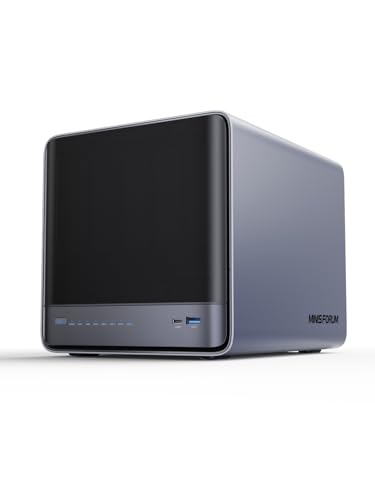
The MINISFORUM N5 Air 5-Bay Desktop NAS is an ideal choice for video editors who demand high performance and extensive storage capabilities. With an AMD Ryzen 7 255 CPU and Radeon 780M graphics, it handles multi-user access and high-speed video decoding effortlessly. You can expand storage up to 174TB with five SATA and three M.2 NVMe slots, while RAID options guarantee data security. Its 10GbE and 5GbE ports support link aggregation for lightning-fast transfers. Plus, the innovative design allows easy upgrades, and the MinisCloud OS offers compatibility across platforms with robust features like ZFS snapshots and Docker apps.
Best For: Video editors and content creators who require high performance and extensive storage capabilities for managing large files.
Pros:
- High processing power with an AMD Ryzen 7 255 CPU and Radeon 780M graphics for seamless multi-user access and video decoding.
- Expandable storage options with a maximum capacity of 174TB and flexible RAID configurations for data security.
- Fast network connectivity through 10GbE and 5GbE ports that support link aggregation for quick file transfers.
Cons:
- Barebone design requires users to purchase additional components such as RAM and storage drives separately.
- Potentially high cost for full setup, considering the need for multiple hard drives and upgrades.
- Limited built-in software features may require users to invest time in configuring third-party applications for specific needs.
UGREEN NAS DXP480T Plus 4-Bay All-Flash SSD Network Attached Storage

For video editors seeking lightning-fast performance, the UGREEN NAS DXP480T Plus stands out with its impressive peak speeds of 1250MB/s through a 10GbE network port. Powered by an Intel i5 1235u 10-core CPU and 8GB DDR5 RAM, this 4-bay all-flash SSD NAS guarantees quick file access and superior processing capabilities. With four M.2 NVMe slots, you can expand storage up to 32TB, accommodating various RAID configurations. The user-friendly app simplifies your management tasks, while UGREEN NASync enhances data security, safeguarding your projects with encryption and multi-factor authentication. This NAS is perfect for all your video editing needs.
Best For: Video editors and professionals looking for high-speed storage solutions with robust data security features.
Pros:
- High-performance: Achieves peak speeds of 1250MB/s for rapid file access and processing.
- Expandable storage: Offers four M.2 NVMe slots, supporting up to 32TB of storage with various RAID configurations.
- User-friendly management: Features an all-inclusive app for easy control of storage, files, and photos.
Cons:
- Higher cost: As a premium product, it may not be budget-friendly for all users.
- Limited to SSDs: Only supports SSDs, which may not be suitable for users needing traditional HDD options.
- Requires technical knowledge: Setting up RAID configurations and managing storage may be complex for inexperienced users.
TERRAMASTER F8 SSD Plus NAS – 8Bay Network Attached Storage

Looking for a powerful and compact NAS solution for video editing? The TERRAMASTER F8 SSD Plus NAS offers an impressive Core i3-N305 processor and 16GB of DDR5 RAM, allowing for seamless multitasking. With its 10Gbps Ethernet port, you’ll experience lightning-fast transfer speeds up to 1024MB/s. Its ultra-compact design supports eight M.2 NVMe SSDs, delivering a total capacity of 64TB, while the tool-free setup makes installation a breeze. Plus, enjoy whisper-quiet operation and advanced cooling systems to keep your performance stable. Ideal for small businesses and multimedia storage, this NAS is a game-changer for your video editing needs.
Best For: Small businesses and home users looking for a powerful and compact NAS solution for video editing and multimedia storage.
Pros:
- High performance with an 8-core processor and 16GB of DDR5 RAM for seamless multitasking.
- Lightning-fast transfer speeds up to 1024MB/s with the 10Gbps Ethernet port.
- Tool-free installation allows for quick setup and easy memory expansion.
Cons:
- Limited to NVMe SSDs, which may not be suitable for users looking for other storage options.
- Maximum capacity of 64TB may not meet the needs of larger enterprises.
- Single processor model may not be sufficient for extremely demanding applications or heavier workloads.
TERRAMASTER F6-424 Max NAS Storage (Diskless)

With its powerful Core i5 1235U processor and impressive 10-core, 12-thread architecture, the TERRAMASTER F6-424 Max NAS Storage is a game changer for small and medium businesses focused on video editing and production. You’ll benefit from blazing fast application load times—160% quicker—and file retrieval that’s 90% faster. With dual 10GbE Ethernet ports, you can achieve up to 20Gbps bandwidth. The 6-bay design and M.2 NVMe slots guarantee ample storage and hyper caching capabilities. Plus, its 4K video decoding support and compatibility with platforms like Plex assure smooth playback across devices, making your workflow seamless.
Best For: Small and medium businesses focused on video editing, virtualization, and database tasks.
Pros:
- High performance: Equipped with a powerful Core i5 processor and 10 cores for efficient multitasking.
- Fast data access: Application load times are 160% faster and file retrieval is 90% quicker.
- Versatile multimedia support: Compatible with 4K video playback and popular media platforms like Plex.
Cons:
- Diskless design: Requires users to purchase hard drives separately, which may increase initial setup costs.
- Potential overkill for smaller applications: Some features may be unnecessary for very small businesses or simple file storage needs.
- Requires technical knowledge: Setting up and managing a NAS may be complex for users unfamiliar with network storage systems.
Asustor Lockerstor 10 Gen3 NAS (AS6810T)

The Asustor Lockerstor 10 Gen3 NAS (AS6810T) stands out as an exceptional choice for video editors who demand high performance and extensive storage capabilities. With its quad-core AMD Ryzen Embedded V3C14 CPU, you’ll experience incredible processing power, reaching speeds of up to 3.8 GHz. The 10-bay diskless configuration allows for flexible storage options, while the four M.2 NVMe slots and PCIe 4.0 support guarantee rapid data transfer. Plus, dual 10GbE ports offer blazing connectivity, making it easy to handle large video files. With features like Wake on LAN, this NAS is built for efficiency and convenience in your editing workflow.
Best For: The Asustor Lockerstor 10 Gen3 NAS (AS6810T) is best for professional video editors and creative teams seeking high-performance storage solutions with extensive connectivity options.
Pros:
- Incredible processing power with a quad-core AMD Ryzen CPU, providing speeds up to 3.8 GHz.
- Flexible storage options with a 10-bay diskless configuration and multiple M.2 NVMe slots.
- Blazing fast connectivity through dual 10GbE ports, ideal for transferring large video files quickly.
Cons:
- Diskless configuration may require additional investment in hard drives or SSDs to fully utilize the NAS.
- Potentially high upfront cost compared to lower-capacity or lower-performance NAS options.
- Complex setup may be challenging for users unfamiliar with NAS systems.
Factors to Consider When Choosing a NAS with 10GBE for Video Editing
When you’re choosing a NAS with 10GBE for video editing, several key factors come into play. You’ll want to take into account performance specifications, storage capacity options, and connectivity features to guarantee smooth workflows. Don’t overlook cooling mechanisms and data security measures, as they can greatly impact your editing experience and data integrity.
Performance Specifications
Selecting a NAS with 10GbE for video editing hinges on understanding its performance specifications. A 10GbE connection dramatically boosts data transfer speeds, letting you edit high-resolution video files in real time without lag. Look for processors with high core and thread counts, like Intel’s i9 or AMD’s Ryzen series, to guarantee smooth multitasking during your editing tasks. Aim for at least 16GB of RAM to manage large video files and multiple applications without slowing down. Additionally, multiple M.2 NVMe slots are essential for faster caching and improved read/write speeds, providing quick access to your projects. Finally, consider NAS models with efficient cooling systems for peak performance and quiet operation, creating a distraction-free editing environment.
Storage Capacity Options
Choosing the right storage capacity for your NAS is vital in supporting your video editing needs. You’ll find options ranging from 32TB in smaller models to over 256TB in larger, multi-bay systems, which can accommodate extensive media libraries. Consider the number of drive bays, usually between 4 and 10, as this dictates your maximum storage capacity. RAID configurations, like RAID0, RAID1, and RAID5, can enhance both data security and performance. Additionally, look for M.2 NVMe slots that allow for added SSDs, greatly boosting read/write speeds. Opt for NAS that supports high-capacity HDDs or SSDs to guarantee peak performance, as larger drives often provide better data transfer rates and access times, vital for efficient video editing workflows.
Connectivity Features
To guarantee a smooth video editing experience, consider the connectivity features of a NAS, especially its 10GbE capabilities. A NAS with 10GbE offers faster data transfer rates, ensuring seamless access to large video files. Look for dual 10GbE ports, which enable link aggregation to boost performance and provide redundancy in case of network issues. Additionally, support for various Ethernet standards, like 10GBASE-T and 2.5GBASE-T, adds flexibility for integration with your existing network setup. USB 3.2 Gen 2 ports, with speeds up to 10Gb/s, enhance your options for fast external storage access and backups. High-speed connections also facilitate real-time collaboration, allowing multiple users to edit video content simultaneously without experiencing lag or bottlenecks.
Cooling Mechanisms
When working with demanding video editing tasks, effective cooling mechanisms become a key consideration for your NAS. High-performance components generate significant heat, which can lead to throttling or hardware failure. Look for NAS systems that employ advanced cooling solutions, combining convection designs, heat sinks, and silent fans to keep noise levels below 25dB. Dual fan configurations or axial fans can enhance airflow, ensuring efficient heat dissipation during long editing sessions. Additionally, consider models with tool-free designs for easy access to internal components, allowing you to upgrade cooling solutions if needed. Don’t forget regular maintenance, like cleaning dust filters and ensuring unobstructed airflow, to keep your NAS running cool and efficiently over time.
Data Security Measures
As you immerse yourself in video editing, prioritizing data security measures becomes essential, especially with a NAS equipped with 10GBE. Implementing encryption protocols protects your sensitive projects from unauthorized access. Multi-factor authentication further secures your NAS by requiring multiple verification forms before allowing access, greatly reducing breach risks.
Regular firmware updates are vital for addressing security vulnerabilities and enhancing your NAS’s defenses against cyber threats. Additionally, consider RAID configurations for data redundancy; if one drive fails, your editing data remains intact and accessible. Finally, utilizing local storage solutions minimizes data leakage risks and gives you better control over sensitive files compared to relying solely on cloud storage options. Prioritize these measures to safeguard your creative endeavors.
Multimedia Support Capabilities
With robust data security measures in place, you can shift your focus to multimedia support capabilities when selecting a NAS with 10GBE for video editing. Look for systems that support 4K media playback and real-time transcoding to guarantee smooth editing and streaming of high-resolution videos. HDMI output capabilities will allow you to connect the NAS directly to displays, making it easier to view media files during your editing sessions. A powerful processor, like an Intel Core i5 or i9, paired with at least 8GB of RAM, enhances performance for demanding multimedia tasks. Additionally, multiple high-speed connectivity options, including dual 10GbE ports, streamline data transfers, while support for various RAID configurations guarantees data redundancy and improved performance for your projects.