
When it comes to enhancing your church’s live streaming experience, selecting the right PTZ controller can make all the difference. These controllers not only simplify camera operation but also elevate the overall production quality. From user-friendly interfaces to advanced features like AI tracking, the options are numerous. So, which models should you consider to guarantee your congregation stays engaged during services? Let’s explore the top contenders that could transform your streaming setup.
FoMaKo KC608 Pro NDI PTZ Camera Controller
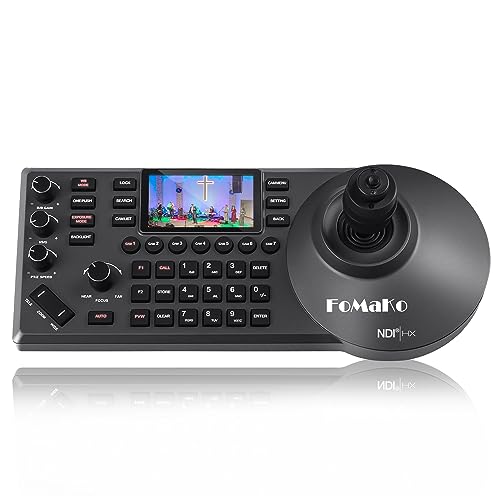
The FoMaKo KC608 Pro NDI PTZ Camera Controller is an excellent choice for churches looking to enhance their live streaming capabilities. With its ergonomic design and built-in LCD preview, you’ll find it comfortable to operate during services. The 4D precision joystick gives you precise control over up to 255 cameras, while the NDI license guarantees seamless integration with your existing setup. Plus, its compatibility with major streaming software like vMix and OBS makes it versatile for various applications. You’ll appreciate the 3-year warranty and 24/7 expert support, providing peace of mind as you elevate your church’s broadcasting experience.
Best For: The FoMaKo KC608 Pro NDI PTZ Camera Controller is best for churches and organizations seeking to improve their live streaming and broadcasting capabilities with a user-friendly and versatile control system.
Pros:
- Ergonomic design with a comfortable wrist rest for extended use.
- High compatibility with various protocols and streaming software, ensuring versatility.
- Includes a 3-year warranty and 24/7 expert support for added peace of mind.
Cons:
- Slightly heavier at 3.85 pounds, which may affect portability.
- The price point may be higher for smaller churches with limited budgets.
- Requires a LAN cable for setup, which may complicate installation for some users.
AVKANS PowerJoy PTZ Camera Joystick Controller for Live Streaming

For churches looking to enhance their live streaming capabilities, the AVKANS PowerJoy PTZ Camera Joystick Controller stands out with its user-friendly design and powerful features. It supports multiple protocols, making it compatible with up to 100 network cameras, including AVKANS and other brands. The 5-inch LCD screen provides a live preview in stunning 1080p resolution. With Power over Ethernet, setup is a breeze using just one cable. You can easily control pan, tilt, zoom, and more, while shortcuts and advanced features like auto tracking elevate your streaming experience. Plus, the included NDI license opens up additional possibilities for camera control.
Best For: Churches and organizations looking to enhance their live streaming capabilities with a versatile and user-friendly PTZ camera controller.
Pros:
- Supports multiple protocols for compatibility with up to 100 network cameras.
- Easy setup with Power over Ethernet, requiring only one cable for power and connectivity.
- Advanced features such as auto tracking and camera shortcuts improve live streaming efficiency.
Cons:
- Limited control over certain camera functions when using NDI protocol, such as Iris and AutoTracking.
- The 5-inch LCD screen may be small for some users who prefer larger displays.
- May require additional configuration for optimal performance with non-AVKANS cameras.
Tenveo NDI PTZ Camera Joystick Controller

Designed with churches in mind, the Tenveo NDI PTZ Camera Joystick Controller features a 7-inch LCD Quad-Screen that allows you to monitor up to four camera feeds in real-time. With its 4D Joystick, you can make smooth variable-speed adjustments for pan, tilt, and zoom. It supports up to 255 PTZ cameras, providing flexibility for your setup. Plus, you can record and replay camera movements for automated shots. Compatible with various protocols and streaming platforms, this controller simplifies integration and enhances your live broadcasts. Enjoy excellent customer support, including a 3-year warranty and lifetime assistance, making it a reliable choice for your church.
Best For: Churches, live event organizers, and educational institutions looking for an efficient solution to manage multiple PTZ cameras during broadcasts.
Pros:
- Quad-Screen Monitoring: View and manage up to 4 camera feeds simultaneously for enhanced situational awareness.
- Broad Compatibility: Supports various protocols and platforms, making it easy to integrate with existing equipment.
- User-Friendly Features: The 4D joystick allows for precise and smooth camera control, while recording capabilities facilitate automated shots.
Cons:
- Limited to 720P on Quad-Screen: While the main view supports 1080P, the quad-screen only offers 720P resolution.
- Requires Firmware Upgrade for AI Tracking: Some advanced features, like AI auto tracking, necessitate additional updates.
- Potential Complexity for Beginners: Users new to PTZ cameras may find the setup and configuration process challenging.
Tenveo NDI PTZ Camera Controller for Live Streaming
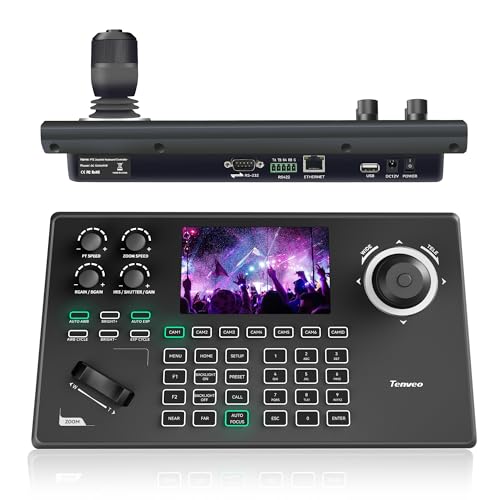
Churches seeking seamless live streaming solutions will find the Tenveo NDI PTZ Camera Controller (KB200MAX) a game-changer. With its 5-inch LCD preview screen and 4D joystick, you can easily control multiple PTZ cameras with precision. The built-in NDI license allows for effortless camera control and preset calling, making it perfect for services and events. You can connect up to 255 cameras, switch quickly, and record PTZ movements for smooth playback. Plus, with PoE support and easy IP configuration, installation is a breeze. Enjoy peace of mind with Tenveo’s three-year warranty and lifetime technical assistance.
Best For: Churches and organizations seeking a reliable and user-friendly solution for multi-camera live streaming.
Pros:
- Built-in NDI license for seamless camera control and preset calling.
- Supports up to 255 cameras with quick switching capabilities.
- Easy installation with PoE support and IP configuration.
Cons:
- May require additional training for users unfamiliar with PTZ camera systems.
- Limited to compatibility with specific camera brands and protocols.
- Initial setup might be complex for large multi-camera configurations.
Canon RC-IP100 Remote PTZ Camera Controller

The Canon RC-IP100 Remote PTZ Camera Controller is an ideal choice for churches seeking seamless video production with its ability to manage up to 100 Canon cameras effortlessly. You’ll love the 7” touch screen that simplifies navigation, while the zoom lever and customizable buttons give you precise control. With remote operation features, you can smoothly pan, tilt, and zoom, ensuring you capture every moment effectively. The intuitive interface allows for easy configuration of up to 100 presets, making it perfect for dynamic church environments. Plus, you’ll receive everything you need right in the package, including an AC adapter and cable.
Best For: Churches and organizations looking for an efficient solution to manage multiple Canon PTZ cameras for video production.
Pros:
- User-friendly 7” touch screen for easy navigation and control.
- Supports up to 100 cameras, allowing for extensive multi-camera setups.
- Customizable buttons and intuitive interface enhance operational efficiency in dynamic environments.
Cons:
- Limited to Canon cameras, restricting versatility for users with mixed brands.
- May require a learning curve for users unfamiliar with remote camera systems.
- The price point could be a concern for smaller organizations or budgets.
FoMaKo PTZ Camera Controller (KC606)

For churches looking to elevate their live streaming capabilities, the FoMaKo PTZ Camera Controller (KC606) stands out with its intuitive 4D joystick and 3-inch LCD screen. This controller simplifies your setup with a single LAN cable and offers effortless control over PTZ cameras, including pan, tilt, zoom, focus, and customizable presets. You can manage multiple cameras seamlessly, making it perfect for dynamic services. With a 3-year warranty and 24/7 customer support, you’re assured of reliable assistance. Plus, its NDI upgradeability enhances functionality, making it a versatile choice for live streaming in various settings.
Best For: Churches, educational institutions, and event organizers looking to enhance their live streaming and video production capabilities with a user-friendly PTZ camera controller.
Pros:
- Easy setup and operation with a single LAN cable connection.
- Customizable buttons for quick access to frequently used functions.
- Robust customer support with a 3-year warranty and lifetime technical assistance.
Cons:
- Limited to specific camera protocols which may restrict compatibility with some devices.
- NDI upgrade may require additional investment for full functionality.
- The compact 3-inch screen may be too small for detailed monitoring in larger setups.
Canon RC-IP1000 PTZ Controller with 7-inch Touch Screen

Offering a 7-inch touch screen, the Canon RC-IP1000 PTZ Controller is perfect for churches that seek high-quality video production with ease of use. You’ll enjoy smooth pan-tilt-zoom movements and precise control over multiple cameras simultaneously. The intuitive touch panel displays operation screens and camera images clearly, making navigation a breeze. With customizable controls, including 10 user buttons and 5 function dials, you can quickly access your favorite settings. Plus, the adjustable reaction rate on the control lever and zoom rocker enhances your operability, ensuring that you can focus on delivering an engaging live stream experience.
Best For: Churches and organizations seeking high-quality video production with easy-to-use remote camera control.
Pros:
- Intuitive 7-inch touch screen for clear navigation and operation.
- Customizable controls with 10 user buttons and 5 function dials for quick access to settings.
- Smooth pan-tilt-zoom movements for precise camera control across multiple devices.
Cons:
- Premium price point may be a barrier for smaller organizations or budgets.
- Requires a learning curve for users unfamiliar with PTZ camera systems.
- Limited compatibility with certain older camera models, potentially restricting use.
Tenveo NDI PTZ Camera with Joystick Controller Bundle
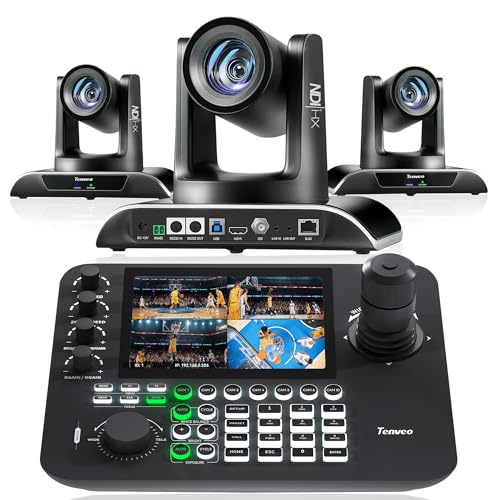
Designed specifically for dynamic environments like churches, the Tenveo NDI PTZ Camera with Joystick Controller Bundle stands out with its AI Auto Tracking capabilities. This bundle features a powerful 30X optical zoom camera and a joystick controller with a 7” LCD quad-screen, allowing you to manage multiple feeds effortlessly. You’ll enjoy ultra-low latency, high-quality 1080P video streaming, perfect for capturing every moment during services or events. With seamless compatibility with popular live streaming software, you’ll elevate your broadcasts. Plus, the three-year warranty and lifetime technical support provide peace of mind as you enhance your church’s streaming experience.
Best For: Churches, event organizers, and educators looking for a high-quality, user-friendly camera solution for live streaming and video production.
Pros:
- High-quality 1080P video streaming with ultra-low latency, ensuring clear broadcasts.
- AI Auto Tracking capabilities for effortless subject tracking during dynamic events.
- Versatile connectivity options with compatibility for various protocols and live streaming software.
Cons:
- The initial setup may require technical knowledge for optimal configuration.
- The price point may be higher than basic camera systems, which could be a consideration for smaller budgets.
- Limited built-in audio capabilities, requiring additional audio equipment for complete setups.
Tenveo NDI PTZ Camera Joystick Controller

The Tenveo NDI PTZ Camera Joystick Controller stands out with its intuitive 4D joystick, making it an excellent choice for churches that need to manage live streaming and events seamlessly. With a 5-inch LCD screen, you can preview your shots in real-time. Control up to 255 PTZ cameras, and quickly select from seven for efficient operation. It supports various protocols, including NDI and Visca, ensuring compatibility with multiple devices. Plus, the three-year warranty and lifetime technical support guarantee your investment is secure. Experience enhanced control, precision, and simplicity for all your church’s live streaming needs.
Best For: The Tenveo NDI PTZ Camera Joystick Controller is best for churches and organizations looking to enhance their live streaming and event management capabilities.
Pros:
- Intuitive 4D joystick for smooth and precise camera control.
- Supports multiple protocols, ensuring compatibility with a wide range of cameras and equipment.
- Comes with a 3-year warranty and lifetime technical support for peace of mind.
Cons:
- May have a learning curve for users unfamiliar with joystick controllers.
- Limited to controlling up to 255 cameras, which may be insufficient for very large setups.
- Reliance on Ethernet and PoE may require additional infrastructure for optimal use.
FoMaKo PTZ Camera HDMI with 20x Optical Zoom
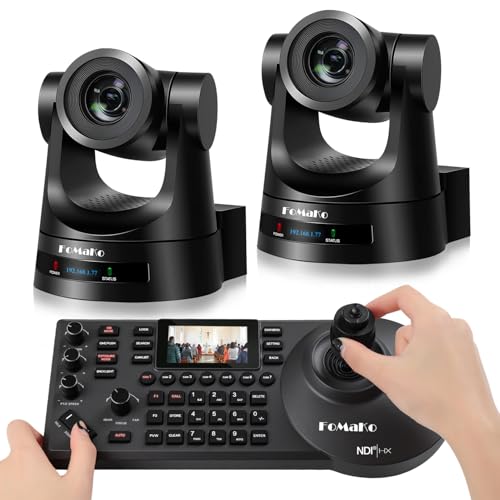
For churches seeking high-quality video production, the FoMaKo PTZ Camera HDMI with 20x Optical Zoom stands out with its advanced AI Auto-Tracking Gen 3 feature. This camera excels in various settings, including worship services and events, delivering stunning HD 1080p video quality. With multiple control protocols and easy connectivity to platforms like YouTube and Facebook, it’s designed for seamless integration. The customizable tracking options, combined with its durable gear transmission structure, guarantee precise movement and longevity. Plus, it supports multiple mounting options, making it versatile for any setup. Enhance your live streaming experience with this exceptional camera!
Best For: Churches and organizations looking for high-quality, versatile video production solutions for worship services and events.
Pros:
- Advanced AI Auto-Tracking Gen 3 for customizable tracking and precise movement.
- HD 1080p video quality with smooth H.264/H.265 encoding for low bandwidth usage.
- Supports multiple mounting options and control methods for flexible installation.
Cons:
- The NDI upgrade requires a separate request, which may add to initial setup time.
- May require additional accessories for optimal use with specific platforms.
- The advanced features may have a learning curve for first-time users.
Factors to Consider When Choosing a PTZ Controller for Church
When choosing a PTZ controller for your church, consider several key factors to guarantee it meets your needs. You’ll want to check compatibility with your camera brands, look for a user-friendly interface, and assess connectivity options. Don’t forget to evaluate the control protocol support and precision to get the best performance from your setup.
Compatibility With Camera Brands
Choosing a PTZ controller that works seamlessly with your camera brands is essential for ensuring smooth operations during church events. First, make sure the controller supports multiple protocols like VISCA, Pelco-D, and NDI, which helps maintain compatibility with various cameras. It’s also wise to select a controller capable of managing up to 255 PTZ cameras simultaneously, allowing for future expansion. Check for PoE (Power over Ethernet) support, as it simplifies installation by combining power and data through one Ethernet cable. Finally, review the manufacturer’s specifications for brand compatibility, and look for customizable shortcuts that provide quick access to frequently used functions, enhancing your operational efficiency during live streaming.
User-Friendly Interface Design
Selecting a PTZ controller is only part of the equation; the user-friendly interface design plays a significant role in how effectively you can manage your camera systems during church events. Look for an intuitive layout that allows you to access multiple PTZ camera functions with minimal training. Controllers with LCD screens offer real-time previews and feedback, enhancing your efficiency. Ergonomic features, like wrist rests and well-placed buttons, boost comfort during long services. Customizable shortcuts for frequently used functions streamline your workflow, letting you switch between camera feeds quickly. A well-designed interface should cater to both novice and experienced users, ensuring you can perform critical camera operations easily, even under pressure.
Control Protocol Support
Understanding control protocol support is essential for optimizing your church’s PTZ camera system. Make certain the controller you choose is compatible with common protocols like VISCA, Pelco-D, and Pelco-P, as these are widely supported by many camera brands. Supporting NDI (Network Device Interface) is critical for seamless integration with modern IP-based cameras, enhancing your live streaming capabilities. Look for controllers that can manage multiple camera protocols simultaneously, providing flexibility for your multi-camera setup. Additionally, confirm that the controller can handle both RS232 and RS485 connections, which are important for reliable communication with PTZ cameras. These features guarantee you have a robust and adaptable system for your church’s needs.
Connectivity Options Available
When optimizing your PTZ camera setup, the connectivity options available play a significant role in ensuring seamless integration with your existing systems. Most PTZ controllers offer various connectivity options, like RS232, RS422, RS485, and Ethernet (IP), allowing you to connect with different camera systems flexibly. If you’re looking to simplify installation, consider controllers that utilize Power over Ethernet (PoE), which only require a single Ethernet cable for both power and data. Make sure the controller supports industry-standard control protocols such as VISCA, Pelco-D, or NDI for compatibility with various brands. Additionally, advanced features like web interfaces for managing cameras and firmware upgrades can enhance your control, but it’s essential to check compatibility with your current network and streaming software.
PTZ Control Precision
To create an enchanting live experience during church services, precision control of your PTZ cameras is essential. High-quality controllers often come with 4D joysticks, allowing you to pan, tilt, and zoom at variable speeds for smooth, nuanced movements. This precision greatly enhances the viewing experience, making every moment fascinating. Look for controllers that enable you to set and recall multiple presets—some models allow up to 255—so you can effortlessly switch between angles for dynamic events. Additionally, consider controllers with AI tracking features that automatically follow subjects, enhancing accuracy without manual adjustments. Finally, verify compatibility with various control protocols like VISCA and NDI to seamlessly operate multiple cameras, boosting overall control precision during services.
Video Quality and Resolution
Choosing the right PTZ controller for your church hinges on video quality and resolution, as these factors directly impact how effectively your congregation engages with the service. Aim for a resolution of at least 1080p for clear, sharp images, but consider 4K for even greater detail. Higher resolutions capture more nuances during services, enhancing viewer engagement. Look for controllers that support H.264 or H.265 formats, which optimize streaming quality while conserving bandwidth—crucial for live broadcasts. Frame rates between 30fps and 60fps guarantee smooth playback, especially during dynamic movements. Additionally, features like auto-focus and low-light performance can considerably improve video quality, ensuring your broadcasts remain impactful in various lighting conditions typically found in churches.
Warranty and Support Options
Selecting a PTZ controller for your church involves considering warranty and support options, as these can greatly impact your long-term satisfaction and operational efficiency. Look for controllers that offer a minimum of a 3-year limited warranty, guaranteeing reliability. Many options also provide a 30-day money-back guarantee, giving you a chance to test functionality before fully committing. Free online training and 24/7 expert assistance can be invaluable for troubleshooting and maximizing your setup. Additionally, lifetime technical support assures you’ll have guidance for any operational issues that arise. If you’re not technically savvy, remote setup assistance can make installation smoother, allowing you to focus on enhancing your church’s live streaming experience without unnecessary stress.