
As you navigate the evolving landscape of video production, selecting the right multi-camera PTZ controller can greatly impact your workflow. In 2026, several innovative options stand out, each offering unique features tailored to different production needs. From intuitive touch screens to versatile compatibility, these controllers enhance your ability to manage live events seamlessly. Curious about which ones could elevate your setup? Let’s explore the top contenders that promise to transform your video production experience.
AVKANS Pro PTZ Camera Joystick Controller with 5-inch Touch Screen

If you’re looking for a versatile and user-friendly solution for your video production needs, the AVKANS Pro PTZ Camera Joystick Controller with its 5-inch Touch Screen is a game changer. This controller simplifies installation with Power over Ethernet, needing just one cable. It’s compatible with various PTZ cameras, including AVKANS models and NDI cameras. You’ll appreciate the control features, allowing you to adjust movements, focus, and speed settings easily. The intuitive touch screen streamlines setup and lets you manage up to 100 camera shortcuts. Plus, enjoy a free NDI license with your order to explore advanced functions.
Best For: The AVKANS Pro PTZ Camera Joystick Controller is best for churches, video production teams, and live streaming professionals seeking an efficient and versatile camera control solution.
Pros:
- Easy installation with Power over Ethernet (PoE) requiring only one Ethernet cable.
- Compatible with a wide range of PTZ cameras, allowing flexibility in camera selection.
- User-friendly interface with a 5-inch touch screen for simplified setup and management of camera settings.
Cons:
- NDI functions require a license, which may not be ideal for all users.
- Possible bugs when previewing NDI feeds due to varying RTSP URL formats across brands.
- Limited support for non-PTZ camera brands, which may restrict options for some users.
FoMaKo KC608 Pro NDI PTZ Camera Controller
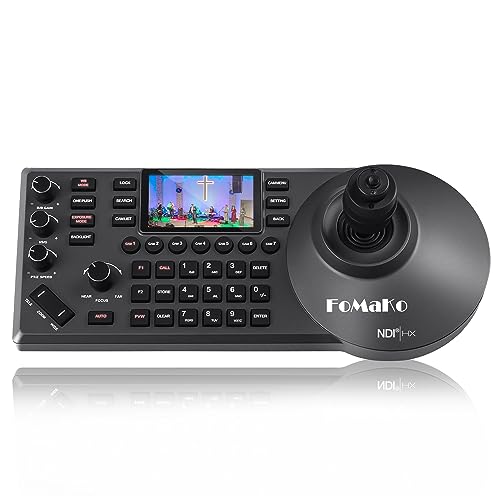
The FoMaKo KC608 Pro NDI PTZ Camera Controller stands out for professionals in the AV live streaming and broadcasting industry, thanks to its powerful features like PoE powering and support for multiple control protocols. With its ergonomic design and built-in LCD preview, you’ll experience comfortable control using the 4D precision joystick. It manages up to 255 PTZ cameras and includes an NDI license for seamless integration. The controller’s compatibility with popular software, like vMix and OBS, makes it versatile across various environments. Plus, you’ll benefit from a 3-year warranty and 24/7 expert support, ensuring peace of mind.
Best For: Professionals in the AV live streaming, production, and broadcasting industry who require reliable and versatile camera control.
Pros:
- Ergonomic design ensures comfortable use during long sessions.
- Supports multiple control protocols, enhancing compatibility with various cameras.
- Includes a 3-year warranty and 24/7 expert support for user assistance.
Cons:
- The weight may be cumbersome for some users, making portability a challenge.
- Limited user reviews may not provide a comprehensive insight into long-term performance.
- Higher price point compared to basic camera controllers may be a consideration for budget-conscious users.
Tenveo NDI PTZ Camera Joystick Controller

Designed specifically for professionals in video production, the Tenveo NDI PTZ Camera Joystick Controller stands out with its intuitive 4D joystick, enabling smooth control over panning, tilting, and zooming. With a 5-inch LCD screen for real-time previews, you can manage up to 255 PTZ cameras effortlessly. It supports various protocols like NDI and Visca, allowing seamless integration with different equipment. Whether you’re streaming a church service or hosting a large conference, this controller’s quick selection feature for seven cameras boosts your operational efficiency. Plus, with a three-year warranty and lifetime support, you’ll have peace of mind during your events.
Best For: The Tenveo NDI PTZ Camera Joystick Controller is best for professionals in video production and live event management, including churches, conferences, and online learning environments.
Pros:
- Intuitive 4D joystick for precise control over camera movements.
- Supports multiple protocols for versatile equipment integration.
- Quick selection feature allows efficient management of up to 7 cameras.
Cons:
- May have a learning curve for users unfamiliar with joystick controls.
- Limited to managing a maximum of 255 cameras, which may be restrictive for larger setups.
- Requires a stable network connection for optimal performance with NDI support.
PTZ Controller Camera with 5 Inch LCD Screen

For professionals seeking reliable control in video production, the Hsility PTZ Controller Camera with a 5-inch LCD screen stands out as an exceptional choice. Its ergonomic design features a 4D joystick and knob buttons, allowing you to easily manage PTZ and zoom functions. This controller supports up to 999 devices simultaneously and is compatible with various network protocols, making it versatile for any setup. With a tough aluminum alloy cover, it’s built to withstand wear. Ideal for venues like courts and banks, this device guarantees seamless operation and enhances your video production experience.
Best For: Professionals in video production and security monitoring who require reliable and versatile control over PTZ cameras.
Pros:
- Multi-compatible with standard network protocols, supporting a wide range of IP PTZ cameras.
- Ergonomic design featuring a 4D joystick and knob buttons for intuitive control.
- Durable construction made of tough aluminum alloy to resist scratches and damage.
Cons:
- Weighty design at 2.2 pounds may not be ideal for portable use.
- Limited display resolution at 480p may not meet the needs of high-definition applications.
- Potential learning curve for new users unfamiliar with joystick-based controls.
PTZ Camera Controller with 4D Joystick for Live Streaming

If you’re looking to enhance your live streaming experience, the PTZ Camera Controller with a 4D Joystick is an exceptional choice. This controller allows you to manage up to 256 PTZ cameras with ease, offering precise control over pan, tilt, zoom, and focus. Featuring a user-friendly LCD screen, it simplifies your setup with Power over Ethernet, reducing cable clutter. You can quickly switch between six cameras and access 255 presets, making it perfect for any event or broadcast. Plus, its compatibility with major brands and advanced IP technology guarantees a seamless integration into your existing system.
Best For: Those seeking a versatile and efficient solution for live streaming across various applications, including events, education, and broadcasting.
Pros:
- Easy multi-camera control with the ability to manage up to 256 PTZ cameras.
- User-friendly interface with a built-in LCD screen and quick access to presets for streamlined operation.
- Power over Ethernet (PoE) simplifies installation by reducing cable clutter and allowing simultaneous power and data transmission.
Cons:
- Potential compatibility issues with older camera models that may not support required firmware updates.
- Learning curve for first-time users who may find advanced features complex to navigate initially.
- Limited to specific protocols (VISCA, Pelco-D/P, RS422, RS232), which may restrict integration with some systems.
Tenveo NDI PTZ Camera Joystick Controller

The Tenveo NDI PTZ Camera Joystick Controller stands out as an exceptional choice for live streaming professionals and event organizers who demand real-time control over multiple camera feeds. With its 7-inch LCD Quad-Screen, you can monitor up to four PTZ cameras simultaneously, ensuring no blind spots during dynamic events. The 4D Joystick allows for precise adjustments in pan, tilt, zoom, and speed. Plus, it’s compatible with various protocols, making it easy to integrate with your existing setup. You’ll appreciate the track recording feature, which enables you to replay camera movements for seamless automated shots.
Best For: Live streaming professionals, event organizers, and churches seeking real-time control over multiple PTZ camera feeds.
Pros:
- Quad-Screen Monitoring: View and manage up to 4 camera feeds simultaneously, ensuring comprehensive coverage during events.
- Universal Compatibility: Works with various camera protocols (NDI, VISCA, Onvif, Pelco-D/P) for easy integration with existing setups.
- Track Recording Feature: Allows precise recording and playback of camera movements for automated shots, enhancing production quality.
Cons:
- Learning Curve: May require time to master all features and functionalities, especially for new users.
- Firmware Upgrade for AI Tracking: AI Auto Tracking feature requires a firmware upgrade, which could be a limitation for some users.
- Limited Resolution on Quad-Screen: Quad-Screen supports only up to 720P30, which may not meet the needs of high-resolution productions.
Tenveo NDI PTZ Camera Controller for Live Streaming and Video Production
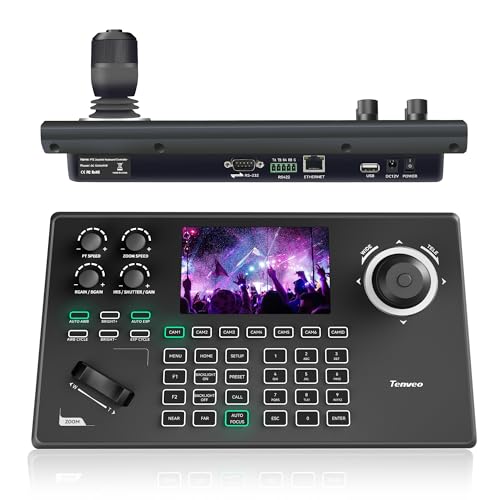
Streamlining your live streaming experience, the Tenveo NDI PTZ Camera Controller (KB200MAX) is perfect for video producers seeking precise control over multiple cameras. With its 5-inch LCD preview screen and 4D joystick, you’ll gain effortless access to NDI PTZ camera controls and presets. It supports protocols like VISCA and Pelco, managing up to 255 cameras for seamless switching during broadcasts. You can record and playback movement sequences, enhancing your production’s professionalism. Installation is a breeze with PoE support. Plus, Tenveo backs it with a three-year warranty, ensuring peace of mind for all your live streaming needs.
Best For: Video producers and live streamers looking for precise control over multiple PTZ cameras in various settings such as churches, events, and broadcasts.
Pros:
- Flexible Control: Dual network and analog control modes with compatibility for multiple protocols, allowing for easy integration with various camera brands.
- User-Friendly Interface: Equipped with a 5-inch LCD preview screen and a 4D joystick for intuitive camera management and quick switching between up to 255 cameras.
- Comprehensive Support: Comes with a three-year warranty, lifetime technical assistance, and a money-back guarantee for added customer reassurance.
Cons:
- Limited to Supported Protocols: May not work with cameras outside of the specified control protocols (NDI, VISCA, Pelco-D, Pelco-P).
- Requires Specific Software Versions: Installation and IP Auto-Search function necessitate specific versions of Tenveo Cameras and the PTZ Controller, which could limit usability for some users.
- Complexity for Beginners: The multitude of features and settings may be overwhelming for users without prior experience in video production or live streaming.
KATOVJJTS PTZ Camera Controller with 5.5″ LCD Screen for Live Streaming

For video producers seeking an intuitive solution, the KATOVJJTS PTZ Camera Controller stands out with its 5.5″ LCD screen, designed specifically for live streaming and worship events. Supporting 4K UHD input/output and equipped with an NDI license, it simplifies managing multiple cameras. You can easily control camera movements with the 4D joystick and adjust settings like focus, speed, and presets. Its compatibility with various protocols, including VISCA and Pelco, guarantees seamless integration into your setup. With real-time video preview and POE support, this controller streamlines your production workflow, allowing you to concentrate on creating engaging content.
Best For: Video producers and churches looking for an efficient and user-friendly camera controller for live streaming and video production.
Pros:
- Supports 4K UHD input/output, ensuring high-quality video production.
- Includes NDI license for easy control and management of NDI cameras.
- Real-time video preview on a 5.5″ LCD screen enhances monitoring during live events.
Cons:
- Limited to specific protocols, which may not suit all camera systems.
- Requires a learning curve for users unfamiliar with PTZ camera controls.
- Screen size may be small for some users, especially in large setups.
FoMaKo PTZ Camera Controller (KC606)

Designed with versatility in mind, the FoMaKo PTZ Camera Controller (KC606) is perfect for professionals in live events, education, and broadcasting. You’ll appreciate its 4D joystick and 3-inch LCD screen, making control intuitive and seamless. With PoE capabilities and compatibility with various protocols, setup is a breeze using just one cable. You can control multiple cameras effortlessly, customizing shortcuts to fit your workflow. Whether you’re streaming church services or esports, its high-quality silicone design guarantees excellent usability—even in low light. Plus, enjoy peace of mind with a 3-year warranty and lifetime technical support.
Best For: Professionals in live events, education, and broadcasting looking for an intuitive and versatile PTZ camera control solution.
Pros:
- Easy setup with a single cable for PoE connection, simplifying the installation process.
- Customizable buttons allow users to tailor shortcuts for efficient workflow management.
- High-quality silicone design enhances usability in low-light environments, ensuring reliable control.
Cons:
- The initial cost may be a consideration for smaller organizations or individuals.
- Limited to compatibility with specific protocols, which may restrict use with some older camera models.
- Learning curve may exist for users unfamiliar with PTZ camera operations or live streaming setups.
Tenveo NDI PTZ Camera with Joystick Controller Bundle
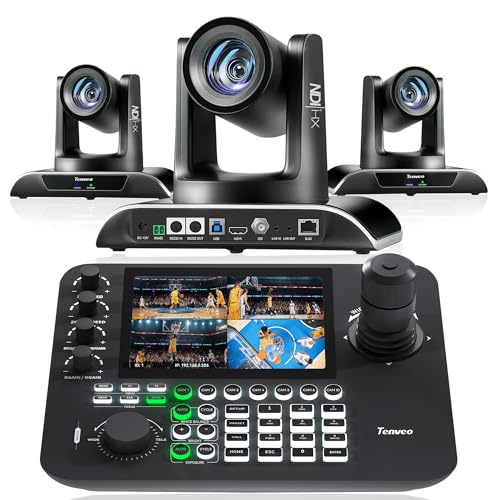
The Tenveo NDI PTZ Camera with Joystick Controller Bundle is perfect for those who need reliable, high-quality video production solutions, especially in dynamic environments like churches, conferences, and live events. With a 30X optical zoom and AI auto tracking, it captures every detail effortlessly. The 7” LCD joystick controller allows you to manage up to four feeds, ensuring smooth shifts and real-time previews. You’ll enjoy ultra-low latency streaming and compatibility with various protocols like NDI and VISCA. Plus, it comes with a three-year warranty and lifetime support, making it a smart investment for any video production setup.
Best For: Professionals and organizations in need of high-quality video production solutions for live events, conferences, and streaming.
Pros:
- High-quality 1080P60 video output with 30X optical zoom and AI auto tracking capabilities.
- Joystick controller allows real-time management of up to four camera feeds simultaneously.
- Backed by a 3-year warranty and lifetime technical support for peace of mind.
Cons:
- The audio device is not included, requiring additional purchases for complete setups.
- The price point may be high for casual users or those with limited budgets.
- Requires some technical knowledge to fully utilize all features and compatibility with software.
Factors to Consider When Choosing a Multi Camera PTZ Controller
When choosing a multi-camera PTZ controller, you’ll want to think about several key factors. Consider compatibility with different protocols, the number of cameras you plan to control, and how user-friendly the interface is. Also, take note of the installation process and the precision of the control features to guarantee a smooth production experience.
Compatibility With Protocols
Choosing a multi-camera PTZ controller that supports a variety of protocols is essential for ensuring compatibility with different camera brands and models. Look for controllers that support VISCA, Pelco-D/P, and NDI, as this enhances your setup’s flexibility. Additionally, controllers with RS232, RS422, RS485, and Ethernet IP connections allow for better integration with existing systems. Opt for controllers that can manage multiple protocols simultaneously, enabling seamless operation across various camera types. This capability is vital, especially when controlling up to 255 PTZ cameras, boosting your efficiency during live events. Keep in mind features like AI tracking or customizable settings, as they may require specific protocol compatibility for the best performance in your video productions.
Number of Cameras Controlled
Selecting a multi-camera PTZ controller that can manage a specific number of cameras is essential for enhancing your video production capabilities. Consider how many cameras you need to control simultaneously; options usually range from 7 to 1000, depending on the model. Look for controllers that offer quick selection shortcuts for multiple cameras, which can boost your operational speed during live events. Make sure the controller supports various protocols for compatibility with different camera brands, as this affects how many cameras you can integrate. Evaluate whether the design allows for managing complex setups with features like auto-tracking and preset movements. Finally, consider ease of setup, as some controllers provide auto-search for IP addresses, simplifying large camera management during installation.
User Interface and Design
After determining the number of cameras to control, the next essential aspect is the user interface and design of the multi-camera PTZ controller. A user-friendly interface with a touch screen, preferably 5 inches or larger, makes configuring network settings and camera parameters intuitive. Look for ergonomic design features, like well-placed joysticks and buttons, as these enhance comfort during long sessions. Customizable keys and shortcuts can considerably speed up access to your frequently used functions. Additionally, high-quality materials, such as silicone buttons and durable aluminum casings, guarantee usability in low-light conditions and increase longevity. Real-time video preview capabilities on the interface are crucial, providing instant feedback and monitoring multiple feeds, especially in dynamic environments like live events.
Installation and Setup Ease
How easily can you set up your multi-camera PTZ controller? Look for models that use Power over Ethernet (PoE) technology, allowing you to simplify installation with just one Ethernet cable for both power and data. Choose controllers with user-friendly interfaces, like touch screens or ergonomic controls, to make navigation a breeze. It’s essential to guarantee compatibility with various network protocols, such as VISCA or Pelco-D/P, for seamless integration with different camera brands. Opt for devices with auto-discovery features to quickly identify and configure connected cameras, drastically reducing setup time. Finally, consider controllers that come with extensive documentation and reliable customer support to enhance your installation experience and effectively troubleshoot any issues.
Control Features and Precision
When you’re choosing a multi-camera PTZ controller, the control features and precision offered can greatly enhance your production quality. Look for a controller with a 4D joystick, enabling intuitive and precise control over pan, tilt, zoom, and focus adjustments. Customizable presets and user-defined keys allow you to access frequently used settings quickly, boosting your operational efficiency. Make certain the controller is compatible with various control protocols like VISCA and Pelco-D/P to guarantee seamless integration with different camera brands. Opt for devices that can manage multiple PTZ cameras simultaneously, allowing for easy switching between feeds. Additionally, controllers with built-in LCD screens provide real-time video monitoring, giving you essential visual feedback for quick adjustments during live events.
NDI Support and Licensing
As you explore multi-camera PTZ controllers, NDI support becomes a significant factor in enhancing your video production setup. NDI allows for high-quality video transmission over Ethernet, reducing cable clutter and simplifying your connections. However, many controllers require a license to access NDI functionalities, granting access to features like auto tracking and multi-camera management. Some models even include a free NDI license, letting you test the capabilities before making a commitment. It’s essential to check compatibility with various NDI protocols, such as NDI HX and NDI HX2, ensuring smooth integration with your existing camera systems. Finally, be aware that variations in RTSP URL formats can affect NDI feeds, so thorough testing is essential for peak performance.
Ergonomics and Comfort
Choosing a multi-camera PTZ controller often hinges on ergonomics and comfort, factors that can greatly affect your efficiency during long production sessions. Look for controllers with wrist rests and strategically placed controls to minimize strain. High-quality silicone keypads enhance usability, especially in low-light settings where touch sensitivity matters. A 4D joystick design allows for smoother, more precise movements, reducing fatigue and boosting control efficiency during live events. Consider the weight and dimensions; lighter models are easier to handle over extended periods, while compact designs keep your workspace tidy. Finally, customizable buttons let you tailor controls to your preferences, improving comfort and streamlining your workflow by minimizing repetitive actions.
Warranty and Technical Support
A solid warranty and reliable technical support can make all the difference when selecting a multi-camera PTZ controller. Look for a warranty of at least three years, which offers confidence against defects and malfunctions. Many controllers also include a 30-day money-back guarantee, giving you the option to return the product if it doesn’t meet your needs. Reliable technical support should provide lifetime assistance, helping you with setup and troubleshooting throughout the product’s lifespan. Additionally, online training resources and documentation can enhance your understanding and usage of the device. Finally, prioritize systems with prompt customer service response times, ideally within 12 to 24 hours, to guarantee a smoother user experience and greater satisfaction.